
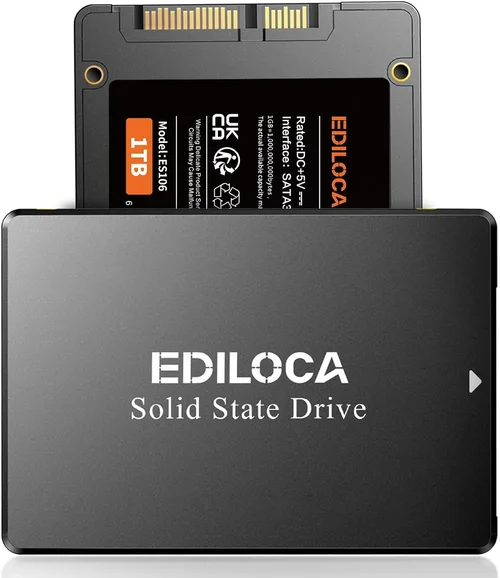
Solid-state drives (SSDs) have revolutionized data storage, offering lightning-fast speeds, silent operation, and exceptional reliability compared to traditional hard disk drives (HDDs). For users who prioritize data redundancy and system uptime, combining SSDs in a RAID 1 configuration—also known as disk mirroring—has become an increasingly popular strategy. RAID 1 ensures that every byte of data written to one drive is simultaneously copied to another, creating an exact duplicate. This means if one SSD fails, the system can continue operating seamlessly using the mirrored drive, minimizing downtime and protecting against data loss.
But is it truly the best choice to invest in SSDs for RAID 1? That’s the central question this comprehensive buying guide aims to answer. Whether you’re a creative professional working with large video files, a small business owner managing critical customer data, or a home user backing up family photos and documents, understanding the nuances of SSD-based RAID 1 setups is essential. In this guide, we’ll walk you through everything you need to know—from performance expectations and cost considerations to compatibility issues and long-term reliability. You’ll learn how to evaluate SSDs specifically for RAID 1 use, avoid common pitfalls, and make a confident, informed purchasing decision tailored to your needs.
The market for SSDs has exploded in recent years, with options ranging from budget SATA models to high-end NVMe drives capable of blistering speeds. However, not all SSDs are created equal—especially when deployed in RAID configurations. Factors like controller design, NAND type, write endurance, firmware optimization, and even power management can significantly impact performance and longevity in a mirrored setup. This guide cuts through the marketing noise and technical jargon to deliver expert-level insights grounded in real-world usage. By the end, you’ll have a clear roadmap for selecting the right SSDs for your RAID 1 array, ensuring both optimal performance and maximum data protection.

What to Look for When Buying SSDs for RAID 1
1. Endurance and TBW Rating
When building a RAID 1 array with SSDs, endurance—measured in Terabytes Written (TBW)—is arguably the most critical factor. Unlike single-drive setups where wear is distributed across one device, RAID 1 writes the same data to both drives simultaneously. This effectively doubles the write workload on each SSD over time. For example, if you write 50GB of data daily, each drive in the array will log 50GB toward its TBW rating every day. Over a year, that’s nearly 18TB written per drive.
Consumer-grade SSDs often have modest TBW ratings—sometimes as low as 150TBW for a 1TB drive—while enterprise or prosumer models can exceed 1,000TBW. If you plan to use your RAID 1 setup for frequent file transfers, database operations, or media editing, opting for drives with higher endurance is non-negotiable. Look for SSDs labeled as “high endurance,” “workload optimized,” or “enterprise-grade.” These typically use more durable NAND flash (like 3D TLC or MLC) and include advanced wear-leveling algorithms to extend lifespan.
2. Consistent Performance Under Load
RAID 1 doesn’t improve read or write speeds like RAID 0; instead, it prioritizes redundancy. However, consistent performance under sustained workloads is vital. Many consumer SSDs experience significant speed drops once their SLC cache is exhausted—a phenomenon known as “write cliff.” In a RAID 1 setup, this can lead to system lag during large file operations or backups, defeating the purpose of using fast SSDs in the first place.
To avoid this, prioritize SSDs with large, dynamic SLC caches and strong sustained write performance. Enterprise-focused drives often maintain steady speeds even during prolonged writes because they’re designed for 24/7 operation. Additionally, look for drives with robust controllers and firmware that minimize performance fluctuations. Real-world benchmarks (not just synthetic tests) are your best friend here—sites like AnandTech, Tom’s Hardware, and StorageReview provide detailed performance analyses under various loads.
3. Firmware and RAID Optimization
Not all SSDs are optimized for RAID environments. Some consumer models include power-loss protection or garbage collection features that assume single-drive operation, which can cause issues in mirrored arrays. For instance, if one drive performs a background cleanup while the other doesn’t, it could lead to synchronization errors or degraded performance.
Enterprise and prosumer SSDs often ship with RAID-aware firmware that coordinates operations between drives, ensures consistent trim commands, and supports features like predictive failure analysis. Brands like Samsung (with its Pro series), Crucial (MX and P series), and Kingston (DC series) explicitly design certain models for RAID compatibility. Always verify RAID support in the product specifications or user manual before purchasing.
4. Power Loss Protection (PLP)
Sudden power outages can corrupt data during write operations—especially in RAID setups where two drives must remain perfectly synchronized. Power Loss Protection (PLP) is a hardware feature that uses capacitors to provide enough energy for the SSD to finish pending writes and safely flush its cache during an unexpected shutdown.
While rare in consumer SSDs, PLP is standard in enterprise-grade models. If your RAID 1 array will be used in environments prone to power instability (e.g., home offices without UPS backup or remote workstations), investing in SSDs with PLP is a wise safeguard. Without it, a brownout or blackout could result in data inconsistency between the mirrored drives, requiring a full resync and potentially causing data loss.
5. Brand Reputation and Reliability Track Record
Not all SSD brands are equally reliable—especially under the stress of continuous mirroring. Stick with manufacturers known for consistent quality control, transparent specifications, and strong post-purchase support. Samsung, Crucial, Western Digital, Kingston, and Intel (now part of Solidigm) have established reputations for producing durable, well-engineered SSDs.
Avoid no-name or ultra-budget brands that cut corners on components or firmware. A failed SSD in a RAID 1 array isn’t just an inconvenience—it can trigger rebuild processes that stress the remaining drive and increase the risk of a second failure. Look for brands that offer detailed reliability metrics (like annualized failure rates) and have a history of supporting RAID deployments.
6. Warranty Length and Support Policy
A long warranty is a strong indicator of a manufacturer’s confidence in their product’s longevity—critical for RAID 1 users who expect years of uninterrupted service. Most consumer SSDs come with 3- to 5-year warranties, but enterprise models often offer 5 years or more, sometimes with advance replacement programs.
Pay close attention to warranty terms: some exclude RAID use unless explicitly stated. Others may void coverage if the drive exceeds its TBW limit, even if it’s still functional. Choose SSDs with comprehensive warranties that cover both time and endurance, and ensure the manufacturer provides responsive technical support. A quick phone call or live chat can save hours of troubleshooting if issues arise.
7. Form Factor and Interface Compatibility
RAID 1 arrays require matching drives—not just in capacity, but also in form factor and interface. Mixing SATA and NVMe drives, or even different NVMe generations (e.g., PCIe 3.0 vs. 4.0), can lead to compatibility headaches or performance bottlenecks. Ensure both SSDs use the same interface (SATA III, NVMe M.2, U.2, etc.) and fit your motherboard or RAID controller.
For most users, M.2 NVMe SSDs offer the best balance of speed, compactness, and modern compatibility. However, if you’re using an older system or a dedicated hardware RAID card, SATA SSDs may be necessary. Always verify your system’s specifications before buying—don’t assume newer is always better if your hardware can’t support it.
8. Price per Gigabyte vs. Total Cost of Ownership
While it’s tempting to choose the cheapest SSDs available, RAID 1 demands a long-term perspective. A lower upfront cost can translate to higher total cost of ownership if the drives fail prematurely, require frequent replacements, or cause data recovery expenses. Calculate the price per gigabyte, but also factor in expected lifespan, warranty coverage, and performance consistency.
For example, a $100 1TB SSD with a 300TBW rating may seem like a bargain, but if it fails after two years of heavy use, you’ve effectively paid $50 per year just for replacement risk. A $150 drive with 600TBW and a 5-year warranty offers better value over time. Think of your RAID 1 investment as insurance—you’re paying a premium for peace of mind and reliability.
Different Types of SSDs for RAID 1

Common Buying Mistakes to Avoid
❌ Mistake: Using Mismatched SSDs
Why it’s bad: RAID 1 requires identical drives for optimal performance and reliability. Mixing brands, models, capacities, or firmware versions can lead to synchronization errors, reduced speeds, or even array failure. Even minor differences in NAND type or controller logic can cause one drive to lag behind the other.
What to do instead: Always buy two drives from the same production batch if possible. Purchase them together from the same retailer, and verify model numbers, firmware versions, and capacities match exactly. If replacing a failed drive, source an identical replacement—not just a similar one.
❌ Mistake: Ignoring Write Endurance
Why it’s bad: Consumer SSDs with low TBW ratings may fail prematurely under the constant write load of RAID 1. A drive rated for 150TBW might last only 1–2 years with daily heavy usage, leaving you vulnerable to data loss during rebuilds.
What to do instead: Calculate your expected annual write volume and choose SSDs with at least 2–3x that amount in TBW. For example, if you write 100GB daily (≈36TB/year), select drives with 100TBW or higher. Prioritize models with 3D TLC or MLC NAND over QLC for better endurance.
❌ Mistake: Assuming All NVMe Drives Are Equal
Why it’s bad: NVMe is a protocol, not a quality guarantee. Many budget NVMe SSDs use slow controllers, minimal DRAM caches, and low-end NAND, resulting in poor sustained performance—especially under RAID workloads.
What to do instead: Look beyond the NVMe label. Check for DRAM cache presence, controller brand (Phison, Silicon Motion, Marvell), and real-world benchmark results. Avoid DRAM-less NVMe drives for RAID 1—they rely heavily on system memory and can bottleneck performance.
❌ Mistake: Overlooking Power Loss Protection
Why it’s bad: Without PLP, a sudden power outage can corrupt data mid-write, breaking the mirror and requiring a full resync. This is especially risky in home or mobile setups without uninterruptible power supplies.
What to do instead: If your environment lacks stable power, invest in SSDs with built-in PLP or use a UPS. Enterprise drives almost always include PLP; some prosumer models (like Samsung 980 Pro with optional PLP variants) offer it too.
❌ Mistake: Buying Based Solely on Price
Why it’s bad: The cheapest SSDs often use inferior components, lack RAID optimization, and have short warranties. A $80 drive that fails in 18 months costs more in downtime and replacement than a $120 drive that lasts 5 years.
What to do instead: Evaluate total cost of ownership, including expected lifespan, warranty, and performance consistency. Spend a bit more upfront for drives with proven reliability and strong support.
❌ Mistake: Neglecting Firmware Updates
Why it’s bad: Outdated firmware can cause compatibility issues, performance bugs, or security vulnerabilities—especially in RAID environments where synchronization is critical.
What to do instead: Register your SSDs with the manufacturer and check for firmware updates regularly. Many brands provide tools (like Samsung Magician or Crucial Storage Executive) to automate this process.
❌ Mistake: Forgetting About Heat Management
Why it’s bad: NVMe SSDs in RAID 1 can generate significant heat during sustained writes, leading to thermal throttling and reduced performance. Poor ventilation exacerbates this issue.
What to do instead: Use SSD heatsinks or ensure adequate case airflow. Some M.2 slots include built-in heatsinks—use them. Monitor temperatures with tools like HWInfo or CrystalDiskInfo.
Budget Guidelines: How Much Should You Spend?
- Entry-Level ($80–$150 for a pair): Suitable for light home use, such as backing up documents, photos, or light media files. Expect SATA or budget NVMe SSDs with moderate endurance (150–300TBW). Ideal for users who write less than 20GB per day. Example: Two 1TB Crucial BX500 SATA SSDs.
- Mid-Range ($150–$300 for a pair): The sweet spot for most users. These SSDs offer strong performance, good endurance (400–600TBW), and often include RAID-friendly features. Great for small businesses, content creators, and gamers. Example: Two 1TB Samsung 980 or WD Black SN770 NVMe drives.
- Premium ($300–$600 for a pair): Designed for professionals and power users. High-end NVMe SSDs with excellent sustained speeds, robust controllers, and 800TBW+ endurance. Often include PLP and enterprise-grade firmware. Example: Two 1TB Samsung 990 Pro or Kingston DC2000 drives.
- Luxury ($600+ for a pair): Enterprise-class SSDs built for 24/7 operation, extreme workloads, and mission-critical applications. Feature maximum TBW (1,500TBW+), full PLP, advanced error correction, and 5-year+ warranties. Best for servers, workstations, and environments where downtime is unacceptable. Example: Two 1TB Intel D7-P5510 or Solidigm P5316 drives.
Expert Tips for Getting the Best Deal
- Buy during major sales events: Black Friday, Cyber Monday, Prime Day, and back-to-school seasons often feature significant SSD discounts. Sign up for price alerts on sites like CamelCamelCamel or Slickdeals.
- Consider refurbished enterprise drives: Reputable sellers (like ServerSupply or SSD Resale) offer certified refurbished enterprise SSDs at 40–60% off retail. These often come with remaining warranty and are ideal for RAID 1 due to their high endurance.
- Check manufacturer rebates and bundles: Some brands offer mail-in rebates or bundle SSDs with free cloning software or migration tools—useful when setting up your RAID array.
- Prioritize retailers with generous return policies: Choose stores like Amazon, Newegg, or Best Buy that allow 30-day returns. Test your drives thoroughly before finalizing the setup.
- Verify RAID support before buying: Contact customer support or check forums to confirm the SSD model is known to work well in RAID 1. Avoid models with reported sync issues.
- Use monitoring software: Install tools like CrystalDiskInfo or the manufacturer’s utility to track drive health, temperature, and TBW usage. Early warnings can prevent failures.
- Don’t forget the RAID controller: If using hardware RAID, ensure your controller supports SSDs and has adequate cache. Software RAID (via Windows Storage Spaces or Linux mdadm) is free but may lack advanced features.
- Plan for future expansion: Buy drives with room to grow. A 2TB RAID 1 array gives you 2TB of usable space—consider starting with larger capacities to avoid upgrading soon.

Frequently Asked Questions
Q: Do I really need SSDs for RAID 1, or can I use HDDs?
A: While HDDs can be used in RAID 1, SSDs offer superior speed, reliability, and power efficiency. For modern systems—especially those handling large files or requiring quick boot times—SSDs are the clear choice. HDDs are slower, louder, and more prone to mechanical failure.
Q: Will RAID 1 double my SSD’s lifespan?
A: No—RAID 1 doesn’t extend lifespan; it duplicates wear. Both drives experience the same write cycles. However, redundancy means you’re less likely to lose data if one fails, effectively increasing system uptime.
Q: Can I mix SATA and NVMe SSDs in RAID 1?
A: Generally, no. Most RAID controllers and software solutions require identical interfaces. Mixing SATA and NVMe can cause compatibility issues or force the array to run at the slower SATA speed.
Q: Is RAID 1 enough for data protection?
A: RAID 1 protects against drive failure but not against ransomware, accidental deletion, or physical disasters. Always maintain a separate backup (3-2-1 rule: 3 copies, 2 media types, 1 offsite).
Q: How long does it take to rebuild a RAID 1 array?
A: Rebuild time depends on drive capacity and system load. A 1TB SSD may take 1–3 hours; a 4TB drive could take 8–12 hours. During rebuild, performance may degrade, so avoid heavy workloads.
Q: Do I need a hardware RAID card?
A: Not necessarily. Modern operating systems support software RAID 1 (e.g., Windows Storage Spaces, macOS Disk Utility, Linux mdadm). Hardware RAID offers better performance and features but adds cost and complexity.
Q: Can I use different capacity SSDs in RAID 1?
A: Technically yes, but the array will only use the capacity of the smaller drive. For example, pairing a 1TB and 2TB SSD results in a 1TB mirrored array—wasting 1TB of space. Always match capacities.
Q: Are QLC SSDs bad for RAID 1?
A: QLC NAND has lower endurance and slower write speeds, making it less ideal for RAID 1 if you have frequent writes. However, for read-heavy or archival use, QLC can be cost-effective.
Q: How do I monitor SSD health in RAID 1?
A: Use SMART monitoring tools like CrystalDiskInfo, HWInfo, or the manufacturer’s software. Check attributes like “Media Wearout Indicator,” “Reallocated Sectors,” and “Total LBAs Written” regularly.
Q: What happens if both SSDs fail simultaneously?
A: This is extremely rare but possible due to power surges, firmware bugs, or manufacturing defects. That’s why RAID 1 should always be paired with an external backup strategy.
Our Final Recommendations
- Best for Budget-Conscious Buyers: Crucial MX500 1TB SATA SSD (Pair) – Reliable, widely compatible, and offers solid endurance for light workloads at under $100 for two.
- Best Overall Value: Samsung 980 1TB NVMe SSD (Pair) – Excellent balance of speed, endurance (600TBW), and price. Firmware is RAID-aware, and Samsung’s reputation is unmatched.
- Best Premium Option: Samsung 990 Pro 1TB NVMe SSD (Pair) – Top-tier performance, 1,200TBW endurance, and optional PLP variants. Ideal for professionals and enthusiasts.
- Best for Beginners: WD Blue SN580 1TB NVMe SSD (Pair) – Easy to set up, reliable, and backed by Western Digital’s strong support. Great entry point into NVMe RAID 1.
- Best for Advanced Users: Kingston DC2000 1TB U.2 SSD (Pair) – Enterprise-grade with PLP, 1.3DWPD endurance, and full RAID optimization. Perfect for 24/7 workloads and critical data.
Conclusion: Making the Right Choice
Choosing SSDs for a RAID 1 array isn’t just about picking the fastest or cheapest drives—it’s about balancing performance, endurance, reliability, and long-term value. RAID 1 demands more from your hardware than single-drive setups, so cutting corners can lead to frustration, data loss, or unexpected costs down the line. By focusing on key factors like TBW rating, firmware optimization, power loss protection, and brand reputation, you can build a mirrored storage solution that delivers both speed and peace of mind.
Remember, RAID 1 is a redundancy tool, not a backup replacement. Always pair your array with a robust external backup strategy to protect against human error, malware, or physical damage. And don’t forget to monitor your drives regularly—early detection of issues can prevent catastrophic failures.
Whether you’re safeguarding family memories, protecting business-critical files, or building a high-performance workstation, the right SSDs in a RAID 1 configuration can provide the reliability and responsiveness you need. Use this guide as your roadmap, prioritize your specific use case, and invest wisely. Your data deserves nothing less.