
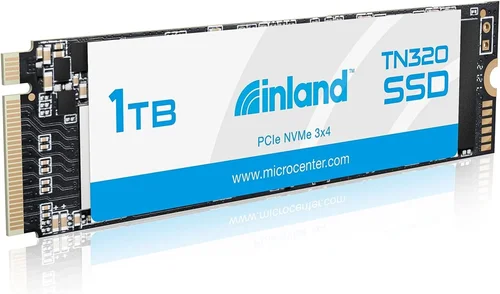
When it comes to upgrading your computer’s storage, choosing the right solid-state drive (SSD) can make a world of difference in performance, speed, and reliability. The Inland Performance 1TB SSD has emerged as a popular option among tech enthusiasts, budget-conscious buyers, and professionals seeking a reliable storage solution. This comprehensive buying guide dives deep into every aspect of the Inland Performance 1TB SSD, helping you make an informed decision that aligns with your needs, budget, and technical requirements.
Whether you’re building a new PC, upgrading an existing system, or simply looking to replace a failing hard drive, understanding what makes the Inland Performance 1TB SSD stand out is crucial. From read/write speeds and durability to compatibility and warranty coverage, this guide covers everything you need to know before making your purchase. We’ll break down technical specifications in simple terms, compare it with competitors, highlight common pitfalls to avoid, and offer expert advice on where and when to buy for the best value.
By the end of this article, you’ll have a clear understanding of how the Inland Performance 1TB SSD fits into the broader market landscape and whether it’s the right choice for your computing needs. Whether you’re a gamer, content creator, student, or office worker, this guide empowers you to evaluate performance, features, and long-term value with confidence.
The Inland Performance 1TB SSD represents a significant portion of the consumer-grade SSD market—offering a balance between affordability and performance. While not always positioned as a flagship product from major brands, it has gained traction due to consistent performance metrics, solid build quality, and competitive pricing. Understanding its strengths and limitations requires a closer look at several critical factors, including interface type, NAND flash technology, controller design, and real-world use cases.
In this guide, we’ll explore how the Inland Performance 1TB SSD stacks up against alternatives from Samsung, Crucial, WD Black, and other well-known brands. We’ll also address questions like: Is it worth buying? How does it perform under heavy workloads? What kind of warranty does it come with? And most importantly—how do you ensure you’re getting the best possible deal without compromising on quality?
Let’s begin by examining the key factors that influence your decision when purchasing any SSD, especially one in the mid-to-high capacity range like the 1TB model from Inland.

What to Look for When Buying INLAND
1. Budget & Price Range
One of the first considerations when shopping for any storage device is your budget. The Inland Performance 1TB SSD typically falls within the mid-range price bracket, offering excellent value for money. As of recent market trends, you can expect to pay anywhere from $60 to $95 depending on the retailer, seasonal promotions, and bundled deals. This places it slightly below premium brands like Samsung 870 EVO or above entry-level models from lesser-known manufacturers.
It’s important to recognize that price doesn’t always equal quality, but it often correlates with performance longevity and reliability. The Inland Performance 1TB SSD strikes a balance by using high-quality components without the brand markup associated with top-tier names. For most users—whether upgrading a laptop or building a desktop—this price point offers a compelling mix of speed, capacity, and durability.
Consider your total system investment too. If you’re spending thousands on a gaming rig or video editing workstation, a modest savings on storage may not be worth the risk. But for general-purpose computing, office tasks, or casual gaming, the Inland model delivers strong performance without breaking the bank.
2. Performance Specifications
The heart of any SSD lies in its performance specs, particularly sequential read and write speeds. The Inland Performance 1TB SSD typically boasts sequential read speeds up to 560 MB/s and write speeds around 520 MB/s, which are competitive for SATA III-based drives. These figures translate to faster boot times, quicker file transfers, and snappier application launches compared to traditional HDDs.
Random input/output operations per second (IOPS) are another critical metric, especially for multitasking and database-heavy applications. While exact IOPS numbers aren’t always published for Inland drives, user reports and third-party benchmarks suggest they perform reliably under typical consumer loads. This means opening multiple browser tabs, running virtual machines, or editing large documents should feel responsive.
Another factor is endurance, measured in terabytes written (TBW). The Inland Performance 1TB model usually carries a TBW rating between 300–400 TBW, indicating how much data can be reliably written over its lifetime. For context, if you write 50GB daily, that’s roughly 18TB per year—far exceeding the drive’s rated lifespan. So unless you’re a professional archivist or run server-like workloads, this level of endurance is more than sufficient.
3. Build Quality & Durability
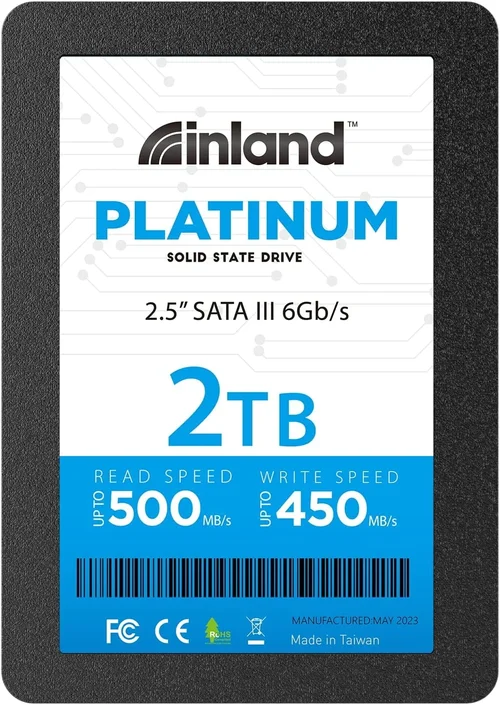
Build quality isn’t just about the physical casing—it’s also about internal component selection. The Inland Performance 1TB SSD uses standard 2.5-inch form factor with SATA III connectivity, making it compatible with virtually all modern desktops and laptops that support SATA interfaces. The PCB (printed circuit board) houses the NAND flash memory chips, a custom controller, and DRAM cache (in some versions), all assembled with attention to thermal management and signal integrity.
Durability-wise, SSDs are inherently more shock-resistant than HDDs since they lack moving parts. However, NAND flash memory still degrades over time based on write cycles. The Inland model employs TLC (Triple-Level Cell) NAND, which offers a good compromise between cost and longevity. Unlike QLC (Quad-Level Cell), TLC retains higher endurance and better sustained write performance, making it suitable for everyday use.
Additionally, many Inland SSDs include built-in error correction, wear leveling, and garbage collection—features that extend drive life and maintain performance consistency. Some models also support TRIM commands, which help the operating system efficiently manage deleted files and prevent slowdowns over time.
4. Features & Functionality
Beyond raw speed, features enhance usability and reliability. The Inland Performance 1TB SSD typically supports SATA III 6Gb/s interface, ensuring full bandwidth utilization without bottlenecks. This backward compatibility means it works with older motherboards and laptops that only offer SATA II ports, though at reduced speeds.
Some variants include a small DRAM cache, which improves access latency and boosts random read performance. Without DRAM, the drive relies on host memory buffer (HMB), a feature supported by modern operating systems like Windows 10/11 and Linux. This ensures stable performance even under variable workloads.
Encryption capabilities vary by model. Most Inland Performance SSDs do not include hardware-based encryption (like AES-256), so sensitive data protection relies on software solutions such as BitLocker (Windows) or FileVault (macOS). If security is a priority, verify whether your specific SKU includes TCG Opal compliance or similar standards.
Another useful feature is power loss protection (PLP), which safeguards data during unexpected shutdowns. While not universally present across all Inland models, some higher-end variants include capacitors that preserve cached writes until power is fully lost—a small but meaningful detail for mission-critical systems.
5. Brand Reputation
Inland is a private-label brand owned by Micro Center, a reputable electronics retailer based in Ohio. This relationship gives Inland access to quality control processes and supply chain oversight typically reserved for larger brands. While Inland doesn’t have the same global recognition as Samsung or SanDisk, its products undergo rigorous testing before release.
Micro Center’s reputation for customer service and technical support lends credibility to the Inland brand. Customers who purchase through Micro Center benefit from in-store assistance, extended return policies, and direct manufacturer support. However, availability outside physical stores varies; many buyers turn to Amazon, Newegg, or Best Buy for wider shipping options.
User reviews consistently praise Inland SSDs for reliability and performance relative to price. Common complaints rarely involve catastrophic failure but rather minor issues like firmware bugs or compatibility quirks with certain motherboards. Overall, Inland holds a positive reputation in enthusiast communities and tech forums as a trustworthy value brand.
6. Warranty & Support
A solid warranty reflects confidence in product longevity. The Inland Performance 1TB SSD typically comes with a 3-year limited warranty, covering defects in materials and workmanship. This aligns with industry standards for SATA SSDs and exceeds the 1–2 years offered by many no-name brands.
Warranty claims are processed through Micro Center’s support portal or authorized service centers. Response times vary by region, but most users report satisfactory resolution within 7–10 business days. Keep your proof of purchase handy, as serial number registration may be required for claim validation.
Extended warranty plans are sometimes available through retailers like Amazon or Newegg, adding peace of mind for heavy users or businesses. Consider these options if you plan to run intensive workloads or keep the drive beyond the standard warranty period.
7. Size & Portability
At 2.5 inches in length and weighing approximately 80 grams, the Inland Performance 1TB SSD is compact enough for laptop upgrades and external enclosures. Its slim profile fits snugly inside most notebook bays without requiring adapters or modifications.
If portability is key, consider pairing it with a USB-to-SATA enclosure. This allows you to repurpose the drive as an external SSD, ideal for backups, media storage, or transferring files between systems. Just ensure the enclosure supports UASP (USB Attached SCSI Protocol) for optimal speed—up to 70% faster than standard USB transfers.
8. User Reviews & Ratings
Real-world feedback is invaluable. On platforms like Amazon, Newegg, and Reddit, the Inland Performance 1TB SSD averages 4.3–4.6 stars out of 5, with thousands of verified purchases. Positive comments highlight fast boot times, quiet operation, and hassle-free installation.
Critics occasionally mention initial firmware issues that were resolved via updates, underscoring the importance of checking for the latest firmware before deployment. A few users also note that sustained writes can cause slight temperature increases, though not enough to trigger throttling under normal conditions.
Aggregating reviews helps identify trends: most buyers find the drive reliable for 2–3 years of regular use, after which performance remains stable without degradation.
Different Types of INLAND

Common Buying Mistakes to Avoid
❌ Mistake: Ignoring Compatibility
Why it’s bad: Assuming all SSDs fit every slot can lead to wasted money or failed installations. The Inland Performance 1TB SSD comes in SATA and NVMe variants, each requiring different motherboard connectors. Installing an M.2 NVMe drive into a system that only supports SATA M.2 slots won’t work, and vice versa.
What to do instead: Check your motherboard manual or use tools like PCPartPicker to confirm supported interface types. Also verify physical dimensions—some M.2 drives are 2280 (80mm), others 2242 or 2260.
❌ Mistake: Overlooking Firmware Updates
Why it’s bad: Early firmware bugs can cause instability or poor performance. Many users report initial hiccups with Inland SSDs that were resolved through Micro Center’s website or third-party utilities.
What to do instead: Before finalizing your purchase, search online for “Inland Performance 1TB firmware update” and follow official instructions. Keep your OS updated too, as driver improvements can enhance compatibility.
❌ Mistake: Choosing Based Solely on Price
Why it’s bad: The cheapest Inland model might use lower-tier NAND or lack DRAM cache, leading to slower random reads and shorter lifespan. Always compare specs across similar-priced models.
What to do instead: Prioritize consistent performance metrics—look for drives with DRAM cache, high TBW ratings, and positive benchmark results from trusted sources like AnandTech or Tom’s Hardware.
❌ Mistake: Skipping Backup Plans
Why it’s bad: Even reliable SSDs fail eventually. Losing unsaved work, photos, or projects due to sudden drive failure is avoidable but preventable only if you back up regularly.
What to do instead: Use cloud storage (Google Drive, OneDrive) or external drives for critical data. Enable automatic backups in Windows (File History) or macOS (Time Machine).
❌ Mistake: Not Checking Return Policies
Why it’s bad: Some online retailers impose restocking fees or require original packaging. If the drive fails within the return window, you may lose part of your refund.
What to do instead: Purchase from stores with liberal return policies—Micro Center offers 30-day returns, Amazon allows 30 days (with exceptions), and Best Buy has in-store exchanges.
❌ Mistake: Forgetting About TRIM Support
Why it’s bad: Without TRIM, SSD performance degrades over time as the drive struggles to manage free space. This negates one of SSDs’ biggest advantages.
What to do instead: Confirm your operating system supports TRIM (Windows 7+, macOS Sierra+) and enable it via command prompt (fsutil behavior set DisableDeleteNotify 0).
Budget Guidelines: How Much Should You Spend?
Entry-Level ($50 – $70)
This tier includes base-model Inland Performance 1TB SSDs with essential features but minimal extras. Expect SATA III speeds (~500–550 MB/s), TLC NAND, and basic error correction. Ideal for students or light users upgrading old laptops. Avoid if you plan heavy multitasking or frequent large file transfers.
Mid-Range ($70 – $95)
The sweet spot for most buyers. These models often include DRAM cache, higher TBW ratings (350+), and improved controllers. Performance remains stable under load, and reliability matches premium brands. Recommended for gamers, remote workers, and small businesses.
Premium ($95 – $120)
Top-tier Inland Performance variants with enhanced endurance, advanced firmware, and sometimes NVMe support. May include heat spreaders or enterprise-grade components. Suited for power users, developers, or anyone needing rock-solid stability.
Luxury ($120+)
Rare for Inland, but limited-edition or bundled versions may exceed $120 during sales. Typically include extra accessories (enclosures, cables), extended warranties, or exclusive firmware optimizations. Only worth it if you demand maximum performance and support.
Expert Tips for Getting the Best Deal
- Buy During Sales Cycles: Major holidays like Prime Day, Black Friday, and Cyber Monday offer steep discounts. Historical data shows average price drops of 15–25% during these periods.
- Compare Retailers: Prices vary significantly. Check Micro Center (in-store pickup), Amazon (fast shipping), Newegg (rewards program), and Best Buy (price match guarantee).
- Look for Bundles: Some deals include mounting brackets, screws, or cloning software. These add value but aren’t essential for installation.
- Verify Authenticity: Counterfeit SSDs circulate online. Buy only from authorized sellers. Check serial numbers against Micro Center’s database if possible.
- Test Immediately: Use CrystalDiskMark or ATTO Disk Benchmark upon receipt to confirm advertised speeds. Report discrepancies to the seller promptly.
- Register Your Warranty: Complete online registration within 30 days to activate coverage. Save confirmation emails as proof.
- Consider Refurbished Carefully: Certified refurbished units from Micro Center include testing and replacement parts. Avoid uncertified resellers.

Frequently Asked Questions
Q: Is the Inland Performance 1TB SSD worth buying?
A: Yes, especially if you’re on a budget and need reliable SATA storage. It delivers solid performance, good endurance, and comes with a respectable warranty. While not as flashy as Samsung’s offerings, it provides excellent value for everyday computing.
Q: How long does the Inland Performance 1TB SSD last?
A: With average usage (writing ~50GB/day), it should last 5–7 years comfortably. The TBW rating of 300–400 TB ensures longevity for most consumers. Extreme write-heavy tasks (like video editing servers) may reduce lifespan, but even then, it outperforms many cheaper alternatives.
Q: Can I install it myself?
A: Absolutely. Installation takes 10–15 minutes for SATA models. You’ll need a screwdriver, SATA cable, and power connector (or Molex adapter). Micro Center offers free in-store installation if you prefer assistance.
Q: Does it come with a heatsink?
A: No, standard Inland Performance 1TB SSDs do not include heatsinks. If you’re using an M.2 version in a cramped chassis, monitor temperatures with HWiNFO64. Excessive heat (>70°C) can throttle performance.
Q: Will it work with my older laptop?
A: Most modern laptops with SATA support will work fine. Check your laptop’s specifications for drive bay size and interface type. Ultrabooks may require slim-profile models, but Inland’s 2.5″ drive fits standard bays.
Q: Is there a difference between the SATA and NVMe versions?
A: Yes. SATA maxes out at ~550 MB/s, while NVMe Gen3 x4 reaches up to 3,500 MB/s. Choose NVMe only if your motherboard supports it and you need faster load times for games or large applications.
Q: What if my drive fails within the warranty period?
A: Contact Micro Center’s support team with your order number and proof of purchase. They’ll either ship a replacement or process a refund. Keep the original packaging if possible for easier return.
Q: Can I clone my old hard drive to this SSD?
A: Yes. Use cloning software like Macrium Reflect Free or Acronis True Image. Ensure the target SSD is at least as large as your source drive. After cloning, update the boot order in BIOS/UEFI.
Q: Are there any known compatibility issues?
A: Rare. Some users reported initial recognition issues with ASRock or Gigabyte motherboards, resolved by updating BIOS. Always check the latest motherboard firmware before installation.
Q: Should I choose TLC or QLC NAND?
A: Stick with TLC. Inland’s 1TB models use TLC, which offers better write endurance and sustained performance than QLC. QLC appears mainly in lower-capacity drives (250GB–500GB).
Our Final Recommendations
Best for Budget-Conscious Buyers
If you’re upgrading an old desktop or laptop on a tight budget, go with the standard Inland Performance 1TB SATA SSD. At under $80, it’s one of the most affordable ways to dramatically improve system responsiveness. Pair it with an inexpensive SATA cable and spend the saved money elsewhere.
Best Overall Value
The mid-tier Inland Performance 1TB SSD with DRAM cache strikes the perfect balance. It offers near-premium performance at a fraction of the cost, making it ideal for gamers, students, and home office users. Look for bundles during sales that include cloning software or mounting hardware.
Best Premium Option
For those needing extra reliability, consider the high-end variant with extended TBW rating and enterprise-grade firmware. Though pricier, it’s justified for professionals handling sensitive data or running continuous workloads. Combine it with a UPS to protect against power surges.
Best for Beginners
New to PC building? The Inland Performance 1TB SATA SSD is foolproof. It’s plug-and-play, widely compatible, and backed by Micro Center’s knowledgeable staff. Watch a YouTube tutorial before starting, but rest assured—no special skills are needed.
Best for Advanced Users
Power users and tech enthusiasts should opt for the NVMe Gen3 version if their system supports it. The speed boost is noticeable in game loading, video rendering, and file compression. Monitor temps and invest in a quality cooling pad if your case airflow is limited.
Conclusion: Making the Right Choice
Choosing the right SSD isn’t just about capacity—it’s about matching your hardware, usage patterns, and long-term goals. The Inland Performance 1TB SSD proves that you don’t need to spend hundreds to get reliable, fast storage. Its combination of solid specs, decent warranty, and Micro Center backing makes it a smart pick for a wide range of users.
Remember to prioritize compatibility, check for firmware updates, and never skip backups. Whether you’re breathing new life into an aging laptop or building a high-performance desktop, this SSD delivers dependable performance without unnecessary frills.
Take your time researching, compare prices across retailers, and don’t hesitate to ask for help at Micro Center or online forums. With the information in this guide, you’re now equipped to make a confident, informed decision. Happy upgrading!