
[FEATURED_IMAGE_PLACEOLDER]
When it comes to upgrading your computer’s storage, the choice between Intel Optane memory and traditional SSDs (Solid State Drives) can feel like navigating a tech labyrinth. Both promise faster boot times, quicker file access, and smoother multitasking—but they achieve these gains in fundamentally different ways. As we move through 2026, the storage landscape continues to evolve rapidly, with new generations of NAND flash, PCIe Gen5 interfaces, and hybrid acceleration technologies reshaping performance expectations. Whether you’re building a gaming rig, upgrading an aging laptop, or optimizing a workstation for content creation, understanding the nuances between Optane and SSD is critical to making a smart, future-proof investment.
This guide is designed to cut through the marketing noise and deliver a clear, expert-level comparison of Optane versus SSD technologies. You’ll learn not just the technical differences, but also how those differences translate into real-world performance, longevity, cost-efficiency, and usability. We’ll explore everything from latency and endurance to compatibility and value for money, helping you determine which solution aligns best with your specific needs. Whether you’re a casual user looking to speed up an old PC or a power user demanding maximum throughput, this comprehensive breakdown will equip you with the knowledge to choose wisely.
The storage market today is more diverse than ever. While SSDs dominate mainstream computing thanks to plummeting prices and ever-increasing capacities, Intel’s Optane technology—though now in its sunset phase—still holds relevance for certain niche applications. Meanwhile, emerging alternatives like computational storage and CXL-based memory pooling are beginning to blur the lines between traditional categories. In this guide, we’ll focus on the practical comparison between Optane and SSDs as they exist in 2026, factoring in availability, support, and long-term viability. By the end, you’ll have a complete roadmap to selecting the right storage solution—no matter your budget or use case.

What to Look for When Buying Buying Guide
1. Budget & Price Range
Your budget is often the most immediate constraint when choosing between Optane and SSD. Traditional SSDs—especially SATA and NVMe models based on TLC or QLC NAND—have become incredibly affordable. A 1TB NVMe SSD can now be found for under $60, making high-capacity, high-speed storage accessible to nearly everyone. In contrast, Intel Optane memory modules (such as the discontinued 800p, 900p, and P5800X series) were always premium products, with prices per gigabyte significantly higher than even high-end SSDs. For example, a 16GB Optane M10 module might cost nearly as much as a 1TB mainstream NVMe drive.
It’s important to consider not just the upfront cost, but also the value over time. While Optane offered exceptional endurance and low latency, its limited capacity and lack of new product development mean it’s no longer a cost-effective choice for most users. SSDs, on the other hand, continue to benefit from economies of scale and technological advancements, delivering more storage per dollar every year. If you’re working within a tight budget—say, under $100—you’ll almost certainly get better overall value from a modern SSD than any Optane solution.
2. Performance Specifications
Performance is where the core distinction between Optane and SSD becomes most apparent. SSDs rely on NAND flash memory, which stores data in cells that must be erased before being rewritten—a process that introduces latency and wear over time. Even the fastest NVMe SSDs using PCIe Gen4 or Gen5 interfaces typically exhibit higher latency (measured in microseconds) compared to Optane, which uses 3D XPoint technology. Optane memory delivers consistent, ultra-low latency—often under 10 microseconds—making it ideal for workloads that demand rapid, predictable response times, such as database operations, virtualization, or real-time analytics.
However, raw speed isn’t everything. Sequential read/write speeds for consumer SSDs now routinely exceed 7,000 MB/s (Gen4) and even 12,000 MB/s (Gen5), far outpacing Optane’s maximum throughput of around 2,500–3,000 MB/s. For everyday tasks like loading games, launching applications, or transferring large media files, this raw bandwidth often matters more than latency. Additionally, modern SSDs with advanced controllers and DRAM caches have closed much of the performance gap in real-world usage. Unless you’re running highly specialized, latency-sensitive workloads, a top-tier NVMe SSD will likely feel just as fast—or faster—than Optane in day-to-day computing.
3. Build Quality & Durability
Durability is a key differentiator, especially for users who prioritize longevity and data integrity. Intel Optane memory was engineered for extreme endurance. For instance, the P5800X enterprise-grade Optane drive boasts up to 100 drive writes per day (DWPD) over its five-year warranty period—meaning you could rewrite the entire drive’s capacity 100 times daily without exceeding its rated lifespan. This level of resilience made Optane ideal for write-intensive environments like servers, financial trading systems, or scientific computing.
Consumer SSDs, by contrast, vary widely in endurance. High-end models using TLC NAND might offer 600–1,200 terabytes written (TBW) for a 1TB drive, while budget QLC-based drives may dip below 200 TBW. While this is more than sufficient for typical home or office use (most users write less than 20TB per year), it falls short of Optane’s industrial-grade robustness. That said, modern SSDs incorporate sophisticated wear-leveling algorithms, over-provisioning, and error correction to maximize lifespan. For non-enterprise users, the durability difference rarely translates into practical concerns—unless you’re performing constant, heavy writes over many years.
4. Features & Functionality
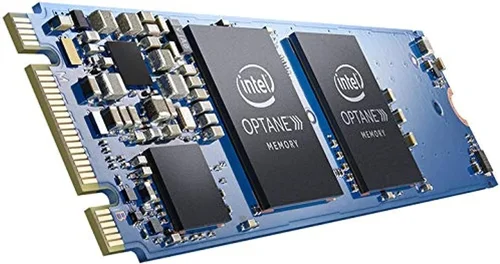
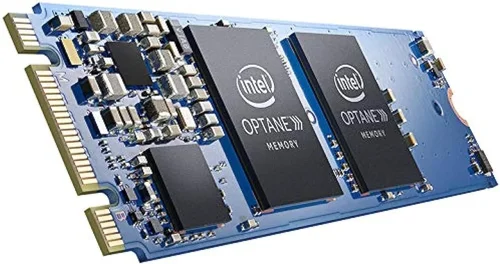
Beyond raw specs, consider what features matter most to your workflow. Optane memory originally launched as a caching solution—small modules (16GB–64GB) designed to accelerate slower HDDs by storing frequently accessed data. This “Optane Memory + HDD” setup was marketed as a budget-friendly way to get SSD-like responsiveness without replacing your entire storage array. However, with SSD prices dropping so dramatically, this hybrid approach has become largely obsolete. Most users now opt for a single, large SSD instead.
Modern SSDs, meanwhile, come packed with features like hardware encryption (AES-256), power-loss protection, thermal throttling management, and support for advanced protocols like NVMe 2.0 and ZNS (Zoned Namespaces). Some high-end models even include built-in AI-driven performance optimization or compatibility with Microsoft DirectStorage for faster game loading. Optane, while technically impressive, lacked many of these consumer-oriented enhancements and was never widely adopted in mainstream systems. Its functionality remains largely confined to legacy enterprise or enthusiast setups.
5. Brand Reputation & Ecosystem Support
Brand matters—not just for reliability, but for ecosystem integration and long-term support. Intel was the sole developer and manufacturer of Optane technology, and with the company discontinuing consumer Optane products in 2022, the ecosystem has effectively frozen. No new Optane drives are being produced, driver updates are minimal, and compatibility with newer platforms (like Intel’s 13th/14th Gen CPUs or AMD Ryzen 7000/8000 series) is spotty at best. This lack of forward support makes Optane a risky choice for anyone planning to upgrade their system in the next few years.
In contrast, SSD brands like Samsung, Western Digital, Crucial, Kingston, and Sabrent have strong track records, robust software suites (e.g., Samsung Magician, WD Dashboard), and active development pipelines. They regularly release firmware updates, offer migration tools, and ensure compatibility with the latest motherboards and operating systems. Moreover, third-party support for SSDs is universal—whether you’re using Windows, macOS, Linux, or ChromeOS, you’ll find seamless integration. Optane, by nature of its proprietary design, never achieved this level of broad compatibility.
6. Warranty & Support
Warranty terms reflect a manufacturer’s confidence in their product—and here, SSDs generally offer better consumer protection. Most reputable SSD brands provide 3- to 5-year limited warranties, often tied to both time and TBW limits. For example, a Samsung 990 Pro comes with a 5-year warranty or 1,200 TBW (for the 2TB model), whichever comes first. This gives users peace of mind and clear guidelines for expected lifespan.
Optane drives, particularly the enterprise-focused P-series, did offer generous warranties (up to 5 years), but consumer Optane Memory modules (like the M0 or M10) often came with shorter coverage—sometimes as little as 1–3 years. More critically, with Intel exiting the Optane market, warranty claims are becoming harder to process, and replacement units are scarce. If your Optane module fails today, finding a compatible replacement may be nearly impossible. SSDs, by contrast, remain widely available, with straightforward RMA processes and global service networks.
7. Size & Portability
Form factor plays a role, especially for laptop users or those building compact desktops. SSDs are available in a wide range of form factors: 2.5-inch SATA, M.2 2280 (the most common), M.2 2242/2260 (for thin laptops), and even U.2 or EDSFF for servers. This flexibility makes SSDs easy to integrate into almost any system.
Optane memory was primarily offered in M.2 2280 and add-in card (AIC) formats, limiting its use to desktops and larger laptops. The smaller Optane Memory caching modules (16GB–32GB) were M.2 2280 as well, but their limited capacity made them impractical as primary drives. Today, if you need portable, high-capacity storage, SSDs are the only viable option—especially with the rise of compact external NVMe enclosures that deliver desktop-class speeds on the go.
8. User Reviews & Real-World Feedback
Nothing beats real-world experience. Across forums like Reddit, Tom’s Hardware, and Linus Tech Tips, the consensus in 2026 is clear: for the vast majority of users, modern SSDs outperform Optane in practical scenarios. Gamers report faster level loads with Gen4 NVMe drives; video editors praise the sustained write speeds of high-end SSDs during 4K/8K editing; and everyday users appreciate the simplicity of a single, fast, large-capacity drive.
Optane still earns praise in niche circles—particularly among sysadmins running virtual machines or developers working with large in-memory databases—but even they acknowledge its diminishing relevance. The lack of new hardware, combined with the rising performance of SSDs, has shifted the balance decisively. User benchmarks consistently show that while Optane wins in latency-sensitive microbenchmarks, SSDs dominate in application launch times, file transfers, and overall system responsiveness.
Different Types of Buying Guide

Common Buying Mistakes to Avoid
❌ Mistake: Choosing Optane for General-Purpose Upgrades
Why it’s bad: Optane memory was never intended as a primary storage solution for most users. Its limited capacity (typically 16GB–64GB for consumer modules) is insufficient for modern operating systems, applications, and media libraries. Attempting to use Optane as your main drive will result in constant storage warnings and poor usability.
What to do instead: Opt for a 1TB or larger NVMe SSD as your primary drive. If you’re upgrading an older system with an HDD, replace it entirely with an SSD—don’t rely on Optane caching, which is outdated and ineffective compared to a full SSD swap.
❌ Mistake: Overpaying for PCIe Gen5 Without Need
Why it’s bad: PCIe Gen5 SSDs offer incredible speeds, but most consumer applications—including gaming and office work—don’t benefit noticeably from them. You’ll pay a premium for performance you won’t fully utilize, especially if your motherboard or CPU doesn’t support Gen5.
What to do instead: Stick with a high-quality PCIe Gen4 SSD unless you’re doing professional video editing or scientific computing. A Gen4 drive like the Samsung 980 Pro or WD Black SN850X delivers excellent performance at a much lower cost.
❌ Mistake: Ignoring TBW and Endurance Ratings
Why it’s bad: Buying a cheap QLC SSD without checking its terabytes written (TBW) rating can lead to premature failure if you perform heavy writes (e.g., video editing, database work, or frequent large file transfers).
What to do instead: Always check the TBW specification. For heavy workloads, choose TLC-based SSDs with higher endurance. Look for drives rated for at least 600 TBW per 1TB of capacity.
❌ Mistake: Assuming All M.2 Drives Are NVMe
Why it’s bad: Some M.2 slots support only SATA-based SSDs, which are slower than NVMe. Installing an NVMe drive in a SATA-only M.2 slot will result in it not being detected.
What to do instead: Check your motherboard manual to confirm whether the M.2 slot supports NVMe (PCIe) or only SATA. When in doubt, buy a 2.5-inch SATA SSD—they’re universally compatible.
❌ Mistake: Neglecting Cooling for High-Performance SSDs
Why it’s bad: High-speed NVMe SSDs, especially Gen4 and Gen5 models, generate significant heat. Without proper cooling, they may throttle performance to prevent overheating, negating their speed advantages.
What to do instead: Use a heatsink (many motherboards include one) or purchase an aftermarket SSD cooler. This is especially important in small-form-factor builds or enclosed cases with poor airflow.
❌ Mistake: Buying Based Solely on Sequential Speeds
Why it’s bad: Marketing materials often highlight peak sequential read/write speeds, but real-world performance depends more on random 4K read/write speeds and IOPS (input/output operations per second). A drive with high sequential speeds but poor random performance will feel sluggish in daily use.
What to do instead: Look at reviews that include real-world benchmarks (e.g., PCMark 10 Storage Test, CrystalDiskMark random tests). Prioritize drives with strong 4K random performance for better system responsiveness.
❌ Mistake: Overlooking Firmware Updates and Software Tools
Why it’s bad: Some budget SSDs lack robust firmware update mechanisms or companion software, making it harder to monitor health, optimize performance, or recover from issues.
What to do instead: Choose brands that offer reliable software suites (e.g., Samsung Magician, Crucial Storage Executive). These tools help maintain drive health, enable secure erase, and ensure you’re running the latest firmware.
Budget Guidelines: How Much Should You Spend?
- Entry-Level ($40–$80): Perfect for basic upgrades or secondary storage. Expect SATA SSDs or budget NVMe drives with QLC NAND. Capacities range from 500GB to 1TB. Ideal for office PCs, school laptops, or light gaming. Look for brands like Kingston, Team Group, or Silicon Power.
- Mid-Range ($80–$150): The sweet spot for most users. High-quality TLC-based NVMe SSDs (1TB–2TB) with strong performance, good endurance, and reliable warranties. Models like the Crucial P5 Plus, WD Blue SN580, or Samsung 980 (non-Pro) offer excellent value. Great for gaming, content creation, and general productivity.
- Premium ($150–$300): For enthusiasts and professionals. PCIe Gen4 or Gen5 drives with top-tier controllers, DRAM caches, and advanced features like hardware encryption and thermal management. Examples include the Samsung 990 Pro, WD Black SN850X, or Sabrent Rocket 4 Plus. Ideal for 4K video editing, 3D rendering, or high-FPS gaming.
- Luxury ($300+): Reserved for extreme workloads or future-proofing. Includes 4TB+ Gen5 drives, enterprise-grade SSDs, or specialized solutions like ZNS drives. Only necessary for data centers, AI training, or professional studios. Optane falls into this category but is no longer recommended due to obsolescence.
Expert Tips for Getting the Best Deal
- Buy During Major Sales Events: Prices on SSDs drop significantly during Black Friday, Cyber Monday, Amazon Prime Day, and back-to-school seasons. Set price alerts using tools like CamelCamelCamel or Honey to catch discounts.
- Prioritize Reputable Retailers: Purchase from authorized dealers (Newegg, Amazon, Best Buy, B&H) to ensure warranty validity and avoid counterfeit products. Avoid unknown eBay or AliExpress sellers offering “too good to be true” deals.
- Compare Total Cost of Ownership: Factor in warranty length, TBW rating, and software support—not just upfront price. A slightly more expensive drive with a 5-year warranty and better endurance may save money long-term.
- Check Motherboard Compatibility: Before buying an NVMe SSD, verify that your motherboard supports the drive’s interface (Gen3/Gen4/Gen5) and form factor (M.2 2280). Some older boards may disable SATA ports when M.2 is used.
- Use Cloning Software Wisely: When upgrading from an HDD or smaller SSD, use manufacturer-provided cloning tools (e.g., Acronis True Image for WD, Samsung Data Migration) to transfer your OS and files seamlessly.
- Monitor Drive Health: Install SMART monitoring tools (like CrystalDiskInfo or the manufacturer’s utility) to track wear levels, temperature, and error rates. Early detection can prevent data loss.
- Don’t Overlook Used Market Risks: While used enterprise SSDs can be tempting, they often have high wear levels. Avoid unless you can verify remaining TBW and obtain a warranty.
- Consider Future Upgrades: If you plan to build a new PC soon, invest in a Gen4 or Gen5 SSD now to avoid needing another upgrade in a year. Future-proofing saves money and hassle.

Frequently Asked Questions
Q: Is Intel Optane still worth buying in 2026?
A: For most users, no. Intel discontinued consumer Optane products in 2022, and there’s no new hardware in development. While Optane still excels in ultra-low latency and endurance, its high cost per gigabyte, limited capacity, and lack of future support make it a poor investment compared to modern SSDs. Only consider Optane if you have a specific legacy system or enterprise need that justifies its niche advantages.
Q: Can I use Optane memory with an AMD system?
A: Officially, no. Intel Optane Memory caching required Intel Rapid Storage Technology (RST) and specific chipsets (primarily 200-series and newer Intel platforms). It does not work with AMD Ryzen systems. However, standalone Optane SSDs (like the 900p or P5800X) can be used on AMD platforms as regular NVMe drives—but without the caching functionality.
Q: Will a Gen5 SSD make my games load faster?
A: Only if the game supports Microsoft DirectStorage and your GPU is compatible. As of 2026, only a handful of titles (like Forspoken and Ratchet & Clank: Rift Apart on PC) fully leverage Gen5 speeds. For most games, a Gen4 SSD provides nearly identical load times. The real benefit of Gen5 is in professional workloads like video editing or large dataset processing.
Q: How long do SSDs really last?
A: For typical users, decades. Most consumer SSDs are rated for hundreds of terabytes written—far more than the average person will use in a lifetime. Even QLC drives with lower endurance will outlast the useful life of your computer. Modern wear-leveling and over-provisioning ensure longevity, so don’t worry about “wearing out” your SSD under normal use.
Q: Should I enable TRIM on my SSD?
A: Yes, absolutely. TRIM helps maintain SSD performance by informing the drive which data blocks are no longer in use, allowing for efficient garbage collection. It’s enabled by default in Windows, macOS, and most Linux distributions. Disabling it can lead to slowdowns over time.
Q: Can I recover data from a failed SSD?
A: It’s difficult and often expensive. Unlike HDDs, SSDs don’t have easily accessible platters, and data recovery requires specialized tools and cleanroom environments. Prevention is key: always back up important data to cloud storage or an external drive.
Q: Do I need DRAM on my SSD?
A: For most users, yes. DRAM acts as a cache for the SSD’s mapping table, significantly improving performance and longevity. DRAM-less SSDs (often using HMB—Host Memory Buffer) can work but may suffer from slower speeds under heavy workloads. Look for drives with dedicated DRAM unless you’re on a very tight budget.
Q: Is it safe to fill my SSD to capacity?
A: No. SSDs need free space (typically 10–20%) for wear leveling and garbage collection. Filling a drive to 95%+ can cause severe performance degradation and reduce lifespan. Always leave some headroom.
Q: Can I use an external SSD as my primary drive?
A: Technically yes, but not recommended for daily use. External SSDs connected via USB or Thunderbolt are great for backups or portable storage, but they introduce latency and potential connection issues. For best performance, install your OS and applications on an internal SSD.
Q: What’s the difference between SLC, MLC, TLC, and QLC NAND?
A: These refer to how many bits are stored per memory cell. SLC (1 bit) is fastest and most durable but expensive. MLC (2 bits) is a balance. TLC (3 bits) is common in consumer drives. QLC (4 bits) is cheaper and higher-capacity but slower and less durable. For most users, TLC offers the best balance of performance, capacity, and price.
Our Final Recommendations
- Best for Budget-Conscious Buyers: Crucial P3 1TB NVMe SSD – Offers excellent Gen3 performance at under $60. Great for upgrading older systems or building a budget PC.
- Best Overall Value: Samsung 980 (Non-Pro) 1TB – Reliable, fast, and backed by Samsung’s excellent software and warranty. Perfect for everyday use and light gaming.
- Best Premium Option: WD Black SN850X 2TB – Top-tier Gen4 performance, robust build, and ideal for gamers and creators who demand speed and capacity.
- Best for Beginners: Kingston NV2 1TB – Simple, affordable, and easy to install. Comes with cloning software and requires no setup.
- Best for Advanced Users: Samsung 990 Pro 2TB – PCIe Gen4 flagship with exceptional random performance, low latency, and advanced thermal management. Ideal for power users and professionals.
Conclusion: Making the Right Choice
The debate between Optane and SSD isn’t really a debate anymore—at least not for mainstream users. While Intel’s Optane technology was a marvel of engineering, offering unparalleled latency and endurance, its time has passed. In 2026, the rapid advancement of NAND-based SSDs has rendered Optane obsolete for all but the most specialized applications. Modern SSDs deliver faster sequential speeds, larger capacities, broader compatibility, and far better value, all while closing the gap in real-world responsiveness.
Your choice should hinge on your specific needs, not marketing hype. If you’re upgrading a home PC, building a gaming rig, or managing a small business workstation, a high-quality NVMe SSD is the clear winner. Focus on reputable brands, adequate capacity (1TB minimum), and sufficient endurance for your workload. Avoid the temptation of legacy technologies like Optane unless you have a documented, critical need that only it can fulfill.
Ultimately, storage is the foundation of your computing experience. Invest wisely, prioritize reliability and compatibility, and don’t chase specs that don’t translate to real-world benefits. With the insights from this guide, you’re now equipped to make a confident, informed decision—one that will keep your system running smoothly for years to come. Upgrade smart, and enjoy the speed.