
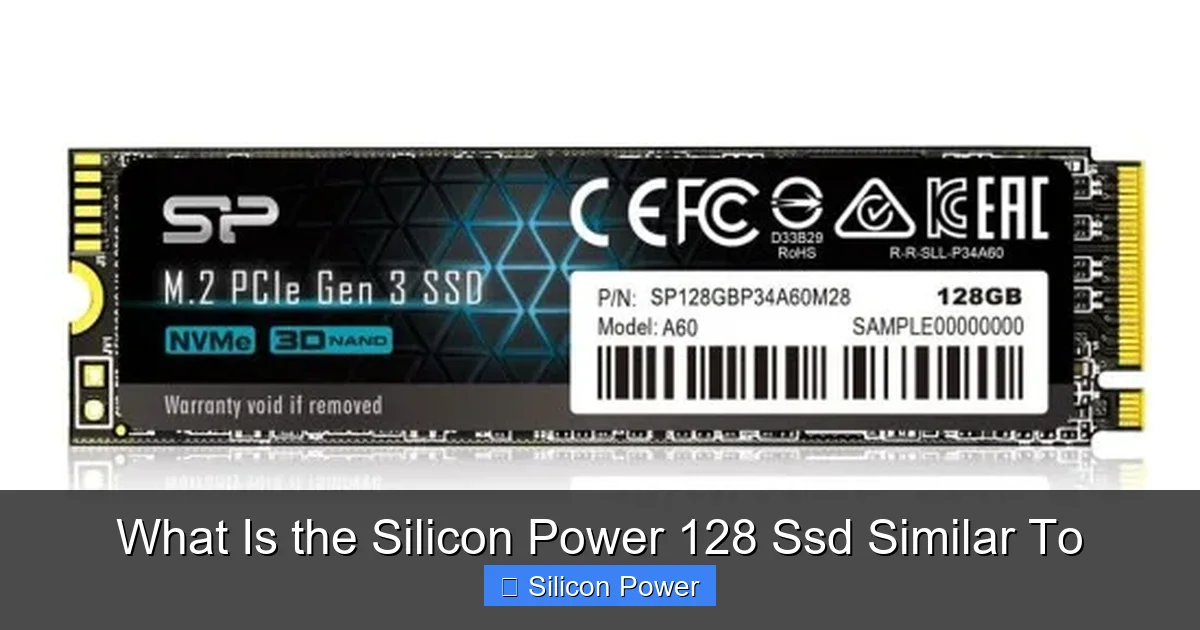
The Silicon Power 128 SSD is a budget-friendly SATA solid-state drive that delivers solid performance for everyday computing tasks. It’s similar to entry-level drives like the Kingston A400 and Crucial BX500, offering fast boot times, quick file transfers, and improved system responsiveness over traditional hard drives—all at an affordable price.
Key Takeaways
- Affordable Performance: The Silicon Power 128 SSD offers great value, matching the performance of other budget SATA SSDs like the Kingston A400 and Crucial BX500.
- SATA III Interface: It uses the standard SATA III connection, making it compatible with most laptops and desktops that have a 2.5-inch drive bay.
- Reliable for Daily Use: While not built for heavy workloads, it’s perfect for general use—web browsing, office apps, media playback, and light multitasking.
- Improved System Responsiveness: Upgrading from an HDD to this SSD significantly reduces boot times and speeds up application launches.
- Limited Endurance Compared to Premium Drives: It has lower TBW (terabytes written) ratings than higher-end models, so it’s best suited for light to moderate usage.
- No DRAM Cache in Some Models: Certain versions lack a DRAM cache, which can slightly impact sustained performance during large file transfers.
- Great Entry-Level Upgrade: Ideal for users looking to breathe new life into older systems without spending much.
Quick Answers to Common Questions
What is the Silicon Power 128 SSD similar to?
It’s similar to other budget SATA SSDs like the Kingston A400, Crucial BX500, and Team Group GX2, offering comparable speed, capacity, and price for everyday use.
Is the Silicon Power 128 SSD good for gaming?
It’s fine for casual gaming and faster load times, but 128GB fills up quickly with modern games. A larger SSD is better for serious gamers.
Does the Silicon Power 128 SSD have DRAM?
Some models do, but many 128GB versions are DRAM-less, which can affect sustained performance during large file transfers.
Can I use this SSD in a laptop?
Yes, it uses a standard 2.5-inch form factor and 7mm thickness, making it compatible with most laptops and desktops.
How long does the Silicon Power 128 SSD last?
With typical use, it can last 5–7 years. It has a 3-year warranty and around 70–80 TBW endurance rating.
📑 Table of Contents
- Introduction: Why the Silicon Power 128 SSD Matters
- Understanding the Silicon Power 128 SSD: Key Features
- What Is the Silicon Power 128 SSD Similar To?
- Real-World Performance: How Does It Hold Up?
- Who Should Buy the Silicon Power 128 SSD?
- Installation Tips and Best Practices
- Conclusion: Is the Silicon Power 128 SSD Right for You?
Introduction: Why the Silicon Power 128 SSD Matters
If you’ve ever waited minutes for your computer to start up, or watched a spinning wheel while opening a simple document, you know how frustrating slow storage can be. That’s where solid-state drives (SSDs) come in—and the Silicon Power 128 SSD is one of the most accessible ways to upgrade your system without breaking the bank.
This compact 2.5-inch SATA SSD is designed for everyday users who want faster performance than a traditional hard drive (HDD) but don’t need the blazing speeds of NVMe drives. Whether you’re reviving an aging laptop or building a budget desktop, the Silicon Power 128 SSD offers a noticeable improvement in speed and responsiveness. It’s not the fastest SSD on the market, but it’s reliable, affordable, and widely compatible—making it a smart choice for students, home users, and small offices.
In this article, we’ll explore what the Silicon Power 128 SSD is similar to, comparing it to other popular budget SSDs. We’ll look at performance, build quality, compatibility, and real-world use cases. By the end, you’ll know exactly whether this drive fits your needs—and how it stacks up against the competition.
Understanding the Silicon Power 128 SSD: Key Features
Visual guide about What Is the Silicon Power 128 Ssd Similar To
Image source: products.eneba.games
Before diving into comparisons, let’s break down what makes the Silicon Power 128 SSD tick. This drive is part of Silicon Power’s broader lineup of storage solutions, which includes USB flash drives, memory cards, and other SSDs. The 128GB model is one of their most popular entry-level options, especially for users upgrading from HDDs.
Storage Capacity and Form Factor
The “128” in the name refers to its storage capacity—128 gigabytes. While this might seem small compared to modern 1TB or 2TB drives, it’s more than enough for a lightweight operating system, essential applications, and a handful of documents or media files. The drive uses the standard 2.5-inch form factor, which fits perfectly in most laptops and desktop drive bays. It’s also slim—just 7mm thick—so it works in ultrabooks and slim systems that require low-profile drives.
Interface and Speed
This SSD connects via SATA III (6Gb/s), the same interface used by most older and mid-range systems. While SATA III is slower than the newer NVMe protocol used in M.2 drives, it’s still significantly faster than HDDs. The Silicon Power 128 SSD delivers sequential read speeds of up to 560 MB/s and write speeds around 530 MB/s. These numbers are typical for SATA III SSDs and represent a massive leap over traditional hard drives, which usually max out at 100–150 MB/s.
Controller and NAND Type
Silicon Power doesn’t always disclose the exact controller or NAND flash type used in every model, but based on teardowns and user reports, many of their 128GB SSDs use TLC (triple-level cell) NAND with a Phison or Silicon Motion controller. TLC offers a good balance of cost, performance, and endurance for everyday use. However, some lower-cost models may use QLC (quad-level cell) NAND, which is cheaper but less durable over time.
DRAM Cache: A Key Differentiator
One important detail to note is that not all Silicon Power 128 SSDs include a DRAM cache. DRAM (dynamic RAM) helps the drive manage data more efficiently, especially during sustained workloads. Drives without DRAM rely on system memory (HMB—Host Memory Buffer) or slower caching methods, which can lead to performance drops during large file transfers. If you’re comparing models, check the specifications carefully—some versions of this drive do include DRAM, while others don’t.
Endurance and Warranty
The Silicon Power 128 SSD typically comes with a 3-year limited warranty, which is standard for budget SSDs. Its endurance is rated around 70–80 TBW (terabytes written), meaning you can write about 70–80 terabytes of data over the drive’s lifetime before it may start to fail. For light users—someone who writes a few gigabytes per day—this could last 5–7 years. Heavy users, like video editors or developers, might wear it out faster, but for general use, it’s more than sufficient.
What Is the Silicon Power 128 SSD Similar To?
Now that we understand its specs, let’s answer the main question: What is the Silicon Power 128 SSD similar to? In short, it’s most comparable to other budget SATA SSDs from brands like Kingston, Crucial, and Team Group. These drives target the same audience—users who want a reliable, affordable upgrade from HDDs without paying premium prices.
Comparison with Kingston A400 128GB
The Kingston A400 is one of the most popular budget SSDs on the market, and it’s a direct competitor to the Silicon Power 128 SSD. Both use SATA III, offer similar capacities, and target the same price range. In terms of performance, they’re nearly identical: the A400 hits around 500 MB/s read and 450 MB/s write, which is just slightly below the Silicon Power’s peak speeds.
One advantage the Kingston A400 has is brand recognition and widespread availability. Kingston is a well-established name in memory and storage, so many users feel more confident buying from them. However, the Silicon Power drive often comes at a lower price point, making it a better value for budget shoppers. Both drives lack DRAM in their 128GB models, so performance under heavy loads is similar.
Comparison with Crucial BX500 128GB
The Crucial BX500 is another strong contender in the budget SSD space. Like the Silicon Power, it uses SATA III and TLC NAND. The BX500 offers slightly better endurance—around 80 TBW—and comes with a 3-year warranty. Performance-wise, it’s very close: up to 540 MB/s read and 500 MB/s write.
Where the BX500 pulls ahead is in software support. Crucial includes its Storage Executive tool, which lets users monitor drive health, update firmware, and enable features like Momentum Cache. Silicon Power doesn’t offer a comparable software suite, so users miss out on these extras. However, for basic use, both drives perform similarly, and the Silicon Power often costs less.
Comparison with Team Group GX2 128GB
The Team Group GX2 is another budget-friendly SATA SSD that’s often compared to the Silicon Power 128. It offers similar speeds—up to 550 MB/s read and 520 MB/s write—and uses a 2.5-inch form factor. Like the others, it lacks DRAM in the 128GB version.
One thing that sets the GX2 apart is its aggressive pricing. It’s often one of the cheapest SSDs available, sometimes even undercutting the Silicon Power. However, some users report slightly lower real-world performance and less consistent build quality. If you’re on a tight budget, the GX2 is a viable alternative, but the Silicon Power generally offers better reliability and customer support.
Comparison with Older or OEM Drives
You might also see the Silicon Power 128 SSD compared to older drives like the Samsung 850 EVO or even some OEM (original equipment manufacturer) SSDs found in pre-built computers. While the 850 EVO is a higher-tier drive with better endurance and DRAM, it’s also more expensive and often overkill for basic use. The Silicon Power is more similar to the budget drives that come in low-cost laptops or desktops from brands like Acer, HP, or Lenovo.
Real-World Performance: How Does It Hold Up?
Specs are one thing, but how does the Silicon Power 128 SSD actually perform in daily use? Let’s look at some practical scenarios.
Boot Times and System Responsiveness
One of the biggest benefits of upgrading to any SSD is faster boot times. On a typical Windows 10 or 11 system, the Silicon Power 128 SSD can reduce startup time from over a minute (with an HDD) to under 20 seconds. Applications like web browsers, office suites, and media players also launch much quicker. You’ll notice less lag when switching between programs, especially if you’re using a system with 8GB of RAM or less.
File Transfers and Copy Speeds
When copying large files—like videos or software installers—the drive performs well initially, hitting close to its rated speeds. However, if the drive lacks DRAM, you might see a drop in speed after transferring several gigabytes. For example, copying a 10GB video file might start at 500 MB/s but slow down to 100–200 MB/s halfway through. This is normal for DRAM-less SSDs and doesn’t affect everyday tasks like opening documents or streaming videos.
Gaming and Multitasking
For casual gaming, the Silicon Power 128 SSD works fine. Games load faster than on an HDD, and level transitions are smoother. However, if you’re playing modern AAA titles that require frequent asset loading, a larger SSD (like a 500GB or 1TB model) is better. The 128GB capacity fills up quickly, especially with game installs that can take 50–100GB each.
Multitasking is manageable, but again, the lack of DRAM can cause minor hiccups when running multiple apps at once. If you’re a power user who keeps dozens of browser tabs open while editing photos or coding, consider a drive with DRAM or more capacity.
Longevity and Reliability
In terms of reliability, the Silicon Power 128 SSD is solid for its class. It doesn’t have the reputation for failure that some ultra-cheap SSDs do. User reviews on Amazon, Newegg, and other retailers are generally positive, with most people reporting stable performance over 1–2 years of use. That said, it’s not built for 24/7 operation or heavy write workloads. Avoid using it in servers, NAS systems, or as a scratch disk for video editing.
Who Should Buy the Silicon Power 128 SSD?
This drive isn’t for everyone, but it’s perfect for a specific group of users.
Ideal Users
– **Students:** Need a fast, reliable drive for schoolwork, research, and light entertainment.
– **Home Users:** Want to speed up an old laptop or desktop without spending much.
– **Office Workers:** Use basic software like Word, Excel, and email—no heavy multitasking.
– **Budget Builders:** Assembling a low-cost PC and need affordable storage.
– **Secondary Drive Users:** Adding a small SSD for the OS while keeping files on a larger HDD.
Who Should Look Elsewhere?
– **Gamers with Large Libraries:** 128GB fills up fast with modern games.
– **Content Creators:** Video editors, photographers, and 3D artists need more space and better endurance.
– **Power Users:** Those who run virtual machines, compile code, or handle large datasets.
– **Future-Proofers:** If you plan to keep your system for 5+ years, consider a 500GB or 1TB SSD.
Installation Tips and Best Practices
Upgrading to the Silicon Power 128 SSD is straightforward, but a few tips can make the process smoother.
Cloning vs. Fresh Install
You have two options: clone your existing drive or do a fresh install of your operating system. Cloning is faster and keeps all your files and settings, but it can carry over bloatware and slowdowns. A fresh install gives you a clean, optimized system but requires reinstalling apps and restoring files.
If you choose to clone, use free tools like Macrium Reflect Free or Clonezilla. Make sure your current drive is healthy and defragmented before cloning.
Secure Erase and Optimization
After installation, enable TRIM (a command that helps maintain SSD performance) in your OS. On Windows, this is usually on by default. You can also use the built-in Optimize Drives tool to check TRIM status.
Avoid defragmenting the SSD—it’s unnecessary and can reduce its lifespan. SSDs don’t benefit from defragmentation like HDDs do.
Partitioning and Usage Tips
Leave about 10–15% of the drive unallocated or unused. This helps maintain performance over time by giving the drive space for wear leveling and garbage collection.
Don’t fill the drive to capacity. Once it’s over 80% full, performance can degrade. Use an external drive or cloud storage for large files like videos and photos.
Conclusion: Is the Silicon Power 128 SSD Right for You?
The Silicon Power 128 SSD is a solid, no-frills storage upgrade that delivers exactly what budget users need: speed, reliability, and affordability. It’s similar to other entry-level SATA SSDs like the Kingston A400, Crucial BX500, and Team Group GX2, offering comparable performance at a competitive price.
While it lacks some premium features—like DRAM in certain models and advanced software tools—it more than makes up for it with everyday usability. For anyone tired of slow boot times and sluggish performance, this drive is a worthwhile investment. It won’t turn your old laptop into a speed demon, but it will make it feel like new again.
If you’re looking for a simple, effective way to boost your system’s responsiveness without spending a lot, the Silicon Power 128 SSD is a smart choice. Just remember to pair it with enough RAM and consider upgrading to a larger capacity if your storage needs grow.
Frequently Asked Questions
Is the Silicon Power 128 SSD faster than an HDD?
Yes, it’s significantly faster. While HDDs average 100–150 MB/s, this SSD delivers up to 560 MB/s read speeds, resulting in much quicker boot times and app launches.
Can I install Windows on the Silicon Power 128 SSD?
Absolutely. It’s a great choice for installing Windows 10 or 11, giving you a fast, responsive system for daily tasks.
Does this SSD support NVMe?
No, it uses the SATA III interface, not NVMe. It’s not compatible with M.2 NVMe slots, but it works in any system with a 2.5-inch SATA bay.
Is the Silicon Power brand reliable?
Yes, Silicon Power is a reputable manufacturer with a good track record for budget storage. Their SSDs are widely used and generally well-reviewed.
Should I buy the 128GB or a larger capacity?
If you only need the OS and a few apps, 128GB is fine. But for more storage, consider 256GB or 500GB to avoid running out of space quickly.
Can I use this SSD as an external drive?
Yes, with a 2.5-inch USB enclosure, you can turn it into a portable SSD for backups or file transfers.