
Is your PS4 feeling sluggish? Are those endless loading screens between levels or during game startup stealing precious gaming minutes? You’re not alone! Many PlayStation 4 owners dream of speeding up their console, and the best way to do that is by upgrading its storage. While the PS4 came with a traditional hard drive (HDD), an SSD (Solid State Drive) can dramatically cut down load times, making your gaming experience much smoother.
When it comes to reliable and high-performance storage, Sabrent is a name that often comes up. They offer a range of robust SSD solutions, and finding the Sabrent best SSD drive for PS4 might just be the upgrade you need. In this article, we’ll dive into some top-tier Sabrent drives and compatible options that can breathe new life into your PlayStation 4. We’ll explore internal (via enclosure) and external SSD options, helping you pick the perfect storage solution for your needs.
Why Upgrade to an SSD for Your PS4?
Before we jump into the products, let’s quickly chat about why an SSD is a game-changer for your PS4:
- Blazing Fast Load Times: This is the big one! SSDs have no moving parts, allowing them to access data much quicker than HDDs. You’ll notice significantly reduced load times in games, faster booting of your PS4, and quicker menu navigation.
- Smoother Gameplay: While an SSD won’t directly improve frame rates (that’s the console’s GPU), faster data streaming can lead to fewer texture pop-ins and a more consistent experience in open-world games.
- Durability: Without delicate moving parts, SSDs are more resistant to drops and bumps, making them ideal for portable external storage.
- Quieter Operation: No moving parts means no mechanical noise – just silent, efficient storage.
Our Top Picks: Sabrent & Compatible SSDs for PS4
Here are our hand-picked selections, including some fantastic Sabrent options and a solid compatible alternative, that could be the Sabrent best SSD drive for PS4 (or best compatible drive) for you.
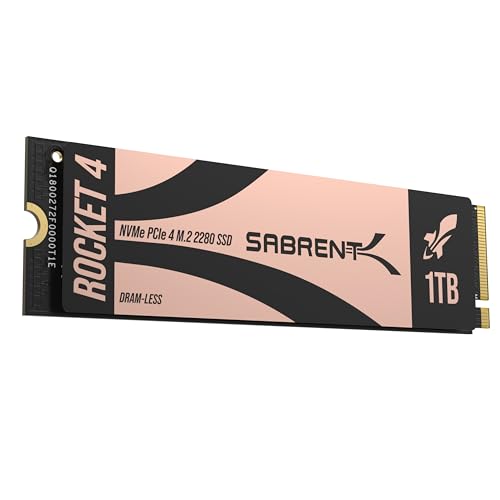
1. SABRENT Rocket 4 1TB NVMe SSD PCIe Gen4 M.2 2280

If you’re looking for extreme speed and future-proofing, the Sabrent Rocket 4 1TB NVMe SSD is a phenomenal piece of hardware. While this specific drive is designed for the cutting-edge PCIe Gen4 speeds found in modern PCs and the PS5, it can still serve your PS4 well when placed in a compatible USB 3.0 external enclosure. This gives you the flexibility to enjoy lightning-fast performance for your current console setup and carry that speed over if you ever upgrade to a PS5 or a high-end PC. It’s a premium option that truly embodies Sabrent’s commitment to performance.
- Blazing Gen4 Speed: Experience PCIe 4.0 NVMe performance with up to 7450MB/s read and 6100MB/s write speeds — optimized for fast boots, smooth gaming, and demanding workloads.
- High IOPS, Efficient Design: Delivers up to 850K/800K random IOPS while maintaining low heat and power draw — built for stable, long-term performance without throttling.
- Broad System Compatibility: Single-sided M.2 2280 form factor ensures wide compatibility across desktops, laptops, and PS5 systems with tight thermal or space constraints.
- Made for Pros and Gamers: Whether you’re creating, streaming, or gaming, the Rocket 4 provides fast, responsive storage ideal for high-performance systems.
- Trusted Sabrent Support: Engineered with premium hardware and supports Windows, macOS, and Linux. Register your drive online for firmware updates and expert technical help.
Pros:
– Unrivaled speed (when paired with a compatible system like PS5/PC).
– Excellent for future-proofing your storage.
– Robust and efficient design for stable performance.
– Sabrent’s reputation for quality and support.
Cons:
– Requires a separate external enclosure to work with PS4.
– PS4’s USB 3.0 port will cap its true Gen4 speeds significantly.
– Higher price point due to Gen4 technology.
User Impressions: Users rave about the incredible speed and reliability of the Rocket 4 drives, particularly for gaming on PS5 and demanding PC applications. They appreciate the solid build quality and the peace of mind that comes with Sabrent’s support. For PS4 users utilizing an enclosure, the speed boost over an HDD is still very noticeable and appreciated.
2. SABRENT Rocket XTRM 5 4TB Thunderbolt 5 Portable SSD

Talk about overkill – in the best way possible! The Sabrent Rocket XTRM 5 is an absolute beast of a portable SSD, leveraging Thunderbolt 5 technology for mind-blowing transfer speeds. While your PS4 won’t be able to utilize the full Thunderbolt 5 capabilities (it will connect via USB 3.0 speeds), this drive is still an incredibly fast and robust external solution. With a massive 4TB capacity, you’ll have room for a colossal game library, and its rugged design ensures your data stays safe on the go. If you’re looking for the ultimate in external storage that will serve you well across all your devices, this might be the Sabrent best SSD drive for PS4 and beyond.
- Ultra-Fast Thunderbolt 5 Performance: Achieve up to 64Gbps transfer speeds with 80Gbps connection via Thunderbolt 5 for seamless high-speed data access, large file transfers, and demanding workloads.
- Broad Compatibility with Older Devices: Backward compatible with Thunderbolt 3, Thunderbolt 4, and USB4 at 10, 20, or 40Gbps. USB fallback supports 20Gbps (USB 3.2 Gen 2×2), 10Gbps, and 5Gbps for wide device coverage.
- Rugged and Durable Construction: Built with an aluminum body for heat dissipation and durability. Includes a silicone sleeve for enhanced drop protection and resistance to environmental hazards.
- Plug and Play, No External Power Needed: Bus-powered for easy use without external adapters. Comes with a premium Thunderbolt cable for hassle-free, high-performance connections on the go.
- Reliable, Future-Proof Storage Solution: Ideal for creators, professionals, and gamers. Designed to support evolving hardware and deliver long-term, versatile high-speed storage for any workflow.
Pros:
– Enormous 4TB capacity for extensive game libraries.
– Extremely durable and rugged design with drop protection.
– Bus-powered and plug-and-play for convenience.
– Future-proof with Thunderbolt 5 technology (even if PS4 doesn’t use it).
– Still delivers excellent USB 3.0 speeds on PS4.
Cons:
– Thunderbolt 5 capabilities are massively underutilized by PS4.
– Very high price point for a PS4-only storage solution.
– Might be overkill for most PS4 users.
User Impressions: Professionals and power users are blown away by the speed and build quality of the XTRM 5. Its robust nature and compatibility with various devices, even at reduced speeds, make it a highly versatile and dependable external drive. PS4 users find it provides an excellent speed boost and massive storage, even if they’re not tapping into its full potential.
3. SABRENT Rocket 4 2TB NVMe SSD PCIe Gen4 M.2 2280

Just like its 1TB sibling, the Sabrent Rocket 4 2TB NVMe SSD offers incredible speed and a generous amount of storage. This 2TB version is perfect if you have a massive digital game collection or want to ensure you won’t run out of space anytime soon. While its native Gen4 speeds are geared towards PS5 and high-end PCs, combining it with an external USB 3.0 enclosure makes it a formidable external drive for your PS4. You get Sabrent’s renowned performance, ample capacity, and the assurance of a high-quality component that will last through console generations.
- Next-Gen Gen4 Performance: Reach up to 7450MB/s read and 6400MB/s write speeds with PCIe 4.0 NVMe – perfect for ultra-fast boots, smooth gameplay, and demanding workloads.
- High IOPS, Low Heat: Get up to 1000K/950K random IOPS with minimal thermal output – built for sustained speed without sacrificing stability or lifespan.
- Universal Compatibility: Compatible with desktops, laptops, and PS5. Single-sided M.2 2280 design fits compact systems with no airflow or throttling issues.
- Power for Pros and Gamers: Whether you’re gaming, editing, or building a performance rig, the Rocket 4 delivers fast, reliable storage for intensive applications.
- Sabrent Quality and Support: Built with premium components and broad OS support including Windows, macOS, and Linux. Register online for firmware updates and expert assistance.
Pros:
– Huge 2TB capacity for extensive game libraries.
– Top-tier Gen4 NVMe speeds for PS5/PC (via enclosure for PS4).
– Excellent heat management for sustained performance.
– Future-proof investment for next-gen consoles or PC builds.
Cons:
– Requires an external enclosure for PS4 compatibility.
– PS4’s USB 3.0 interface limits its peak performance.
– Premium price point.
User Impressions: Users consistently praise the Rocket 4 2TB for its remarkable speed and capacity. It’s often cited as a go-to choice for PS5 upgrades and high-performance PC builds. When used with an external enclosure for PS4, gamers report a significant improvement in load times, making it a worthwhile upgrade despite the need for an extra accessory.
4. BUFFALO External SSD 1TB – Compatible with PS4 / PS5
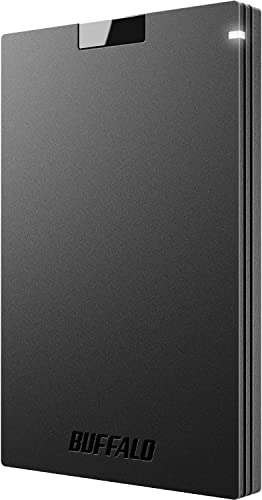
Sometimes, simplicity and direct compatibility are key. The Buffalo External SSD 1TB is a fantastic option that’s explicitly designed with PS4 (and PS5) gamers in mind. This plug-and-play external drive offers a solid 1TB of storage, which is ample space for dozens of your favorite titles, and it connects directly via USB. It’s compact, durable, and provides a noticeable speed boost over your PS4’s internal HDD without any fuss or the need for additional enclosures. This is a strong contender if you’re looking for an immediate and straightforward upgrade for your PS4’s storage and performance.
- BEST VALUE SSD: Compact and reliable SSD to meet your on-the-go demand. Compatible with PS4/PS5, Macs, and PCs. Save space and loading time on your console by storing your game data on Buffalo SSDs.
- IDEAL ON-THE-GO ACCESSORY: Quickly copy your large data. If you are a professional in need of fast and secure storage, the Buffalo SSD is ready for on-the-go backup for photos, videos, docs, and more.
- FAST SPEEDS AND MULTI-TASKING: Faster speed than HDD enables you to connect the device to PC and do large intensive tasks simultaneously.
- COMPACT, DURABLE, & RELIABLE: Shock-resistant, rugged design provides drop protection. Compact form factor to carry your data in your pocket. No matter if it’s for work or fun, you can easily use your Buffalo SSD on-the-go.
- USB 3.2 CONNECTIVITY & 3-YEAR WARRANTY: Supports USB-C / USB-A. Easily connect the Buffalo SSD to your PC and other mobile devices. THREE-YEAR WARRANTY for registered devices (two years if unregistered).
Pros:
– Directly compatible with PS4 via USB.
– Excellent value for a 1TB external SSD.
– Compact and durable with shock resistance.
– Plug-and-play ease of use.
– Comes with a good warranty.
Cons:
– Not as fast as internal NVMe SSDs (though still much faster than HDD).
– External form factor may not appeal to all users.
User Impressions: Gamers love the Buffalo external SSD for its straightforward setup and noticeable performance improvement on both PS4 and PS5. Its compact size and robust build also make it a popular choice for those who need portable storage. Many appreciate the value it offers compared to higher-end options.
5. SABRENT 2.5 Inch SATA to USB 3.0 Tool Free External Enclosure

Okay, this isn’t an SSD itself, but it’s an absolutely essential component if you want to use an internal 2.5-inch SATA SSD with your PS4 as an external drive, or even repurpose an old laptop drive! The Sabrent 2.5 Inch SATA to USB 3.0 Tool Free External Enclosure is a brilliant, cost-effective way to build your own custom external SSD. Just pop any 2.5-inch SATA SSD (or HDD) into this enclosure, and voilà – you’ve got a super-fast, portable storage solution for your PS4. This gives you the flexibility to choose your preferred SSD brand and capacity, making it a powerful option for building your ideal Sabrent best SSD drive for PS4 setup.
- Tool Free Design: Easy to install, no screwdrivers needed.
- Transfer Rates Up to 5 Gbps: When connected to a USB 3.0 port (backwards compatible with USB 2.0/1.1).
- Suitable for 2.5” SATA/SSD: Supports Standard Notebook 2.5″ SATA and SATA II Hard drives. Optimized for SSD, Supports UASP SATA III.
- Hot-swappable, Plug and Play: No drivers needed.
- Operating System Compatibility: Supports Windows (XP, Vista, 7, 8) and Mac OS X and Higher.
Pros:
– Allows you to create a custom external SSD with your choice of drive.
– Cost-effective, especially if you have a spare SATA SSD.
– Tool-free design makes installation incredibly easy.
– USB 3.0 speeds provide a significant boost for PS4.
– Portable and versatile for other uses (PC, laptop).
Cons:
– Requires purchasing a separate 2.5-inch SATA SSD.
– Does not come with an SSD pre-installed.
User Impressions: Customers love this Sabrent enclosure for its simplicity and effectiveness. Many use it to repurpose old laptop drives or to turn a new SATA SSD into a lightning-fast external drive for their PS4 or PC. The tool-free design is a frequently praised feature, making it accessible even for those not tech-savvy.
Frequently Asked Questions (FAQ)
Q1: Can I use any SSD with my PS4?
A: Not just any SSD, but most standard 2.5-inch SATA SSDs can be used internally (replacing the PS4’s HDD) or externally via a USB 3.0 enclosure. NVMe SSDs like the Sabrent Rocket 4 require an M.2 NVMe to USB 3.0 enclosure to work with PS4, as the console doesn’t natively support NVMe directly.
Q2: How much faster will my PS4 be with an SSD?
A: You can expect significantly faster load times, often cutting them in half or more for many games. PS4 boot-up times will also be noticeably quicker. While the PS4’s internal SATA II interface (for internal upgrades) or external USB 3.0 interface won’t fully utilize the maximum speed of modern SSDs, the improvement over the stock HDD is substantial.
Q3: Is it better to use an internal or external SSD for PS4?
A: For the PS4, an external SSD connected via USB 3.0 is generally recommended. It’s easier to set up, offers comparable performance to an internal SATA II SSD (due to the PS4’s internal limitations), and you don’t void your warranty by opening the console. The only catch is that external drives can’t store PS4 Pro enhanced games that need to run from the internal drive, but they can store and run regular PS4 games and applications perfectly.
Q4: How do I set up an external SSD with my PS4?
A: It’s super easy!
1. Connect your external SSD (or Sabrent enclosure with an SSD inside) to one of your PS4’s USB 3.0 ports.
2. Go to Settings > Devices > USB Storage Devices.
3. Select your SSD and choose Format as Extended Storage.
4. Follow the on-screen prompts. Once formatted, you can set it as the default installation location for new games.
Q5: Will using a high-end NVMe SSD like the Sabrent Rocket 4 on my PS4 be a waste of money?
A: While the PS4 won’t utilize the full Gen4 speed of an NVMe drive (it will be limited by the USB 3.0 speed), it’s not entirely a waste if you plan to upgrade to a PS5 or use it with a PC in the future. You’re getting a top-tier drive that will serve you exceptionally well on next-gen hardware. For current PS4 use, a more budget-friendly SATA SSD in an enclosure or a dedicated external SSD like the Buffalo might offer better value for money.
Q6: Do I need external power for an external SSD on PS4?
A: Most 2.5-inch external SSDs and enclosures (like the Sabrent 2.5 Inch SATA to USB 3.0 Enclosure) are “bus-powered,” meaning they draw power directly from the PS4’s USB port. You typically won’t need an additional power adapter. This makes them very convenient and portable.
Q7: Can I transfer existing PS4 games to a new external SSD?
A: Yes! Once your external SSD is set up as extended storage, you can move games from your PS4’s internal drive to the external one. Go to Settings > Storage > System Storage > Applications, press Options on your controller, select Move to Extended Storage, and choose the games you want to move.
Upgrading your PS4’s storage to an SSD is one of the most impactful performance upgrades you can make. Whether you opt for a high-performance solution like a Sabrent Rocket NVMe in an enclosure or a straightforward external drive like the Buffalo, you’ll be treated to a noticeably snappier and more enjoyable gaming experience. Happy gaming!