
Is your PlayStation 5 storage bursting at the seams? You’re not alone! With massive game sizes, it’s super easy to fill up that internal SSD. But don’t sweat it – expanding your PS5’s storage is a total game-changer, letting you keep more titles downloaded and ready to play. While the PS5 has an internal expansion slot for a super-fast M.2 NVMe SSD, many gamers also look for the best external SSD for PS5 to manage their game library efficiently.
In this guide, we’ll dive deep into the top external (and one key internal) storage solutions that can help you reclaim your precious game space. We’ve rounded up 7 fantastic options, breaking down what makes each one stand out, so you can pick the perfect companion for your PS5.
Why You Need External Storage for Your PS5
Running out of storage space on your PS5 is annoying, forcing you to constantly delete and re-download games. External storage solves this by:
- Expanding Your Game Library: Keep dozens, even hundreds, of games downloaded and ready to launch.
- Saving Time: No more waiting hours for large game files to re-download.
- Archiving PS5 Games: While you can’t play PS5 games directly from a standard external SSD/HDD, you can store them there and quickly transfer them back to your internal drive when you want to play – which is much faster than re-downloading.
- Playing PS4 Games Directly: Many external drives allow you to play your entire PS4 game collection directly from them, saving valuable space on your PS5’s internal SSD.
Understanding PS5 Storage Options: Internal vs. External
Before we jump into our top picks, it’s important to understand the two main ways to expand your PS5’s storage:
- Internal M.2 NVMe SSD: This is the only way to play native PS5 games directly from expanded storage. These drives go into a dedicated slot inside your PS5 and need to meet specific speed requirements (PCIe Gen4 with 5,500 MB/s read speed minimum, plus a heatsink). Think of this as an extension of your PS5’s lightning-fast built-in drive.
- External USB SSD/HDD: These drives connect via a USB port.
- External SSDs: Faster than HDDs, great for playing PS4 games directly and for quickly transferring PS5 games back and forth. They are generally more durable and portable.
- External HDDs: More affordable for larger capacities, ideal for archiving PS5 games and playing PS4 games directly. They are slower than SSDs, so transfers take longer.
Our list includes a mix to cover all your storage needs, but we’ll focus on external solutions primarily.
Factors to Consider When Choosing External Storage
When looking for the best external SSD for PS5, keep these points in mind:
- Speed: For M.2 NVMe, aim for 5500 MB/s read speed or higher. For external USB drives, faster read/write speeds mean quicker game transfers (especially for PS5 games) and smoother PS4 game loading.
- Capacity: How many games do you want to store? 1TB, 2TB, 4TB, or even more? Consider your gaming habits.
- Compatibility: Ensure the drive works seamlessly with your PS5. All external drives need to be USB 3.0 or higher.
- Durability & Portability: If you plan to move the drive around, a rugged, compact design is a plus.
- Price: Balance your budget with your performance and capacity needs.
The 7 Top Storage Solutions for Your PS5
Let’s dive into our hand-picked selections!
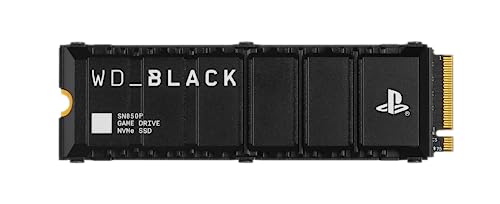
1. WD_BLACK 2TB SN850P NVMe M.2 SSD Officially Licensed

This isn’t an “external” SSD in the traditional sense, but it’s often the first choice for PS5 owners looking for serious internal storage expansion. The WD_BLACK SN850P is specifically designed and officially licensed for the PlayStation 5, ensuring seamless compatibility and top-tier performance. If you want to play PS5 games directly from expanded storage without any compromises on speed, this M.2 NVMe SSD is a phenomenal choice. It even comes with an integrated heatsink, making installation a breeze and keeping things cool under heavy gaming sessions.
-
Key Features:
- Officially licensed M.2 NVMe SSD for PlayStation 5.
- Capacities from 1TB to 4TB, storing up to 100 games (4TB model).
- Integrated, optimized heatsink for easy, worry-free installation.
- Allows playing PS5 games directly from the drive.
- Blazing-fast PCIe Gen 4 speeds up to 7,300MB/s read.
- Includes a 14-day trial of PlayStation Plus Premium | Deluxe.
-
Pros:
- Unparalleled speed for PS5 games.
- Officially licensed for guaranteed compatibility.
- Easy installation with pre-attached heatsink.
- Eliminates transfer times for PS5 games.
-
Cons:
- Requires internal installation (not a plug-and-play external solution).
- Generally pricier than external SSDs or HDDs.
-
User Impressions: Gamers consistently praise the SN850P for its incredible speed, ease of installation, and the sheer convenience of having more PS5 games instantly accessible. Many call it the ultimate storage upgrade for their console.
2. Seagate Game Drive for PS5 5TB External HDD – USB

The Seagate Game Drive is an officially licensed external hard drive (HDD) specifically designed for PlayStation consoles. While it’s an HDD (meaning slower than an SSD), its massive 5TB capacity makes it an excellent choice for archiving your PS5 games and for playing your entire PS4 library directly. Its matching firmware ensures seamless operation with your console, and the cool blue LED lighting gives it a stylish edge. It’s truly a “game vault” that prevents you from having to delete beloved titles.
-
Key Features:
- Officially licensed with matching firmware for PS5 and PS4.
- Stylish blue LED lighting.
- Massive 5TB capacity for a huge game vault.
- Lightweight and portable design.
- Allows playing PS4 games directly.
- Stores PS5 games for transfer back to the internal drive when ready to play.
-
Pros:
- Huge storage capacity for the price.
- Officially licensed for reliable compatibility.
- Perfect for archiving PS5 games and playing PS4 games.
- Portable and eye-catching design.
-
Cons:
- It’s an HDD, so slower speeds compared to SSDs.
- PS5 games must be transferred to the internal SSD to be played.
-
User Impressions: Users love the vast amount of storage this drive provides for its cost, making it perfect for those with large game collections, especially PS4 titles. The “official” branding gives many peace of mind regarding compatibility.
3. BUFFALO External SSD 1TB – Compatible with PS4 / PS5
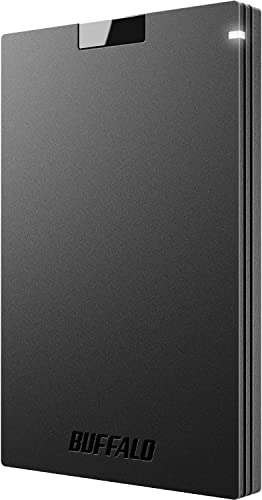
The Buffalo External SSD is a compact and durable solution that offers a fantastic balance of speed, portability, and value. It’s a versatile drive that works not just with PS5 and PS4, but also with Macs and PCs, making it a great all-around storage option. Its shock-resistant design means you can confidently take your game library on the go, and the fast SSD speeds significantly reduce load and transfer times compared to traditional HDDs.
-
Key Features:
- Excellent value for an external SSD.
- Compatible with PS4, PS5, Macs, and PCs.
- Faster than traditional HDDs for quick data transfer.
- Compact, durable, and shock-resistant design.
- USB 3.2 connectivity (USB-C / USB-A compatible).
- Includes a 3-year warranty (for registered devices).
-
Pros:
- Great blend of performance and affordability.
- Highly portable and rugged.
- Versatile compatibility across multiple platforms.
- Good for playing PS4 games directly and fast PS5 game transfers.
-
Cons:
- Capacity options might be lower than some HDDs for the price.
- Not an officially licensed product (but fully compatible).
-
User Impressions: Customers often highlight the Buffalo SSD’s impressive speed for its price point and its robust, pocket-friendly design. It’s seen as a reliable and convenient solution for gamers who need a quick storage boost.
4. Samsung T7 Portable SSD, 1TB External Solid State Drive

The Samsung T7 Portable SSD is a powerhouse when it comes to speed and reliability, making it a stellar candidate for the best external SSD for PS5 if you prioritize rapid transfers. Designed for creators but perfect for gamers, it boasts impressive read/write speeds up to 1,050/1,000 MB/s, meaning your PS5 game transfers will be done in a flash. Its sleek, solid aluminum unibody construction provides excellent shock resistance, ensuring your games are safe even if the drive takes a tumble.
-
Key Features:
- Blazing fast read/write speeds up to 1,050/1,000 MB/s (PCIe NVMe technology).
- Compact design with capacities up to 4TB.
- Extensive compatibility with PCs, mobile phones, and gaming consoles.
- Durable with shock resistance and fall protection up to 6 feet.
- World’s #1 flash memory brand, ensuring reliability.
-
Pros:
- Extremely fast for transferring PS5 games.
- Very durable and portable.
- Sleek and attractive design.
- Trusted brand for flash memory.
-
Cons:
- Premium price point, especially for higher capacities.
- No integrated heatsink (not for internal PS5 slot).
-
User Impressions: Gamers and professionals alike laud the Samsung T7 for its incredible speed, rock-solid reliability, and compact form factor. It’s often recommended for those who frequently move large files or want the quickest possible game transfers.
5. SanDisk 1TB Extreme Portable SSD, Officially Licensed

SanDisk steps up with their Extreme Portable SSD, specifically designed and officially licensed for PlayStation consoles. This makes it a highly dependable choice if you’re looking for an external drive that’s guaranteed to play nice with your PS5. With speeds up to 1000MB/s, it’s excellent for quickly moving games between your external archive and the PS5’s internal storage. Plus, its IP65 rating and impressive 3-meter drop protection mean it’s built to withstand the rigors of gaming life, offering true peace of mind.
-
Key Features:
- Designed, tested, and officially licensed for PlayStation consoles.
- Enhanced speeds up to 1000MB/s for quick game transfers.
- Expands space for new PS5 titles without deleting old ones.
- IP65 rating for water and dust resistance, plus 3-meter drop protection.
- Comes with a 1-month trial of Discord Nitro.
- Backed by a 5-year limited warranty.
-
Pros:
- Officially licensed for assured compatibility.
- Highly durable and rugged for on-the-go use.
- Fast transfer speeds for PS5 game archiving.
- Excellent for playing PS4 games directly.
-
Cons:
- May be slightly more expensive due to licensing and rugged features.
- Not an internal SSD for direct PS5 game play.
-
User Impressions: Users appreciate the SanDisk Extreme Portable SSD for its robust build quality and peace of mind from the official PlayStation licensing. Its speed and durability are frequently highlighted as major selling points for active gamers.
6. Seagate Portable 2TB External Hard Drive HDD — USB 3.0

Sometimes, simplicity and sheer capacity are all you need. The Seagate Portable 2TB External Hard Drive is a no-frills, plug-and-play solution that offers ample storage at an attractive price point. While it’s an HDD, making it slower for game transfers than SSDs, it’s perfectly capable of storing your PS5 games for later transfer and running your PS4 library directly. Its compact design and USB 3.0 connectivity make it a convenient and budget-friendly way to expand your digital library without fuss.
-
Key Features:
- Easily store and access 2TB of content on the go.
- Simple drag-and-drop backup.
- Plug-and-play setup with automatic recognition (no software needed).
- USB 3.0 cable included.
- Works with Windows or Mac computers as well.
-
Pros:
- Very affordable per gigabyte.
- Simple, plug-and-play operation.
- Great for archiving PS5 games and playing PS4 titles.
- Compact and portable.
-
Cons:
- Slower transfer speeds due to being an HDD.
- PS5 games must be transferred to internal storage to play.
- Less durable than SSDs.
-
User Impressions: This Seagate drive is a favorite for budget-conscious users who need a lot of storage without breaking the bank. Its reliability for basic storage needs and ease of use are frequently praised.
7. Avolusion PRO-5X Series 8TB USB 3.0 External Gaming Hard Drive

If maximizing storage capacity is your absolute top priority, the Avolusion PRO-5X Series 8TB USB 3.0 External Gaming Hard Drive is an absolute monster. This drive offers a staggering 8TB of space, built around a refurbished 7200RPM enterprise-grade HDD for enhanced reliability and performance compared to standard consumer HDDs. It’s designed specifically with gaming consoles in mind, letting you play PS4 games directly and providing an enormous archive for your PS5 titles. While you still need to transfer PS5 games back to the internal SSD to play, the sheer volume of games you can store here is unmatched.
-
Key Features:
- Massive 8TB capacity.
- Features a refurbished 7200RPM enterprise HDD for reliability and performance.
- Designed for 24/7 operation.
- Compatible with PS5 (for storage/PS4 games) and PC.
- Allows playing PS4 games directly.
- Faster than re-downloading PS5 games when moving them back to internal storage.
-
Pros:
- Unparalleled storage capacity for an external drive.
- Enterprise-grade HDD for improved durability and speed (for an HDD).
- Ideal for archiving a huge library of PS5 games.
- Great for playing a vast collection of PS4 games.
-
Cons:
- It’s still an HDD, so slower than SSDs for transfers.
- PS5 games must be moved to the internal SSD for play.
- “Refurbished” internal drive might give some pause (though tested).
-
User Impressions: Users who need vast amounts of storage swear by the Avolusion PRO-5X, appreciating its immense capacity for game archiving. The 7200RPM speed is also a noticeable improvement over slower HDDs for those huge game transfers.
Making the Right Choice
Choosing the best external SSD for PS5 (or an internal NVMe SSD) really comes down to your primary needs:
- For pure PS5 game performance and direct play: Go for the WD_BLACK SN850P (M.2 NVMe internal).
- For fast PS4 game play and quick PS5 game transfers, plus portability: The Samsung T7, SanDisk Extreme, or Buffalo External SSDs are excellent choices.
- For massive storage capacity at an affordable price, primarily for archiving PS5 games and playing PS4 titles: The Seagate Game Drive, Seagate Portable, or Avolusion PRO-5X HDDs will serve you well.
No matter which you choose, expanding your PS5’s storage is one of the best upgrades you can make to enhance your gaming experience. Say goodbye to deleting games and hello to an ever-ready library!
Frequently Asked Questions (FAQ)
Q1: Can I play PS5 games directly from an external SSD?
A: You can only play native PS5 games directly from an internal M.2 NVMe SSD installed in the PS5’s expansion slot. External USB SSDs and HDDs can store PS5 games, but you must transfer them back to the console’s internal SSD to play them. However, you can play PS4 games directly from any compatible external USB drive.
Q2: What’s the difference between an external SSD and an external HDD for PS5?
A: The main difference is speed and price. External SSDs (Solid State Drives) are significantly faster, more durable, and generally more compact but also more expensive per gigabyte. External HDDs (Hard Disk Drives) are slower and more fragile but offer much larger capacities for a lower price. For PS5 games, both require transferring back to the internal SSD to play, but SSDs will transfer them much faster.
Q3: How much storage do I really need for my PS5?
A: It depends on your gaming habits! Most PS5 games range from 50GB to well over 100GB. A 1TB external drive can hold 10-20 large games. If you have a vast PS4 library or want to archive many PS5 games, 2TB to 8TB might be more suitable. Consider how many games you keep installed simultaneously.
Q4: Is installing an internal M.2 NVMe SSD difficult for the PS5?
A: No, Sony designed the PS5 to make M.2 SSD installation relatively straightforward. You’ll need a Phillips head screwdriver, and the process involves removing a side plate, opening the expansion slot, inserting the drive, and reassembling. There are plenty of online tutorials that make it super easy.
Q5: Will using an external drive improve PS5 game performance?
A: No, using an external USB drive (SSD or HDD) will not improve the performance (load times, frame rates) of native PS5 games, as they must be played from the internal SSD. For PS4 games played from an external SSD, you might see slightly faster load times compared to an external HDD, but typically not a huge difference from playing on the internal PS5 SSD.
Q6: What transfer speed is considered good for an external SSD for PS5?
A: For external USB SSDs, look for drives with read/write speeds of 500 MB/s or higher. Drives like the Samsung T7 or SanDisk Extreme offer speeds closer to 1000 MB/s, which means even quicker transfers of those huge PS5 game files when you move them on and off your console.
Q7: Do I need an officially licensed drive for my PS5?
A: No, you don’t need an officially licensed drive. Many third-party external SSDs and HDDs work perfectly fine with the PS5 as long as they meet the USB 3.0 (or higher) requirement. However, officially licensed products, like the WD_BLACK SN850P or Seagate Game Drive, offer guaranteed compatibility and often come with PS5-optimized firmware or features.