

The PlayStation 5 has revolutionized console gaming with its lightning-fast load times, immersive 3D audio, and stunning 4K visuals—all powered by a custom SSD that dramatically reduces game loading screens. But what happens when you want to expand your storage? Whether you’ve filled up your internal 825GB drive or simply want more space for your growing library of next-gen titles, adding an external SSD to your PS5 is no longer just an option—it’s a necessity for serious gamers. With dozens of SSDs on the market claiming compatibility, performance, and value, choosing the right one can feel overwhelming. That’s where this guide comes in.
In this comprehensive buying guide, we’ll cut through the noise and help you make an informed decision based on real-world performance, technical requirements, and your personal gaming habits. You’ll learn exactly what Sony requires from a PS5-compatible SSD, how to avoid common pitfalls, and which models deliver the best balance of speed, reliability, and price. Whether you’re a casual player looking for extra space or a performance enthusiast chasing every millisecond of load time improvement, we’ve got you covered. By the end, you’ll know not only which SSDs are worth your money but also how to install, configure, and maintain them for long-term success.
The market for PS5 SSDs has matured significantly since the console’s launch in late 2020. Early adopters faced limited options and sky-high prices, but today’s landscape offers a wide range of high-speed NVMe Gen4 drives from trusted brands like Samsung, WD, Crucial, and Sabrent—all designed specifically with PS5 expansion in mind. However, not all SSDs are created equal. Some promise top-tier speeds but fail under sustained loads; others skimp on cooling solutions, leading to thermal throttling during extended play sessions. Our goal is to give you the knowledge and confidence to pick the perfect SSD that fits your budget, performance needs, and future-proofing goals—without wasting money on unnecessary features or falling for marketing hype.

What to Look for When Buying Buying Guide
1. Performance Specifications
When it comes to PS5 SSDs, raw speed isn’t everything—but it’s definitely the starting point. Sony mandates a minimum sequential read speed of 5,500 MB/s for any NVMe SSD used in the PS5’s expansion slot. This isn’t arbitrary; it’s based on the internal SSD’s performance, and anything slower could bottleneck your gaming experience. Look for drives rated at or above this threshold, ideally with sustained read speeds between 6,000–7,000 MB/s for headroom during intense gameplay.
Don’t just focus on peak numbers, though. Real-world performance matters more than synthetic benchmarks. Some SSDs hit 7,000 MB/s in short bursts but drop significantly under continuous load due to poor thermal management. Check reviews that test sustained performance over 30+ minutes of gameplay simulation. Also, pay attention to write speeds and random I/O performance—these affect texture streaming, level loading, and multitasking (like downloading while playing).
2. Form Factor & Physical Compatibility
The PS5 uses an M.2 NVMe SSD slot located behind the side panel, but not every M.2 drive will fit. Sony specifies that the SSD must be 22mm wide (the “22” in 2280) and no longer than 80mm (hence “80” in 2280). That means 2260 or 2242 drives won’t work. Additionally, the total height—including any heatsink—must not exceed 11.25mm. Many aftermarket SSDs come with bulky heatsinks that violate this limit, so always double-check dimensions before buying.
If your chosen SSD doesn’t include a compatible heatsink, you may need to purchase one separately or use the PS5’s built-in metal cover as a heat spreader. However, third-party heatsinks often provide better thermal performance, especially for high-wattage drives. Just ensure they’re low-profile and don’t interfere with the PS5’s internal components or outer shell when reassembled.
3. Thermal Management & Cooling
Heat is the silent killer of SSD performance. Under heavy load, an uncooled or poorly cooled NVMe drive can throttle its speed to prevent damage, resulting in longer load times and stuttering. The PS5’s internal airflow helps, but it’s not enough for high-performance Gen4 drives pushing 7,000 MB/s+. A quality heatsink is non-negotiable for consistent performance.
Look for SSDs that come with integrated, low-profile aluminum heatsinks designed for console use. Brands like WD Black, Samsung, and Corsair often include these. If you’re buying a bare drive, pair it with a reputable heatsink like the EKWB M.2 Universal or Sabrent Rocket Heatsink—both are slim, effective, and PS5-friendly. Avoid RGB-lit heatsinks; they add bulk and offer no functional benefit in a sealed console.
4. Brand Reputation & Reliability
Not all SSD manufacturers are equal when it comes to long-term reliability. Stick with established brands known for consistent quality control, robust firmware, and strong track records in the consumer and enterprise markets. Samsung, Western Digital, Crucial (a Micron brand), Kingston, and Sabrent are generally safe bets. Avoid no-name or ultra-budget brands that cut corners on NAND flash quality or controller chips.
Reliability also ties into endurance ratings, measured in terabytes written (TBW). For a 1TB SSD, aim for at least 600–700 TBW; for 2TB, 1,200 TBW or higher. This indicates how much data can be written over the drive’s lifetime before failure becomes likely. While most gamers won’t hit these limits, higher TBW often correlates with better build quality and longer warranty periods.
5. Warranty & Support
A solid warranty is a strong indicator of a manufacturer’s confidence in their product. Most premium PS5 SSDs come with 5-year limited warranties, sometimes extendable with registration. Samsung, for example, offers 5 years or up to the rated TBW—whichever comes first. Crucial and WD also provide similar coverage. Shorter warranties (3 years or less) may signal lower-end components or planned obsolescence.
Customer support matters too. If you encounter installation issues or drive failures, responsive technical assistance can save you hours of frustration. Check user forums and Reddit threads to see how brands handle RMA requests and troubleshooting. Brands with dedicated gaming divisions (like WD Black or Samsung Gaming Hub) often prioritize gamer needs more than general storage companies.
6. Budget & Price Range
PS5 SSDs range from around $60 for entry-level 1TB models to over $300 for high-capacity, ultra-fast 4TB drives. Your budget should align with your storage needs and performance expectations. Casual players who mainly download indie games or older titles might get away with a slower, cheaper drive—but remember, Sony’s 5,500 MB/s requirement still applies.
As of 2026, the sweet spot for most users is a 2TB Gen4 SSD priced between $120–$180. These offer ample space for 10–15 modern AAA titles (which can exceed 100GB each) while delivering excellent performance. Avoid overspending on 4TB drives unless you’re a content creator or plan to keep your PS5 for 5+ years without upgrading. Prices continue to drop annually, so future-proofing has diminishing returns.
7. Capacity Needs
Capacity is often overlooked but critically important. The PS5’s internal drive offers roughly 667GB of usable space—enough for 5–7 large games. Once you start adding titles like Call of Duty: Modern Warfare III (120GB+) or Final Fantasy XVI (140GB), that fills up fast. A 1TB SSD gives you about 930GB usable—double your original space. But for serious gamers, 2TB is the new baseline.
Consider your download habits. Do you buy digitally or use discs? Digital buyers need more local storage. Do you delete games after finishing them, or keep a full library? If you’re a completionist or streamer who records gameplay, lean toward 2TB or higher. Also, note that PS5 games cannot be played directly from USB external drives—only stored. To play, they must be moved back to internal or M.2 storage, so having enough fast space is essential.
8. Future-Proofing & Upgradability
Technology evolves quickly, and while the PS5’s architecture is built to last, investing in a drive that won’t become obsolete in 2–3 years is wise. Opt for PCIe Gen4 x4 NVMe SSDs—they’re the current standard and fully supported by the PS5. Avoid older Gen3 drives, even if they’re cheaper; they won’t meet Sony’s speed requirement and can’t be used in the expansion slot.
Also consider whether the SSD supports newer features like SLC caching, DRAM buffers, and advanced wear leveling. These improve longevity and performance consistency. While not strictly necessary, they add peace of mind. Finally, think about compatibility beyond the PS5—some of these drives work great in high-end PCs or next-gen consoles, giving you flexibility if you upgrade your setup later.
Different Types of Buying Guide

Common Buying Mistakes to Avoid

❌ Mistake: Buying a Gen3 SSD
Why it’s bad: PCIe Gen3 SSDs max out around 3,500 MB/s—far below Sony’s 5,500 MB/s requirement. Even if physically compatible, the PS5 will reject them during setup, leaving you with a useless drive.
What to do instead: Always verify the drive is PCIe Gen4 x4 NVMe. Check the product title, description, and specs. If it doesn’t explicitly say “Gen4” or “PCIe 4.0,” assume it’s not compatible.
❌ Mistake: Ignoring Heatsink Requirements
Why it’s bad: High-speed Gen4 drives generate significant heat. Without proper cooling, they throttle performance within minutes, negating the benefits of fast storage and potentially shortening lifespan.
What to do instead: Choose an SSD that includes a low-profile, PS5-compatible heatsink—or buy one separately. Never install a bare high-performance drive without thermal management.
❌ Mistake: Overpaying for Marginal Speed Gains
Why it’s bad: Drives rated at 7,400 MB/s vs. 6,500 MB/s may cost 30% more but offer negligible real-world improvement in load times. The PS5’s architecture caps perceived benefits beyond ~6,500 MB/s.
What to do instead: Focus on drives in the 6,000–6,600 MB/s range. You’ll save money without sacrificing noticeable performance.
❌ Mistake: Choosing the Wrong Capacity
Why it’s bad: A 500GB SSD gives you only ~465GB usable space—barely enough for 3–4 modern games. You’ll constantly juggle titles, defeating the purpose of expansion.
What to do instead: Start with 1TB minimum, but strongly consider 2TB. It’s the practical sweet spot for most users in 2026.
❌ Mistake: Skipping User Reviews & Real-World Testing
Why it’s bad: Marketing specs don’t tell the whole story. Some drives perform well in benchmarks but fail under sustained load or have buggy firmware.
What to do instead: Read hands-on reviews from trusted tech sites (like Tom’s Hardware, Gamers Nexus, or PlayStation Blog) and check Reddit communities like r/PS5 for user experiences.
❌ Mistake: Forgetting About Warranty & Return Policies
Why it’s bad: SSDs can fail prematurely due to manufacturing defects. Without a good warranty or flexible return window, you’re stuck with a dead drive.
What to do instead: Buy from retailers with 30–60 day return windows (Amazon, Best Buy, Newegg) and register your drive for warranty coverage immediately.
❌ Mistake: Assuming All External SSDs Work for PS5 Games
Why it’s bad: Only M.2 NVMe SSDs can run PS5 games. USB external SSDs can store them but not play them—you must transfer back to internal/M.2 storage first.
What to do instead: Use external SSDs only for PS4 games or backups. For PS5 titles, invest in an internal M.2 expansion drive.
Budget Guidelines: How Much Should You Spend?
- Entry-Level ($60–$100): Ideal for light gamers or those needing minimal extra space. Expect 1TB capacity, 5,500–6,000 MB/s speeds, and basic heatsinks. Models like the Crucial P3 Plus or Kingston Fury Renegade fit here. Performance is adequate but may throttle under heavy use.
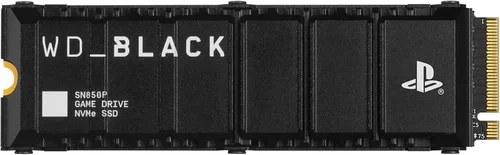
- Mid-Range ($120–$180): The sweet spot for most PS5 owners. Offers 2TB capacity, 6,000–6,600 MB/s speeds, robust cooling, and reliable brands. Drives like the WD Black SN850P or Samsung 980 Pro with Heatsink deliver excellent value and longevity.
- Premium ($200–$300): For enthusiasts who want maximum performance and future-proofing. Includes 2TB–4TB capacities, top-tier controllers, advanced NAND, and premium build quality. Examples: Sabrent Rocket 4 Plus-G, Corsair MP600 PRO LPX. Overkill for average users but perfect for power gamers.
- Luxury ($300+): Reserved for professionals or collectors. Features 4TB+ capacities, enterprise-grade endurance, and cutting-edge tech. Rarely justified for pure gaming, but useful if you also use the drive in a high-end PC.
Expert Tips for Getting the Best Deal
- Buy during major sales events: Amazon Prime Day, Black Friday, and PlayStation’s own holiday promotions often feature SSD discounts of 20–40%. Patience pays off.
- Check manufacturer refurbished programs: Samsung, WD, and Crucial sell certified refurbished SSDs at 20–30% off with full warranties. These are rigorously tested and indistinguishable from new units.
- Compare total cost of ownership: A slightly more expensive drive with a better heatsink and longer warranty may save money long-term by avoiding replacements or performance issues.
- Use retailer trade-in programs: Some stores offer gift cards for old electronics. Trade in an old hard drive or console to offset SSD costs.
- Verify compatibility before purchase: Use Sony’s official M.2 SSD compatibility checklist (available on PlayStation Support) to cross-reference your chosen model.
- Install correctly the first time: Follow Sony’s step-by-step guide precisely. Improper installation can damage the SSD or PS5 motherboard. Take photos before disassembling.
- Monitor drive health: Use tools like CrystalDiskInfo (on PC) or PS5’s built-in storage diagnostics to check for early signs of failure.
- Don’t forget backup: Even the best SSDs can fail. Regularly back up save data to PlayStation Plus cloud or an external drive.

Frequently Asked Questions
Q: Can I use any NVMe SSD in my PS5?
A: No. Only PCIe Gen4 x4 NVMe SSDs with a minimum read speed of 5,500 MB/s and a 2280 form factor are supported. The drive must also fit within the PS5’s physical constraints, including height with heatsink.
Q: Do I need a heatsink for my PS5 SSD?
A: Yes, if your SSD doesn’t include one. High-performance Gen4 drives require active or passive cooling to prevent thermal throttling. The PS5’s internal airflow alone is insufficient for sustained workloads.
Q: Can I play PS5 games from an external USB SSD?
A: No. External USB SSDs can only store PS5 games—you must transfer them back to internal or M.2 storage to play. However, you can play PS4 games directly from external drives.
Q: Will a faster SSD reduce load times significantly?
A: Marginally. Drives above 6,500 MB/s show diminishing returns on the PS5. Most users won’t notice the difference between a 6,000 and 7,000 MB/s drive in actual gameplay.
Q: How much storage do I really need?
A: For most gamers, 2TB is ideal. It allows 10–15 modern AAA titles without constant management. Heavy downloaders or streamers should consider 4TB.
Q: Can I use the same SSD in my PC and PS5?
A: Technically yes, but not simultaneously. You’d need to remove it from one device to use in another. Also, formatting for PS5 erases all data, so backup first.
Q: What happens if my SSD fails?
A: You’ll lose any unsaved game data stored on it, but your PS5 system and saves on internal storage remain safe. Most drives come with 5-year warranties for replacement.
Q: Are cheaper SSDs safe to use?
A: Only if they meet Sony’s specs and come from reputable brands. Avoid no-name drives with unknown NAND or controllers—they risk data corruption or early failure.
Q: Can I install the SSD myself?
A: Yes! Sony provides a detailed guide. It takes 10–15 minutes and requires only a Phillips screwdriver. No technical expertise needed.
Q: Will upgrading my SSD improve FPS or graphics?
A: No. SSDs affect load times and texture streaming, not frame rates or visual fidelity. Those are handled by the GPU and CPU.
Our Final Recommendations
- Best for Budget-Conscious Buyers: Crucial P3 Plus 1TB – Reliable Gen4 performance at under $80, includes basic heatsink. Perfect for casual gamers who need extra space without breaking the bank.
- Best Overall Value: WD Black SN850P 2TB – Blends top-tier speed (7,300 MB/s), excellent cooling, and WD’s gaming pedigree. Priced around $150, it’s the go-to choice for most PS5 owners.
- Best Premium Option: Samsung 980 Pro with Heatsink 2TB – Industry-leading reliability, 7,000 MB/s speeds, and Samsung’s 5-year warranty. Ideal for those who want the best without compromise.
- Best for Beginners: Kingston Fury Renegade 2TB – Easy installation, solid performance (7,300 MB/s), and a sleek, PS5-optimized heatsink. Great first upgrade for new PS5 users.
- Best for Advanced Users: Sabrent Rocket 4 Plus-G 4TB – Massive capacity, blazing speeds, and customizable firmware. Suited for tech-savvy gamers who demand maximum flexibility and future-proofing.
Conclusion: Making the Right Choice
Choosing the right SSD for your PS5 isn’t just about speed or price—it’s about finding the perfect balance of performance, reliability, and value that matches your gaming lifestyle. We’ve covered everything from technical requirements and thermal management to budget tiers and common pitfalls, equipping you with the knowledge to avoid costly mistakes and invest wisely. Remember, the best SSD is the one that meets your specific needs without overspending on features you’ll never use.
Prioritize your priorities: if you’re a casual player, a mid-range 2TB drive will serve you well for years. If you’re a performance junkie or content creator, splurge on a premium model with top-tier cooling and endurance. And always double-check compatibility before hitting “buy.” With the right SSD installed, you’ll enjoy faster load times, more storage freedom, and a smoother, more immersive PS5 experience.
Ready to upgrade? Don’t wait—your next-gen games deserve next-gen storage. Use this guide to make a confident, informed decision, and get back to what matters most: playing.