
Is your laptop feeling sluggish? Does it take ages to boot up or open applications? The secret to a lightning-fast laptop often lies in one simple upgrade: a Solid State Drive (SSD). If you’re looking for the best SSD drive for laptop performance, you’ve come to the right place!
Replacing your old, slow hard disk drive (HDD) with an SSD is hands down one of the most impactful upgrades you can make. SSDs dramatically improve boot times, application loading, file transfers, and overall system responsiveness. They’re also more durable, energy-efficient, and quiet since they have no moving parts. But with so many options out there, how do you pick the right one?
We’ve scoured the market to bring you a comprehensive guide to the top SSDs available, perfect for breathing new life into your laptop. Whether you’re a casual user, a gamer, or a creative professional, there’s an SSD here for you. Let’s dive in!
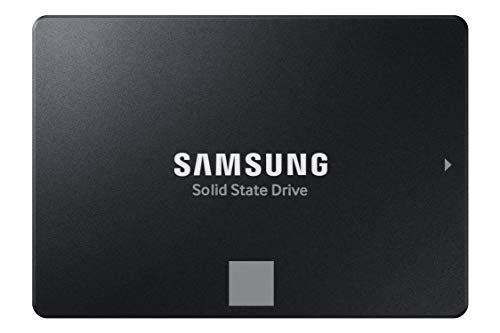
1. Samsung 870 EVO SATA III SSD 1TB 2.5” Internal Solid State Drive

The Samsung 870 EVO is often hailed as the gold standard for SATA SSDs, and for good reason. This drive offers an incredible blend of performance, reliability, and broad compatibility, making it an all-star choice for anyone looking to seriously upgrade their laptop’s storage. It’s built with Samsung’s pioneering flash memory technology, ensuring consistent high performance even under heavy workloads, making it ideal for gamers, content creators, and professionals alike.
Key Features:
– Maximizes SATA interface limits with up to 560/530 MB/s sequential read/write speeds.
– Designed for heavy workloads, perfect for high-end PCs, workstations, and NAS.
– Industry-defining reliability with up to 600 TBW under a 5-year limited warranty.
– Extensive compatibility with major host systems and applications.
– Easy upgrade process with standard 2.5-inch SATA form factor.
– Includes Samsung Magician 6 software for easy drive management and performance enhancement.
– World’s #1 flash memory brand with in-house produced components.
Pros:
– Exceptional performance for a SATA SSD.
– Outstanding reliability and long endurance.
– User-friendly management software.
– Broad compatibility ensures it works with most laptops.
– Easy to install for a seamless upgrade.
Cons:
– Not as fast as NVMe SSDs (but that’s a different interface).
– Higher price point compared to some budget SATA options.
User Impressions:
Customers consistently praise the 870 EVO for its noticeable speed boost and rock-solid reliability. Many highlight the ease of installation and the helpfulness of the Magician software. It’s frequently recommended as a top-tier choice for general use and demanding applications.
2. PNY CS900 500GB 3D NAND 2.5″ SATA III Internal Solid State Drive

If you’re looking for a cost-effective way to give your laptop a significant performance boost without breaking the bank, the PNY CS900 is an excellent contender. This drive is designed to deliver super-fast OS boot times and application loads, making your everyday computing experience much smoother. It’s a straightforward upgrade that offers superior performance compared to traditional hard drives, perfect for general users and those on a budget.
Key Features:
– Super-fast OS boot times and application loading.
– Exceptional performance with up to 550MB/s sequential read and 500MB/s sequential write speeds.
– Significantly outperforms traditional hard drives (HDD).
– Ultra-low power consumption for improved battery life.
– Backwards compatible with SATA II 3GB/sec.
Pros:
– Very affordable entry point into SSD technology.
– Noticeable speed improvement over HDDs.
– Energy-efficient for better laptop battery life.
– Simple and effective upgrade for older laptops.
Cons:
– Performance is good but not top-tier compared to premium SATA SSDs.
– No bundled software for advanced management.
User Impressions:
Users love the PNY CS900 for its value proposition. Many report a dramatic improvement in their laptop’s responsiveness after switching from an HDD. It’s frequently cited as a great budget-friendly option for reviving an aging system.
3. Crucial BX500 1TB 3D NAND SATA 2.5-Inch Internal SSD

The Crucial BX500 is all about getting you up and running faster, without any fuss. This internal SSD is designed to be an accessible upgrade for almost any laptop, offering a whopping 300% speed increase over typical hard drives. Beyond speed, it’s also remarkably energy-efficient, helping to extend your laptop’s battery life. Built with Micron’s advanced 3D NAND technology, you’re getting reliable storage from a company with decades of memory and storage expertise.
Key Features:
– Boot up faster, load files quicker, and improve overall system responsiveness.
– Up to 300% faster than a typical hard drive.
– Improves battery life (45x more energy efficient than an HDD).
– Utilizes Micron 3D NAND technology.
– Backed by a Crucial 3-year limited warranty.
Pros:
– Excellent performance jump from an HDD.
– Significant improvement in laptop battery efficiency.
– From a reputable memory and storage manufacturer.
– Solid warranty for peace of mind.
Cons:
– Lacks advanced features found in higher-end SSDs.
– Write speeds can sometimes lag behind other premium SATA drives.
User Impressions:
Reviewers frequently highlight the easy installation and the immediate, noticeable performance boost. The BX500 is praised for being a straightforward, no-frills upgrade that delivers exactly what it promises – a much faster, more responsive laptop.
4. Western Digital 1TB WD Blue SA510 SATA Internal Solid State Drive

Western Digital has long been a trusted name in storage, and their WD Blue SA510 SATA SSD continues that tradition. This 1TB internal drive is a reliable choice for upgrading your laptop, providing ample storage capacity and improved performance over traditional hard drives. It’s a solid, no-nonsense option for everyday computing, ensuring your system runs smoothly whether you’re browsing, working, or streaming.
Key Features:
– Ample 1TB storage capacity.
– Standard 2.5″ form factor for easy laptop installation.
– Utilizes SATA drive interface for broad compatibility.
– Designed as an internal laptop component.
Pros:
– Trustworthy brand reputation.
– Good balance of capacity and performance for general users.
– Reliable for daily computing tasks.
– Easy to install in most laptops.
Cons:
– Performance is standard for a SATA drive, not groundbreaking.
– Fewer detailed performance specs or unique features highlighted compared to competitors.
User Impressions:
Users appreciate the reliability and the trusted Western Digital brand. Many find it to be a dependable upgrade that makes their laptops feel much faster and more responsive, especially coming from an HDD. It’s a solid, safe bet for an internal SSD.
5. SanDisk 2TB Extreme Portable SSD – Up to 1050MB/s, USB-C

While our focus is primarily on internal drives, sometimes the best SSD drive for laptop use means one you can take with you! The SanDisk Extreme Portable SSD is a fantastic external option for laptop users who need fast, rugged, and capacious storage on the go. Boasting NVMe solid-state performance, it offers incredible read and write speeds in a compact, durable package. Perfect for photographers, videographers, or anyone needing to transfer large files quickly and securely between devices.
Key Features:
– NVMe solid state performance with up to 1050MB/s read and 1000MB/s write speeds.
– Extremely portable and durable with up to 3-meter drop protection and IP65 water/dust resistance.
– Handy carabiner loop for secure attachment.
– Password protection with 256-bit AES hardware encryption.
– SanDisk Memory Zone app for file management.
Pros:
– Blazing fast speeds for an external drive.
– Exceptionally rugged and resistant to elements.
– Secure with hardware encryption.
– Highly portable and convenient.
Cons:
– External drive, so it doesn’t replace your internal storage.
– Requires a USB-C port for optimal performance (though often compatible with USB-A via adapter).
User Impressions:
Customers rave about the SanDisk Extreme’s speed and durability. It’s a favorite among creatives for backing up and editing large media files on location. The rugged build quality and compact size are frequently highlighted as major advantages.
6. Kingston 240GB A400 SATA 3 2.5″ Internal SSD SA400S37/240G

For those looking for the absolute most affordable way to experience the benefits of an SSD, the Kingston A400 is an unbeatable choice. While the 240GB capacity might be tighter for some, it’s still perfect for housing your operating system and essential applications, leaving your traditional HDD for bulk storage if you have a dual-drive setup. It delivers significantly faster boot-up times, quicker application loading, and overall improved responsiveness compared to any hard drive.
Key Features:
– Fast start-up, loading, and file transfers.
– More reliable and durable than a hard drive due to no moving parts.
– Available in multiple capacities, ideal for OS/application drive or HDD replacement.
Pros:
– Extremely budget-friendly.
– Provides a substantial performance boost over HDDs.
– Highly reliable and durable.
– Easy and straightforward installation.
Cons:
– Lower capacity may be limiting for some users.
– Performance is basic for an SSD, not designed for heavy, sustained workloads.
User Impressions:
The Kingston A400 is a hit with users looking to revitalize older, slow laptops on a tight budget. Many express astonishment at the transformation in their laptop’s speed. It’s considered a solid entry-level SSD that delivers excellent value for money.
7. Samsung T7 Portable SSD, 1TB External Solid State Drive

Another fantastic external option for enhancing your laptop’s capabilities, the Samsung T7 Portable SSD is built for creators and professionals on the move. With PCIe NVMe technology, it delivers incredible read and write speeds, making it perfect for handling large video files, high-resolution photos, or extensive game libraries. Its robust aluminum unibody construction provides excellent shock resistance, meaning your valuable data is safe, even if it takes a tumble. This is truly one of the best SSD drive for laptop users who prioritize portability and speed for their external storage needs.
Key Features:
– PCIe NVMe technology for fast read/write speeds up to 1,050/1,000 MB/s.
– Compact design with capacities up to 4TB.
– Extensive compatibility with PCs, mobile phones, and cameras (including iPhone 15 Pro Res 4K at 60fps video).
– Shock resistance and fall protection up to 6 feet due to solid aluminum unibody.
– World’s #1 flash memory brand with in-house components.
Pros:
– Blazing fast speeds, almost twice as fast as the previous T5.
– Excellent durability and shock resistance.
– Wide compatibility with various devices.
– Ideal for high-resolution video recording directly to the drive.
– Sleek, premium design.
Cons:
– External drive, so it doesn’t replace internal storage.
– Premium price point for an external drive.
User Impressions:
Users are consistently impressed by the T7’s incredible speed, especially when dealing with large media files. Its compact size and robust build are frequently mentioned as benefits for portable use. It’s highly recommended by content creators and power users.
FAQ Section
Q1: What’s the main difference between SATA and NVMe SSDs?
A1: The biggest difference is speed and the interface they use. SATA SSDs connect via the SATA port and offer speeds up to around 550 MB/s, which is much faster than traditional HDDs. NVMe (Non-Volatile Memory Express) SSDs connect via the PCIe slot, allowing for much higher speeds, often reaching thousands of MB/s. For internal laptop upgrades, you’ll need to check if your laptop supports NVMe (M.2 slot) or if you’re limited to SATA (2.5-inch bay).
Q2: How much SSD storage do I really need for my laptop?
A2: It depends on your usage!
– 250GB-500GB: Good for basic users, students, or as a primary drive for the OS and a few essential programs if you store most files in the cloud or on an external drive.
– 500GB-1TB: Ideal for most users. Enough space for the OS, numerous applications, and a decent amount of files and games.
– 1TB+: Recommended for gamers, video editors, graphic designers, or anyone with large media libraries and many applications.
Q3: Is it easy to install an SSD in a laptop?
A3: For 2.5-inch SATA SSDs, it’s generally straightforward. Most laptops have a dedicated bay and a few screws. M.2 NVMe SSDs are also quite simple to install, slotting directly into an M.2 slot on the motherboard. However, access to these components varies greatly by laptop model. Always check your laptop’s manual or look up an installation guide specific to your model before starting.
Q4: Can I use an external SSD with my laptop, and what are the benefits?
A4: Absolutely! External SSDs like the SanDisk Extreme Portable or Samsung T7 are fantastic for laptops. They offer blazing-fast portable storage, perfect for backing up files, carrying large project files, or even running portable applications or games without taking up internal space. They’re excellent for transferring data quickly between devices or for expanding storage on laptops with limited internal upgrade options.
Q5: How do SSDs improve overall laptop performance compared to HDDs?
A5: SSDs use flash memory to store data, unlike HDDs which use spinning platters and read/write heads. This means SSDs can access data almost instantly. The improvements include:
– Faster Boot Times: Your laptop will start up in seconds, not minutes.
– Quicker Application Loading: Programs open much faster.
– Speedier File Transfers: Copying large files becomes a breeze.
– Improved Responsiveness: Overall system feels snappier and less prone to freezing.
– Better Battery Life: Less power consumption due to no moving parts.
– Enhanced Durability: More resistant to drops and bumps.
Q6: Are SSDs more reliable than traditional hard drives?
A6: Yes, generally. Because SSDs have no moving parts, they are much less susceptible to damage from drops, bumps, or vibrations. This makes them inherently more durable and reliable for portable devices like laptops. While both types of drives can fail, SSDs typically have a longer lifespan under normal use conditions and are less prone to mechanical failure.
Q7: Should I clone my existing hard drive or do a fresh Windows installation when upgrading to an SSD?
A7: You have both options!
– Cloning: Many SSDs (like Samsung’s) come with migration software that copies your entire old drive to the new SSD. This is convenient as it retains all your programs and settings.
– Fresh Installation: A clean install of Windows on the new SSD is often recommended for optimal performance. It removes old clutter, drivers, and software you no longer use, leading to a truly fresh and fast system. It’s more work but can yield better results.