
Ever feel like your PC is dragging its feet? Slow boot times, sluggish game loading, or endless waits for files to transfer can really put a damper on your computing experience. If you’re still rocking a traditional hard drive or an older, slower SSD, it might be time for a serious upgrade. And when it comes to high-performance storage, Sabrent is a name that consistently delivers, offering a fantastic range of options for every kind of PC user.
In this guide, we’re diving deep into some of the top-tier Sabrent internal SSDs for PC, helping you pick the perfect solid-state drive to transform your system. Whether you’re a hardcore gamer, a creative professional, or just looking for a snappier everyday machine, there’s a Sabrent SSD built to meet your demands. Let’s explore the Sabrent best internal SSD for PC options available right now!
What to Look for in a Sabrent Internal SSD
Before we jump into the reviews, here are a few key things to consider when choosing your next internal SSD:
- Interface (PCIe Gen4/Gen5 vs. SATA): PCIe (NVMe) SSDs are significantly faster than older SATA SSDs. Gen4 is the current mainstream performance standard, while Gen5 offers cutting-edge, future-proof speeds for the most demanding users.
- Form Factor (M.2 2280 vs. 2230): Most modern internal SSDs come in the M.2 form factor. 2280 is the standard size for desktops and many laptops, while 2230 is much smaller, designed for ultra-compact devices like handheld gaming PCs or specific laptops.
- Capacity: How much storage do you need? 1TB is a good starting point for many, but 2TB or even 4TB might be necessary for large game libraries or extensive media files.
- Read/Write Speeds: Higher numbers here mean faster data transfers. Pay attention to both sequential (large file transfers) and random (small file operations, critical for OS responsiveness) speeds.
- NAND Type (TLC vs. QLC): TLC (Triple-Level Cell) generally offers better endurance and sustained performance. QLC (Quad-Level Cell) offers higher capacities at a lower cost, often suitable for bulk storage or gaming libraries where write endurance isn’t as critical.
The Best Sabrent Internal SSDs for PC: Our Top Picks
Here are our top picks for the Sabrent best internal SSD for PC upgrades:
SABRENT Rocket Q4 2230 NVMe SSD 2TB – PCIe Gen4

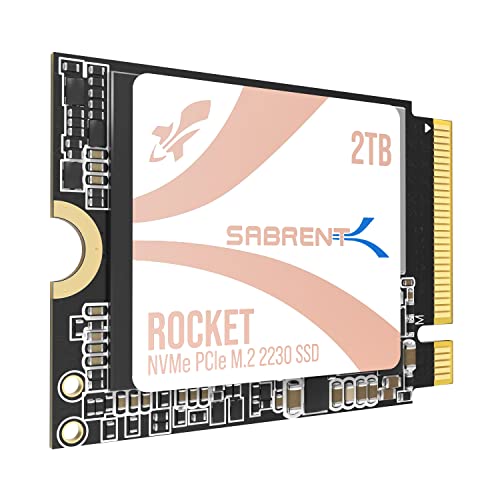
If you’re looking to supercharge your Steam Deck, ASUS ROG Ally, or a compact Surface Pro device, the Sabrent Rocket Q4 2230 NVMe SSD is an absolute game-changer. This tiny powerhouse packs a massive 2TB of Gen4 storage into a minuscule M.2 2230 form factor, finally letting you ditch those slow microSD cards. It’s engineered to fit into those tight spaces without compromise, delivering respectable Gen4 speeds that make game loading and system responsiveness a dream.
-
Key Features:
- Designed for Tight Spaces: Fits Steam Deck, ASUS ROG Ally (with adapter), Surface Pro, and other space-constrained devices with true M.2 2230 form factor.
- Powerful Performance: Achieve up to 5GB/s read and 800K IOPS with a Gen4 PCIe interface and Phison E21T controller.
- Massive 2TB Capacity: Eliminate the need for microSD cards or external drives. Store your full game library and files internally with high-speed QLC flash.
- Efficient and Reliable: DRAM-less with Host Memory Buffer (HMB) support for low power draw, responsive performance, and excellent thermal behavior.
- Retail Quality You Can Trust: New, fully supported SSD with downloadable Sabrent Acronis cloning software.
-
Pros:
- Exceptional for compact devices like Steam Deck/ROG Ally due to 2230 form factor.
- Massive 2TB capacity is a huge upgrade for handhelds.
- Decent Gen4 speeds for its size and target devices.
- Efficient operation helps preserve battery life.
-
Cons:
- QLC NAND might have lower sustained write speeds compared to TLC.
- Not designed for primary drives in full-sized desktop PCs.
- Max read speed (5GB/s) is lower than some full-size Gen4 drives.
-
User Impressions: Users rave about this SSD for its perfect fit and transformative performance in handheld gaming devices. The 2TB capacity is frequently highlighted as a major plus, allowing extensive game libraries to be stored internally. Many appreciate the ease of installation and the noticeable boost in game loading times.
SABRENT Rocket 4 1TB NVMe SSD PCIe Gen4 M.2 2280

The Sabrent Rocket 4 1TB is a fantastic all-rounder for anyone looking to embrace PCIe Gen4 speeds without breaking the bank. This M.2 2280 drive offers a superb balance of performance, reliability, and compatibility, making it a stellar choice for a primary drive in a desktop PC or a performance upgrade for many laptops. With blazing read and write speeds, it’ll make your system feel snappier, your games load quicker, and your demanding applications respond instantly.
-
Key Features:
- Blazing Gen4 Speed: Experience PCIe 4.0 NVMe performance with up to 7450MB/s read and 6100MB/s write speeds.
- High IOPS, Efficient Design: Delivers up to 850K/800K random IOPS while maintaining low heat and power draw.
- Broad System Compatibility: Single-sided M.2 2280 form factor ensures wide compatibility across desktops, laptops, and PS5 systems.
- Made for Pros and Gamers: Ideal for high-performance systems for creation, streaming, or gaming.
- Trusted Sabrent Support: Engineered with premium hardware and supports Windows, macOS, and Linux.
-
Pros:
- Excellent Gen4 performance, significantly faster than Gen3.
- High random IOPS for responsive system and application loading.
- Good thermal management and power efficiency.
- Wide compatibility, including PS5.
-
Cons:
- 1TB might be limiting for users with very large game libraries or media files.
- Not the absolute peak of Gen4 speeds (Rocket 4 Plus models are faster).
-
User Impressions: Users consistently praise the Rocket 4 for its impressive speed boost over older drives and its reliable performance. Gamers particularly appreciate the reduced loading times, while general users note the overall system responsiveness. Its ease of installation and robust build quality are also frequently mentioned.
SABRENT 2TB Rocket 4 Plus NVMe 4.0 Gen4 PCIe M.2
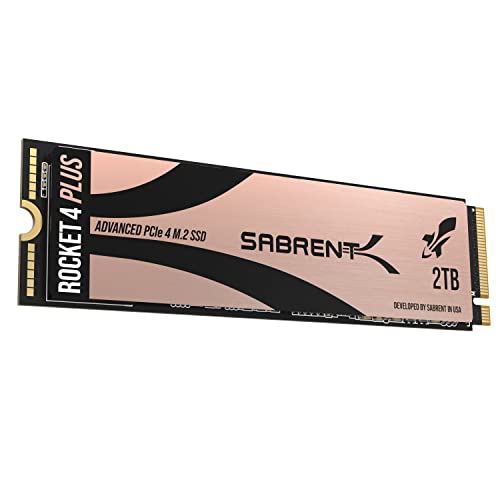
For those who demand the absolute best in PCIe Gen4 performance, the Sabrent 2TB Rocket 4 Plus is a powerhouse. This SSD pushes the boundaries of Gen4 speeds, offering incredible read and write capabilities that will satisfy even the most demanding gamers, content creators, and professionals. With 2TB of high-endurance TLC NAND, it’s built for sustained performance under heavy workloads, making it a top contender for the title of Sabrent best internal SSD for PC if you’re serious about speed.
-
Key Features:
- Blazing-Fast Performance: Achieve up to 7100MB/s read and 6600MB/s write speeds with PCIe Gen4.
- Next-Gen NVMe Interface: Built on NVMe 1.4 and PCIe Gen4 x4 for maximum throughput and low latency.
- High-Endurance TLC NAND: Engineered with premium 3D TLC NAND for long-lasting performance and stability.
- Advanced Thermal Management: Requires heatsink for optimal Gen4 performance; compatible with motherboard heatsinks or PS5 slot.
- Easy Cloning & Sector Control: Includes Acronis True Image for SABRENT; new utility supports custom 512e/4K formatting.
-
Pros:
- Near-peak Gen4 speeds for incredibly fast data transfers.
- 2TB capacity is ample for most users, including gamers and creators.
- TLC NAND offers superior endurance and consistent performance.
- Excellent choice for PS5 expansion.
-
Cons:
- Requires a heatsink for optimal performance, which might add to cost or installation complexity.
- Premium price point reflects its high-end performance.
-
User Impressions: Users frequently highlight the mind-blowing speeds and stability of the Rocket 4 Plus, especially when used for intense gaming or video editing. The 2TB capacity is a significant draw, and many appreciate the inclusion of cloning software. The necessity of a heatsink is often noted, but users report excellent thermal performance when properly equipped.
SABRENT 1TB Rocket 4 Plus NVMe 4.0 Gen4 PCIe M.2

Bringing the blistering performance of the Rocket 4 Plus series to a 1TB capacity, this drive is perfect for users who want top-tier Gen4 speeds without needing the larger 2TB or 4TB options. It offers the same advanced features and high-endurance TLC NAND as its larger siblings, making it an excellent choice for a primary OS drive, a dedicated game drive, or for content creation where every millisecond counts. It’s a compelling option if you’re searching for the Sabrent best internal SSD for PC with a focus on raw speed in a more accessible capacity.
-
Key Features:
- NVMe M.2 PCIe Gen4 x4 Interface. PCIe 4.0 Compliant / NVMe 1.3 Compliant.
- Power Management Support for APST / ASPM / L1.2.
- Supports SMART and TRIM commands. Supports ONFi 2.3, ONFi 3.0, ONFi 3.2 and ONFi 4.0 interface.
- Advanced Wear Leveling, Bad Block Management, Error Correction Code, and Over-Provision.
- All Sabrent SSDs come with FREE Sabrent Acronis True Image for Sabrent Software for easy Cloning.
-
Pros:
- Achieves very high Gen4 speeds, ideal for gaming and demanding applications.
- Includes advanced reliability and data integrity features.
- Free Acronis cloning software simplifies migration.
- Excellent performance-to-price ratio at 1TB for a Rocket 4 Plus.
-
Cons:
- Still benefits from a heatsink for sustained peak performance.
- 1TB might feel limited for users with extensive game libraries.
-
User Impressions: Similar to the 2TB version, users are consistently impressed by the speed and responsiveness provided by the 1TB Rocket 4 Plus. It’s often chosen for booting operating systems and loading frequently played games, where its performance truly shines. The included software is a bonus for many during setup.
SABRENT Rocket 2230 1TB NVMe SSD – PCIe Gen4 M.2
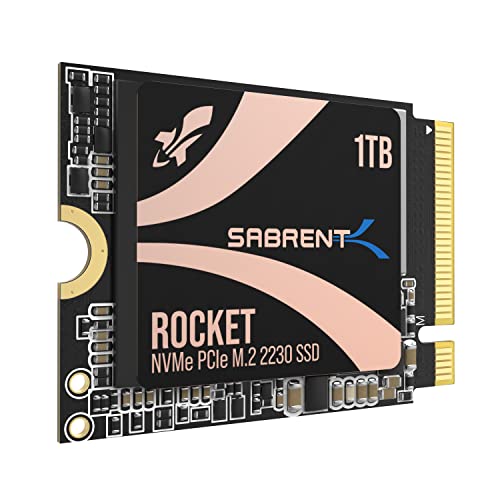
If the 2TB QLC 2230 was a bit much or you prefer TLC NAND, the Sabrent Rocket 2230 1TB steps up to the plate. This compact NVMe SSD is specifically engineered for devices where space is at an absolute premium, such as the Steam Deck, Surface Pro, or certain ultrabooks. It delivers robust Gen4 performance with the added benefit of premium 3D TLC NAND, offering a balance of speed, endurance, and efficiency. It’s the perfect internal storage upgrade for giving your small device a significant boost.
-
Key Features:
- Compact Compatibility: Designed for Steam Deck, Surface Pro, ultrabooks, and other small devices that require M.2 2230.
- High-Speed Gen4 Performance: Achieve speeds up to 5GB/s and 800K IOPS for faster game loading and multitasking.
- 1TB Capacity: Store more games, apps, and files without relying on slow microSD cards.
- Reliable and Efficient: Built with a new Gen4 NVMe controller and premium 3D TLC NAND. DRAM-less with HMB support for low power usage and cool operation.
- Retail-Grade Quality: Avoid second-hand OEM drives. Includes full warranty and Sabrent Acronis True Image cloning software.
-
Pros:
- Ideal M.2 2230 form factor for ultra-compact devices.
- Premium 3D TLC NAND for better endurance and performance consistency.
- Good Gen4 speeds for its compact size.
- 1TB capacity offers a substantial upgrade for handhelds.
-
Cons:
- Specific form factor limits its use to compatible devices.
- Max speed is lower than full-sized Gen4 SSDs.
-
User Impressions: This 1TB 2230 SSD is a popular choice for handheld gaming device owners who want reliable TLC performance. Users report significantly faster game loading and overall system responsiveness on their Steam Decks and ROG Allys. The “retail-grade” quality and included software are also appreciated perks.
SABRENT Rocket 5 2TB Advanced Performance Internal M.2 PCIe

Prepare for the future of storage with the Sabrent Rocket 5 2TB, their fastest SSD ever. This beast takes full advantage of PCIe 5.0 bandwidth, delivering absolutely mind-boggling transfer speeds that redefine what’s possible for high-performance computing. If you’re building a top-tier gaming rig or a workstation for heavy-duty content creation, the Rocket 5 is designed to leave everything else in the dust. This is the undisputed Sabrent best internal SSD for PC if you’re aiming for absolute peak performance and have a PCIe 5.0 compatible system.
-
Key Features:
- Our Fastest SSD Ever: Natural successor to Rocket 4 Plus, reaching all-new heights in storage performance.
- Never Get Left Behind: Enjoy transfers at up to an astounding 14 GB/s, making the best use of PCIe 5.0 bandwidth. DirectStorage-optimized firmware.
- Business Or Pleasure: Optimally balanced for content creation, high-end applications, and gaming. Backward-compatible.
- Stylishly Cool Design: Available on its own or with a custom heatsink using top-grade materials and dual heatpipes.
- It’s Sabrent: Great for Windows, macOS, Linux, and more. Register for firmware updates and technical support.
-
Pros:
- Unrivaled PCIe 5.0 speeds (up to 14 GB/s read) – truly next-gen performance.
- DirectStorage-optimized firmware for future-proof gaming.
- 2TB capacity is excellent for a high-end drive.
- Backward compatible with PCIe Gen4 systems (at Gen4 speeds).
-
Cons:
- Requires a PCIe 5.0 motherboard and CPU to achieve full speeds.
- Premium price point, reflecting cutting-edge technology.
- Absolutely requires robust cooling (heatsink) for sustained performance.
-
User Impressions: Early adopters are blown away by the incredible speeds, noting significant performance gains in demanding professional applications and future-ready gaming. The future-proofing aspect is a major draw, with users confident it will handle anything thrown at it for years to come. The need for a good heatsink is a common point, but its performance makes it worth it.
Conclusion
Sabrent truly offers a diverse and impressive lineup when it comes to internal SSDs for your PC. From the ultra-compact Rocket Q4 2230 perfect for handhelds to the mind-bending speed of the PCIe 5.0 Rocket 5, there’s a drive tailored for almost every need and budget.
Choosing the Sabrent best internal SSD for PC ultimately boils down to your specific requirements:
* For compact devices: The Rocket Q4 2230 2TB or Rocket 2230 1TB.
* For mainstream Gen4 performance and value: The Rocket 4 1TB.
* For high-end Gen4 gaming and content creation: The Rocket 4 Plus 1TB or 2TB.
* For cutting-edge, future-proof PCIe 5.0 speed: The Rocket 5 2TB.
No matter which Sabrent SSD you choose, you’re investing in quality, performance, and reliability that will breathe new life into your system. Say goodbye to slow loading screens and hello to lightning-fast computing!
FAQ Section
Q1: What’s the main difference between NVMe and SATA SSDs?
A1: NVMe (Non-Volatile Memory Express) SSDs use the PCIe interface, which offers significantly higher bandwidth and lower latency than SATA (Serial Advanced Technology Attachment) SSDs. This means NVMe drives are much faster, with top-tier models reaching speeds many times that of SATA drives, which are limited to around 550MB/s.
Q2: What do PCIe Gen3, Gen4, and Gen5 mean for SSDs?
A2: These generations refer to the version of the PCIe interface used. Each new generation roughly doubles the bandwidth of the previous one.
* Gen3 offers speeds up to around 3,500 MB/s.
* Gen4 (current mainstream) offers speeds up to around 7,500 MB/s.
* Gen5 (latest cutting-edge) offers speeds up to around 14,000 MB/s.
You’ll need a compatible motherboard and CPU to take full advantage of newer generations.
Q3: Do I need a heatsink for my NVMe SSD?
A3: For high-performance PCIe Gen4 and especially Gen5 NVMe SSDs, a heatsink is highly recommended, and often necessary, for sustained peak performance. These drives can generate significant heat under heavy load, and without proper cooling, they may “throttle” (reduce speed) to prevent overheating. Many motherboards come with integrated M.2 heatsinks, or you can purchase aftermarket options.
Q4: What do “M.2 2280” or “M.2 2230” mean?
A4: “M.2” refers to the form factor of the SSD. The numbers indicate the physical dimensions: the first two digits are the width (always 22mm for these Sabrent drives), and the last two or three digits are the length in millimeters. So, “2280” means 22mm wide by 80mm long (standard desktop/laptop size), and “2230” means 22mm wide by 30mm long (very compact, for handhelds and ultra-small devices).
Q5: How much SSD capacity do I need?
A5: It depends on your usage:
* 500GB: Good for a basic OS drive and a few essential applications, but might fill up quickly.
* 1TB: A good sweet spot for most users, allowing for the OS, many applications, and a decent library of games or media.
* 2TB or more: Ideal for gamers with large game libraries, content creators working with large files (4K video, high-resolution images), or users who want extensive storage without needing a secondary HDD.
Q6: Can I use a Sabrent NVMe SSD in a laptop?
A6: Yes, many modern laptops support M.2 NVMe SSDs, typically in the 2280 form factor. However, it’s crucial to check your laptop’s specifications or manual to confirm compatibility, available M.2 slots, and the supported PCIe generation (Gen3 or Gen4). Compact 2230 drives are specifically for smaller laptops and handhelds.
Q7: Is Sabrent a good brand for SSDs?
A7: Yes, Sabrent has established itself as a reputable brand in the storage market, particularly for NVMe SSDs. They are known for offering high-performance drives, often at competitive prices, with good reliability and solid customer support. Many of their drives include useful software like Acronis True Image for cloning.
Q8: What is the difference between TLC and QLC NAND flash?
A8: These refer to how data is stored on the NAND flash chips:
* TLC (Triple-Level Cell): Stores 3 bits of data per cell. Offers good balance of performance, endurance, and cost. Generally preferred for primary drives and heavy write workloads.
* QLC (Quad-Level Cell): Stores 4 bits of data per cell. Allows for higher capacities at a lower cost, but typically has lower endurance (fewer write cycles) and can have slower sustained write speeds once its SLC cache is full. Ideal for bulk storage, game libraries, or read-heavy applications where cost and capacity are prioritized.