
Is your computer feeling sluggish? Are you tired of waiting for apps to load or your operating system to boot? If you’re nodding along, it’s probably time for an upgrade, and a Solid State Drive (SSD) is one of the most impactful changes you can make. While storage sizes vary, a 500GB SSD often hits that sweet spot – enough space for your OS, essential programs, and a good chunk of games or files, all without breaking the bank.
We’re diving deep into some of the Crucial best 500GB SSD for cheap options, alongside a strong contender from another brand, to help you find that perfect blend of performance and value. Crucial, a brand known for its reliable memory and storage solutions, is a go-to for many users looking for a significant performance boost on a budget. Let’s get your PC flying!
Our Top 500GB SSD Picks for Speed and Value
Here’s a look at some fantastic 500GB SSDs that offer great performance without emptying your wallet.
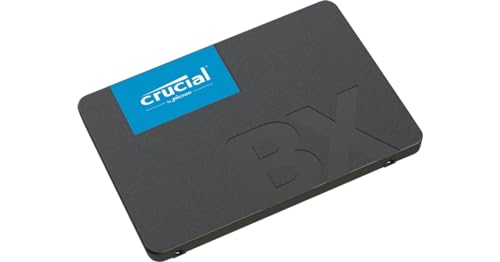
1. Crucial BX500 500GB SATA III 2.5″ SSD

The Crucial BX500 is often the go-to choice for anyone looking to replace an old, slow hard drive with an SSD on a tight budget. It’s a fantastic entry-level drive that delivers a noticeable leap in performance for everyday tasks, making your system feel snappier and more responsive. If you’re upgrading an older laptop or desktop with a SATA connection, this drive is a simple, effective, and extremely wallet-friendly way to breathe new life into your machine.
-
Key Features:
- Delivers read speeds of up to 540MB/s and write speeds up to 500MB/s
- Equipped with 3D NAND memory technology for improved energy efficiency and durability
- Compact 2.5-inch form factor for easy installation in laptops and desktops
- Experience faster load times and shorter waits for apps and games
-
Pros:
- Excellent value for money, truly a budget champion
- Significant speed improvement over traditional HDDs
- Energy-efficient, leading to longer battery life for laptops
- Reliable performance for everyday computing
-
Cons:
- SATA III interface limits maximum speed compared to NVMe drives
- Lacks a DRAM cache, which can affect sustained performance under heavy loads
-
User Impressions: Customers frequently praise the BX500 for its ease of installation and the immediate performance boost it provides, especially for older systems. It’s consistently reviewed as a reliable and affordable upgrade.
2. Crucial P310 500GB PCIe Gen4 NVMe M.2 SSD

Stepping up the performance ladder, the Crucial P310 offers blazing-fast Gen4 NVMe speeds that were once reserved for high-end systems. This drive is a game-changer for those who demand serious speed for gaming, content creation, or just lightning-quick boot times and application launches. Its broad compatibility, even with some handheld gaming devices, makes it a versatile choice for anyone ready to experience the full potential of NVMe.
-
Key Features:
- PCIe 4.0 Performance: Delivers up to 6,600 MB/s read and 5,000 MB/s write speeds
- Spacious 500GB SSD: Ideal for AAA games, applications, and media
- Broad Compatibility: Works with laptops, desktops, and select gaming consoles (e.g., ROG Ally X, Lenovo Legion Go, AYANEO Kun)
- Backward compatible with PCIe Gen3 systems for flexible upgrades
- Up to 2x faster than previous Gen3 generation, improving productivity for real-world tasks
- Built with advanced G8 NAND and thermal control for reliable performance
-
Pros:
- Extremely fast Gen4 speeds drastically reduce load and boot times
- M.2 form factor is sleek and takes up less physical space
- Excellent for serious gamers and power users
- Backward compatibility ensures it works even with older motherboards
-
Cons:
- Requires an M.2 slot and PCIe Gen4 support for full speed
- Typically a higher price point than SATA SSDs
-
User Impressions: Users are blown away by the speed, noting how quickly games load and how responsive their systems become. The broad compatibility across various devices is also a huge plus for many.
3. Crucial MX500 500GB 3D NAND SATA III 2.5 Inch Internal SSD

The Crucial MX500 is widely considered a benchmark for SATA SSDs, striking an incredible balance between performance, reliability, and price. Unlike its BX500 sibling, the MX500 typically features a DRAM cache, which helps maintain consistent performance, especially under heavier workloads. It’s an excellent all-rounder, offering robust security features and proven endurance, making it one of the Crucial best 500GB SSD for cheap when you need top-tier SATA performance.
-
Key Features:
- 2.5-inch Solid State Drive, 500GB capacity
- Sequential reads up to 560 MB/s and sequential writes up to 510 MB/s
- Utilizes 3D NAND technology for efficiency and durability
- Features Dynamic Write Acceleration for faster saves and file transfers
- Includes a hardware-based encryption engine for data security
- Integrated power loss immunity to protect data
-
Pros:
- Exceptional reliability and endurance
- Consistently strong performance for a SATA drive
- Includes DRAM cache for sustained speeds and responsiveness
- Excellent value for its feature set and performance
- Easy to install in most laptops and desktops
-
Cons:
- Limited by the SATA III interface speeds (not as fast as NVMe)
- Might be slightly more expensive than entry-level SATA drives like the BX500
-
User Impressions: Reviewers frequently call the MX500 the “gold standard” for SATA SSDs, praising its consistent performance, reliability, and overall value. Many highlight its long lifespan and quick boot times.
4. Crucial P3 500GB PCIe Gen3 3D NAND NVMe M.2 SSD

For those looking to step into the world of NVMe without needing the absolute bleeding edge of Gen4, the Crucial P3 500GB is a fantastic choice. It offers a substantial upgrade from SATA SSDs, providing significantly faster data transfer rates and dramatically improving overall system responsiveness. It’s perfect for a gaming PC or a workstation that needs a quick boot drive and snappy application loading, balancing performance with affordability.
-
Key Features:
- NVMe (PCIe Gen3 x4) technology with up to 3500MB/s sequential reads
- Random read/write up to 350K/460K IOPS
- Data transfer rate: 3500.0 megabytes_per_second
- Specific uses: Personal, Gaming, Business
- Performs up to 33% better than the previous generation
- Solid Gen3 performance, rated at MTTF greater than 1.5 million hours for extended longevity and reliability
-
Pros:
- Much faster than SATA SSDs, offering a noticeable performance boost
- Excellent value for an NVMe drive
- M.2 form factor saves space and reduces cable clutter
- Highly reliable with a strong Mean Time To Failure (MTTF) rating
-
Cons:
- Not as fast as newer PCIe Gen4 NVMe drives
- May not include a DRAM cache, depending on the specific model variation
-
User Impressions: Users love the speed-to-price ratio, stating it’s a “no-brainer” upgrade from SATA drives. They appreciate the easy installation and the dramatic improvement in system boot-up and application loading times.
5. PNY CS900 500GB 3D NAND 2.5″ SATA III Internal Solid State Drive

While we’ve focused heavily on Crucial, it’s always good to see what other brands offer, especially when looking for an excellent budget option. The PNY CS900 is a formidable competitor, providing a super-fast and reliable storage solution for those sticking with the traditional 2.5-inch SATA form factor. It’s a no-frills, high-performance drive that’s perfect for refreshing an older laptop or desktop that still relies on SATA connections.
-
Key Features:
- Upgrade your laptop or desktop computer with super-fast OS boot times and application loads
- Exceptional performance offering up to 550MB/s sequential Read and 500MB/s sequential Write speeds
- Superior performance as compared to traditional hard drives (HDD)
- Ultra-low power consumption for improved battery life in laptops
- Backwards compatible with SATA II 3GB/sec
-
Pros:
- Very competitive pricing, making it an excellent budget-friendly choice
- Strong sequential read/write speeds for a SATA drive
- Low power consumption is great for mobile devices
- Easy and straightforward upgrade for HDD users
-
Cons:
- Limited by SATA III interface speeds
- May lack advanced features like hardware encryption found in some premium SATA SSDs
-
User Impressions: Customers are generally very satisfied with the PNY CS900, highlighting its affordability and the noticeable speed difference compared to mechanical hard drives. It’s often recommended as a cost-effective solution for older systems.
What to Look for in a 500GB SSD for Cheap
When you’re trying to find the Crucial best 500GB SSD for cheap (or any brand, really!), it’s important to consider a few factors:
- SATA vs. NVMe: SATA drives (like the BX500 and MX500) are excellent, affordable upgrades for most older systems. NVMe drives (like the P3 and P310) are much faster but require a compatible M.2 slot on your motherboard. If your PC supports NVMe, it’s generally worth the slight extra cost for the performance boost.
- DRAM Cache: Some budget SSDs (like the BX500) skip the DRAM cache to save costs. While fine for light use, a DRAM cache (like on the MX500) helps maintain consistent performance under heavier loads.
- Endurance (TBW): This refers to how much data can be written to the drive over its lifetime. For a 500GB drive, typically 150-300 TBW is good for average users, ensuring it lasts for years.
- Brand Reputation: Crucial (Micron) and PNY are well-known brands in the storage world, offering reliable products with good warranties.
Frequently Asked Questions (FAQ)
Q1: Why should I upgrade to a 500GB SSD?
A1: Upgrading to a 500GB SSD offers a dramatic improvement in your computer’s speed and responsiveness compared to traditional hard drives (HDDs). You’ll experience much faster boot times, quicker application loading, and smoother multitasking. A 500GB capacity is also a great sweet spot, providing ample space for your operating system, essential software, and a decent library of games or files without being overly expensive.
Q2: Is 500GB enough storage for a typical user?
A2: For most casual and even moderate users, 500GB is perfectly adequate. It allows plenty of space for Windows (or macOS/Linux), a good suite of productivity software, several large games, and thousands of documents, photos, and some videos. If you’re a heavy video editor or have an enormous game library, you might consider a 1TB SSD or supplement your 500GB SSD with a secondary HDD for mass storage.
Q3: What’s the main difference between a SATA SSD and an NVMe SSD?
A3: The main difference is speed and connection interface. SATA SSDs connect via a SATA cable and are limited to around 550 MB/s. NVMe SSDs, on the other hand, plug directly into an M.2 slot on your motherboard and use the PCIe bus, allowing them to achieve speeds several times faster – often reaching 3,500 MB/s for Gen3 and 7,000 MB/s for Gen4 NVMe drives. If your motherboard supports NVMe, it’s generally the better choice for performance.
Q4: Are Crucial SSDs reliable?
A4: Yes, Crucial SSDs are widely regarded as very reliable. Crucial is a brand of Micron Technology, one of the world’s largest memory and storage manufacturers. They produce their own NAND flash memory, which goes into their drives, giving them excellent quality control. Their drives consistently receive positive reviews for their durability and long lifespan.
Q5: How easy is it to install a 500GB SSD?
A5: Installing a 2.5-inch SATA SSD is relatively easy. For desktops, it usually involves screwing the drive into a bay and connecting a SATA data and power cable. For laptops, it might mean removing a panel and swapping out the old drive. NVMe M.2 SSDs are even simpler, usually just slotting into an M.2 port on the motherboard and securing with a small screw. Many resources and videos are available online to guide you through the process.
Q6: Can I use a 500GB SSD for gaming?
A6: Absolutely! A 500GB SSD is an excellent choice for gaming. Installing games on an SSD will drastically reduce load times, getting you into the action much faster. While 500GB might not hold your entire collection of AAA titles, it’s perfect for your most frequently played games, providing a smoother and more enjoyable gaming experience.
Q7: What does “for cheap” really mean when it comes to SSDs?
A7: “For cheap” in the context of SSDs generally means finding drives that offer excellent performance-to-price ratios, especially when compared to their faster, more expensive counterparts or when looking at the cost per gigabyte. For 500GB SSDs, this usually means drives under $40-$60, depending on sales and whether it’s a SATA or NVMe model. It’s about maximizing your performance upgrade while sticking to a budget.
Q8: What is 3D NAND memory technology?
A8: 3D NAND is a type of flash memory technology that stacks memory cells vertically in multiple layers. This allows manufacturers to pack more storage capacity into a smaller space and also improves durability and power efficiency compared to older 2D (planar) NAND designs. Most modern SSDs, including the ones reviewed here, utilize 3D NAND.
Conclusion
Finding the Crucial best 500GB SSD for cheap doesn’t have to be a daunting task. Whether you opt for the budget-friendly reliability of the Crucial BX500 or PNY CS900, the solid SATA performance of the Crucial MX500, or leap into the world of NVMe with the Crucial P3 or the blazing fast P310, there’s an excellent option for every need and budget. An SSD upgrade is arguably the best investment you can make for an older PC or a new build on a budget. Get ready to experience a whole new level of speed and responsiveness!