
Let’s face it, in today’s digital world, we’re all swimming in data. From high-resolution photos and 4K videos to massive game libraries and endless work files, storage is a precious commodity. While traditional hard drives (HDDs) still have their place, Solid State Drives (SSDs) have truly revolutionized how we store and access our information. They’re faster, more durable, and increasingly affordable.
But with so many options out there, how do you pick the best SSD for storage that fits your needs? Whether you’re looking for lightning-fast external backups, robust portable drives, or an internal upgrade for your PC, we’ve got you covered. We’ve handpicked five top-tier SSDs that stand out for their performance, reliability, and value. Let’s dive in!
Why Choose an SSD for Storage?
Before we jump into the best SSDs, let’s quickly touch on why solid-state drives are often the superior choice for modern storage solutions:
- Blazing Fast Speeds: SSDs don’t have moving parts, meaning incredibly fast read and write speeds. This translates to quicker file transfers, faster application loading, and snappier system responsiveness.
- Durability & Reliability: Without delicate spinning platters, SSDs are much more resistant to drops, bumps, and general wear and tear. This makes them ideal for portable use.
- Compact & Portable: Their solid-state nature allows for incredibly small and lightweight designs, perfect for throwing in a bag or pocket.
- Silence & Efficiency: No moving parts means no noise and lower power consumption, which can be a boon for laptop battery life.
Now, let’s explore some of the best SSD for storage options available right now.
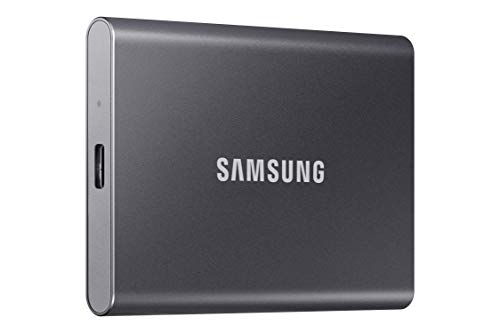
Samsung T7 Portable SSD, 1TB External Solid State Drive

The Samsung T7 Portable SSD is a true workhorse, perfect for anyone who needs reliable, speedy external storage on the go. This sleek, compact drive is a favorite among content creators, photographers, and everyday users alike due to its impressive performance and robust build. It leverages PCIe NVMe technology to deliver read/write speeds that are almost double what you’d get from its predecessor, the T5, making quick work of even the largest files. If you’re looking for a dependable external drive to back up important documents, edit videos on the fly, or store your vast photo collection, the T7 is an excellent choice. Plus, its recent support for iPhone 15 Pro Res 4K video recording makes it an essential tool for mobile videographers.
Key Features:
– Made for creators with fast speeds and durable features
– PCIe NVMe technology with speeds up to 1,050/1,000 MB/s
– Compact design with capacities up to 4TB (this review focuses on 1TB)
– Extensive compatibility with PCs, mobile phones, and cameras
– Supports iPhone 15 Pro Res 4K at 60fps video recording
– Shock resistance and fall protection up to 6 feet
– Solid aluminum unibody construction
– Backed by Samsung, a world-leading flash memory brand
Pros:
– Exceptional transfer speeds for large files
– Highly durable and shock-resistant
– Wide compatibility across devices
– Ideal for professional photo/video work, including iPhone Pro Res
– Very portable and lightweight
– Comes from a trusted, reputable brand
Cons:
– Premium price point compared to traditional external HDDs
– Aluminum body can get warm during intense, prolonged transfers
User Impressions:
Users consistently praise the Samsung T7 for its snappy performance and rock-solid reliability. Many highlight its compact size and durable feel, making it an ideal companion for travel or field work. The seamless integration with various devices, including iPhones, also receives high marks, cementing its status as a top-tier portable storage solution.
SanDisk 1TB Extreme Portable SSD – Up to 1050MB/s, USB-C

When “extreme” is in the name, you expect a lot, and the SanDisk Extreme Portable SSD delivers! This drive is built like a tank, designed to withstand the rigors of the outdoors, clumsy handling, or just busy everyday life. With up to 3-meter drop protection and IP65 water and dust resistance, it’s perfect for adventurers, field photographers, or anyone who needs their data to survive anything. Beyond its rugged exterior, it packs serious NVMe performance, ensuring your files move quickly and efficiently. If you need a virtually indestructible best SSD for storage that won’t let you down in challenging environments, this is your go-to.
Key Features:
– NVMe solid state performance with up to 1050MB/s read and 1000MB/s write speeds
– Up to 3-meter drop protection
– IP65 water and dust resistance
– Handy carabiner loop for securing to bags or belts
– Password protection with 256-bit AES hardware encryption
– Compatible with SanDisk Memory Zone app for file management
Pros:
– Exceptionally durable with high drop, water, and dust resistance
– Very fast NVMe speeds for quick transfers
– Compact and lightweight for superior portability
– Enhanced data security with hardware encryption
– Convenient carabiner loop for secure carrying
Cons:
– Can be more expensive than less rugged options
– Some users might find the design slightly utilitarian
User Impressions:
Customers rave about the SanDisk Extreme’s durability, often citing personal stories of it surviving drops or spills without a hitch. The speed is also a consistent highlight, making it a favorite for quickly offloading photos and videos during shoots. The added security features provide peace of mind for those carrying sensitive data.
SSK Portable SSD 1TB External Solid State Drives

The SSK Portable SSD might just be the dark horse in the race for the best SSD for storage. It’s incredibly lightweight and compact, making it one of the most portable options on our list. Don’t let its tiny footprint fool you, though; this drive offers blazing-fast 10Gbps speeds, ideal for rapid file transfers. What truly makes it stand out is its commitment to thermal management with a 2mm thick aluminum alloy case, keeping it cool even during demanding tasks. For iPhone users, its support for 4K60Hz ProRes HDR video capture with low power consumption makes it an absolute game-changer.
Key Features:
– Blazing-fast 10Gbps external SSD speeds (up to 1050MB/s read, 1000MB/s write)
– LED light for instant activity indication
– S.M.A.R.T. monitoring and TRIM technology for health and lifespan
– Includes both USB-C and USB-A cables for wide compatibility
– Maintains steady 10Gbps speeds for files smaller than 250GB (SLC caching)
– Empowers 4K60Hz ProRes HDR video capture for iPhone
– 2mm thick aluminum alloy case for superior heat dissipation
– Impressively lightweight (36.6g) and compact (2.61.50.5 inch)
Pros:
– Exceptionally portable and lightweight design
– Excellent heat dissipation prevents slowdowns
– High-speed data transfers for most files
– Versatile connectivity with dual USB cables
– Great value for iPhone users recording high-res video
– Good for managing drive health with S.M.A.R.T. and TRIM
Cons:
– Capacity display difference (actual vs. reported on Windows) can be confusing for some
– Less established brand recognition compared to Samsung or SanDisk
User Impressions:
Users are consistently surprised by the SSK Portable SSD’s performance given its small size and often competitive price. Many appreciate its truly pocket-friendly design and its ability to remain cool under load. iPhone users, in particular, commend its seamless integration for recording high-quality video directly to the drive.
SAMSUNG 870 EVO SATA SSD 500GB 2.5” Internal Solid State Drive

While external SSDs offer portability, the SAMSUNG 870 EVO shines as an internal best SSD for storage and system upgrade. This 2.5-inch SATA SSD is the go-to choice for revitalizing older desktops or laptops that still rely on traditional hard drives. It maximizes the SATA interface, delivering excellent sequential speeds for everyday computing, gaming, and even 8K video processing. Known for Samsung’s legendary reliability, the 870 EVO offers industry-leading endurance and compatibility, making it a hassle-free upgrade for any PC user looking for a significant performance boost without jumping to more expensive NVMe internal drives.
Key Features:
– Maximize SATA interface limit with up to 560/530 MB/s sequential speeds
– Accelerates write speeds and maintains long-term high performance with a larger variable buffer
– Industry-defining reliability with up to 600 TBW under a 5-year limited warranty (for 1TB model, 300 TBW for 500GB)
– Highly compatible with major host systems and applications (chipsets, motherboards, NAS, video recording)
– Easy upgrade via standard 2.5-inch SATA form factor
– Samsung Magician software for drive management and optimization
– World’s #1 brand for flash memory since 2003
Pros:
– Excellent performance for a SATA SSD
– Unmatched reliability and long lifespan
– Very wide compatibility with existing systems
– Easy to install and upgrade
– Samsung Magician software adds great value for drive management
– Ideal for breathing new life into older PCs or as a secondary storage drive
Cons:
– Limited to SATA speeds, which are slower than NVMe SSDs
– Not a portable solution
– 500GB capacity might be restrictive for primary game libraries or extensive media collections
User Impressions:
The Samsung 870 EVO is consistently praised for being a “set it and forget it” upgrade. Users report significantly faster boot times, application loading, and overall system responsiveness after switching from an HDD. Its reputation for reliability and the user-friendly Magician software are frequently highlighted as major advantages.
Seagate Storage Expansion Card 2TB Solid State Drive – Xbox Series X|S

This isn’t your average external SSD; the Seagate Storage Expansion Card is tailor-made for Xbox Series X|S gamers. If you’ve ever found yourself constantly deleting games to make space, this officially licensed expansion card is a lifesaver. It integrates seamlessly with the Xbox Velocity Architecture, meaning you can play Xbox Series X|S optimized games directly from the card with the same lightning-fast load times, high framerates, and graphical fidelity as playing from the console’s internal SSD. For serious gamers who want to expand their digital library without compromise, this is unequivocally the best SSD for storage specifically for the Xbox ecosystem.
Key Features:
– Designed in partnership with Xbox for seamless gameplay
– Play Xbox Series X|S games directly from the card without sacrificing performance
– Only 2TB expansion card and highest capacity available for Xbox Series X
– Leverages officially licensed Xbox Velocity Architecture
– Allows collection of thousands of games across four generations of Xbox
– Includes a 3-year warranty
Pros:
– Only official way to expand Xbox Series X|S storage for optimized games
– Maintains full next-gen performance
– Simple plug-and-play installation
– High 2TB capacity for extensive game libraries
– Backed by a 3-year warranty
Cons:
– Exclusively for Xbox Series X|S; cannot be used with PCs or other devices
– Significantly more expensive per GB than standard external SSDs
– Limited use case, only valuable for dedicated Xbox gamers
User Impressions:
Xbox Series X|S owners almost universally agree that this expansion card is an essential accessory. They appreciate its true plug-and-play nature and the complete absence of any performance compromise when playing games stored on the card. While the price is a common sticking point, users feel it’s a necessary investment for a premium gaming experience.
Frequently Asked Questions (FAQ)
Q1: What’s the main difference between an internal and external SSD?
A1: An internal SSD is installed inside your computer (like the Samsung 870 EVO) and is typically used as your primary drive for the operating system and programs. An external SSD (like the Samsung T7 or SanDisk Extreme) connects via a USB cable and is highly portable, ideal for backups, file transfers between devices, or expanding storage for consoles.
Q2: Why should I choose an SSD over a traditional Hard Disk Drive (HDD) for storage?
A2: SSDs are significantly faster, more durable (no moving parts), consume less power, and operate silently compared to HDDs. While HDDs offer a lower cost per gigabyte, SSDs provide superior performance and reliability, which is crucial for modern applications, large file transfers, and portable use.
Q3: What factors should I consider when buying the best SSD for storage?
A3: Key factors include:
* Capacity: How much storage do you need (e.g., 500GB, 1TB, 2TB, 4TB)?
* Speed: Look at read/write speeds (MB/s). NVMe SSDs are faster than SATA SSDs.
* Portability/Form Factor: Do you need an external drive you can carry, or an internal one for your PC?
* Durability: For external drives, consider features like shock, water, and dust resistance.
* Compatibility: Ensure it works with your devices (PC, Mac, console, phone).
* Price: Balance features and capacity with your budget.
Q4: What do MB/s and TBW mean in SSD specifications?
A4:
* MB/s (Megabytes per second): This measures the data transfer speed. Higher numbers mean faster read and write operations.
* TBW (Terabytes Written): This indicates the total amount of data that can be written to the SSD over its lifetime before it might start to fail. A higher TBW rating means better endurance and longevity for the drive.
Q5: Can I use an external SSD with my smartphone or tablet?
A5: Yes, many modern external SSDs, especially those with USB-C connectivity like the Samsung T7 or SSK Portable SSD, are compatible with smartphones and tablets that support USB On-The-Go (OTG) and external storage. This is particularly useful for transferring photos, videos, or even recording high-resolution video directly to the SSD, as seen with the iPhone 15 Pro.
Q6: How much storage capacity do I really need for my SSD?
A6: It depends on your usage:
* 500GB: Good for basic document storage, light photo collection, or as a boot drive.
* 1TB: Ideal for most users, offering ample space for documents, a decent photo/video library, and a selection of games.
* 2TB+: Recommended for serious content creators, gamers with large libraries, or professionals dealing with massive datasets. Always factor in future needs!
Q7: Are SSDs truly more durable than HDDs?
A7: Absolutely! HDDs contain spinning platters and read/write heads, making them susceptible to damage from drops or impacts. SSDs, being solid-state devices with no moving parts, are inherently more resistant to physical shock, vibrations, and temperature changes, making them much more durable, especially for portable applications.