

Are you tired of your laptop dragging its feet? Does it take ages to boot up, load games, or open applications? If so, it might be time for a serious upgrade, and a Solid State Drive (SSD) is often the best place to start. When it comes to high-performance storage, Sabrent has quickly become a name synonymous with speed, reliability, and innovation. They offer a range of SSDs that can genuinely transform your laptop experience.
But with so many options, how do you pick the Sabrent best SSD for laptops that’s right for you? Don’t sweat it! We’ve done the heavy lifting and compiled a list of the top 5 Sabrent SSDs, reviewing each one to help you make an informed decision. Whether you’re a hardcore gamer, a creative professional, or just someone who wants a snappier everyday machine, there’s a Sabrent SSD here for you.
What Makes Sabrent SSDs Stand Out?
Sabrent has carved out a strong niche in the SSD market, especially with their “Rocket” series. They’re known for:
- Cutting-Edge Performance: Often leveraging the latest PCIe Gen4 NVMe technology for blazing-fast read and write speeds.
- Reliability: Using premium components and robust controllers to ensure data integrity and long lifespans.
- Diverse Options: Offering various capacities and form factors (like M.2 2280 and the compact 2230) to fit different laptops and use cases.
- Value: Providing competitive performance without always breaking the bank.
Ready to find your laptop’s next big upgrade? Let’s dive into our top picks!
Our Top 5 Sabrent Best SSD for Laptops
1. SABRENT Rocket 4 1TB NVMe SSD PCIe Gen4 M.2 2280

This 1TB powerhouse is a fantastic starting point for anyone looking to embrace the future of storage. The Rocket 4 is designed to deliver incredible speed, making your laptop feel incredibly responsive. If you’re upgrading from an older SATA drive or even a slower NVMe, you’ll immediately notice the difference in boot times, game loading, and overall system snappiness. It’s perfect for mainstream users and gamers who want a significant performance boost without overspending.
-
Key Features:
- Blazing Gen4 Speed: Up to 7450MB/s read and 6100MB/s write speeds.
- High IOPS, Efficient Design: Up to 850K/800K random IOPS with low heat and power draw.
- Broad System Compatibility: Standard single-sided M.2 2280 form factor.
- Made for Pros and Gamers: Ideal for demanding workloads and high-performance systems.
- Trusted Sabrent Support: Supports Windows, macOS, and Linux with online registration for updates and expert help.
-
Pros:
- Exceptional speed for its price point.
- Efficient operation keeps temperatures down.
- Widely compatible with most modern laptops.
- Solid capacity for OS, apps, and a good selection of games.
-
Cons:
- Requires a PCIe Gen4 compatible laptop to reach full speeds (still fast on Gen3).
-
User Impressions: Customers frequently praise the Rocket 4 1TB for its straightforward installation and dramatic performance improvements. Many note how quickly their systems boot and how smooth gaming becomes. It’s often cited as a great value for cutting-edge speed.
2. SABRENT 2.5 Inch SATA to USB 3.0 Tool Free External Enclosure

While not an internal SSD itself, this Sabrent external enclosure is an incredibly useful accessory for laptop users, especially if you’re upgrading your internal drive or need portable storage. It lets you turn any 2.5-inch SATA SSD or HDD into a super-fast, tool-free external drive. This is brilliant for repurposing old laptop drives, creating a portable backup solution, or even cloning your existing drive before an internal upgrade. It complements your new internal Sabrent best SSD for laptops perfectly!
-
Key Features:
- Tool-Free Design: Easy installation of 2.5” SATA/SSD drives.
- Fast Transfer Rates: Up to 5 Gbps with USB 3.0 (also backwards-compatible).
- Optimized for SSD: Supports UASP SATA III for enhanced performance.
- Hot-Swappable, Plug and Play: No drivers needed.
- Broad OS Support: Works with Mac, Windows (7, 8, Vista, XP), and Mac OS X and higher.
-
Pros:
- Extremely easy to set up and use.
- Excellent for data migration or external backups.
- Affordable way to get portable high-speed storage (when combined with an SSD).
- Compact and durable design.
-
Cons:
- It’s an enclosure, not an SSD; you need to provide your own 2.5-inch drive.
- Speeds are limited by SATA and USB 3.0, not NVMe.
-
User Impressions: Users love the simplicity and effectiveness of this enclosure. It’s highly recommended for anyone needing to transfer data, clone drives, or give a second life to an old laptop SSD. The tool-free design is a consistent highlight.
3. SABRENT Rocket 2230 1TB NVMe SSD – PCIe Gen4 M.2
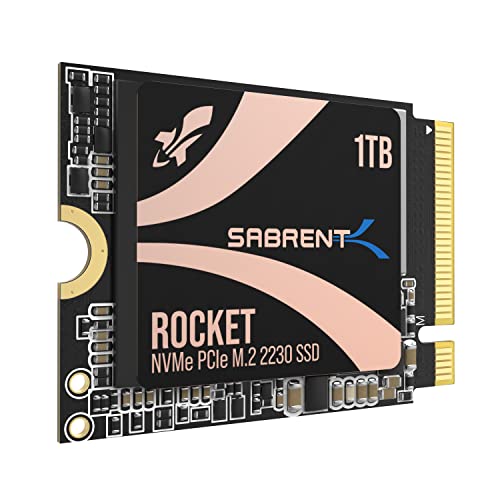
This tiny marvel is a game-changer for specific devices! If you own a Steam Deck, a Microsoft Surface Pro, or certain ultrabooks and thin-and-light laptops, you know how hard it is to find compatible upgrades. The Sabrent Rocket 2230 is explicitly designed for these compact systems, offering a full 1TB of high-speed Gen4 storage in a minuscule form factor. It’s the ultimate upgrade for expanding internal storage where space is at an absolute premium.
-
Key Features:
- Compact Compatibility: M.2 2230 form factor perfect for Steam Deck, Surface Pro, ultrabooks.
- High-Speed Gen4 Performance: Up to 5GB/s read and 800K IOPS.
- 1TB Capacity: Ample space for games, apps, and files without slow microSD cards.
- Reliable and Efficient: Gen4 NVMe controller with premium 3D TLC NAND and HMB support for low power usage.
- Retail-Grade Quality: Full warranty, Sabrent Acronis True Image cloning software, and firmware support.
-
Pros:
- Specifically designed for extremely small form factor devices.
- Brings high-speed Gen4 performance to previously limited systems.
- Significant storage upgrade for handhelds and ultrabooks.
- Includes cloning software, which is a huge plus for upgrades.
-
Cons:
- Only suitable for devices that require the M.2 2230 size.
- Performance, while great for its size, is slightly lower than full-sized Gen4 Rocket 4 drives.
-
User Impressions: Steam Deck and Surface Pro owners rave about this SSD, calling it the perfect and often only viable upgrade. They highlight the easy installation (for those devices) and the immense improvement in game load times and overall system responsiveness compared to microSD cards.
4. SABRENT Rocket 4 2TB NVMe SSD PCIe Gen4 M.2 2280

Stepping up the capacity, the Sabrent Rocket 4 2TB offers all the incredible speed of its 1TB sibling but with double the storage. This drive is ideal for serious gamers with massive game libraries, video editors working with large files, or power users who simply need more space without compromising on performance. It’s one of the Sabrent best SSD for laptops if you’re building a high-performance rig or want to future-proof your storage.
-
Key Features:
- Next-Gen Gen4 Performance: Up to 7450MB/s read and 6400MB/s write speeds.
- High IOPS, Low Heat: Up to 1000K/950K random IOPS with minimal thermal output.
- Universal Compatibility: Single-sided M.2 2280 design fits most desktops, laptops, and PS5 systems.
- Power for Pros and Gamers: Fast, reliable storage for intensive applications.
- Sabrent Quality and Support: Premium components, broad OS support (Windows, macOS, Linux).
-
Pros:
- Blazing fast speeds for demanding applications.
- Generous 2TB capacity handles large game libraries and creative projects.
- Excellent thermal management for sustained performance.
- Reliable and widely compatible.
-
Cons:
- Premium price tag compared to lower capacities.
- Full speeds require a Gen4 compatible system.
-
User Impressions: Users frequently express satisfaction with the 2TB Rocket 4, noting its incredible speed and the freedom that comes with such a large, fast storage device. Gamers especially appreciate the near-instant load times for even the largest titles.
5. SABRENT Rocket 4 4TB NVMe SSD PCIe Gen4 M.2 2280

For the ultimate power user, the Sabrent Rocket 4 4TB is an absolute beast. If you’re a content creator, an engineer, or a gamer who refuses to uninstall anything, this drive offers an enormous 4TB of storage combined with top-tier Gen4 performance. It’s designed for those who demand the absolute best in both speed and capacity, ensuring you have ample room for massive projects, extensive media libraries, and every game you own, all running at incredible speeds. This is arguably the Sabrent best SSD for laptops for unparalleled capacity and performance.
-
Key Features:
- Massive Gen4 Performance: Up to 7450MB/s read and 6400MB/s write speeds.
- Built for Speed and Stability: Up to 1000K/950K random IOPS with consistent low-heat output.
- Broad Compatibility: Slim, single-sided M.2 2280 design fits most laptops, desktops, and PS5.
- For Demanding Users: Ideal for gamers, media editors, engineers, and power users.
- Sabrent Reliability & Support: Premium hardware, OS compatibility across Windows, macOS, Linux.
-
Pros:
- Unrivaled 4TB capacity in a single M.2 drive.
- Top-tier Gen4 speeds for any workload imaginable.
- Exceptional stability and thermal management.
- Future-proof storage solution for years to come.
-
Cons:
- Significantly higher price point.
- Most users might not need this much storage or speed.
-
User Impressions: Power users and professionals who invest in the 4TB Rocket 4 are consistently blown away by its capacity and raw performance. They highlight its ability to handle huge project files and game installations with ease, making it a true workhorse for high-demand environments.
How to Choose the Right Sabrent SSD for Your Laptop
Picking the right SSD isn’t just about speed; it’s about compatibility and your specific needs. Here are a few things to consider:
- Form Factor: Most modern laptops use M.2 NVMe SSDs, typically the 2280 size (22mm wide, 80mm long). However, some ultra-compact devices (like the Steam Deck) need the M.2 2230 size. Double-check your laptop’s manual or physical slot to confirm.
- PCIe Generation: Does your laptop support PCIe Gen3 or Gen4? Gen4 drives are faster but will only run at Gen3 speeds in a Gen3 slot. They are backward compatible, so a Gen4 drive will still work, just not at its maximum potential.
- Capacity: How much storage do you need? 1TB is a great balance for most users, 2TB is fantastic for gamers and content creators, and 4TB is for extreme power users.
- Budget: Higher capacities and newer technologies (like Gen4) generally come with higher price tags. Balance your performance needs with what you’re willing to spend.
FAQ Section
Q1: What’s the main difference between NVMe and SATA SSDs?
A1: NVMe (Non-Volatile Memory Express) SSDs connect directly to the motherboard via the PCIe interface, offering significantly faster speeds (thousands of MB/s) than SATA SSDs, which use the older SATA interface (limited to around 550 MB/s). NVMe is the choice for high-performance laptops.
Q2: What is PCIe Gen4, and why is it important for SSDs?
A2: PCIe Gen4 is the fourth generation of the Peripheral Component Interconnect Express interface. It doubles the bandwidth of PCIe Gen3, allowing Gen4 NVMe SSDs to achieve incredible read and write speeds, often exceeding 7000MB/s. This translates to quicker boot times, faster game loads, and smoother handling of large files.
Q3: How do I know if my laptop supports NVMe or PCIe Gen4?
A3: The best way is to check your laptop’s exact model specifications on the manufacturer’s website or in its user manual. You can also physically inspect the M.2 slot; some motherboards label their slots (e.g., “PCIe Gen4 x4”). If your laptop is a few years old, it likely supports Gen3 NVMe. Newer, high-end laptops (especially those with AMD Ryzen 3000 series or Intel 11th Gen and newer processors) often support Gen4.
Q4: Is it difficult to install a Sabrent SSD in a laptop?
A4: For M.2 NVMe SSDs, installation usually involves unscrewing a single screw, gently inserting the drive into the M.2 slot, and then securing it with the screw. While relatively straightforward, it does require opening your laptop, which some users might find daunting. Always consult your laptop’s manual or a reliable online tutorial for your specific model.
Q5: Will a PCIe Gen4 Sabrent SSD work in a Gen3 slot?
A5: Yes, absolutely! PCIe Gen4 SSDs are backward compatible with Gen3 slots. However, they will operate at the maximum speeds supported by the Gen3 slot, meaning you won’t get the full Gen4 performance. They’ll still be very fast, often saturating the Gen3 bandwidth.
Q6: Why choose Sabrent over other SSD brands?
A6: Sabrent has built a strong reputation for offering high-performance SSDs, particularly their “Rocket” series, at competitive prices. They are known for using quality components, providing good software support (like cloning tools), and offering a diverse range of products, including niche form factors like the M.2 2230, which many other brands don’t provide.
Q7: How much storage capacity do I really need for my laptop SSD?
A7: This depends on your usage!
* 500GB: Good for basic users, web browsing, and light office work. Can feel cramped quickly.
* 1TB: The sweet spot for most users, offering ample space for the OS, essential applications, and a decent library of games or media.
* 2TB: Ideal for serious gamers, content creators, or anyone with large media libraries who wants plenty of room without constant file management.
* 4TB+: For extreme power users, professionals dealing with massive datasets, or those who simply never want to worry about storage space again.
Conclusion
Upgrading your laptop’s storage to a high-quality SSD is one of the most impactful improvements you can make. Sabrent offers a fantastic range of options, from compact drives for specialized devices to massive, lightning-fast solutions for power users. We hope this guide has helped you narrow down the Sabrent best SSD for laptops that will transform your computing experience. Happy upgrading!