

Is your Mac Mini feeling a little cramped for storage, or are you looking to supercharge your workflow with blazing-fast data access? You’re not alone! While the Mac Mini is a powerhouse, its internal storage can be costly to upgrade at the time of purchase. That’s where a high-quality external SSD comes in, offering a fantastic solution for expanding your storage and boosting performance without breaking the bank.
But with so many options out there, how do you pick the right one? Especially when you’re looking for the Sabrent best external SSD for Mac Mini, or other top-tier alternatives that deliver exceptional speed and reliability? We’ve got you covered! In this comprehensive guide, we’ll dive into the best external SSDs perfectly suited for your Mac Mini, focusing on speed, durability, and seamless integration.
Let’s explore some top contenders, including excellent Sabrent external SSD options, to help you find the perfect storage companion for your beloved Mac Mini.
Why Your Mac Mini Needs an External SSD
Before we jump into the reviews, let’s quickly touch on why an external SSD is a game-changer for Mac Mini users:
- Cost-Effective Storage Expansion: Get more gigabytes (or terabytes!) for your buck compared to internal upgrades.
- Blazing Speeds: Thunderbolt and USB 3.2 Gen 2×2 SSDs offer read/write speeds that can rival, or even surpass, your Mac Mini’s internal drive for certain tasks. This is crucial for video editing, large file transfers, and running virtual machines.
- Portability: Take your important files, projects, or even an entire macOS installation with you wherever you go.
- Dedicated Work Drives: Use an external SSD for specific tasks like video editing, music production, or gaming, keeping your main drive clutter-free.
- Boot Drive Option: Some users even choose to run their entire operating system from an external SSD for potential performance benefits or specific workflows.
Our Top Picks: Sabrent and Other Leading External SSDs for Mac Mini
We’ve carefully selected a range of external SSDs, highlighting what makes each one great for your Mac Mini. Many of these offer the kind of performance and reliability you’d expect from the Sabrent best external SSD for Mac Mini options, while others bring unique features like integrated hubs or rugged designs.
1. SABRENT Rocket XTRM Plus 2TB Thunderbolt 3 Portable SSD

If you’re after serious speed and robust build quality, the Sabrent Rocket XTRM Plus is a phenomenal choice. This upgraded Thunderbolt 3 portable SSD delivers incredible performance, making it perfect for creative professionals who handle massive files like 4K/8K video. Its durable aluminum shell and silicone sleeve mean it’s ready for life on the go, whether you’re bouncing between studios or working from a coffee shop. It truly embodies what many consider the Sabrent best external SSD for Mac Mini when Thunderbolt 3 is your primary connection.
-
Key Features:
- Upgraded Thunderbolt 3/USB SSD for enhanced performance.
- Flexible high-speed performance: up to 2,700 MB/s (Thunderbolt 3) or 900 MB/s (USB 3.2 Gen 2×1).
- Built with an aluminum outer shell for ruggedness and heat dissipation.
- Removable silicone sleeve provides additional protection.
- Includes premium Thunderbolt 3 and USB-A to USB-C cables.
- Plug-and-play, bus-powered, and universally compatible with Windows, macOS, and Linux.
-
Pros:
- Exceptional Thunderbolt 3 speeds for demanding tasks.
- Premium, durable construction with added silicone protection.
- Excellent heat management for sustained performance.
- Versatile connectivity with both Thunderbolt and USB cables included.
- Bus-powered, so no external power adapter needed.
-
Cons:
- Thunderbolt 3 speeds require a Thunderbolt port on your Mac Mini.
- Higher price point compared to USB-only drives.
-
User Impressions: Users consistently praise its incredible speed and solid build quality, often noting how seamlessly it integrates with their Mac Minis for video editing and large data backups. Many highlight its reliability as a key selling point.
2. ORICO MiniMate Pro 2TB External SSD Compatibility with Mac

The ORICO MiniMate Pro isn’t just an external SSD; it’s a precisely designed accessory that seamlessly complements your Mac Mini M4. If aesthetics and a perfect desktop setup are high on your list, this drive is a winner. It’s built for instant storage expansion and optimized to leverage your Mac Mini’s Thunderbolt speeds, ensuring you don’t compromise on performance while maintaining a clean, integrated look.
-
Key Features:
- Instant storage expansion without cluttering your Mac Mini’s internal drive.
- Dimensionally precise to seamlessly complement the Mac Mini M4.
- Optimized for Mac Mini M4’s Thunderbolt speeds for exceptional performance.
- Broad compatibility with other USB 4.0 devices.
- Comes with two high-quality cables.
-
Pros:
- Perfect aesthetic and size match for the Mac Mini M4.
- Leverages Thunderbolt speeds for lightning-fast transfers.
- Simplifies desktop aesthetics by integrating perfectly.
- Easy plug-and-play functionality.
-
Cons:
- Specific design might not appeal to everyone or older Mac Mini models as much.
- Primarily aimed at Mac Mini M4, though compatible with other USB 4.0 devices.
-
User Impressions: Mac Mini M4 owners rave about how perfectly it fits and looks with their setup, often calling it the “missing piece.” They appreciate the fast transfer speeds, especially for media files, and the fact that it doesn’t stand out as a separate peripheral.
3. 40Gbps M.2 NVMe SSD Enclosure for Mac mini M4/M4 Pro

For those who love to DIY and want the ultimate control over their storage, this NewQ 40Gbps M.2 NVMe SSD Enclosure is an ingenious solution. Instead of buying a pre-built SSD, you can choose your own M.2 NVMe drive and slot it into this enclosure, which is designed to integrate perfectly with the Mac Mini M4/M4 Pro. It’s a fantastic way to achieve internal-level performance via Thunderbolt 4 without the cost of factory upgrades.
-
Key Features:
- Effortlessly expands storage capacity for Mac Mini M4/M4 Pro.
- Snap-on installation that seamlessly matches the Mac mini’s design.
- 40Gbps enclosure delivering up to 3000MB/s via Thunderbolt 4.
- Rigorously tested for reliable stability.
- Unique power button groove structure for perfect Mac Mini startup solution.
- Multi-SSD size support (2230, 2242, 2260, 2280 NVMe SSDs).
-
Pros:
- Cost-effective way to get high-speed storage.
- Allows choice of SSD brand and capacity.
- Perfect physical integration with Mac Mini M4/M4 Pro.
- Supports various NVMe SSD sizes.
- Easy, tool-free installation.
-
Cons:
- Requires purchasing an M.2 NVMe SSD separately.
- Only for Mac Mini M4/M4 Pro models (physical fit).
- Achieving maximum speeds requires a Gen 4×4 M-Key NVMe SSD.
-
User Impressions: Tech-savvy users love the flexibility and the ability to customize their storage. They frequently mention the excellent transfer speeds, which feel truly “internal,” and the smart design that makes it look like a part of the Mac Mini itself.
4. Satechi Mac mini Hub & Stand with SSD Enclosure for…

The Satechi Mac mini Hub & Stand is more than just an SSD enclosure; it’s a complete docking station designed to declutter and expand your Mac Mini’s capabilities. It not only provides external storage capabilities for M.2 SSDs (NVMe PCIe/NGFF SATA) but also adds a host of essential ports, making it an all-in-one solution for connectivity and storage. Note that this specific model is not compatible with the Mac Mini M4, but it’s fantastic for M1/M2 models and Mac Studio.
-
Key Features:
- External storage capabilities for M.2 SSDs (NVMe PCIe/NGFF SATA) up to 10Gbps.
- Supports 2242, 2260, and 2280 SSDs (SSD not included).
- 7-in-1 Expansion Ports: USB-C data (10Gbps), two USB-A (5Gbps), one high-speed USB-A (10Gbps), Micro/SD Card Readers, 3.5mm headphone jack.
- Optimized cooling with built-in air vents.
- Sleek brushed aluminum finish that matches Mac Mini M2/M1 and Mac Studio.
- Includes screw, screwdriver, and thermal pad for SSD installation.
-
Pros:
- Combines an SSD enclosure with a multi-port hub.
- Excellent for organizing cables and peripherals.
- Stylish design that perfectly complements older Mac Mini models.
- Improves airflow and cooling for the Mac Mini.
- Easy DIY SSD installation.
-
Cons:
- SSD is not included.
- Not compatible with Mac Mini M4.
- USB-A ports have some limitations (no CD readers, Apple SuperDrive, iPad charging).
-
User Impressions: Users with Mac Mini M1/M2 models absolutely adore this product for its ability to clean up their desk, add much-needed ports, and provide fast storage in one sleek package. They often highlight its premium feel and how it transforms their workspace.
5. SABRENT 2TB External Aluminum SSD, Rocket Nano V2, USB…

When you need a compact yet incredibly powerful portable SSD, the Sabrent Rocket Nano V2 steps up. This tiny titan boasts burst transfers over 1500 MB/s via USB 3.2 Gen 2×2, making it perfectly capable of handling smooth 8K video recording and other high-bitrate content. Its robust aluminum construction with a silicone sleeve ensures durability and excellent heat management, making it an excellent Sabrent best external SSD for Mac Mini if USB connectivity is your main focus.
-
Key Features:
- Burst transfers over 1500 MB/s with sustained performance.
- USB 3.2 Gen 2×2 interface for maximum speed.
- Constructed of aluminum with an external silicone sleeve for ruggedness.
- Available up to 4TB capacity.
- Includes both Type-C to Type-A and Type-C to Type-C cables.
- Wide compatibility with USB backward compatibility.
-
Pros:
- Extremely fast USB 3.2 Gen 2×2 speeds.
- Very compact and lightweight design.
- Excellent durability and heat dissipation.
- High capacity options available.
- Comes with all necessary cables.
-
Cons:
- Requires a USB 3.2 Gen 2×2 port on your Mac Mini to achieve full speed (otherwise it will fall back to slower USB speeds).
- Not Thunderbolt-level speeds.
-
User Impressions: Reviewers are consistently impressed by the Nano V2’s tiny footprint and massive performance. It’s a favorite for photographers and videographers who need to offload large files quickly on location, appreciating its sturdy feel and reliable operation.
6. SABRENT Rocket XTRM 5 2TB Thunderbolt 5 Portable SSD

Future-proof your storage with the Sabrent Rocket XTRM 5. This is the cutting edge of external SSD technology, leveraging Thunderbolt 5 for mind-blowing speeds of up to 64Gbps (80Gbps connection). If you’re a professional working with massive datasets, uncompressed video, or simply want the fastest possible external storage for your Mac Mini, this drive is designed to deliver. Its rugged build means it’s as tough as it is fast, securing its place as a top contender for the Sabrent best external SSD for Mac Mini for those with Thunderbolt 5 ports.
-
Key Features:
- Ultra-fast Thunderbolt 5 performance: up to 64Gbps transfer speeds (80Gbps connection).
- Broad backward compatibility with Thunderbolt 3, Thunderbolt 4, and USB4.
- Rugged aluminum body for heat dissipation and durability.
- Includes a silicone sleeve for enhanced drop protection.
- Plug and play, bus-powered, no external power needed.
- Comes with a premium Thunderbolt cable.
-
Pros:
- Industry-leading Thunderbolt 5 speeds.
- Excellent backward compatibility ensures versatility.
- Extremely durable and well-protected design.
- Bus-powered for ultimate portability and convenience.
- Ideal for future-proofing your setup.
-
Cons:
- Thunderbolt 5 is new, so compatibility with older Mac Minis is at lower speeds.
- Premium price reflects cutting-edge technology.
-
User Impressions: Early adopters are blown away by the sheer speed, noting it’s a dream for handling gargantuan files. They appreciate the robust construction and the peace of mind that comes with knowing they have the fastest connection available for their demanding workflows.
7. ORICO MiniMate Pro 1TB External SSD Compatibility with Mac

Just like its 2TB sibling, the ORICO MiniMate Pro 1TB offers the same sleek design and seamless integration with your Mac Mini M4. This smaller capacity option is perfect if you need significant, lightning-fast storage expansion but don’t require the full 2TB. It’s still optimized for Thunderbolt speeds, ensuring your Mac Mini gets the performance boost it deserves, all while maintaining a tidy, matching aesthetic.
-
Key Features:
- Instant storage expansion for videos, documents, and materials.
- Dimensionally precise design to complement the Mac Mini M4.
- Optimized for Mac Mini M4’s Thunderbolt speeds.
- Comes with two high-quality cables included.
- Broad compatibility with other USB 4.0 devices.
-
Pros:
- Perfect aesthetic and size match for the Mac Mini M4.
- Excellent Thunderbolt speeds for its price point.
- Cleans up your desktop by blending in seamlessly.
- Conveniently includes necessary cables.
-
Cons:
- 1TB might not be enough for extremely demanding professionals.
- Specific design primarily targets the Mac Mini M4.
-
User Impressions: Users find the 1TB version to be a sweet spot for price and performance, especially for those who need fast scratch disks or dedicated project storage without committing to a larger, more expensive drive. Its design is consistently praised.
8. Crucial X10 1TB Portable SSD, Up to 2,100MB/s, USB 3.2…

The Crucial X10 is a fantastic all-around portable SSD that balances high performance with exceptional durability. With speeds up to 2,100MB/s via USB 3.2 Gen 2×2, it’s a strong contender for demanding users, including Mac Mini owners who need reliable, fast external storage. Its IP65 dust and water resistance, coupled with robust drop protection, make it an ideal companion for those who are always on the move or prone to accidental spills.
-
Key Features:
- Ultra-fast speeds: up to 2,100MB/s read speeds.
- Built to last with IP65 dust and water resistance.
- Drop resistant up to 9.8 ft (3 meters).
- Broad compatibility: Windows, Mac, iPad Pro, Chromebooks, Android, Linux, PlayStation, Xbox.
- Compact 1TB capacity for secure and reliable storage.
- Includes bonus Mylio Photos plus and Acronis True Image software.
-
Pros:
- Excellent speed for a USB-C external SSD.
- Outstanding durability against dust, water, and drops.
- Very broad device compatibility.
- Compact and easy to carry.
- Includes valuable software.
-
Cons:
- Requires a USB 3.2 Gen 2×2 port for maximum speed.
- Not as fast as Thunderbolt-specific drives.
-
User Impressions: Customers love the Crucial X10 for its ruggedness and peace of mind, especially those who travel or work in less-than-ideal environments. They consistently highlight its fast performance and ease of use across multiple devices, including their Mac Minis.
9. SABRENT Rocket XTRM 5 4TB Thunderbolt 5 Portable SSD
If the 2TB version of the Sabrent Rocket XTRM 5 caught your eye but you need even more space, the 4TB model is your answer. This powerhouse offers the same cutting-edge Thunderbolt 5 performance (up to 64Gbps/80Gbps connection) but doubles the storage capacity. It’s the ultimate solution for professionals who need both lightning-fast speeds and vast amounts of storage for things like extensive video libraries, large sample packs, or multiple virtual machines. This truly solidifies its position as a top-tier Sabrent best external SSD for Mac Mini for high-end users.
-
Key Features:
- Ultra-Fast Thunderbolt 5 Performance: up to 64Gbps transfer speeds (80Gbps connection).
- Broad Compatibility with Older Devices: Thunderbolt 3, Thunderbolt 4, USB4, USB 3.2 Gen 2×2, etc.
- Rugged and Durable Construction: Aluminum body with silicone sleeve.
- Plug and Play, No External Power Needed: Bus-powered with premium Thunderbolt cable included.
- Reliable, Future-Proof Storage Solution: Ideal for creators, professionals, and gamers.
-
Pros:
- Unmatched Thunderbolt 5 speeds combined with massive 4TB capacity.
- Robust build quality for heat dissipation and drop protection.
- Excellent backward compatibility for broad usability.
- Bus-powered convenience.
- Truly future-proof external storage for Mac Mini users.
-
Cons:
- Highest price point due to capacity and cutting-edge tech.
- Full speed requires a Thunderbolt 5 port, which is still emerging.
-
User Impressions: This 4TB monster is revered by users who deal with immense data. They frequently describe it as “blazingly fast” and “indispensable” for their professional workflows, especially appreciating the huge capacity paired with the highest possible transfer rates.
10. SABRENT Rocket Nano Rugged 1TB USB 3.2 10Gb/s External SSD
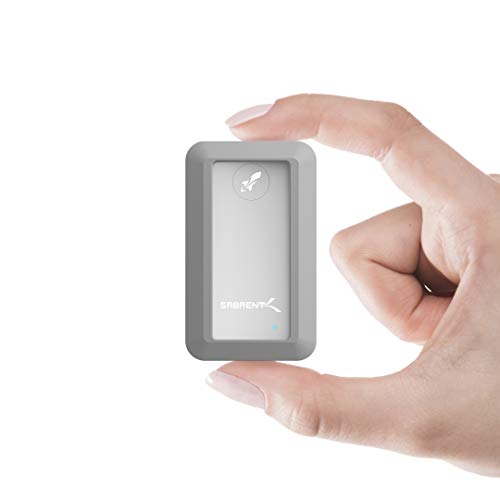
For Mac Mini users who need a balance of speed, portability, and exceptional durability, the Sabrent Rocket Nano Rugged 1TB is a standout. It’s built like a tank, boasting IP67 water resistance and 1-meter drop protection, all while delivering ultra-fast 10Gbps throughput. This drive is perfect for fieldwork, travel, or just peace of mind in a busy home or office environment. It offers strong performance in a compact and virtually indestructible package.
-
Key Features:
- IP67 water resistance (1 meter depth for up to 30 minutes).
- Rugged design with 1-meter drop tested protection.
- Compatibility with Windows and Mac OS.
- Plug & Play, OS independent, and fully bus-powered.
- Ultra-fast 10Gbps throughput, up to 1000MB/s.
- Ultra-slim aluminum alloy sandblasted shell.
-
Pros:
- Outstanding water and drop resistance for extreme durability.
- Fast 10Gbps USB 3.2 Gen 2 speed.
- Extremely compact and portable.
- Bus-powered and OS-independent for easy use.
- Sleek and professional appearance despite its ruggedness.
-
Cons:
- Not as fast as Thunderbolt drives or USB 3.2 Gen 2×2.
- 1TB might be limiting for some professional workflows.
-
User Impressions: Customers love the “peace of mind” this drive offers due to its ruggedness. They often use it for outdoor shoots or for daily backups where durability is a key concern, praising its reliable performance and surprisingly sleek look for such a tough device.
Buying Guide: What to Look for in a Mac Mini External SSD
Choosing the Sabrent best external SSD for Mac Mini or any other top brand depends on your specific needs. Here’s what to consider:
-
Connectivity (Port Type):
- Thunderbolt (3, 4, or 5): Offers the fastest speeds (up to 40Gbps for TB3/4, 80Gbps for TB5). Ideal for professionals like video editors who transfer huge files regularly. Your Mac Mini model will determine which Thunderbolt standard it supports.
- USB 3.2 Gen 2×2 (20Gbps): A great mid-range option, offering speeds up to 2000 MB/s. Many newer Mac Minis have USB-C ports that support this.
- USB 3.2 Gen 2 (10Gbps): Still very fast (up to 1000 MB/s) and more common. Suitable for most everyday tasks and even lighter creative work.
- USB 3.0/3.1 Gen 1 (5Gbps): The slowest of the modern USB standards, but still much faster than traditional HDDs. Good for basic storage needs.
- Check your Mac Mini’s ports! Most modern Mac Minis have Thunderbolt/USB4 ports, which are backward compatible with all USB-C standards.
-
Speed (Read/Write MB/s):
- Higher numbers mean faster data transfer. Look for speeds over 1000 MB/s for a noticeable performance boost, especially if you’re running apps or editing directly from the drive.
- Thunderbolt drives generally offer the highest speeds.
-
Capacity:
- How much space do you need? 1TB is a good starting point for general use and backups.
- 2TB-4TB+ is recommended for creative professionals, gamers, or anyone with large media libraries.
-
Durability:
- If you travel or use your drive in varied environments, look for features like aluminum enclosures, silicone sleeves, IP-rated water/dust resistance, and drop protection.
-
Portability:
- Consider size and weight if you plan to carry it around often. Smaller, bus-powered drives (no external power adapter needed) are more convenient.
-
Design & Aesthetics:
- Do you want something that matches your Mac Mini, like the ORICO MiniMate Pro, or a sleek, minimalist drive like the Sabrent Rocket Nano?
-
Price:
- Set a budget. Faster speeds and higher capacities generally mean higher prices.
FAQ: Your Burning Questions About External SSDs for Mac Mini Answered!
Q1: Is an external SSD faster than the internal storage of my Mac Mini?
A1: It depends! Modern Mac Minis have very fast internal NVMe SSDs. However, high-end external SSDs, especially those using Thunderbolt 4 or 5, can offer comparable or even superior raw data transfer speeds in some scenarios. For older Mac Minis or base models with smaller SSDs, an external SSD can certainly feel faster for large file operations.
Q2: Can I run macOS from an external SSD on my Mac Mini?
A2: Yes, absolutely! You can install macOS on an external SSD and boot your Mac Mini from it. This is a popular option for users who want to run multiple macOS versions, recover from issues, or simply dedicate their internal drive to other tasks. Make sure your external SSD is fast (Thunderbolt or high-speed USB-C) for the best experience.
Q3: What’s the difference between Thunderbolt and USB-C for external SSDs?
A3: While they share the same physical connector, Thunderbolt offers significantly higher bandwidth than standard USB-C. Thunderbolt 3/4 provides up to 40Gbps, Thunderbolt 5 up to 80Gbps, whereas USB 3.2 Gen 2×2 provides 20Gbps, and USB 3.2 Gen 2 provides 10Gbps. Thunderbolt is generally faster and can daisy-chain multiple devices. Your Mac Mini’s ports are typically Thunderbolt/USB4, meaning they support both.
Q4: Do I need an external power adapter for these SSDs?
A4: Most portable external SSDs, including the Sabrent options reviewed here, are “bus-powered.” This means they draw power directly from your Mac Mini’s USB or Thunderbolt port and do not require a separate power adapter, making them very convenient for portability.
Q5: Is it safe to disconnect an external SSD without ejecting it first?
A5: No, it’s generally not safe. Always eject your external SSD from macOS before physically disconnecting it. Failing to do so can lead to data corruption or loss, especially if files are actively being written or read from the drive.
Q6: What’s a good capacity for a Mac Mini external SSD?
A6: For general use, backups, and storing documents/photos, 1TB is a good starting point. If you work with large files like 4K video, high-resolution photos, or large software libraries, 2TB to 4TB or more would be more suitable. It’s always a good idea to get slightly more than you think you need.
Q7: Can I use an external SSD for Time Machine backups?
A7: Yes! An external SSD makes an excellent Time Machine backup drive. Its speed means backups will be completed much faster than with a traditional hard drive, and its durability means your precious data is safer.
Final Thoughts
Whether you’re a creative professional needing a lightning-fast scratch disk, a casual user looking to expand storage, or simply want to future-proof your setup, an external SSD is an indispensable accessory for your Mac Mini. The market offers fantastic options, from the cutting-edge Sabrent best external SSD for Mac Mini with Thunderbolt 5, to robust and stylish alternatives from ORICO, Satechi, and Crucial.
Consider your specific needs for speed, capacity, durability, and budget, and you’re sure to find the perfect external SSD to enhance your Mac Mini experience! Happy computing!