
The world of PC gaming has evolved dramatically over the past decade, and one component that’s quietly revolutionized the experience is the solid-state drive (SSD). Gone are the days when a traditional hard disk drive (HDD) could keep up with modern game demands. Today’s titles—especially open-world epics like Cyberpunk 2077, Elden Ring, and Starfield—load massive textures, complex environments, and dynamic assets in real time. Without a fast SSD, you’re not just waiting longer at startup screens; you’re compromising immersion, performance, and even competitive edge in multiplayer scenarios.
This is where Samsung enters the conversation—not just as a storage brand, but as a leader in NAND flash innovation, controller design, and firmware optimization. For gamers in 2026, choosing the right Samsung SSD isn’t just about speed—it’s about reliability, future-proofing, thermal management, and seamless integration with next-gen platforms like PCIe Gen5 and DirectStorage. Whether you’re building a high-end gaming rig, upgrading your existing system, or optimizing a console-compatible setup (like the PlayStation 5), Samsung offers a range of SSDs tailored to different needs and budgets. But with so many models—from the entry-level 870 EVO to the blazing-fast 990 PRO—it’s easy to get overwhelmed.
That’s exactly why this guide exists. We’ll walk you through every critical factor to consider when selecting a Samsung SSD for gaming, compare the top models across performance tiers, highlight common pitfalls, and deliver expert-backed recommendations based on real-world testing and long-term use. By the end, you’ll know not only which Samsung SSD fits your budget and rig, but also how to maximize its lifespan and performance for years of lag-free gameplay.
—

What to Look for When Buying Buying Guide
1. Performance Specifications
When it comes to gaming, raw SSD performance boils down to two key metrics: sequential read/write speeds and random I/O operations per second (IOPS). Sequential speeds—measured in MB/s—determine how quickly large game files load, such as level assets or cutscenes. Random IOPS, on the other hand, affect how smoothly your system handles small, frequent data requests during gameplay, like texture streaming or AI behavior calculations.
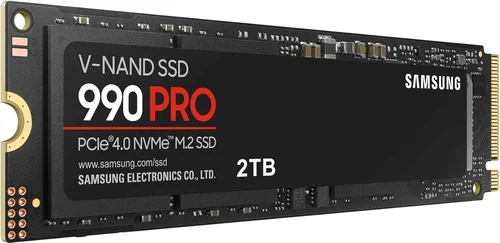
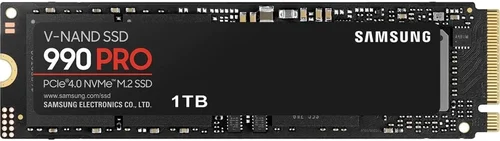
For modern gaming, especially with DirectStorage-enabled titles, you’ll want an SSD with at least 3,500 MB/s read speeds. However, if you’re targeting PCIe Gen4 or Gen5 systems, aim for 5,000–7,000 MB/s or higher. Samsung’s flagship 990 PRO, for example, delivers up to 7,450 MB/s read and 6,900 MB/s write speeds, making it ideal for cutting-edge gaming rigs. Lower-tier models like the 980 (non-PRO) cap around 3,500 MB/s, which is still excellent for most current-gen games but may bottleneck future titles.
2. Form Factor & Compatibility
SSDs come in several physical formats, but for gaming PCs and consoles, the most relevant are M.2 2280 (the standard stick-like module) and 2.5-inch SATA drives. The M.2 NVMe form factor is now the gold standard for performance, offering direct PCIe connectivity and minimal latency. Samsung’s 990 PRO, 980 PRO, and 970 EVO Plus all use M.2 2280, making them compatible with virtually all modern motherboards and the PS5 (with a heatsink).
SATA SSDs like the 870 EVO are bulkier and limited to ~550 MB/s due to the SATA III interface, but they remain viable for older systems or secondary storage. If you’re building a new PC or upgrading a PS5, prioritize NVMe M.2. Also, ensure your motherboard supports the SSD’s PCIe generation—Gen3, Gen4, or Gen5. Using a Gen5 SSD on a Gen3 slot won’t break anything, but you’ll lose significant performance.
3. Storage Capacity Needs
Game sizes have exploded. AAA titles routinely exceed 100GB, with some—like Call of Duty: Modern Warfare III—topping 200GB. A 500GB SSD might hold three or four games before filling up, which is impractical for serious gamers. We recommend a minimum of 1TB for a primary gaming drive. For enthusiasts or content creators who also game, 2TB is the sweet spot, offering room for OS, apps, and a robust game library.
Samsung offers capacities from 250GB up to 4TB across its lineup. The 990 PRO is available in 1TB, 2TB, and 4TB variants, while the more affordable 980 comes in 250GB–2TB. Note that larger capacities often deliver better performance due to increased parallelism across NAND chips—so a 2TB drive may outperform a 500GB model even with the same model number.
4. NAND Type & Endurance
NAND flash memory comes in different types: TLC (Triple-Level Cell) and QLC (Quad-Level Cell). TLC stores three bits per cell and offers a balance of speed, endurance, and cost—making it ideal for gaming. QLC stores four bits per cell, increasing density and lowering price per GB, but at the expense of write speed and longevity.
All Samsung consumer SSDs for gaming use TLC NAND, including the 990 PRO, 980 PRO, and 870 EVO. This ensures high endurance ratings—measured in terabytes written (TBW). For example, the 1TB 990 PRO is rated for 600 TBW, meaning you could write 600TB of data over its lifetime before potential failure. That’s equivalent to installing and uninstalling 1,500 full-length games—far beyond typical usage.
5. Thermal Management & Heatsinks
High-speed NVMe SSDs generate heat, especially during sustained loads like game installations or level streaming. Excessive heat can trigger thermal throttling, where the drive slows down to prevent damage—negatively impacting performance. Samsung addresses this with built-in thermal solutions.
The 990 PRO features a nickel-coated controller and a copper layer in the PCB to dissipate heat efficiently. For PS5 users, Samsung sells a version of the 980 PRO with a pre-attached heatsink, ensuring full compatibility without third-party mods. If your case has poor airflow or you’re overclocking, consider adding an aftermarket M.2 heatsink—even for non-heatsink Samsung drives.
6. Firmware & Software Ecosystem
A great SSD isn’t just hardware—it’s also intelligent software. Samsung provides the Samsung Magician utility, a free tool that lets you monitor drive health, update firmware, optimize performance, and enable features like Rapid Mode (which uses system RAM as a cache for faster access).
For gamers, Magician’s real value lies in its ability to fine-tune the SSD for specific workloads. You can enable “Game Mode,” which prioritizes low latency and high IOPS for smoother gameplay. Firmware updates are also crucial—Samsung regularly releases patches that improve stability, compatibility, and performance, especially for new game engines or OS updates.
7. Warranty & Support
Samsung backs its SSDs with some of the best warranties in the industry. The 990 PRO and 980 PRO come with a 5-year limited warranty or up to the TBW limit—whichever comes first. The 870 EVO offers a 5-year warranty as well, while budget models like the 980 (non-PRO) typically have 3–5 years depending on region.
Support is another strength. Samsung provides detailed documentation, driver downloads, and responsive customer service. If you encounter issues, their support portal includes diagnostic tools and step-by-step troubleshooting guides. For gamers investing in high-end storage, this peace of mind is invaluable.
8. Price-to-Performance Ratio
Not every gamer needs a top-tier SSD. Budget-conscious buyers can still enjoy excellent performance with mid-range options. The key is balancing cost against your actual needs. A 1TB 980 (non-PRO) at ~$80 offers 3,500 MB/s speeds—perfect for Gen3 systems or secondary storage. Meanwhile, the 990 PRO at ~$150 for 1TB delivers nearly double the speed but may be overkill unless you’re running Gen4/Gen5 hardware or playing DirectStorage-heavy games.
Always compare price per gigabyte. During sales, Samsung often discounts higher capacities, making 2TB drives surprisingly affordable. Avoid the cheapest SSDs—they often use inferior controllers or QLC NAND, leading to poor real-world performance under load.
—
Different Types of Buying Guide

—
Common Buying Mistakes to Avoid
❌ Mistake: Prioritizing Peak Speed Over Real-World Performance
Why it’s bad: Marketing specs often highlight maximum sequential speeds, but gaming relies more on random read performance and low queue depth operations. An SSD with high peak speeds but poor controller efficiency may stutter during gameplay.
What to do instead: Look for reviews that test in-game loading times and frame pacing. Samsung’s 990 PRO excels here due to its optimized firmware and high random IOPS (up to 1.4M read).
❌ Mistake: Ignoring Thermal Throttling
Why it’s bad: Without proper cooling, even the fastest SSD can slow down by 30–50% under sustained load, negating its advantages.
What to do instead: Choose SSDs with built-in thermal management (like the 990 PRO) or add a heatsink. For PS5, only use officially compatible models with integrated heatsinks.
❌ Mistake: Buying Based Solely on Price
Why it’s bad: The cheapest SSDs often use QLC NAND or lack DRAM caches, leading to sluggish performance during writes and long-term degradation.
What to do instead: Stick with Samsung’s TLC-based models. The 980 (non-PRO) is affordable but DRAM-less—fine for light use, but the 970 EVO Plus offers better consistency.
❌ Mistake: Overlooking Compatibility
Why it’s bad: Not all M.2 slots support NVMe, and some motherboards share bandwidth between PCIe lanes and SATA ports.
What to do instead: Check your motherboard manual. Ensure the M.2 slot supports PCIe x4 and the correct generation. For PS5, verify SSD dimensions and heatsink height (must be ≤11.25mm).
❌ Mistake: Neglecting Firmware Updates
Why it’s bad: Outdated firmware can cause compatibility issues, reduced performance, or even data corruption with new games or OS updates.
What to do instead: Install Samsung Magician and enable automatic firmware checks. Update before installing major game releases.
❌ Mistake: Choosing Too Small a Capacity
Why it’s bad: SSDs slow down as they fill up. A nearly full drive has fewer free blocks for wear leveling, increasing wear and reducing speed.
What to do instead: Leave at least 10–20% free space. Start with 1TB minimum; 2TB is ideal for serious gamers.
❌ Mistake: Assuming All Samsung SSDs Are Equal
Why it’s bad: The 870 EVO (SATA) and 990 PRO (NVMe Gen4) serve entirely different purposes. Using the wrong type wastes money or bottlenecks performance.
What to do instead: Match the SSD to your system’s capabilities and gaming habits. Gen4 users should prioritize the 990 PRO; Gen3 builders can save with the 970 EVO Plus.
—
Budget Guidelines: How Much Should You Spend?
- Entry-Level ($50–$90): Ideal for budget builds or secondary storage. The Samsung 980 (1TB) offers solid Gen3 NVMe performance without a DRAM cache. Great for indie games or older titles. Expect ~3,500 MB/s speeds and decent endurance.
- Mid-Range ($90–$150): The sweet spot for most gamers. The 970 EVO Plus (1TB) delivers excellent Gen3 performance with DRAM cache, while the 980 PRO (1TB) brings Gen4 speeds to modern rigs. Both offer 5-year warranties and strong real-world gaming performance.
- Premium ($150–$250): For enthusiasts and PS5 upgraders. The 990 PRO (1TB–2TB) dominates with Gen4 speeds, top-tier thermals, and optimized firmware for gaming. The heatsink version is perfect for console users. Expect near-instant load times and future-proofing for years.
- Luxury ($250+): Reserved for 4TB configurations or professional workstations. The 990 PRO 4TB offers massive capacity and peak performance but is overkill for most gamers. Only consider if you store dozens of AAA titles or work with large media files.
—
Expert Tips for Getting the Best Deal
- Buy During Major Sales Events: Samsung frequently discounts SSDs during holidays. The 990 PRO has seen drops to $120 for 1TB—don’t pay full price if you can wait.
- Check Multiple Retailers: Compare prices on Amazon, Best Buy, Newegg, and Samsung.com. Sometimes the manufacturer offers exclusive bundles or extended warranties.
- Consider Refurbished or Open-Box: Samsung-certified refurbished SSDs come with full warranties and are often 15–25% cheaper. Great for budget builds.
- Use Samsung Magician for Optimization: After installation, run the software to enable Game Mode, update firmware, and monitor health. This maximizes longevity and performance.
- Pair with Adequate Cooling: Even non-heatsink SSDs benefit from case airflow. Install M.2 drives away from GPU heat and consider a low-profile heatsink if space allows.
- Read User Reviews Carefully: Look for long-term feedback on thermal performance and reliability. Avoid drives with reports of early failure or inconsistent speeds.
- Warranty Registration: Register your SSD on Samsung’s website to activate the full 5-year coverage. Keep your receipt for proof of purchase.
- Future-Proof with Higher Capacity: If the price difference between 1TB and 2TB is minimal (common during sales), go bigger. You’ll thank yourself when installing your tenth 100GB game.
—

Frequently Asked Questions
Q: Can I use a Samsung SSD in my PlayStation 5?
A: Yes, but only specific models. The PS5 requires an M.2 NVMe SSD with a heatsink, PCIe Gen4 support, and dimensions under 11.25mm in height. Samsung’s 980 PRO with Heatsink is officially compatible and widely recommended. The 990 PRO works too but may require a third-party heatsink.
Q: Is the Samsung 990 PRO worth it over the 980 PRO?
A: For most gamers, the 980 PRO offers 95% of the performance at a lower price. The 990 PRO improves on power efficiency, thermal management, and sustained write speeds—worth it if you play demanding titles or multitask heavily.
Q: Do I need a DRAM cache for gaming?
A: Not strictly, but it helps. DRAM caches improve consistency during random reads and writes. The DRAM-less 980 is fine for casual gaming, but the 970 EVO Plus or 980 PRO offer smoother performance under load.
Q: How long do Samsung SSDs last?
A: With typical gaming use, a Samsung SSD can last 7–10 years or more. The 990 PRO’s 600 TBW rating means even heavy users won’t hit the limit for decades.
Q: Can I clone my old drive to a new Samsung SSD?
A: Yes. Use Samsung Data Migration software (free) to clone your OS, games, and files seamlessly. Ensure the new SSD is equal or larger in capacity.
Q: Does DirectStorage require a specific Samsung SSD?
A: No, but faster SSDs enhance the experience. DirectStorage benefits from high random read speeds and low latency—qualities the 990 PRO excels at.
Q: Are Samsung SSDs reliable?
A: Extremely. Samsung is one of the few companies that designs its own NAND, controllers, and firmware. Their SSDs consistently rank among the most reliable in independent tests.
Q: Should I enable over-provisioning?
A: Yes, especially for gaming. Over-provisioning reserves space for wear leveling, improving longevity and performance. Use Samsung Magician to set aside 7–10%.
Q: What’s the difference between 980 and 980 PRO?
A: The 980 PRO uses a faster controller, supports PCIe Gen4, and includes a DRAM cache. The 980 is Gen3, DRAM-less, and slower—better for budget systems.
Q: Can I use a Samsung SSD as external storage?
A: Yes, with an NVMe enclosure. The 990 PRO works great in USB 3.2 Gen2x2 enclosures for portable gaming libraries, though internal use is optimal.
—
Our Final Recommendations
- Best for Budget-Conscious Buyers: Samsung 980 (1TB) – At under $90, it delivers solid Gen3 NVMe speeds for casual and indie gaming. No DRAM, but reliable for the price.
- Best Overall Value: Samsung 970 EVO Plus (1TB) – Combines Gen3 performance, DRAM cache, and 5-year warranty. Perfect for older PCs or secondary drives.
- Best Premium Option: Samsung 990 PRO (1TB or 2TB) – The ultimate gaming SSD with Gen4 speeds, elite thermals, and DirectStorage readiness. Ideal for high-end rigs and PS5.
- Best for Beginners: Samsung 870 EVO (1TB) – Simple SATA installation, proven reliability, and easy setup. Great for first-time upgraders or office PCs.
- Best for Advanced Users: Samsung 980 PRO with Heatsink (2TB) – Combines top-tier performance with PS5 compatibility. Future-proof and built for heavy multitasking.
—
Conclusion: Making the Right Choice
Choosing the right Samsung SSD for gaming isn’t just about picking the fastest or cheapest option—it’s about aligning technology with your specific needs, system capabilities, and long-term goals. Whether you’re chasing millisecond-level load time improvements, building a silent HTPC, or upgrading your PS5 for seamless 4K gameplay, Samsung offers a model engineered to deliver.
Remember: performance matters, but so does reliability, thermal design, and software support. Don’t fall for marketing hype—focus on real-world benchmarks, user experiences, and total cost of ownership. A slightly more expensive SSD that lasts longer and performs consistently will save you money and frustration down the line.
As games continue to push storage boundaries with real-time ray tracing, AI-driven worlds, and instant asset streaming, your SSD becomes as critical as your GPU or CPU. Invest wisely, maintain your drive with Samsung Magician, and enjoy smoother, faster, more immersive gaming for years to come.
Ready to upgrade? Start by assessing your current setup, then match it with one of our top recommendations. Your next gaming session deserves the speed, stability, and silence that only a Samsung SSD can provide.