
If you’re a video editor, you know the struggle is real when it comes to storage. Those massive 4K and 8K files don’t just eat up space; they demand blazing-fast transfer speeds to keep your workflow smooth and lag-free. That’s where a high-performance external SSD comes in, and Sabrent has emerged as a serious contender in this space.
When looking for the Sabrent best external SSD for video editing, you need drives that offer unparalleled speed, robust durability, and ample capacity. Sabrent’s Rocket series, in particular, has been turning heads with its innovative use of Thunderbolt technology and NVMe performance. But how does it stack up against other top brands? We’ve rounded up four of Sabrent’s finest external SSDs, plus one powerful competitor, to help you make the best choice for your video editing needs. Let’s dive in!
Why an External SSD is a Game-Changer for Video Editing
Traditional spinning external hard drives just can’t keep up with the demands of modern video editing. External SSDs, on the other hand, offer several key advantages:
- Speed: Dramatically faster read/write speeds mean quicker file transfers, smoother playback of high-resolution footage, and less waiting around.
- Durability: With no moving parts, SSDs are far more resistant to drops and shocks, making them perfect for on-the-go content creators.
- Portability: They’re typically much smaller and lighter, easily fitting into your camera bag or even your pocket.
- Efficiency: Faster access to project files means improved workflow efficiency, letting you spend more time creating and less time waiting.
Now, let’s explore the top contenders for the Sabrent best external SSD for video editing.
Our Top Picks for External SSDs for Video Editing
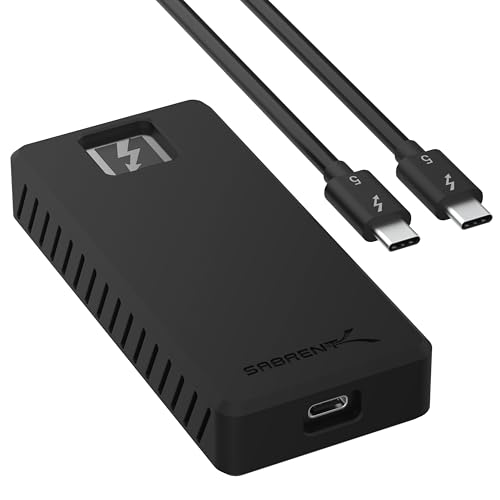
1. SABRENT Rocket XTRM 5 4TB Thunderbolt 5 Portable SSD

If you’re looking to future-proof your video editing setup, the SABRENT Rocket XTRM 5 4TB Thunderbolt 5 Portable SSD is a true game-changer. This beast leverages the very latest Thunderbolt 5 technology, offering speeds that feel almost unreal. For professional editors dealing with uncompressed 8K footage or massive project files, this drive dramatically cuts down transfer times, ensuring your creative flow is never interrupted. It’s not just about speed, though; the generous 4TB capacity means you’ll have plenty of room for multiple large projects.
Key Features:
– Ultra-Fast Thunderbolt 5 Performance: Achieve up to 64Gbps transfer speeds with 80Gbps connection via Thunderbolt 5.
– Broad Compatibility with Older Devices: Backward compatible with Thunderbolt 3, Thunderbolt 4, and USB4.
– Rugged and Durable Construction: Aluminum body for heat dissipation, plus a silicone sleeve for drop protection.
– Plug and Play, No External Power Needed: Bus-powered and comes with a premium Thunderbolt cable.
– Reliable, Future-Proof Storage Solution: Ideal for creators, professionals, and gamers, designed for long-term versatility.
Pros:
– Unmatched Thunderbolt 5 speeds for the most demanding tasks.
– Excellent future-proofing with backward compatibility.
– High 4TB capacity for extensive project storage.
– Extremely durable and protected against drops.
– Convenient bus-powered operation.
Cons:
– Premium price point due to cutting-edge technology.
– Thunderbolt 5 hosts are still relatively new and uncommon.
User Impressions:
Users are consistently blown away by the sheer speed and robust build quality of this drive. Many consider it a worthwhile investment for its ability to handle intensive video editing workflows with ease, appreciating the peace of mind that comes with future-proof performance.
2. SABRENT Rocket XTRM Plus 2TB Thunderbolt 3 Portable SSD

The SABRENT Rocket XTRM Plus 2TB Thunderbolt 3 Portable SSD is a fantastic choice if you need a high-performance drive that perfectly balances speed, compatibility, and value. This upgraded Thunderbolt 3 portable SSD delivers impressive data transfer rates, making it ideal for current-generation Macs and PCs that feature Thunderbolt 3 or USB-C. Its enhanced design and robust build make it a reliable companion for any video editor who’s often on the move, ensuring your valuable data is both fast and secure.
Key Features:
– Upgraded TB3/USB SSD: Enhanced design for on-the-go use, plug and play.
– Flexible High-Speed Performance: Up to 2,700 MB/s with 40Gbps Thunderbolt 3 or 900 MB/s in 10Gbps USB 3.2 Gen 2×1 fallback mode.
– Built To Last: Aluminum shell for ruggedness and improved heat dissipation, with a removable silicone sleeve.
– Complete Package: Includes premium Thunderbolt 3 and USB-A to USB-C cables.
– Universal Compatibility: Works with Windows, macOS, and Linux systems.
Pros:
– Excellent Thunderbolt 3 speeds suitable for 4K video editing.
– Versatile connectivity with strong USB fallback speeds.
– Extremely durable, built with an aluminum body and silicone sleeve.
– Comes with all necessary cables, offering great value.
– Wide operating system compatibility.
Cons:
– Not as future-proof or fast as Thunderbolt 5 options.
– 2TB capacity might be limiting for extremely large, multi-project archives.
User Impressions:
Customers frequently praise the Rocket XTRM Plus for its reliable and consistent performance, highlighting its robust construction and the convenience of included cables. It’s often recommended as a solid, dependable choice for professionals who need a fast, durable external drive.
3. SABRENT Rocket XTRM 5 2TB Thunderbolt 5 Portable SSD
Just like its 4TB sibling, the SABRENT Rocket XTRM 5 2TB Thunderbolt 5 Portable SSD brings the groundbreaking speeds of Thunderbolt 5 to your fingertips, but in a slightly more accessible 2TB capacity. This is an excellent option for editors who crave the absolute fastest data transfer rates but don’t necessarily need the largest storage footprint. It’s still ideal for handling demanding 4K/8K video files, high-res RAW footage, and complex project files, ensuring your workflow remains incredibly responsive and efficient.
Key Features:
– Ultra-Fast Thunderbolt 5 Performance: Achieve up to 64Gbps transfer speeds with 80Gbps connection via Thunderbolt 5.
– Broad Compatibility with Older Devices: Backward compatible with Thunderbolt 3, Thunderbolt 4, and USB4.
– Rugged and Durable Construction: Aluminum body for heat dissipation, plus a silicone sleeve for drop protection.
– Plug and Play, No External Power Needed: Bus-powered and comes with a premium Thunderbolt cable.
– Reliable, Future-Proof Storage Solution: Ideal for creators, professionals, and gamers, designed for long-term versatility.
Pros:
– Offers cutting-edge Thunderbolt 5 speeds for unparalleled performance.
– Excellent backward compatibility ensures broad usability.
– Robust construction with added drop protection.
– Bus-powered design means no extra power bricks needed.
– A strong investment for future video editing hardware.
Cons:
– Still carries a premium price for the latest technology.
– 2TB might be less space than some heavy users require for multiple projects.
User Impressions:
Users are incredibly impressed by the speed and responsiveness of this 2TB Thunderbolt 5 drive. Many note its ability to dramatically speed up their video rendering and file transfers, calling it an essential tool for high-end production workflows.
4. SABRENT 1TB Rocket Nano XTRM External SSD, USB 3.2 / Thunderbolt 3

The SABRENT 1TB Rocket Nano XTRM External SSD is where ultimate portability meets impressive performance. Don’t let its tiny size fool you – this little powerhouse is built for speed and versatility. Perfect for editors who need a compact yet fast drive for daily work, quick transfers, or as a dedicated scratch disk on the go. Its dual compatibility with Thunderbolt 3 and USB 3.2 Gen 2×1 makes it incredibly flexible, ready to connect to virtually any modern machine. For anyone seeking the Sabrent best external SSD for video editing in a pocket-sized package, this is it.
Key Features:
– Always Works: Thunderbolt 3 transfer mode, compatible with older USB systems.
– Speed To Keep Up: Thunderbolt 3 connects at 40Gbps (up to 2700MBps), USB mode up to 900MBps.
– Rugged Portability: Small, solid aluminum body for heat dissipation and durability, optional silicon sleeve.
– Convenience At Your Fingertips: Plug and play, bus-powered, includes both Thunderbolt and USB-C to USB-A cables.
– It’s Sabrent: Works with Windows and macOS systems.
Pros:
– Extremely compact and lightweight, perfect for travel.
– Versatile connectivity with both Thunderbolt 3 and high-speed USB.
– Surprisingly fast for its size, excellent for daily editing tasks.
– Durable aluminum body with extra protection from the silicone sleeve.
– All necessary cables included for wide device compatibility.
Cons:
– 1TB capacity might be too small for storing large, long-term video projects.
– Not as fast as the dedicated Thunderbolt 5 drives.
User Impressions:
This drive consistently receives high marks for its incredible portability and robust performance. Users love that they can throw it in any bag and have access to fast storage, making it a favorite for mobile editing setups or as a fast scratch disk.
5. SanDisk 4TB Extreme PRO Portable SSD – The Challenger

While we’re focusing on Sabrent, it’s worth acknowledging strong competitors. The SanDisk 4TB Extreme PRO Portable SSD stands as a formidable challenger, renowned for its incredible durability and robust NVMe performance. If your priority is a portable external drive that can withstand the rigors of field production while still delivering fast enough speeds for 4K video editing, this SanDisk model is an excellent alternative. It brings enterprise-grade reliability to the consumer market, perfect for editors who demand resilience alongside speed.
Key Features:
– Powerful NVMe solid state performance: Up to 2000MB/s read/write speeds.
– Forged aluminum chassis: Acts as a heatsink to maintain sustained high speeds.
– Travel worry-free: 5-year limited warranty and a forged aluminum chassis-silicone shell combo.
– Extreme durability: Up to 3-meter drop protection and IP65 water and dust resistance.
– SanDisk Memory Zone app: Easily manage files and automatically free up space.
Pros:
– Exceptional durability with IP65 rating and drop protection.
– Very fast NVMe USB speeds, great for 4K editing workloads.
– Long 5-year warranty offers excellent peace of mind.
– Aluminum chassis aids in thermal management for sustained performance.
– Handy carabiner loop for secure transport.
Cons:
– Not a Thunderbolt device, so speeds are lower than Thunderbolt 3/5 drives.
– Relies solely on USB-C connectivity, which might not be universal for all older systems.
User Impressions:
Customers consistently praise the SanDisk Extreme PRO for its tank-like build quality and reliable performance, especially in challenging environments. Many professional photographers and videographers swear by it for its ruggedness and consistent speed, making it a go-to for fieldwork.
FAQ Section
1. Why do I need an external SSD for video editing, and isn’t an external hard drive enough?
External SSDs (Solid State Drives) are crucial for video editing because they offer significantly faster read/write speeds compared to traditional external HDDs (Hard Disk Drives). This speed is vital for playing back high-resolution footage (like 4K or 8K) smoothly, quickly transferring large video files, and reducing render times. HDDs often become bottlenecks in a video editing workflow, causing lag and stuttering, whereas SSDs enable a much more efficient and frustration-free experience.
2. What makes Sabrent a good choice for video editing SSDs?
Sabrent has quickly gained a reputation for producing high-performance external SSDs, particularly with their focus on Thunderbolt technology and NVMe performance. Their drives often boast excellent sustained transfer speeds, robust build quality (aluminum casings, silicone sleeves), and a commitment to backward compatibility, ensuring they work with a wide range of devices. Sabrent also often includes necessary cables, making their products ready to use right out of the box.
3. What’s the difference between Thunderbolt 3, Thunderbolt 5, and USB 3.2 for external SSDs?
These refer to the interface technology used for connecting the SSD to your computer, and they dictate the maximum theoretical speed:
– USB 3.2 Gen 2×1: Offers speeds up to 10Gbps (around 1,000 MB/s). Good for 4K editing but might struggle with very high bitrates.
– Thunderbolt 3: Offers speeds up to 40Gbps (around 2,700 MB/s). This is a game-changer for 4K/6K editing, providing incredibly fast transfers.
– Thunderbolt 5: The latest standard, offering up to 80Gbps (around 6,400 MB/s) with 64Gbps transfer speeds. This is designed for future high-res workflows like 8K+ and multiple display setups, making it the fastest option available.
The faster the interface, the quicker your large video files will transfer and the smoother your editing will be.
4. How much storage capacity do I need for video editing?
This depends heavily on your workflow, the resolution of your footage, and how long you keep projects.
– 1TB: Good for smaller, individual projects in 1080p or occasional 4K, or as a scratch disk.
– 2TB: A common sweet spot for many 4K editors, offering a good balance of capacity and cost for several projects.
– 4TB or more: Ideal for professional editors working with multiple large 4K/8K projects, raw footage, or those who need to archive projects on their working drive. Remember, raw uncompressed footage can consume hundreds of gigabytes per hour.
5. Can I use these Sabrent SSDs with both Windows and Mac?
Yes, most Sabrent external SSDs are designed for universal compatibility with both Windows and macOS systems. They often come pre-formatted or can be easily formatted to a file system like exFAT or APFS (for Mac), which allows seamless use across different operating systems. Always check the product specifications for exact compatibility details, but generally, Sabrent aims for broad device support.
6. Is Sabrent better than SanDisk for video editing?
“Better” is subjective and depends on your specific needs. Sabrent often excels in offering the absolute latest in Thunderbolt speed (especially with Thunderbolt 5), making it a top choice for those prioritizing raw transfer speeds and future-proofing. SanDisk, particularly its Extreme PRO series, is renowned for its exceptional ruggedness, reliability, and robust build quality (IP-rated, drop protection), making it a favorite for editors who work in challenging outdoor or travel environments where durability is paramount. Both brands offer high-quality NVMe performance, so your choice might come down to whether cutting-edge speed or extreme durability is your higher priority.
7. How does an external SSD improve my video editing workflow?
An external SSD dramatically improves your workflow by:
– Faster project loading: Your editing software and project files load almost instantly.
– Smooth playback: No more stuttering or dropped frames when scrubbing through high-resolution timelines.
– Quicker rendering: While CPU/GPU primarily handles rendering, fast SSDs ensure that source files are fed to the processors without delay.
– Rapid file transfers: Moving raw footage from camera cards or between different drives becomes a matter of seconds, not minutes.
– Portability: Take your entire project with you on a tiny, durable drive, ready to edit anywhere.
8. What factors should I consider when buying an external SSD for video editing?
– Speed: Look for Thunderbolt (3, 4, or 5) for the fastest speeds, or at least USB 3.2 Gen 2×2 or Gen 2×1 for good performance.
– Capacity: Match it to your project size and number of active projects (2TB-4TB is common for 4K).
– Durability: An aluminum casing, shock resistance, and optional silicone sleeves are great for protection.
– Connectivity: Ensure it has ports compatible with your computer (Thunderbolt, USB-C, USB-A).
– Portability: If you’re often on the go, consider smaller, lighter ‘nano’ drives.
– Price: Balance performance and capacity with your budget. The latest tech often costs more.
Conclusion
Choosing the Sabrent best external SSD for video editing ultimately depends on your specific needs, budget, and the current hardware you’re using. If you’re ready to embrace the future of speed, the Thunderbolt 5 drives like the Rocket XTRM 5 are unbeatable. For those seeking a perfect blend of performance and compatibility with current systems, the Thunderbolt 3 XTRM Plus and Nano XTRM drives offer excellent value.
Remember, investing in a high-quality external SSD isn’t just about storage; it’s about investing in a smoother, more efficient, and ultimately more enjoyable video editing experience. Whichever Sabrent drive you choose, you’re getting a powerful tool designed to keep up with the demands of modern content creation.