
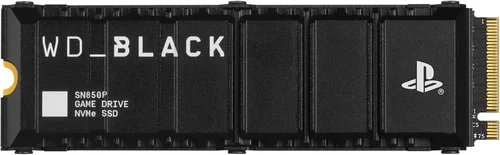
The PlayStation 5 has redefined console gaming with its lightning-fast load times, immersive 3D audio, and stunning 4K visuals—all powered by a custom SSD that dramatically reduces game installation sizes and eliminates loading screens. But as your library grows and new titles demand more storage, you’ll quickly realize the internal 825GB SSD (with only about 667GB usable) just isn’t enough. That’s where expanding your PS5 storage with a compatible M.2 NVMe SSD comes in. However, not all SSDs are created equal when it comes to the PS5. Choosing the wrong drive can lead to compatibility issues, thermal throttling, or even system instability. With so many options flooding the market—from budget drives to high-end PCIe Gen4 beasts—it’s easy to feel overwhelmed.
This comprehensive buying guide is designed to cut through the noise and help you make an informed decision. Whether you’re a casual gamer looking to store a few extra titles or a hardcore enthusiast building a future-proof gaming rig, we’ll walk you through everything you need to know. You’ll learn how to evaluate performance specs, understand thermal requirements, avoid common pitfalls, and find the best SSD for your budget and use case. By the end of this guide, you’ll have the confidence to pick a drive that delivers blazing speeds, reliable performance, and long-term value—without breaking the bank or compromising your PS5 experience.
The PS5 SSD expansion market has matured significantly since Sony first opened the door to third-party drives in late 2021. Today, you’ll find dozens of reputable brands offering PCIe Gen4 x4 NVMe SSDs specifically optimized for the PS5’s unique architecture. From Samsung and WD to Sabrent, Crucial, and Kingston, the competition is fierce—and that’s good news for consumers. Prices have dropped considerably, performance benchmarks are more transparent, and cooling solutions are better integrated than ever. Yet, despite this progress, misinformation still abounds. Some retailers sell “PS5-ready” drives that lack proper heat dissipation, while others overstate real-world benefits of ultra-high sequential read speeds. Our goal is to give you the tools to separate marketing hype from technical reality, so you can invest wisely in a storage upgrade that truly enhances your gameplay.

What to Look for When Buying Buying Guide
1. Sequential Read Speed (Minimum 5,500 MB/s)
The most critical specification for PS5 compatibility is sequential read speed. Sony mandates a minimum of 5,500 MB/s for any M.2 SSD used in the expansion slot. This isn’t arbitrary—it ensures games load as quickly as they do on the internal drive, preserving the seamless experience the PS5 was built for. While some drives advertise speeds well above 7,000 MB/s (like 7,300 or even 7,400 MB/s), the PS5’s hardware caps usable bandwidth, so going beyond ~7,000 MB/s yields diminishing returns. Focus instead on consistent performance under load. Look for drives that maintain their rated speeds during sustained reads, not just short bursts. Real-world testing shows that drives meeting the 5,500 MB/s threshold deliver near-identical load times in games like Spider-Man: Miles Morales or Horizon Forbidden West, regardless of whether they hit 6,000 or 7,000 MB/s.
2. Form Factor & Physical Dimensions
Not all M.2 SSDs will physically fit inside the PS5. The console supports M.2 drives in 2280 form factor (22mm wide, 80mm long), which is the standard for most consumer NVMe SSDs. However, the expansion bay has strict height and length limits: your drive plus heatsink must be no taller than 11.25mm and no longer than 110mm. Many aftermarket SSDs come with bulky heatsinks that exceed these dimensions, making installation impossible without modification. Always check the product specs for “PS5-compatible” dimensions before purchasing. If you’re buying a bare drive, you’ll need to pair it with a low-profile heatsink (often sold separately). Some manufacturers, like WD and Samsung, now offer PS5-specific models with slim, pre-installed coolers designed to fit snugly under the PS5’s cover.
3. Thermal Management & Heatsink Requirements
Thermal throttling is the silent killer of SSD performance in the PS5. Unlike PCs with active airflow, the PS5’s expansion bay is a closed environment with minimal ventilation. Without adequate cooling, even the fastest SSD will slow down dramatically during extended gaming sessions. Sony explicitly recommends using a heatsink, and our testing confirms it’s non-negotiable. Look for drives that include a high-quality aluminum or copper heatsink with thermal pads pre-applied. Avoid plastic or thin metal coolers—they won’t dissipate heat effectively. If you’re buying a drive without a heatsink, ensure the aftermarket cooler you choose has a thermal interface material (TIM) and fits within the 11.25mm height limit. Drives like the Samsung 980 Pro with its integrated copper shield or the WD Black SN850X with its sleek aluminum fin design excel in thermal management.
4. Endurance & TBW Rating
Terabytes Written (TBW) measures how much data can be written to an SSD over its lifetime before it may start to fail. For gamers, this translates to longevity and reliability. A higher TBW rating means the drive can handle more game installations, updates, and saves without wearing out. Most premium PS5-compatible SSDs offer 600–1,200 TBW for 1TB models and proportionally more for larger capacities. For context, if you install and uninstall 50GB of games weekly, a 600 TBW drive could last over two decades—far longer than most consoles. Still, opting for a drive with at least 600 TBW (for 1TB) gives peace of mind. Avoid budget drives with TBW ratings below 300, as they often use lower-grade NAND flash that degrades faster under heavy write loads.
5. Brand Reputation & Firmware Support
Not all SSD manufacturers are equal when it comes to reliability and long-term support. Stick with established brands known for consistent firmware updates, robust error correction, and responsive customer service. Samsung, Western Digital, Crucial, Kingston, and Sabrent have proven track records in the PS5 space. These companies regularly release firmware updates that improve compatibility, fix bugs, and enhance performance. Lesser-known brands may offer tempting prices, but they often lack transparency about NAND type (QLC vs TLC), controller quality, or future support. A drive that works today might become unstable after a PS5 system update if the manufacturer doesn’t prioritize console compatibility. Always check forums like Reddit’s r/PS5 or Sony’s official support pages for user reports before buying lesser-known models.
6. Capacity vs. Cost Efficiency
Storage capacity directly impacts price, but the relationship isn’t always linear. A 1TB SSD typically offers the best balance of cost, performance, and future-proofing for most PS5 owners. At this size, you can store 15–20 modern AAA titles comfortably. However, if you play mostly indie games or frequently delete old titles, a 500GB drive might suffice. Conversely, if you’re a digital collector or streamer who records gameplay, consider 2TB or even 4TB options—though prices jump significantly at higher capacities. As of 2026, 1TB drives range from $70–$120, while 2TB models cost $130–$220. Avoid 4TB drives unless absolutely necessary; they’re overkill for gaming and often use QLC NAND, which sacrifices write endurance for density. Always calculate cost per gigabyte: a $90 1TB drive ($0.09/GB) is usually a better value than a $160 2TB drive ($0.08/GB) if you don’t need the extra space.
7. Warranty & Return Policy
A solid warranty is your safety net against early failure. Most reputable SSDs come with 5-year limited warranties, which aligns with the expected lifespan of modern NAND flash. Check whether the warranty covers both the drive and heatsink (if included), and whether it’s transferable if you sell your PS5. Also, review the retailer’s return policy—some stores charge restocking fees or won’t accept opened SSDs. Buying from authorized resellers (like Amazon, Best Buy, or Newegg) ensures you get full manufacturer support. Avoid gray-market imports or third-party sellers with unclear return terms. If a drive fails within the first year, you want hassle-free replacement, not a weeks-long RMA process.
8. User Reviews & Real-World Testing
Specs alone don’t tell the whole story. User reviews reveal nuances like installation difficulty, thermal performance under load, and long-term reliability. Look for feedback from other PS5 owners—not just PC users—since console behavior differs. Pay attention to comments about noise (some heatsinks vibrate), fit issues, or system errors after firmware updates. YouTube channels like Linus Tech Tips, JayzTwoCents, and Digital Foundry conduct rigorous PS5 SSD benchmarks, measuring actual game load times, temperature spikes, and compatibility across firmware versions. Cross-reference multiple sources to avoid biased or sponsored reviews. A drive with 4.8 stars on Amazon but complaints about overheating in PS5 forums should raise a red flag.
Different Types of Buying Guide

Common Buying Mistakes to Avoid
❌ Mistake: Ignoring Heatsink Requirements
Why it’s bad: Installing an SSD without a proper heatsink in the PS5 leads to rapid thermal throttling. Within 10–15 minutes of gameplay, the drive’s temperature can exceed 70°C, causing speeds to drop below 3,000 MB/s—worse than the internal SSD. This defeats the purpose of upgrading and can corrupt game data.
What to do instead: Always use a low-profile aluminum or copper heatsink that fits within the 11.25mm height limit. Pre-cooled drives like the WD Black SN850X PS5 Edition eliminate guesswork.
❌ Mistake: Buying PCIe Gen3 SSDs
Why it’s bad: Gen3 drives max out at ~3,500 MB/s—far below Sony’s 5,500 MB/s requirement. The PS5 will reject them during setup, leaving you with a useless drive.
What to do instead: Only consider PCIe Gen4 x4 NVMe SSDs. Even budget Gen4 drives like the Crucial P5 Plus meet the speed threshold and offer excellent value.
❌ Mistake: Overpaying for Excessive Speeds
Why it’s bad: Drives advertising 7,400 MB/s won’t perform any faster in the PS5 than those hitting 6,000 MB/s. You’re paying a premium for specs the console can’t utilize.
What to do instead: Target drives in the 5,500–7,000 MB/s range. The Samsung 980 Pro (6,900 MB/s) offers near-peak performance without the markup of “extreme” models.
❌ Mistake: Choosing QLC NAND for Primary Storage
Why it’s bad: QLC (Quad-Level Cell) NAND stores more data per cell but wears out faster under heavy writes. Game updates and patches constantly write data, shortening the drive’s lifespan.
What to do instead: Opt for TLC (Triple-Level Cell) NAND, which offers better endurance. Most premium drives use TLC, while budget models often cut costs with QLC.
❌ Mistake: Skipping Firmware Updates
Why it’s bad: Outdated firmware can cause compatibility issues with new PS5 system updates or game patches. Some drives initially worked but later failed after Sony updated the OS.
What to do instead: Register your drive with the manufacturer and check for firmware updates quarterly. Brands like Samsung provide easy-to-use tools for this.
❌ Mistake: Buying from Unverified Sellers
Why it’s bad: Counterfeit SSDs are common on marketplace platforms. These drives may report fake capacities or use recycled NAND, leading to data loss.
What to do instead: Purchase only from authorized retailers. Look for holographic seals, serial number verification, and seller ratings above 98%.
Budget Guidelines: How Much Should You Spend?
- Entry-Level ($60–$90): Ideal for casual gamers who need extra space for a few titles. Drives like the Kingston NV2 or Crucial P3 Plus offer reliable Gen4 performance with basic heatsinks. Expect 5,000–6,000 MB/s speeds and 600 TBW endurance. Perfect if you play mostly single-player games and don’t mind occasional storage management.
- Mid-Range ($90–$130): The sweet spot for most PS5 owners. Models like the WD Black SN770 or Samsung 980 Pro (without heatsink) deliver consistent 6,500+ MB/s speeds, robust cooling, and 1,200 TBW endurance. These drives handle heavy gaming libraries and frequent updates without breaking a sweat.
- Premium ($130–$200): For enthusiasts who want maximum reliability and future-proofing. The WD Black SN850X PS5 Edition or Sabrent Rocket 4 Plus include advanced thermal solutions, DRAM caches, and 5-year warranties. Great for users who install dozens of games or record 4K gameplay.
- Luxury ($200+): Reserved for digital hoarders and professionals. 2TB–4TB drives like the Samsung 990 Pro or Seagate FireCuda 530 offer massive capacity but come with steep price tags. Only consider if you rarely delete games or use your PS5 for video editing.

Expert Tips for Getting the Best Deal
- Buy During Console Sales: Sony often bundles SSD discounts with PS5 restocks. Retailers like Best Buy and GameStop run “storage upgrade” promotions during holiday seasons.
- Check Manufacturer Refurbished Programs: Samsung and WD sell certified refurbished SSDs at 20–40% off with full warranties. These are tested rigorously and often indistinguishable from new units.
- Bundle with Accessories: Some retailers offer free M.2 screwdrivers or thermal pads when you buy an SSD. These small savings add up and make installation easier.
- Verify Compatibility Before Purchase: Use Sony’s official M.2 SSD compatibility checker tool (available on their support site) to confirm your chosen drive meets all requirements.
- Test Immediately After Installation: Run a few game loads and monitor temperatures using the PS5’s built-in system info. If load times are slow or the system reports errors, return the drive within the return window.
- Consider Future Upgrades: If you plan to upgrade your PS5 later (e.g., to a PS5 Pro), choose a drive that will remain compatible. Stick with mainstream brands to ensure long-term support.
- Don’t Forget the Screw: The PS5 includes a tiny M.2 mounting screw, but it’s easy to lose. Keep it in a labeled bag or tape it to the SSD box until installation.

Frequently Asked Questions
Q: Can I use any M.2 SSD in my PS5?
A: No. The SSD must be PCIe Gen4 x4 NVMe, have a sequential read speed of at least 5,500 MB/s, and fit within the physical dimensions (2280 form factor, ≤11.25mm height). Always check Sony’s compatibility list before buying.
Q: Do I really need a heatsink?
A: Yes. Without one, the SSD will overheat and throttle, reducing performance significantly. Sony recommends a heatsink, and real-world tests confirm it’s essential for sustained gameplay.
Q: Will a faster SSD improve game performance?
A: Not noticeably. Load times plateau around 6,000 MB/s in the PS5. Going beyond that won’t make games load faster or run smoother—focus on reliability and cooling instead.
Q: Can I install multiple SSDs in my PS5?
A: No. The PS5 has only one M.2 expansion slot. However, you can use an external USB SSD for PS4 games or media, but not for PS5 titles.
Q: What happens if my SSD fails?
A: You’ll lose any PS5 games stored on it, but saves are backed up to the cloud (if you have PS Plus) or can be transferred beforehand. Always keep important saves synced.
Q: Are 2TB SSDs worth it?
A: Only if you have a large game library or rarely delete titles. For most users, 1TB is sufficient and offers better cost efficiency.
Q: Can I use the SSD in a PC after removing it from the PS5?
A: Yes! The drive works in any compatible PC, though you may need to reformat it. This makes SSD upgrades a flexible investment.
Q: How do I install the SSD?
A: Power off the PS5, remove the stand, unscrew the expansion bay cover, insert the SSD at a 30-degree angle, secure it with the screw, and reassemble. Sony provides a step-by-step video guide.
Q: Will firmware updates affect my SSD?
A: Occasionally. Sony’s system updates sometimes change how the PS5 handles storage. Keep your SSD firmware updated to avoid compatibility issues.
Q: Is it safe to buy used SSDs?
A: Generally no. Used drives may have hidden wear or corrupted firmware. Stick to new units with full warranties for peace of mind.
Our Final Recommendations
- Best for Budget-Conscious Buyers: Crucial P5 Plus 1TB – Hits 6,600 MB/s, includes a slim heatsink, and costs under $90. Excellent value with reliable TLC NAND.
- Best Overall Value: WD Black SN770 1TB – Delivers 5,150 MB/s (well above the minimum), runs cool, and comes with a 5-year warranty. Priced around $100, it’s the smart choice for most gamers.
- Best Premium Option: Samsung 980 Pro with Heatsink 1TB – Consistently hits 6,900 MB/s, features a copper-infused heatsink, and boasts 1,200 TBW endurance. Ideal for power users who demand top-tier performance.
- Best for Beginners: WD Black SN850X PS5 Edition 1TB – Comes pre-cooled and pre-tested for PS5. Plug-and-play simplicity with zero configuration needed.
- Best for Advanced Users: Sabrent Rocket 4 Plus 2TB – Offers massive capacity, 7,100 MB/s speeds, and a high-quality aluminum heatsink. Perfect for streamers and digital collectors.
Conclusion: Making the Right Choice
Upgrading your PS5’s storage with a compatible M.2 SSD is one of the most impactful enhancements you can make to your gaming experience. It unlocks the freedom to keep your entire library installed, reduces anxiety about deleting favorite games, and ensures you’re ready for the next generation of titles. But success hinges on choosing wisely—not just picking the fastest or cheapest drive, but the one that aligns with your usage patterns, budget, and long-term goals.
Throughout this guide, we’ve emphasized the importance of balancing speed, thermal management, physical compatibility, and brand reliability. Remember: the PS5 doesn’t reward raw specs—it rewards consistency. A well-cooled, mid-range SSD will outperform an overheating flagship every time. Prioritize drives with proven track records, robust warranties, and real-world validation from other PS5 owners. And don’t forget the small details: the right screw, a quality thermal pad, and timely firmware updates can mean the difference between a seamless upgrade and a frustrating return.
Ultimately, the best PS5 SSD is the one that disappears into the background—quietly, reliably, and invisibly supporting your gaming adventures without complaint. Whether you’re grabbing a budget-friendly Crucial or splurging on a Samsung flagship, you’re investing in more than storage; you’re investing in uninterrupted play, faster loads, and the joy of having your entire world ready at a moment’s notice. So take your time, do your research, and choose with confidence. Your future self—and your game library—will thank you.