

So, you’ve just unboxed a speedy new Sabrent SSD, or maybe you’re eyeing one for an upgrade. Fantastic choice! Sabrent drives are known for their impressive performance and reliability. But getting the most out of your SSD isn’t just about the hardware; it’s also about how you set it up. One crucial, yet often overlooked, optimization tweak is choosing the right allocation unit size (AUS) when formatting your drive with NTFS. This little setting can significantly impact your Sabrent SSD’s efficiency, speed, and overall performance.
We’re going to dive into what allocation unit size means, why it matters for your Sabrent NTFS SSD, and then check out five awesome Sabrent products that are just waiting to be optimized. Let’s make sure you’re getting every bit of speed your drive has to offer!
Understanding Allocation Unit Size (AUS) for NTFS SSDs
First off, let’s demystify “allocation unit size.” You might also hear it called “cluster size.” Essentially, it’s the smallest block of disk space that your file system (NTFS, in this case) can allocate to store a file. Think of it like a piece of paper: if your paper size is large, you might waste a lot of space for a tiny note, but you can write a long essay without flipping pages often. If your paper size is small, you use less waste for tiny notes, but a long essay requires many pages.
Why does this matter for SSDs?
Traditional Hard Disk Drives (HDDs) have spinning platters, and larger allocation units can reduce the number of “seek” operations, making them faster for large files. SSDs, however, use flash memory and don’t have moving parts, so seek times aren’t an issue. Instead, SSD performance can be influenced by how efficiently data is written and read in blocks.
- Smaller AUS (e.g., 4KB): This is the default for NTFS. It’s great if your drive stores lots of small files, as it minimizes wasted space (called “slack space”). However, for very large files, the SSD has to manage more individual blocks, which can slightly reduce sequential read/write speeds.
- Larger AUS (e.g., 64KB): This is often recommended for drives primarily storing large files (like video editing projects, huge game libraries, or virtual machines). It allows the SSD to write and read data in bigger chunks, potentially boosting sequential performance and reducing file fragmentation. The downside is that if you store many tiny files, a lot of space will be wasted since even a 1KB file will occupy a full 64KB block.
So, what’s the Sabrent best allocation unit size for NTFS SSD? Well, it truly depends on your primary use case. For a general-purpose drive with a mix of small and large files, the default 4KB is often a safe bet. But for a dedicated gaming drive or a drive for large media files, experimenting with 16KB or even 64KB might yield better results. Many users find a 16KB or 32KB allocation unit size to be a good balance for modern Sabrent NVMe SSDs, especially for gaming and mixed-use scenarios, offering a sweet spot between performance and efficiency.
Ready to see some Sabrent drives that can benefit from this optimization? Let’s check them out!
Our Top 5 Sabrent SSD Products to Optimize
Here are five fantastic Sabrent products that deliver outstanding performance, and which can benefit from thoughtful allocation unit size selection during formatting.
SABRENT USB 3.0 4-Bay 2.5” SATA SSD and HDD Docking…
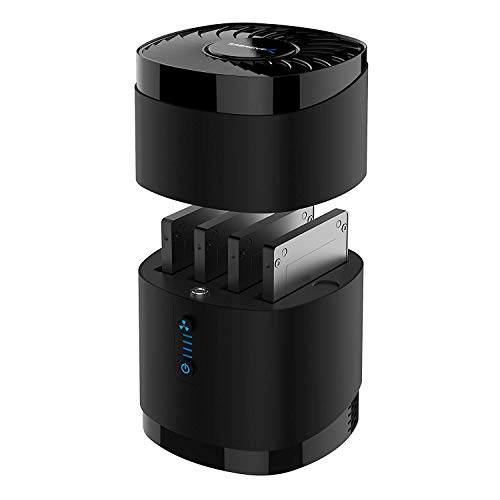
This versatile docking station is an absolute godsend for anyone who frequently swaps between 2.5” SATA SSDs or HDDs. Whether you’re a technician, a data hoarder, or just someone with a collection of old drives, this dock makes accessing, transferring, and backing up data incredibly simple and fast, all while keeping your drives cool and performing optimally. It’s a fantastic solution for managing multiple drives without needing to install them internally.
Key Features:
– High Capacity and Broad Compatibility: Supports up to 4x 16TB 2.5” SATA SSDs or HDDs (maximum 12.5mm thickness). Not compatible with RAID or 15mm drives.
– Blazing Fast Transfers: USB 3.0 interface delivers up to 5Gbps transfer speeds. Backward compatible with USB 2.0 and 1.1 devices.
– Tool-Free Drive Access: Quickly and easily swap drives with no screws or tools required. Magnetic cover design ensures fast access.
– Enhanced Cooling and Long-Term Reliability: Built-in whisper-quiet fan keeps drives cool and healthy. Optional on/off switch for noise and power control. Engineered for continuous 24/7 operation.
– Plug and Play Compatibility: Works right out of the box with Windows, macOS, and Linux. No drivers required for standard operation.
Pros:
– Excellent for managing multiple 2.5″ drives
– Tool-free design for easy hot-swapping
– Active cooling system for drive longevity
– Fast USB 3.0 transfer speeds
– Broad OS compatibility
Cons:
– Only 2.5″ drives supported (no 3.5″)
– Not compatible with RAID setups
– USB 3.0, not the newer, faster USB 3.2 Gen 2
User Impressions: Customers love the convenience and robust build quality of this dock. Many highlight the ease of use for cloning drives and accessing data from older SSDs. The quiet fan and magnetic cover are frequently praised features that make it a joy to use.
SABRENT Rocket 2230 1TB NVMe SSD – PCIe Gen4 M.2…
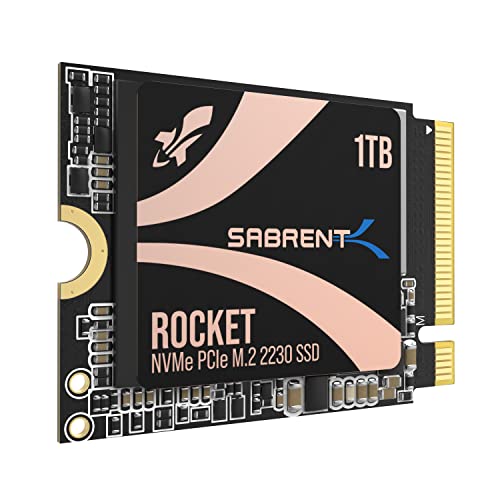
For those with devices where space is a premium, like the Steam Deck, Microsoft Surface Pro, or compact ultrabooks, the Sabrent Rocket 2230 is an absolute game-changer. This tiny yet mighty NVMe SSD delivers incredible PCIe Gen4 speeds in a form factor that fits where larger drives simply can’t. It’s the perfect upgrade to unleash the full potential of your portable devices, drastically cutting down loading times and boosting overall responsiveness.
Key Features:
– Compact Compatibility: Designed for Steam Deck, Surface Pro, ultrabooks, and other small devices that require M.2 2230 – the perfect upgrade where space is limited.
– High-Speed Gen4 Performance: Achieve speeds up to 5GB/s and 800K IOPS for faster game loading, seamless multitasking, and better overall responsiveness.
– 1TB Capacity: Store more games, apps, and files without relying on slow microSD cards. Perfect for expanding internal storage on handhelds and laptops.
– Reliable and Efficient: Built with a new Gen4 NVMe controller and premium 3D TLC NAND. DRAM-less with HMB support for low power usage and cool operation.
– Retail-Grade Quality: Avoid second-hand OEM drives. Includes full warranty, Sabrent Acronis True Image cloning software, and firmware update support.
Pros:
– Incredible performance for its tiny size
– Ideal for Steam Deck and other 2230-compatible devices
– Generous 1TB capacity for portable gaming/work
– Efficient and reliable operation
– Includes useful cloning software
Cons:
– Specific 2230 form factor means limited general compatibility
– DRAM-less design, though HMB mitigates this well
– Can be more expensive per GB than larger SSDs
User Impressions: Steam Deck owners particularly rave about this SSD, noting significant improvements in game loading times and overall system snappiness. Users appreciate the reliable performance and the peace of mind that comes with a retail-grade product designed specifically for these compact devices.
SABRENT USB 3.2 Type A to SATA/U.2 SSD Adapter Cable…

Need quick, tool-free access to a 2.5”, 3.5” SATA drive, or even a U.2 SSD? This Sabrent adapter cable is your go-to solution. It’s the epitome of simplicity, transforming any bare drive into an external USB storage device in seconds. With support for high-speed USB 3.2 Gen 2 and TRIM/UASP, it ensures your drives perform at their best whether you’re recovering data, upgrading, or just need temporary access.
Key Features:
– Simplicity | Tool-free and easy to use: Easily access your 2.5” & 3.5” SATA SSDs and HDDs or your U.2 (SFF-8639) SSDs with this convenient, tool-less USB adapter. This adapter makes it simple to work with a variety of drives.
– Compatibility | USB with TRIM & UASP: The adapter connects through a USB 3.2 Gen 2×1 (USB 3.1) interface for up to 10Gbps of bandwidth. It is backward compatible with older USB ports at respective protocol speed limits. This adapter supports TRIM and UASP for maximum device endurance and performance.
– Power | Handles Hungry Drives: A power adapter is included to provide power for 3.5” HDDs and U.2 SSDs. This helps make sure your drives have sufficient power to remain stable during prolonged use.
– Convenience | Everything you need in one package: An integrated USB cable makes your life a little bit easier. Know when the adapter is working by checking the LED power indicator. Plug in the adapter and then the drive, and off you go; it couldn’t be simpler!
– Support | Backed by Sabrent: Designed for Windows and macOS but may work with other devices. Please visit sabrent.com to register your product, and contact our technical support team if you need any assistance.
Pros:
– Universal compatibility with 2.5″, 3.5″ SATA, and U.2 drives
– High-speed 10Gbps USB 3.2 Gen 2 interface
– Includes power adapter for demanding drives
– Tool-free and incredibly easy to use
– Supports TRIM and UASP for optimal SSD health
Cons:
– U.2 support is great, but U.2 drives are less common for average users
– Adapter design means the drive is exposed
– Integrated USB cable isn’t replaceable if damaged
User Impressions: This adapter is praised for its versatility and hassle-free operation. Users frequently highlight its ability to power 3.5″ HDDs and U.2 SSDs, which many other adapters lack. It’s considered an essential tool for IT professionals and anyone needing quick drive access.
SABRENT Rocket 4 1TB NVMe SSD PCIe Gen4 M.2 2280…

The Sabrent Rocket 4 1TB NVMe SSD is a powerhouse designed for users who demand uncompromised speed. With PCIe Gen4 technology, it delivers blistering read and write speeds that transform everything from boot times to game loading and demanding professional applications. Whether you’re a hardcore gamer, a content creator, or a power user, this drive provides the responsive storage needed to keep up with your workflow without breaking a sweat.
Key Features:
– Blazing Gen4 Speed: Experience PCIe 4.0 NVMe performance with up to 7450MB/s read and 6100MB/s write speeds — optimized for fast boots, smooth gaming, and demanding workloads.
– High IOPS, Efficient Design: Delivers up to 850K/800K random IOPS while maintaining low heat and power draw — built for stable, long-term performance without throttling.
– Broad System Compatibility: Single-sided M.2 2280 form factor ensures wide compatibility across desktops, laptops, and PS5 systems with tight thermal or space constraints.
– Made for Pros and Gamers: Whether you’re creating, streaming, or gaming, the Rocket 4 provides fast, responsive storage ideal for high-performance systems.
– Trusted Sabrent Support: Engineered with premium hardware and supports Windows, macOS, and Linux. Register your drive online for firmware updates and expert technical help.
Pros:
– Exceptional PCIe Gen4 read/write speeds
– High random IOPS for excellent responsiveness
– Compatible with PS5 and a wide range of PCs
– Efficient thermal design to prevent throttling
– 1TB is a great balance of speed and capacity
Cons:
– Requires a PCIe 4.0 compatible motherboard for full speed
– Can generate heat under sustained heavy load (heatsink recommended for some setups)
– Premium performance comes at a premium price
User Impressions: Gamers and professionals are consistently impressed by the speed and stability of the Rocket 4. It’s a popular choice for PS5 storage expansion and high-end PC builds, with users reporting significant improvements in application load times and file transfers.
SABRENT Rocket 4 2TB NVMe SSD PCIe Gen4 M.2 2280…

If the 1TB Rocket 4 impressed you, the 2TB version takes things up a notch, offering even greater capacity without sacrificing any of that legendary Gen4 speed. This is the ultimate upgrade for users who need vast amounts of ultra-fast storage – think extensive game libraries, large media projects, or complex virtual environments. Experience unparalleled performance and ample space, making it perfect for the most demanding applications and users.
Key Features:
– Next-Gen Gen4 Performance: Reach up to 7450MB/s read and 6400MB/s write speeds with PCIe 4.0 NVMe – perfect for ultra-fast boots, smooth gameplay, and demanding workloads.
– High IOPS, Low Heat: Get up to 1000K/950K random IOPS with minimal thermal output – built for sustained speed without sacrificing stability or lifespan.
– Universal Compatibility: Compatible with desktops, laptops, and PS5. Single-sided M.2 2280 design fits compact systems with no airflow or throttling issues.
– Power for Pros and Gamers: Whether you’re gaming, editing, or building a performance rig, the Rocket 4 delivers fast, reliable storage for intensive applications.
– Sabrent Quality and Support: Built with premium components and broad OS support including Windows, macOS, and Linux. Register online for firmware updates and expert assistance.
Pros:
– Top-tier PCIe Gen4 speeds and IOPS
– Massive 2TB capacity for extensive storage needs
– Excellent thermal management for sustained performance
– Highly compatible with various systems, including PS5
– Ideal for high-performance gaming and professional work
Cons:
– Higher price point due to capacity and performance
– Full speed requires a PCIe 4.0 system
– May still benefit from an aftermarket heatsink in constrained environments
User Impressions: This 2TB drive is frequently cited as a ‘set it and forget it’ solution for high-capacity, high-performance storage. Users especially appreciate the extra breathing room it provides for modern game installations and large video files, all while maintaining lightning-fast speeds.
FAQ: All About Allocation Unit Size and Sabrent SSDs
Getting the most out of your Sabrent SSD often involves understanding a few technical details. Here are some common questions about allocation unit size and its impact on your drives.
Q1: What exactly is Allocation Unit Size (AUS)?
A: Allocation Unit Size, also known as cluster size, is the smallest block of disk space that the file system (like NTFS) can use to store data. Even if a file is smaller than the AUS, it will still occupy at least one full allocation unit.
Q2: Why is AUS particularly important for SSDs compared to traditional HDDs?
A: While HDDs benefit from larger clusters to reduce physical seek times, SSDs (being flash-based) don’t have moving parts. For SSDs, AUS impacts how efficiently the drive manages blocks of data, affecting sequential read/write performance and storage utilization. A poorly chosen AUS can lead to slight performance dips or increased wasted space.
Q3: What is the default Allocation Unit Size for NTFS in Windows?
A: The default AUS for NTFS partitions in Windows is typically 4KB (4096 bytes). This size is generally a good all-rounder for drives containing a mix of small and large files, as it balances efficiency with minimal wasted space.
Q4: What is generally considered the Sabrent best allocation unit size for NTFS SSD?
A: There isn’t a single “best” size, as it depends on your primary use case.
* 4KB (Default): Good for general use, OS drives, and drives with many small files.
* 16KB or 32KB: Often a good balance for gaming drives or mixed-use drives, potentially offering better performance for larger game files while not excessively wasting space on smaller files.
* 64KB: Best for drives dedicated to very large files, such as video editing, large databases, or virtual machine storage, where sequential read/write speed and minimal fragmentation are paramount, and wasted space for tiny files is less of a concern.
Q5: How does a larger AUS affect SSD performance and storage?
A: A larger AUS can improve sequential read/write performance for large files because the SSD handles fewer, larger blocks of data. This can be beneficial for activities like gaming or video editing. However, it can lead to more “slack space” (wasted space) if you store many very small files, as each small file will still occupy a full, larger allocation unit.
Q6: How does a smaller AUS affect SSD performance and storage?
A: A smaller AUS (like the default 4KB) is more efficient in terms of storage space, especially if your drive contains many small files, as it minimizes wasted space. However, for very large files, the SSD might have to manage more individual blocks, which could theoretically lead to a slight reduction in peak sequential transfer speeds compared to a larger AUS optimized for big files.
Q7: Can I change the allocation unit size on my Sabrent SSD after it’s already formatted and has data on it?
A: No, you cannot change the allocation unit size without reformatting the drive. Reformatting will erase all data on the partition. If you want to change the AUS, you’ll need to back up your data, reformat the drive with the desired AUS, and then restore your data.
Q8: Does the allocation unit size affect the overall lifespan or wear of my Sabrent SSD?
A: While AUS primarily impacts performance and storage efficiency, it doesn’t directly or significantly affect the lifespan or wear of your SSD in a measurable way for typical usage. SSD wear is more related to the total amount of data written (TBW) and the quality of the NAND flash and controller.