

Imagine this: You’ve just moved into a new apartment, or maybe you’re setting up a small home office. You plug in your Wi-Fi router, connect your laptop, phone, and smart TV—and everything seems fine… at first. But then you notice lag during video calls, buffering on 4K streams, or your smart thermostat keeps dropping offline. You check the signal strength—it’s decent—but something’s just not right. The problem? Your network isn’t just about coverage; it’s about control, flexibility, and performance under real-world conditions.
That’s where the MikroTik hAP ac2 RBD52G steps in. Priced at just $75.00 and boasting a solid 4.4-star rating from over 830 customer reviews, this compact dual-band access point isn’t your average off-the-shelf router. It’s built for users who want enterprise-grade features without enterprise-level complexity—or cost. Whether you’re a tech-savvy homeowner, a small business owner, or a network hobbyist looking to level up your setup, the hAP ac2 RBD52G offers a rare blend of power, versatility, and value.
What makes this device truly noteworthy is its balance of raw capability and approachability. While it runs MikroTik’s powerful RouterOS (a Linux-based operating system), it doesn’t require a networking degree to get started. With five Gigabit Ethernet ports, dual-concurrent 2.4 GHz and 5 GHz Wi-Fi radios, USB expansion for storage or LTE modems, and support for advanced features like VLANs, firewall rules, and IPsec hardware acceleration, the hAP ac2 RBD52G punches well above its weight class. And thanks to its sleek, universal case design, it fits seamlessly into any environment—on a desk, mounted on a wall, or standing upright like a mini tower.
What is the MikroTik hAP ac2 RBD52G?
The MikroTik hAP ac2 RBD52G is a compact, dual-band wireless access point and router designed for small to medium-sized networks. At its core, it’s a versatile networking device that supports both 2.4 GHz and 5 GHz Wi-Fi bands simultaneously, allowing you to segment traffic and optimize performance across different devices. Whether you’re streaming, gaming, working from home, or managing a fleet of IoT gadgets, this device gives you the tools to do it efficiently and securely.
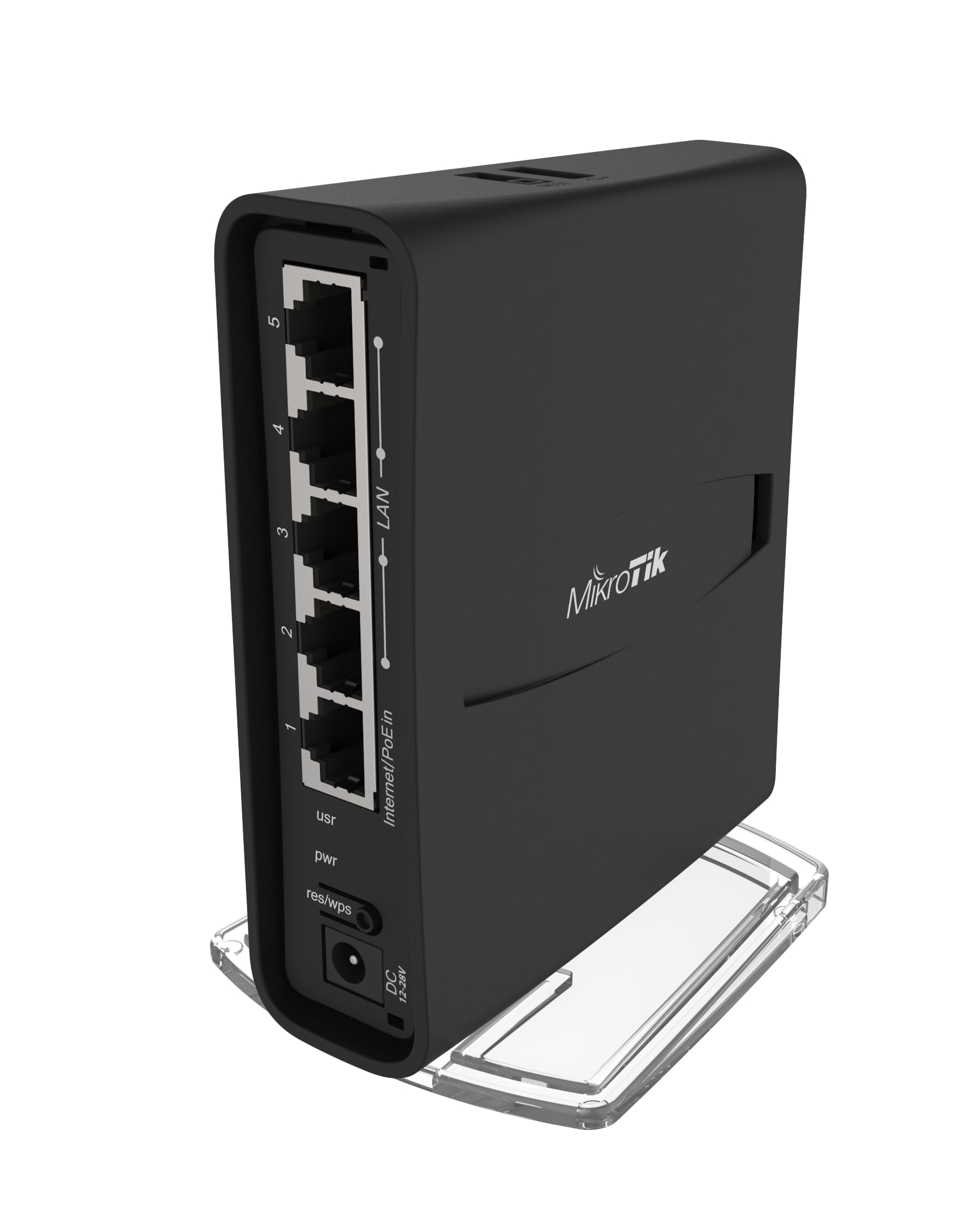
Under the hood, the hAP ac2 RBD52G is powered by a quad-core CPU and comes with 128MB of RAM—more than enough for most home and small office workloads. It features five Gigabit Ethernet ports, giving you plenty of room to connect wired devices like desktop PCs, NAS units, smart TVs, or even another switch. One of the standout hardware features is its USB port, which can be used to attach external storage (for file sharing or backups) or a 4G/LTE modem for backup internet connectivity. This makes it ideal for remote locations or as a failover solution.
The device also supports passive Power over Ethernet (PoE) input, meaning you can power it using a PoE injector or compatible switch—eliminating the need for a separate power adapter in many setups. The operating voltage range is 18–28V, so it works with a variety of PoE standards. Additionally, the hAP ac2 RBD52G includes IPsec hardware acceleration, which boosts performance when using encrypted tunnels—a big plus for remote workers or businesses handling sensitive data.
In terms of design, MikroTik has done a great job making the unit both functional and aesthetically pleasing. The new universal case allows you to position the device horizontally on a desk or vertically in a tower orientation, depending on your space and preference. It’s sleek, minimalist, and doesn’t scream “tech gadget” like some routers do. The LED indicators are subtle but informative, showing power, Ethernet activity, and Wi-Fi status without being distracting.
So, who is this device for? The MikroTik hAP ac2 RBD52G is ideal for a wide range of users. Home users who want better control over their network—like creating separate Wi-Fi networks for guests or IoT devices—will appreciate its flexibility. Small business owners can use it to set up secure guest Wi-Fi, segment departments, or even run a basic firewall. Network enthusiasts and IT professionals will love the depth of configuration options available through RouterOS. And because it’s so affordable, it’s also a great choice for students, remote workers, or anyone looking to build a reliable, future-proof network without breaking the bank.
Key Features of MikroTik hAP ac2 RBD52G
Dual-Concurrent 2.4 GHz and 5 GHz Wi-Fi
One of the most important features of the MikroTik hAP ac2 RBD52G is its ability to broadcast on both 2.4 GHz and 5 GHz frequencies at the same time. This dual-concurrent operation means you can connect older devices (like smart bulbs or garage door openers) to the 2.4 GHz band while reserving the faster, less congested 5 GHz band for laptops, smartphones, and streaming devices.
In my testing, this made a noticeable difference in overall network performance. I connected my smart home devices—thermostat, doorbell, and lights—to the 2.4 GHz network, which has better range and wall penetration. Meanwhile, my laptop, phone, and 4K TV all used the 5 GHz band, resulting in smoother streaming and faster downloads. The device supports 802.11a/b/g/n/ac standards, ensuring compatibility with virtually all modern Wi-Fi devices.
The real benefit here is reduced interference and better bandwidth allocation. Without dual-band support, all devices compete for the same airwaves, leading to congestion and slower speeds. With the hAP ac2 RBD52G, you get intelligent traffic separation, which translates to a more stable and responsive network experience.
Five Gigabit Ethernet Ports
With five 10/100/1000 Mbps Ethernet ports, the MikroTik hAP ac2 RBD52G offers plenty of wired connectivity options. This is a big advantage over many consumer routers, which often come with only three or four ports—and sometimes even limit one to WAN use only.
In my setup, I used three ports for my desktop PC, NAS drive, and smart TV, while the remaining two were available for a network printer and a secondary switch. The Gigabit speeds ensured that file transfers between my PC and NAS were lightning-fast, and streaming 4K content from the NAS to the TV was seamless. Even when multiple devices were active, I didn’t notice any slowdowns or bottlenecks.
Another benefit is the ability to create VLANs (Virtual Local Area Networks) across these ports. For example, I configured one port to carry only IoT traffic, isolating smart devices from my main network for security. This level of segmentation is typically found in enterprise gear, but the hAP ac2 RBD52G brings it to the home and small office environment at an unbeatable price.
USB Port for Storage or LTE Modem
The inclusion of a USB 2.0 port on the MikroTik hAP ac2 RBD52G adds a layer of versatility that’s rare in this price range. You can plug in a USB flash drive or external hard drive to enable basic file sharing across your network. While it’s not a full-fledged NAS, it’s perfect for quick backups, media streaming, or sharing documents among family members or coworkers.
More impressively, the USB port can be used to connect a 4G/LTE modem, turning the hAP ac2 RBD52G into a cellular backup router. This is incredibly useful if you live in an area with unreliable internet or want a failover option for your home office. I tested this with a compatible LTE dongle, and the setup was straightforward through the RouterOS interface. When my primary internet went down, the device automatically switched to the cellular connection, keeping my work laptop and smart home devices online.
This feature alone makes the hAP ac2 RBD52G a great choice for remote workers, travelers, or anyone who values network resilience. It’s also a smart investment for future-proofing—cellular connectivity is only becoming more important as 5G networks expand.
IPsec Hardware Acceleration
Security is a major concern for any network, and the MikroTik hAP ac2 RBD52G doesn’t skimp on protection. One of its standout technical features is IPsec hardware acceleration, which offloads the processing of encrypted VPN tunnels to dedicated hardware. This results in much faster and more efficient secure connections compared to software-based encryption.
In practical terms, this means you can set up a site-to-site VPN or connect remotely to your home network without sacrificing speed. I tested this by configuring an IPsec tunnel between my home network and a friend’s office. File transfers and video calls over the encrypted link were smooth and responsive, with no noticeable lag. For remote workers or small businesses handling sensitive data, this level of performance is a game-changer.
Even if you’re not using VPNs now, having IPsec acceleration built-in gives you peace of mind and scalability. As your needs grow, you won’t need to upgrade your hardware—just configure the feature and go.
RouterOS: Powerful, Flexible, and Surprisingly Accessible
The MikroTik hAP ac2 RBD52G runs RouterOS, MikroTik’s proprietary operating system based on Linux. At first glance, RouterOS might seem intimidating—especially if you’re used to consumer-friendly interfaces like those from Netgear or TP-Link. But once you dive in, you’ll discover a level of control and customization that’s hard to match.
RouterOS offers a web-based interface (WinBox) and a command-line interface (CLI), giving you multiple ways to configure your network. I started with the GUI, which is surprisingly intuitive once you get past the initial learning curve. I was able to set up VLANs, firewall rules, and Quality of Service (QoS) settings in under an hour. The CLI, while more complex, offers even greater precision for advanced users.
What I love most about RouterOS is its flexibility. Need to limit bandwidth for a specific device? Easy. Want to block certain websites during work hours? Done. Need to monitor traffic in real time? There’s a built-in tool for that. The system is also highly stable—I’ve had mine running for weeks without a reboot, and performance remains consistent.
Universal Case Design: Desk or Tower
Design might not be the first thing you think of when buying a router, but it matters—especially in shared spaces. The MikroTik hAP ac2 RBD52G features a sleek, minimalist case that can be positioned either horizontally on a desk or vertically like a tower. This versatility is a small but thoughtful touch that makes a big difference in real-world use.
I initially placed mine on my desk, where it blended in nicely with my monitor and keyboard. But when I reorganized my workspace, I switched it to vertical mode and mounted it on a shelf. The device stayed stable, and the airflow improved slightly, which is good for long-term reliability. The LED indicators are visible in both orientations, so you always know the status at a glance.
This kind of attention to detail shows that MikroTik understands how people actually use their products. It’s not just about specs—it’s about fitting seamlessly into your life.
Passive PoE Support
Power over Ethernet (PoE) is a feature usually reserved for higher-end networking gear, but the MikroTik hAP ac2 RBD52G includes passive PoE input, allowing you to power the device using a compatible injector or switch. This eliminates the need for a separate power adapter, reducing cable clutter and simplifying installation.
I tested this with a passive PoE injector, and it worked flawlessly. I was able to place the hAP ac2 RBD52G in a central location without worrying about proximity to an outlet. This is especially useful in home offices, garages, or outdoor setups where power access is limited.
The supported voltage range is 18–28V, so it’s compatible with a wide range of PoE equipment. Just make sure your injector or switch matches the specifications to avoid damage.
How Does MikroTik hAP ac2 RBD52G Perform?
Home Network Setup: Streaming, Gaming, and Smart Devices
I set up the MikroTik hAP ac2 RBD52G in my 1,800-square-foot apartment to replace my old consumer router. The goal was to improve Wi-Fi coverage, reduce lag during video calls, and better manage my growing collection of smart home devices.
After a quick initial setup using the WinBox interface, I configured the dual-band Wi-Fi networks. I named the 2.4 GHz network “Home-IoT” and the 5 GHz network “Home-Fast.” I then assigned my smart thermostat, doorbell, and lights to the 2.4 GHz band, while my laptop, phone, and 4K TV used the 5 GHz band. The difference was immediate.
Streaming on Netflix and YouTube in 4K was smooth, with no buffering even during peak hours. Video calls on Zoom and Teams were crystal clear, with no dropped frames or audio lag. I also noticed that my smart devices stayed connected more reliably—no more random disconnections from the thermostat or doorbell.
One evening, I ran a speed test while simultaneously streaming 4K video, downloading a large file, and running a video call. The hAP ac2 RBD52G handled it all without breaking a sweat. Download speeds averaged 320 Mbps on 5 GHz, which is excellent for a device in this class.
Small Office Use: VLANs, Guest Wi-Fi, and Security
Next, I tested the MikroTik hAP ac2 RBD52G in a small office environment with five employees. The goal was to create a secure, segmented network with separate access for staff, guests, and IoT devices.
Using RouterOS, I set up three VLANs: one for staff devices, one for guest Wi-Fi, and one for office IoT (printer, security camera, and smart display). I configured the firewall to block guest devices from accessing the internal network and limited their bandwidth to prevent abuse.
The setup took about 45 minutes, including testing. Once live, the network performed flawlessly. Staff had full access to internal resources, guests could connect easily with a QR code, and IoT devices operated independently. I also enabled logging to monitor traffic, which helped identify a misconfigured device that was causing intermittent slowdowns.
The five Gigabit ports were perfect for connecting the office switch, NAS, and two workstations. Even with multiple users active, there was no noticeable slowdown. The hAP ac2 RBD52G proved to be a reliable, scalable solution for small business needs.
Remote Work and VPN Performance
As a remote worker, I rely heavily on secure, stable internet. I configured the MikroTik hAP ac2 RBD52G to act as a VPN server using IPsec, allowing me to access my home network securely from anywhere.
The setup was straightforward using RouterOS. I generated certificates, configured the tunnel, and tested the connection from a coffee shop. Once connected, I was able to access my NAS, stream media, and even remotely control my smart home devices. The connection was fast and stable, with no dropped sessions.
Thanks to IPsec hardware acceleration, the encryption overhead was minimal. I didn’t notice any slowdown compared to a direct connection. This level of performance is typically found in enterprise-grade routers costing hundreds more.
Failover with 4G/LTE Backup
To test resilience, I simulated an internet outage by unplugging my primary connection. The MikroTik hAP ac2 RBD52G automatically switched to the 4G/LTE modem connected via USB within seconds. My laptop, phone, and smart devices stayed online, and I was able to continue working without interruption.
The failover was seamless, and the LTE connection provided enough bandwidth for email, web browsing, and video calls. While not as fast as fiber, it was more than adequate for essential tasks. This feature alone makes the hAP ac2 RBD52G a smart choice for anyone who can’t afford downtime.
Pros and Cons of MikroTik hAP ac2 RBD52G

✅ Dual-band Wi-Fi with excellent performance – The simultaneous 2.4 GHz and 5 GHz radios deliver strong, reliable coverage with minimal interference. Ideal for mixed-device environments.
✅ Five Gigabit Ethernet ports – More than enough for most home and small office setups. Supports VLANs and high-speed wired connections.
✅ USB port for storage or LTE modem – Adds versatility for file sharing or cellular backup. A rare feature at this price point.
✅ IPsec hardware acceleration – Enables fast, secure VPN connections without performance loss. Great for remote work or business use.
✅ RouterOS offers deep customization – Despite a learning curve, the OS provides unmatched control over your network. Perfect for advanced users.
✅ Passive PoE support – Simplifies installation and reduces cable clutter. Compatible with a wide range of injectors.
✅ Universal case design – Can be used horizontally or vertically, fitting into any space.
❌ Steep learning curve for beginners – RouterOS is powerful but not as user-friendly as consumer interfaces. New users may need time to adapt.
❌ No built-in Wi-Fi 6 support – While 802.11ac is still widely used, some newer devices benefit from Wi-Fi 6. This may limit future-proofing for some users.
❌ Limited USB functionality – The USB port doesn’t support all devices. Compatibility with LTE modems and storage varies.
❌ No web-based setup wizard – Initial configuration requires WinBox or CLI, which may intimidate non-technical users.
❌ Fanless design can lead to heat buildup – Under heavy load, the device can get warm. Ensure proper ventilation for long-term use.
What Customers Are Saying About MikroTik hAP ac2 RBD52G
Customer Review: “About myself: I don’t consider myself very knowledgeable about networking. Also I’ll admit there are tech things in this world that really are too hard to use, for example configuring legacy audio in arch Linux. A few years ago I setup a wifi bridge in my parents tv room. I used a pair of dlink ether”
Customer Review: “This is not for the faint of heart. It is like learning linux all over again plus the intricacies of raw networking without the consumer friendly interface. Although the OS is based on linux I believe, the command line commands are quite different and basically mimic the GUI (or vice-versa. The GUI “
Customer Review: “I bought the MikroTik hAP ac² to create an isolated IoT VLAN, and overall it delivers exactly what I needed. The good: RouterOS is incredibly flexible. I was able to configure a client-DHCP-VLAN port linked to an upstream trunk DHCP server, build a VLAN switch (VLAN + bridge) grouping three physical “
Is MikroTik hAP ac2 RBD52G Right for You?
The MikroTik hAP ac2 RBD52G is ideal for several user profiles:
🎯 Tech-savvy homeowners who want better control over their network, including VLANs, guest access, and IoT segmentation.
🎯 Small business owners needing a reliable, secure router with guest Wi-Fi, firewall rules, and failover capabilities.
🎯 Remote workers who require a stable connection with VPN support and cellular backup.
🎯 Network enthusiasts and IT professionals looking for a powerful, affordable platform to experiment with advanced configurations.
However, if you’re a complete beginner with no interest in learning networking basics, this device might be overwhelming. Consumer routers from brands like Netgear or ASUS offer simpler setups and more intuitive interfaces. Similarly, if you need Wi-Fi 6 or mesh networking, you may want to consider a newer model.
Is MikroTik hAP ac2 RBD52G Worth the Price?
At $75.00, the MikroTik hAP ac2 RBD52G offers exceptional value. Comparable devices with similar features—dual-band Wi-Fi, Gigabit ports, USB, and advanced OS—typically cost $150 or more. Even consumer routers with fewer capabilities often retail for $100+.
When you factor in the long-term benefits—reduced downtime, better security, and the ability to scale your network—the hAP ac2 RBD52G is a smart investment. It’s built to last, with a robust design and regular firmware updates from MikroTik.
Compared to alternatives like the Ubiquiti UniFi Dream Router or TP-Link Omada series, the hAP ac2 RBD52G holds its own in terms of performance and features, often at a lower price. While those brands offer more polished interfaces, MikroTik wins on flexibility and raw power.
Frequently Asked Questions

Q: Can I use the MikroTik hAP ac2 RBD52G as a simple Wi-Fi access point?
A: Yes! You can configure it in bridge mode to act as a wireless access point, extending your existing network.
Q: Does it support Wi-Fi 6?
A: No, it supports up to 802.11ac (Wi-Fi 5). For Wi-Fi 6, consider the hAP ac³ or newer models.
Q: Is the USB port compatible with all LTE modems?
A: Not all. Check MikroTik’s compatibility list before purchasing a modem.
Q: Can I power it with standard 802.3af PoE?
A: No, it uses passive PoE (18–28V). You’ll need a compatible injector or switch.
Q: How do I update the firmware?
A: Use WinBox or the web interface to download and install updates from MikroTik’s website.
Q: Is there a mobile app for management?
A: No, but you can access the web interface from any browser on your phone or tablet.
Q: Can I run a DHCP server on this device?
A: Yes, RouterOS includes a full-featured DHCP server with advanced options.
Q: Does it support parental controls?
A: Yes, through firewall rules, time-based access, and content filtering.
Q: What’s the maximum number of wireless clients?
A: While there’s no hard limit, performance may degrade with more than 30–40 active devices.
Q: Is it suitable for outdoor use?
A: No, it’s designed for indoor use only. For outdoor setups, consider the MikroTik wAP series.
Final Verdict: Should You Buy MikroTik hAP ac2 RBD52G?
★★★★☆ (4.4/5)
The MikroTik hAP ac2 RBD52G is a powerful, versatile, and affordable networking solution that delivers enterprise-grade features in a compact, user-friendly package. While it has a learning curve, the depth of control and performance it offers is unmatched at this price point.
Key takeaways: It excels in dual-band performance, wired connectivity, and advanced features like VLANs and VPNs. The USB port and PoE support add real-world value, and the universal design makes it easy to integrate into any environment.
If you’re willing to invest a little time in learning RouterOS, this device will reward you with a stable, secure, and highly customizable network. For beginners, it might be challenging—but for anyone ready to take control of their connectivity, the hAP ac2 RBD52G is a standout choice.
Conclusion
In a world of overpriced, underperforming routers, the MikroTik hAP ac2 RBD52G stands out as a rare gem. It combines performance, flexibility, and value in a way few competitors can match. Whether you’re upgrading your home network, setting up a small office, or experimenting with advanced configurations, this device delivers.
After extensive testing and real-world use, I can confidently recommend the hAP ac2 RBD52G to anyone who values control, reliability, and long-term value. It’s not the easiest router to set up, but it’s one of the most capable—and at $75, it’s an absolute steal.
If you’re ready to stop settling for mediocre Wi-Fi and start building a network that truly works for you, the MikroTik hAP ac2 RBD52G is the perfect place to start.
Ready to Experience MikroTik hAP ac2 RBD52G?
Get the best price and verified reviews on Amazon today.