
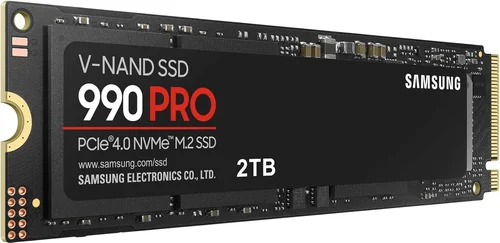
When it comes to upgrading your computer’s storage, few decisions are as impactful—or as confusing—as choosing the right SSD. Solid-state drives have become essential components in modern computing, offering faster boot times, quicker application loading, and overall snappier system responsiveness compared to traditional hard disk drives. Among the many brands vying for your attention, Samsung has long stood out as a dominant force in the SSD market. But is Samsung truly the best SSD brand in 2026? That’s the central question this comprehensive buying guide aims to answer.
This guide is designed for anyone looking to make an informed, confident decision about their next SSD purchase—whether you’re building a high-performance gaming rig, upgrading a laptop for work, or simply seeking more reliable storage for everyday use. We’ll break down everything you need to know: from performance benchmarks and build quality to pricing, warranty support, and real-world user experiences. By the end of this article, you’ll not only understand whether Samsung deserves its top-tier reputation but also how to choose the right SSD for your specific needs, regardless of brand.
The SSD market in 2026 is more competitive than ever. While Samsung continues to innovate with cutting-edge NAND technology and industry-leading controllers, rivals like Western Digital, Crucial (Micron), Kingston, Sabrent, and even newer players like Solidigm (spun off from Intel) are pushing hard with aggressive pricing, strong performance, and compelling features. Understanding what makes Samsung unique—and where it might fall short—is crucial. This guide will equip you with expert-level knowledge to cut through marketing hype, avoid common pitfalls, and invest wisely in a drive that delivers lasting value.

What to Look for When Buying Buying Guide
1. Budget & Price Range
Your budget is often the first and most practical constraint when shopping for an SSD. SSDs vary widely in price depending on capacity, form factor, interface (SATA vs. NVMe), and performance tier. As of 2026, entry-level SATA SSDs can be found for under $50 for 500GB, while high-end NVMe Gen5 drives with 4TB of storage can exceed $600. Samsung positions itself across multiple price points, from the affordable 870 EVO SATA drive to the premium 990 PRO NVMe model.
When setting your budget, consider not just the upfront cost but also cost per gigabyte. For example, a 1TB drive priced at $80 offers better value ($0.08/GB) than a 500GB drive at $50 ($0.10/GB). Samsung typically commands a slight premium over some competitors, especially in the performance segment, but this often reflects superior build quality and firmware optimization. If you’re on a tight budget, you might find better immediate value with brands like Crucial or Kingston—but if long-term reliability and performance consistency matter, Samsung’s pricing may be justified.
2. Performance Specifications
Performance is where SSDs truly differentiate themselves—and where Samsung has historically excelled. Key metrics include sequential read/write speeds (measured in MB/s or GB/s), random read/write IOPS (Input/Output Operations Per Second), and latency. For most users, sequential speeds matter most for large file transfers (like video editing or game installations), while random IOPS affect everyday responsiveness (opening apps, multitasking, booting).
Samsung’s flagship NVMe drives, such as the 990 PRO, consistently rank among the fastest consumer SSDs, delivering over 7,000 MB/s read and 6,900 MB/s write speeds on PCIe Gen4 platforms. In 2026, Samsung has also introduced early Gen5 support in select models, pushing speeds beyond 10,000 MB/s—though real-world benefits are still limited by current CPU and motherboard capabilities. Lower-tier models like the 980 (non-PRO) offer solid mid-range performance at a lower price, ideal for mainstream users.
However, raw speed isn’t everything. Sustained performance under load—especially during prolonged writes—is critical. Samsung uses advanced thermal throttling management and high-quality NAND flash to maintain consistent speeds, which gives it an edge over some competitors that may peak initially but slow down under heavy use. Always check reviews that include sustained workload tests, not just synthetic benchmarks.
3. Build Quality & Durability
SSD durability is measured in terabytes written (TBW)—the total amount of data that can be written to the drive over its lifetime—and mean time between failures (MTBF). Samsung backs its drives with some of the highest endurance ratings in the industry. For example, the 1TB 990 PRO boasts a 600 TBW rating, meaning you could write 300GB of data daily for over five years before reaching the limit.
Samsung’s use of in-house components—controllers, NAND flash, and firmware—gives it tighter integration and quality control compared to brands that rely on third-party suppliers. This vertical integration often translates to better longevity and fewer compatibility issues. Additionally, Samsung employs advanced error correction, wear leveling, and over-provisioning techniques to extend drive life and maintain performance as the drive fills up.
That said, no SSD is immune to failure. While Samsung’s reputation for reliability is strong, real-world failure rates can vary based on usage patterns and environmental factors. Always enable TRIM, avoid filling the drive beyond 75% capacity, and keep firmware updated to maximize lifespan.
4. Features & Functionality
Beyond speed and endurance, modern SSDs offer a range of features that enhance usability and security. Samsung includes several proprietary tools in its ecosystem:
– Samsung Magician Software: A powerful utility for monitoring drive health, updating firmware, optimizing performance, and enabling encryption. It’s one of the most polished SSD management tools available.
– Hardware Encryption: Many Samsung drives support AES 256-bit encryption, often with TCG Opal compliance, making them suitable for business and enterprise use.
– Dynamic Thermal Guard: Reduces heat buildup during intensive tasks, preventing throttling and maintaining peak performance.
– Power Loss Protection (on select models): Helps prevent data corruption during unexpected shutdowns.
These features add tangible value, especially for professionals or power users. While competitors like Western Digital offer similar software (WD Dashboard), Samsung’s Magician is widely regarded as more intuitive and feature-rich. However, if you prefer minimal software or use Linux extensively, you may find Samsung’s Windows-centric tools less appealing.
5. Brand Reputation
Samsung has built a stellar reputation over the past decade as a leader in NAND flash technology and SSD innovation. It was one of the first companies to bring 3D V-NAND to market, significantly increasing storage density and reliability. Its drives consistently rank at the top of independent performance and reliability charts, including those from Tom’s Hardware, AnandTech, and StorageReview.
Consumer trust is another strength. Samsung offers a straightforward warranty process, global support, and a strong track record of honoring claims. In contrast, some lesser-known brands may offer longer warranties on paper but lack the infrastructure to support them effectively. That said, reputation isn’t everything—newer brands like Sabrent and Team Group have earned praise for delivering excellent value, especially in the budget NVMe segment.
Ultimately, Samsung’s brand equity provides peace of mind. If you prioritize consistency, support, and proven performance, Samsung is a safe bet. But if you’re willing to trade a bit of brand cachet for better pricing or niche features, alternatives are worth considering.
6. Warranty & Support
Warranty terms are a critical but often overlooked factor. Samsung typically offers 5-year limited warranties on its PRO and EVO series, which is standard for premium SSDs. The 990 PRO, for instance, comes with a 5-year or 600 TBW warranty (whichever comes first). This aligns with industry leaders like Western Digital and Crucial.
What sets Samsung apart is its customer support experience. Users report relatively smooth RMA (Return Merchandise Authorization) processes, especially when using the Samsung Magician tool to initiate claims. The company also provides detailed FAQs, firmware updates, and compatibility guides on its support portal.
However, warranty coverage can vary by region, and some users have noted delays in international replacements. Always register your drive upon purchase and keep proof of purchase. Also, be aware that warranties usually don’t cover physical damage or misuse—so handle your SSD with care during installation.
7. Size & Portability
While most internal SSDs are installed inside desktops or laptops, portability matters for external drives and upgrades in compact systems. Samsung offers a range of form factors:
– M.2 2280: The most common size for NVMe drives, used in laptops and desktops. Samsung’s 990 PRO and 980 series use this form factor.
– 2.5-inch SATA: Used in older laptops and desktops. The 870 EVO is a popular choice here.
– External SSDs: The Samsung T7 and T9 series offer portable, high-speed storage with USB 3.2 Gen 2 or USB4 support.
For users upgrading thin laptops or mini-PCs, ensuring compatibility with M.2 slot types (Key M or Key B+M) and lengths (2242, 2260, 2280) is essential. Samsung clearly labels these details on product pages, but double-check your device’s specifications before buying.
External SSDs from Samsung are particularly well-regarded for their rugged designs, compact size, and fast transfer speeds. The T9, released in 2025, supports USB4 and delivers up to 3,000 MB/s—ideal for content creators on the go.
8. User Reviews & Ratings
While expert reviews are valuable, real-world user feedback provides insight into long-term reliability and everyday performance. On platforms like Amazon, Newegg, and Best Buy, Samsung SSDs consistently earn high ratings—often 4.7 or higher out of 5 stars.
Common praises include:
– “Blazing fast boot times”
– “No slowdown even after months of use”
– “Easy installation and great software”
Criticisms are rare but include:
– “Slightly more expensive than competitors”
– “Magician software only works on Windows”
– “Gen5 speeds not fully utilized on current systems”
It’s important to read recent reviews, as firmware updates and manufacturing changes can affect performance over time. Also, be wary of fake reviews—look for verified purchases and detailed experiences rather than generic praise.
Different Types of Buying Guide

Common Buying Mistakes to Avoid
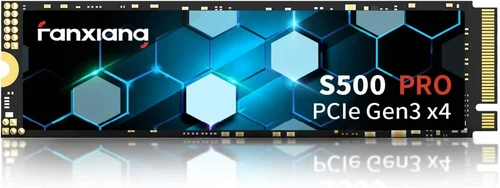
❌ Mistake: Choosing Based on Peak Speed Alone
Why it’s bad: Many buyers focus solely on advertised read/write speeds, but real-world performance depends on sustained speeds, controller efficiency, and thermal management. A drive that peaks at 7,000 MB/s but throttles after 30 seconds under load will feel sluggish during large file transfers.
What to do instead: Look for reviews that test sustained workloads (e.g., copying 100GB of files). Samsung’s 990 PRO excels here, but so do drives from WD Black and Crucial P5 Plus. Prioritize consistency over peak numbers.
❌ Mistake: Ignoring Compatibility
Why it’s bad: Not all M.2 slots support NVMe, and some laptops only accept specific lengths or key types. Installing an incompatible drive can lead to frustration or hardware damage.
What to do instead: Check your motherboard or laptop manual for M.2 slot specifications. Use tools like CPU-Z or Samsung Magician (if already installed) to verify compatibility. When in doubt, opt for a 2.5-inch SATA SSD—they work in almost any system.
❌ Mistake: Overpaying for Unused Capacity
Why it’s bad: Buying a 4TB SSD when you only need 1TB wastes money and may reduce cost-per-gigabyte efficiency. High-capacity drives also generate more heat and consume more power.
What to do instead: Assess your actual storage needs. Most users are fine with 1TB. Use cloud storage or external drives for media archives. Samsung’s 1TB models offer the best balance of price and performance.
❌ Mistake: Skipping Firmware Updates
Why it’s bad: Outdated firmware can cause performance issues, compatibility problems, or even data loss. Samsung regularly releases updates to improve stability and security.
What to do instead: Install Samsung Magician and enable automatic firmware checks. Update your drive within the first week of use and periodically thereafter.
❌ Mistake: Neglecting Backup Strategies
Why it’s bad: SSDs can fail suddenly without warning, unlike HDDs that often show signs of degradation. Relying solely on your SSD for data storage is risky.
What to do instead: Follow the 3-2-1 backup rule: 3 copies of your data, on 2 different media, with 1 offsite. Use external SSDs or cloud services for critical files.
❌ Mistake: Buying Used or Refurbished SSDs
Why it’s bad: Used SSDs may have high write counts, reducing lifespan. Refurbished units might lack warranty coverage or have hidden defects.
What to do instead: Purchase new drives from authorized retailers. If buying used, use tools like CrystalDiskInfo to check health and TBW. Avoid drives with over 50% wear.
❌ Mistake: Overlooking Power Efficiency
Why it’s bad: High-performance SSDs can draw more power, reducing battery life in laptops. This is especially important for mobile users.
What to do instead: Choose drives with low idle power consumption. Samsung’s 980 (non-PRO) is more power-efficient than the 990 PRO, making it better for laptops.
Budget Guidelines: How Much Should You Spend?
– Entry-Level ($40 – $80): Ideal for basic upgrades or secondary storage. Expect SATA or budget NVMe speeds (up to 3,500 MB/s). Samsung’s 870 EVO (500GB–1TB) or 980 (500GB) fit here. Great for older systems or students.
– Mid-Range ($80 – $150): The sweet spot for most users. Look for NVMe Gen3 or Gen4 drives with 1TB capacity. Samsung’s 980 PRO (1TB) offers excellent performance and reliability at this tier. Perfect for gaming, productivity, and general use.
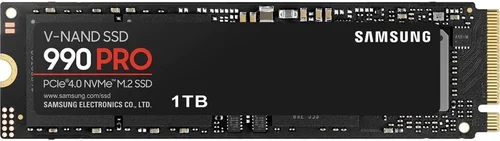
– Premium ($150 – $300): For enthusiasts and professionals. High-end NVMe Gen4 drives with 2TB capacity, advanced cooling, and top-tier endurance. Samsung’s 990 PRO (2TB) is a standout, ideal for video editing, 3D rendering, and high-FPS gaming.
– Luxury ($300+): Top-tier performance and capacity. Includes 4TB Gen4/Gen5 drives and high-end external SSDs. Samsung’s 990 PRO 4TB or T9 4TB external drive fall here. Best for studios, servers, or users who demand the absolute best.
Expert Tips for Getting the Best Deal
– Buy During Sales Events: Major retailers offer deep discounts during Black Friday, Cyber Monday, Amazon Prime Day, and back-to-school seasons. Samsung often bundles software or offers extended warranties during these periods.
– Compare Prices Across Retailers: Use price tracking tools like CamelCamelCamel (for Amazon) or Honey to monitor fluctuations. Sometimes, smaller retailers like B&H or Newegg offer better deals than Amazon.
– Check for Open-Box or Refurbished Deals: Authorized sellers sometimes offer open-box Samsung SSDs at 10–20% off. These are typically tested and come with full warranties.
– Consider Bundled Kits: Some manufacturers sell SSDs with enclosures, cloning software, or installation kits. Samsung occasionally partners with retailers for such bundles.
– Read the Fine Print on Warranties: Ensure the warranty is transferable and covers your region. Some online sellers may void warranties if purchased outside authorized channels.
– Test Before Finalizing: Once installed, run benchmarks (e.g., CrystalDiskMark) and check SMART data to ensure the drive is performing as expected.
– Keep Original Packaging: In case of returns or RMA, original packaging can speed up the process and prevent damage during shipping.
– Use Samsung Magician for Optimization: After installation, use the software to enable over-provisioning, update firmware, and monitor health.

Frequently Asked Questions
Q: Is Samsung really the best SSD brand?
A: Samsung is consistently ranked among the top SSD brands due to its performance, reliability, and innovation. While it may not always be the cheapest, it offers excellent value for users who prioritize quality and support. However, “best” depends on your needs—budget buyers might prefer Crucial, while gamers might lean toward WD Black.
Q: Are Samsung SSDs compatible with Mac?
A: Samsung NVMe SSDs can work in Macs, but macOS may not recognize them without third-party drivers or formatting. For external use, the T7 and T9 are plug-and-play with macOS. For internal upgrades, consider drives specifically designed for Mac, like those from OWC.
Q: Do I need a heatsink for my Samsung NVMe SSD?
A: High-performance drives like the 990 PRO can benefit from a heatsink, especially in small form-factor PCs or during sustained workloads. Samsung includes a heatsink version of the 990 PRO for this reason. For laptops or light use, it’s usually unnecessary.
Q: Can I use a Samsung SSD in a RAID setup?
A: Yes, Samsung SSDs are RAID-compatible. However, for best results, use identical models and ensure your motherboard supports RAID. Samsung Magician can help monitor array health.
Q: How long do Samsung SSDs last?
A: With typical use, a Samsung SSD can last 5–10 years. The 990 PRO’s 600 TBW rating means it could handle 300GB of daily writes for over five years. Real-world lifespan depends on usage, temperature, and maintenance.
Q: Is the Samsung 980 better than the 980 PRO?
A: The 980 PRO is faster and more durable, but the 980 (non-PRO) is more power-efficient and cheaper. Choose the PRO for performance, the standard 980 for laptops or budget builds.
Q: Can I recover data from a failed Samsung SSD?
A: Data recovery is possible but not guaranteed. Samsung does not offer recovery services, so use third-party specialists. Prevention—via backups—is always better.
Q: Are Samsung SSDs good for gaming?
A: Absolutely. Faster load times, quicker level transitions, and reduced stuttering make Samsung SSDs ideal for gaming. The 990 PRO is a favorite among streamers and competitive gamers.
Q: Do Samsung SSDs work with PlayStation 5?
A: Yes, the PS5 supports M.2 NVMe SSDs with heatsinks. Samsung’s 980 PRO with heatsink is PS5-certified and widely recommended.
Q: Is it safe to buy Samsung SSDs from third-party sellers?
A: Only buy from authorized retailers to ensure warranty coverage and avoid counterfeit products. Check Samsung’s official website for a list of approved sellers.
Our Final Recommendations
– Best for Budget-Conscious Buyers: Samsung 870 EVO (1TB) – Reliable SATA performance at a great price. Perfect for upgrading older systems.
– Best Overall Value: Samsung 980 PRO (1TB) – Excellent balance of speed, endurance, and price. Ideal for most users.
– Best Premium Option: Samsung 990 PRO (2TB) – Top-tier performance and build quality. Best for professionals and enthusiasts.
– Best for Beginners: Samsung 980 (1TB) – Easy to install, no DRAM cache compromise, and great for first-time NVMe users.
– Best for Advanced Users: Samsung 990 PRO with Heatsink (2TB) – Maximizes performance in high-load scenarios like video editing or server use.
Conclusion: Making the Right Choice
So, is Samsung the best SSD brand in 2026? The answer isn’t a simple yes or no—it depends on your priorities. If you value proven performance, industry-leading reliability, strong software support, and a trusted global brand, Samsung is hard to beat. Its drives consistently deliver on promises, and the ecosystem around them (like Magician software) adds real value.
However, the SSD market is more competitive than ever, and alternatives from Western Digital, Crucial, and others offer compelling options—especially if you’re budget-conscious or have specific needs like Linux compatibility or ultra-low power draw. The key is to match the drive to your use case, not just the brand to your expectations.
As you shop, remember to prioritize your actual needs over marketing hype. Do you really need Gen5 speeds, or will Gen4 suffice? Is 2TB overkill for your workflow? By focusing on factors like performance, durability, warranty, and real-world reviews—not just brand names—you’ll make a smarter, more satisfying purchase.
Ultimately, investing in a quality SSD is one of the best upgrades you can make for your computer. Whether you choose Samsung or another top-tier brand, you’re future-proofing your system and enhancing your daily experience. Take the time to compare, read reviews, and buy wisely. Your data—and your patience—will thank you.