
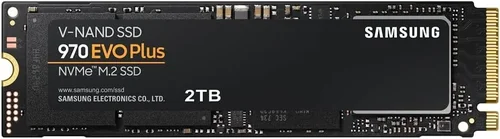
The solid-state drive (SSD) market has evolved dramatically over the past decade, transforming from a niche performance upgrade into a mainstream necessity for anyone serious about computing speed, reliability, and efficiency. Whether you’re building a high-end gaming rig, upgrading a laptop for professional workloads, or simply looking to breathe new life into an aging system, choosing the right SSD is one of the most impactful decisions you can make. With dozens of brands, form factors, and performance tiers available in 2026, the process can feel overwhelming—especially when marketing claims promise “blazing-fast speeds” and “unmatched endurance.” That’s where this comprehensive buying guide comes in. We’re here to cut through the noise, demystify technical jargon, and help you make a smart, informed decision based on your actual needs—not just flashy specs.
In this guide, you’ll learn how to evaluate SSDs across every critical dimension: from raw performance benchmarks and endurance ratings to real-world usability, compatibility, and long-term value. We’ll explore why the Samsung 970 EVO Plus remains a benchmark in the NVMe SSD space—and whether it still deserves the title of “best SSD” in today’s competitive landscape. You’ll discover how newer contenders like the WD Black SN850X, Crucial T700, and even budget-friendly options from Kingston or Crucial stack up against Samsung’s flagship. By the end, you won’t just know what to buy—you’ll understand why it’s the right choice for your specific use case.
The SSD market in 2026 is more diverse than ever. While SATA SSDs still hold relevance for legacy systems, PCIe Gen4 and emerging Gen5 drives dominate the high-performance segment, delivering sequential read/write speeds that were unimaginable just a few years ago. At the same time, pricing has become increasingly accessible, with 1TB Gen4 NVMe drives often available under $80 during sales. Yet, not all SSDs are created equal. Factors like NAND type (TLC vs. QLC), controller quality, DRAM cache presence, firmware optimization, and thermal management can dramatically affect real-world performance and longevity. This guide will walk you through each of these considerations, equipping you with the knowledge to avoid overpaying for unnecessary features—or worse, underestimating your storage needs and ending up with a bottlenecked system.

What to Look for When Buying Buying Guide
1. Performance Specifications
When evaluating SSDs, performance is often the first thing people look at—and for good reason. But raw speed numbers alone don’t tell the whole story. Sequential read/write speeds (measured in MB/s) indicate how quickly large files like videos or game installs can be transferred. For example, the Samsung 970 EVO Plus offers up to 3,500 MB/s read and 3,300 MB/s write speeds, which was top-tier when it launched in 2019. However, newer Gen4 drives like the WD Black SN850X push beyond 7,000 MB/s, and Gen5 models like the Crucial T700 exceed 12,000 MB/s. While these numbers sound impressive, most everyday tasks—web browsing, office apps, even gaming—don’t benefit significantly beyond ~3,500 MB/s. The real differentiator lies in random read/write performance (measured in IOPS), which affects how quickly your system handles small, scattered files like OS boot processes, application launches, and multitasking.
Latency and queue depth also matter. A drive with high IOPS but poor latency may feel sluggish during everyday use. Samsung’s Magician software and firmware updates have historically optimized the 970 EVO Plus for consistent low-latency performance, which contributes to its reputation for smooth operation. However, if you’re running database servers, video editing workstations, or AI training environments, you’ll want to prioritize drives with sustained high IOPS under heavy workloads. Always check real-world benchmarks from trusted sources like Tom’s Hardware, AnandTech, or StorageReview—not just manufacturer claims.
2. NAND Flash Type and Endurance
The type of NAND flash memory used in an SSD directly impacts its durability, speed, and cost. Most consumer SSDs use either TLC (Triple-Level Cell) or QLC (Quad-Level Cell) NAND. TLC stores three bits per cell and offers a good balance of speed, endurance, and price—it’s what powers the Samsung 970 EVO Plus. QLC stores four bits per cell, allowing for higher capacities at lower costs but with reduced write speeds and endurance. For typical users, QLC is fine for secondary storage or light workloads, but TLC remains the gold standard for primary drives.
Endurance is measured in terabytes written (TBW)—the total amount of data that can be written to the drive over its lifetime. The 1TB Samsung 970 EVO Plus has a TBW rating of 600TB, which is excellent for a consumer drive. To put that in perspective, writing 100GB per day would take over 16 years to reach that limit. However, QLC drives often have lower TBW ratings (e.g., 200–400TB for 1TB models), making them less suitable for write-intensive tasks like video editing or server use. Always check the TBW rating and consider your usage patterns. If you’re a content creator or developer, opt for TLC or even MLC (though rare in consumer drives) for maximum longevity.
3. DRAM Cache and HMB Technology
DRAM cache plays a crucial role in SSD performance by storing the flash translation layer (FTL) map, which tells the controller where data is physically stored on the NAND. Drives with a dedicated DRAM chip (like the Samsung 970 EVO Plus) typically offer faster and more consistent performance, especially during sustained writes or heavy multitasking. DRAM-less SSDs, on the other hand, rely on Host Memory Buffer (HMB) technology, which borrows a small portion of your system’s RAM to manage the FTL. While HMB has improved significantly and works well for light workloads, it can introduce latency spikes under heavy use and may not be ideal for demanding applications.
The Samsung 970 EVO Plus includes a 1GB LPDDR4 DRAM cache for the 1TB model, contributing to its smooth performance and low latency. In contrast, some budget QLC drives omit DRAM entirely to cut costs. If you’re using your SSD as a boot drive or for applications that require frequent small-file access (like Photoshop or compiling code), a DRAM-equipped drive is strongly recommended. For secondary storage or media libraries, HMB may suffice—but don’t expect the same level of responsiveness.
4. Form Factor and Compatibility
SSDs come in several form factors, and compatibility is key. The most common for desktops and modern laptops is the M.2 2280 (22mm wide, 80mm long), which plugs directly into the motherboard. The Samsung 970 EVO Plus is an M.2 NVMe drive, meaning it uses the PCIe interface and requires an M.2 slot that supports NVMe (not just SATA). Older systems may only support SATA M.2 drives, so always check your motherboard or laptop specifications before buying.
Other form factors include 2.5-inch SATA SSDs (ideal for older laptops or systems without M.2 slots) and U.2 drives (used in enterprise environments). While the 970 EVO Plus is compact and easy to install, ensure your system has adequate airflow or a heatsink, as NVMe drives can get hot under load. Some motherboards include built-in M.2 heatsinks, but if yours doesn’t, consider adding an aftermarket one—especially if you’re using a high-performance Gen4 or Gen5 drive. Thermal throttling can significantly reduce performance, and the 970 EVO Plus, while efficient, can benefit from passive cooling during extended workloads.
5. Brand Reputation and Firmware Support
Not all SSD brands are equal when it comes to reliability and long-term support. Samsung has long been regarded as a leader in the SSD market, thanks to its in-house controller design, high-quality NAND, and consistent firmware updates. The 970 EVO Plus benefits from Samsung’s Magician software, which provides drive health monitoring, performance optimization, secure erase, and firmware updates. This level of support is rare among competitors and adds significant value over time.
Other reputable brands include Western Digital, Crucial (a Micron subsidiary), Kingston, and SK Hynix. Each offers solid products, but Samsung’s track record for stability and performance tuning gives it an edge for users who prioritize reliability. Firmware updates can fix bugs, improve compatibility, and even boost performance—so choosing a brand with a history of timely updates is wise. Avoid no-name or ultra-budget brands that may use recycled NAND or lack proper validation, as they can fail prematurely or cause data corruption.
6. Warranty and Support
Warranty length and terms are strong indicators of a manufacturer’s confidence in their product. The Samsung 970 EVO Plus comes with a 5-year limited warranty or up to the TBW limit (whichever comes first), which is standard for high-end consumer SSDs. This means if your drive fails within five years or before reaching 600TB written (for the 1TB model), Samsung will replace it—no questions asked. Some brands offer shorter warranties (3 years) or lower TBW thresholds, so always compare these details.
Customer support quality also varies. Samsung provides global support with online resources, live chat, and phone assistance in many regions. If you encounter issues, having responsive support can make a big difference. Additionally, check if the warranty is transferable—important if you plan to sell your system later. A strong warranty not only protects your investment but also reflects the drive’s expected lifespan.
7. Price and Value Proposition
Price is always a consideration, but the cheapest SSD isn’t always the best value. The Samsung 970 EVO Plus launched at a premium price but has since dropped significantly, often selling for under $90 for the 1TB model in 2026. At that price, it offers exceptional performance, reliability, and features, making it a strong contender even against newer drives. However, if you’re on a tight budget, alternatives like the Crucial P3 or Kingston NV2 provide decent Gen3 or Gen4 performance at lower prices.
Value isn’t just about upfront cost—it’s about cost per gigabyte, performance per dollar, and long-term reliability. A $70 1TB drive that fails in two years offers worse value than a $90 drive that lasts five. Consider total cost of ownership, including potential data recovery costs or downtime. For most users, the 970 EVO Plus strikes an excellent balance between price and performance, especially during sales events like Black Friday or Prime Day.
8. User Reviews and Real-World Performance
While specs and benchmarks are important, real-world user feedback provides invaluable insights. The Samsung 970 EVO Plus has accumulated tens of thousands of reviews across Amazon, Newegg, and Best Buy, with consistently high ratings for speed, reliability, and ease of installation. Users frequently praise its boot times, application load speeds, and quiet operation. However, some note that it can get warm under heavy use, reinforcing the need for proper cooling.
Look for patterns in reviews: Are multiple users reporting the same issue (e.g., thermal throttling, compatibility problems)? Do professional reviewers confirm the manufacturer’s claims? Cross-referencing user experiences with expert benchmarks gives you a complete picture. Avoid drives with a high number of 1- or 2-star reviews citing failure, slow speeds, or poor support—these are red flags.
Different Types of Buying Guide

Common Buying Mistakes to Avoid
❌ Mistake: Prioritizing Peak Speeds Over Real-World Performance
Why it’s bad: Many buyers focus solely on sequential read/write numbers, but everyday tasks rely more on random I/O performance and low latency. A drive with 7,000 MB/s speeds but poor random performance may feel slower in practice than a well-optimized 3,500 MB/s drive like the 970 EVO Plus.
What to do instead: Look at real-world benchmarks for boot times, app launches, and file transfers. Use tools like CrystalDiskMark or AS SSD to test random 4K performance.
❌ Mistake: Ignoring Thermal Management
Why it’s bad: High-performance NVMe drives generate heat, and without proper cooling, they can throttle, reducing speed and lifespan. The 970 EVO Plus can reach 70°C+ under load, which may trigger thermal throttling on some systems.
What to do instead: Install an M.2 heatsink or ensure good case airflow. Consider drives with built-in thermal pads or choose models known for efficient heat dissipation.
❌ Mistake: Buying QLC for Primary Storage
Why it’s bad: QLC drives have slower write speeds and lower endurance. Using one as your boot drive can lead to sluggish performance during updates, installs, or multitasking.
What to do instead: Reserve QLC for secondary storage (e.g., media libraries). Use TLC or MLC for your OS and applications.
❌ Mistake: Overlooking DRAM Cache
Why it’s bad: DRAM-less SSDs may offer similar peak speeds but struggle with sustained performance and consistency, especially under load.
What to do instead: Always check if the drive includes DRAM. For primary use, avoid HMB-only models unless you’re on a tight budget.
❌ Mistake: Skipping Firmware Updates
Why it’s bad: Outdated firmware can cause compatibility issues, bugs, or reduced performance. Samsung regularly releases updates for the 970 EVO Plus to improve stability.
What to do instead: Use manufacturer tools (e.g., Samsung Magician) to check for and install firmware updates periodically.
❌ Mistake: Not Checking Compatibility
Why it’s bad: Not all M.2 slots support NVMe. Some only work with SATA M.2 drives, and older systems may lack M.2 entirely.
What to do instead: Consult your motherboard or laptop manual. Use tools like CPU-Z or HWiNFO to verify slot capabilities before purchasing.
❌ Mistake: Ignoring Warranty and Support
Why it’s bad: A short warranty or poor support can leave you stranded if the drive fails. Some brands offer limited regional coverage.
What to do instead: Choose drives with at least a 5-year warranty and check the manufacturer’s support reputation.
Budget Guidelines: How Much Should You Spend?
– Entry-Level ($40–$70 for 1TB): Ideal for budget builds or upgrading old systems. Look for SATA SSDs or DRAM-less NVMe Gen3 drives. Expect decent performance for everyday tasks but lower endurance and no advanced features. Examples: Kingston A400, Crucial BX500.
– Mid-Range ($70–$100 for 1TB): The sweet spot for most users. Offers TLC NAND, DRAM cache, and strong performance. The Samsung 970 EVO Plus fits here during sales. Great for gaming, productivity, and general use. Examples: WD Blue SN580, Crucial P3 Plus.
– Premium ($100–$150 for 1TB): For enthusiasts and professionals. Gen4 NVMe drives with high endurance, excellent cooling, and top-tier performance. Ideal for content creation, video editing, and high-end gaming. Examples: WD Black SN850X, Samsung 980 Pro.
– Luxury ($150+ for 1TB): Cutting-edge Gen5 drives with extreme speeds and advanced features. Best for workstations, AI development, or future-proofing. Requires compatible hardware and active cooling. Examples: Crucial T700, Sabrent Rocket 5.
Expert Tips for Getting the Best Deal
– Buy During Sales Cycles: Major retailers offer deep discounts on SSDs during holidays and shopping events. Sign up for price alerts on Amazon, Newegg, or Best Buy.
– Compare Total Cost of Ownership: Factor in warranty, endurance, and performance—not just upfront price. A slightly more expensive drive with better longevity may save money long-term.
– Check Return Policies: Ensure the retailer offers a hassle-free return window (30 days minimum) in case of compatibility issues or defects.
– Use Price Tracking Tools: Websites like CamelCamelCamel (for Amazon) or Honey can alert you when prices drop on specific models.
– Consider Refurbished or Open-Box: Certified refurbished SSDs from reputable sellers often come with full warranties and can save 20–30%.
– Test Before Committing: If possible, test the drive in your system before finalizing the setup. Use benchmarking tools to verify performance.
– Prioritize Your Use Case: Don’t overspend on Gen5 if you’re just browsing the web. Match the drive to your actual needs.
– Monitor Drive Health: Use tools like Samsung Magician, CrystalDiskInfo, or HWMonitor to track SSD health and temperature over time.
Frequently Asked Questions
Q: Is the Samsung 970 EVO Plus still worth buying in 2026?
A: Yes, especially if you find it on sale. While newer Gen4 and Gen5 drives offer higher peak speeds, the 970 EVO Plus remains an excellent choice for most users due to its proven reliability, strong random performance, and low latency. It’s ideal for gaming, productivity, and general use—especially if your system doesn’t support Gen4.
Q: Can I use the Samsung 970 EVO Plus in a laptop?
A: Yes, as long as your laptop has an M.2 NVMe slot. Most modern ultrabooks and gaming laptops support it. Check your laptop’s manual or manufacturer specs to confirm compatibility.
Q: Does the 970 EVO Plus need a heatsink?
A: Not necessarily, but it’s recommended for sustained workloads. In desktops with good airflow, it may run fine without one. In compact laptops or high-load scenarios, a heatsink can prevent thermal throttling.
Q: How does the 970 EVO Plus compare to the 980 Pro?
A: The 980 Pro is a Gen4 drive with faster sequential speeds (up to 7,000 MB/s), while the 970 EVO Plus is Gen3 (up to 3,500 MB/s). The 980 Pro is better for large file transfers, but for everyday use, the difference is minimal. The 970 EVO Plus often offers better value.
Q: What’s the difference between NVMe and SATA?
A: NVMe uses the PCIe interface for much faster data transfer, while SATA is limited to ~550 MB/s. NVMe is the standard for modern systems, but SATA is still viable for older hardware.
Q: How long will a 1TB Samsung 970 EVO Plus last?
A: With a 600TBW rating, it could last over 16 years with 100GB of daily writes. For typical users, it will likely outlast the system itself.
Q: Can I clone my old HDD to the 970 EVO Plus?
A: Yes, using Samsung’s Data Migration software or third-party tools like Macrium Reflect or Acronis True Image.
Q: Is DRAM important for gaming?
A: Yes. DRAM helps with fast loading of game assets and reduces stuttering. A DRAM-equipped drive like the 970 EVO Plus provides a smoother gaming experience.
Q: What if my motherboard doesn’t support NVMe?
A: You’ll need a SATA SSD or an M.2 SATA drive. Alternatively, consider a PCIe adapter card, though this may not be supported on all systems.
Q: Are cheaper SSDs safe to use?
A: Some are, but avoid no-name brands with no warranty or reviews. Stick to reputable manufacturers, even at lower price points.
Our Final Recommendations
– Best for Budget-Conscious Buyers: Crucial P3 1TB – Offers Gen3 NVMe performance at a low price, great for upgrades.
– Best Overall Value: Samsung 970 EVO Plus 1TB – Proven reliability, strong performance, and excellent software support.
– Best Premium Option: WD Black SN850X 1TB – Top-tier Gen4 performance with great endurance and cooling.
– Best for Beginners: Kingston NV2 1TB – Simple, affordable, and compatible with most systems.
– Best for Advanced Users: Crucial T700 1TB – Gen5 speeds for professionals and enthusiasts with compatible hardware.
Conclusion: Making the Right Choice
Choosing the right SSD doesn’t have to be overwhelming. By focusing on your specific needs—whether that’s speed, capacity, durability, or budget—you can narrow down the options and avoid common pitfalls. The Samsung 970 EVO Plus remains a standout choice in 2026, not because it’s the fastest, but because it delivers consistent, reliable performance with excellent support and real-world usability. It’s a testament to Samsung’s engineering that a drive launched years ago still competes strongly with newer models.
However, the “best” SSD ultimately depends on your system, use case, and budget. If you’re building a high-end workstation, a Gen5 drive may be worth the investment. If you’re upgrading an older laptop, a SATA SSD might be the practical choice. Always prioritize compatibility, endurance, and real-world performance over marketing hype.
Take the time to research, compare, and consider long-term value. Use the tips and guidelines in this article to make a confident decision. And remember: a great SSD doesn’t just make your system faster—it makes it more enjoyable to use, day after day. Invest wisely, and your computer will thank you.