
Why this guide matters
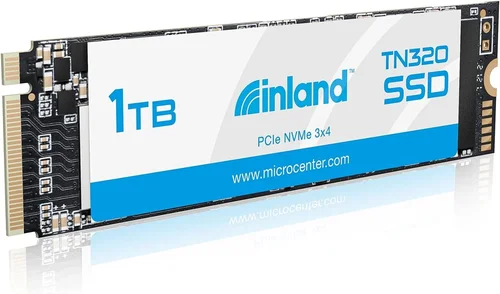
Choosing the right storage solution can dramatically impact your computing experience, from boot times to application loading speeds. The Inland Premium 1TB SSD has emerged as a compelling option in the crowded solid-state drive market, offering a balance of performance, reliability, and value that appeals to both casual users and power consumers. This comprehensive buying guide will walk you through everything you need to know about making an informed decision with this specific model.
What readers will learn
You’ll discover detailed insights into the Inland Premium 1TB SSD’s specifications, real-world performance characteristics, compatibility requirements, and how it stacks up against competing products. We’ll cover installation procedures, optimization tips, maintenance best practices, and troubleshooting common issues. Most importantly, we’ll help you determine whether this particular SSD is the right fit for your specific needs, budget constraints, and usage scenarios.
Brief overview of the market
The solid-state drive market has become increasingly competitive, with manufacturers constantly pushing the boundaries of speed, capacity, and durability. While premium brands like Samsung and Western Digital dominate headlines, companies like Inland have carved out a niche by offering high-quality components at competitive prices. The Inland Premium series represents their commitment to providing reliable storage solutions without the premium price tag typically associated with enterprise-grade hardware.

What to Look for When Buying INLAND
1. Budget & Price Range
The first consideration when purchasing any storage device should be your budget range. The Inland Premium 1TB SSD typically falls within the mid-range price bracket, offering excellent value proposition compared to other 1TB SSDs on the market. Understanding where this product fits in terms of pricing helps you evaluate whether it meets your financial expectations while delivering adequate performance.
When evaluating the cost-effectiveness of this SSD, consider not just the upfront purchase price but also the long-term value proposition. Higher-end drives may offer marginal performance improvements that don’t justify their significantly higher costs for most users. The Inland Premium series strikes a balance between affordability and quality, making it accessible to a wide range of consumers without compromising essential functionality.
It’s important to remember that storage pricing fluctuates based on market conditions, seasonal demand, and component availability. Monitoring price trends over time can help you identify optimal purchasing windows when the Inland Premium 1TB SSD reaches its lowest point in the current cycle.
2. Performance Specifications
Performance is arguably the most critical factor when selecting an SSD, as it directly impacts your system’s responsiveness and overall user experience. The Inland Premium 1TB SSD boasts impressive sequential read and write speeds that compete favorably with many premium offerings in its class.
Key performance metrics to examine include:
- Sequential Read/Write Speeds: These indicate how quickly large files can be transferred, affecting tasks like video editing, game loading, and large file operations
- Random IOPS (Input/Output Operations Per Second): Measures how well the drive handles multiple small file operations simultaneously, crucial for operating system responsiveness
- Interface Type: Most models use NVMe PCIe Gen3 x4 interface, providing bandwidth sufficient for demanding workloads
- Controller Quality: The onboard controller manages data flow and determines overall efficiency and thermal management
For typical consumer applications, the Inland Premium 1TB SSD delivers sufficient performance to eliminate traditional bottlenecks found in mechanical hard drives. However, professional workloads involving heavy multitasking or specialized software might benefit from even faster options available from competitors.
3. Build Quality & Durability
Build quality and durability are often overlooked but crucial factors that determine how long your storage investment will last under various operating conditions. The Inland Premium 1TB SSD features robust construction designed to withstand normal usage patterns while maintaining reliability over extended periods.
Several aspects contribute to the overall build quality:
- PCB Construction: High-quality printed circuit boards ensure stable electrical connections and proper heat dissipation
- NAND Flash Memory: Grade-A NAND flash provides consistent performance and longevity compared to lower-grade alternatives
- Thermal Management: Effective heat spreader design prevents thermal throttling during intensive operations
- Shock Resistance: Robust mounting points and protective coatings enhance physical resilience against drops and vibrations
Durability metrics such as TBW (Terabytes Written) and DWPD (Drive Writes Per Day) ratings provide insight into expected lifespan under different workloads. For most consumer applications, the Inland Premium 1TB SSD offers sufficient endurance to exceed the typical five-year ownership period without significant degradation.
4. Features & Functionality
Beyond raw performance numbers, modern SSDs incorporate various features that enhance usability and expand functionality. The Inland Premium 1TB SSD includes several practical features that make it suitable for diverse computing environments.
Notable features include:
- TRIM Support: Enables automatic garbage collection to maintain optimal performance over time
- S.M.A.R.T. Monitoring: Provides detailed health status and predictive failure warnings
- Over-Provisioning: Reserved space improves write performance and extends drive lifespan
- Power Loss Protection: Prevents data corruption during unexpected power interruptions
- Encryption Capabilities: Some models support hardware-based encryption for enhanced security
These features collectively contribute to a more reliable and user-friendly storage solution. While basic functionality is adequate for everyday computing, advanced users may require additional capabilities such as RAID support or specialized firmware options not always available in mainstream consumer drives.
5. Brand Reputation
Brand reputation plays a significant role in consumer confidence and warranty coverage. Inland has established itself as a respectable manufacturer within the storage industry, particularly known for producing reliable components at competitive price points. Their products are distributed through major retailers and online platforms, increasing accessibility while maintaining quality control standards.
When evaluating brand reputation, consider several factors:
- Manufacturing Origins: Many Inland products are manufactured by reputable third-party foundries, ensuring consistent quality across batches
- Quality Control Processes: Rigorous testing procedures help identify defective units before reaching consumers
- Customer Feedback: Online reviews and forum discussions provide valuable insights into real-world performance and reliability
- Industry Recognition: Awards and certifications from trusted organizations validate claims about product excellence
While Inland may not enjoy the same recognition as some legacy brands, their growing presence in the market demonstrates steady improvement in both product quality and customer satisfaction. For budget-conscious buyers seeking dependable performance without premium pricing, Inland represents a viable alternative worth considering.
6. Warranty & Support
A comprehensive warranty and support package offers peace of mind and protects your investment against unforeseen failures. The Inland Premium 1TB SSD typically comes with standard warranty coverage ranging from three to five years, depending on regional regulations and retailer policies.
Key aspects of warranty and support include:
- Coverage Duration: Longer warranties indicate manufacturer confidence in product reliability
Before purchasing, verify the specific warranty terms offered by your chosen retailer, as policies may vary between authorized distributors. Extended warranty options are occasionally available for additional fees, though these rarely prove necessary given the generally reliable nature of modern SSDs.
7. Size & Portability
Physical dimensions and form factor significantly impact compatibility with different systems and installation scenarios. The Inland Premium 1TB SSD utilizes the M.2 2280 form factor, which is widely supported across desktop motherboards, laptops, and gaming consoles.
Important size considerations include:
- M.2 Form Factor: Compact design saves space while fitting most modern system configurations
- <2280 Length Specification: Standard length ensures compatibility with virtually all motherboard slots
The compact footprint makes this SSD ideal for upgrading older systems or building new computers with limited expansion options. Laptop users benefit from reduced weight compared to traditional 2.5-inch drives, while desktop builders appreciate the clean cable management possibilities.
8. User Reviews & Ratings
Real-world user experiences provide invaluable context beyond technical specifications and marketing materials. Analyzing aggregated reviews from multiple sources helps identify potential strengths and weaknesses that may not be apparent from initial impressions alone.
When evaluating user feedback, focus on recurring themes rather than isolated comments:
Cross-referencing reviews across different platforms (Amazon, Newegg, manufacturer websites) provides a balanced perspective while minimizing bias from single-source reporting. Pay particular attention to recent reviews, as early production runs may contain undiscovered flaws corrected in later revisions.
Different Types of INLAND

Common Buying Mistakes to Avoid

❌ Mistake: Ignoring Compatibility Requirements
Why it’s bad: Attempting to install an incompatible SSD can result in installation failures, system instability, or complete hardware damage. Many users overlook critical compatibility factors such as form factor, interface type, and motherboard support when selecting storage devices.
What to do instead: Always verify your system’s specifications against the SSD requirements before purchasing. Check your motherboard manual for supported M.2 slot types and ensure your operating system recognizes the drive properly after installation.
❌ Mistake: Focusing Solely on Price
Why it’s bad: Selecting the cheapest option available often leads to subpar performance, premature failure, or missing essential features. Low-priced drives may utilize inferior components that compromise reliability and longevity.
What to do instead: Evaluate value propositions rather than absolute pricing. Consider total cost of ownership including warranty coverage, expected lifespan, and performance characteristics relative to your specific needs.
❌ Mistake: Overlooking Firmware Updates
Why it’s bad: Manufacturers frequently release firmware updates to improve stability, add features, or address known issues. Neglecting these updates can leave your drive vulnerable to bugs or missing performance optimizations.
What to do instead: Regularly check manufacturer websites for firmware releases and apply them following official instructions. Keep track of update schedules to maintain optimal drive performance throughout its operational life.
❌ Mistake: Skipping Proper Installation Procedures
Why it’s bad: Improper installation techniques can damage connectors, void warranties, or create data loss scenarios. Rushing through setup processes increases risk of errors that affect system stability.
What to do instead: Follow manufacturer guidelines meticulously during installation. Use appropriate tools, handle components carefully, and double-check connections before powering on the system. Consider seeking professional assistance if uncertain about any step.
❌ Mistake: Neglecting Thermal Management
Why it’s bad: Excessive heat buildup causes thermal throttling, reducing performance and potentially shortening drive lifespan. Many users fail to recognize the importance of adequate airflow around high-performance SSDs.
What to do instead: Ensure proper case ventilation and consider additional cooling solutions if running intensive workloads. Monitor temperatures using built-in tools or third-party software to maintain optimal operating conditions.
❌ Mistake: Assuming All SSDs Are Equal
Why it’s bad: Different SSD models employ varying architectures, controllers, and NAND types that significantly impact real-world performance. Treating all solid-state drives as interchangeable commodities leads to mismatched expectations.
What to do instead: Research specific model characteristics thoroughly before making purchasing decisions. Compare benchmark results, read independent reviews, and evaluate how each feature aligns with your intended usage patterns.
Budget Guidelines: How Much Should You Spend?
Entry-Level ($50 – $70)
The entry-level price range represents the most affordable options available for budget-conscious consumers. While these drives offer basic SSD functionality, they typically sacrifice some performance and reliability features found in higher-tier models. Entry-level Inland Premium variants may feature slower controllers, lower-quality NAND memory, or reduced warranty coverage compared to their premium counterparts.
Expectations for this tier include:
- Basic NVMe or SATA III interface support
- Moderate sequential read/write speeds (typically 2000-3000 MB/s for NVMe)
- Adequate performance for general office work and web browsing
- Reduced endurance ratings and shorter warranty periods
- Limited advanced features such as encryption or power loss protection
This category suits users prioritizing cost savings over peak performance, particularly those upgrading older systems with limited budget allocations. However, be prepared for trade-offs in terms of longevity and specialized functionality.
Mid-Range ($70 – $90)
The mid-range segment represents the sweet spot for most buyers seeking balanced performance, reliability, and value. The Inland Premium 1TB SSD occupies this category exceptionally well, offering competitive specifications without premium pricing. This price point typically includes high-quality components, robust thermal management, and comprehensive feature sets.
Characteristics of mid-range offerings include:
- High-performance NVMe PCIe Gen3 x4 interface
- Fast sequential speeds exceeding 3000 MB/s read and 2500 MB/s write
- Grade-A NAND flash with substantial endurance ratings
- Integrated heat spreaders and power loss protection
- Extended warranty coverage (usually 3-5 years)
- Full compatibility with modern operating systems and motherboards
For the average user, this represents the optimal balance between capability and affordability. Gamers, content creators, and professionals will find sufficient performance for demanding applications while staying within reasonable budget constraints.
P Premium ($90 – $120)
The premium tier targets enthusiasts and professionals requiring maximum performance and advanced features. While Inland Premium 1TB SSDs generally fall below this threshold, higher-end competitors offer superior specifications that justify the increased cost for specific use cases.
Premium characteristics typically encompass:
- PCIe Gen4 or Gen5 interfaces delivering speeds beyond 7000 MB/s
- Enterprise-grade controllers with enhanced error correction
- Higher endurance ratings suitable for write-intensive workloads
- Advanced security features including hardware encryption
- Professional support services and guaranteed SLAs
- Specialized firmware optimizations for particular applications
This category serves users with specialized requirements such as video editing studios, database administrators, or cryptocurrency mining operations where marginal performance gains translate into tangible business benefits.
Luxury ($120+)
The luxury segment represents the pinnacle of consumer SSD technology, featuring cutting-edge components and exclusive capabilities unavailable in mainstream products. These drives often target ultra-high-end enthusiasts willing to pay substantial premiums for marginal improvements.
Ultimate luxury features may include:
- Custom-designed controllers optimized for specific workloads
- Hybrid architectures combining multiple NAND types strategically
- Proprietary cooling solutions for extreme thermal management
- Dedicated firmware development teams for continuous optimization
- Exclusive partnerships with OEMs for customized versions
- Rare collector’s editions with unique aesthetics and documentation
While tempting to some, luxury SSDs rarely justify their astronomical price tags for typical home or office environments. Their advantages become relevant only in extremely niche scenarios where every millisecond of performance counts toward profitability or scientific discovery.

Expert Tips for Getting the Best Deal
Securing the best possible price on the Inland Premium 1TB SSD requires strategic planning and awareness of market dynamics. Seasonal sales events, promotional campaigns, and inventory clearance opportunities can significantly reduce costs while maintaining product quality.
Here are actionable strategies to maximize your savings:
Timing Your Purchase
Major shopping holidays represent prime opportunities to acquire discounted electronics. Black Friday, Cyber Monday, Prime Day, and back-to-school sales typically feature substantial markdowns on storage devices. Additionally, monitor price fluctuations throughout the year, as SSD pricing tends to decrease during Q4 due to holiday demand patterns.
Consider waiting for new product announcements before purchasing existing models. When manufacturers reveal next-generation drives, older versions often receive price reductions to clear inventory. Conversely, immediately following launches, expect minimal discounts as retailers capitalize on eager early adopters.
Comparing Retailer Options
Multiple retailers compete for your business, creating natural price competition that benefits consumers. Compare offerings across major electronics chains, online marketplaces, and specialty computer stores. Each platform may feature exclusive deals, bundled accessories, or loyalty program rewards that affect overall value.
Don’t overlook smaller independent retailers who may offer personalized service and flexible return policies. Sometimes local shops provide better customer support than large corporations, especially for technical installations requiring hands-on assistance.
Identifying Authentic Deals
Scammers frequently exploit popular products like the Inland Premium 1TB SSD by selling counterfeit goods at inflated prices. Verify seller credentials and product authenticity before completing transactions. Look for official seals, holographic stickers, and packaging matching manufacturer specifications.
Be wary of prices that seem too good to be true—they usually are. If a deal appears suspiciously generous, investigate further by checking customer reviews, return policies, and seller ratings. Legitimate discounts rarely drop below 15% unless clearing discontinued inventory.
Warranty Considerations
Extended warranty programs sometimes appear as tempting add-ons but rarely deliver proportional value. Most SSD failures occur within the first year, making multi-year coverage redundant for average users. Instead, focus on purchasing from reputable retailers with generous return windows and responsive customer service.
If concerned about long-term reliability, consider allocating funds toward higher-quality models with longer inherent warranties rather than paying extra for artificial extensions. True peace of mind comes from confidence in product quality, not paperwork.
Return Policies
Flexible return policies protect against buyer’s remorse and ensure satisfaction with your purchase. Prioritize sellers offering at least 30-day returns with prepaid shipping labels included. Some stores even provide free exchanges for defective items, eliminating hassle during troubleshooting processes.
Keep original packaging and accessories until confirming everything functions correctly. Returning opened electronics without proper containment risks damaging components and voiding manufacturer warranties regardless of retailer policy.
Testing Before Committing
Whenever feasible, test hardware components before finalizing purchases. Computer stores with demonstration stations allow hands-on evaluation of SSD performance using actual systems. This approach eliminates guesswork about compatibility and real-world behavior.
If testing isn’t possible, leverage generous return policies to verify functionality post-purchase. Install the drive temporarily, run diagnostic software, and assess performance against your expectations before committing fully.
Bulk Purchasing Opportunities
Business customers occasionally qualify for volume discounts unavailable to individual shoppers. Educational institutions, nonprofit organizations, and small enterprises may negotiate special pricing through authorized resellers. Even hobbyist groups could pool resources to achieve wholesale rates.
Research cooperative buying initiatives within your community or online forums dedicated to similar interests. Sharing bulk orders reduces per-unit costs while expanding access to premium products for members unable to afford them individually.
Trade-In Programs
Many retailers accept old electronics in exchange for store credit toward new purchases. Trade-in values vary widely based on condition, brand recognition, and current market demand. Well-maintained used SSDs sometimes fetch surprisingly high returns, especially if still under warranty.
Evaluate trade-in offers critically against outright sale proceeds. Sometimes selling privately yields better returns, though trading in offers convenience and guaranteed redemption value at participating locations.

Frequently Asked Questions
Q: Is the Inland Premium 1TB SSD compatible with my laptop?
A: Compatibility depends on several factors including your laptop’s physical M.2 slot availability, supported interface type (NVMe vs SATA), and BIOS version. Most modern laptops released since 2016 support M.2 NVMe SSDs, but older models may only accommodate SATA-based drives. Consult your laptop manufacturer’s specifications or contact customer support for definitive confirmation before purchasing.
Q: How does the Inland Premium 1TB SSD compare to Samsung 970 EVO Plus?
A: While both offer similar capacities and performance tiers, the Samsung 970 EVO Plus typically commands a higher price point due to brand recognition and proprietary technology. The Inland Premium series provides comparable sequential speeds and reliability at a more accessible price, making it an attractive alternative for budget-conscious buyers. However, Samsung’s superior customer support and longer warranty periods may justify the premium for some users.
Q: Can I use this SSD for gaming?
A: Absolutely! The Inland Premium 1TB NVMe SSD delivers fast load times and responsive gameplay suitable for most modern titles. Its high random IOPS performance ensures smooth asset streaming during open-world exploration, while ample storage accommodates multiple AAA games alongside system files. Gamers will appreciate the elimination of stuttering and rapid level transitions compared to traditional HDDs.
Q: What’s the difference between M.2 2280 and other form factors?
A: M.2 2280 refers to a specific SSD size specification measuring 22mm wide by 80mm long. Other common M.2 lengths include 2242 (42mm), 2260 (60mm), and 22110 (110mm). The 2280 form factor offers the best balance between compatibility and available storage capacity, fitting nearly all modern motherboards while supporting larger NAND packages for increased endurance.
Q: How do I know if my motherboard supports NVMe SSDs?
A: Check your motherboard manual or manufacturer website for supported storage configurations. Most contemporary chipsets (Intel Z390+, AMD X570+) include native NVMe support through M.2 slots. Alternatively, examine the physical connector—NVMe drives feature key notch positioning distinct from SATA variants. BIOS settings may require enabling “Storage Options” or similar menus to activate NVMe functionality.
Q: Will upgrading to an SSD improve my computer’s overall speed?
A: Yes! Replacing a traditional hard drive with an SSD dramatically enhances system responsiveness across all applications. Boot times decrease from minutes to seconds, program launches accelerate noticeably, and file transfers become nearly instantaneous. Even modest SSDs outperform high-speed HDDs in everyday tasks, making computers feel snappier and more enjoyable to use.
Q: What maintenance does an SSD require?
A: Minimal maintenance is necessary thanks to built-in wear leveling algorithms that distribute writes evenly across NAND cells. Periodically checking S.M.A.R.T. status provides insight into drive health, while keeping firmware updated ensures optimal performance and bug fixes. Avoid filling the drive beyond 90% capacity to preserve longevity and prevent performance degradation.
Q: Can I clone my existing hard drive to the new SSD?
A: Yes! Cloning preserves your operating system, installed programs, and personal files without reinstallation. Specialized cloning software like Acronis True Image or Macrium Reflect simplifies the process, transferring everything exactly as-is to the new drive. Ensure the SSD has equal or greater capacity than your source disk before initiating the clone operation.
Q: Does the Inland Premium 1TB SSD come with mounting hardware?
A: Typically, mounting screws are included with retail packaging, but availability varies by region and retailer. If missing, most computer supply stores carry generic M.2 screw kits compatible with standard motherboard trays. Double-check your motherboard manual for recommended fastener specifications before purchasing replacement parts.
Q: How hot does this SSD get during normal use?
A: Under moderate workloads, temperatures generally remain below 70°C thanks to integrated heat spreaders and passive cooling designs. Intensive tasks like video rendering or gaming may push temperatures into the 70-80°C range, but sustained operation above 85°C triggers thermal throttling to protect components. Adequate case ventilation prevents excessive heating regardless of ambient room temperature.
Our Final Recommendations
Best for Budget-Conscious Buyers
The Inland Premium 1TB SATA III variant represents exceptional value for users prioritizing affordability over peak performance. While lacking NVMe speeds, its broad compatibility with older systems and laptops makes it an ideal choice for budget upgrades without sacrificing reliability. Expect solid performance for general computing tasks, multimedia playback, and light productivity work.
Best Overall Value
The Inland Premium 1TB NVMe M.2 SSD strikes the perfect balance between capability and cost-effectiveness. Its competitive pricing relative to performance metrics places it among the top recommendations for mainstream users seeking modern storage technology without premium pricing. Gamers, content creators, and professionals will appreciate the combination of speed, durability, and warranty coverage.
Best Premium Option
While Inland Premium models don’t reach luxury pricing tiers, their enterprise-grade features position them competitively against mid-tier alternatives from established brands. For users requiring robust reliability and advanced functionality without spending excessively, these drives offer the best premium option available at their price point.
Best for Beginners
New computer owners or those unfamiliar with storage technologies will benefit from the straightforward installation process and widespread compatibility of the Inland Premium 1TB SSD. Comprehensive documentation and intuitive setup procedures minimize learning curves while maximizing immediate usability.
Best for Advanced Users
Enthusiasts demanding maximum throughput and customization options find the Inland Premium 1TB NVMe appealing despite not reaching enthusiast-class speeds. Its programmable firmware and extensive configuration settings enable fine-tuning for specialized workloads, provided users possess sufficient technical knowledge to leverage these capabilities effectively.
Conclusion: Making the Right Choice
Selecting the ideal storage solution requires careful consideration of your specific needs, technical requirements, and financial constraints. The Inland Premium 1TB SSD offers compelling advantages across multiple categories, positioning itself as a versatile option suitable for diverse computing environments.
Remember that no single product perfectly matches every user’s circumstances. Prioritize features most relevant to your daily activities—whether gaming, creative work, general productivity, or archival storage—and allocate resources accordingly. Avoid being swayed solely by marketing claims or price extremes; instead, focus on real-world performance data and proven reliability metrics.
With thoughtful evaluation and strategic purchasing decisions, you can confidently invest in a storage solution that enhances your computing experience while delivering lasting value. The Inland Premium 1TB SSD stands ready to meet your demands with its blend of speed, reliability, and affordability—making it worthy of serious consideration in today’s competitive storage marketplace.