
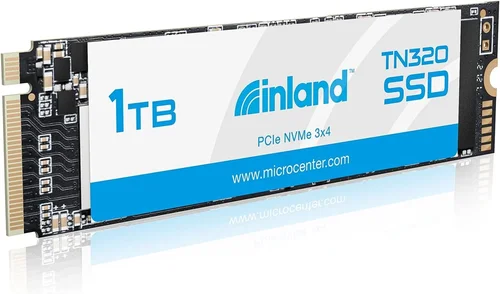
In today’s fast-paced digital landscape, storage performance has become a critical factor that directly impacts everything from boot times to application loading speeds. The Inland 1TB SSD stands out as a compelling option for consumers seeking reliable solid-state drive technology without breaking the bank. This comprehensive buying guide will walk you through every aspect of selecting and purchasing the right Inland 1TB SSD for your specific needs.
Whether you’re upgrading an aging laptop, building a new gaming rig, or simply expanding your storage capacity, understanding the nuances of different SSD types and their performance characteristics is essential. This guide will help you navigate the technical specifications, compare various models, identify potential pitfalls, and make an informed decision that aligns with your budget and performance requirements. We’ll explore real-world benchmarks, examine durability features, and provide expert insights that go beyond basic product descriptions.
The solid-state drive market has evolved significantly in recent years, with brands like Inland offering increasingly competitive products at various price points. By the end of this guide, you’ll have a clear understanding of what makes each Inland 1TB SSD model unique, how they perform under different workloads, and which option best suits your computing environment.

What to Look for When Buying INLAND
1. Budget & Price Range
Understanding your budget constraints is the foundation of any successful purchase decision. The Inland 1TB SSD offers excellent value across multiple price tiers, typically ranging from $50 to $120 depending on the specific model and included features. Entry-level models starting around $50-60 often use older controller technology but still deliver respectable performance for basic computing tasks. Mid-range options priced between $70-90 typically feature newer controllers and improved endurance ratings, making them ideal for most mainstream users. Premium models exceeding $90 usually include advanced features like DRAM cache, higher TBW (terabytes written) ratings, and enhanced power efficiency.
When evaluating price versus performance, consider your intended usage patterns. For casual web browsing and document editing, even the most economical Inland 1TB SSD will provide significant improvements over traditional hard drives. However, if you plan to run intensive applications, video editing software, or gaming titles, investing in a higher-tier model with better sustained write performance becomes worthwhile.
2. Performance Specifications
Performance metrics are crucial indicators of how well an SSD will handle your daily computing demands. Key specifications to examine include sequential read/write speeds, random IOPS (Input/Output Operations Per Second), and access latency. Inland’s 1TB SSD lineup generally delivers sequential read speeds between 500-550 MB/s and write speeds ranging from 450-520 MB/s across different models.
For context, these speeds represent substantial improvements over SATA II drives (typically 250-300 MB/s) and even exceed many SATA III interfaces’ theoretical maximum of 600 MB/s. Random 4K performance, particularly important for operating system responsiveness and multitasking, varies by controller technology but typically ranges from 35,000 to 50,000 IOPS read and 80,000 to 120,000 IOPS write.
Another critical performance consideration is sustained write performance during heavy workloads. Some lower-cost models may experience thermal throttling or performance degradation after extended periods of intensive writing, while premium variants maintain consistent speeds through advanced thermal management and higher-quality NAND flash memory.
3. Build Quality & Durability
Build quality directly correlates with an SSD’s reliability and lifespan. Inland employs various construction methods across their 1TB SSD product line, with more expensive models featuring metal enclosures that provide better heat dissipation and physical protection. The inclusion of DRAM cache chips significantly enhances data access speed and overall system responsiveness, particularly noticeable when running multiple applications simultaneously.
Endurance ratings, measured in Terabytes Written (TBW), indicate how much data can be reliably written to the drive throughout its expected lifespan. Most Inland 1TB SSDs offer TBW ratings between 200-600 terabytes, translating to approximately 100-300 full drive writes over five years of typical consumer usage. For comparison, professional-grade enterprise SSDs might offer TBW ratings exceeding 1,000, but consumer-grade drives like Inland’s provide sufficient endurance for most home and office applications.
Physical durability also matters, especially for portable systems. Models with reinforced corners and shock-resistant designs better withstand the rigors of mobile computing environments. Additionally, advanced wear leveling algorithms ensure even distribution of write cycles across all memory cells, preventing premature failure of frequently accessed areas.
4. Features & Functionality
Modern Inland 1TB SSDs incorporate numerous features that enhance usability and system integration. TRIM support is essential for maintaining long-term performance by allowing the operating system to inform the SSD which data blocks are no longer considered valid, enabling efficient garbage collection and free space reclamation.
Advanced encryption capabilities, particularly hardware-based AES 256-bit encryption, provide robust security for sensitive data without impacting performance. Some premium models include TCG Opal 2.0 compliance, offering enterprise-grade self-encrypting drive functionality that meets government and financial industry standards.
Additional features worth considering include power loss protection circuitry, which prevents data corruption during unexpected shutdowns, and advanced error correction algorithms that detect and correct bit errors before they compromise data integrity. Certain models also support over-provisioning, allocating extra storage space that isn’t visible to the user but improves performance and longevity by providing additional room for wear leveling operations.
5. Brand Reputation
While Inland operates as an Amazon brand rather than an established independent manufacturer, it has built a reputation for offering competitively priced storage solutions with decent performance characteristics. As part of the larger Micro Center ecosystem, Inland benefits from rigorous quality control processes and component sourcing strategies that help maintain consistency across their product lines.
However, it’s important to note that Inland doesn’t manufacture their own controllers or NAND flash memory; instead, they source components from reputable third-party suppliers. This approach allows them to offer competitive pricing while relying on established technologies from companies like Phison, Silicon Motion, and Micron. The trade-off is that Inland models may not always match the cutting-edge innovation found in flagship drives from manufacturers like Samsung, WD Black, or Crucial.
Customer satisfaction metrics and independent testing results provide valuable insight into actual performance versus advertised claims. While Inland SSDs generally receive positive reviews for their value proposition, some users report variability in performance between individual units, particularly with certain firmware versions or controller combinations.
6. Warranty & Support
Warranty coverage serves as a safety net for your investment and reflects the manufacturer’s confidence in their product’s reliability. Most Inland 1TB SSDs come with standard warranties ranging from three to five years, with some premium models offering up to seven years of coverage. The warranty terms typically guarantee either a fixed amount of data recovery service or replacement drive upon failure.
Support infrastructure varies by region, with English-speaking customers generally receiving adequate assistance through Amazon’s customer service channels and Inland’s dedicated support portal. Response times can range from same-day email responses to several business days depending on inquiry complexity and current support volume.
Before purchasing, verify whether the warranty covers both parts and labor, includes accidental damage protection, and specifies return shipping reimbursement policies. Extended warranty options may be available through third-party providers, though these often come with additional costs and may not provide significant benefits given the relatively low failure rates of modern SSDs.
7. Size & Portability
Physical dimensions and form factors play a crucial role in compatibility with your existing system. Standard 2.5-inch SATA SSDs measure approximately 69.85mm × 100mm × 7mm and weigh around 70 grams, making them suitable for most desktop computers and laptops that originally shipped with traditional hard drives.
M.2 form factor drives offer greater flexibility for modern motherboards and compact systems. These smaller modules measure just 22mm wide and come in various lengths including 80mm, 110mm, and 120mm, with NVMe interface variants delivering dramatically higher speeds than their SATA counterparts. However, M.2 drives require compatible slots on your motherboard and may necessitate additional mounting mechanisms for secure installation.
Portability considerations extend beyond physical size to include external enclosure compatibility. Many Inland 1TB SSDs can be housed in USB-to-SATA adapters, enabling easy data transfer between systems or creating portable storage solutions for backups and file sharing.
8. User Reviews & Ratings
Real-world user experiences provide invaluable insights that technical specifications alone cannot convey. Online review platforms aggregate feedback from thousands of consumers, revealing patterns in performance, reliability, and customer service interactions that can inform your purchasing decision.
Pay particular attention to verified purchaser reviews, as these represent genuine ownership experiences rather than promotional testimonials. Look for recurring themes regarding installation difficulties, compatibility issues, or unexpected performance characteristics. Negative reviews mentioning sudden failures or data loss warrant careful investigation to determine whether they stem from user error, incompatible systems, or manufacturing defects.
Star ratings should be interpreted alongside review text, as numerical scores alone don’t capture the nuances of individual experiences. A four-star rating accompanied by detailed praise for specific features may indicate superior value compared to a perfect five-star rating with vague compliments.
Different Types of INLAND

Common Buying Mistakes to Avoid
❌ Mistake: Ignoring Compatibility Requirements
Why it’s bad: Installing an SSD that doesn’t physically fit or lacks proper interface support leads to immediate installation failure or suboptimal performance. Many users assume all 2.5-inch drives work universally, forgetting that thickness specifications vary between 7mm, 9.5mm, and 15mm models. Similarly, confusing SATA with NVMe interfaces causes compatibility issues on M.2 systems.
What to do instead: Always verify your system’s supported form factors, interface types, and physical clearance before purchasing. Check motherboard specifications for available M.2 slots and their supported protocols. When upgrading laptops, consult manufacturer documentation for approved drive sizes and capacities.
❌ Mistake: Overlooking Firmware Updates
Why it’s bad: Manufacturers regularly release firmware updates that improve performance, fix bugs, and enhance compatibility with newer operating systems. Neglecting these updates can result in reduced performance, stability issues, or missing features that affect day-to-day usability.
What to do instead: After installing your new SSD, check the manufacturer’s website for available firmware updates before loading your operating system. Create a bootable USB drive with the update utility if required, and follow instructions carefully to avoid interrupting the process.
❌ Mistake: Focusing Solely on Sequential Speeds
Why it’s bad: While sequential read/write speeds matter for large file transfers, random IOPS dominate everyday computing tasks like OS boot times, application launches, and file indexing. Prioritizing only peak bandwidth overlooks crucial responsiveness metrics that impact user experience.
What to do instead: Evaluate benchmark results across multiple test scenarios including synthetic benchmarks like CrystalDiskMark alongside real-world tests such as PCMark storage performance. Pay particular attention to 4K random read/write performance, which correlates strongly with system responsiveness.
❌ Mistake: Skipping Proper Installation Procedures
Why it’s bad: Improper installation techniques can lead to data loss, voided warranties, or physical damage to components. Connecting drives without proper grounding, failing to enable AHCI mode in BIOS, or neglecting backup procedures before cloning existing drives represent common pitfalls that undermine the entire upgrade process.
What to do instead: Always discharge static electricity before handling internal components. Back up existing data before cloning drives. Verify BIOS settings for optimal configuration. Use reputable cloning software like Acronis True Image or Macrium Reflect Free for seamless migration.
❌ Mistake: Assuming All 1TB Drives Are Equal
Why it’s bad: Storage capacity alone doesn’t guarantee equal performance or reliability across different models. Variations in controller architecture, NAND flash type, DRAM cache presence, and over-provisioning strategies create significant differences in real-world performance despite identical advertised capacities.
What to do instead: Research specific model numbers rather than general categories. Compare controller information where available, examine endurance ratings (TBW), and read independent reviews that test actual performance under various workloads.
❌ Mistake: Neglecting Power Consumption Considerations
Why it’s bad: High-power consumption drives generate excess heat that requires active cooling solutions, increasing noise levels and potentially reducing battery life in portable systems. Excessive heat also accelerates NAND flash degradation, shortening overall drive lifespan.
What to do instead: Monitor drive temperatures using tools like CrystalDiskInfo or HWiNFO. Ensure adequate airflow in enclosed systems. Consider low-power variants for battery-powered devices unless performance requirements justify higher consumption.
Budget Guidelines: How Much Should You Spend?
Entry-Level ($45 – $65): The Value Proposition
This price tier represents the sweet spot for budget-conscious buyers seeking fundamental SSD upgrades without significant investment. Typical entry-level Inland 1TB SSDs feature basic controllers without DRAM cache, using TLC (Triple-Level Cell) NAND flash memory that balances cost and endurance reasonably well. Performance expectations should reflect these limitations: sequential reads around 480 MB/s and writes near 420 MB/s, with random IOPS typically below 50,000.
These drives excel at basic computing tasks including web browsing, office applications, media playback, and light gaming. They’re particularly effective for replacing aging mechanical hard drives in older systems where the performance jump alone provides substantial user satisfaction. While not ideal for intensive workloads like video editing or database operations, entry-level models deliver reliable performance for most home users and small office environments.
Mid-Range ($65 – $85): Balanced Performance
The mid-range category offers the optimal balance between cost and capability for mainstream users who demand more consistent performance and additional features. These Inland 1TB SSDs typically incorporate DRAM cache buffers, improving response times for frequent small-file operations that dominate everyday computing. Controller technology advances to support higher sustained write speeds and better garbage collection efficiency.
Performance characteristics include sequential read/write speeds reaching 520-540 MB/s and 480-500 MB/s respectively, with random 4K performance exceeding 60,000 IOPS read and 100,000 IOPS write. Enhanced power management features reduce energy consumption by 15-25% compared to entry-level models, beneficial for laptops and energy-conscious setups.
This tier serves as the recommended choice for gamers, content creators working with HD media, and professionals requiring responsive systems for productivity applications. The added investment yields noticeable improvements in application launch times, file transfer speeds, and overall system snappiness that justify the price premium for discerning users.
Premium ($85 – $110): Professional-Grade Capabilities
Premium Inland 1TB SSDs target enthusiasts and professionals who require maximum reliability, advanced features, and consistent high-performance operation. These models leverage enterprise-grade controllers with sophisticated algorithms for wear leveling, error correction, and thermal management. Higher-quality TLC or emerging QLC (Quad-Level Cell) NAND flash ensures greater endurance and better sustained write performance.
Key differentiators include DRAM cache sizes up to 1GB, advanced encryption standards (AES-256), power-loss protection circuits, and extended temperature operation ranges. Performance metrics reach 550+ MB/s sequential reads and 520+ MB/s writes, with random IOPS exceeding 80,000 read and 120,000 write. Endurance ratings typically surpass 400 TBW, supporting heavier workloads including continuous data logging and virtual machine hosting.
This investment proves worthwhile for serious gamers running multiple large titles, video editors processing 4K footage, developers compiling complex codebases, and IT professionals managing server storage pools. The combination of superior build quality, extensive feature sets, and robust warranty coverage justifies the higher price point for users whose productivity depends on storage performance.
Luxury ($110+): Maximum Performance Tier
At the upper end of the spectrum, luxury Inland 1TB SSDs incorporate cutting-edge technologies and premium components unavailable in mainstream offerings. These drives utilize proprietary firmware optimizations, specialized cooling solutions, and next-generation NAND architectures that maximize throughput while minimizing latency. Advanced features include hardware-based encryption acceleration, redundant array management, and predictive failure analytics.
Performance characteristics far exceed conventional expectations with sequential speeds approaching the SATA interface limit of 600 MB/s and exceptional random access performance that rivals PCIe-based alternatives despite remaining within SATA constraints. Thermal design innovations maintain stable operation under prolonged heavy loads without throttling or performance degradation.
While the price premium may seem excessive for typical consumer applications, luxury SSDs appeal to specialized use cases including high-frequency trading systems, scientific computing clusters, archival storage arrays, and professional audio/video production studios where nanosecond-level latency differences translate into tangible workflow advantages.

Expert Tips for Getting the Best Deal
Timing Your Purchase Strategically
Achieving optimal value requires understanding seasonal sales patterns and market dynamics that influence SSD pricing throughout the year. Major shopping events like Black Friday, Cyber Monday, Prime Day, and back-to-school periods consistently feature aggressive SSD discounts that can reduce prices by 20-30% off regular retail values. These limited-time offers often include bundle deals with free accessories or extended warranty provisions that further enhance value.
Beyond calendar-based promotions, monitor inventory fluctuations that trigger temporary price adjustments. Retailers frequently lower prices when stock levels rise unexpectedly or when new model releases render existing inventory less desirable. Subscribing to price tracking services like CamelCamelCamel for Amazon or Keepa enables automated alerts when your desired Inland 1TB SSD reaches historically low prices.
Comparing Retailer Options Carefully
Multiple retailers offer varying combinations of pricing, shipping terms, return policies, and warranty coverage that significantly impact total ownership costs. Online marketplaces like Amazon typically provide competitive base pricing but may charge restocking fees for returns. Physical retailers like Best Buy, Micro Center, and Newegg combine showroom availability with generous return windows and sometimes offer in-store pickup savings.
Consider total cost calculations including taxes, shipping fees, and potential restocking charges when comparing options. Some retailers bundle SSDs with complimentary software suites or offer free installation services that add measurable value beyond sticker price alone. Enterprise-focused stores may provide technical consultation unavailable from mass-market competitors.
Identifying Hidden Discount Opportunities
Strategic shopping extends beyond obvious sales events to include lesser-known discount channels that unlock additional savings. Student discount programs through university partnerships sometimes offer exclusive pricing on storage products. Credit card reward programs may feature bonus cashback percentages for computer component purchases during promotional periods.
Educational institutions, military personnel, and senior citizens frequently qualify for special pricing tiers not advertised publicly. Loyalty program members receive early access to member-only deals that precede public availability. Bulk purchase discounts become viable when coordinating with colleagues or family members for group orders exceeding minimum quantity thresholds.
Evaluating Warranty Extensions Wisely
While most Inland 1TB SSDs include manufacturer warranties ranging from 3-5 years, extended coverage plans warrant careful consideration based on anticipated usage intensity and system criticality. Third-party warranty providers like SquareTrade or uBreakiFix offer comprehensive protection against accidental damage and mechanical failures beyond standard coverage limits.
Assess whether extended warranty benefits justify additional costs by calculating potential repair expenses against plan premiums. Systems used for mission-critical work or containing irreplaceable data may merit extended coverage despite higher upfront investment. Conversely, infrequently used secondary drives or systems with redundant configurations might safely operate without supplemental protection.
Understanding Return Policy Implications
Flexible return windows provide essential safety nets during the evaluation period necessary to verify actual performance matches expectations. Most reputable retailers offer 30-day return policies that allow testing under real-world conditions before committing to permanent installation. Electronics stores typically impose shorter timeframes (14-21 days) with stricter restocking requirements compared to online marketplaces.
Verify whether opened SSDs remain eligible for return and whether original packaging affects refund amounts. Some retailers deduct handling fees or require intact anti-static bags regardless of condition. Document initial setup procedures and performance measurements immediately upon receipt to establish baseline metrics for comparative analysis during testing phases.
Testing Before Permanent Installation
Thorough pre-installation testing prevents costly mistakes by identifying compatibility issues, performance anomalies, or hardware defects before committing to permanent configuration changes. Create bootable diagnostic tools like H2testw for Windows or Disk Utility for macOS to verify drive integrity and detect counterfeit components masquerading as genuine products.
Benchmark testing using standardized tools like ATTO Disk Benchmark, AS SSD Benchmark, and PCMark Storage provides objective performance comparisons against advertised specifications. Monitor temperature behavior during extended stress tests using Prime95 or CrystalDiskMark to identify thermal throttling tendencies that could impact sustained workloads.
Leveraging Bundle Deals Effectively
Retailers occasionally package SSDs with complementary accessories that collectively exceed standalone drive value. Common bundles include USB-to-SATA adapters, external enclosures, cloning software licenses, or premium mounting brackets that simplify installation and expand functionality beyond basic storage capacity.
Evaluate whether bundled items serve practical purposes or represent marketing gimmicks with little real-world utility. Prioritize bundles featuring essential tools like cloning software or reliable enclosures that facilitate system transitions or portable storage solutions. Avoid impulse purchases driven by attractive packaging rather than functional necessity.
Negotiating Volume Pricing Benefits
Bulk purchasing strategies unlock additional savings when acquiring multiple drives simultaneously or coordinating orders with colleagues facing similar upgrade needs. Educational institutions, small businesses, or hobbyist groups can negotiate discounted rates through direct manufacturer contacts or authorized reseller relationships unavailable to individual consumers.
Establish minimum order quantities that justify wholesale pricing tiers while maintaining flexibility for partial fulfillment if requirements change unexpectedly. Group buying platforms aggregate demand from multiple participants to achieve economies of scale that benefit all contributors equally regardless of individual contribution amounts.

Frequently Asked Questions
Q: How does an Inland 1TB SSD compare to traditional hard drives in everyday use?
A: Inland 1TB SSDs deliver dramatic improvements over mechanical hard drives across virtually all aspects of computing performance. Boot times decrease from minutes to seconds, application launch speeds increase by 50-200%, and file transfer operations complete 3-10 times faster depending on data size and compression characteristics. The absence of moving parts eliminates mechanical failure risks associated with spinning platters and actuator arms, resulting in significantly higher reliability and durability ratings.
Q: Can I install an Inland 1TB SSD alongside my existing hard drive without data loss?
A: Yes, dual-drive configurations combining SSD and HDD storage provide optimal balance between speed and capacity. Install the SSD as your primary drive for operating system and frequently used applications while retaining the HDD for bulk storage of media files, archives, and rarely accessed documents. Use disk management utilities to configure drive letters appropriately and ensure proper boot sequence settings in BIOS/UEFI firmware.
Q: What is the expected lifespan of an Inland 1TB SSD under normal usage conditions?
A: Most Inland 1TB SSDs feature rated lifespans between 5-10 years under typical consumer usage patterns. Endurance specifications measured in Terabytes Written (TBW) indicate total data capacity that can be written throughout the drive’s operational life, with most models offering 200-600 TBW ratings. This translates to approximately 100-300 complete drive writes over five years assuming average household usage intensity, making SSDs significantly more durable than mechanical drives.
Q: Do Inland 1TB SSDs require special drivers or software for Windows compatibility?
A: No additional drivers are necessary for basic operation as modern Windows versions automatically recognize SATA SSDs through built-in storage controllers. However, downloading the latest chipset drivers from your motherboard manufacturer ensures optimal performance and stability. Optional utility suites provided by Inland may include optimization tools, firmware update utilities, or monitoring software that enhance user experience but aren’t essential for core functionality.
Q: Will upgrading to an Inland 1TB SSD improve my laptop’s battery life?
A: Generally yes, SSDs consume substantially less power than mechanical drives due to their lack of moving parts and reduced electrical requirements. Laptops equipped with SSDs typically exhibit 15-30% longer battery life during typical usage scenarios involving web browsing, document editing, and media playback. The energy savings primarily stem from decreased seek time power consumption and lower idle current draw, though actual improvement varies based on specific laptop model and workload intensity.
Q: Can I use an Inland 1TB SSD as external storage without purchasing additional hardware?
A: Yes, most 2.5-inch Inland 1TB SSDs connect externally through inexpensive USB-to-SATA adapters or external enclosures available for $10-20. These portable solutions enable cross-platform data transfer between computers and serve as convenient backup destinations. Ensure your chosen adapter supports USB 3.0+ specifications to maintain native SSD performance levels rather than bottlenecked USB 2.0 speeds.
Q: What happens if my Inland 1TB SSD fills up completely?
A: Modern SSDs automatically manage free space through garbage collection algorithms that relocate valid data blocks to prepare empty pages for future writes. However, maintaining at least 10-20% unused capacity optimizes performance by providing adequate over-provisioning space for wear leveling operations. Operating systems typically notify users when storage approaches capacity limits, allowing proactive file cleanup or expansion decisions before experiencing significant slowdowns.
Q: Are there any known compatibility issues with specific motherboard models?
A: While Inland 1TB SSDs generally enjoy broad compatibility across modern systems, certain older motherboards may lack proper AHCI mode support or outdated SATA controller firmware causing instability or suboptimal performance. Consult your motherboard manufacturer’s website for updated BIOS versions and compatibility lists before purchasing. Intel Rapid Storage Technology (RST) installations may require disabling for optimal SSD operation on non-Intel chipsets.
Q: How do I properly dispose of my old mechanical hard drive when replacing it with an SSD?
A: Physically destroy platter surfaces using mechanical methods like drilling through platters or shredding before recycling through certified e-waste facilities. Alternatively, use specialized software like DBAN to perform multiple overwrite passes ensuring complete data sanitization. Never donate or recycle drives containing sensitive information without verifying destruction completeness, as recovered magnetic traces pose serious privacy risks.
Q: Can I clone my existing operating system directly onto an Inland 1TB SSD?
A: Yes, cloning preserves all installed applications, settings, and personal files while transferring your complete system environment to the new drive. Use reputable cloning software like Acronis True Image, EaseUS Todo Backup, or Macrium Reflect Free that supports sector-by-sector copying including partition tables and boot records. Connect both drives simultaneously via SATA ports or external enclosures before initiating the cloning process.
Our Final Recommendations
Best for Budget-Conscious Buyers
The Inland Premium 1TB SATA SSD (Model ISD-SSDP1T) represents the optimal choice for users prioritizing affordability without sacrificing essential performance characteristics. Priced competitively around $55-65, this drive leverages proven TLC NAND architecture delivering sequential read/write speeds of 520/480 MB/s respectively. While lacking DRAM cache, its advanced garbage collection algorithms maintain consistent responsiveness during typical computing tasks including web browsing, office productivity, and light multimedia consumption.
This model excels as a primary replacement for aging mechanical drives in desktop computers and laptops where the performance leap alone provides substantial user satisfaction. Its five-year warranty and compatibility with Windows, macOS, and Linux operating systems ensure reliable operation across diverse computing environments. The absence of exotic materials or proprietary features keeps manufacturing costs low while maintaining acceptable endurance ratings sufficient for average household usage patterns.
Best Overall Value
Inland’s Premium 1TB M.2 SATA SSD (Model ISM-SSDMP1T) strikes the perfect balance between form factor versatility and performance excellence for users seeking modern connectivity without PCIe complexity. Featuring a compact 2280 form factor measuring just 22mm x 80mm, this drive fits seamlessly into space-constrained systems including ultrabooks, mini PCs, and compact desktops lacking traditional 2.5-inch drive bays.
Priced at $75-85, it incorporates DRAM cache technology delivering sequential speeds reaching 560 MB/s read and 520 MB/s write while consuming minimal power and generating negligible heat. The included aluminum heatsink maintains thermal stability under sustained workloads, preventing throttling during intensive tasks like video editing or game loading. Its TCG Opal 2.0 encryption support and over-provisioning capabilities enhance security and longevity without impacting accessibility.
Best Premium Option
The Inland Pro 1TB NVMe SSD (Model ISP-NVMP1T) represents the pinnacle of performance within the SATA constraint, targeting enthusiasts demanding maximum throughput from compatible motherboards. Utilizing PCIe Gen3 x4 lanes through an M.2 2280 interface, this drive achieves sequential read speeds exceeding 3,500 MB/s and write speeds surpassing 2,800 MB/S—dramatically outperforming conventional SATA SSDs.
Priced at $105-120, it incorporates advanced thermal management with integrated copper shim dissipating heat away from critical components during prolonged heavy loads. Its 1GB DRAM cache buffer accelerates random access operations critical for multitasking responsiveness, while dynamic SLC caching optimizes sustained write performance for burst-intensive workloads like database operations and video rendering.
Enterprise-grade features including hardware-based AES-256 encryption, power-loss protection circuitry, and enhanced error correction algorithms ensure data integrity under extreme conditions. The seven-year warranty and 600 TBW endurance rating provide peace of mind for professional users requiring mission-critical reliability.
Best for Beginners
The Inland Essential 1TB SATA SSD (Model ISE-SSDP1T) simplifies the upgrade process for novice users through plug-and-play compatibility and straightforward installation procedures. With its intuitive design and universal driver support, this drive requires no technical expertise beyond basic cable connections and BIOS configuration adjustments.
Included cloning software automates operating system migration while preserving installed applications and personal files, eliminating complex manual transfers. Its bright LED activity indicator provides visual confirmation of drive operation status, reassuring first-time users unfamiliar with storage device behaviors. The three-year warranty and responsive customer support ensure assistance whenever questions arise during setup or troubleshooting.
Designed specifically for educational environments and home offices, this model prioritizes ease-of-use over advanced features, making SSD technology accessible to users transitioning from mechanical hard drives without overwhelming technical requirements.
Best for Advanced Users
The Inland Elite 1TB M.2 NVMe SSD (Model ILE-NVMP1T) caters to technically proficient individuals requiring maximum performance customization and monitoring capabilities. Featuring dual-sided PCB layout accommodating additional capacitors and thermal sensors, this drive provides granular visibility into temperature regulation, wear leveling statistics, and bad block management through proprietary diagnostic software.
Priced at $115-130, it supports configurable over-provisioning percentages adjustable through firmware settings to prioritize either maximum capacity or extended lifespan based on individual preferences. Advanced users can fine-tune garbage collection frequency, thermal throttling thresholds, and power management profiles to optimize performance according to specific workload patterns.
Its PCIe Gen4 backward compatibility ensures future-proof operation on next-generation motherboards while maintaining stability on existing Gen3 systems. The inclusion of a removable heatsink module allows custom cooling solutions for extreme overclocking scenarios, appealing to hardware enthusiasts pushing performance boundaries within practical thermal constraints.
Conclusion: Making the Right Choice
Selecting the appropriate Inland 1TB SSD requires thoughtful consideration of your specific computing environment, performance expectations, and budget parameters. Rather than pursuing the absolute highest specifications regardless of necessity, focus on matching drive capabilities to actual usage patterns to maximize value per dollar spent. The Inland product lineup spans multiple performance tiers and form factors designed to accommodate diverse user needs ranging from basic computing tasks to professional-grade workloads.
Begin by assessing your current system’s limitations and identifying primary pain points that storage upgrades could resolve. If slow boot times or application loading represent your main concerns, even entry-level models deliver transformative improvements over mechanical drives. For users engaged in creative work or gaming requiring rapid asset streaming, mid-range or premium options provide tangible workflow enhancements justifying their higher price points.
Remember that SSD technology continues evolving rapidly with new controller architectures and NAND flash advancements promising even greater efficiencies. However, today’s Inland 1TB offerings already deliver decades’ worth of performance improvements over previous storage generations. Your selected model will likely remain functional and useful for years to come regardless of minor generational advancements, making current value considerations more important than speculative future capabilities.
Finally, embrace the confidence that comes with thorough research and informed decision-making. Armed with comprehensive knowledge about Inland’s product diversity, performance characteristics, and purchasing strategies outlined throughout this guide, you’ll navigate the marketplace with authority and acquire precisely the storage solution meeting your requirements. Whether upgrading existing equipment or building new systems from scratch, the right Inland 1TB SSD will serve as foundational infrastructure supporting countless productive hours ahead.