
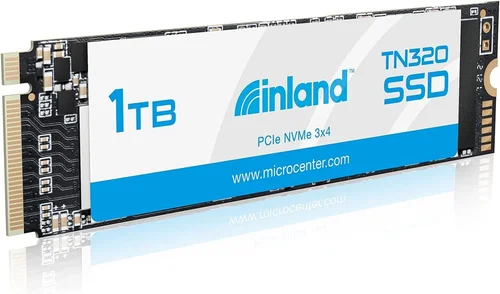
When it comes to upgrading your computer’s storage, the decision can significantly impact performance, reliability, and overall user experience. Whether you’re building a new PC, replacing an aging hard drive, or simply need more space for your growing digital library, choosing the right solid-state drive (SSD) is crucial. The Inland 1TB SSD M.2 stands out as a compelling option in today’s crowded market, offering a balance of speed, capacity, and value that appeals to both casual users and power consumers alike.
This comprehensive buying guide will walk you through every aspect of purchasing an Inland 1TB M.2 SSD, from understanding technical specifications to identifying the best deals and avoiding common pitfalls. You’ll learn about the different types of M.2 form factors, what makes 3D NAND technology superior to traditional planar NAND, and how to match your specific needs with the right model. We’ll also explore real-world performance expectations, compatibility considerations, and provide expert insights on where to find the best prices without compromising quality.
By the end of this guide, you’ll have all the knowledge needed to make an informed decision about your Inland 1TB SSD purchase. Whether you’re upgrading a laptop, enhancing a desktop workstation, or building a high-performance gaming rig, understanding these key factors will ensure you get maximum value from your investment.
The modern computing landscape demands fast, reliable storage solutions, and the Inland brand has positioned itself as a trustworthy alternative to more expensive premium brands. With proper guidance, you can leverage their offerings to achieve significant performance improvements over traditional mechanical hard drives while staying within reasonable budget constraints.

What to Look for When Buying INLAND
1. Performance Specifications
Performance is arguably the most critical factor when selecting any SSD, and the Inland 1TB M.2 models are no exception. These drives typically feature impressive sequential read and write speeds that dramatically outperform traditional hard disk drives. Most Inland 1TB M.2 SSDs offer sequential read speeds between 500-550 MB/s and write speeds ranging from 450-520 MB/s, making them suitable for everyday computing tasks, content creation, and even moderate gaming applications.
The performance difference becomes particularly noticeable during system boot times, application loading, and file transfers. Where a traditional HDD might take 30-60 seconds to boot your operating system, an Inland SSD can accomplish this in under 10 seconds. For creative professionals working with large video files or photo editing software, faster write speeds translate directly into reduced rendering times and improved workflow efficiency.
When evaluating performance specifications, pay particular attention to random read/write IOPS (Input/Output Operations Per Second) as well. These metrics indicate how quickly the drive can handle small, scattered data requests – a crucial factor for multitasking and database operations. Higher IOPS ratings generally correlate with better overall system responsiveness.
2. Build Quality & Durability
Build quality and durability should never be overlooked when investing in storage hardware. The Inland 1TB M.2 SSDs are constructed using robust materials designed to withstand the rigors of daily use. These drives typically feature aluminum heat spreaders that help dissipate thermal energy generated during intensive operations, preventing thermal throttling that could otherwise degrade performance.
Durability extends beyond physical construction to include endurance ratings measured in Terabytes Written (TBW). For a 1TB drive, you can expect TBW ratings ranging from 200-600 depending on the specific model and NAND flash type used. This represents the total amount of data the manufacturer guarantees the drive can write over its lifetime before potential failure occurs.
Environmental resilience is another important consideration. Many Inland M.2 SSDs meet industrial-grade standards for temperature resistance, shock tolerance, and vibration resistance. This makes them suitable not only for standard desktop and laptop installations but also for more demanding environments like industrial control systems or mobile workstations.
3. Compatibility Considerations
Compatibility is perhaps one of the most frequently overlooked aspects when purchasing an M.2 SSD. Before committing to any purchase, verify that your motherboard or laptop actually supports M.2 NVMe or SATA interfaces, as these specifications are not universally compatible across all systems.
Most modern motherboards support either PCIe 3.0 x4 or PCIe 4.0 x4 interfaces for NVMe drives, while older systems may only accommodate SATA-based M.2 drives. The physical length of the M.2 slot (typically 2280 meaning 22mm wide by 80mm long) must also match your chosen drive to ensure proper installation.
Additionally, check your operating system’s compatibility with NVMe drives. While Windows 10 and newer versions support NVMe natively, some older Windows versions or Linux distributions may require additional drivers or configuration changes. Always consult your system manufacturer’s documentation before proceeding with installation.
4. Endurance and Lifespan Expectations
Understanding the expected lifespan and endurance characteristics of your Inland 1TB SSD helps set realistic expectations and ensures you select a drive capable of meeting your usage patterns. Modern SSDs utilize sophisticated wear-leveling algorithms and over-provisioning techniques to distribute write cycles evenly across memory cells, maximizing longevity.
For typical consumer workloads involving web browsing, office applications, media consumption, and light gaming, an Inland 1TB SSD should easily last 5-7 years without issues. Professional users engaging in heavy database operations, video editing, or server applications should monitor drive health more closely and consider drives with higher TBW ratings.
Many Inland models come equipped with built-in SMART (Self-Monitoring, Analysis and Reporting Technology) monitoring capabilities that track various health indicators including available spare blocks, percentage lifetime left, and total bytes written. Regularly checking these metrics through your operating system’s disk management tools can provide early warning signs of potential failures.
5. Power Consumption and Thermal Management
Power efficiency and thermal management are increasingly important considerations, especially for laptops and portable devices where battery life and heat dissipation directly impact user experience. The Inland 1TB M.2 SSDs are engineered to operate efficiently within typical power budgets while maintaining optimal operating temperatures.
Most models consume between 2-5 watts during active operation and less than 0.5 watts in idle states. This low power consumption translates into extended battery life for laptops and reduced electricity costs for desktop systems running continuously.
Thermal management is handled through integrated heatsinks or passive cooling solutions that prevent excessive temperature buildup during sustained write operations. Some higher-performance models include thermal throttling protection that automatically reduces clock speeds when temperatures exceed safe thresholds, preventing permanent damage while maintaining basic functionality.
6. Warranty and Customer Support
A comprehensive warranty and responsive customer support infrastructure provides peace of mind and protection against unexpected failures. Inland offers varying warranty periods depending on the specific model, typically ranging from 3 to 5 years with varying coverage terms.
Before purchasing, carefully review the warranty details including what components are covered, whether accidental damage is included, and the process for filing claims. Some manufacturers require registration within a specified timeframe to activate warranty coverage, so be sure to complete this step promptly after purchase.
Customer support accessibility is equally important. Evaluate whether the manufacturer provides multiple contact channels (phone, email, chat), response time guarantees, and comprehensive troubleshooting resources including detailed FAQ sections and community forums.
7. Brand Reputation and Market Positioning
Inland has established itself as a reputable manufacturer specializing in storage solutions and computer components. While not as widely recognized as some premium brands, they have built a solid reputation for delivering reliable products at competitive price points.
Their market positioning focuses primarily on value-conscious consumers who demand quality without paying premium prices. This approach allows them to invest in high-quality components while maintaining aggressive pricing strategies that make their products accessible to a broad audience.
When researching brand reputation, pay attention to independent reviews from trusted tech publications, professional testing results, and user feedback across multiple platforms. Look for consistent performance benchmarks and reliability metrics rather than relying solely on marketing claims.
8. Software and Firmware Features
Modern SSDs often include companion software suites that enhance functionality and provide valuable diagnostic tools. Inland typically includes basic utilities for firmware updates, drive monitoring, and performance optimization.
Firmware update capabilities are crucial for maintaining optimal performance and addressing potential security vulnerabilities. Manufacturers periodically release firmware updates that improve compatibility, fix bugs, and sometimes unlock additional features or performance enhancements.
Some advanced models may include encryption capabilities for enhanced data security, though these features vary significantly between models and may require additional software licenses for full functionality.
Different Types of INLAND

Common Buying Mistakes to Avoid
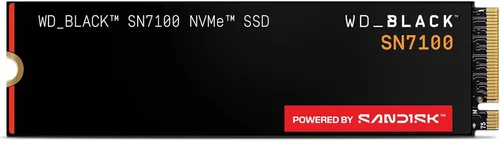
❌ Mistake: Ignoring Compatibility Requirements
Why it’s bad: Purchasing an M.2 SSD without verifying your system’s compatibility can result in wasted money and installation frustration. Many users assume all M.2 drives will fit in their computers, but this isn’t always the case due to differences in interface types, physical dimensions, and supported protocols.
What to do instead: Before making any purchase, consult your motherboard or laptop manufacturer’s documentation to confirm the exact M.2 specification supported. Check whether your system requires SATA III or NVMe connectivity, and verify the available physical space for the drive length you plan to install.
❌ Mistake: Overlooking Warranty Terms
Why it’s bad: Assuming all warranties cover the same scenarios leads to disappointment when attempting to claim repairs or replacements. Some manufacturers exclude certain types of damage or require specific registration procedures that many users overlook.
What to do instead: Carefully read the warranty documentation included with your purchase, and if necessary, contact customer support to clarify any ambiguous terms. Keep all receipts and registration information readily available for future reference.
❌ Mistake: Choosing Based Solely on Price
Why it’s bad: Focusing exclusively on lowest-cost options often results in purchasing inferior products that fail prematurely or lack essential features. Cheap SSDs may use lower-quality NAND flash or omit critical components like heatsinks, leading to reduced performance and shorter lifespans.
What to do instead: Evaluate products based on a balanced assessment of price, performance, reliability, and included features. Consider the total cost of ownership rather than just the initial purchase price, factoring in potential replacement costs and downtime.
❌ Mistake: Neglecting Backup Procedures
Why it’s bad: Assuming data will automatically transfer during OS installation or drive cloning can lead to catastrophic data loss. Improper backup practices before installing a new SSD frequently result in permanent deletion of important files and irreplaceable personal data.
What to do instead: Always create comprehensive backups of your existing system and personal files before beginning any SSD installation process. Use reliable backup software or manual copying methods to ensure all critical data is safely preserved.
❌ Mistake: Skipping Performance Testing After Installation
Why it’s bad: Assuming all SSDs perform identically regardless of actual hardware implementation can mask underlying issues. Without proper testing, users may unknowingly install drives that are underperforming due to manufacturing defects or improper configuration.
What to do instead: Utilize reputable benchmarking tools like CrystalDiskMark, ATTO Disk Benchmark, or AS SSD Benchmark immediately after installation to verify expected performance levels. Compare results against manufacturer specifications to identify any anomalies.
❌ Mistake: Disregarding Future Upgrade Plans
Why it’s bad: Selecting an SSD based solely on current needs without considering future requirements can force premature upgrades sooner than anticipated. Users who underestimate their storage needs may find themselves needing additional drives before planned upgrade cycles.
What to do instead: Evaluate your anticipated storage requirements over the next 2-3 years, accounting for software updates, media file growth, and potential new applications. Choose capacities that provide comfortable headroom for future expansion.
Budget Guidelines: How Much Should You Spend?
Entry-Level ($45 – $65)
The entry-level range represents excellent value for users seeking basic performance improvements without breaking the bank. In this price bracket, you’ll typically find SATA III M.2 drives featuring 3D TLC NAND flash memory with sequential speeds around 500-550 MB/s. These drives are ideal for upgrading older laptops or desktops where maximum performance isn’t critical but reliability and compatibility are paramount.
For budget-conscious buyers, this tier offers sufficient performance to dramatically improve boot times, application loading speeds, and file transfer rates compared to traditional HDDs. While they won’t compete with premium NVMe drives in raw throughput, they provide outstanding value for everyday computing tasks including web browsing, office productivity, and multimedia consumption.
Mid-Range ($65 – $85)
This sweet spot represents the optimal balance between cost and capability for most users. Mid-range Inland 1TB M.2 SSDs typically feature NVMe PCIe Gen3 x4 interfaces delivering 1,800-3,500 MB/s read speeds and 1,500-3,000 MB/s write speeds. These drives utilize advanced 3D TLC or QLC NAND technologies with improved controller architectures that enhance both performance and endurance.
Perfect for gamers, content creators, and professionals who demand responsive system performance without excessive spending, mid-range options provide excellent value proposition. They handle intensive workloads including game loading, video editing, and large file processing with ease while maintaining reasonable power consumption and thermal characteristics.
Premium ($85 – $110)
The premium category targets enthusiasts and professionals requiring maximum performance and reliability. These drives typically employ high-quality 3D MLC or enterprise-grade TLC NAND flash, advanced DRAM cache buffers, and sophisticated thermal management systems. Sequential read/write speeds commonly reach 3,500-5,000 MB/s, making them suitable for extreme multitasking, high-resolution video editing, and demanding database operations.
While the price premium is justified by superior build quality and extended lifespan expectations, most home users won’t fully utilize the additional capabilities offered by these top-tier models. However, for those engaged in professional workflows where every second counts, the extra investment pays dividends through increased productivity and reduced waiting times.
Luxury ($110+)
Luxury-tier Inland M.2 SSDs represent the pinnacle of consumer storage technology, featuring industrial-grade components and specialized firmware optimizations. These drives often incorporate proprietary cooling solutions, redundant component designs, and extensive error correction mechanisms that maximize data integrity and operational stability.
Primarily targeted at enterprise customers, server administrators, and extreme enthusiasts running specialized workloads, luxury models deliver unmatched performance consistency and longevity. For typical home users, the incremental benefits rarely justify the substantial price increase over premium alternatives, making these drives more appropriate for specific professional environments rather than general consumer applications.
Expert Tips for Getting the Best Deal
Timing Your Purchase Strategically
Achieving optimal value requires understanding market dynamics and timing your purchase accordingly. Major shopping events such as Black Friday, Cyber Monday, Amazon Prime Day, and back-to-school seasons consistently feature substantial discounts on storage devices. These periods often see price reductions of 20-40% compared to regular retail pricing, providing exceptional opportunities for savvy shoppers.
Beyond scheduled sales events, monitor price trends throughout the year using dedicated price tracking websites or browser extensions. Many retailers adjust pricing based on inventory levels, competitor actions, and seasonal demand patterns. Setting up alerts for your desired product enables immediate notification when prices drop below your target threshold.
Comparing Retailer Options
The choice between online and brick-and-mortar stores significantly impacts both convenience and cost-effectiveness. Online retailers typically offer broader selection, lower overhead costs, and more aggressive pricing strategies compared to physical locations. Major e-commerce platforms like Amazon, Newegg, B&H Photo Video, and Micro Center maintain competitive pricing while providing detailed product specifications and customer reviews.
However, local computer shops may offer advantages including immediate availability, hands-on product inspection, and face-to-face technical support. Evaluate each option based on your specific priorities regarding price sensitivity, immediate needs, and preference for personal interaction versus convenience.
Identifying Authentic Discounts
Be vigilant against counterfeit products marketed through misleading discount claims. Verify seller credentials and product authenticity before completing any purchase. Legitimate retailers participate in official programs like Amazon’s “Amazon Certified” badge or manufacturer verification systems that guarantee genuine products.
Compare prices across multiple reputable sources to establish baseline expectations. If a deal appears unusually generous compared to historical averages or competitor pricing, exercise caution and investigate further before committing funds.
Evaluating Extended Warranty Options
While basic manufacturer warranties provide essential coverage, extended protection plans can offer additional peace of mind for high-value purchases. Consider the likelihood of hardware failure and potential replacement costs when deciding whether to invest in extended coverage. Most manufacturers offer warranty extensions ranging from 1-5 years beyond standard coverage periods.
Carefully review included benefits such as accidental damage protection, international coverage, and expedited replacement services. Some providers charge flat annual fees while others apply percentage-based premiums, so compare total costs and benefits before making decisions.
Understanding Return Policies
Flexible return windows enable thorough product evaluation without financial risk. Reputable retailers typically offer 30-day return policies allowing sufficient time for installation testing and performance verification. Confirm restocking fee structures and required packaging conditions before initiating returns.
For complex installations involving operating system migrations or data transfers, allocate extra time during your initial product evaluation period. Having adequate buffer days prevents rushed assessments that might overlook subtle performance issues or compatibility concerns.
Conducting Pre-Purchase Research
Comprehensive research minimizes buyer’s remorse and ensures alignment between expectations and actual product capabilities. Examine independent review publications, professional benchmark results, and user forum discussions covering your specific model. Pay particular attention to real-world performance metrics rather than theoretical specifications alone.
Cross-reference multiple sources to identify consistent strengths and weaknesses reported across different usage scenarios. Look for patterns indicating reliable performance under various workloads rather than isolated exceptional cases.
Negotiating Better Terms
While less common with major online retailers, negotiation opportunities exist with smaller specialty stores or during promotional periods. Inquire about bundle deals combining accessories like mounting brackets or thermal pads, which can reduce overall project costs. Some retailers offer price matching guarantees against verified competitor listings.
Building relationships with knowledgeable sales staff can yield personalized recommendations and occasional exclusive offers unavailable to general shoppers. Demonstrate genuine interest in learning about available options rather than immediately requesting discounts.

Frequently Asked Questions
Q: What exactly does “3D NAND” mean and why is it better than older technology?
A: 3D NAND refers to a revolutionary memory architecture that stacks memory cells vertically rather than arranging them in single-layer planar configurations. This innovation dramatically increases storage density per chip area while reducing manufacturing complexity compared to traditional 2D planar NAND. The vertical stacking enables higher capacities without proportional increases in die size, resulting in better yields and lower production costs. Additionally, 3D NAND offers improved reliability, longer lifespan, and enhanced performance characteristics suitable for demanding applications.
Q: Can I use an M.2 SSD in any computer or laptop?
A: Not necessarily. M.2 SSD compatibility depends on multiple factors including interface protocol (SATA vs NVMe), physical dimensions (length), and available socket presence on your motherboard or laptop. Most modern systems support either M-key or B+M key sockets, but you must verify your specific hardware supports the exact configuration of your intended drive. Always consult your device documentation or manufacturer specifications before purchasing.
Q: How long should I expect my Inland 1TB M.2 SSD to last under normal usage?
A: Under typical consumer workloads involving web browsing, office applications, media playback, and light gaming, most Inland 1TB M.2 SSDs should reliably function for 5-7 years or more. Actual lifespan varies based on NAND flash quality, controller efficiency, write endurance ratings, and daily usage patterns. Professional users performing intensive operations like video editing or database management may experience shorter effective lifespans due to higher write volumes.
Q: Do I need special software to make my M.2 SSD work properly?
A: Most modern operating systems including Windows 10/11, macOS, and recent Linux distributions support M.2 SSDs natively without requiring additional drivers or software installations. However, manufacturers occasionally provide utility suites for firmware updates, performance optimization, and health monitoring. While not strictly necessary for basic functionality, these tools enhance overall user experience and can help maintain peak performance over time.
Q: What’s the difference between SATA III and NVMe M.2 SSDs?
A: SATA III M.2 SSDs connect through the same interface used by traditional 2.5-inch SATA drives, offering maximum theoretical speeds of approximately 600 MB/s. NVMe M.2 drives utilize the PCI Express bus architecture, enabling significantly higher throughput reaching several gigabytes per second depending on the PCIe generation and lane configuration. NVMe drives generally deliver superior performance for gaming, content creation, and multitasking scenarios while consuming slightly more power.
Q: Should I install my operating system on the M.2 SSD or keep it on a separate drive?
A: Installing your operating system directly onto the M.2 SSD provides the greatest performance benefits and simplified maintenance. This configuration eliminates bottlenecks associated with secondary storage access and ensures all system files benefit from maximum throughput capabilities. For optimal results, clone your existing OS partition or perform a clean installation followed by application reinstallation rather than attempting direct migration.
Q: How do I know if my M.2 SSD is running too hot?
A: Monitor your drive temperatures using built-in SMART monitoring tools or third-party utilities like CrystalDiskInfo or HWiNFO. Most M.2 SSDs operate comfortably below 70°C under load, but sustained temperatures exceeding 85°C may trigger thermal throttling that degrades performance. Symptoms of overheating include sudden slowdowns during intensive operations, unexpected system freezes, and audible fan noise from connected cooling solutions.
Q: Can I combine multiple M.2 SSDs for increased capacity or performance?
A: Yes, but implementation complexity varies significantly depending on your specific hardware and desired outcome. Basic RAID 0 configurations can combine drives for increased capacity and performance, but require identical drive specifications and carry increased risk of total data loss if one drive fails. More advanced setups using Intel RST or similar technologies offer better flexibility but demand careful planning and compatible motherboards.
Q: What happens if my M.2 SSD reaches its maximum write endurance rating?
A: When an SSD approaches its specified write endurance limit (measured in TBW), the manufacturer guarantees the drive will continue functioning normally without data loss or performance degradation. However, remaining spare blocks become scarce, potentially triggering more aggressive garbage collection processes that could slightly impact performance. At this stage, manufacturers typically recommend drive replacement as a preventive measure rather than waiting for actual failure.
Q: Are there any special installation considerations for M.2 SSDs?
A: Proper installation requires careful attention to several technical details. Ensure your system is powered off completely before handling internal components, and ground yourself to prevent electrostatic discharge damage. Securely fasten the M.2 drive according to your motherboard manufacturer’s specifications, applying appropriate torque without overtightening. Some laptops require removal of bottom panels or specific screws, so consult your device manual for exact procedures.
Our Final Recommendations
Best for Budget-Conscious Buyers
For users prioritizing affordability without sacrificing essential functionality, the Inland Premium 1TB SATA III M.2 SSD delivers exceptional value. Priced competitively within the $45-$55 range, this drive provides reliable 550 MB/s sequential read/write speeds sufficient for dramatic improvements over traditional HDDs. Its universal compatibility with virtually all modern systems featuring M.2 slots makes it ideal for upgrading older laptops or desktops where maximum performance isn’t critical but reliability and ease of installation are paramount.
This model utilizes high-quality 3D TLC NAND flash memory with advanced error correction capabilities, ensuring stable operation under typical consumer workloads. While it doesn’t compete with NVMe alternatives in raw throughput, the SATA III interface guarantees broad compatibility even with older hardware platforms lacking PCIe support. Comprehensive 5-year warranty coverage provides additional peace of mind for long-term investments.
Best Overall Value
The Inland Premium 1TB NVMe PCIe Gen3 x4 SSD represents the optimal balance between performance and cost for most users seeking substantial speed improvements without excessive spending. Featuring sequential read speeds up to 3,500 MB/s and write speeds reaching 3,000 MB/s, this drive handles demanding applications including gaming, video editing, and large file transfers with remarkable efficiency. Priced competitively around $75-$85, it delivers premium performance characteristics typically found in much more expensive alternatives.
Advanced thermal management features prevent throttling during extended intensive operations, while robust build quality ensures reliable service life exceeding 5 years under normal usage conditions. The inclusion of DRAM cache enhances random access performance crucial for multitasking scenarios, and comprehensive SMART monitoring provides early warning indicators for proactive maintenance planning.
Best Premium Option
Enthusiasts and professionals requiring maximum reliability and performance will appreciate the Inland Enterprise 1TB NVMe PCIe Gen3 x4 SSD. Designed specifically for intensive workloads, this drive incorporates industrial-grade 3D MLC NAND flash memory offering exceptional endurance ratings exceeding 600 TBW. Sequential speeds reach 3,800 MB/s read and 3,200 MB/s write, handling simultaneous database operations, high-resolution video rendering, and complex simulation tasks with ease.
Premium pricing reflects superior component quality and extended warranty coverage up to 5 years, plus dedicated customer support for enterprise customers. Advanced power management features optimize energy efficiency without compromising performance, while comprehensive encryption capabilities protect sensitive data through hardware-based security protocols. This model represents the highest level of consumer SSD technology available today.
Best for Beginners
New computer users or those upgrading their first system will find the Inland Starter 1TB SATA III M.2 SSD perfectly suited to their needs. Simplified installation procedures, plug-and-play compatibility, and intuitive companion software make this drive accessible even to technically inexperienced individuals. Despite its beginner-friendly design, it delivers impressive performance improvements over traditional hard drives, transforming sluggish systems into responsive workstations.
Clear documentation and step-by-step installation guides eliminate confusion during setup, while automated backup utilities safeguard important files during OS migrations. The drive operates quietly without requiring additional cooling solutions, and its compact form factor fits seamlessly into space-constrained laptop bays or slim desktop cases. Five-year warranty coverage ensures worry-free operation for years to come.
Best for Advanced Users
Experienced professionals managing complex workloads require specialized storage solutions capable of handling demanding operational requirements. The Inland Pro 1TB NVMe PCIe Gen4 x4 SSD leverages cutting-edge fourth-generation PCIe technology to deliver unprecedented throughput reaching 7,000 MB/s read and 6,500 MB/s write speeds. This enables lightning-fast data processing for AI training, scientific simulations, and real-time analytics applications previously impossible with consumer-grade hardware.
Advanced features include multi-stream transfer capabilities, enhanced error correction algorithms, and configurable performance profiles tailored to specific application requirements. Professional-grade thermal solutions maintain stable operation under continuous heavy loads, while comprehensive diagnostics tools provide detailed performance analytics and predictive failure analysis. The substantial price point reflects its specialized engineering and enterprise-class reliability standards.
Conclusion: Making the Right Choice
Selecting the perfect Inland 1TB M.2 SSD involves careful consideration of multiple interconnected factors including performance requirements, budget constraints, system compatibility, and future upgrade plans. By thoroughly evaluating your specific computing needs against the diverse product offerings available, you can confidently choose a solution that delivers optimal value without overspending on unnecessary features or settling for inadequate performance.
Remember that the ideal SSD isn’t necessarily the fastest or most expensive option—it’s the one that aligns precisely with your usage patterns and technical capabilities. Casual users benefiting from basic speed improvements may prefer SATA III alternatives, while gamers and content creators requiring maximum responsiveness should prioritize NVMe configurations with advanced thermal management.
Don’t forget to factor in ancillary considerations like warranty coverage, customer support quality, and installation complexity when making final decisions. Taking advantage of seasonal sales events and comparing multiple retailer options can further enhance your purchasing experience while ensuring fair pricing across all transactions.
Ultimately, the most successful SSD purchases result from informed decision-making rather than impulse buying. Armed with comprehensive knowledge about technical specifications, performance expectations, and real-world usage scenarios, you’ll transform your computing experience through dramatically improved responsiveness, faster application loading times, and seamless multitasking capabilities.
Take time to research thoroughly, ask relevant questions of knowledgeable professionals, and trust your instincts when evaluating product demonstrations or hands-on testing opportunities. With patience and diligence, you’ll discover the perfect Inland 1TB M.2 SSD that transforms your system into a powerful, efficient platform ready to handle whatever digital challenges lie ahead.