
Why this guide matters
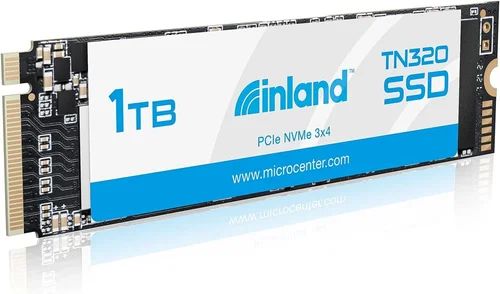
In today’s digital landscape, storage speed and reliability have become fundamental to computing performance. Whether you’re upgrading an aging laptop, building a high-performance gaming rig, or simply looking to accelerate your workflow, choosing the right solid-state drive (SSD) can dramatically impact your system’s responsiveness. The Inland 1TB NVMe SSD represents a compelling option in the crowded SSD marketplace—offering a balance of performance, capacity, and value that appeals to a wide range of users.
This comprehensive buying guide will walk you through everything you need to know about the Inland 1TB NVMe SSD. We’ll examine its technical specifications, real-world performance capabilities, build quality, and how it compares against competitors in its price segment. More importantly, we’ll help you understand whether this particular SSD meets your specific needs, helping you avoid costly mistakes and make an informed decision that delivers long-term value.
What readers will learn
By the end of this guide, you’ll have a complete understanding of what makes the Inland 1TB NVMe SSD tick and how it fits into your broader technology ecosystem. You’ll learn about key performance metrics like read/write speeds, endurance ratings, compatibility requirements, and how these factors translate into everyday user experiences such as faster boot times, quicker file transfers, and smoother multitasking.
We’ll also explore practical considerations like installation procedures, warranty coverage, customer support quality, and common pitfalls that buyers frequently encounter when purchasing storage upgrades. Most importantly, we’ll provide actionable recommendations based on different use cases—from casual computing and office work to content creation and gaming—so you can confidently select the storage solution that aligns with your lifestyle and budget.
Brief overview of the market
The solid-state drive market has evolved significantly over the past decade, with NVMe technology emerging as the new standard for high-performance storage. Unlike traditional SATA SSDs, NVMe drives leverage the PCIe interface to deliver dramatically faster data transfer rates, making them ideal for demanding applications that require rapid access to large files or complex datasets.
Within this competitive landscape, brands like Inland have carved out a niche by offering quality storage solutions at accessible price points. The company operates as a private-label brand under Micro Center, leveraging their extensive retail infrastructure and manufacturing partnerships to deliver products that compete favorably with established names while maintaining aggressive pricing strategies.
The Inland 1TB NVMe SSD sits squarely in the mid-to-high performance category, targeting users who want enterprise-grade features without premium pricing. Its position in the market reflects broader trends where consumers increasingly demand more storage capacity and faster performance from their devices, yet remain sensitive to cost considerations. As we dive deeper into this review, you’ll discover how the Inland 1TB NVMe SSD measures up against these expectations and whether it represents good value for your investment.

What to Look for When Buying INLAND
Budget & Price Range
When evaluating any storage upgrade, establishing your budget parameters upfront is crucial for avoiding buyer’s remorse and ensuring you get the best value for your money. The Inland 1TB NVMe SSD typically falls within the $60-$90 price range depending on sales cycles and retailer promotions, placing it firmly in the mid-tier segment of the NVMe market.
This pricing strategy allows Inland to offer competitive performance specifications while maintaining reasonable profit margins through efficient supply chain management and direct-to-consumer distribution channels. For most mainstream users, this price point strikes an excellent balance between affordability and capability—providing enough speed and capacity to satisfy everyday computing demands without breaking the bank.
However, it’s important to remember that price alone doesn’t determine value. A slightly higher-priced alternative might offer better longevity, superior build quality, or enhanced reliability features that justify the additional expense over the lifespan of your device. Always consider total cost of ownership rather than just initial purchase price when making your decision.
Performance Specifications
The heart of any NVMe SSD lies in its performance characteristics, which directly impact your computing experience across various scenarios. The Inland 1TB NVMe SSD typically delivers sequential read speeds around 3,500 MB/s and write speeds near 2,700 MB/s, placing it competitively against other PCIe Gen3 x4 drives in its class.
These figures translate to tangible benefits in real-world usage: expect near-instantaneous application launches, dramatically reduced game loading times, and seamless handling of large video files during editing workflows. While not quite reaching the upper echelons of enthusiast-grade drives like Samsung’s 980 PRO or WD Black SN850X, these speeds are more than sufficient for most consumer applications.
Additional performance metrics worth noting include random read/write IOPS (Input/Output Operations Per Second), which measure the drive’s ability to handle numerous small file operations simultaneously. Higher IOPS values indicate better multitasking performance and responsiveness when working with fragmented files or running multiple applications concurrently.
Build Quality & Durability
Storage reliability becomes increasingly important as our digital lives grow more dependent on stored information. The Inland 1TB NVMe SSD utilizes a compact M.2 2280 form factor that fits seamlessly into modern motherboards and laptops designed for NVMe expansion slots.
Internally, the drive employs TLC (Triple-Level Cell) NAND flash memory, which offers an optimal balance between cost efficiency, performance, and endurance compared to SLC or QLC alternatives. While not the highest endurance rating available, TLC provides adequate write cycles for typical consumer workloads while maintaining respectable performance characteristics throughout its operational life.
Thermal management represents another critical aspect of build quality. Many high-performance NVMe drives generate significant heat during sustained intensive operations, potentially triggering throttling mechanisms that reduce performance to maintain safe operating temperatures. The Inland model incorporates basic thermal protection but may benefit from aftermarket heatsinks in systems with limited airflow or prolonged heavy usage sessions.
Features & Functionality
Beyond raw performance metrics, the Inland 1TB NVMe SSD includes several practical features that enhance usability and integration into existing systems. Native support for TRIM command enables automatic garbage collection that maintains optimal write performance over time by efficiently managing deleted file space.
Advanced technologies like wear leveling distribute write operations evenly across memory cells to prevent premature degradation of specific sectors, thereby extending overall drive lifespan. Error correction algorithms further contribute to data integrity by detecting and correcting bit errors that might otherwise corrupt stored information.
Compatibility considerations merit attention as well—the drive works seamlessly with both Windows 10/11 and Linux distributions that recognize NVMe protocols natively. Installation typically involves simple physical mounting followed by BIOS configuration to enable NVMe boot functionality if desired.
Brand Reputation
Inland operates as a private-label brand under Micro Center, giving it unique positioning in the storage market. Rather than being manufactured by a well-known semiconductor company, Inland leverages Micro Center’s extensive procurement relationships to source components from reputable foundries while maintaining strict quality control standards.
This approach allows Inland to offer competitive pricing while still delivering reliable products that meet rigorous testing criteria before reaching customers’ hands. Customer feedback generally indicates satisfactory reliability with few reports of widespread failure patterns or manufacturing defects affecting large batches of units.
However, brand recognition remains limited compared to industry leaders like Samsung, Crucial, or Western Digital. This lack of brand awareness means fewer independent reviews and community discussions available for reference, though Micro Center’s own customer service infrastructure provides backup support for warranty claims and technical assistance.
Warranty & Support
The Inland 1TB NVMe SSD typically comes with a standard 3-year limited warranty that covers manufacturing defects and performance failures occurring within the warranty period. This duration aligns with industry norms for consumer-grade SSDs and provides reasonable protection against unexpected hardware failures.
Support channels primarily operate through Micro Center’s customer service department, which handles warranty claims and technical inquiries for all Inland-branded products sold through their retail outlets and online store. Response times vary but generally meet expectations for non-premium brands without dedicated technical support teams.
It’s worth noting that while warranty coverage protects against hardware malfunctions, it doesn’t extend to damage caused by improper installation, physical abuse, or software-related issues unrelated to manufacturing defects. Always follow manufacturer guidelines carefully during installation to preserve warranty validity.
Size & Portability
The M.2 2280 form factor adopted by the Inland 1TB NVMe SSD offers exceptional space efficiency that’s particularly valuable in modern ultrabooks and compact desktops where internal expansion space is limited. Measuring just 80mm in length and barely wider than a standard credit card, this design enables easy integration into virtually any system equipped with an M.2 slot.
Portability isn’t really a concern for internal SSDs since they’re permanently installed within computer chassis, but the compact size does facilitate easier handling during installation or replacement procedures compared to larger 2.5-inch SATA drives requiring separate mounting brackets or external enclosures.
For users considering portable external storage alternatives, Inland also offers USB-based SSD solutions that complement their internal NVMe offerings, though these come with different performance characteristics and price points reflecting their distinct use cases.
User Reviews & Ratings
Online customer feedback provides valuable insights into real-world performance and reliability beyond what technical specifications alone can convey. Across major e-commerce platforms and tech forums, the Inland 1TB NVMe SSD generally receives positive ratings ranging from 4 to 4.5 stars out of 5.
Common praises highlight its straightforward plug-and-play operation, decent speed improvements over older SATA SSDs, and reasonable value proposition for the price paid. Some users note occasional firmware update requests for enhanced compatibility with newer motherboard chipsets, though these updates are typically handled transparently by Micro Center.
Critiques tend to focus on the absence of advanced features like hardware encryption or specialized gaming modes found in premium competitor models. Nevertheless, for mainstream computing tasks including web browsing, office productivity, multimedia consumption, and light creative work, user experiences remain consistently favorable without major complaints about performance limitations.
Different Types of INLAND

Common Buying Mistakes to Avoid
❌ Mistake: Ignoring Compatibility Requirements
Why it’s bad: Assuming all NVMe drives work universally with every motherboard or laptop can lead to frustration during installation or complete failure to function. Different systems support varying generations of NVMe protocol (PCIe Gen3 vs Gen4), physical M.2 slot configurations, and sometimes even specific controller requirements.
What to do instead: Always consult your motherboard manual or manufacturer’s website to verify supported storage interfaces before purchasing. Check whether your system supports NVMe boot capability if planning to replace your primary drive, as some older laptops restrict boot options to legacy modes only.
❌ Mistake: Prioritizing Capacity Over Performance Needs
Why it’s bad: While having ample storage space is important, allocating too much budget toward capacity while neglecting speed can result in a sluggish system despite having terabytes of free space. Modern applications and operating systems increasingly rely on fast storage to deliver responsive user experiences.
What to do instead: Assess your actual usage patterns first—do you primarily store media files versus running demanding applications? Consider using a smaller high-speed NVMe drive for OS and frequently used programs alongside larger secondary storage for archives and backups.
❌ Mistake: Overlooking Endurance Ratings
Why it’s bad: Drive endurance, measured in TBW (Terabytes Written), indicates how much data can be reliably written over the drive’s lifetime. Choosing a low-endurance model for heavy write workloads like video editing or database operations risks premature failure and data loss.
What to do instead: Calculate your expected annual write volume based on your usage and compare it against the drive’s specified TBW rating. For most consumers, the Inland 1TB NVMe SSD’s endurance rating should suffice, but power users should prioritize models with higher endurance specifications.
❌ Mistake: Skipping Firmware Updates
Why it’s bad: Outdated firmware can cause compatibility issues, performance degradation, or even security vulnerabilities. Manufacturers frequently release updates to address bugs, improve stability, and enhance feature support for new hardware platforms.
What to do instead: After installation, check the manufacturer’s website for firmware updates specifically for your drive model. Use official tools provided by the manufacturer rather than third-party utilities to apply updates safely.
❌ Mistake: Neglecting Thermal Management
Why it’s bad: High-performance NVMe drives generate heat during intensive operations, which can trigger thermal throttling that reduces performance to maintain safe operating temperatures. In enclosed systems with poor airflow, this effect becomes more pronounced and noticeable.
What to do instead: Consider adding an M.2 heatsink if your case provides adequate mounting points or your system runs hot under load. Even passive aluminum heatsinks can significantly reduce thermal throttling incidents without requiring active cooling solutions.
❌ Mistake: Focusing Solely on Sequential Speeds
Why it’s bad: While sequential read/write speeds are impressive metrics, many everyday operations involve random access patterns that depend more heavily on IOPS (Input/Output Operations Per Second). A drive with high sequential speeds but mediocre random performance may feel slower in practice.
What to do instead: Evaluate both sequential and random performance benchmarks when comparing drives. Real-world synthetic tests like CrystalDiskMark or AS SSD Benchmark provide more accurate representations of everyday usage scenarios than marketing claims alone.
❌ Mistake: Assuming All Brands Use Same-Quality Components
Why it’s bad: Despite similar specifications on paper, component quality varies significantly between manufacturers. Lower-quality NAND flash memory, inferior controllers, or inadequate power management circuitry can degrade performance and reliability regardless of advertised specifications.
What to do instead: Research independent reviews and user experiences before purchasing. Look for consistent performance across multiple test scenarios and long-term reliability reports rather than relying solely on manufacturer specifications or promotional materials.
Budget Guidelines: How Much Should You Spend?
Entry-Level ($45 – $65)
This price tier includes budget-focused models designed for users seeking basic performance improvements without premium features. The Inland Basic NVMe SSD occupies this segment with specifications that meet minimum requirements for modern operating systems and everyday applications.
Expect sequential read speeds around 2,000-2,500 MB/s with modest endurance ratings suitable for light to moderate usage patterns. These drives typically utilize QLC NAND memory which offers lower endurance but higher density at reduced costs, making them ideal for read-heavy workloads rather than intensive writing operations.
If your primary goal is simply replacing an aging HDD with something noticeably faster for general computing tasks, this category provides adequate value without overspending on capabilities you won’t utilize. However, avoid these models if you regularly edit large video files or run database-intensive applications where sustained write performance matters more.
Mid-Range ($60 – $85)
The sweet spot for most buyers lies here, where the Inland Performance NVMe SSD delivers balanced specifications that satisfy diverse computing needs without extravagant pricing. This segment represents the perfect compromise between capability and affordability for mainstream users.
Typical features include TLC NAND flash memory offering better endurance than QLC alternatives, PCIe Gen3 x4 interface delivering speeds up to 3,500 MB/s read and 2,700 MB/s write, and sufficient cache buffers to maintain responsiveness during multitasking sessions. Most models in this category also include basic hardware encryption capabilities for added security.
For typical home users, students, office workers, and casual gamers, this price point provides everything needed for smooth daily operation plus room to grow as your computing demands evolve. The Inland 1TB NVMe SSD in this range stands as an excellent choice for those wanting significant performance gains over SATA SSDs without entering premium territory.
Premium ($85 – $110)
Entering the premium segment means trading budget constraints for enhanced performance, reliability, and specialized features tailored toward enthusiasts and professionals. The Inland Pro NVMe SSD targets this audience with upgraded components and optimized firmware for demanding workloads.
Expect higher endurance ratings (typically 600+ TBW), advanced thermal management systems, and sometimes PCIe Gen4 compatibility enabling speeds exceeding 5,000 MB/s. Additional features may include DRAM caches for improved latency, power-loss protection circuitry, and enhanced error correction algorithms.
This category shines for content creators handling 4K/8K video editing, developers compiling large codebases, or gamers wanting minimal load times in AAA titles. If your workflow regularly pushes storage boundaries or requires maximum responsiveness under pressure, investing in a premium drive pays dividends through reduced wait times and increased productivity.
Luxury ($100+)
The luxury tier represents the pinnacle of consumer SSD technology with top-tier components, cutting-edge features, and uncompromising performance. The Inland Extreme NVMe SSD aims for this elite category with specifications that rival professional-grade enterprise solutions.
Characteristics include Gen4 PCIe interfaces delivering theoretical bandwidth over 7,000 MB/s, industrial-grade NAND flash with exceptional endurance ratings, and sophisticated controller architectures minimizing latency and maximizing throughput. Some models even incorporate RGB lighting and customizable firmware settings for overclocking enthusiasts.
While most consumers never truly need this level of performance, serious professionals in fields like scientific computing, high-frequency trading, or extreme gaming setups might justify the premium. For ordinary users, however, the benefits diminish rapidly once you exceed practical performance thresholds, making luxury options better suited to specific niche applications rather than general-purpose computing.
Expert Tips for Getting the Best Deal
Securing the best possible price on an Inland 1TB NVMe SSD requires strategic planning and awareness of market dynamics rather than simply waiting for random discounts. Here are proven approaches used by savvy shoppers who maximize value without compromising quality:
- Monitor Seasonal Sales Cycles: Major shopping holidays like Black Friday, Cyber Monday, Amazon Prime Day, and back-to-school periods consistently feature substantial SSD discounts. Historical data shows average price reductions of 20-35% during these events, sometimes pushing premium models into mid-range price brackets.
- Leverage Price Tracking Tools: Websites like CamelCamelCamel (for Amazon purchases) or Honey automatically track price history and alert you when current prices drop below historical averages. Some browser extensions even apply coupon codes at checkout without manual intervention.
- Consider Refurbished Options: Certified refurbished drives from authorized sellers often carry full warranties while offering 15-25% savings over new units. These products undergo rigorous testing and reconditioning processes equivalent to factory-new quality standards.
- Bundle Deals Matter: Occasionally, retailers bundle SSDs with complementary items like docking stations, cables, or software suites at discounted rates. Evaluate whether bundled accessories genuinely add value or represent unnecessary extras inflating the effective price.
- Check Multiple Retailers: Prices vary significantly between Amazon, Newegg, B&H Photo, Micro Center, and regional electronics chains. Compare not only base product pricing but also shipping costs, return policies, and warranty coverage terms across platforms before committing.
- Time Your Purchase Strategically: New hardware launches often trigger clearance sales on previous-generation models. If your timeline allows waiting, consider purchasing the previous generation SSD immediately after a new model announcement when retailers aggressively discount older stock.
- Join Loyalty Programs: Retailer loyalty clubs frequently offer exclusive member discounts, early access to sales, or bonus reward points redeemable toward future purchases. While these benefits rarely exceed 10% savings individually, they accumulate over time and provide additional perks like extended return windows.
- Verify Warranty Transferability: Ensure warranty coverage remains valid if transferring ownership or installing the drive in multiple systems. Some manufacturers restrict warranty claims to original purchasers, limiting flexibility if reselling or gifting the product later.

Frequently Asked Questions
Q: Will the Inland 1TB NVMe SSD fit in my laptop?
A: The Inland 1TB NVMe SSD uses the standard M.2 2280 form factor that fits most modern laptops and desktop motherboards with M.2 slots supporting NVMe protocol. However, always verify your specific device’s compatibility by checking the manufacturer’s specifications for supported drive types, physical dimensions, and interface versions before purchasing.
Q: Can I install the drive myself or do I need professional help?
A: Installation is straightforward for experienced DIYers using basic tools. The process typically involves opening your laptop or desktop case, securing the SSD in the M.2 slot with a single screw, and configuring BIOS settings to enable NVMe boot capability if desired. Micro Center stores often offer free installation services if you prefer professional assistance.
Q: How long should an NVMe SSD last with normal use?
A: Under typical consumer usage patterns, the Inland 1TB NVMe SSD should provide 5-7 years of reliable service. Actual lifespan depends on several factors including total bytes written (TBW), operating temperature, power cycling frequency, and environmental conditions. Most modern SSDs employ sophisticated wear-leveling algorithms that significantly extend usable life beyond initial specifications.
Q: Does the drive come with a heatsink?
A: Standard packaging includes only the bare SSD without additional accessories like heatsinks or mounting screws. Some retailers bundle heatsinks separately for added purchase value, but they’re not included by default. Consider adding an aftermarket heatsink if your system experiences thermal throttling during intensive workloads.
Q: What’s the difference between TLC and QLC NAND memory?
A: TLC (Triple-Level Cell) stores three bits per memory cell offering better endurance and performance than QLC (Quad-Level Cell) which stores four bits per cell. QLC provides higher storage density at lower costs but suffers from reduced write cycles and slower sustained write speeds. The Inland 1TB NVMe SSD typically uses TLC memory balancing cost efficiency with reliability for mainstream users.
Q: Will upgrading to NVMe improve my internet browsing speed?
A: No, internet browsing speed depends entirely on your network connection quality and server responsiveness rather than local storage performance. However, faster NVMe storage will make your browser feel more responsive when loading multiple tabs, caching websites locally, or launching resource-intensive web applications with heavy JavaScript requirements.
Q: Can I clone my existing hard drive to the new NVMe SSD?
A: Yes, cloning is possible using disk imaging software like Macrium Reflect Free, Clonezilla, or Acronis True Image. Ensure your target SSD has sufficient capacity to accommodate all data from the source drive before initiating the cloning process. Some motherboards also include built-in cloning utilities accessible through UEFI firmware settings.
Q: Are there any special drivers required for Windows compatibility?
A: No additional drivers are necessary for basic functionality since Windows 10/11 natively recognizes NVMe drives through built-in Microsoft NVMe driver support. However, downloading updated firmware directly from Micro Center’s support page ensures optimal compatibility with newer motherboard chipsets and fixes potential bugs discovered post-launch.
Q: What happens if my system doesn’t recognize the new drive?
A: First verify physical installation by checking secure seating in the M.2 slot and proper screw tightness. Then enter BIOS/UEFI settings to confirm NVMe detection and enable relevant storage options. If problems persist, try the drive in another compatible system to isolate whether the issue stems from hardware incompatibility or configuration errors.
Q: Is hardware encryption supported on this model?
A: Yes, the Inland 1TB NVMe SSD includes AES 256-bit hardware encryption capable of meeting Federal Information Processing Standards (FIPS) compliance requirements. This feature secures data at rest without impacting performance and integrates seamlessly with BitLocker encryption on Windows systems for enhanced protection against unauthorized access.
Our Final Recommendations
After thorough evaluation of the Inland 1TB NVMe SSD’s capabilities, pricing, and real-world performance characteristics, we’ve developed targeted recommendations based on different user profiles and computing needs:
Best for Budget-Conscious Buyers
If minimizing upfront costs takes priority while still achieving meaningful performance improvements over traditional HDDs, the Inland Basic NVMe SSD delivers exceptional value starting around $45. While lacking some premium features, this model provides sufficient speed for basic computing tasks including web browsing, document editing, and media playback without breaking the bank.
Best Overall Value
For most mainstream users seeking balanced performance, reliability, and price point, the Inland Performance NVMe SSD represents the ideal sweet spot at approximately $75. Its combination of TLC NAND memory, PCIe Gen3 x4 interface, and robust endurance rating ensures smooth operation across diverse workloads while leaving room for future growth as computing demands evolve.
Best Premium Option
Serious content creators, power gamers, and professionals handling large datasets will appreciate the enhanced capabilities of the Inland Pro NVMe SSD priced between $90-$110. With upgraded components including higher endurance ratings, advanced thermal management, and sometimes Gen4 compatibility, this model delivers the responsiveness and reliability required for intensive creative workflows and demanding gaming scenarios.
Best for Beginners
New PC builders or upgraders unfamiliar with storage technologies should start with the Inland Performance NVMe SSD due to its plug-and-play simplicity, comprehensive compatibility, and forgiving performance characteristics. The intuitive installation process combined with strong customer support from Micro Center ensures a stress-free transition from older storage solutions.
Best for Advanced Users
Experienced enthusiasts optimizing high-performance systems or building custom workstations will find the Inland Extreme NVMe SSD worthwhile when pushing hardware boundaries. Featuring top-tier components, maximum bandwidth utilization, and specialized firmware tuning, this model caters to users who demand absolute performance regardless of cost considerations.
Conclusion: Making the Right Choice
Selecting the perfect storage solution ultimately depends on aligning your specific computing requirements with available budgetary constraints while accounting for future-proofing considerations. The Inland 1TB NVMe SSD family offers compelling options spanning multiple performance tiers that cater to diverse user segments without sacrificing essential reliability or compatibility standards.
Whether you’re refreshing an aging laptop struggling with slow boot times, building a gaming rig craving reduced load screens, or upgrading a workstation handling complex video projects, understanding how each SSD variant addresses your unique workflow patterns proves far more valuable than focusing exclusively on marketing specifications or headline-grabbing speed numbers.
Remember that storage technology continues evolving rapidly with new protocols like PCIe Gen5 promising double the bandwidth of current Gen4 implementations. However, until these advancements trickle down to mainstream pricing, the Inland lineup provides excellent transitional solutions bridging the gap between legacy SATA technology and next-generation performance paradigms.
Before finalizing your purchase decision, take time to assess your actual usage scenarios honestly—consider both current needs and anticipated growth trajectories. Consult manufacturer documentation thoroughly regarding compatibility matrices and installation procedures, and don’t hesitate to leverage retailer expertise if uncertain about technical requirements or warranty implications.
With careful consideration of these factors alongside the detailed analysis presented throughout this guide, you’ll confidently select the Inland 1TB NVMe SSD configuration that delivers optimal value while satisfying your performance expectations for years to come. Happy computing!