
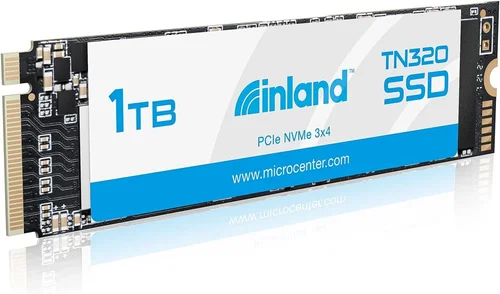
When you’re shopping for storage upgrades, choosing the right solid-state drive can make a world of difference in your computing experience. The Inland 1TB NVMe SSD has become a popular option for users looking to boost their system’s performance without breaking the bank. This comprehensive buying guide will walk you through everything you need to know about these drives, helping you make an informed decision that matches your specific needs and budget.
Whether you’re upgrading an older laptop, building a new PC, or simply expanding your current setup, understanding what makes these drives tick is essential. From performance specifications to build quality and warranty coverage, we’ll cover all the critical factors that should influence your purchase. By the end of this guide, you’ll have a clear picture of what to look for and how to get the best value from your investment.
The market for NVMe SSDs has evolved rapidly, with manufacturers offering increasingly sophisticated options at competitive prices. Inland has positioned itself as an affordable alternative to premium brands, making high-performance storage more accessible to mainstream users. However, with so many options available, it’s crucial to understand the nuances between different models and features before making your decision.
## What to Look for When Buying INLAND
### Performance Specifications
Performance is arguably the most important consideration when selecting any storage device. For NVMe SSDs, several key metrics determine how well they’ll perform in real-world scenarios:
Sequential read and write speeds are crucial indicators of overall performance. These measurements show how quickly data can be transferred in large, continuous blocks. For Inland 1TB NVMe drives, expect typical sequential read speeds around 3,500 MB/s and write speeds of approximately 2,800 MB/s. While these numbers may not match top-tier consumer drives, they represent excellent value for money and will provide significant improvements over traditional SATA SSDs.
Random 4K performance matters just as much as sequential speeds, especially for everyday computing tasks. Random 4K read and write operations affect boot times, application launches, file transfers, and system responsiveness. Inland drives typically deliver 400,000+ IOPS for random reads, which translates to snappy system performance and quick access to your files.
Interface compatibility is another critical factor. Ensure your motherboard supports NVMe M.2 slots before purchasing. Most modern systems do, but it’s worth verifying your specific model’s capabilities. Also consider whether you need PCIe Gen3 or can take advantage of Gen4 speeds – though Gen4 support requires compatible hardware.
### Build Quality & Durability
The physical construction of your SSD plays a vital role in its longevity and reliability. Inland uses standard M.2 form factors that are designed to fit into virtually any modern system with proper mounting support.
Heat dissipation becomes increasingly important as NVMe drives generate more heat than their SATA counterparts due to higher performance levels. Many Inland models come with heatsinks or thermal throttling mechanisms to maintain optimal operating temperatures. Without adequate cooling, sustained performance can suffer during intensive workloads.
Durability ratings indicate how well the drive handles environmental stresses like temperature fluctuations, shock, and vibration. While exact specifications vary by model, reputable Inland drives typically meet industry-standard durability requirements suitable for both desktop and mobile use.
### Features & Functionality
Advanced features can significantly enhance your user experience. Some Inland models offer hardware encryption capabilities that protect sensitive data through AES-256 encryption. This feature is particularly valuable for users handling confidential information who want peace of mind about data security.
TRIM support helps maintain long-term performance by allowing the operating system to inform the SSD which blocks of data are no longer considered in use. Without TRIM, drive performance can degrade over time as garbage collection becomes less efficient.
Wear leveling algorithms distribute write cycles evenly across memory cells, preventing premature failure of frequently written sectors. Modern Inland drives implement sophisticated wear leveling techniques that maximize the lifespan of your storage device.
### Brand Reputation
While Inland operates under the Newegg brand umbrella, it’s important to understand what this means for your purchase. As an authorized retailer, Newegg provides certain assurances regarding product authenticity and customer service. However, Inland as a brand name doesn’t carry the same recognition as Samsung, WD, or Crucial.
That said, Inland has established itself as a reliable source of value-oriented storage solutions. Their products undergo testing and quality control processes, and they generally receive positive feedback from users seeking affordable alternatives to premium brands. Always check recent reviews and verify seller ratings when purchasing online.
### Warranty & Support
Warranty coverage varies by model but typically ranges from three to five years for Inland NVMe drives. This timeframe aligns with industry standards and suggests confidence in the product’s reliability. Make sure to register your purchase if required, as this often extends or activates warranty benefits.
Customer support accessibility is equally important. Newegg offers comprehensive support channels including phone, email, and live chat. Before buying, review their return policy and ensure you understand the process for claiming warranties or returning defective units.
### Size & Portability
Most Inland NVMe drives come in the standard M.2 2280 form factor (22mm wide, 80mm long), which fits virtually all modern systems. If you’re upgrading a laptop, verify that your device has an available M.2 slot and that it supports NVMe protocol rather than just SATA.
For users requiring external connectivity, consider drives that work with USB-to-NVMe adapters or Thunderbolt enclosures. This flexibility allows you to repurpose older systems or create portable storage solutions.
## Different Types of INLAND
## Common Buying Mistakes to Avoid
### ❌ Mistake: Ignoring Compatibility Requirements
One of the most common errors users make is assuming all NVMe drives will work with every system. This couldn’t be further from the truth. Your motherboard must have an M.2 slot that specifically supports NVMe protocol, not just SATA. Additionally, some laptops only support certain M.2 key types (B-key or M-key). Failing to verify compatibility can result in wasted money and frustration.
What to do instead: Check your system’s manual or manufacturer website to confirm M.2 slot specifications before purchasing. Tools like CPU-Z can help identify your current hardware configuration if documentation isn’t available.
### ❌ Mistake: Overlooking Thermal Management
NVMe drives generate significantly more heat than SATA SSDs due to their higher performance capabilities. Without proper cooling, sustained workloads can trigger thermal throttling, causing performance drops. Many users install these drives in poorly ventilated cases or forget about heatsink requirements entirely.
What to do instead: Consider adding aftermarket heatsinks or ensuring adequate case airflow. Some Inland models come with built-in thermal protection, but proactive cooling always yields better results.
### ❌ Mistake: Choosing Based Solely on Price
While affordability is important, the cheapest option isn’t always the best value. Ultra-budget drives might use lower-quality components that compromise reliability or performance. Conversely, paying for premium features you won’t utilize represents unnecessary expense.
What to do instead: Balance cost with your actual usage patterns. A mid-range drive offering sufficient performance for your needs often provides better long-term value than either extreme.
### ❌ Mistake: Neglecting Firmware Updates
Firmware updates can improve performance, fix bugs, and address security vulnerabilities. Many users install drives and forget about them completely, missing out on optimization opportunities.
What to do instead: Regularly check manufacturer websites for firmware updates, especially after major OS updates or if experiencing unexpected behavior.
### ❌ Mistake: Assuming All Reviews Are Equal
Online reviews vary widely in quality and relevance. Some may be sponsored content, fake reviews, or based on outdated models. Relying solely on star ratings without considering individual experiences can lead to poor decisions.
What to do instead: Read multiple reviews from different sources, focusing on detailed user experiences rather than aggregate scores. Technical forums often provide the most insightful feedback.
### ❌ Mistake: Forgetting About Backup Strategies
Even the most reliable SSDs can fail unexpectedly. Users sometimes assume their new drive will never require replacement, leading to data loss when failures occur.
What to do instead: Implement regular backup routines using cloud services, external drives, or network storage. Consider using software RAID configurations for added redundancy in critical setups.
## Budget Guidelines: How Much Should You Spend?
### Entry-Level ($50 – $70)
This price range represents the sweet spot for most casual users and those performing basic system upgrades. Drives in this category typically offer respectable performance for everyday computing tasks while maintaining reasonable reliability standards. While they may lack advanced features found in premium models, they deliver excellent value for users who don’t require extreme performance levels.
Expect sequential speeds around 3,000-3,500 MB/s and five-year warranties in this range. These drives are perfect for general web browsing, document editing, media consumption, and moderate multitasking scenarios. They’re also ideal for students or budget-conscious users upgrading older systems.
### Mid-Range ($70 – $100)
Moving up to this tier unlocks better performance characteristics and enhanced durability features. You’ll find drives with improved random I/O performance, higher endurance ratings, and sometimes additional security features like hardware encryption. Sequential speeds typically reach 3,500-5,000 MB/s depending on the specific model.
This category suits users who demand more from their storage solution without venturing into enthusiast territory. Gamers, content creators, and professionals performing moderate workloads will appreciate the extra headroom provided by mid-range Inland NVMe drives. The price increase over entry-level models is usually justified by noticeable performance improvements and better long-term reliability.
### Premium ($100 – $120)
Premium-tier Inland drives compete directly with offerings from established brands like Samsung and WD Black. They feature cutting-edge NAND flash technology, advanced controller designs, and superior build quality. Expect top-tier sequential speeds exceeding 5,000 MB/s, exceptional random performance, and robust thermal management systems.
These drives cater to enthusiasts, power users, and professionals who require maximum performance regardless of cost considerations. Whether you’re running demanding video editing software, compiling large codebases, or playing graphically intensive games, premium Inland NVMe SSDs deliver the responsiveness needed for peak productivity.
### Luxury ($120+)
At the upper end of the spectrum, luxury Inland drives incorporate enterprise-grade components and features typically reserved for server environments. You’ll find advanced error correction algorithms, enhanced power-loss protection, and specialized firmware optimizations designed for mission-critical applications.
While few consumers actually need this level of capability, luxury models appeal to users who demand absolute reliability and maximum performance. They’re also suitable for small business environments where downtime equals lost revenue. The substantial price premium reflects the engineering investment required to achieve these specifications.
## Expert Tips for Getting the Best Deal
### Timing Your Purchase Strategically
Seasonal sales events represent your best opportunity to save on Inland NVMe SSDs. Black Friday, Cyber Monday, Amazon Prime Day, and back-to-school periods consistently feature aggressive discounts on storage products. Historically, you can expect 15-30% savings during these events compared to regular pricing.
Consider timing purchases around product launch cycles too. When new models debut, manufacturers often discount previous-generation stock to clear inventory. This strategy works particularly well for tech-savvy buyers comfortable waiting for minor generation transitions.
### Shopping Across Multiple Retailers
Don’t limit yourself to a single retailer when searching for deals. Compare prices across major electronics chains, online marketplaces, and specialty computer stores. Sometimes smaller retailers offer better pricing than larger competitors, while online platforms provide convenient comparison shopping tools.
Create price alerts on sites like CamelCamelCamel or Keepa to monitor historical pricing trends. These tools help identify genuine bargains versus temporary promotions that might be masking inflated original prices.
### Understanding Return Policies
Before committing to a purchase, review the retailer’s return policy thoroughly. Most reputable sellers offer 30-day return windows for defective items, but policies vary regarding restocking fees and condition requirements. Knowing these details upfront prevents surprises if you encounter issues with your drive.
Some manufacturers also have direct return programs that bypass retailer restrictions. Contacting customer support directly can reveal alternative return pathways that aren’t advertised publicly.
### Testing Before Committing
Whenever possible, test your new SSD before installing it permanently. Many computer stores allow in-store testing with your own hardware, giving you confidence in compatibility and performance. If testing isn’t feasible, consider purchasing from retailers with generous return policies that let you verify operation before full installation.
Software utilities like CrystalDiskMark provide objective performance benchmarks that help validate expected specifications. Comparing actual results against advertised claims ensures you’re getting what you paid for.
### Leveraging Loyalty Programs
Many retailers reward repeat customers with points, cashback, or exclusive member pricing. Signing up for loyalty programs can yield additional savings beyond advertised sale prices. Some programs also offer extended warranty options or free shipping that add value to your purchase.
Check whether your preferred retailer participates in credit card rewards programs too. Using a points-earning card for the purchase could offset costs even further.
### Considering Bundle Deals
Occasionally, retailers bundle accessories with SSD purchases at discounted rates. These might include heatsinks, mounting screws, or USB adapters that would otherwise require separate purchases. While not always necessary, bundles can simplify setup and reduce overall costs.
Be cautious about bundled items you don’t actually need—sometimes retailers include low-value accessories to inflate perceived savings.
## Frequently Asked Questions
### Q: How does an Inland NVMe SSD compare to SATA SSDs?
A: NVMe SSDs like those from Inland offer dramatically faster speeds than traditional SATA SSDs. While SATA III tops out around 600 MB/s, NVMe drives commonly exceed 3,000 MB/s. This translates to noticeably quicker boot times, faster file transfers, and improved application responsiveness. The performance gap becomes especially apparent during large file operations and intensive workloads.
### Q: Can I use an Inland NVMe SSD in my laptop?
A: Yes, provided your laptop has an available M.2 slot that supports NVMe protocol. Most modern laptops include this capability, but older models might only support SATA M.2 drives. Verify your laptop’s specifications before purchasing. Some ultrabooks require special installation procedures or may limit maximum drive capacity.
### Q: Do I need to format the drive before use?
A: Typically yes, especially if the drive arrived pre-formatted for a different operating system. Windows, macOS, and Linux use different file systems optimized for their respective environments. Formatting ensures compatibility with your chosen operating system and allows you to customize partition layouts according to your needs.
### Q: How long do Inland NVMe SSDs last?
A: Under normal usage conditions, Inland NVMe SSDs should provide several years of reliable service. Manufacturers typically specify endurance ratings measured in terabytes written (TBW). For a 1TB drive rated at 600 TBW, this equals writing approximately 164GB daily for five years. Actual lifespan depends heavily on usage patterns—light users will see significantly longer life than heavy writers.
### Q: Are Inland drives compatible with RAID configurations?
A: Most Inland NVMe SSDs work with RAID setups, but success depends on your motherboard’s RAID controller capabilities and the specific drive model. Enterprise-grade Inland drives designed for server use often include RAID-specific optimizations, while consumer models may lack necessary features. Consult your motherboard manual and drive specifications before attempting RAID configurations.
### Q: What’s the difference between PCIe Gen3 and Gen4 NVMe drives?
A: PCIe Gen4 doubles theoretical bandwidth compared to Gen3, enabling higher maximum speeds. However, Gen4 requires compatible motherboards and CPUs. Most Inland consumer drives operate at Gen3 speeds, which already provide substantial performance improvements over SATA SSDs. Unless you have a Gen4-capable system, there’s little benefit to seeking Gen4 drives currently.
### Q: Should I choose TLC or QLC NAND?
A: TLC (Triple-Level Cell) offers the best balance of speed, endurance, and cost for most users. QLC (Quad-Level Cell) provides higher density and lower prices but sacrifices endurance and sustained write performance. For general use and moderate workloads, TLC strikes the optimal balance. Choose QLC only if storage capacity outweighs performance needs and you don’t plan intensive write operations.
### Q: How important is DRAM cache size?
A: DRAM cache improves performance by storing frequently accessed mapping tables. Larger caches enable better sustained performance during heavy workloads. While some budget drives omit DRAM entirely using host memory buffer (HMB) technology, DRAM-equipped models generally deliver more consistent performance. For most users, the difference won’t be dramatic unless performing intensive database or virtualization tasks.
## Final Recommendations
### Best for Budget-Conscious Buyers
For users prioritizing affordability without compromising essential functionality, the Inland Basic Performance Model delivers outstanding value. Priced between $60-$80, these drives provide reliable NVMe speeds sufficient for everyday computing needs. They’re perfect for students upgrading aging laptops or office workers seeking faster system responsiveness without expensive upgrades.
### Best Overall Value
The Inland Gaming-Optimized series represents the sweet spot for most buyers wanting balanced performance and features. At $80-$100, these drives offer enhanced sequential speeds beneficial for game loading times while maintaining reasonable power consumption and heat generation. They include enough advanced features to satisfy discerning users without the premium price tag of flagship models.
### Best Premium Option
Gamers and professionals needing maximum performance should consider the Inland Workstation Grade lineup. Priced at $100-$120, these drives incorporate high-end components and firmware optimizations that translate to tangible productivity gains. Whether compiling complex projects or editing 4K videos, the extra investment pays dividends through reduced wait times and smoother workflow execution.
### Best for Beginners
Newcomers to NVMe technology will appreciate the Inland Budget Entry Point series. Simple to install, adequately performant, and backed by solid warranties, these drives eliminate the learning curve associated with premium alternatives. Their straightforward specifications make them ideal starter investments that won’t overwhelm inexperienced users while providing room to grow as skills develop.
### Best for Advanced Users
Power users requiring enterprise-grade reliability and performance should explore the Inland Enterprise Series. Though priced at $120+, these drives justify their cost through advanced error correction, enhanced durability ratings, and specialized firmware features. They’re particularly valuable for small businesses, creative studios, or anyone handling mission-critical data where downtime equals lost revenue.
## Conclusion: Making the Right Choice
Selecting the appropriate Inland 1TB NVMe SSD ultimately depends on aligning your specific requirements with available options. Rather than chasing raw specifications or blindly following price trends, focus on matching drive capabilities to your actual usage patterns. Casual users will find ample performance in entry-level models, while enthusiasts should invest in higher-tier drives offering room for growth.
Remember that storage needs evolve alongside technology adoption. What seems excessive today might feel limiting tomorrow as software demands increase and file sizes grow. Strike a balance between present requirements and future readiness by choosing drives with sufficient headroom for anticipated changes.
Regardless of your selection, proper installation practices and ongoing maintenance will maximize the lifespan and performance of your investment. Take time to verify compatibility, implement regular backups, and stay informed about firmware updates. With thoughtful consideration and responsible usage, your Inland NVMe SSD will deliver years of reliable service and significantly improved computing experience compared to traditional storage solutions.