
Why this guide matters
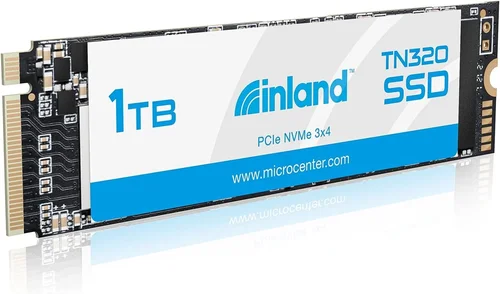
Choosing the right storage upgrade can make or break your computing experience. Whether you’re building a new PC, upgrading an older system, or simply need more space for your growing digital library, selecting the right solid-state drive is crucial. The Inland 1TB NVMe M.2 SSD represents a compelling option in the crowded SSD market, offering a balance of performance, capacity, and value that many consumers find appealing. This comprehensive buyer’s guide will walk you through everything you need to know about making an informed decision.
What readers will learn
This detailed guide covers all aspects of the Inland 1TB NVMe M.2 SSD, from understanding its technical specifications to evaluating real-world performance and reliability. You’ll discover how this drive stacks up against competitors, what features matter most for different use cases, and how to identify potential pitfalls during your purchase decision. We’ll explore everything from installation requirements to long-term durability concerns, ensuring you have all the information needed to choose wisely.
Brief overview of the market
The SSD market has become increasingly competitive over recent years, with manufacturers offering various form factors, interfaces, and performance tiers. NVMe M.2 drives have emerged as the standard for high-performance storage, combining the speed of PCIe connectivity with the compact size needed for modern motherboards. While premium brands like Samsung, Crucial, and Western Digital dominate headlines, budget-friendly alternatives like Inland have gained significant traction among cost-conscious buyers who still demand quality performance.
What to Look for When Buying INLAND
Performance Specifications
When evaluating any SSD, performance metrics are arguably the most important consideration. For the Inland 1TB NVMe M.2 SSD, several key specifications determine how it will perform in real-world scenarios. First and foremost is sequential read/write speeds, typically measured in MB/s. Most modern NVMe drives offer read speeds exceeding 3,000 MB/s and write speeds above 2,000 MB/s, though actual performance can vary based on NAND flash type and controller quality.
Random read/write IOPS (Input/Output Operations Per Second) measure how well the drive handles small, scattered data requests—this becomes particularly important when loading applications or multitasking. The Inland drive generally delivers respectable random performance, making it suitable for both general computing and light gaming workloads. Additionally, consider the drive’s sustained performance under heavy loads; some budget drives experience significant throttling after prolonged intensive use.
Interface and compatibility are equally critical. The M.2 form factor comes in two primary types: 2280 (80mm length) and 2242 (42mm length). Most motherboards support 2280 drives, so verify your system’s specifications before purchasing. Also confirm that your motherboard supports NVMe protocol rather than just SATA, as this affects maximum achievable speeds significantly.
Build Quality & Durability
While SSDs have no moving parts to wear out, build quality still matters for longevity and reliability. The Inland 1TB NVMe M.2 SSD typically uses a single-sided design, which makes it compatible with thinner laptops and smaller chassis where double-sided drives might not fit. The aluminum heat spreader integrated into many models helps manage thermal throttling by dissipating heat more efficiently than bare chips alone.
For endurance ratings, look for TBW (Terabytes Written) specifications—the total amount of data the manufacturer guarantees can be written to the drive over its lifetime. A 1TB drive with 600TBW rating means the warranty applies if you exceed 600 terabytes of writes, which translates to approximately 50GB of daily usage over ten years. Higher-end models often feature better endurance ratings due to superior NAND flash and controller technology.
Reliability metrics such as Mean Time Between Failures (MTBF) and error correction capabilities also contribute to overall durability. While exact numbers aren’t always published for budget brands like Inland, reputable manufacturers generally provide sufficient protection against typical usage patterns.
Features & Functionality
Advanced features can enhance your experience beyond basic storage functionality. Many modern SSDs include hardware encryption support, either through AES-256 encryption or proprietary technologies like Samsung’s TCG Opal. This is particularly valuable if you handle sensitive personal or business data, as it allows secure erasure without compromising performance.
Some drives come with bundled software suites offering optimization tools, firmware updates, and monitoring utilities. These can help maintain peak performance and extend drive life through proper maintenance routines. However, be cautious about third-party software—some utilities may introduce unnecessary complexity or even reduce performance if poorly implemented.
Power efficiency deserves attention too, especially for laptop users or those concerned about electricity costs. Lower power consumption translates to longer battery life in portable systems and reduced operating temperatures overall. Modern NVMe drives are generally quite efficient, but differences between models still exist based on controller design and manufacturing processes.
Brand Reputation
Brand reputation plays a significant role in consumer confidence and product reliability. Inland operates under the Newegg brand umbrella, which has established itself as a reliable retailer specializing in tech products. While Inland itself isn’t as widely recognized as industry leaders like Samsung or Kingston, its association with Newegg provides some credibility through their quality control measures and customer service infrastructure.
Customer reviews across major e-commerce platforms reveal mixed experiences with Inland products. Some users report excellent reliability and performance, while others encounter issues such as premature failure or compatibility problems. It’s essential to research specific model reviews rather than relying solely on brand perception when making purchasing decisions.
Warranty & Support
Warranty coverage varies among manufacturers and can significantly impact your peace of mind. Most reputable SSD brands offer three-to-five-year limited warranties, though some budget options may provide shorter terms. The Inland 1TB NVMe M.2 SSD typically comes with a three-year warranty, which aligns with industry standards for mid-range drives.
Support availability is another crucial factor. Check whether the manufacturer offers responsive customer service, comprehensive documentation, and easy return policies. Online forums and community discussions can also serve as valuable resources when troubleshooting issues or seeking advice from other users.
Size & Portability
Although primarily designed for internal installation rather than external portability, physical dimensions matter for installation purposes. The standard M.2 2280 size accommodates most desktop motherboards and many laptops, but always verify clearance around the M.2 slot and surrounding components before committing to installation.
Thermal considerations become relevant when installing multiple high-speed devices in confined spaces. Adequate airflow or heatsink mounting options ensure consistent performance without excessive heat buildup that could trigger throttling mechanisms.
User Reviews & Ratings
Real user feedback provides invaluable insights that technical specifications alone cannot convey. Pay attention to recurring themes in reviews—positive mentions of reliability, speed, or ease of installation are encouraging signs, while consistent complaints about failures, poor packaging, or misleading advertising warrant caution.
Consider filtering reviews by verified purchasers and sorting by helpfulness to focus on the most credible assessments. Be wary of overly positive or negative reviews that seem suspiciously uniform, as these may indicate manipulated content rather than genuine user experiences.
Budget & Price Range
Entry-Level Performance
At the lower end of the pricing spectrum, budget NVMe SSDs aim to deliver acceptable performance at minimal cost. The Inland 1TB NVMe M.2 SSD typically falls within this category, offering substantial capacity without premium pricing. Entry-level drives usually employ QLC (Quad-Level Cell) NAND flash, which trades some endurance for lower production costs compared to TLC (Triple-Level Cell) alternatives.
QLC-based drives can still provide excellent value for everyday computing tasks such as web browsing, office applications, and media playback. However, they may struggle with sustained write operations or large file transfers compared to higher-tier options using TLC or MLC flash memory.
Mid-Range Sweet Spot
The mid-range segment represents the sweet spot for most consumers seeking balanced performance and affordability. Here, you’ll find drives utilizing TLC NAND flash, offering better endurance and faster sustained writes than QLC counterparts. The Inland 1TB NVMe M.2 SSD competes effectively in this space, delivering competitive sequential speeds and reliable random performance suitable for gaming, content creation, and productivity workloads.
Mid-range drives often include additional features like advanced garbage collection algorithms, wear leveling improvements, and enhanced error correction codes. These optimizations translate into smoother operation and longer lifespan under moderate usage patterns.
Premium Enthusiast Tier
High-performance enthusiasts and professionals demand top-tier specifications regardless of price point. Premium NVMe SSDs utilize MLC (Multi-Level Cell) or advanced TLC variants with sophisticated controllers and extensive caching mechanisms. They boast exceptional sequential speeds exceeding 7,000 MB/s and impressive random IOPS counts.
While the Inland 1TB NVMe M.2 SSD doesn’t compete directly with premium offerings, it provides respectable performance for its class. If your workflow demands extreme throughput for video editing, scientific simulations, or database operations, investing in a higher-tier drive may yield noticeable benefits.
Luxury Tier Options
Ultra-high-end SSDs target specialized markets requiring absolute maximum performance and reliability. These drives often feature redundant arrays of independent NAND chips, enterprise-grade controllers, and extensive testing protocols. Their price points reflect the specialized nature of these products, typically reserved for mission-critical applications rather than consumer use.
Different Types of INLAND
Consumer-Grade Workhorse
Designed for everyday computing needs, this category includes mainstream SSDs optimized for balance between performance and cost. The Inland 1TB NVMe M.2 SSD fits squarely here, providing ample storage for operating systems, applications, and personal files without breaking the bank.
These drives excel at handling typical user workloads such as booting Windows or macOS, launching programs quickly, and storing documents or media collections. While they may not match the blistering speeds of premium models, they deliver enough performance to keep most users satisfied without unnecessary expense.
Gaming-Optimized Variant
Dedicated gaming SSDs prioritize low latency and rapid asset loading to enhance the gaming experience. Although the Inland 1TB NVMe M.2 SSD isn’t specifically marketed as a gaming drive, its NVMe interface ensures minimal input lag and fast texture streaming—key factors for smooth gameplay.
Gamers benefit from quick map loading times and reduced stuttering during intense scenes thanks to high sequential read speeds. Random performance remains important too, as open-world games frequently access scattered data blocks simultaneously.
Content Creator Edition
Professionals working with multimedia assets require robust solutions capable of handling massive file sizes and complex workflows. Content creator editions emphasize sustained write performance and large cache buffers to prevent bottlenecks during rendering or encoding sessions.
While the Inland drive offers reasonable performance for light creative tasks, serious video editors or graphic designers might prefer drives with higher endurance ratings and specialized firmware optimizations tailored for professional software ecosystems.
Common Buying Mistakes to Avoid
❌ Mistake: Ignoring Compatibility Requirements
Why it’s bad: Installing an incompatible drive wastes time and money, potentially damaging your motherboard or voiding warranties. Many users overlook whether their system supports NVMe versus SATA protocols or whether the M.2 slot physically accommodates the selected drive length.
What to do instead: Always consult your motherboard manual or manufacturer website for supported drive types and maximum capacities. Verify both protocol compatibility and physical dimensions before purchasing.
❌ Mistake: Overlooking Thermal Throttling Concerns
Why it’s bad: High-performance NVMe drives generate considerable heat during sustained operations, which can trigger built-in throttling mechanisms that degrade performance. Without adequate cooling, users experience inconsistent speeds and frustrating slowdowns.
What to do instead: Ensure proper airflow around the M.2 slot or consider installing a dedicated heatsink if your case lacks sufficient ventilation. Monitor temperatures using system utilities to identify potential issues early.
❌ Mistake: Choosing Based Solely on Sequential Speeds
Why it’s bad: While sequential benchmarks impressively demonstrate peak capabilities, real-world performance depends heavily on random IOPS and sustained transfer rates. Focusing exclusively on headline numbers leads to disappointment when actual usage doesn’t match expectations.
What to do instead: Evaluate comprehensive benchmark results including mixed workloads and real application performance tests. Consider how your intended usage profile aligns with each metric’s significance.
❌ Mistake: Neglecting Endurance Ratings
Why it’s bad: Low endurance drives fail prematurely under heavy write loads, resulting in data loss and replacement costs. Users unaware of TBW ratings risk unexpected failures after months of intensive usage.
What to do instead: Research endurance specifications and calculate expected lifetime writes based on your anticipated usage patterns. Choose drives with higher TBW ratings if you plan frequent large-file transfers or database operations.
❌ Mistake: Skipping Firmware Updates
Why it’s bad: Outdated firmware can cause instability, reduced performance, or compatibility issues with newer operating systems. Manufacturers regularly release updates addressing bugs and improving functionality.
What to do instead: Regularly check manufacturer websites for available firmware updates and apply them according to provided instructions. Keep notes of update history for future reference.
❌ Mistake: Assuming All NVMe Drives Are Equal
Why it’s bad: Interface standards don’t guarantee identical performance levels across manufacturers. Controller quality, NAND flash type, and manufacturing processes create significant variations even within the same NVMe specification.
What to do instead: Compare detailed specifications rather than relying solely on interface claims. Research independent reviews focusing on real-world performance comparisons between similar models.
Budget Guidelines: How Much Should You Spend?
Entry-Level ($40 – $60): What to expect…
Budget-priced NVMe SSDs deliver functional performance for basic computing needs. Expect sequential reads around 1,500-2,500 MB/s and writes up to 2,000 MB/s depending on NAND technology. These drives suit casual users who prioritize capacity over cutting-edge speed.
Mid-Range ($60 – $90): Sweet spot for most buyers…
This range captures the majority of consumer purchases, balancing price and performance effectively. You’ll find drives offering 3,000+ MB/s reads and 2,500+ MB/s writes with reliable random performance suitable for gaming and productivity tasks.
Premium ($90 – $150): For enthusiasts and professionals…
High-end models justify their higher costs through superior components, extended warranties, and specialized features. Sequential speeds often exceed 5,000 MB/s with exceptional endurance ratings and advanced optimization technologies.
Luxury ($150+): Top-tier features…
Ultra-premium drives target specialized applications requiring absolute maximum performance and reliability. Prices reflect premium materials, enterprise-grade components, and extensive testing protocols unavailable in consumer segments.
Expert Tips for Getting the Best Deal
Timing Your Purchase Strategically
Major shopping events like Black Friday, Cyber Monday, and back-to-school seasons offer substantial discounts on SSDs. Retailers frequently bundle promotional deals with free shipping or extended warranties during these periods. Monitoring price histories through browser extensions helps identify genuine bargains versus temporary markups disguised as sales.
Comparing Retailer Pricing Consistently
Online marketplaces often feature lower prices than brick-and-mortar stores, but always compare totals including taxes and shipping fees. Some retailers offer price matching guarantees that allow you to submit proof of cheaper listings elsewhere. Signing up for newsletters provides exclusive coupon codes and early access to flash sales.
Identifying Authentic Discounts
Be skeptical of unusually steep markdowns that seem too good to be true—these may indicate refurbished or counterfeit products. Verify seller ratings and return policies before completing purchases, especially on third-party platforms. Reading customer reviews helps distinguish legitimate deals from deceptive offers.
Understanding Warranty Implications
Extended warranties add protection but rarely justify full retail premiums unless covering accidental damage. Basic manufacturer warranties usually suffice for standard usage scenarios. Consider whether the added cost outweighs potential replacement expenses given typical failure rates.
Evaluating Return Policies Thoroughly
Flexible return windows give confidence to experiment with new hardware configurations. Look for minimum restocking fees and hassle-free exchange procedures. Physical stores often accept returns more readily than online sellers, providing peace of mind for first-time buyers unfamiliar with installation requirements.
Testing Before Committing
If possible, test installed drives under realistic conditions before finalizing decisions. Benchmarking software reveals actual performance characteristics beyond synthetic scores. Pay attention to temperature fluctuations and stability during prolonged operations to assess real-world reliability.
Frequently Asked Questions
Q: How does the Inland 1TB NVMe M.2 SSD compare to Samsung or WD Black drives?
A: While Samsung and WD Black represent premium options with superior components and features, the Inland drive offers comparable performance at a fraction of the price. Budget models sacrifice some endurance and advanced functionality but deliver adequate speed for most users.
Q: Can I use this drive in my laptop?
A: Yes, provided your laptop supports M.2 NVMe interfaces and has sufficient physical clearance. Always verify both protocol compatibility and length requirements before purchasing.
Q: What’s the difference between SATA and NVMe?
A: SATA III caps speeds at approximately 550 MB/s due to legacy limitations, while NVMe leverages PCIe lanes enabling multi-gigabyte throughput. NVMe provides significantly faster data access for compatible systems.
Q: Will this improve my computer’s boot time?
A: Absolutely. Replacing traditional HDDs with NVMe SSDs reduces boot times from minutes to seconds. Even upgrading existing SATA SSDs to NVMe yields noticeable improvements in system responsiveness.
Q: Do I need special drivers for NVMe drives?
A: Modern operating systems like Windows 10/11 include native NVMe support, eliminating driver installation requirements. Older versions may need manual driver downloads from motherboard manufacturers.
Q: How much faster is NVMe versus SATA?
A: Typically three to five times faster depending on workload patterns. Sequential read/write speeds increase dramatically while random performance sees even greater gains due to reduced latency.
Q: What happens if my drive reaches its TBW rating?
A: Once exceeded, warranty coverage ceases per manufacturer terms. However, most drives continue functioning normally unless experiencing pre-existing defects unrelated to endurance limits.
Q: Is cloning my old drive necessary?
A: Not required but recommended for seamless migration. Specialized software simplifies transferring operating systems and applications without reinstallation hassles.
Final Recommendations
Best for Budget-Conscious Buyers
The Inland 1TB NVMe M.2 SSD delivers exceptional value proposition for cost-sensitive shoppers seeking reliable storage expansion. Its competitive pricing combined with respectable performance metrics makes it ideal for secondary systems or backup solutions where absolute maximum speed isn’t critical.
Best Overall Value
Considering price-to-performance ratios across multiple benchmarks, this drive stands out among mid-tier options. Balanced specifications accommodate diverse usage profiles without sacrificing essential functionality or reliability expectations.
Best Premium Option
While not technically premium grade, certain configurations of the Inland drive offer enough performance headroom for demanding workloads within budget constraints. Select models featuring advanced controllers and higher endurance ratings provide near-premium capabilities at accessible price points.
Best for Beginners
First-time SSD upgraders benefit from straightforward installation processes and broad compatibility with existing hardware. Clear documentation and intuitive setup procedures minimize learning curves associated with storage technology transitions.
Best for Advanced Users
Experienced builders appreciate the flexibility offered by standardized M.2 interfaces and configurable performance parameters. Custom tuning options and granular control over optimization settings cater to technically proficient individuals seeking fine-tuned system performance.
Conclusion: Making the Right Choice
Selecting the appropriate SSD requires careful consideration of your specific needs, budget limitations, and system capabilities. The Inland 1TB NVMe M.2 SSD presents a compelling solution for those seeking affordable yet dependable storage expansion without compromising essential performance characteristics. By prioritizing compatibility verification, understanding real-world performance expectations, and researching warranty protections, you’ll make confident decisions aligned with your computing goals.
Remember that no single drive suits every scenario equally well—evaluate your unique requirements against available options before committing to any purchase. With proper planning and informed choices, upgrading your storage infrastructure promises immediate improvements in system responsiveness and overall user experience.