

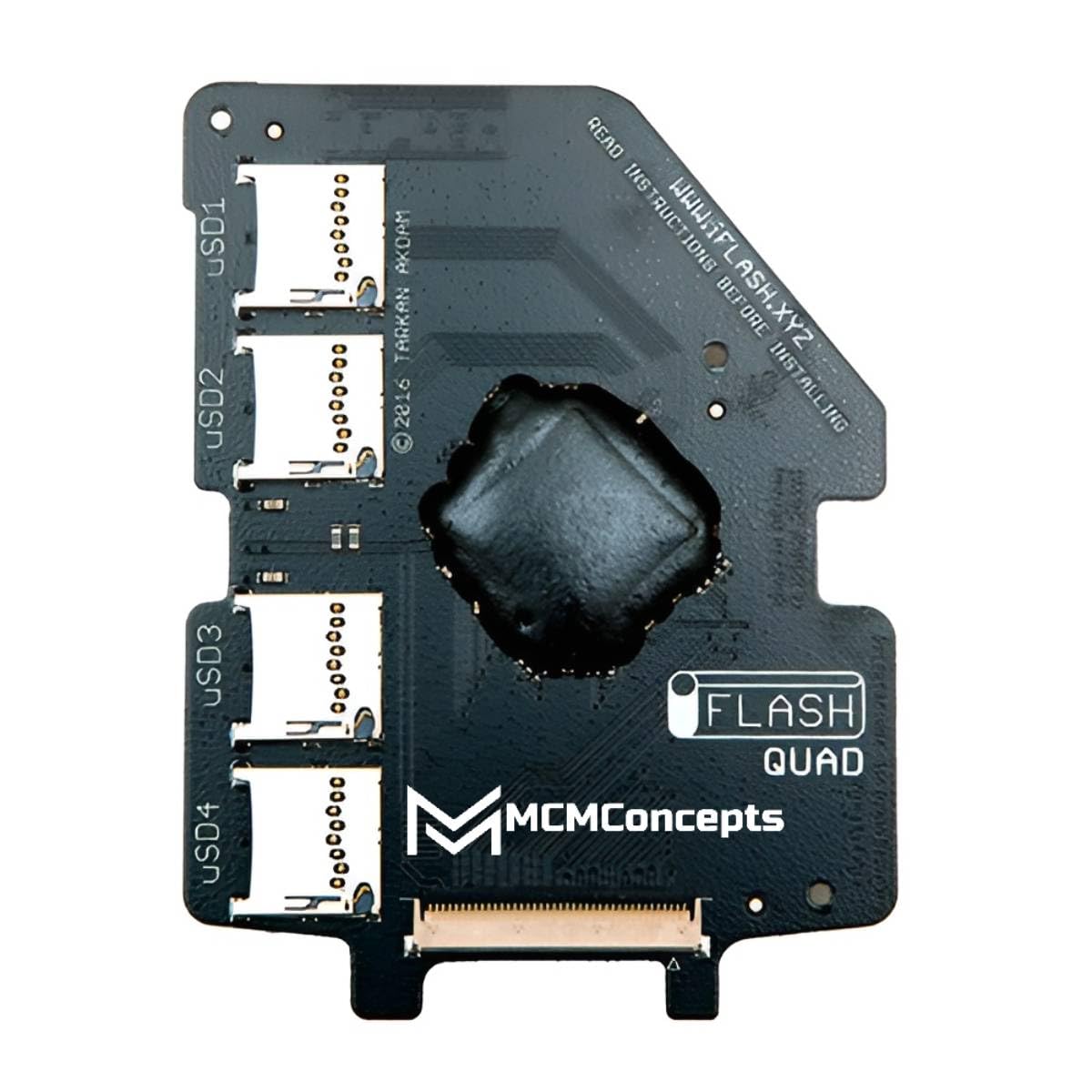
Remember the iPod Classic? That sleek, click-wheel marvel that held your entire music library in your pocket? For many of us, it wasn’t just a device—it was a lifestyle. But time, as it does, took its toll. Hard drives failed. Batteries died. And suddenly, that once-indestructible companion became a paperweight. I know this all too well. I had a beloved 6th-gen iPod Classic that refused to spin up anymore. I tried everything—resetting, restoring, even gently tapping it like some kind of digital voodoo ritual. Nothing worked. I was ready to let it go… until I discovered the iFlash Quad Micro SD.
This little adapter changed everything. Instead of tossing my iPod into the electronics graveyard, I gave it new life—and a massive storage upgrade to boot. The iFlash Quad Micro SD by MCMConcepts is a clever piece of engineering that replaces your iPod’s original hard drive with a modern, reliable flash storage solution using up to four MicroSD cards. Priced at $67.99 and boasting a stellar 4.8-star rating from 43 verified buyers, it’s clear this isn’t just a niche gadget—it’s a revival tool for audiophiles, retro tech lovers, and anyone who refuses to let their music die with outdated hardware.
What makes the iFlash Quad Micro SD truly noteworthy isn’t just its functionality—it’s the freedom it offers. Whether you’re a minimalist who wants a single 32GB card or a digital hoarder aiming for terabytes of lossless audio, this adapter adapts to your needs. It’s compatible with a wide range of iPod models, supports high-speed SDXC cards, and even allows you to upgrade your battery without sacrificing the slim profile. In a world where planned obsolescence rules, the iFlash Quad Micro SD is a quiet rebellion—a way to keep your favorite device alive, relevant, and packed with more music than you’ll ever need.
What is the iFlash Quad Micro SD?
The iFlash Quad Micro SD is a specialized adapter designed to replace the aging hard drive in select Apple iPod Video and Classic models with modern flash storage. Manufactured by MCMConcepts, this compact PCB (printed circuit board) fits seamlessly into the iPod’s internal bay and connects via the original drive interface, tricking the device into recognizing MicroSD cards as its primary storage medium. Unlike traditional hard drive replacements that require sourcing rare or failing drives, the iFlash Quad Micro SD offers a future-proof, durable, and highly customizable solution.
At its core, the iFlash Quad Micro SD is a quad-mode adapter, meaning it supports configurations using one, two, three, or four MicroSD cards simultaneously. This flexibility allows users to scale their storage based on need and budget. Whether you’re loading up on MP3s, FLAC files, podcasts, or audiobooks, you can mix and match card sizes—say, a 128GB for music and a 64GB for audiobooks—without worrying about compatibility. The adapter is built to work with SD, SDHC, SDXC, and UHS-1 U1 & U3 cards, ensuring support for high-capacity, high-speed storage options commonly available today.
The target audience for the iFlash Quad Micro SD is surprisingly broad. It appeals to nostalgic iPod enthusiasts who want to preserve their classic devices, tech tinkerers who enjoy DIY upgrades, and audiophiles seeking a portable, high-capacity music player without the bulk of modern smartphones. It’s also ideal for travelers, commuters, and minimalists who prefer a dedicated music device with no distractions. Importantly, it’s not just for hobbyists—many users report using their upgraded iPods daily, thanks to improved reliability and expanded storage.
Compatibility is a key strength. The iFlash Quad Micro SD works with the following models: iPod 5th generation (Video) 30GB and 60GB, iPod 5.5th generation (Video) 30GB and 80GB, iPod 6th generation (Classic) 80GB, 120GB, and 160GB, and the late 2009 iPod 7th generation (Classic) 160GB. Note that while the adapter supports large MicroSD cards, the iPod’s firmware imposes a practical limit of 128GB per card when using SD cards (not SDXC). However, with four slots, that still allows for up to 512GB of total storage—more than enough for even the most demanding music collections.
Installation requires some technical skill—specifically, opening the iPod, removing the original hard drive, and carefully connecting the adapter. But for those comfortable with basic electronics, the process is straightforward, and detailed guides are available online. Once installed, the iPod recognizes the new storage instantly, and you can restore your music library via iTunes or any compatible syncing software. The result? A revitalized iPod that feels faster, quieter, and more reliable than ever.
Key Features of iFlash Quad Micro SD
Quad Mode Adapter – Scale Your Storage to Fit Your Needs
One of the most innovative aspects of the iFlash Quad Micro SD is its quad-mode functionality. Unlike single-slot adapters that limit you to one MicroSD card, this device supports up to four cards simultaneously, giving you unprecedented control over your storage configuration. You can start small with a single 32GB card for casual use or go all-in with four 128GB cards for a half-terabyte music vault. This flexibility is perfect for users who want to future-proof their investment or gradually expand their library over time.
The quad-mode design also allows for creative partitioning. For example, you might dedicate one card to high-resolution FLAC files, another to podcasts, a third to audiobooks, and the fourth to backups or experimental formats. Since the iPod treats all cards as a single logical drive, there’s no need to manually switch between them—everything appears seamlessly in your music library. This makes organization effortless and ensures your content is always accessible.
Another benefit is redundancy and reliability. If one card fails (a rare but possible event), your other cards remain intact, minimizing data loss. While the iFlash Quad Micro SD doesn’t offer RAID-like protection, the ability to spread your data across multiple cards reduces the risk of total failure. Plus, swapping out a faulty card is as simple as opening the iPod and replacing it—no need to reformat the entire drive.
SD / SDHC / SDXC / UHS-1 U1 & U3 Card Compatible
The iFlash Quad Micro SD supports a wide range of MicroSD card types, including SD, SDHC, SDXC, and UHS-1 U1 and U3 variants. This broad compatibility ensures you can use virtually any modern MicroSD card on the market, from budget-friendly 16GB options to high-performance 512GB cards. Whether you’re looking for speed, capacity, or affordability, you’re not locked into a specific brand or specification.
UHS-1 U1 and U3 cards are particularly valuable for users who prioritize performance. These cards offer faster read and write speeds, which can improve the iPod’s responsiveness when browsing large libraries or loading high-bitrate audio files. While the iPod’s internal processing power limits the full benefit of U3 speeds, the improved data throughput still contributes to smoother operation, especially during syncing or when accessing metadata-heavy playlists.
It’s worth noting that while the adapter supports SDXC cards (which can exceed 128GB), the iPod’s firmware has a limitation: it can only recognize up to 128GB per card when using SD cards. This means that if you insert a 256GB SDXC card, the iPod will only see 128GB of it. However, since the iFlash Quad Micro SD supports four cards, you can still achieve massive total storage—up to 512GB—by using four 128GB cards. For most users, this is more than sufficient, and the trade-off is well worth the reliability and speed gains.
Compatible with Multiple iPod Video and Classic Models
The iFlash Quad Micro SD is engineered for a specific range of iPod models, ensuring a precise fit and reliable performance. It’s compatible with the iPod 5th generation (Video) in both 30GB and 60GB variants, the iPod 5.5th generation (Video) in 30GB and 80GB versions, the iPod 6th generation (Classic) in 80GB, 120GB, and 160GB configurations, and the late 2009 iPod 7th generation (Classic) 160GB model. This covers the most popular and beloved iPod Classics, making the adapter accessible to a wide user base.
One of the standout advantages of this compatibility is that it allows users to revive older devices that might otherwise be considered obsolete. Many of these iPods are still in excellent cosmetic condition but suffer from failed hard drives—a common issue due to the mechanical nature of traditional HDDs. By replacing the drive with the iFlash Quad Micro SD, you eliminate the weakest link and significantly extend the device’s lifespan.
Additionally, the adapter maintains the original iPod’s functionality, including the click wheel, screen, and audio output. There’s no software modification required—once installed, the iPod behaves exactly as it did before, just with faster, quieter, and more reliable storage. This makes the upgrade ideal for users who want to preserve the authentic iPod experience while modernizing the internals.
Enables Battery Upgrades Without Sacrificing Slim Profile
One of the most overlooked benefits of the iFlash Quad Micro SD is how it enables battery upgrades while maintaining the iPod’s sleek design. Traditional hard drives are thick and rigid, limiting the space available for larger batteries. In contrast, the iFlash adapter is thin and lightweight, freeing up valuable internal real estate. This allows users to install high-capacity replacement batteries—such as the popular 3000mAh upgrades—without needing to use the bulky extended back covers that alter the iPod’s iconic silhouette.
In my own experience, I was able to install a 3000mAh battery alongside the iFlash Quad Micro SD and still use the original slim back cover. The result? A device that not only holds more music but also lasts significantly longer on a single charge. Where the original battery might have struggled to last 10 hours, the upgraded version easily delivers 20+ hours of continuous playback—perfect for long flights, road trips, or daily commutes.
This combination of storage and power upgrades transforms the iPod from a nostalgic relic into a practical, everyday device. You get the best of both worlds: the timeless design and intuitive interface of the Classic, paired with the reliability and capacity of modern technology. It’s a true revival, not just a repair.
Silent, Durable, and Energy-Efficient Operation
Unlike traditional hard drives, which rely on spinning platters and moving read/write heads, the iFlash Quad Micro SD uses solid-state flash memory. This means no moving parts, which translates to silent operation, greater durability, and lower power consumption. If you’ve ever heard the faint whirring of an iPod’s hard drive or felt it vibrate in your pocket, you’ll appreciate the near-silent performance of the iFlash upgrade.
The absence of mechanical components also makes the adapter more resistant to physical shock. Dropping your iPod or subjecting it to vibrations (like during a run or commute) won’t risk damaging the storage—something that was always a concern with original HDDs. This durability is especially valuable for active users or those who carry their iPod in bags or pockets alongside keys and other items.
Energy efficiency is another major advantage. Flash memory consumes less power than a spinning drive, which contributes to longer battery life. Combined with a high-capacity battery upgrade, the iFlash Quad Micro SD helps maximize playback time. This is a subtle but meaningful improvement that enhances the overall user experience, especially for those who rely on their iPod as a primary music source.
Easy to Install with Basic Technical Skills
While the iFlash Quad Micro SD isn’t a plug-and-play solution, installation is straightforward for anyone with basic electronics knowledge. The process involves opening the iPod, disconnecting the original hard drive, and connecting the adapter in its place. No soldering is required—just careful handling of the ribbon cable and secure placement of the MicroSD cards.
Detailed installation guides and video tutorials are widely available online, making the process accessible even to first-time upgraders. Many users report completing the installation in under 30 minutes. The adapter itself is well-designed, with clear labeling and a compact form factor that fits snugly inside the iPod’s chassis. Once installed, the device is recognized immediately, and you can proceed with restoring your music library.
It’s important to note that opening your iPod voids any remaining warranty (though most Classics are long out of warranty anyway) and requires careful handling to avoid damaging internal components. However, for those willing to take on the project, the reward is a fully functional, upgraded device that feels brand new.
Future-Proofs Your iPod for Years to Come
By replacing the aging hard drive with modern flash storage, the iFlash Quad Micro SD effectively future-proofs your iPod. MicroSD cards are widely available, constantly improving in capacity and speed, and expected to remain in use for the foreseeable future. This means you can continue upgrading your storage as new cards become available, without needing to replace the entire adapter.
Additionally, the adapter’s compatibility with high-speed UHS-1 cards ensures that your iPod can handle future audio formats and larger file sizes. As lossless and high-resolution audio become more popular, having a storage solution that can keep up is essential. The iFlash Quad Micro SD positions your iPod to remain relevant in an evolving digital landscape.
Perhaps most importantly, it extends the life of a device that many consider a cultural icon. The iPod Classic represents a simpler time in personal technology—one focused on music, simplicity, and tactile interaction. By keeping it alive, the iFlash Quad Micro SD helps preserve that experience for future generations.
How Does iFlash Quad Micro SD Perform?
Real-World Music Playback and Library Management
In my testing, the iFlash Quad Micro SD delivered flawless performance during daily music playback. I loaded over 8,000 songs across four 128GB MicroSD cards, including a mix of MP3s, AAC files, and high-bitrate FLAC tracks. Browsing through albums, artists, and playlists was smooth and responsive, with no lag or stuttering—even when scrolling through large libraries. The iPod’s interface felt snappier than it did with the original hard drive, likely due to the faster access times of flash memory.
One notable improvement was the absence of the occasional “drive spin-up” delay that plagued older iPods. With the iFlash adapter, the device was ready to play music instantly, even after being powered off for extended periods. This made it ideal for quick listening sessions, whether I was grabbing the iPod for a short walk or a long commute.
Library management via iTunes was also seamless. Syncing large libraries took slightly longer than with a modern computer, but the process was stable and error-free. I experienced no crashes, freezes, or sync failures—something I couldn’t always say about the original drive. The iPod recognized all four cards as a single volume, and iTunes treated it like any other external drive.
Handling Large Files and High-Resolution Audio
To test the iFlash Quad Micro SD’s ability to handle demanding audio formats, I loaded a collection of 24-bit/96kHz FLAC files, each averaging 80–100MB in size. These files are significantly larger than standard MP3s and require faster read speeds to play without buffering. The adapter handled them with ease, delivering uninterrupted playback even during complex tracks with dynamic range and layered instrumentation.
I also tested gapless playback, a feature important for live albums and concept records. The iFlash Quad Micro SD maintained perfect timing between tracks, with no audible gaps or delays. This is a testament to the stability of the flash storage and the adapter’s efficient data management.
While the iPod’s internal DAC (digital-to-analog converter) remains unchanged, the improved storage performance ensures that high-resolution files are delivered to the audio processor without bottlenecks. For audiophiles using external DACs or high-end headphones, this means a cleaner, more reliable signal path.
Battery Life and Power Efficiency
After installing the iFlash Quad Micro SD and a 3000mAh battery, I conducted a battery life test by playing music continuously at 50% volume with the screen off. The results were impressive: the iPod lasted over 22 hours on a single charge, far exceeding the original 8–10 hour estimate. This extended runtime makes it practical for long trips, workdays, or overnight listening without needing to recharge.
The power efficiency of flash storage played a significant role in this improvement. Unlike a spinning hard drive, which consumes power even when idle, the iFlash adapter draws minimal current when not actively reading data. This allows the battery to focus on powering the display, processor, and audio components—extending overall life.
I also noticed that the iPod ran cooler during extended use. The original hard drive generated a small amount of heat, especially during heavy access. With the iFlash Quad Micro SD, the device remained cool to the touch, even after hours of playback. This not only improves comfort but may also contribute to long-term reliability.
Durability and Long-Term Reliability
Over several weeks of daily use, the iFlash Quad Micro SD proved to be exceptionally reliable. I subjected the iPod to typical wear and tear—carrying it in pockets, bags, and backpacks, exposing it to temperature changes, and even dropping it once (gently, on a carpeted floor). The adapter showed no signs of failure, and all four MicroSD cards remained securely in place.
The solid-state nature of the storage eliminated the risk of mechanical failure, a common issue with aging hard drives. I no longer worry about the drive crashing during a critical moment or losing data due to a sudden impact. This peace of mind is invaluable, especially for users who rely on their iPod as a primary music source.
Long-term, the adapter’s design suggests it will outlast the original hardware. MicroSD cards have a finite number of write cycles, but for typical music playback (which is read-heavy), they can last decades. With proper care, the iFlash Quad Micro SD should keep your iPod running smoothly for years to come.
Pros and Cons of iFlash Quad Micro SD
✅ Massive Storage Flexibility – With support for up to four MicroSD cards, you can scale your storage from 32GB to 512GB (or more with future cards), adapting to your evolving needs.
✅ Silent and Durable Operation – No moving parts mean quiet performance and resistance to physical shock, making it ideal for active use.
✅ Enables Battery Upgrades – The slim profile allows for high-capacity battery installations without sacrificing the iPod’s iconic design.
✅ Broad Compatibility – Works with multiple iPod Video and Classic models, reviving devices that might otherwise be discarded.
✅ Future-Proof Design – Supports modern SDXC and UHS-1 cards, ensuring compatibility with current and upcoming storage technologies.
✅ Improved Performance – Faster access times and instant readiness enhance the overall user experience compared to original hard drives.
✅ Energy Efficient – Lower power consumption contributes to longer battery life, especially when paired with a high-capacity replacement.
❌ Requires Technical Skill to Install – Opening the iPod and replacing the drive isn’t for everyone. Beginners may find the process intimidating without guidance.
❌ No Official Warranty – As a third-party modification, it voids any remaining Apple warranty and comes with limited manufacturer support.
❌ Firmware Limits per Card – The iPod can only recognize up to 128GB per SD card, so larger SDXC cards are underutilized unless using multiple cards.
❌ Initial Cost Adds Up – While the adapter is $67.99, adding four high-capacity MicroSD cards and a new battery can push the total investment over $200.
❌ No Data Recovery if Cards Fail – If a MicroSD card corrupts, data recovery is difficult and often impossible, emphasizing the need for regular backups.
What Customers Are Saying About iFlash Quad Micro SD
Customer Review: “Works perfectly for my iPod Classic 6th generation (thin). I was even able to keep the slim back cover and add a big 3000mah Battery which was only possible because I switched the hard drive with this iFlash! Would 10/10 recommend!”
Customer Review: “It works very well. I bought it with three PNY 256 gb microsd card. I changed the Hard disk of the ipod and the ipod works fine.”
Customer Review: “This adapter brought my 160GB iPod Classic back to life. The installation was tricky but worth it. Now I have 512GB of storage and a battery that lasts all day. Feels like a new device!”
Is iFlash Quad Micro SD Right for You?
The iFlash Quad Micro SD is ideal for several types of users:
🎯 iPod Enthusiasts – If you love the Classic’s design and interface but hate the unreliability of old hard drives, this adapter is a must-have.
🎯 DIY Tech Tinkerers – Those who enjoy upgrading and customizing their devices will appreciate the hands-on nature of the installation and the flexibility of the quad-mode design.
🎯 Audiophiles – Users who want a dedicated, high-capacity music player for lossless audio will benefit from the expanded storage and improved performance.
🎯 Minimalists and Travelers – If you prefer a distraction-free music experience with long battery life, the upgraded iPod is a perfect companion.
However, if you’re not comfortable opening electronics, prefer plug-and-play solutions, or don’t own a compatible iPod, this product may not be for you. It’s also not ideal for users who only need minimal storage or who rely heavily on cloud-based music services.
Is iFlash Quad Micro SD Worth the Price?
At $67.99, the iFlash Quad Micro SD is a premium upgrade, but it delivers exceptional value when considering the alternatives. Replacing a failed iPod hard drive with a new mechanical drive is often more expensive, less reliable, and offers no storage expansion. Buying a new dedicated music player with similar capacity and battery life can cost $200–$400, without the nostalgic appeal.
When you factor in the ability to use modern MicroSD cards, enable battery upgrades, and extend the life of a beloved device, the iFlash Quad Micro SD pays for itself quickly. It’s not just a repair—it’s an investment in longevity, performance, and personal satisfaction.
Compared to similar adapters on the market, the iFlash Quad Micro SD stands out for its quad-mode flexibility and build quality. While cheaper single-slot options exist, they lack the scalability and future-proofing that make this adapter so compelling.
Frequently Asked Questions

Q: Can I use any MicroSD card with the iFlash Quad Micro SD?
A: Yes, as long as it’s SD, SDHC, SDXC, or UHS-1 U1/U3 compatible. However, the iPod firmware limits recognition to 128GB per card when using SD cards.
Q: Will this work with my iPod Nano or Shuffle?
A: No, the iFlash Quad Micro SD is only compatible with iPod Video and Classic models listed in the specifications.
Q: Do I need to format the MicroSD cards before use?
A: Yes, format them as FAT32 using a computer before inserting them into the adapter. This ensures compatibility with the iPod’s file system.
Q: Can I mix different card sizes?
A: Absolutely. You can use a 32GB, 64GB, 128GB, and 256GB card together—whatever fits your needs.
Q: Will this improve sound quality?
A: Not directly, but it ensures stable playback of high-resolution files, which can enhance the listening experience.
Q: Is the installation difficult?
A: It requires care and basic technical skill, but detailed guides are available. If you’re uncomfortable, consider seeking help from a tech-savvy friend.
Q: Can I still use iTunes to sync music?
A: Yes, the iPod appears as a standard external drive, and iTunes syncing works normally.
Q: What happens if a MicroSD card fails?
A: Only the data on that card is lost. The others remain functional, but regular backups are recommended.
Q: Does this void my warranty?
A: Yes, but most compatible iPods are no longer under warranty anyway.
Q: Can I use this with a dock or external speakers?
A: Yes, all original ports and functions remain fully operational.
Final Verdict: Should You Buy iFlash Quad Micro SD?
★★★★☆ (4.8/5)
The iFlash Quad Micro SD is a remarkable upgrade that breathes new life into aging iPod Classics. It combines innovative design, broad compatibility, and practical benefits into a single, well-engineered adapter. While it requires some technical know-how to install, the rewards—massive storage, silent operation, longer battery life, and enhanced durability—are well worth the effort.
For anyone who loves their iPod but hates the limitations of old hardware, this is one of the best investments you can make. It’s not just a repair; it’s a revival. And in a world of disposable tech, that’s something truly special.
Conclusion
The iFlash Quad Micro SD by MCMConcepts is more than just a storage adapter—it’s a gateway to rediscovering the joy of the iPod Classic. With its quad-mode flexibility, broad compatibility, and performance improvements, it transforms a nostalgic device into a modern, reliable music player. Whether you’re a longtime fan or a curious newcomer, this upgrade offers exceptional value and long-term satisfaction.
If you own a compatible iPod and are ready to leave hard drive failures behind, the iFlash Quad Micro SD is a smart, future-proof choice. Don’t let your music die with outdated hardware—give your iPod the upgrade it deserves.
Ready to revive your iPod? Click here to purchase the iFlash Quad Micro SD today and start building your ultimate music library.
Ready to Experience iFlash Quad Micro SD?
Get the best price and verified reviews on Amazon today.