
If you’re looking to boost your PC’s performance or expand its storage, a Solid State Drive (SSD) is often the first thing that comes to mind. And when it comes to reliable and innovative storage solutions, Sabrent is a name that frequently pops up. While Sabrent offers fantastic M.2 NVMe SSDs, they also provide a brilliant ecosystem of accessories and solutions that make integrating any SATA SSD into your PC setup a breeze.
Whether you’re upgrading an old laptop, building a new desktop, or just need a quick way to transfer data, finding the Sabrent best SATA SSD for PC experience often means looking at the tools that enable your SSD to shine. We’re not just talking about internal drives here; we’re exploring docks, enclosures, and adapters that unlock the full potential of your SATA SSDs. Let’s dive into some of the top picks that make managing your storage easier and faster.
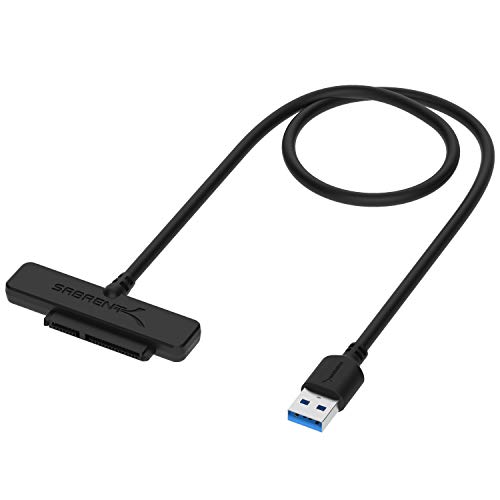
1. SABRENT SATA to USB Cable – USB 3.0 to 2.5”

This little cable is an absolute lifesaver for anyone needing quick, temporary access to a 2.5″ SATA drive. Imagine you’ve pulled an old SSD or hard drive out of a laptop and need to grab some files, or perhaps you’re cloning your OS to a new drive. This Sabrent cable makes it incredibly simple – just plug and play, no external power needed for most 2.5″ drives. It’s truly a must-have tool for tech enthusiasts and casual users alike, simplifying what used to be a complicated process.
Key Features:
– Connects a 2.5″ SATA I/II/III hard drive or SSD to your computer with UASP Support.
– Speeds up to 5Gbps with USB 3.0, ensuring fast data transfers.
– Hot-swappable, plug and play, no drivers needed.
– LED light indicates Power and Activity status for easy monitoring.
– Reverse compatible with USB 2.0 & USB 3.0.
– Enhanced Support: Firmware updates and Acronis True Image software are available for download on the Sabrent website.
Pros:
– Extremely portable and convenient for quick drive access.
– UASP support enhances transfer speeds for compatible systems.
– No external power supply needed for 2.5″ drives.
– Broad compatibility with various SATA drive versions.
Cons:
– Only works with 2.5″ drives (not 3.5″ without additional power).
– USB 3.0 speeds might not be the absolute fastest compared to newer standards.
User Impressions:
Users frequently praise this cable for its simplicity and reliability. Many have found it invaluable for data recovery, SSD upgrades, and quick backups. The plug-and-play nature is a huge plus, with people appreciating not having to install drivers or deal with bulky enclosures. It’s often described as a “tool kit essential.”
2. SABRENT USB-C Lay Flat Docking Station – NVMe M.2 + 2.5”/3.5” SATA

If you’re dealing with multiple drives, both M.2 NVMe and traditional SATA, this Sabrent docking station is a powerhouse. It offers incredible versatility, allowing you to easily swap drives in and out without tools. But what really sets it apart is the offline clone function – copy one drive to another without even needing a PC! This feature alone makes it an invaluable asset for anyone managing multiple drives or performing frequent backups and upgrades, especially when seeking the Sabrent best SATA SSD for PC integration options.
Key Features:
– Wide Compatibility: Dual Format Support for M.2 PCIe NVMe SSDs (2242, 2260, 2280) and 2.5”/3.5” SATA SSDs or HDDs.
– 10Gbps High-Speed USB-C: USB 3.2 Gen 2 Type-C port for rapid data transfers.
– Tool-Free Installation: Easy drive swapping with a secure hinged lid.
– Smart Cloning, No PC Needed: Offline clone function with direction switch and progress LEDs.
– Cross-Platform Ready: Compatible with Windows, macOS, and Linux.
– Powered via included 12V adapter for stable performance.
Pros:
– Extremely versatile, supporting both NVMe and SATA drives.
– Offline cloning is a huge time-saver and convenience.
– Fast USB-C speeds for efficient data handling.
– Tool-free design makes drive management a breeze.
Cons:
– Requires an external power adapter, reducing portability slightly.
– Docking station format might take up more desk space than a simple cable.
User Impressions:
Reviewers love the all-in-one nature of this dock, especially the ability to clone drives without a computer. The build quality and ease of use are frequently highlighted, with users finding it perfect for technicians, content creators, and those with extensive drive collections. Its broad compatibility makes it a highly recommended solution.
3. Western Digital 1TB WD Blue SA510 SATA Internal Solid State Drive

While not a Sabrent-branded product, the Western Digital 1TB WD Blue SA510 is an excellent example of the kind of high-quality SATA SSD that Sabrent’s accessories are designed to support and enhance. This internal SSD offers a fantastic balance of performance, reliability, and value, making it a popular choice for PC builders and upgraders. Pairing it with a Sabrent enclosure or mounting bracket truly rounds out your Sabrent best SATA SSD for PC setup. It’s perfect for breathing new life into an older system or serving as a speedy secondary drive in a new build.
Key Features:
– Storage Capacity: 1 TB, offering ample space for your OS, games, and applications.
– Drive Interface: SATA III (6Gb/s), ensuring broad compatibility and good performance.
– Drive Type: Internal 2.5″ Solid State Drive.
– Form Factor: 2.5″, widely compatible with most laptops and desktop drive bays.
– Designed for mainstream use, offering a great upgrade path from traditional HDDs.
Pros:
– Reliable performance from a trusted brand (Western Digital).
– Excellent value for its capacity and speed.
– Low power consumption and silent operation.
– Improves system responsiveness significantly compared to HDDs.
Cons:
– SATA speeds are slower than NVMe SSDs (though still very fast for most users).
– 2.5″ form factor might require an adapter for 3.5″ desktop bays (see Sabrent Product #5!).
User Impressions:
Customers consistently praise the WD Blue SA510 for its reliability and performance gains. Many users report noticeable improvements in boot times, application loading, and overall system snappiness after upgrading from an HDD. It’s often recommended as a solid, affordable choice for general-purpose computing and light gaming.
4. SABRENT USB 3.2 Type-C Tool-Free Enclosure for M.2 PCIe NVMe and SATA SSDs

This Sabrent enclosure is the epitome of convenience and speed. If you’ve got an M.2 SSD (either NVMe or SATA) that you want to turn into a blazing-fast external drive, this is your go-to. The tool-free design is a game-changer, letting you swap drives in seconds. Its sleek aluminum case not only looks great but also helps with heat dissipation. For anyone needing portable, high-speed storage, this enclosure delivers a premium experience and is a strong contender for enabling the Sabrent best SATA SSD for PC external solutions.
Key Features:
– CONVENIENCE: 100% Tool-Free installation and removal of SSDs.
– DESIGN: Ultra-slim Aluminum case with ABS frame, ensuring durability and portability.
– COMPATIBILITY: M.2 form factor compatible with both SATA and NVMe in sizes: 2242/2260/2280.
– SPEED: USB 3.2 supports data transmission speeds up to 10Gbps. Backward compatible with USB 3.1 and USB 3.0.
– PLUG & PLAY: No additional drivers required, bus powered (no external power supply needed).
Pros:
– Incredibly easy, tool-free installation.
– Dual compatibility with both M.2 NVMe and M.2 SATA SSDs.
– High-speed 10Gbps USB 3.2 Type-C interface.
– Portable and durable aluminum design.
Cons:
– Only for M.2 form factor SSDs, not 2.5″ SATA drives.
– While it works with M.2 SATA, its full speed potential is best realized with NVMe drives.
User Impressions:
Users are consistently impressed by the tool-free design and the robust build quality of this enclosure. The fast transfer speeds are frequently highlighted, making it ideal for large file transfers, running virtual machines, or even portable gaming. It’s praised for its reliability and ease of use across different operating systems.
5. SABRENT 3.5 Inch to x2 SSD / 2.5 Inch Internal Mounting Kit

For desktop PC users looking to neatly install their 2.5″ SATA SSDs, this Sabrent mounting kit is a simple yet essential accessory. Many modern cases still feature 3.5″ drive bays, and this bracket allows you to mount up to two 2.5″ drives (like SSDs) into a single 3.5″ slot. It’s the perfect solution for keeping your internal PC build clean and organized, ensuring your Sabrent best SATA SSD for PC setup is tidy inside and out. It even comes with all the necessary cables and screws, making installation a breeze.
Key Features:
– Includes Molex 4 Pin to x2 15 Pin SATA Power Splitter Cable and x2 SATA Cables (Data).
– Screw pack included to mount the drives securely.
– Quick and easy installation process.
– Compatible with all types of 2.5″ hard drives, including SSD DRIVES.
– Designed for use in a standard 3.5″ internal drive bay.
Pros:
– Allows efficient use of existing 3.5″ drive bays.
– Comes with all necessary cables and screws, saving extra purchases.
– Supports up to two 2.5″ drives.
– Simple, straightforward installation.
Cons:
– Only useful for internal desktop PC builds.
– Not needed if your PC case already has dedicated 2.5″ mounting points.
User Impressions:
Customers appreciate the completeness of this kit – having the cables and screws included is a big plus. It’s consistently praised for making SSD installation in desktop PCs easy and tidy. Users find it sturdy and effective, allowing them to maximize storage in their systems without hassle.
Making the Right Choice for Your PC
Choosing the Sabrent best SATA SSD for PC experience isn’t always about picking a single SSD. It’s often about selecting the right accessories that allow you to utilize your SATA drives to their fullest potential, whether internally or externally. Sabrent truly excels in providing these crucial tools, from simple cables for quick access to versatile docks for complex data management.
Consider your needs: Do you need a portable solution for backups, an internal upgrade for an aging PC, or a multi-drive docking station for advanced tasks? With these Sabrent solutions, you’re well-equipped to get the most out of your SATA SSDs, enhancing your PC’s speed and versatility.
FAQ Section
Q1: What exactly is a SATA SSD, and how does it differ from an NVMe SSD?
A1: SATA (Serial Advanced Technology Attachment) SSDs connect to your PC via a SATA cable and port, offering speeds typically up to 600MB/s. NVMe (Non-Volatile Memory Express) SSDs connect via the PCIe interface, often in an M.2 form factor, and are significantly faster, reaching speeds several times that of SATA SSDs (e.g., 3000-7000MB/s). While NVMe offers superior performance, SATA SSDs are still excellent for general use, gaming, and are more affordable.
Q2: Why would I need a Sabrent enclosure or docking station for my SATA SSD?
A2: Sabrent enclosures and docking stations allow you to use an internal SATA SSD as an external drive. This is incredibly useful for data transfer, creating backups, upgrading your PC without installing the SSD internally first, or even running an operating system from an external drive. They offer portability and flexibility that internal drives can’t.
Q3: Can these Sabrent accessories work with both SSDs and traditional Hard Disk Drives (HDDs)?
A3: Yes, most Sabrent SATA accessories, like the SATA to USB cable and the Lay Flat Docking Station, are compatible with both 2.5″ SATA SSDs and 2.5″/3.5″ SATA HDDs. However, for 3.5″ HDDs, you’ll almost always need an external power adapter, which is often included with docking stations.
Q4: Is USB 3.0 fast enough for a SATA SSD?
A4: USB 3.0 (also known as USB 3.2 Gen 1) offers theoretical speeds up to 5Gbps (625MB/s), which is generally sufficient to max out the performance of most SATA III SSDs (which cap at 600MB/s). For even faster external performance, especially with NVMe drives, USB 3.2 Gen 2 (10Gbps) or USB 3.2 Gen 2×2 (20Gbps) are preferable, and Sabrent offers products supporting these.
Q5: What is UASP support and why is it important for external SSDs?
A5: UASP (USB Attached SCSI Protocol) is a protocol that allows USB devices to process multiple commands simultaneously, similar to how internal SATA drives work. This significantly improves data transfer speeds, especially for read/write operations with small files, compared to the older BOT (Bulk-Only Transport) protocol. If your PC and external SSD setup both support UASP, you’ll get much better performance.
Q6: I have a 3.5″ hard drive bay in my desktop PC, but I want to install a 2.5″ SSD. What do I need?
A6: You’ll need a 3.5-inch to 2.5-inch drive bay adapter or mounting bracket, like the Sabrent 3.5 Inch to x2 SSD Mounting Kit reviewed above. This allows you to securely mount your smaller 2.5″ SSD into the larger 3.5″ bay. The Sabrent kit even includes the necessary power and data cables, making the installation process straightforward.
Q7: Can I use Sabrent enclosures for cloning my operating system?
A7: Absolutely! Products like the Sabrent Lay Flat Docking Station offer an offline clone function, allowing you to copy your OS drive to a new SSD without even needing your PC involved. For enclosures that connect to your PC, you can use third-party cloning software (often provided by SSD manufacturers like Acronis True Image mentioned with Sabrent products) to migrate your OS to a new SSD housed in the enclosure.