

If you’re a Mac user, you know the importance of reliable, fast, and spacious storage. Whether you’re juggling large video files, editing high-resolution photos, or just need to back up your precious data, an external SSD is a game-changer. And when it comes to performance and durability, Sabrent is a brand that consistently delivers. But with so many options, how do you pick the Sabrent best external SSD for Mac that’s right for you?
Don’t sweat it! We’ve done the heavy lifting and compiled a list of the top Sabrent external SSDs that are perfect for your macOS setup, along with one excellent alternative. We’ll break down their features, what makes them stand out, and who they’re best for. Let’s dive in and find your next go-to storage solution!
1. SABRENT 1TB Rocket Nano XTRM External SSD, USB 3.2 / Thunderbolt 3
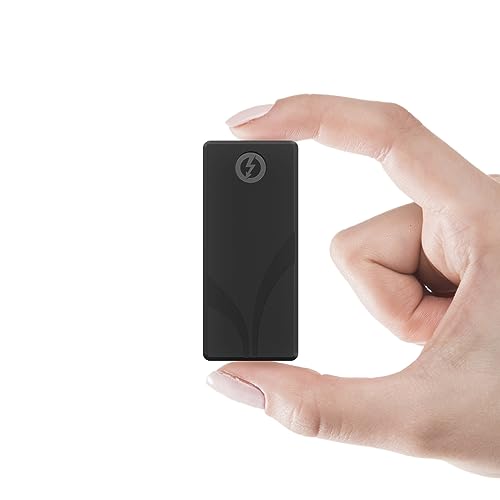
The Rocket Nano XTRM is a fantastic blend of speed and versatility, making it a stellar choice for Mac users who demand top-tier performance but also need broad compatibility. It’s built to perform at blazing Thunderbolt 3 speeds while still playing nice with older USB systems, ensuring you’re never left without a connection. Its robust, compact design means it’s ready for anything your mobile workflow throws at it.
-
Key Features:
- Dual compatibility: Thunderbolt 3 (40Gbps) for up to 2700MBps, and USB 3.2 Gen 2×1 for up to 900MBps.
- Rugged aluminum body for heat dissipation and durability.
- Includes an optional silicon sleeve for extra drop protection.
- Plug-and-play, bus-powered, no drivers needed.
- Comes with both Thunderbolt and USB-C to USB-A cables.
- Compatible with Windows and macOS systems.
-
Pros:
- Exceptional speed with Thunderbolt 3 connectivity.
- Excellent backward compatibility with USB systems.
- Highly durable and portable design.
- Comes with all necessary cables.
- Bus-powered for convenience.
-
Cons:
- Thunderbolt 3 speeds require a compatible port on your Mac.
- Higher price point compared to USB-only drives.
User Impressions: Users frequently praise the Nano XTRM for its incredible speed, especially when connected via Thunderbolt. They love its compact size and the peace of mind offered by its robust build quality, making it a reliable companion for professionals on the go.
2. SABRENT Rocket XTRM Plus 2TB Thunderbolt 3 Portable SSD

Stepping up the game, the Rocket XTRM Plus offers enhanced performance and a generous 2TB of storage, making it ideal for creative professionals and power users. This upgraded Thunderbolt 3 portable SSD maintains Sabrent’s commitment to durability and sleek design, ensuring your demanding workflows run smoothly. Its sustained performance is a significant advantage for tasks like 4K/8K video editing or large project transfers.
-
Key Features:
- Upgraded Thunderbolt 3 (40Gbps) for up to 2700MB/s, with USB 3.2 Gen 2×1 (10Gbps) fallback mode up to 900MB/s.
- Durable aluminum shell for ruggedness and improved heat dissipation.
- Removable silicone sleeve for added protection.
- Plug-and-play, bus-powered operation.
- Includes premium Thunderbolt 3 and USB-A to USB-C cables.
- Universal compatibility with Windows, macOS, and Linux.
-
Pros:
- Excellent sustained high-speed performance for professional tasks.
- Increased storage capacity (2TB).
- Robust build with active heat management.
- Flexible connectivity options.
- Backed by Sabrent’s technical support.
-
Cons:
- Premium price tag.
- Full speed benefits only with Thunderbolt 3 ports.
User Impressions: Users are impressed by the XTRM Plus’s ability to handle intensive tasks without throttling. Many highlight its solid construction and the convenience of included cables, solidifying its reputation as a reliable workhorse for Mac-based creative projects.
3. SABRENT Rocket Nano Rugged 1TB USB 3.2 10Gb/s External SSD
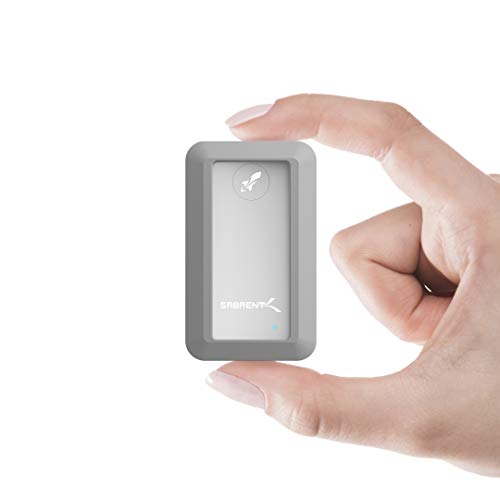
For those who prioritize protection above all else, the Sabrent Rocket Nano Rugged is your go-to. This external SSD is specifically designed to withstand the elements, boasting IP67 water resistance and 1-meter drop testing. While it focuses on USB 3.2 speeds rather than Thunderbolt, its durability makes it a unique and valuable option, especially for outdoor photographers, filmmakers, or anyone prone to accidental mishaps.
-
Key Features:
- IP67 water resistance (1 meter depth for up to 30 minutes).
- 1-meter drop tested rugged design.
- Ultra-fast 10Gbps throughput (up to 1000MB/s).
- Compatibility with Windows and macOS.
- Plug-and-play, OS independent, and fully bus-powered.
- Ultra-slim aluminum alloy sandblasted shell for sleekness and durability.
-
Pros:
- Outstanding water and dust resistance.
- Excellent drop protection.
- Still offers very good USB 3.2 speeds.
- Compact and travel-friendly.
- Driver-free operation.
-
Cons:
- Not as fast as Thunderbolt 3/5 drives.
- May be overkill if ruggedness isn’t a primary concern.
User Impressions: Reviewers rave about the peace of mind this drive offers. It’s frequently recommended for users who work in challenging environments, with many citing its reliability after accidental splashes or drops as a major selling point.
4. SABRENT 1TB Rocket Nano V2 External SSD – USB 3.2 Gen 2×2 Type-C

The Rocket Nano V2 brings a new level of USB-based performance, making it a compelling choice if your Mac has USB 3.2 Gen 2×2 ports. This isn’t just a speedy drive; it’s also built with Sabrent’s signature ruggedness, featuring an anodized aluminum housing and a shock-absorbing silicone sleeve. It’s perfect for those who need incredibly fast backups and direct editing of high-bitrate content without stepping into the Thunderbolt price bracket.
-
Key Features:
- Unrivaled USB 3.2 Gen 2×2 speeds over 1500 MB/s.
- Rugged anodized aluminum housing with shock-absorbing silicone sleeve.
- Compact, travel-friendly design (fits in your pocket).
- Includes USB-C to USB-C and USB-C to USB-A cables for broad compatibility.
- High-endurance NAND flash with advanced wear leveling and health monitoring.
-
Pros:
- Exceptional speeds for a USB-based external SSD for Mac.
- Robust protection against drops, dust, and debris.
- Excellent for 8K video recording and large file editing.
- Complete cable package.
- Engineered for longevity and data safety.
-
Cons:
- Requires a USB 3.2 Gen 2×2 port on your Mac for maximum speeds (older Macs may not have this).
- Still relies on USB, not Thunderbolt, for connectivity.
User Impressions: Users are consistently impressed by the V2’s speed, especially noting its effectiveness for demanding tasks like real-time video editing. The combination of speed and a well-protected design makes it a favorite among content creators.
5. SABRENT Rocket XTRM 5 4TB Thunderbolt 5 Portable SSD

Prepare for the future with the Sabrent Rocket XTRM 5. This powerhouse brings Thunderbolt 5 technology to the forefront, offering mind-boggling transfer speeds up to 64Gbps with an 80Gbps connection. If you’re a professional dealing with colossal files, 8K+ workflows, or need the absolute fastest external storage available for your next-gen Mac, this is undeniably the Sabrent best external SSD for Mac in terms of raw speed and future-proofing.
-
Key Features:
- Ultra-fast Thunderbolt 5 performance: up to 64Gbps transfer speeds (80Gbps connection).
- Broad backward compatibility: Thunderbolt 3, Thunderbolt 4, USB4, USB 3.2 Gen 2×2, etc.
- Rugged aluminum body for heat dissipation and durability, plus a silicone sleeve.
- Bus-powered, plug-and-play with included premium Thunderbolt cable.
- Reliable, future-proof storage solution for creators, professionals, and gamers.
-
Pros:
- Unmatched speed and performance with Thunderbolt 5.
- Excellent future-proofing for new Mac models.
- Exceptional backward compatibility across various port types.
- Robust and durable construction.
- Perfect for the most demanding workloads.
-
Cons:
- Premium price tag, representing a significant investment.
- Full speed benefits require a Thunderbolt 5 port (currently rare on Macs).
- May be overkill for average users.
User Impressions: Early adopters are blown away by the sheer speed, calling it a “game-changer” for large-scale projects. The robust build quality and extensive compatibility, even with older systems, are also frequently highlighted as strong positives.
6. SABRENT Rocket XTRM 5 2TB Thunderbolt 5 Portable SSD
Similar to its 4TB sibling, the Sabrent Rocket XTRM 5 2TB offers the same cutting-edge Thunderbolt 5 performance in a slightly more accessible capacity. This drive is for those who need the absolute pinnacle of speed and future-proof connectivity but might not require the massive 4TB storage right away. It’s still an incredible choice for professional Mac users who want to stay ahead of the curve.
-
Key Features:
- Ultra-fast Thunderbolt 5 performance: up to 64Gbps transfer speeds (80Gbps connection).
- Broad backward compatibility: Thunderbolt 3, Thunderbolt 4, USB4, USB 3.2 Gen 2×2, etc.
- Rugged aluminum body for heat dissipation and durability, plus a silicone sleeve.
- Bus-powered, plug-and-play with included premium Thunderbolt cable.
- Reliable, future-proof storage solution for creators, professionals, and gamers.
-
Pros:
- Cutting-edge Thunderbolt 5 speeds.
- Excellent future-proofing.
- Wide range of backward compatibility.
- Durable construction with included protection.
- Ideal for demanding, speed-critical tasks.
-
Cons:
- High price point.
- Requires a Thunderbolt 5 port for maximum performance (limited availability).
User Impressions: Just like the 4TB version, users praise its blistering speeds and robust build. Many appreciate having a 2TB option for the Thunderbolt 5 technology, making it a powerful tool for high-performance Mac workflows.
7. Crucial X9 2TB Portable SSD, Up to 1050MB/s, USB 3.2 Gen2
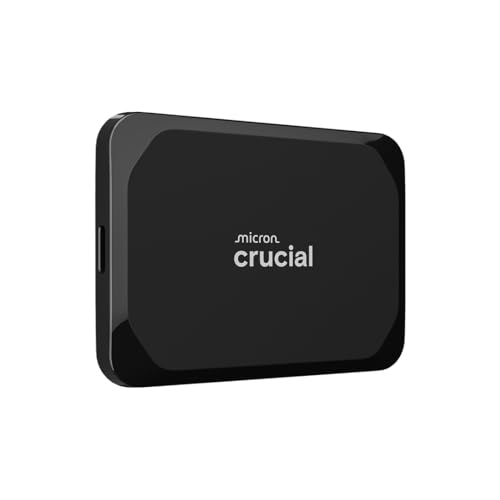
While this article primarily focuses on Sabrent, we wanted to include a strong alternative that delivers excellent performance and value, and the Crucial X9 2TB Portable SSD fits the bill perfectly. It’s a fantastic all-rounder for Mac users looking for reliable, fast storage that’s also incredibly durable. For everyday use, gaming, and media editing, the Crucial X9 offers a compelling blend of speed, ruggedness, and broad compatibility at a competitive price point.
-
Key Features:
- High-speed performance up to 1050MB/s via USB 3.2 Gen2.
- IP55 water and dust resistance, plus 7.5 ft (2 meters) drop resistance.
- Broad compatibility with Windows, Mac, iPad Pro, Chromebooks, Android, Linux, PS4, PS5, and Xbox.
- High-capacity 2TB storage in a compact design.
- Bonus software included (Mylio Photos plus and Acronis True Image).
-
Pros:
- Excellent value for its speed and capacity.
- Highly durable with strong water, dust, and drop resistance.
- Very broad device compatibility.
- Compact and travel-friendly.
- Includes useful bonus software.
-
Cons:
- Not as fast as Thunderbolt-enabled Sabrent drives.
- USB-C to USB-C cable might need an adapter for older USB-A Macs.
User Impressions: Users consistently praise the Crucial X9 for its robust build, compact size, and impressive speeds for a USB-C drive. It’s a popular choice for those needing reliable storage for everyday tasks and casual creative work on their Macs.
Frequently Asked Questions (FAQ)
Q1: Why should I choose an external SSD for my Mac over a traditional hard drive?
A1: External SSDs offer significantly faster data transfer speeds, making them ideal for tasks like video editing, large file transfers, and running applications directly from the drive. They are also more durable, quieter, and consume less power than traditional hard drives, which is a big plus for portable Mac setups.
Q2: What’s the difference between Thunderbolt and USB-C for external SSDs?
A2: While both use the same physical USB-C connector shape, Thunderbolt (especially Thunderbolt 3, 4, and 5) offers much higher bandwidth than standard USB-C. Thunderbolt 3 can reach up to 40Gbps, Thunderbolt 4 is similar but with more guaranteed features, and Thunderbolt 5 pushes it to 80Gbps, whereas standard USB-C (USB 3.2 Gen 2) typically maxes out at 10Gbps or 20Gbps (Gen 2×2). For Mac users, especially professionals, Thunderbolt provides superior performance for the most demanding tasks.
Q3: Will these Sabrent SSDs work with my older Mac that only has USB-A ports?
A3: Many Sabrent external SSDs, like the Rocket Nano XTRM or Nano V2, come with both USB-C to USB-C and USB-C to USB-A cables, ensuring backward compatibility with older Mac models that only have USB-A ports. However, you’ll be limited to the USB-A port’s speed, which will be slower than a USB-C or Thunderbolt connection.
Q4: Do I need to format my new Sabrent external SSD for my Mac?
A4: Most Sabrent external SSDs come pre-formatted, often in exFAT, which is compatible with both macOS and Windows. For optimal performance and full macOS features (like Time Machine backups), it’s recommended to reformat it to APFS (for macOS 10.13 High Sierra or newer) or HFS+ (Mac OS Extended) using Disk Utility.
Q5: Are Sabrent external SSDs bus-powered, or do they require an external power adapter?
A5: Almost all Sabrent portable external SSDs, including those reviewed here, are bus-powered. This means they draw power directly from your Mac’s USB or Thunderbolt port, eliminating the need for an extra power adapter and making them incredibly convenient for on-the-go use.
Q6: What does “rugged” mean for an external SSD like the Rocket Nano Rugged?
A6: A “rugged” external SSD is designed to withstand harsh conditions. Features typically include enhanced drop resistance (e.g., tested for drops up to 1-2 meters), and often water and dust resistance (indicated by an IP rating like IP67). This makes them ideal for users who frequently travel or work in environments where their gear might be exposed to bumps, splashes, or dust.
Q7: Is Sabrent a good brand for Mac users?
A7: Absolutely! Sabrent has built a strong reputation for producing high-performance, reliable storage solutions, particularly external SSDs that cater well to Mac users’ needs. Their emphasis on Thunderbolt connectivity, robust build quality, and excellent speed makes them a top choice for anyone looking for the Sabrent best external SSD for Mac.
Choosing the Sabrent best external SSD for Mac ultimately depends on your specific needs, budget, and the ports available on your Mac. Whether you’re a professional demanding the absolute fastest Thunderbolt 5 speeds, a content creator needing robust and rapid USB-C storage, or an adventurer requiring a rugged and reliable drive, Sabrent offers a solution that combines performance, durability, and Mac compatibility. We hope this guide helps you make an informed decision and supercharge your Mac’s storage capabilities!