

If you’re a Mac user, especially one involved in creative work like video editing, graphic design, or high-resolution photography, you know the struggle: internal storage fills up fast, and slow external drives can bottleneck your workflow. That’s where a high-performance external SSD, particularly one leveraging Thunderbolt technology, becomes a game-changer. And when it comes to speed, reliability, and robust design, Sabrent often stands out.
In this comprehensive guide, we’re diving deep into the Sabrent best external SSD for Mac Thunderbolt options, exploring why these drives are a go-to for many professionals. We’ll also look at a couple of other top-tier drives that deliver exceptional performance for your Apple ecosystem. Get ready to supercharge your Mac’s storage capabilities!
Why Choose a Thunderbolt SSD for Your Mac?
Mac computers, especially the more recent models, come equipped with Thunderbolt ports, offering blazing-fast data transfer speeds far superior to standard USB connections. Thunderbolt 3, 4, and now 5 provide immense bandwidth, making them ideal for tasks that demand quick access to large files, such as editing 4K/8K video directly from the external drive or running virtual machines.
Sabrent has carved out a reputation for producing high-quality, durable, and incredibly fast external SSDs that perfectly complement Mac’s Thunderbolt ecosystem. Their drives are often bus-powered, meaning no extra power bricks are needed, making them incredibly portable.
Let’s dive into the top contenders.
The Best External SSDs for Mac Thunderbolt
1. SABRENT Rocket XTRM Plus 2TB Thunderbolt 3 Portable SSD

The Sabrent Rocket XTRM Plus 2TB is an enhanced version of an already popular portable SSD, specifically designed for those who demand top-tier performance on the go. Its sleek yet incredibly durable aluminum design, coupled with a protective silicone sleeve, makes it a robust companion for any creative professional or power user. If you’re looking for a Sabrent best external SSD for Mac Thunderbolt that balances speed and resilience, this one’s a strong contender.
-
Key Features:
- Upgraded Thunderbolt 3/USB Portable SSD.
- Flexible High-Speed Performance: Up to 2,700 MB/s (Thunderbolt 3) or 900 MB/s (USB 3.2 Gen 2×1).
- Built with a rugged aluminum shell for durability and heat dissipation.
- Includes removable silicone sleeve for extra protection.
- Comes with premium Thunderbolt 3 and USB-A to USB-C cables.
- Plug-and-play, bus-powered for convenience.
- Universal Compatibility: Windows, macOS, Linux.
-
Pros:
- Exceptional Thunderbolt 3 speeds for demanding tasks.
- Excellent fallback compatibility with USB.
- Robust build quality with added drop protection.
- Bus-powered means no external adapter needed.
- Comprehensive cable package.
-
Cons:
- Thunderbolt 3 speeds require a Thunderbolt 3 port (though USB fallback is good).
- May run warm during extended heavy use due to high speeds.
-
User Impressions: Users frequently praise its lightning-fast transfer speeds, especially when connected via Thunderbolt. Many appreciate the solid metal construction and the included protective sleeve, giving them peace of mind when traveling. It’s often cited as a reliable workhorse for video editing on MacBooks.
2. SABRENT 1TB Rocket Nano XTRM External SSD, USB 3.2 / Thunderbolt 3
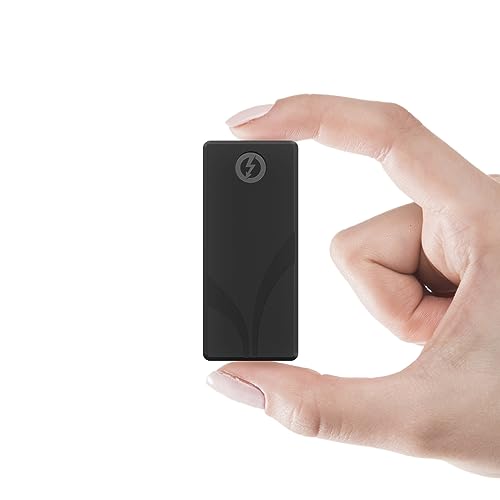
Don’t let the “Nano” in its name fool you; the Sabrent Rocket Nano XTRM packs a serious punch in a tiny form factor. This little powerhouse is designed for ultimate portability without compromising on speed. It’s the perfect choice for professionals who need a compact, fast, and durable external drive that can handle serious data. It epitomizes what a portable Sabrent best external SSD for Mac Thunderbolt should be: small, fast, and reliable.
-
Key Features:
- Compact, rugged design with Thunderbolt 3 and USB 3.2 Gen 2×1 compatibility.
- Blazing Fast Thunderbolt 3 speeds up to 2700MBps (40Gbps).
- USB mode offers speeds up to 900MBps (10Gbps) with backward compatibility.
- Solid aluminum body for heat dissipation and durability.
- Optional silicon sleeve included for enhanced protection.
- Plug-and-play, bus-powered with no drivers needed.
- Comes with both Thunderbolt and USB-C to USB-A cables.
- Compatible with Windows and macOS.
-
Pros:
- Incredibly small and pocket-friendly design.
- Outstanding Thunderbolt 3 performance.
- Excellent USB fallback and broad compatibility.
- Durable aluminum construction with extra sleeve protection.
- Truly plug-and-play for seamless use.
-
Cons:
- 1TB might not be enough for extremely large project files for some users.
- Premium price tag for its size and speed.
-
User Impressions: Reviewers rave about its diminutive size and robust build, often stating they can easily slip it into any bag or even a pocket. The speed is consistently highlighted as a major benefit, making it a favorite among photographers and videographers who need quick on-location backups.
3. SABRENT Rocket XTRM 5 4TB Thunderbolt 5 Portable SSD

Stepping into the future, the Sabrent Rocket XTRM 5 is for those who want to future-proof their storage solution. With Thunderbolt 5 technology, this drive offers unprecedented speeds, making it an absolute beast for the most demanding workflows, content creators, and gamers. If you’re building a setup for tomorrow’s performance requirements, this 4TB option is arguably the Sabrent best external SSD for Mac Thunderbolt in terms of raw, forward-looking speed.
-
Key Features:
- Ultra-Fast Thunderbolt 5 Performance: Up to 64Gbps transfer speeds (80Gbps connection).
- Broad Compatibility: Backward compatible with Thunderbolt 3, Thunderbolt 4, and USB4.
- Robust aluminum body for durability and efficient heat dissipation.
- Includes a silicone sleeve for enhanced drop protection.
- Plug and Play, Bus-powered (no external power needed).
- Comes with a premium Thunderbolt cable.
- Ideal for creators, professionals, and gamers.
-
Pros:
- Cutting-edge Thunderbolt 5 speeds for ultimate performance.
- Excellent backward compatibility ensures wide usability.
- Rugged construction provides peace of mind.
- High 4TB capacity for extensive storage needs.
- Future-proof investment for evolving hardware.
-
Cons:
- Thunderbolt 5 is still emerging, so full speed might not be achievable on older Macs.
- Higher price point due to advanced technology and capacity.
-
User Impressions: Early adopters are thrilled with its phenomenal speed and the ample 4TB capacity. The backward compatibility is a huge plus, allowing users to leverage it with current Thunderbolt 3/4 Macs while being ready for future upgrades. Its sturdy build also receives positive mentions.
4. SABRENT Rocket XTRM 5 2TB Thunderbolt 5 Portable SSD
Just like its 4TB sibling, the Sabrent Rocket XTRM 5 2TB brings the future of external storage to your fingertips with Thunderbolt 5. This 2TB version offers the same incredible speed and future-proofing capabilities but at a slightly more accessible capacity and price point. It’s a fantastic choice if you need bleeding-edge performance but don’t quite require the massive 4TB storage right away, still making it a top contender for the Sabrent best external SSD for Mac Thunderbolt for those looking ahead.
-
Key Features:
- Ultra-Fast Thunderbolt 5 Performance: Up to 64Gbps transfer speeds (80Gbps connection).
- Broad Compatibility: Backward compatible with Thunderbolt 3, Thunderbolt 4, and USB4.
- Rugged and Durable Construction: Aluminum body for heat dissipation, silicone sleeve for protection.
- Plug and Play, No External Power Needed: Bus-powered with included Thunderbolt cable.
- Reliable, Future-Proof Storage Solution: Great for creators, professionals, and gamers.
-
Pros:
- Unmatched Thunderbolt 5 speeds for next-gen performance.
- Excellent backward compatibility with older Thunderbolt and USB standards.
- Durable design protects your data.
- Convenient bus-powered operation.
- More affordable entry point into Thunderbolt 5 than higher capacities.
-
Cons:
- Requires a Thunderbolt 5 port for maximum performance (though still fast on older TB).
- Still a premium investment compared to Thunderbolt 3 drives.
-
User Impressions: Users appreciate having access to Thunderbolt 5 speeds in a more manageable 2TB capacity. The backward compatibility is a frequent highlight, ensuring it works well with existing Mac setups while preparing for future upgrades. Its robust build is also a plus for those on the move.
5. SABRENT 2TB External Aluminum SSD, Rocket Nano V2, USB 3.2 Gen 2×2

While the main focus of this article is on Thunderbolt, it’s worth noting that not every Mac user strictly needs Thunderbolt speeds, or perhaps they have a Mac that primarily uses USB-C. The Sabrent Rocket Nano V2 is an exceptional USB-C external SSD for Mac users, delivering fantastic speeds over USB 3.2 Gen 2×2, perfect for high-resolution video recording and demanding everyday tasks. It’s a robust and speedy choice, especially if Thunderbolt isn’t your primary concern or you prioritize wider USB compatibility.
-
Key Features:
- Burst transfers over 1500 MB/s with sustained performance for 8K video recording (via USB 3.2 Gen 2×2).
- Constructed of aluminum with an external silicone sleeve for ruggedness.
- Available up to 4TB, ensuring ample space.
- Cutting-edge internal hardware for high-endurance flash and wear management.
- Includes both Type-C to Type-A and Type-C to Type-C cables for flexibility.
- Compatible with a wide range of devices with USB backward compatibility.
-
Pros:
- Excellent speeds for a USB 3.2 Gen 2×2 drive, rivaling some entry-level Thunderbolt 3 drives.
- Extremely rugged and portable design.
- High capacities available (up to 4TB).
- Includes versatile cables for broad compatibility.
- No drivers required, simple plug-and-play.
-
Cons:
- Does not offer Thunderbolt speeds; maxes out at USB 3.2 Gen 2×2.
- Requires a USB 3.2 Gen 2×2 port for maximum performance, otherwise, speeds will be lower.
-
User Impressions: Customers love the Rocket Nano V2 for its impressive USB speeds and incredibly durable, compact design. Many highlight its capability for smooth 8K video recording, making it a popular choice for content creators who work with USB-C connections. The included cables are also a big convenience.
6. SanDisk Professional 4TB PRO-G40 SSD – Up to 3000MB/s, Thunderbolt 3
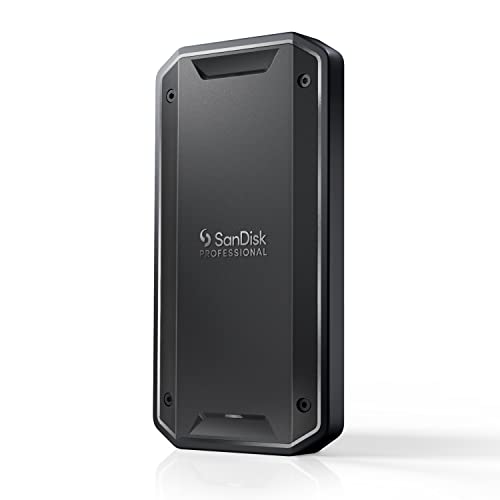
While this isn’t a Sabrent drive, the SanDisk Professional PRO-G40 is such a compelling option for Mac users that it deserves a spot in any discussion about the best external SSD for Mac Thunderbolt. This drive is built like a tank, offering extreme ruggedness alongside impressive Thunderbolt 3 performance. For professionals working in harsh environments or those who simply demand the utmost durability without sacrificing speed, the PRO-G40 is a premium alternative that delivers.
-
Key Features:
- Super-fast speeds up to 3000MB/s read and 2500MB/s write with Thunderbolt 3 (40Gbps).
- Dual-mode compatibility with both Thunderbolt 3 (40Gbps) and USB-C (10Gbps).
- Ultra-rugged design with IP68 dust/water resistance, 4000lb crush resistance, and 3m drop resistance.
- Cool aluminum core for effective heat dissipation.
- Pro-grade enclosure for premium strength.
- Mac ready (APFS formatted).
-
Pros:
- Exceptional ruggedness and durability (IP68, crush, drop resistant).
- Blazing Thunderbolt 3 speeds, ideal for professional media workflows.
- Excellent dual-mode compatibility with Thunderbolt and USB-C.
- Pre-formatted for Mac (APFS), ready to use out of the box.
- Effective thermal management to maintain sustained performance.
-
Cons:
- Premium price tag.
- While fast, it’s not Thunderbolt 5 like some Sabrent options.
-
User Impressions: Users consistently praise the PRO-G40 for its incredible durability and speed. It’s a favorite among outdoor photographers, filmmakers, and anyone who needs peace of mind that their data is protected, even in challenging conditions. The “Mac ready” formatting is also a convenient bonus.
7. SABRENT Rocket XTRM Plus 4TB Thunderbolt 3 Portable SSD
Rounding out our list, we have the larger capacity sibling of our first entry: the Sabrent Rocket XTRM Plus 4TB. This drive offers the same powerful Thunderbolt 3 performance and robust build quality but doubles the storage capacity. If you’re handling massive project files, extensive media libraries, or need a comprehensive backup solution with top-tier speed, this 4TB variant provides the extra room you need. It solidifies its place as a prime candidate for the Sabrent best external SSD for Mac Thunderbolt for high-capacity requirements.
-
Key Features:
- Upgraded Thunderbolt 3/USB SSD for enhanced performance.
- Flexible High-Speed Performance: Up to 2,700 MB/s (Thunderbolt 3) or 900 MB/s (USB 3.2 Gen 2×1).
- Built with a durable aluminum shell for ruggedness and improved heat dissipation.
- Removable silicone sleeve provides additional protection.
- Includes a premium Thunderbolt 3 cable and a USB-A to USB-C cable.
- Plug-and-play and bus-powered.
- Universal Compatibility: Windows, macOS, and Linux systems.
-
Pros:
- High 4TB capacity for extensive storage needs.
- Excellent Thunderbolt 3 speeds with reliable USB fallback.
- Robust and durable construction with added protection.
- Convenient bus-powered operation.
- Comprehensive cable package for broad connectivity.
-
Cons:
- Thunderbolt 3 is not as future-proof as Thunderbolt 5.
- Can be a significant investment, but justifiable for the capacity and speed.
-
User Impressions: Users with large data sets, particularly video editors and photographers, love the 4TB capacity combined with the speed of Thunderbolt 3. They find it incredibly reliable for large file transfers and direct-from-drive editing. The durable design also provides confidence for mobile workflows.
Frequently Asked Questions (FAQ)
Q1: Why should I choose a Thunderbolt external SSD over a regular USB one for my Mac?
A: Thunderbolt offers significantly higher data transfer speeds (up to 40Gbps for TB3/4, 80Gbps for TB5) compared to most USB connections (e.g., USB 3.2 Gen 2×1 at 10Gbps). This means faster file transfers, smoother 4K/8K video editing directly from the drive, and better performance for demanding applications. Macs are equipped with Thunderbolt ports, so you can take full advantage of these speeds.
Q2: What’s the difference between Thunderbolt 3, Thunderbolt 4, and Thunderbolt 5?
A:
* Thunderbolt 3: Offers 40Gbps bandwidth, supporting two 4K displays or one 5K display.
* Thunderbolt 4: Still 40Gbps bandwidth, but with stricter requirements for minimum video and data support, allowing for more consistent performance across devices, and typically supporting more accessories like docks. It requires 32Gbps PCIe bandwidth, compared to TB3’s 16Gbps, meaning faster external storage.
* Thunderbolt 5: The latest generation, boasting up to 80Gbps (and Burst Mode up to 120Gbps), designed for even higher resolution displays and faster external storage, perfect for future-proofing your setup.
Q3: Do Sabrent Thunderbolt SSDs require external power?
A: Most Sabrent Rocket external Thunderbolt SSDs, including the ones reviewed here, are bus-powered. This means they draw all the necessary power directly from your Mac’s Thunderbolt port, eliminating the need for an external power adapter and making them incredibly convenient and portable.
Q4: How do I format a Sabrent external SSD for my Mac?
A: When you first connect a new Sabrent SSD to your Mac, you might need to format it.
1. Open Disk Utility (found in Applications > Utilities).
2. Select your Sabrent SSD from the sidebar (make sure to select the drive itself, not just a volume under it).
3. Click Erase.
4. Choose a Name for your drive.
5. For Format, select APFS (for macOS 10.13 High Sierra and newer) or Mac OS Extended (Journaled) (for older macOS versions or if you need compatibility with older Macs).
6. For Scheme, select GUID Partition Map.
7. Click Erase again to confirm.
Q5: Are Sabrent external SSDs reliable for professional use like video editing?
A: Absolutely. Sabrent is a well-regarded brand in the SSD market, known for its performance and reliability. Their Thunderbolt external SSDs, like the Rocket XTRM Plus and XTRM 5 series, are specifically designed to offer sustained high speeds and durability, making them excellent choices for demanding professional workflows such as 4K/8K video editing, large file transfers, and running virtual machines.
Q6: Can I use a Thunderbolt SSD with a Mac that only has USB-C ports?
A: This depends on the specific Thunderbolt SSD and your Mac. Many Thunderbolt 3/4 SSDs, including some Sabrent models, offer “dual-mode” compatibility, meaning they can fall back to USB 3.2 Gen 2 (10Gbps) or USB 3.2 Gen 2×2 (20Gbps) if connected to a non-Thunderbolt USB-C port. You won’t get full Thunderbolt speeds, but they will still perform much faster than older USB standards. Check the product specifications for “USB fallback” compatibility.
Q7: What does the “rugged” design mean for these external SSDs?
A: A “rugged” design typically means the drive’s enclosure is built from durable materials (like aluminum) and may include features like silicone sleeves, IP-rated dust and water resistance (like the SanDisk PRO-G40), or enhanced drop protection. This helps protect your valuable data from accidental bumps, drops, and environmental elements, making them ideal for fieldwork or frequent travel.
Choosing the right Sabrent best external SSD for Mac Thunderbolt can significantly enhance your productivity and give you the freedom to work with large files on the go. Whether you prioritize pure speed, maximum capacity, or ultimate ruggedness, there’s a Sabrent drive (or a worthy alternative) ready to meet your needs. Happy computing!