

Gaming on the Xbox Series X is an incredible experience, with stunning graphics, lightning-fast load times, and buttery-smooth framerates. But let’s be real, with game sizes ballooning, that 1TB of internal storage (or less, after the OS takes its cut) fills up faster than you can say “Quick Resume.” If you’re constantly juggling game installs, deleting old favorites, or waiting ages for transfers, it’s time to expand your horizons.
You’ve landed here likely looking for the Sabrent best SSD for Xbox Series X – and while Sabrent makes some phenomenal SSDs, the Xbox Series X has a very specific way it handles expandable storage for its latest-gen optimized games. Don’t worry, we’ll cover both the official expansion cards and how Sabrent’s incredible drives can still be a game-changer for your console setup.
In this guide, we’re diving deep into the top 7 solid-state drives that can transform your Xbox Series X storage situation. We’ll look at the official expansion cards designed for seamless performance, alongside Sabrent’s high-speed offerings that provide excellent external storage solutions or alternative uses. Get ready to expand your game library without compromise!
Why Your Xbox Series X Needs an SSD Upgrade
Before we jump into the products, let’s quickly touch on why upgrading your Xbox Series X storage with a fast SSD is practically essential:
- Massive Game Sizes: Modern games, especially next-gen titles, can easily chew up 100GB or more. Your internal drive runs out of space quickly.
- Faster Load Times: While the internal SSD is super fast, moving games to a slow external HDD will kill those speedy load times. A good SSD keeps things snappy.
- “Quick Resume” Power: Want to jump between multiple games instantly? More storage means you can keep more games ready in Quick Resume.
- Future-Proofing Your Library: As more games arrive, you’ll want ample space to download and play them without constant management headaches.
Ready to say goodbye to storage woes? Let’s check out the contenders!
Seagate Storage Expansion Card 2TB Solid State Drive

The Seagate Storage Expansion Card is a truly plug-and-play solution, specifically designed to match the Xbox Velocity Architecture of your Xbox Series X|S. This 2TB beast ensures you can play all your Xbox Series X|S optimized games directly from the card with absolutely no compromise on graphics, latency, load times, or framerates – it’s literally like having more internal storage. If you want the most seamless, official experience, this is the gold standard for expanding your console’s storage.
Key Features:
– Designed in partnership with Xbox to seamlessly play Xbox Series X|S games from the internal SSD or the expansion card without sacrificing graphics, latency, load times or framerates.
– Every game that plays from the Storage Expansion Card for Xbox Series X|S plays at the same peak levels as the console’s internal SSD. That includes thousands of Original Xbox, Xbox 360, and Xbox One games.
– Officially licensed storage expansion card designed using Xbox Velocity Architecture to provide faster load times, richer environments and more immersive game play.
– Quick resume means gamers can switch between multiple titles in seconds — directly from the internal SSD or the expansion card.
– Enjoy long-term peace of mind with the included 3-year limited warranty.
Pros:
– Unrivaled performance for Series X|S optimized games
– Truly plug-and-play – no setup required
– Supports Quick Resume and all Xbox features
– Officially licensed and fully compatible
Cons:
– Premium price point
– Proprietary format means limited alternative uses
User Impressions: Gamers consistently praise its absolute seamless integration and identical performance to the internal drive. Many state it’s expensive but “worth every penny” for the convenience and peace of mind it offers, allowing them to download without worrying about space.
Seagate Storage Expansion Card for Xbox Series X|S 4TB
When 2TB just isn’t enough, Seagate answers with the colossal 4TB Storage Expansion Card. This is the ultimate solution for hardcore collectors or those who simply never want to delete a game again. It’s the highest capacity expansion card available, offering the same Xbox Velocity Architecture integration as its smaller siblings. If you’re building an epic digital library across four generations of Xbox, this 4TB monster is your ticket to keeping everything installed and ready to play at peak performance.
Key Features:
– Designed in partnership with Xbox to seamlessly play Xbox Series X|S games from the internal SSD or the expansion card without sacrificing graphics, latency, load times, or framerates.
– The only 4TB expansion card—and highest capacity available—that maximizes Xbox Series X storage, allowing you to collect thousands of games across four generations of Xbox without sacrificing performance.
– Officially licensed storage expansion card designed using Xbox Velocity Architecture to provide faster load times, richer environments, and more immersive game play.
– Quick resume means gamers can switch between multiple titles in seconds—directly from the internal SSD or the expansion card.
– Enjoy long-term peace of mind with the included 3-year limited warranty.
Pros:
– Massive 4TB capacity for an enormous game library
– Identical performance to internal SSD for all Xbox games
– Fully licensed and engineered for Xbox Series X|S
– Peace of mind with a 3-year warranty
Cons:
– The most expensive option due to its capacity
– Proprietary design limits versatility
User Impressions: Users are thrilled with the sheer amount of storage this card provides, calling it a “game-changer” for those with large digital collections. While the price is a common point, the consensus is that the convenience and top-tier performance justify the investment for serious gamers.
Seagate Storage Expansion Card for Xbox Series X|S 1 TB
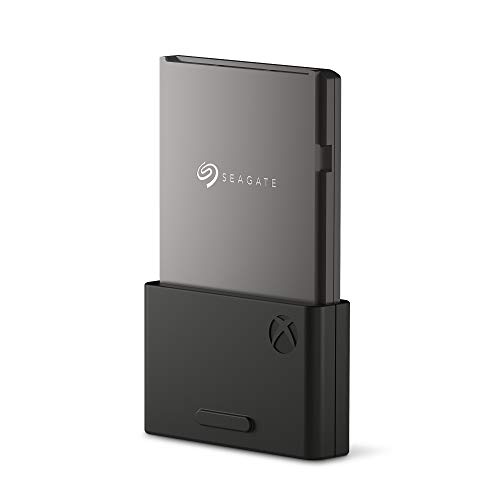
The original and still a fantastic option, the 1TB Seagate Storage Expansion Card offers a perfect balance of increased capacity and cost-effectiveness for many gamers. It delivers the same flawless performance as the console’s internal SSD, meaning you won’t notice any difference whether your game is installed internally or on this card. For those who need a substantial boost without going for the maximum, this 1TB card is an excellent, officially licensed choice that keeps your next-gen games running smoothly.
Key Features:
– Designed in partnership with Xbox to seamlessly play Xbox Series X|S games from the internal SSD or the expansion card without sacrificing graphics, latency, load times or framerates.
– Every game that plays from the Storage Expansion Card for Xbox Series X|S plays at the same peak levels as the console’s internal SSD. That includes thousands of Original Xbox, Xbox 360, and Xbox One games.
– Officially licensed storage expansion card designed using Xbox Velocity Architecture to provide faster load times, richer environments and more immersive game play.
– Quick resume means gamers can switch between multiple titles in seconds — directly from the internal SSD or the expansion card.
– Enjoy long-term peace of mind with the included 3-year limited warranty.
Pros:
– Seamless performance identical to internal SSD
– More affordable entry into official expansion cards
– Easy plug-and-play installation
– Supports all Xbox generations and Quick Resume
Cons:
– Still a premium price for 1TB
– Capacity might still feel limiting for very large libraries
User Impressions: This 1TB card is often lauded as the “sweet spot” for many users, offering a significant storage boost without the higher price tag of the larger capacities. Users appreciate its reliability and the fact that it simply “just works” as advertised.
WD_Black 1TB C50 Storage Expansion Card, Officially Licensed

WD_BLACK, a name synonymous with gaming performance, steps into the Xbox Series X storage arena with their 1TB C50 Expansion Card. This officially licensed card directly competes with Seagate, offering the same Xbox Velocity Architecture integration and delivering identical performance to your console’s internal storage. With its signature slick industrial aesthetic, the WD_BLACK C50 isn’t just about speed; it also looks great plugged into your Xbox. It’s a fantastic alternative for expanding your next-gen game library with confidence.
Key Features:
– The WD_BLACK C50 Storage Expansion Card for Xbox leverages the Xbox Velocity Architecture and delivers the same performance as your Xbox Series X|S internal storage.
– As game file sizes grow, capacities from 512GB to 2TB let you keep more of today’s top titles installed and ready to go. ( 1GB = 1 billion bytes and 1TB = 1 trillion bytes. Actual user capacity may be less depending on operating environment.)
– This officially licensed Xbox storage expansion card is plug-and-play with your Xbox Series X|S, so you don’t have to worry about compatibility or opening your console to install.
– The storage expansion card’s slick, industrial aesthetics deliver the cool factor that WD_BLACK is known for and fit in perfectly with your Xbox console.
– Unlike solutions where you have to transfer Xbox Series X|S games back and forth to the console, the WD_BLACK C50 expansion card lets you keep games ready to play.
Pros:
– Identical performance to Xbox internal SSD
– Sleek, gaming-centric design
– Easy plug-and-play installation
– Officially licensed for full compatibility
Cons:
– Similar premium pricing to Seagate
– Only specific capacities currently available
User Impressions: Reviewers love the WD_BLACK C50 for its consistent performance and easy installation. Many praise its aesthetic and the reliable brand name. It’s seen as a strong competitor to the Seagate card, offering another top-tier choice for seamless Xbox Series X storage expansion.
SABRENT Rocket 4 1TB NVMe SSD PCIe Gen4 M.2 2280

Now, for those specifically searching for the Sabrent best SSD for Xbox Series X, let’s clarify. The Sabrent Rocket 4 is a powerhouse NVMe SSD designed primarily for PCs and PS5, not a direct plug-and-play expansion card for Xbox Series X|S optimized games. However, it’s an incredible drive that, when placed in a high-speed external enclosure (sold separately), can serve as lightning-fast external storage for older generation Xbox games (Xbox One, 360, Original Xbox) and for storing Xbox Series X|S games when not actively playing them (you’d need to transfer them to the internal SSD or an official expansion card to play). Its blazing PCIe Gen4 speeds are truly next-level, making it fantastic for rapid data transfers.
Key Features:
– Blazing Gen4 Speed: Experience PCIe 4.0 NVMe performance with up to 7450MB/s read and 6100MB/s write speeds — optimized for fast boots, smooth gaming, and demanding workloads.
– High IOPS, Efficient Design: Delivers up to 850K/800K random IOPS while maintaining low heat and power draw — built for stable, long-term performance without throttling.
– Broad System Compatibility: Single-sided M.2 2280 form factor ensures wide compatibility across desktops, laptops, and PS5 systems with tight thermal or space constraints.
– Made for Pros and Gamers: Whether you’re creating, streaming, or gaming, the Rocket 4 provides fast, responsive storage ideal for high-performance systems.
– Trusted Sabrent Support: Engineered with premium hardware and supports Windows, macOS, and Linux. Register your drive online for firmware updates and expert technical help.
Pros:
– Phenomenal read/write speeds, excellent for general storage and transfers
– High endurance and reliability from a trusted brand
– Great value for a high-performance Gen4 NVMe drive
– Versatile for PC, PS5, or high-speed external Xbox storage (for older games)
Cons:
– Requires an external enclosure for Xbox use
– Cannot play Xbox Series X|S optimized games directly
– Setup is more involved than official expansion cards
User Impressions: PC and PS5 users rave about the Sabrent Rocket 4’s incredible speed and performance. Those using it for external Xbox storage appreciate its rapid transfer speeds, making moving games back and forth much quicker than with traditional HDDs.
SABRENT 4TB External Aluminum SSD, Rocket Nano V2, USB 3.2 Gen 2×2

The Sabrent Rocket Nano V2 is a beast of an external SSD, perfect for those needing massive, portable, and blisteringly fast storage. This 4TB aluminum wonder connects via USB 3.2 Gen 2×2, offering burst transfers over 1500 MB/s. Like the Rocket 4, it can’t run Xbox Series X|S optimized games directly, but it excels at storing them for quick transfers to your internal SSD. Crucially, it can play all your Xbox One, Xbox 360, and Original Xbox titles directly from the drive with impressive load times. Its rugged aluminum and silicone design also mean your data stays safe and cool. This is truly the Sabrent best SSD for Xbox Series X if you’re looking for an external, portable solution for your older game library and for fast archival.
Key Features:
– Burst transfers over 1500 MB/s with sustained performance capable of smooth 8K video recording. Transfers over USB 3.2 Gen 2×2 interface for maximum speed.
– Constructed of aluminum with an external silicone sleeve for ruggedness in all conditions. The nano V2 looks professional in the field while keeping your data cool and protected.
– Available at up to 4TB to make sure you never run out of space. Simplify your capture experience, even with high bitrate content.
– The nano V2 includes both Type-C to Type-A and Type-C to Type-C cables for flexibility. Compatible with a wide range of devices with USB backward compatibility.
– Please register your nano V2 with the manufacturer to get the most out of your warranty.
Pros:
– Huge 4TB capacity in a portable form factor
– Extremely fast USB 3.2 Gen 2×2 transfer speeds
– Durable, rugged design with excellent heat dissipation
– Plays older Xbox games directly, stores Series X|S games
– Includes both USB-C to USB-A and USB-C to USB-C cables
Cons:
– Cannot run Series X|S optimized games directly
– USB 3.2 Gen 2×2 requires a compatible port for maximum speed (Xbox Series X|S USB ports are slower)
– Pricey for an external drive
User Impressions: Users are incredibly impressed by the Nano V2’s speed and portability. Many highlight its robust build quality and the convenience of having such a large, fast drive for both gaming and general data needs. It’s often recommended for those who want a reliable, high-performance external drive.
Tianken 512GB Storage Expansion Card NVMe Solid State Drive

The Tianken 512GB Storage Expansion Card offers a more budget-friendly entry into the world of official Xbox Series X|S storage expansion. While 512GB might seem small compared to the 4TB beasts, it’s a solid upgrade for those who just need a little extra breathing room for a few more next-gen titles. This card promises seamless gameplay, identical to the internal SSD, ensuring you experience faster load times and immersive gameplay without compromise. Its ultra-slim, all-aluminum design also provides good heat dissipation in a compact package.
Key Features:
– Seamless gameplay: You can play Xbox Series X|S games direct from the storage expansion card without sacrificing graphics, latency, framerates or load times.
– High capacity: High storage expansion card increases the capacity of the Xbox Series X|S Console. You can save the thousands of games of Xbox with excellent performance.
– Ultra Slim Design: Merely 0.3 inch thick. All-Aluminum anti-scratch model delivers remarkable strength and excellent heat dissipation performance.
– Excellent Performance: Multi- Compatibility, Faster load times, Richer environments, and More immersive gameplay. Switch between multiple titles in seconds directly from the internal SSD or the expansion card.
– Plug and Play: The storage expansion card for Xbox Series X|S is ready to use without software installation needed.
Pros:
– More affordable option for official expansion
– Identical performance to internal SSD for all games
– Ultra-slim, durable aluminum design
– Plug-and-play simplicity
Cons:
– Limited 512GB capacity will fill up quickly
– Less established brand compared to Seagate/WD_BLACK
User Impressions: Users looking for a cheaper entry point into Xbox Series X|S expansion appreciate the Tianken card’s performance and ease of use. While the capacity is noted as its main limitation, it’s seen as a viable option for those on a tighter budget who still want the full next-gen experience.
Choosing Your Xbox Series X SSD: Key Considerations
With these options in mind, here’s what to think about when making your choice:
- Official Expansion Card vs. External SSD:
- Official Expansion Cards (Seagate, WD_BLACK, Tianken): These are proprietary cards that plug directly into the Xbox Series X|S expansion slot. They are the only way to play Xbox Series X|S optimized games directly from external storage with zero performance compromise. They’re plug-and-play and act just like your internal drive.
- External SSDs (Sabrent Rocket Nano V2, or an NVMe drive like Sabrent Rocket 4 in an enclosure): These connect via USB. They can store Xbox Series X|S optimized games but cannot play them directly. You’d need to transfer them to your internal drive or an official expansion card. However, they can play older Xbox One, Xbox 360, and Original Xbox games directly, often with improved load times over traditional HDDs. They are typically more versatile and often cheaper per GB.
- Capacity: How many games do you typically keep installed? Are you a digital hoarder or do you manage your library strictly? 1TB is a good starting point, but 2TB or 4TB will give you much more freedom.
- Speed: For Series X|S optimized games, you must have an official expansion card. For older games or storing next-gen titles, a fast external SSD (like the Sabrent options) will still give you excellent performance and quick transfer times.
- Budget: Official expansion cards are a premium investment due to their proprietary nature. External SSDs can offer more bang for your buck, especially if you prioritize older game storage or simply need quick archival space.
- Ease of Use: Official expansion cards are truly plug-and-play. Setting up an external NVMe drive requires an enclosure and formatting, but external portable SSDs are generally plug-and-play once formatted by the Xbox.
FAQ: Your Xbox Series X SSD Questions Answered
Q1: Can I use any external SSD with my Xbox Series X to play optimized games?
A: No. You can store Xbox Series X|S optimized games on any external SSD (or HDD), but to play them, they must be transferred to the console’s internal SSD or an officially licensed Storage Expansion Card. External SSDs can play older Xbox One, Xbox 360, and Original Xbox games directly.
Q2: Why are the official Xbox Series X expansion cards so expensive?
A: The official expansion cards (like those from Seagate and WD_BLACK) are proprietary and specifically designed to mimic the Xbox Velocity Architecture, which is crucial for running Series X|S optimized games without performance loss. This advanced technology and licensing contribute to their higher price compared to standard external SSDs.
Q3: What’s the difference between the Sabrent Rocket 4 and the Rocket Nano V2 for Xbox?
A: The Sabrent Rocket 4 is an internal NVMe SSD (M.2 2280 form factor) primarily for PCs and PS5. To use it with Xbox, you’d need an external enclosure. The Sabrent Rocket Nano V2 is a pre-built, portable external SSD. Both can serve as fast external storage for Xbox (playing older games directly, storing Series X|S games for transfer), but neither can play Series X|S optimized games directly.
Q4: How do I install a storage expansion card on my Xbox Series X?
A: It’s incredibly simple! Just locate the expansion slot at the back of your Xbox Series X (it’s a rectangular slot next to the HDMI port), and firmly push the expansion card in until it clicks. Your Xbox will automatically detect and format it.
Q5: Can I use an unofficial external NVMe SSD in an enclosure to play Xbox Series X|S games?
A: No, not for Series X|S optimized games. Even if you use a super-fast NVMe SSD in an enclosure, the USB interface of the Xbox Series X is not fast enough to meet the requirements of the Xbox Velocity Architecture. Therefore, optimized games must still be played from the internal drive or an official expansion card.
Q6: What’s the best capacity for an Xbox Series X SSD?
A: This depends on your gaming habits.
* 512GB-1TB: Good for a few extra AAA games or if you manage your library frequently.
* 2TB: A great balance for most gamers, offering plenty of room for a diverse library.
* 4TB: Ideal for hardcore collectors, those with slow internet, or anyone who never wants to delete a game.
Q7: Will an external SSD improve my load times for Xbox One games on my Series X?
A: Yes! While external SSDs can’t run Series X|S optimized games, they absolutely can improve load times for backward-compatible Xbox One, Xbox 360, and Original Xbox games when played directly from the external SSD compared to a traditional external HDD.
Conclusion
Expanding your Xbox Series X storage isn’t just about making more room; it’s about enhancing your entire gaming experience. Whether you opt for the seamless, official Seagate or WD_BLACK expansion cards for uninterrupted next-gen gaming, or leverage the incredible speed and capacity of a Sabrent best SSD for Xbox Series X as an external storage powerhouse for older titles and rapid transfers, you’re making a smart move.
Don’t let storage limitations hold back your gaming adventures. Pick the SSD that fits your needs and get back to what matters most: playing more games!