
Love your ASUS ROG Ally but finding yourself constantly running out of space for those massive game files? Or perhaps you’re wishing your favorite titles loaded a little faster? You’re not alone! While the ROG Ally is an incredible handheld gaming PC, its stock storage often feels a bit cramped for today’s ever-growing game libraries. The good news? Upgrading your SSD is one of the best ROG Ally storage upgrades you can make, and it’s simpler than you might think!
The ROG Ally uses an M.2 2230 NVMe SSD, which is a specific, compact form factor. While some adventurous folks opt for 2280 SSDs with adapter boards and internal modifications (which we’ll touch on), this guide focuses primarily on direct-fit 2230 drives that make the upgrade process much smoother.
We’ve scoured the market to bring you a list of the best SSDs for ROG Ally, considering speed, capacity, and overall value. Get ready to supercharge your handheld and jump into your games without the agonizing wait!
Our Top Picks: Best SSDs for ROG Ally
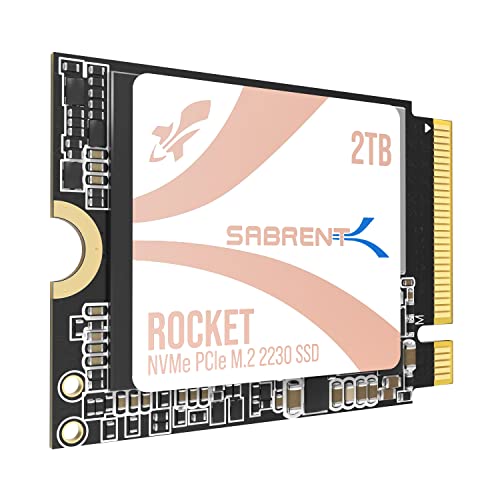
SABRENT Rocket Q4 2230 NVMe SSD 2TB

Known for high-quality components and reliable performance, Sabrent delivers a solid performer that’s perfect for your ROG Ally. This 2TB drive is a fantastic choice if you’re looking for ample storage without sacrificing speed, especially for those who want a true plug-and-play M.2 2230 experience. It’s built for demanding tasks, like loading large game worlds in a flash, ensuring you spend less time waiting and more time gaming.
-
Key Features:
- Designed for Tight Spaces: Fits Steam Deck, ASUS ROG Ally, Surface Pro, and other space-constrained devices with true M.2 2230 form factor.
- Powerful Performance: Achieve up to 5GB/s read and 800K IOPS with a Gen4 PCIe interface and Phison E21T controller—designed for smooth gaming and rapid file access.
- Massive 2TB Capacity: Eliminate the need for microSD cards or external drives. Store your full game library and files internally with high-speed QLC flash.
- Efficient and Reliable: DRAM-less with Host Memory Buffer (HMB) support for low power draw, responsive performance, and excellent thermal behavior.
- Retail Quality You Can Trust: New, fully supported SSD with downloadable Sabrent Acronis cloning software.
-
Pros:
- True 2230 form factor for direct fit.
- Excellent PCIe Gen4 speeds for quick loads.
- Generous 2TB capacity.
- Good thermal management.
- Includes cloning software for easy migration.
-
Cons:
- Can be a bit pricier than some budget QLC alternatives.
-
User Impressions: Users consistently praise its seamless installation in handhelds and the noticeable improvement in game load times. Many appreciate the inclusion of cloning software, making the upgrade process smoother and less of a headache.
WD_BLACK 4TB SN7100 NVMe Internal Gaming SSD Solid State Drive

Looking to push the limits of your ROG Ally’s storage capacity? The WD_BLACK SN7100 offers a massive 4TB, but there’s a catch: this isn’t a direct fit. It’s a 2280 form factor SSD, meaning you’ll need a 2230 to 2280 adapter board and a bit of DIY spirit to install it. If you’re comfortable with a slight modification to your Ally, this drive provides unparalleled storage for your entire game library with blazing-fast Gen4 speeds. It’s an advanced upgrade for those who truly need all the space they can get.
-
Key Features:
- Experience speeds up to 7,250MB/s read and 6,900MB/s write (1-2TB models), with up to 35% faster performance than previous drives.
- Designed for serious gamers, with a PCIe Gen4 interface and latest TLC 3D NAND.
- Available in capacities up to 4TB, giving you tons of storage.
- Built with laptops and handheld gaming devices in mind, with up to 100% more power efficiency over the previous generation.
- Up to 2,400TBW endurance for all your content.
-
Pros:
- Massive 4TB capacity (one of the largest available for handhelds via mod).
- Extremely fast PCIe Gen4 performance.
- High endurance rating (TBW) for longevity.
- Power efficient, good for battery considerations.
-
Cons:
- Requires a 2230 to 2280 adapter board and internal modification of the ROG Ally.
- Not a plug-and-play solution.
-
User Impressions: Enthusiasts rave about the sheer storage capacity and the performance bump after the successful (though slightly complex) installation. It’s often chosen by users who want the absolute maximum internal storage possible for their handheld gaming endeavors.
Addlink New S91 2TB 2230 NVMe High Performance PCIe SSD

The Addlink New S91 is a solid contender for anyone seeking a high-performance ROG Ally storage upgrade without breaking the bank. This 2TB drive offers impressive Gen4 speeds in the compact 2230 form factor, making it an excellent direct-fit option. It’s designed specifically with devices like the Steam Deck and ROG Ally in mind, ensuring seamless compatibility and robust performance for all your gaming needs, from fast loading screens to smooth file transfers.
-
Key Features:
- Interface/Form Factor: PCIe Gen4x4. Backwards compatible with Gen3x4 Interface. 3D NAND SLC Cache support (HMB) host memory buffer/M.2 2230.
- Speed: Read/Write up to 5000/3200MB/s. Designed for Steam gamers, Laptop/Tablet users.
- Compatibility: Designed for M.2 2230 form factor space, including Valve Steam Deck, ROG Ally, and popular Intel & AMD laptop/tablet platforms.
- Features: Supports SLC Caching & (HMB) host memory buffer, SMART, TRIM, Thermal Throttling, SmartECC.
- Warranty: Backed by a 5-year limited warranty.
-
Pros:
- Direct fit 2230 form factor.
- Good PCIe Gen4 read speeds.
- Generous 2TB capacity.
- 5-year warranty provides peace of mind.
-
Cons:
- Write speeds are a bit lower than some premium Gen4 SSDs.
-
User Impressions: Users find the Addlink S91 to be a reliable and cost-effective upgrade. It consistently delivers on its promises for faster game loading and a smooth overall experience in handheld devices, proving to be a fan favorite for its straightforward performance.
Crucial P310 2TB PCIe Gen4 2230 NVMe M.2 SSD

Crucial, a trusted name in memory and storage, brings the P310 2TB SSD, another excellent option for those wanting a straightforward ROG Ally SSD replacement. Its advertised Gen4 speeds promise to dramatically cut down on game load times, letting you jump into action faster. Being a 2230 form factor, it’s designed for easy installation into your handheld without any fuss, making it a highly convenient upgrade. Plus, its power efficiency helps preserve your Ally’s precious battery life on the go.
-
Key Features:
- EXTREME PERFORMANCE: Discover top-tier Gen4 performance that’s 40% faster than other Gen4 SSDs at up to 7,100MB/s for all your favorite games.
- BIGGER GAMING LIBRARY: Get up to 2TB of digital space for your gaming handheld console or laptop.
- EASY INSTALL STORAGE: Easily upgrade overall performance with this compact storage solution.
- POWER EFFICIENCY: Limit battery loss while you’re on the go.
- COMPATIBLE: Install into certain handheld gaming consoles like the Valve Steam Deck and ASUS ROG Ally and certain laptops.
-
Pros:
- Claims very high PCIe Gen4 read speeds (7,100MB/s).
- Direct fit 2230 form factor.
- Good 2TB capacity for a robust game library.
- Power efficient, great for extending gaming sessions.
-
Cons:
- Crucial’s P310 line is typically Gen3; users should verify Gen4 performance from independent reviews for this specific model.
-
User Impressions: Users appreciate the recognized brand name and the promise of high performance. It’s often picked for its ease of installation and the immediate performance benefits it brings to handheld gaming, making long load screens a thing of the past.
WD_BLACK 1TB SN770M M.2 2230 NVMe SSD for Handheld Gaming

For gamers who trust a big name in storage, the WD_BLACK SN770M is specifically designed as a gaming SSD for ROG Ally and other handhelds. This 1TB model is a perfect fit for the 2230 slot and delivers impressive Gen4 speeds, making your games load faster and run smoother. It’s a dedicated solution, built with the needs of portable gaming in mind, ensuring reliable performance and compatibility right out of the box.
-
Key Features:
- Introducing the WD_BLACK SN770M SSD, the first M.2 2230 NVMe SSD built from a brand gamers trust.
- Supercharge compatible handheld devices such as the ASUS ROG Ally and Valve Steam Deck with speeds up to 5,150 MB/s (1TB and 2TB models) for blazingly quick game installations and level loads.
- Play more games, larger games wherever you are with up to 2TB of trusted Western Digital TLC 3D NAND storage.
- Revitalize and expand the storage of your M.2 2230 SSD compatible laptop.
- Backed by Western Digital’s 5-year limited warranty, keep your drive tuned with the Western Digital Dashboard software.
-
Pros:
- Specifically marketed and optimized for handheld gaming devices like the ROG Ally.
- Reliable Western Digital brand.
- Good PCIe Gen4 speeds (up to 5,150 MB/s).
- Direct fit 2230 form factor.
- Comes with a 5-year warranty.
-
Cons:
- 1TB might still be limiting for some users with very large game libraries, especially compared to 2TB options.
-
User Impressions: Users consistently report excellent compatibility and noticeable speed improvements in their ROG Ally and Steam Deck devices. The brand trust and straightforward installation are major selling points, making it a popular choice for a reliable upgrade.
fanxiang 1TB M.2 2230 NVMe SSD, PCIe Gen 4×4 Speed

The fanxiang S630 offers a budget-friendly yet capable option for your ROG Ally SSD upgrade. This 1TB drive boasts solid PCIe Gen 4 speeds, which is more than enough to handle most modern games and drastically reduce load times. Its compact 2230 form factor is perfect for the Ally, and the inclusion of a graphene heat dissipation sticker is a nice touch, helping keep temperatures in check during intense gaming sessions and ensuring stable performance.
-
Key Features:
- Blazing-Fast Performance: Experience ultra-fast read speeds up to 5000 MB/s and write speeds up to 3600MB/s with the fanxiang S630 PCIe 4.0 1TB NVMe SSD.
- Compact M.2 2230 Form Factor: Designed for space-constrained devices, fits perfectly in Steam Deck, Microsoft Surface, laptops, ultrabooks, and mini PCs.
- Advanced Thermal Management: Features a graphene heat dissipation sticker on its surface, acting as an ultra-thin heat sink.
- Premium Flash Technology: Equipped with high-quality 3D NAND Flash chips and a robust controller for higher reliability and durability.
- 5 Years of Reliable After-Sales Support: Backed by a 5-year quality service or 320TBW.
-
Pros:
- Direct fit 2230 form factor.
- Solid PCIe Gen4 speeds.
- Includes a graphene heat dissipation sticker for better thermals.
- 5-year warranty and good TBW.
- Often a more budget-friendly option.
-
Cons:
- Only 1TB capacity available in this listing.
- Brand recognition might be lower for some users compared to established names.
-
User Impressions: Users generally find this SSD to be a great value, delivering performance comparable to more expensive options for everyday gaming. The included heat sticker is a bonus often mentioned positively, highlighting thoughtful design.
What to Consider When Choosing Your ROG Ally SSD
Upgrading your ROG Ally’s SSD is a big step, and picking the right one means considering a few key factors:
- Form Factor (2230 vs. 2280 + Adapter): The ROG Ally natively uses a 2230 M.2 NVMe SSD. These are direct, plug-and-play replacements. While 2280 SSDs offer higher capacities (like the 4TB WD_BLACK SN7100 mentioned above), they require a specific adapter board and involve more complex internal modifications. If you’re not comfortable with advanced DIY, stick to 2230.
- Capacity: How much space do you truly need? 512GB (stock) fills up fast. 1TB is a good starting point for most gamers, but 2TB offers much more breathing room for a growing game library. 4TB+ options are available with the 2280 adapter mod.
- Speed (PCIe Gen3 vs. Gen4): The ROG Ally supports PCIe Gen4, so opting for a Gen4 SSD will give you the fastest load times and overall system responsiveness. While Gen3 drives work, you won’t be maximizing your Ally’s potential.
- Brand Reputation & Warranty: Sticking with reputable brands often means better reliability, customer support, and clearer warranty policies. A 5-year warranty is a common and reassuring standard for SSDs.
- Price: Balance performance and capacity with your budget. You don’t always need the absolute fastest or largest drive, but investing in a good quality SSD is worth it for the improved experience.
- Installation Difficulty: Be aware that opening the Ally and replacing the SSD requires some technical comfort. Gather the right tools (small screwdrivers, pry tool) and watch a few video guides before you start.
FAQ: Your ROG Ally SSD Questions Answered
Q1: What SSD form factor does the ROG Ally use?
A: The ASUS ROG Ally natively uses an M.2 2230 NVMe SSD. This is a small, compact size essential for fitting inside the handheld.
Q2: Can I use a 2280 SSD in my ROG Ally?
A: Yes, but it’s not a direct fit. Using a 2280 SSD requires a 2230 to 2280 adapter board and internal modification, which can be a bit tricky and might technically void your warranty. It’s an option for maximizing storage, but proceed with caution and only if you’re comfortable with advanced DIY.
Q3: How hard is it to replace the SSD in the ROG Ally?
A: It’s a moderately difficult process. You’ll need specific tools (like a small Philips screwdriver and a plastic pry tool) and some patience. There are many excellent video guides available online that can walk you through it step-by-step.
Q4: Do I need to reinstall Windows after upgrading my SSD?
A: Not necessarily. You can use disk cloning software (often provided by SSD manufacturers, or free third-party options) to transfer your existing Windows installation, games, and files directly to the new, larger SSD. This saves a lot of time and effort.
Q5: Will upgrading my SSD void my ROG Ally’s warranty?
A: Opening the device might technically void the warranty, depending on how ASUS interprets it. However, many users have successfully upgraded their SSDs without issues. It’s always best to check ASUS’s official stance or proceed knowing there’s a slight risk.
Q6: Does a faster SSD improve gaming performance (FPS)?
A: While a faster SSD won’t directly increase your frames per second (FPS), it will significantly reduce game load times, application launch times, and overall system responsiveness. It makes for a much smoother and more enjoyable gaming experience, cutting down on waiting and getting you into the action quicker.
Q7: What’s the difference between PCIe Gen3 and Gen4 SSDs?
A: PCIe Gen4 SSDs offer significantly faster read and write speeds compared to Gen3. The ROG Ally supports PCIe Gen4, so choosing a Gen4 SSD will give you the best performance for faster ROG Ally game loading and file transfers, maximizing your handheld’s capabilities.
Conclusion: Upgrade Your Ally, Elevate Your Gaming
Upgrading the SSD in your ROG Ally is hands down one of the most impactful improvements you can make. Whether you’re looking for more space to store your ever-growing game library or want to slash those annoying load times, the best SSD for ROG Ally for you depends on your specific needs and comfort with DIY.
We hope this guide has helped you narrow down your choices and feel more confident about making the leap. Say goodbye to storage anxiety and hello to a smoother, faster, and more enjoyable handheld gaming experience!
Ready to level up your Ally?
Shop SSDs for your ROG Ally on Amazon here