
Is your gaming PC feeling a bit sluggish? Are those loading screens taking forever, pulling you out of the action? If so, it might be time for a serious upgrade that offers a real “aha!” moment: a Solid State Drive (SSD). Specifically, investing in the best SSD for gaming PC can revolutionize your experience, turning frustrating waits into lightning-fast launches and seamless gameplay.
Gone are the days when traditional Hard Disk Drives (HDDs) ruled supreme. For gamers, an SSD isn’t just a nice-to-have; it’s practically a necessity. These flash-based storage devices offer dramatically faster read and write speeds, which translates directly into quicker game loads, smoother texture streaming, and overall snappier system responsiveness. But with so many options out there – NVMe, SATA, PCIe Gen4, Gen5 – choosing the right one can feel like a boss battle itself.
Don’t sweat it! We’ve done the legwork to bring you a curated list of the top contenders for the best SSD for gaming PC right now. Whether you’re building a new rig or upgrading an existing one, we’ve got you covered.
Why an SSD is Crucial for Gaming
Imagine firing up your favorite AAA title and being in the game before you can even grab a sip of your drink. That’s the power of an SSD. Here’s why they’re non-negotiable for serious gamers:
- Blazing Fast Load Times: This is the big one. Games install faster, load levels quicker, and texture pop-in becomes a thing of the past.
- Improved System Responsiveness: Beyond games, your entire operating system will feel snappier. Boot-up times shrink, and applications open instantly.
- Smoother Gameplay: While not directly affecting frame rates, faster data streaming from an SSD can reduce stuttering in open-world games and large environments.
- Durability: With no moving parts, SSDs are more resistant to drops and shocks than traditional HDDs.
- Energy Efficiency & Quiet Operation: They consume less power and run silently, a bonus for any PC build.
Ready to dive into our top picks? Let’s go!
Our Top Picks for the Best SSD for Gaming PC
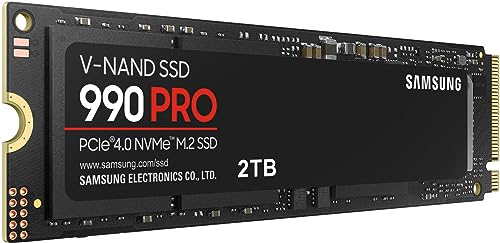
Samsung 990 PRO SSD NVMe M.2 PCIe Gen4

If you’re looking to hit near-maximum performance on the PCIe Gen4 interface, the Samsung 990 PRO is a formidable contender. This drive is designed for hardcore gamers and tech enthusiasts who demand the absolute best in speed and efficiency. It significantly improves random performance over its predecessor, the 980 PRO, making it ideal for heavy computing tasks, complex game worlds, and rapid loading. With Samsung’s reputation for quality and innovation, the 990 PRO stands out as a true “cheat code” for speed.
-
Key Features:
- PCIe 4.0 interface for lightning-fast speeds.
- Read/write speeds up to 7450/6900 MB/s.
- Over 55% improvement in random performance compared to 980 PRO.
- Excellent power efficiency with up to 50% improved performance per watt.
- Available in capacities from 1TB to 4TB.
-
Pros:
- Exceptional sequential and random performance.
- Highly power-efficient for sustained performance.
- Reliable Samsung flash memory and components.
- Ideal for demanding games and creative applications.
-
Cons:
- Premium price point.
- Requires a PCIe 4.0 compatible motherboard to maximize speeds.
-
User Impressions: Users consistently praise the Samsung 990 PRO for its blazing-fast speeds and rock-solid reliability, noting a dramatic improvement in game load times and overall system responsiveness. Many consider it a worthwhile investment for high-end gaming rigs.
- Call to Action: See it on Amazon here
Samsung 870 EVO SATA III SSD 1TB 2.5” Internal Solid

Not everyone needs the bleeding edge of NVMe, and for those rocking slightly older systems or looking for a fantastic value, the Samsung 870 EVO is an absolute SSD all-star. This 2.5-inch SATA drive maximizes the SATA III interface, delivering excellent performance, industry-defining reliability, and unmatched compatibility. It’s a perfect upgrade for laptops or desktops that don’t have M.2 slots, offering a massive leap in speed over traditional hard drives without breaking the bank. The included Samsung Magician software makes management a breeze.
-
Key Features:
- Maximizes SATA III interface with 560/530 MB/s sequential speeds.
- Designed for heavy workloads in PCs, workstations, and NAS.
- Industry-defining reliability with up to 600 TBW under a 5-year warranty.
- Extensive compatibility with major host systems and applications.
- Easy 2.5-inch SATA form factor installation.
- Samsung Magician software for drive management.
-
Pros:
- Excellent performance for a SATA SSD.
- Outstanding reliability and endurance.
- Highly compatible with a wide range of systems.
- More affordable than NVMe alternatives.
- Simple upgrade process.
-
Cons:
- Limited by the SATA III interface, much slower than NVMe drives.
- Doesn’t offer the same raw speed for competitive gaming as NVMe.
-
User Impressions: Customers frequently highlight the 870 EVO’s seamless installation, immediate performance boost over HDDs, and remarkable reliability. It’s often recommended as the go-to choice for budget-conscious upgrades or systems without NVMe slots.
- Call to Action: See it on Amazon here
WD_BLACK 2TB SN850X NVMe Internal Gaming SSD Solid State

The WD_BLACK SN850X is built from the ground up for gamers, promising to transform your PC with top-tier performance and ridiculously short load times. This NVMe Gen4 drive boasts insane speeds, generous capacities, and an optional heatsink for those intense gaming marathons. With Western Digital’s TLC 3D NAND and features like Predictive Loading and Game Mode 2.0, the SN850X is geared to give you every edge in competitive play while keeping your drive cool and performing optimally.
-
Key Features:
- PCIe Gen4 interface with speeds up to 7,300 MB/s.
- Capacities up to 8TB for massive game libraries.
- Optional heatsink version for sustained peak performance.
- WD_BLACK Dashboard software for monitoring and RGB customization (heatsink versions).
- Advanced features like Predictive Loading and Adaptive Thermal Management.
-
Pros:
- Extremely fast, competitive with the best Gen4 drives.
- Large capacity options mean more games.
- Heatsink option is great for preventing thermal throttling.
- Gaming-centric features in the dashboard.
- Excellent choice for a primary game drive.
-
Cons:
- Heatsink version might not fit all laptop or compact PC builds.
- Premium pricing, especially for higher capacities.
-
User Impressions: Gamers rave about the SN850X’s lightning-fast boot-ups and virtually non-existent loading screens. The optional heatsink is a much-appreciated feature for those pushing their systems hard, ensuring consistent performance.
- Call to Action: See it on Amazon here
WD_BLACK 1TB SN7100 NVMe Internal Gaming SSD Solid State

The WD_BLACK SN7100 is another fantastic NVMe Gen4 option from Western Digital, designed with serious gamers and content creators in mind. While it might not hit the absolute peak speeds of some top-tier drives, it offers an excellent balance of speed, efficiency, and endurance. Crucially, its power efficiency makes it a superb choice for laptops and handheld gaming devices, where every watt counts. If you need a reliable and fast upgrade that won’t drain your battery or generate excessive heat, the SN7100 is a smart move.
-
Key Features:
- PCIe Gen4 interface with speeds up to 7,250MB/s read and 6,900MB/s write (1-2TB models).
- Up to 35% faster performance than previous drives.
- Available in capacities up to 4TB.
- Up to 100% more power efficient than the previous generation.
- High endurance of up to 2,400TBW (4TB model).
-
Pros:
- Excellent performance for a Gen4 drive.
- Highly power-efficient, great for laptops and portable devices.
- Strong endurance rating for long-term use.
- Solid value for its performance tier.
-
Cons:
- Doesn’t include a heatsink (might need to purchase separately for desktops).
- Peak speeds are slightly lower than flagship Gen4 drives.
-
User Impressions: Users appreciate the SN7100 for its consistent performance, especially in mobile gaming setups. Its power efficiency is a frequently cited benefit, ensuring cooler and longer-lasting operation in laptops and handhelds.
- Call to Action: See it on Amazon here
Samsung SSD 9100 PRO 2TB, PCIe 5.0×4 M.2 2280

Prepare for the future of gaming with the Samsung SSD 9100 PRO, a groundbreaking PCIe 5.0 drive that pushes the boundaries of speed. Boasting sequential read/write speeds that are double that of even the high-performing 990 PRO, this SSD is for those who want to be at the absolute bleeding edge of technology. Whether you’re a professional content creator, an AI enthusiast, or a gamer demanding instantaneous loads and virtually no lag, the 9100 PRO delivers an unparalleled experience. It’s designed to stay cool under pressure, ensuring consistent, turbo-charged performance.
-
Key Features:
- Breakthrough PCIe 5.0 interface, twice as fast as PCIe 4.0 SSDs.
- Sequential read/write speeds up to 14,800/13,400 MB/s.
- Random read/write speeds up to 2,200K/2,600K IOPS.
- Up to 49% improved power efficiency over the 990 PRO.
- Advanced thermal control keeps performance smooth.
- Available up to 8TB for massive storage.
- Compatible with Magician Software for management.
-
Pros:
- Unmatched speed for gaming, AI, and content creation.
- Future-proof technology for next-gen motherboards.
- Massive capacities available.
- Excellent power efficiency for a high-performance drive.
- Superior thermal management.
-
Cons:
- Requires a PCIe 5.0 compatible motherboard and CPU (newer generation hardware).
- Significantly more expensive than Gen4 alternatives.
- Current real-world gaming benefits over Gen4 might be marginal for most titles.
-
User Impressions: Early adopters are astonished by the 9100 PRO’s incredible speeds, reporting near-instantaneous game loads and system responsiveness. Its future-proof nature and efficiency are major selling points for those building high-end systems.
- Call to Action: See it on Amazon here
TEAMGROUP T-FORCE VULCAN Z 1TB SLC Cache 3D NAND TLC

If you’re on a budget but still want to significantly upgrade from a traditional HDD, the TEAMGROUP T-FORCE VULCAN Z is a solid, reliable choice. This SSD leverages SLC Cache and 3D NAND TLC technology to provide enhanced performance for seamless cutscenes and overall smoother operations. It’s built to be shock-resistant, vibration-resistant, and reduces noise interference, making it a robust and quiet addition to any gaming PC. While it won’t break speed records like an NVMe, it offers a dramatic improvement over spinning disks and serves as an excellent value-oriented option for a primary or secondary drive.
-
Key Features:
- Utilizes SLC Cache and 3D NAND TLC for enhanced performance.
- Designed for seamless cutscenes and improved responsiveness.
- Highly durable: shock-resistant and vibration-resistant.
- Reduced noise interference for quieter operation.
-
Pros:
- Excellent value for money.
- Significantly faster than traditional HDDs.
- Durable and quiet operation.
- Good choice for secondary storage or budget builds.
-
Cons:
- Likely a SATA III interface, meaning much slower than NVMe SSDs.
- Specific speed ratings are not prominently featured, suggesting it’s not a performance leader.
- May not be the best choice for competitive gamers seeking minimal load times.
-
User Impressions: Users generally find the TEAMGROUP T-FORCE VULCAN Z to be a reliable and affordable SSD that delivers a noticeable performance boost over HDDs. It’s often praised as a cost-effective solution for everyday computing and game storage.
- Call to Action: See it on Amazon here
Samsung T7 Portable SSD, 1TB External Solid State Drive

While most of our picks focus on internal drives, sometimes you need the flexibility of an external SSD, and the Samsung T7 Portable SSD fits that bill perfectly. This sleek, compact drive is made for creators, explorers, and gamers who need fast, reliable storage on the go or for console gaming. With speeds almost twice as fast as its predecessor, the T5, it’s perfect for quickly moving large game files, backing up your game library, or even recording high-resolution video directly from your camera or mobile device (including iPhone 15 Pro Res 4K video). Its durable, shock-resistant design means it can handle a bit of adventure.
-
Key Features:
- PCIe NVMe technology for fast read/write speeds up to 1,050/1,000 MB/s.
- Compact, portable design with capacities up to 4TB.
- Extensive compatibility with PCs, mobile phones, and consoles.
- Supports high-resolution video recording (e.g., iPhone 15 Pro Res 4K at 60fps).
- Durable aluminum unibody construction with shock resistance up to 6 feet.
-
Pros:
- Extremely portable and durable.
- Fast transfer speeds for an external drive.
- Versatile for multiple devices (PC, Mac, Android, Consoles).
- Great for expanding console storage or transferring large game files.
- Ideal for creators needing fast external storage for media.
-
Cons:
- Not an internal solution for primary PC game storage or boot drive.
- Performance limited by USB interface, not as fast as internal NVMe SSDs.
- More expensive per GB than internal SATA drives.
-
User Impressions: Customers love the T7 for its incredible portability, robust build quality, and impressive speeds for an external drive. It’s frequently recommended for console gamers looking to expand their game library or PC users needing a fast, versatile external backup solution.
- Call to Action: See it on Amazon here
How to Choose the Right SSD for Your Gaming PC
Picking the best SSD for gaming PC isn’t just about grabbing the fastest one. Here are a few things to consider:
-
Form Factor (M.2 vs. 2.5-inch SATA):
- M.2 NVMe: These look like small sticks of gum and plug directly into your motherboard. They’re typically the fastest, using the PCIe interface. If your motherboard has M.2 slots, this is usually the way to go for your primary drive.
- 2.5-inch SATA: These look like traditional laptop hard drives and connect via SATA cables. They’re slower than NVMe but still much faster than HDDs and are highly compatible with older systems or as secondary storage.
-
Interface (PCIe Gen3, Gen4, Gen5 vs. SATA III):
- PCIe Gen4: The current sweet spot for performance and value. Offers incredible speeds that are more than enough for modern gaming.
- PCIe Gen5: The latest and greatest, offering double the speeds of Gen4. However, it requires a very new motherboard and CPU, and the real-world gaming benefits over Gen4 are currently marginal for most titles. It’s more about future-proofing.
- SATA III: The slowest of the SSD interfaces, but still a massive upgrade from an HDD. Good for older systems or budget builds.
-
Capacity:
- 500GB: Bare minimum for a gaming PC, might only hold a few modern AAA titles.
- 1TB: A good starting point for your main drive, allowing for your OS and several large games.
- 2TB+: Ideal for gamers with large game libraries or those who want to store a ton of games without constantly uninstalling.
-
With or Without Heatsink?
- High-performance NVMe SSDs can get hot under heavy loads, leading to “thermal throttling” (slower speeds). A heatsink helps dissipate heat.
- If your motherboard has built-in M.2 heatsinks, you might not need an SSD with one pre-attached.
- If you don’t have a motherboard heatsink and are buying a high-speed NVMe drive, consider one with a heatsink or buy a third-party one.
Frequently Asked Questions (FAQs)
Q1: What’s the main difference between NVMe and SATA SSDs for gaming?
A1: The main difference lies in their speed and interface. NVMe (Non-Volatile Memory Express) SSDs connect directly to your motherboard via a PCIe slot (usually M.2 form factor) and offer significantly faster read/write speeds (thousands of MB/s) compared to SATA SSDs, which connect via a SATA port and cable (maxing out around 550 MB/s). For gaming, NVMe drives dramatically reduce loading times and improve overall system responsiveness, especially in games that stream large assets.
Q2: Do I really need an SSD for gaming? Can’t I just use my old HDD?
A2: While you can technically game on an HDD, it’s highly recommended to use an SSD. The difference in load times alone is transformative. Games will install, launch, and load levels much faster on an SSD. Many modern games are also designed with SSD speeds in mind, and using an HDD can result in noticeable stuttering or texture pop-in due to slower data retrieval. It’s one of the most impactful upgrades for a gaming PC.
Q3: What is PCIe Gen4/Gen5, and do I need it for gaming?
A3: PCIe (Peripheral Component Interconnect Express) refers to the interface standard for connecting high-speed components like SSDs. Gen4 offers double the bandwidth of Gen3, and Gen5 doubles Gen4’s bandwidth again. For gaming, a Gen4 SSD is currently the sweet spot, providing more than enough speed for virtually all games. Gen5 SSDs are cutting-edge and require very new motherboards/CPUs. While incredibly fast, the real-world gaming benefits over Gen4 for most titles are minimal right now, making them more of a future-proofing investment for enthusiasts or professionals working with extremely large files.
Q4: How much storage capacity do I need for my gaming SSD?
A4: For a primary gaming SSD, 1TB is a good starting point for most users, allowing space for your operating system and several large AAA titles. If you have a vast game library or play many modern, storage-heavy games (which often exceed 100GB each), 2TB or even 4TB would be a more comfortable choice to avoid constantly uninstalling and reinstalling games.
Q5: Can I use an external SSD for gaming?
A5: Yes, you can! External SSDs like the Samsung T7 are excellent for storing and playing games, especially for console gamers (Xbox Series X/S, PS5) or PC users who want to easily transfer games between systems. While they offer much better performance than external HDDs, their speeds are limited by the USB interface and won’t match the raw speed of internal NVMe SSDs directly connected to your motherboard. They’re best for expanding storage or portable game libraries, not typically as your primary boot drive for a desktop PC.
Q6: Is a heatsink necessary for my NVMe SSD?
A6: For high-performance NVMe SSDs (especially Gen4 and Gen5 drives), a heatsink is highly recommended, particularly if your system’s airflow isn’t optimal or if you’re engaging in prolonged, intensive workloads like large file transfers or heavy gaming. NVMe drives can get hot, and excessive heat can lead to “thermal throttling,” where the drive intentionally slows down to prevent damage. Many motherboards now come with integrated M.2 heatsinks, which are usually sufficient. If yours doesn’t, consider an SSD with a pre-attached heatsink or buying an aftermarket one.
Q7: How do I install an internal M.2 NVMe SSD in my gaming PC?
A7: Installing an M.2 NVMe SSD is generally straightforward. First, power off your PC and unplug it. Open your PC case and locate an empty M.2 slot on your motherboard (check your motherboard manual if unsure). Remove the small screw or standoff for the M.2 slot. Gently insert the M.2 SSD into the slot at an angle until it clicks into place. Then, push the drive down and secure it with the screw/standoff. Close your PC case, plug it back in, and power it on. You may need to initialize and format the drive in Windows Disk Management before use.
Upgrading to the best SSD for gaming PC is one of the smartest moves you can make to enhance your gaming experience. Whether you opt for the lightning-fast Gen5 speeds of the Samsung 9100 PRO, the balanced performance of a WD_BLACK Gen4 drive, or the reliable value of a Samsung 870 EVO, you’re in for a treat. Say goodbye to those agonizing load screens and hello to instant action!