
Ever found your Network Attached Storage (NAS) system feeling a little sluggish? Maybe file transfers aren’t as zippy as you’d like, or your virtual machines are lagging? If you’re looking to supercharge your storage solution, upgrading to the best SSD drives for NAS can make a world of difference. Traditional hard disk drives (HDDs) are great for bulk storage, but solid-state drives (SSDs) offer unparalleled speed, responsiveness, and durability, making them perfect for caching, frequently accessed files, or even an all-flash NAS setup.
In this guide, we’ll dive into the top 7 SSDs specifically designed or highly recommended for NAS environments. We’ll explore their unique strengths, helping you pick the perfect drive to enhance your home or business storage experience. Get ready to say goodbye to slow loading times and hello to blazing-fast data access!
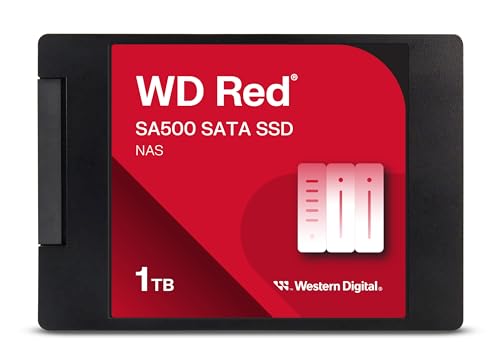
1. Western Digital 1TB WD Red SA500 NAS 3D NAND Internal SSD

The WD Red SA500 is Western Digital’s dedicated SATA SSD line built from the ground up for NAS systems. What truly makes this drive stand out is its superior endurance and optimization for the constant read and write cycles typical of a 24/7 NAS environment. It’s engineered to handle heavy workloads with ease, making it an excellent choice for caching or active data storage where reliability is key.
Key Features:
– Storage optimized for caching in NAS systems for rapid file access.
– Superior endurance for heavy read and write loads in 24/7 environments.
– Purpose-built for NAS with Western Digital 3D NAND for maximum SATA performance.
– Reduces latency and improves responsiveness for databases, multi-user setups, and 4K/8K video editing.
Pros:
– Specifically designed for NAS workloads.
– High endurance rating ensures long lifespan.
– Reliable performance in continuous operation.
– Reduces system latency significantly.
Cons:
– SATA interface limits maximum speed compared to NVMe.
– Might be overkill for very light, occasional NAS use.
User Impressions: Users frequently commend the WD Red SA500 for its robust performance and seamless integration into existing NAS setups, noting a significant improvement in responsiveness, especially for tasks involving many small files or multiple users. Its reliability for 24/7 operation is a common positive highlight.
2. Samsung 870 EVO SATA III SSD 1TB 2.5” Internal Solid State Drive

The Samsung 870 EVO is a true all-star in the SSD world, renowned for its excellent balance of performance, reliability, and compatibility. While not specifically a “NAS drive” like the WD Red series, its robust design and Samsung’s industry-leading technology make it incredibly well-suited for NAS applications, particularly for those looking for a versatile drive that excels at heavy workloads like 8K video processing and multi-user environments.
Key Features:
– Maximizes SATA interface limits with up to 560/530 MB/s sequential speeds.
– Designed for heavy workloads, ideal for gamers, professionals, and NAS.
– Industry-defining reliability with up to 600 TBW under a 5-year warranty.
– Extensively compatibility-tested with major host systems, including NAS devices.
– Easy upgrade with standard 2.5-inch SATA form factor.
– Samsung Magician software for drive management and optimization.
– AES 256-bit Encryption for data security.
Pros:
– Exceptional all-around performance and reliability.
– Broad compatibility with various NAS systems.
– High TBW rating for extended durability.
– Excellent software suite for monitoring and maintenance.
Cons:
– Not purpose-built for NAS, though performs excellently.
– SATA speed limitations compared to NVMe options.
User Impressions: Customers consistently praise the 870 EVO for its consistent, top-tier performance and rock-solid reliability. Many report effortless installation and significant speed boosts in their NAS systems, highlighting its ability to handle demanding tasks without breaking a sweat.
3. Western Digital 500GB WD Red SN700 NVMe Internal Solid State Drive

Stepping into the world of NVMe, the WD Red SN700 offers a significant leap in speed for your NAS. This drive is purpose-built to tackle the most demanding NAS workloads, from virtualization to collaborative editing, providing robust system responsiveness and exceptional I/O performance. If your NAS supports NVMe slots (often for caching), this is where you’ll see a dramatic reduction in latency and a boost in overall system snappiness.
Key Features:
– Robust system responsiveness and exceptional I/O performance.
– Engineered to tackle NAS workloads with superior reliability and endurance.
– Perfect for tough projects like virtualization and collaborative editing.
– Ideal for multitasking applications with multiple users.
– Purpose-built and tested for compatibility with popular NAS systems.
Pros:
– NVMe speeds offer significantly faster performance than SATA.
– Optimized for intensive NAS workloads.
– Excellent endurance for 24/7 operation.
– Designed for compatibility with various NAS devices.
Cons:
– Requires NVMe M.2 slots in your NAS, which not all models have.
– Higher cost per gigabyte compared to SATA SSDs or HDDs.
User Impressions: Users installing the SN700 in their compatible NAS systems report remarkable improvements in application loading times and file access, particularly for database operations or high-concurrent user scenarios. Its quiet operation and enterprise-grade reliability are frequently highlighted.
4. Gigastone 4TB NAS SSD Drive (4-Pack) 24/7 Durable High Endurance

The Gigastone 4TB NAS SSD (4-Pack) is a fantastic value proposition for users looking to equip their NAS with multiple high-endurance drives. This pack offers a considerable 4TB per drive, combined with features like power loss protection and an emphasis on 24/7 operation. It’s built for heavy workloads, making it perfect for creative professionals dealing with virtualization, 4K/8K video editing, or intensive database storage in a multi-user environment.
Key Features:
– High endurance grade, ideal for heavy workload NAS systems.
– 24/7 superior NAS Cache with reliable TBW.
– Includes data protection and power loss protection.
– Sequential transfer speed up to 530 MB/s.
– Designed for creative professionals: virtualization, video editing, database storage.
– Wide compatibility, verified with Synology, QNAP, Asustor, and more.
– 3D NAND Flash with SLC cache for high speed and long lifespan.
Pros:
– Excellent value with a 4-pack of 4TB drives.
– Built for continuous, heavy-duty NAS operation.
– Includes essential data protection features.
– Broad compatibility with major NAS brands.
Cons:
– SATA interface limits speed compared to NVMe.
– Specific compatibility with “server models or SAN environments” is not suggested.
User Impressions: Reviewers appreciate the bulk value and high capacity offered by this 4-pack, making it an attractive option for setting up an all-SSD NAS or significantly expanding a cache pool. Its consistent performance under load and robust data protection features are often praised.
5. Gigastone 4TB NAS SSD Drive 24/7 Durable High Endurance

This is the single-unit version of the Gigastone 4TB NAS SSD, offering all the robust features tailored for NAS use, but as a standalone purchase. It boasts the same high endurance, 24/7 durability, and power loss protection, making it a reliable choice if you only need one or a few drives to expand your existing NAS or replace an aging one without committing to a multi-pack.
Key Features:
– High endurance grade, ideal for heavy workload NAS systems.
– 24/7 superior NAS Cache with reliable TBW.
– Includes data protection and power loss protection.
– Sequential transfer speed up to 530 MB/s.
– Designed for creative professionals: virtualization, video editing, database storage.
– Wide compatibility, verified with Synology, QNAP, Asustor, and more.
– 3D NAND Flash with SLC cache for high speed and long lifespan.
Pros:
– High 4TB capacity for significant storage or caching.
– Built for continuous, heavy-duty NAS operation.
– Includes essential data protection features.
– Broad compatibility with major NAS brands.
Cons:
– SATA interface limits speed compared to NVMe.
– Specific compatibility with “server models or SAN environments” is not suggested.
User Impressions: Users value this Gigastone drive for its strong feature set, especially the power loss protection, which adds peace of mind for valuable data. Its consistent performance in various NAS setups is frequently highlighted.
6. Gigastone 1TB NAS SSD Drive (2-Pack) 24/7 Durable TLC

The Gigastone 1TB NAS SSD (2-Pack) provides a cost-effective way to integrate SSD performance into your NAS, especially for those who need a pair of drives for RAID 1 setups or dual-cache configurations. Featuring TLC 3D NAND and SLC cache technology, these drives balance performance with durability, making them suitable for 24/7 operation and heavy creative workloads like collaborative editing and virtualization.
Key Features:
– High endurance grade, ideal for heavy workload NAS systems.
– 24/7 superior NAS Cache with reliable TBW.
– Includes data protection and power loss protection.
– Sequential transfer speed up to 550 MB/s.
– Designed for creative professionals: virtualization, video editing, database storage.
– Wide compatibility, verified with Synology, QNAP, Asustor, and more.
– TLC 3D NAND with SLC cache for high speed and long lifespan.
Pros:
– Good value with a 2-pack for dual-drive configurations.
– Built for continuous, heavy-duty NAS operation.
– Includes essential data protection features.
– Broad compatibility with major NAS brands.
Cons:
– SATA interface limits speed compared to NVMe.
– Specific compatibility with “server models or SAN environments” is not suggested.
User Impressions: Customers find this 2-pack a convenient and economical way to upgrade their NAS for improved responsiveness. The included power loss protection and verified compatibility with popular NAS brands are often cited as key decision factors.
7. Gigastone SSD 500GB (2-Pack) M.2 NAS SSD 24/7 High Endurance

For those with a NAS system sporting M.2 slots for NVMe caching, the Gigastone SSD 500GB M.2 NAS SSD (2-Pack) is a game-changer. These drives are marketed as “Enterprise Grade” and deliver “turbo speed” for NAS cache, reaching sequential transfer speeds up to 1600 MB/s. This makes them ideal for accelerating server applications, homelabs, or any scenario where maximum performance from a cache drive is critical for handling extreme workloads like intensive databases or multiple virtual machines.
Key Features:
– Enterprise grade, designed for extreme workload NAS systems and caching.
– 24/7 reliable data storage and data protection.
– Sequential transfer speed up to 1600 MB/s.
– Turbo speed SSD cache for NAS business server or homelab.
– Verified compatibility on Synology, QNAP, Asustor models and more.
– Designed for heavy workloads: virtualization, video editing, database storage.
– 3D NAND with SLC cache for high speed performance and longevity.
Pros:
– Blazing-fast NVMe speeds for cache acceleration.
– Enterprise-grade durability and reliability.
– Ideal for extreme and heavy NAS workloads.
– Excellent compatibility with major NAS brands supporting M.2 NVMe.
Cons:
– Requires M.2 NVMe slots, not found on all NAS models.
– 500GB capacity might be small for primary storage in some use cases, but ideal for caching.
User Impressions: Users with compatible NAS devices are highly impressed by the performance boost these M.2 drives provide, noting significant reductions in application load times and overall system latency when used as cache drives. Their robust build and enterprise-grade features offer peace of mind.
Frequently Asked Questions (FAQ)
Q1: Why should I use SSDs in my NAS instead of traditional HDDs?
A1: SSDs offer significantly faster data transfer speeds, lower latency, and higher IOPS (Input/Output Operations Per Second) compared to HDDs. This translates to quicker file access, smoother multitasking, and better performance for demanding applications like virtualization, 4K/8K video editing, and database operations. They also produce less heat, are completely silent, and are more durable due to the lack of moving parts.
Q2: Do I need an SSD for my NAS, or are HDDs enough?
A2: It depends on your usage. For simple bulk storage like backups or archiving, HDDs are usually sufficient and more cost-effective per terabyte. However, if you run virtual machines, frequently access small files, have multiple concurrent users, or need fast read/write speeds for applications, SSDs (especially for caching or an all-flash array) will dramatically improve performance and responsiveness.
Q3: What’s the difference between SATA and NVMe SSDs for NAS?
A3: SATA SSDs connect via the SATA III interface and typically offer speeds up to around 550 MB/s. They’re great for general storage and caching. NVMe (Non-Volatile Memory Express) SSDs, which connect via the M.2 slot and PCIe interface, are much faster, often reaching speeds of 1500 MB/s or more. NVMe drives are ideal for high-performance caching where maximum speed is crucial for very demanding workloads. Your NAS needs to have compatible M.2 NVMe slots to use them.
Q4: What is TBW (Terabytes Written) and why is it important for NAS SSDs?
A4: TBW stands for Terabytes Written and indicates the total amount of data that can be written to an SSD over its lifetime before its endurance is expected to degrade. For NAS systems, which often operate 24/7 and involve constant read/write cycles (especially if used for caching), a higher TBW rating is crucial. It signifies the drive’s durability and ability to handle sustained heavy workloads over many years.
Q5: Can I mix SSDs and HDDs in the same NAS?
A5: Yes, absolutely! Many modern NAS systems support a hybrid approach. You can use SSDs for caching (either read-only or read-write cache) to accelerate frequently accessed data stored on slower HDDs, or use SSDs for specific high-performance volumes while retaining HDDs for large-capacity, less-accessed storage. This offers a great balance of performance and cost efficiency.
Q6: Is “power loss protection” an important feature for NAS SSDs?
A6: Yes, power loss protection (PLP) is a very important feature, especially for NAS drives that store critical data. PLP ensures that data currently in the SSD’s volatile cache (DRAM) is written to non-volatile NAND flash memory in the event of an unexpected power outage. This prevents data corruption or loss, enhancing the integrity and reliability of your stored information.
Q7: How much capacity do I need for a NAS SSD?
A7: For caching purposes, 250GB to 1TB SSDs are often sufficient, depending on the size of your frequently accessed dataset. For an all-flash NAS or specific high-performance volumes, you’ll need larger capacities (e.g., 1TB, 2TB, 4TB, or more) based on your storage requirements. Consider your budget and how much data you actively work with.