
Is your trusty laptop feeling a bit sluggish? Does it take forever to boot up, or are your apps dragging their heels? Chances are, your old hard drive might be the culprit. Upgrading to a solid-state drive (SSD) is one of the most impactful ways to breathe new life into your machine, and Sabrent is a name that consistently delivers high-performance, reliable storage solutions.
Finding the Sabrent best SSD for laptop use can be tricky with so many options out there. That’s why we’ve put together a comprehensive guide to help you navigate Sabrent’s impressive lineup. Whether you’re a gamer, a creative professional, or just someone looking for a snappier everyday experience, there’s a Sabrent SSD perfectly tailored for your needs. Let’s dive in and find the perfect upgrade to supercharge your laptop’s performance!
Understanding SSD Types for Laptops
Before we jump into the reviews, a quick primer on SSD types:
- NVMe M.2 SSDs (PCIe Gen3/Gen4): These are the fastest SSDs available, shaped like a stick of gum and plugging directly into a dedicated M.2 slot on your laptop’s motherboard. They use the PCIe interface for incredible speeds. Many modern laptops, especially ultrabooks and gaming rigs, support these.
- SATA 2.5-inch SSDs: These are the traditional SSDs, shaped like a standard 2.5-inch laptop hard drive. They connect via a SATA cable and are a great upgrade for older laptops that don’t have M.2 slots, or for those on a tighter budget. While slower than NVMe, they’re still a massive improvement over traditional HDDs.
- External SSDs/Enclosures: These aren’t internal drives but offer a fantastic way to expand storage or create a lightning-fast portable drive using Sabrent’s reliable technology.
Now, let’s explore some of Sabrent’s top picks!
The Top 7 Sabrent SSDs and Storage Solutions for Laptops
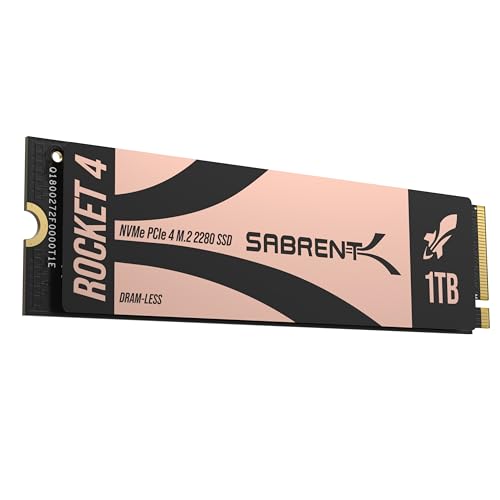
1. SABRENT Rocket 4 1TB NVMe SSD PCIe Gen4 M.2 2280

This Sabrent Rocket 4 1TB NVMe SSD is an absolute powerhouse, designed for users who demand cutting-edge speed for their laptop. If your laptop supports PCIe Gen4, preparing to experience blazing-fast boot times, incredibly quick game loading, and seamless handling of even the most demanding applications. It’s perfect for giving a significant performance boost to compatible gaming laptops and high-end workstations.
- Key Features:
- Blazing Gen4 Speed: Up to 7450MB/s read and 6100MB/s write speeds.
- High IOPS, Efficient Design: Delivers up to 850K/800K random IOPS while maintaining low heat and power draw.
- Broad System Compatibility: Single-sided M.2 2280 form factor fits most modern laptops and even PS5.
- Made for Pros and Gamers: Ideal for high-performance systems.
- Trusted Sabrent Support: Supports Windows, macOS, and Linux; includes firmware updates.
- Pros:
- Phenomenal read/write speeds for incredibly fast performance.
- Efficient design helps prevent thermal throttling in compact laptops.
- Widely compatible with modern laptops.
- Excellent choice for professional content creation and serious gaming.
- Cons:
- Requires a PCIe Gen4 compatible M.2 slot to achieve full speeds.
- May be overkill (and pricier) for basic everyday tasks.
- User Impressions: Customers frequently praise its transformative speed, noting significant improvements in system responsiveness and application load times. Gamers particularly appreciate how quickly their large game libraries load.
- See it on Amazon here
2. SABRENT 2.5 Inch SATA to USB 3.0 Tool Free External Enclosure

While not an SSD itself, this Sabrent external enclosure is a fantastic accessory for any laptop user. It allows you to easily transform any 2.5-inch SATA SSD or HDD into a portable, external drive without needing any tools. This is perfect for data recovery, backing up files, or simply carrying extra storage with you on the go. It’s a testament to Sabrent’s focus on user-friendly and practical solutions.
- Key Features:
- Tool-free design for easy installation and removal of drives.
- Transfer rates up to 5 Gbps with USB 3.0 (backward compatible with USB 2.0).
- Suitable for 2.5” SATA/SSD and supports UASP SATA III for optimized SSD performance.
- Hot-swappable, plug and play, no drivers needed.
- Broad OS compatibility: Mac, Windows (7, 8, Vista, XP), Mac OS X and higher.
- Pros:
- Extremely easy to use, no tools required.
- Cost-effective way to reuse old laptop drives or create external storage.
- Plug-and-play functionality across various operating systems.
- Compact and portable for travel.
- Cons:
- Speed is limited by SATA and USB 3.0 interfaces (not as fast as NVMe or USB 3.2 enclosures).
- Only for 2.5-inch drives, not M.2 SSDs.
- User Impressions: Users love the simplicity and convenience, often using it to clone drives or easily access data from old laptops. It’s widely regarded as a reliable and essential tool for tech-savvy users and casual users alike.
- See it on Amazon here
3. SABRENT Rocket 2230 1TB NVMe SSD – PCIe Gen4 M.2
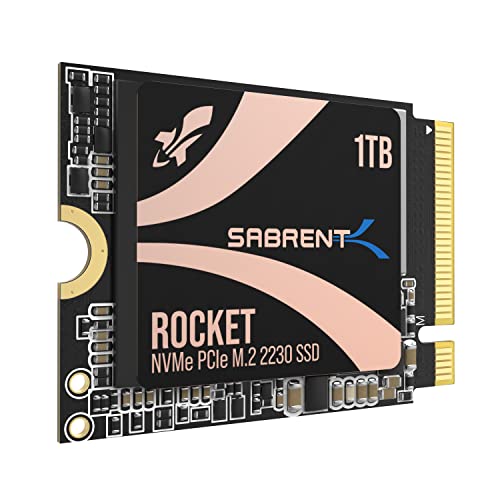
The Sabrent Rocket 2230 is a niche but incredibly important product, especially if you own devices like a Steam Deck, Surface Pro, or certain ultrabooks that only accept the super-compact M.2 2230 form factor. Don’t let its tiny size fool you; this little drive packs a serious punch with Gen4 NVMe performance, making it the Sabrent best SSD for laptop users with space-constrained devices. It’s a game-changer for expanding internal storage on handhelds and mini PCs without compromising on speed.
- Key Features:
- Compact Compatibility: Specifically designed for M.2 2230 slots found in Steam Deck, Surface Pro, ultrabooks, etc.
- High-Speed Gen4 Performance: Achieve speeds up to 5GB/s and 800K IOPS.
- 1TB Capacity: Store more games, apps, and files without relying on slower external storage.
- Reliable and Efficient: Built with a new Gen4 NVMe controller, premium 3D TLC NAND, and HMB support for low power usage.
- Retail-Grade Quality: Full warranty, cloning software, and firmware update support.
- Pros:
- One of the few high-performance 2230 NVMe drives available.
- Dramatically improves load times and overall performance in compatible devices.
- Generous 1TB capacity for such a small form factor.
- Energy-efficient for portable devices.
- Cons:
- Only compatible with devices that support the M.2 2230 size.
- Might be harder to install for beginners due to the small size.
- User Impressions: Owners of Steam Decks and Surface Pro devices rave about this SSD, calling it the perfect upgrade. They highlight the significant speed boost and the peace of mind that comes with a new, warrantied drive rather than OEM pulls.
- See it on Amazon here
4. SABRENT Rocket 4 2TB NVMe SSD PCIe Gen4 M.2 2280

Stepping up the capacity, the Sabrent Rocket 4 2TB NVMe SSD offers the same incredible PCIe Gen4 speeds as its 1TB sibling but with double the storage. This is an ideal choice for users who need ample space for large game libraries, extensive media files, or demanding professional applications that require both speed and capacity. It ensures you won’t be running out of room anytime soon while maintaining peak performance in your laptop.
- Key Features:
- Next-Gen Gen4 Performance: Up to 7450MB/s read and 6400MB/s write speeds.
- High IOPS, Low Heat: Get up to 1000K/950K random IOPS with minimal thermal output.
- Universal Compatibility: Single-sided M.2 2280 design fits desktops, laptops, and PS5.
- Power for Pros and Gamers: Delivers fast, reliable storage for intensive applications.
- Sabrent Quality and Support: Built with premium components and broad OS support.
- Pros:
- Excellent balance of high speed and substantial storage capacity.
- Maintains low temperatures, crucial for laptop environments.
- Reliable performance under sustained heavy workloads.
- Great value for users needing both speed and space.
- Cons:
- Still requires a PCIe Gen4 M.2 slot for maximum benefit.
- A significant investment compared to lower-capacity or Gen3 drives.
- User Impressions: Users with high-end gaming laptops or those involved in video editing often point to this drive as their go-to choice. They appreciate the responsiveness and the ability to store vast amounts of data without performance bottlenecks.
- See it on Amazon here
5. SABRENT Rocket 4 4TB NVMe SSD PCIe Gen4 M.2 2280

For the ultimate power user, the Sabrent Rocket 4 4TB NVMe SSD is an absolute behemoth. Offering a colossal 4TB of storage combined with top-tier PCIe Gen4 performance, this drive is designed for those who refuse to compromise. Whether you’re a professional video editor, a game developer, or a gamer with an insatiable appetite for the largest titles, this SSD delivers the speed and space you need to conquer any task on your laptop.
- Key Features:
- Massive Gen4 Performance: Up to 7450MB/s read and 6400MB/s write speeds.
- Built for Speed and Stability: Achieves up to 1000K/950K random IOPS with consistent low-heat output.
- Broad Compatibility: Slim, single-sided M.2 2280 design works flawlessly in desktops, laptops, and PS5.
- For Demanding Users: Ideal for gamers, media editors, engineers, and power users.
- Sabrent Reliability & Support: Premium hardware and OS compatibility, with technical assistance.
- Pros:
- Unmatched capacity for internal laptop storage.
- Blazing-fast speeds ensure zero bottlenecks for any workload.
- Robust and stable performance even under extreme use.
- Perfect for consolidating massive data libraries onto a single drive.
- Cons:
- Premium price point reflects its top-tier capacity and performance.
- May be overkill for the average laptop user.
- User Impressions: Professionals who handle large datasets or 4K/8K video editing find this drive indispensable, praising its ability to keep up with their demanding workflows. Gamers say it means never having to uninstall a game again!
- See it on Amazon here
6. SABRENT USB 3.2 Type-C Tool-Free Enclosure for M.2 PCIe NVMe and SATA SSDs

This Sabrent enclosure is a versatile and high-performance solution for anyone looking to make a super-fast external drive out of an existing M.2 SSD. Unlike the 2.5-inch enclosure, this one supports both NVMe and SATA M.2 drives, making it incredibly flexible. If you have a spare M.2 drive or want to create a lightning-fast portable storage solution for your laptop, this enclosure is an excellent choice. Its 10Gbps transfer speed makes it incredibly useful for transferring large files quickly.
- Key Features:
- CONVENIENCE: 100% Tool-Free installation for M.2 SSDs.
- DESIGN: Ultra-slim Aluminum case with ABS frame, sleek, durable, and portable.
- COMPATIBILITY: M.2 form factor compatible with both SATA and NVME in sizes: 2242/2260/2280.
- SPEED: USB 3.2 Gen 2 supports data transmission speeds of up to 10Gbps (1000MB/s).
- PLUG & PLAY: No additional drivers required, bus powered, no external power supply needed.
- Pros:
- Extremely easy, tool-free assembly.
- Supports both NVMe and SATA M.2 drives, highly versatile.
- Very fast data transfer speeds up to 10Gbps via USB 3.2 Type-C.
- Sleek, durable, and portable design.
- Cons:
- Requires you to supply your own M.2 SSD.
- Laptop needs a USB 3.2 Gen 2 port to achieve full speed.
- User Impressions: Reviewers are consistently impressed by the ease of installation and the robust build quality. They highlight its perfect functionality for making blazingly fast external drives for their laptops, especially for large file transfers or running operating systems off external storage.
- See it on Amazon here
7. SABRENT 1TB Rocket Nano V2 External SSD – USB 3.2 Type-C

If you need a ready-to-go, incredibly fast, and rugged external SSD, the Sabrent 1TB Rocket Nano V2 is your answer. This isn’t just an enclosure; it’s a complete, pre-assembled external drive built for portability and extreme performance. Capable of over 1500MB/s, it’s perfect for creative professionals on the go who need to work with high-bitrate content directly from their external drive, or for anyone needing ultra-fast backups for their laptop.
- Key Features:
- Unrivaled Speed Performance: Sustained transfer speeds of over 1500MB/s, ideal for 8K video recording and editing.
- Rugged Yet Refined Design: Anodized aluminum housing and shock-absorbing silicone sleeve for protection.
- Ready for Anything: 1TB capacity in a compact, travel-friendly design.
- Dual-Cable Convenience: Includes USB-C to USB-C and USB-C to USB-A cables for broad compatibility.
- Engineered for Longevity: High-endurance NAND flash with advanced wear leveling and health monitoring.
- Pros:
- Phenomenal external transfer speeds, rivaling internal NVMe drives.
- Highly durable and protected against drops, dust, and debris.
- Extremely compact and portable, truly pocket-sized.
- Comes with all necessary cables for immediate use.
- Cons:
- Fixed capacity; cannot swap out the internal SSD.
- Generally more expensive than buying an SSD and enclosure separately.
- User Impressions: Users are blown away by its speed and durability, often recommending it for professional photographers, videographers, and anyone who needs a robust and fast portable drive for their laptop. The compact size and included cables are frequently praised.
- See it on Amazon here
Conclusion: Finding Your Perfect Sabrent Laptop SSD
When it comes to upgrading or expanding your laptop’s storage, Sabrent offers a fantastic range of options that cater to virtually every need and budget. From the blistering speeds of the Rocket 4 NVMe drives for high-performance internal upgrades to the versatile external enclosures and rugged Rocket Nano, there’s a Sabrent best SSD for laptop waiting for you.
Remember to check your laptop’s specifications to determine what type of SSD it supports (M.2 NVMe, 2.5-inch SATA, or both) and what generation of PCIe it can handle. Once you know your requirements, choosing a Sabrent SSD will undoubtedly give your laptop the speed and responsiveness it deserves, making your computing experience smoother and more enjoyable!
FAQ Section
Q1: What’s the main difference between an NVMe SSD and a SATA SSD for my laptop?
A1: The main difference lies in speed and connection type. NVMe (Non-Volatile Memory Express) SSDs use the PCIe interface, connecting directly to your laptop’s motherboard via an M.2 slot, offering significantly faster speeds (often 5-10 times faster) than SATA SSDs. SATA SSDs connect via a SATA cable and are limited to around 550 MB/s, but are still much faster than traditional HDDs. Modern laptops typically support NVMe, while older ones might only have SATA slots.
Q2: How do I know if my laptop supports an NVMe M.2 SSD?
A2: The best way is to check your laptop’s user manual or the manufacturer’s website for its specifications. Look for terms like “M.2 slot,” “NVMe support,” or “PCIe Gen3/Gen4.” You can also physically inspect your laptop’s motherboard after opening it (if you’re comfortable doing so) to see if an M.2 slot is present.
Q3: Can I install a Sabrent SSD in my laptop myself?
A3: For many laptops, yes! Upgrading an SSD is often one of the easiest components to replace. However, the difficulty varies by laptop model. Some laptops have easily accessible bays, while others require more disassembly. Always consult your laptop’s service manual or find a reliable online tutorial for your specific model before attempting an installation. If unsure, a professional can install it for you.
Q4: What does “PCIe Gen4” mean for an SSD, and do I need it?
A4: PCIe Gen4 (PCI Express Generation 4) refers to the generation of the data transfer interface. Gen4 offers double the bandwidth of Gen3, meaning compatible SSDs can achieve much higher read and write speeds (e.g., up to 7,000 MB/s vs. 3,500 MB/s). You only “need” it if your laptop has a PCIe Gen4 M.2 slot and you want the absolute fastest performance for demanding tasks like 4K/8K video editing, large file transfers, or competitive gaming. A Gen3 SSD is still incredibly fast for most users.
Q5: Will upgrading to a Sabrent SSD improve my laptop’s battery life?
A5: Yes, generally, it will. SSDs have no moving parts, making them more power-efficient than traditional hard disk drives (HDDs). While the difference might not be hours, you can expect a slight improvement in battery life after upgrading from an HDD to an SSD, as well as significantly reduced heat and noise.
Q6: Why choose Sabrent over other SSD brands?
A6: Sabrent has built a strong reputation for offering high-performance SSDs at competitive prices. They often use high-quality components, provide excellent customer support, and include useful extras like cloning software with their drives. Their product range is also quite diverse, offering solutions from ultra-compact M.2 2230 drives to massive 4TB NVMe powerhouses and versatile external enclosures.
Q7: What is the benefit of a tool-free external enclosure like the Sabrent ones reviewed?
A7: A tool-free external enclosure offers incredible convenience. It allows you to quickly and easily swap out different 2.5-inch SATA drives or M.2 NVMe/SATA SSDs without needing screwdrivers or special tools. This is perfect for data recovery, quick backups, testing drives, or making portable storage on the fly, saving you time and hassle.