
Is your laptop feeling a bit sluggish these days? Slow boot times, long loading screens, or general lag when multitasking can really put a damper on your productivity and fun. If you’ve been nodding along, then it’s probably time for an upgrade, and an M.2 2280 SSD is often the best bang for your buck!
These tiny, mighty solid-state drives are the ultimate storage solution for modern laptops, offering blazing-fast speeds that traditional hard drives can only dream of. The “2280” in M.2 2280 refers to its dimensions – 22mm wide and 80mm long – making it a compact powerhouse that fits perfectly into most contemporary laptop designs. But with so many options out there, how do you pick the best m 2 2280 ssd for laptop?
Don’t sweat it! We’ve done the heavy lifting for you. We’ve scoured the market to bring you our top 7 picks, including a crucial accessory to keep your high-performance drive cool. Whether you’re a hardcore gamer, a creative professional, or just someone looking for a snappier daily computing experience, you’ll find an excellent option on this list. Let’s dive in and find the perfect upgrade for your portable workhorse!
Our Top Picks for the Best M.2 2280 SSD for Laptop
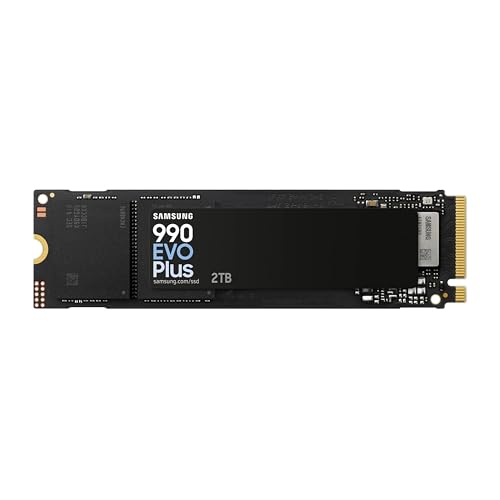
1. Samsung 990 EVO Plus SSD 2TB

If you’re looking for bleeding-edge performance that truly sets your laptop apart, the Samsung 990 EVO Plus is an absolute beast. This drive combines incredible speed with advanced thermal efficiency, making it perfect for power users, content creators, and serious gamers who demand the absolute best. It’s ready for the future, offering compatibility with both PCIe 4.0 and emerging PCIe 5.0 systems, ensuring your investment is future-proof.
-
Key Features:
- Groundbreaking sequential read/write speeds up to 7,250/6,300MB/s.
- Large storage capacities, including a 4TB option, enhanced by Intelligent TurboWrite 2.0.
- Exceptional thermal control with a nickel-coated controller for less power consumption.
- Optimized performance with PCIe 4.0 x4 and PCIe 5.0 x2 compatibility.
- Samsung Magician Software for continuous monitoring, firmware updates, and encryption.
-
Pros:
- Phenomenal speeds for demanding tasks.
- Excellent power efficiency and thermal management.
- Future-proof with PCIe 5.0 compatibility.
- Reliable Samsung brand quality and software support.
-
Cons:
- Premium price point.
- PCIe 5.0 benefits might not be fully utilized by all current laptops.
User Impressions: Users rave about the significant speed boost, noting incredibly fast boot times and application loading. Many appreciate its ability to stay cool under heavy loads, even in laptops. It’s widely considered a top-tier upgrade for those who can utilize its full potential.
2. TEAMGROUP MS30 1TB with SLC Cache 3D NAND TLC M.2

For those looking for a reliable and budget-friendly upgrade without diving into the world of NVMe, the TEAMGROUP MS30 1TB is a fantastic choice. This SATA M.2 SSD provides a substantial speed increase over traditional hard drives and is perfect for giving an older laptop a new lease on life or for users who simply need dependable everyday performance without breaking the bank. It’s a solid, no-frills option that gets the job done efficiently.
-
Key Features:
- Uses SLC Cache technology for improved read/write speeds.
- Built with 3D NAND TLC for good endurance and capacity.
- Standard M.2 2280 form factor, compatible with many laptops.
- Sequential Read/Write speeds of up to 550/500 MB/s.
- Power-saving features ideal for mobile devices.
-
Pros:
- Very affordable 1TB capacity.
- Significant upgrade from an HDD.
- Reliable for everyday computing and general use.
- Low power consumption helps battery life.
-
Cons:
- Slower than NVMe PCIe SSDs.
- Not ideal for intensive gaming or professional video editing.
User Impressions: Customers frequently praise its value for money and the noticeable improvement in their laptop’s responsiveness. It’s often recommended for older systems or as a secondary drive where sheer speed isn’t the primary concern but reliability and capacity are.
3. Samsung 980 SSD 1TB PCle 3.0×4, NVMe M.2 2280

The Samsung 980 SSD offers a fantastic balance of performance and value for laptops that support PCIe 3.0. It’s a smart choice for anyone looking to step up to NVMe speeds without the premium price tag of a Gen4 drive. Whether you’re a gamer needing faster load times or a professional handling large files, the 980 delivers impressive performance, backed by Samsung’s reputation for quality and robust endurance.
-
Key Features:
- Impressive NVMe PCIe Gen 3.0 performance.
- Sequential read speeds up to 3,500MB/s, write up to 3,000MB/s.
- Full Power Mode ensures continuous and consistent high performance.
- High endurance rating with up to 600 TBW.
- Advanced security features including AES 256-bit Full Disk Encryption.
-
Pros:
- Excellent value for NVMe performance.
- Great speed for gaming and demanding applications.
- Robust endurance and reliability.
- Samsung’s Magician software for easy management.
-
Cons:
- Not as fast as newer PCIe Gen4 drives.
- Can run warm under sustained heavy loads without a heatsink.
User Impressions: Users love the dramatic improvement in system responsiveness and application loading. Many highlight it as a great upgrade for existing laptops, especially for gaming and productivity. Its consistent performance, even during heavy use, is frequently mentioned.
4. TEAMGROUP MS30 512GB with SLC Cache 3D NAND TLC M.2
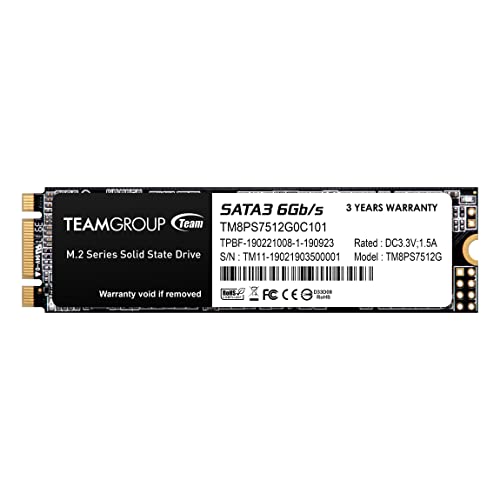
If you’re on a tight budget or just need a primary boot drive with enough space for your essential applications and operating system, the TEAMGROUP MS30 512GB is an excellent contender. Like its 1TB sibling, it offers the significant benefits of an SSD over an HDD at a super accessible price point. It’s perfect for basic computing tasks, web browsing, and improving the general snappiness of your everyday laptop use.
-
Key Features:
- SLC Cache technology for enhanced performance.
- Utilizes 3D NAND TLC for improved durability and efficiency.
- Compact M.2 2280 form factor.
- Sequential Read/Write speeds up to 530/470 MB/s.
- Energy-efficient design, extending laptop battery life.
-
Pros:
- Extremely budget-friendly.
- Vast improvement over traditional hard drives.
- Sufficient capacity for operating system and core applications.
- Low power consumption.
-
Cons:
- Limited storage capacity for larger media libraries or game collections.
- Slower than NVMe drives, suitable for basic use.
User Impressions: Users frequently commend this drive for its affordability and ease of installation, noting that it brings new life to older laptops. It’s a popular choice for quick, noticeable performance boosts without a hefty investment.
5. Laptop NVMe M.2 Heatsink with Nano Thermal Pads

While not an SSD itself, this Laptop NVMe M.2 Heatsink is an absolutely essential accessory for high-performance M.2 NVMe SSDs, especially when housed within the compact confines of a laptop. Modern NVMe drives can generate significant heat under heavy load, leading to “thermal throttling” – where the drive deliberately slows down to prevent overheating. This tiny copper heatsink helps dissipate that heat, ensuring your fast SSD maintains its peak performance.
-
Key Features:
- Universally compatible with M.2 2280 NVMe SSDs.
- Designed for laptops with a minimum installation height of 1.5mm.
- Provides a significant 10-20°C cooling effect.
- Made from 100% pure copper for excellent thermal conductivity.
- Includes two unique silicone thermal pads (0.5mm/1mm thick) for uneven surfaces.
- Easy installation with two mounting methods: rubber ring and high-temperature sticker.
-
Pros:
- Crucial for maintaining optimal NVMe SSD performance.
- Prevents thermal throttling, especially in laptops.
- Compact and easy to install.
- Universal fit for most 2280 NVMe SSDs.
-
Cons:
- Adds a tiny bit of height, which could be an issue in extremely thin laptops (though usually not).
- An additional purchase, not an all-in-one solution.
User Impressions: Users report noticeable improvements in sustained performance, particularly for gaming and large file transfers, without their SSDs slowing down. Many consider it a must-have for high-end NVMe drives in laptops, calling it a small investment for a big performance gain.
6. WD_BLACK 1TB SN7100 NVMe Internal Gaming SSD Solid State Drive

The WD_BLACK SN7100 is purpose-built for gamers and performance enthusiasts who need speed and reliability in their portable rig. With impressive PCIe Gen4 speeds and exceptional power efficiency, it’s designed to keep up with demanding game loads and intensive multitasking. Its robust endurance rating means you can store, play, and create with confidence for years to come. This is truly one of the best m 2 2280 ssd for laptop gamers can choose.
-
Key Features:
- Blazing speeds up to 7,250MB/s read and 6,900MB/s write (for 1-2TB models).
- Engineered for serious gamers with a PCIe Gen4 interface and advanced TLC 3D NAND.
- Available in capacities up to 4TB for extensive game libraries.
- Up to 100% more power efficiency compared to previous generations, ideal for laptops.
- High endurance with up to 2,400TBW (4TB model).
-
Pros:
- Excellent speeds for gaming and heavy applications.
- Great power efficiency for laptop battery life.
- High endurance for longevity.
- Reliable WD_BLACK gaming-grade performance.
-
Cons:
- May require a heatsink in some laptops for sustained peak performance.
- Not the absolute fastest Gen4 drive, but offers a great balance.
User Impressions: Gamers frequently laud the SN7100 for significantly reducing game load times and improving overall system responsiveness. Its power efficiency is a big plus for laptop users, allowing longer gaming sessions on battery.
7. KLEVV CRAS C910 2TB M.2 2280 NVMe PCIe Gen4x4 Laptop SSD

The KLEVV CRAS C910 is another excellent PCIe Gen4 option that aims to deliver phenomenal speed for both work and play. What makes it stand out is its intelligent design, which includes an attachable aluminum heatsink right out of the box. This thoughtful addition helps mitigate thermal throttling, ensuring you consistently experience its advertised speeds, making it a well-rounded and high-performing choice for any modern laptop.
-
Key Features:
- Phenomenal PCIe Gen4 speeds up to 5000/4800MB/s read/write.
- Includes a modern yet powerful attachable aluminum heatsink for 10% temperature reduction.
- Guarantees buttery smooth performance for top-tier gaming and applications.
- Cutting-edge 3D NAND technology for bigger capacity, durability, and lower power consumption.
- Trouble-free installation; slim 1-mm-thick heatsink fits diverse systems.
-
Pros:
- Great PCIe Gen4 performance.
- Included heatsink helps maintain sustained speeds.
- Excellent for gaming, content creation, and professional use.
- Reliable 3D NAND technology with good TBW.
-
Cons:
- While fast, not the absolute fastest Gen4 drive on the market.
- The heatsink, though slim, might still be a tight fit in some extremely thin laptops.
User Impressions: Users are impressed by the noticeable speed increase and the effectiveness of the included heatsink in preventing performance dips. It’s often praised as a reliable and high-value Gen4 SSD that’s easy to install and performs exactly as expected.
Frequently Asked Questions (FAQ)
What is an M.2 2280 SSD?
An M.2 2280 SSD is a compact, rectangular solid-state drive that measures 22mm wide and 80mm long. “M.2” refers to its form factor and connector type, while “2280” specifies its physical dimensions. These drives plug directly into a dedicated M.2 slot on a laptop’s motherboard and are significantly faster and more energy-efficient than traditional 2.5-inch SATA SSDs or hard disk drives (HDDs).
What’s the difference between PCIe Gen3 and Gen4 SSDs?
PCIe (Peripheral Component Interconnect Express) refers to the interface standard used by NVMe SSDs to communicate with your laptop’s CPU. Gen4 is the newer generation, offering roughly double the bandwidth of Gen3. This means Gen4 SSDs can achieve much higher sequential read and write speeds (e.g., 7,000 MB/s for Gen4 vs. 3,500 MB/s for Gen3). For everyday tasks, you might not notice a huge difference, but for large file transfers, video editing, or heavy gaming, Gen4 can provide a significant performance boost if your laptop supports it.
Do I need a heatsink for my laptop M.2 SSD?
For many standard NVMe M.2 SSDs in a laptop, a heatsink isn’t strictly necessary, especially for casual use. However, for high-performance PCIe Gen4 NVMe SSDs or for users who engage in prolonged demanding tasks like gaming, video editing, or large file transfers, a heatsink is highly recommended. High-speed drives can generate considerable heat, leading to thermal throttling where the drive intentionally slows down to prevent damage. A heatsink helps dissipate this heat, ensuring your SSD maintains peak performance.
How do I install an M.2 2280 SSD in my laptop?
Installation generally involves opening your laptop’s back panel, locating the M.2 slot, inserting the SSD at an angle, and then securing it with a small screw. Many laptops will automatically recognize the new drive, but you might need to initialize and format it through Windows Disk Management or macOS Disk Utility before it’s usable. Always consult your laptop’s specific manual or a reliable online tutorial for detailed steps tailored to your model.
What does TBW (Terabytes Written) mean for an SSD?
TBW (Terabytes Written) is a measure of an SSD’s endurance. It indicates the total amount of data that can be written to the drive over its lifetime before it’s expected to fail. For example, a 600 TBW rating means you can write 600 terabytes of data to the drive before its warranty or expected lifespan is reached. For the average user, even a lower TBW rating is usually more than enough for many years of use, but higher TBW is beneficial for heavy users.
Can I use any M.2 SSD in my laptop?
While most modern laptops come with an M.2 slot, not all M.2 SSDs are compatible with all M.2 slots. There are two main types of M.2 SSDs: SATA and NVMe (PCIe). Your laptop’s M.2 slot will support one or both. NVMe drives are significantly faster than SATA. You’ll need to check your laptop’s specifications or motherboard manual to confirm which type of M.2 SSD it supports (SATA, NVMe, or both) and if it supports PCIe Gen3 or Gen4 speeds.
What’s the best capacity for a laptop SSD?
The “best” capacity depends entirely on your needs and budget.
* 256GB-512GB: Good for basic users, operating system, and essential applications.
* 1TB: Ideal for most users, providing ample space for an OS, multiple games, software, and a decent amount of media. It’s often considered the sweet spot for value and storage.
* 2TB+: Recommended for gamers with large libraries, content creators, or anyone who stores vast amounts of data and wants everything on one fast drive.