
Got a Samsung SSD and wondering how to get the most out of it, especially for external use or data transfer? You’re in the right place! Finding the best connector for Samsung SSD can make all the difference in speed, convenience, and protecting your valuable data. Whether you’re looking to turn an internal SATA SSD into a portable drive, or you need the perfect cable for your Samsung T-series or X5 portable SSD, the right connection is key.
In this guide, we’ll dive into the top 7 connectors and enclosures that will help you unlock your Samsung SSD’s full potential. We’ll cover everything from simple adapter cables to robust external enclosures, ensuring you find the perfect match for your needs. Let’s get connected!
Why the Right Connector Matters for Your Samsung SSD
When it comes to solid-state drives, speed is the name of the game. A high-quality connector or enclosure ensures that your SSD’s incredible data transfer speeds aren’t bottlenecked by an outdated or flimsy connection. It’s not just about speed, though; reliable connectivity also protects your data from corruption and makes your life easier with quick plug-and-play functionality. So, let’s explore some fantastic options that could be the best connector for Samsung SSD in your arsenal.
Product Reviews: Our Top 7 Choices
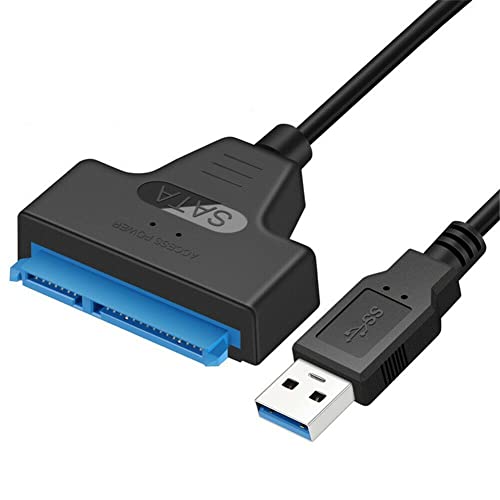
1. NTQinParts USB 3.0 to 2.5″ SATA III Hard Drive Adapter

This simple yet effective cable is a game-changer if you want to quickly connect a 2.5-inch Samsung SATA SSD (like the popular 870 EVO) to your computer via USB. It’s incredibly handy for data recovery, quick backups, or even turning an old internal drive into a temporary external storage solution without needing a full enclosure. Just plug it in, and you’re ready to roll – no extra power adapter needed for most SSDs.
-
Key Features:
- Length: approximately 2FT.
- Compatible with Samsung 870 EVO SATA III SSD (2.5” Internal Solid State Drive: 250GB, 500GB, 1TB, 2TB, 4TB).
- Bus Type: USB 3.0 (backward compatible with USB 2.0 and USB 1.0).
- Works only with 2.5″ SATA drives; 3.5″/5.25″ drives are not supported.
-
Pros:
- Extremely easy to use, true plug-and-play.
- No external power supply needed for 2.5″ SSDs.
- Affordable solution for quick SSD access.
- Compact and portable.
-
Cons:
- Only for 2.5-inch SATA drives, not NVMe or larger HDDs.
- Limited to USB 3.0 speeds (up to 5Gbps), which might not fully utilize higher-end SATA SSDs.
- Leaves the SSD exposed without an enclosure.
-
User Impressions: Users love this adapter for its simplicity and effectiveness. It’s frequently praised as a lifesaver for data migration and quick access to old laptop SSDs, making it a strong contender for the title of best connector for Samsung SSD when you need direct, fuss-free access.
2. QCEs Short USB C to USB C 3.2 Gen 2 Cable
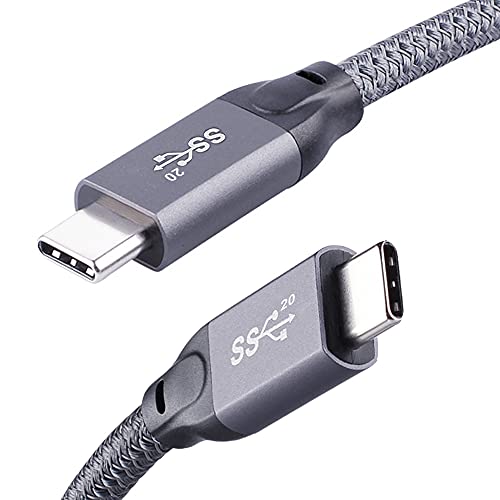
If you own a high-speed Samsung portable SSD like the Samsung X5, T7, T5, or T3, this QCEs USB-C to USB-C cable is designed to match its performance. Supporting a blistering 20Gbps data transfer rate (with compatible devices) and 100W power delivery, this cable is a powerhouse. It’s not just for SSDs; it’s a versatile cable for your MacBook Pro, iPad Pro, and other USB-C devices, supporting even 4K video transfer. The nylon braided design adds a welcome touch of durability.
-
Key Features:
- USB-C 3.2 Gen 2*2 cable for up to 20Gbps data transfer.
- Supports up to 100W (20V/5A) Power Delivery with E-marker chip.
- Compatible with Samsung X5, T7, T5, T3 Portable SSDs, Seagate Fast SSD, WD My Passport SSD.
- Thunderbolt 3 compatible.
- Supports 4K@60Hz video transfer (device must support DP Alt Mode).
- Nylon braided for extra durability with aluminum alloy connectors.
-
Pros:
- Extremely high data transfer speeds (up to 20Gbps).
- Supports fast charging and power delivery.
- Robust and durable construction.
- Versatile for multiple USB-C devices and functions.
-
Cons:
- Maximum speed (20Gbps) requires a device with USB 3.2 Gen 2*2 support.
- It’s a cable, not an adapter for internal SSDs.
- Might be overkill if your devices or SSDs don’t support such high speeds.
-
User Impressions: Customers consistently highlight the impressive speed and build quality of this cable. It’s seen as a reliable and future-proof choice for connecting high-performance external SSDs and charging other devices, making it a strong contender for the best connector for Samsung SSD portable drives.
3. SUNGUY 10Gbps Android Auto USB Cable 1FT, 3A USB C

While specifically marketed for Android Auto, this SUNGUY USB-A to USB-C cable is a fantastic choice for connecting your Samsung SSD (especially portable ones like the T7 if your host device has a USB-A port) to a computer. It boasts 10Gbps USB 3.1 Gen2 speeds, which is plenty fast for most external SSD tasks, and supports 3A fast charging. Its durable nylon braided design and aluminum alloy shell ensure it can handle daily use, whether in your car or at your desk.
-
Key Features:
- USB 3.1 Gen2 Type-C to USB-A Cable with 10Gbps data transfer speed.
- Supports 3A fast charging with 56KΩ pull-up resistor.
- Durable nylon braided cable and premium aluminum alloy shell.
- Widely compatible with USB-C devices including Galaxy S23/S22/S21, iPad Pro, MacBook, etc.
- 1-foot length for portability.
-
Pros:
- Fast 10Gbps data transfer.
- Robust build quality, designed for durability.
- Supports fast charging.
- Great for devices with USB-A ports.
-
Cons:
- USB-A end means it won’t connect directly to newer USB-C only laptops.
- 1-foot length might be too short for some setups.
- Does not support video output.
-
User Impressions: Users appreciate its sturdy build and reliable performance for data transfers and charging. Its compatibility with Android Auto is a bonus for many, but its core strength lies in providing a fast, durable connection for various USB-C devices, including portable Samsung SSDs.
4. ELUTENG 2.5 SSD Enclosure 5Gbps Hard Drive Case Tool Free

Looking to turn your internal 2.5-inch Samsung SATA SSD into a fully protected external drive? The ELUTENG 2.5 SSD Enclosure is an excellent choice. This tool-free enclosure makes installation a breeze – just slide your SSD in. With USB 3.1 Gen 1 (5Gbps) speeds and UASP support, it ensures quick file transfers. Its USB-C interface is convenient, and the built-in multi-layered protection keeps your drive and data safe.
-
Key Features:
- Converts 2.5″ SATA to USB-C HDD enclosure.
- USB 3.1 Gen 1 SuperSpeed (Max 5Gbps) with UASP support.
- Tool-free design for easy installation.
- USB-C interface for easy plug-in.
- Fits 7.5mm/9mm SATA drives up to 6TB capacity.
- Built-in short circuit, overcurrent, and multi-layered protection.
- Compatible with Windows, Linux, macOS.
-
Pros:
- Protects your SSD in a secure casing.
- Tool-free installation is super simple.
- USB-C interface is modern and reversible.
- UASP support boosts data transfer speeds.
- Robust safety features for data protection.
-
Cons:
- Limited to 5Gbps, not the fastest available.
- Only for 2.5-inch SATA drives, not NVMe SSDs.
- Plastic construction might feel less premium than metal alternatives.
-
User Impressions: Reviewers frequently praise the ELUTENG enclosure for its straightforward installation and solid performance. It’s often recommended for repurposing old laptop SSDs or creating an affordable external backup drive, making it a strong contender for the best connector for Samsung SSD when a full enclosure is desired.
5. iDsonix 2.5 inch Hard Drive Enclosure, 6Gbps USB 3.1 to

The iDsonix 2.5 inch Hard Drive Enclosure is another fantastic option for converting your Samsung 2.5-inch SATA SSD into a portable powerhouse. It boasts 6Gbps transfer rates (the maximum speed for SATA III drives) and UASP protocol support, ensuring you get the fastest possible speeds from your SATA SSD. Made with high-quality ABS plastic and a high-performance chip, it offers excellent protection against over-current, over-voltage, and overheating, along with an EVA foam pad to prevent shaking.
-
Key Features:
- Designed for 7mm/9.5mm SATA SSD & HDD (up to 4TB).
- Supports up to 6Gbps transfer rates with UASP protocol.
- Made of high-quality ABS plastic with built-in high-performance chip.
- Provides over-current, over-voltage, and overheating protection.
- Includes EVA foam pad for shock absorption.
- Tool-free installation, plug and play.
- Compatible with Windows, Mac, Linux, PS4/5, Xbox, TV, PC, laptop.
- Detachable USB C to USB A cable included.
-
Pros:
- Maximizes SATA III SSD speeds (6Gbps).
- Excellent protection for your SSD and data.
- Tool-free and very easy to install.
- Wide compatibility with various devices and OS.
- LED indicator for working status.
-
Cons:
- Still limited to SATA drives, not compatible with NVMe.
- The included cable is USB A, so you might need a USB-C to C cable for newer laptops.
-
User Impressions: This iDsonix enclosure consistently receives high marks for its ease of use, robust protection, and ability to deliver full SATA speeds. Users appreciate the thoughtful design details like the foam pad, making it a reliable choice if you’re looking for the best connector for Samsung SSD (2.5-inch SATA type) that also doubles as a protective case.
6. USB C to Micro B Adapter, USB 3.0 Micro B

This compact USB-C to Micro B adapter is a niche but incredibly useful tool for connecting newer USB-C devices (like modern MacBooks, iPads, or Samsung Galaxy phones) to external hard drives or older Samsung portable SSDs (like some versions of the T1 or T3) that use a USB 3.0 Micro-B port. It’s perfect for ensuring compatibility without needing to buy a new cable, offering 5Gbps data transfer speeds. Plus, it comes with a handy anti-loss lanyard.
-
Key Features:
- USB 3.0 Micro B to USB C adapter.
- Connects USB-C devices to external hard drives or smartphones with Micro B ports.
- Supports ultra-fast data transfer rate up to 5Gbps.
- Compatible with portable USB 3.0 external hard drives (WD My Passport, Seagate FreeAgent, etc.) and Samsung Galaxy S5/Note 3/Note Pro 12.2.
- USB-C compatibility includes MacBook Pro/Air, iPad Pro, Dell XPS, Google Chromebook Pixel, Samsung Galaxy S series, etc.
- Made of aluminum alloy shell with anti-loss lanyard.
-
Pros:
- Solves compatibility issues between USB-C and Micro-B devices.
- Extremely compact and portable.
- Offers 5Gbps transfer speeds.
- Durable aluminum construction with anti-loss lanyard.
-
Cons:
- Specific use case – only for Micro B devices.
- Only an adapter, not for connecting internal SSDs.
- Not the fastest speed available (5Gbps).
-
User Impressions: Users love the convenience and portability of this adapter. It’s frequently lauded for solving specific connectivity problems, especially for those with older Micro-B hard drives or devices and newer USB-C laptops. It’s a lifesaver for backwards compatibility.
7. External Hard Drive Cable USB C 3.3ft, Micro-B to USB-C
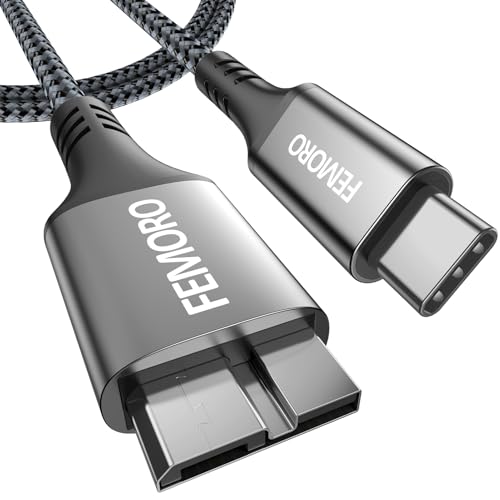
If you need a longer cable to connect your Samsung portable SSD (like the T-series, specifically those with a USB 3.0 Micro-B port) to your USB-C devices, this 3.3ft USB-C to Micro-B cable is an excellent choice. It steps up the speed game with 10Gbps data transfer, making it twice as fast as typical USB 3.0 cables. Its durable nylon braided exterior and aluminum casing with gold-plated plugs ensure longevity and stable performance.
-
Key Features:
- USB-C to Micro-B hard drive cable.
- 10Gbps data transfer speed (USB 3.1 Gen 2 equivalent).
- Supports both data transfer and charging.
- Durable aluminum casing, gold-plated plugs, and flexible braided nylon cable.
- Universal compatibility with USB 3.1 Micro-B port devices (Toshiba Canvio, Seagate FreeAgent, WD My Passport, Samsung Galaxy Note 4/5, S5/S6, etc.).
- 3.3ft length.
-
Pros:
- Very fast 10Gbps data transfer.
- Longer 3.3ft length offers more flexibility.
- Exceptional durability with braided nylon and metal connectors.
- Supports both data and charging.
-
Cons:
- Specific to Micro-B devices, not for internal SATA SSDs.
- Might be longer than needed for some desktop setups.
-
User Impressions: This cable is praised for its robust build, excellent length, and reliable high-speed performance. Users find it perfect for connecting their external drives or older Samsung phones to modern USB-C laptops and tablets, solidifying its place as a top pick for the best connector for Samsung SSD portable drives with Micro-B ports.
Frequently Asked Questions (FAQ)
Q1: What type of connector does my Samsung SSD need?
A1: It depends on your Samsung SSD model. Internal Samsung SSDs (like the 870 EVO, 970 EVO, 980 Pro) use either a SATA interface (for 2.5-inch drives) or an M.2 NVMe interface. For external use, a 2.5-inch SATA SSD needs a SATA-to-USB adapter or enclosure. Portable Samsung SSDs (like the T5, T7, X5) typically use USB-C, with some older models using USB 3.0 Micro-B. Always check your SSD’s specifications.
Q2: What’s the difference between USB 3.0, 3.1, and 3.2 for SSD connectors?
A2: These refer to different generations of USB speeds:
* USB 3.0 (USB 3.1 Gen 1 / USB 3.2 Gen 1): Up to 5 Gbps.
* USB 3.1 Gen 2 (USB 3.2 Gen 2): Up to 10 Gbps.
* USB 3.2 Gen 2×2: Up to 20 Gbps (the fastest and newest standard).
Higher numbers mean faster data transfer, which is crucial for maximizing your SSD’s performance.
Q3: Do I need an enclosure or just a cable for my Samsung SSD?
A3: If you’re using an internal 2.5-inch SATA Samsung SSD externally, you’ll need either a simple adapter cable (like the NTQinParts) for quick access, or an enclosure (like ELUTENG or iDsonix) for protection and a more permanent external drive solution. If you have a Samsung portable SSD (like the T-series or X5), you just need a compatible high-speed cable (like the QCEs or SUNGUY cables reviewed here).
Q4: What is UASP and why is it important for SSD connectors?
A4: UASP stands for “USB Attached SCSI Protocol.” It’s a transfer protocol that allows USB devices to process multiple commands simultaneously and queue them more efficiently, significantly improving read and write speeds, especially for SSDs. If your connector, SSD, and operating system all support UASP, you’ll experience much faster data transfers than with older protocols.
Q5: Can I connect an NVMe Samsung SSD using these connectors?
A5: Most of the connectors and enclosures listed here are for 2.5-inch SATA SSDs or for connecting existing external USB-based Samsung SSDs. NVMe SSDs (which are M.2 form factor) require specific M.2 NVMe enclosures that are different from the 2.5-inch SATA ones. Make sure to check the product description carefully.
Q6: How important is durability for these connectors and enclosures?
A6: Very important! A durable connector or enclosure protects your Samsung SSD from physical damage, but also ensures a stable and reliable connection. Flimsy cables or enclosures can lead to connection drops, slower speeds, or even data corruption. Look for features like nylon braiding, aluminum casings, and robust strain relief.
Q7: Can I use an external Samsung SSD with these connectors for gaming?
A7: Yes, absolutely! Using an external Samsung SSD with a fast connector (like a 10Gbps or 20Gbps USB-C cable or a UASP-enabled enclosure) can significantly reduce game load times compared to traditional external hard drives. It’s a great way to expand your game library on consoles like PS5/PS4 or Xbox, or on your PC/laptop.
Conclusion
Choosing the best connector for Samsung SSD truly depends on your specific needs: whether you’re repurposing an internal SATA drive, seeking maximum speed for a portable SSD, or simply need a reliable cable for daily use. We’ve highlighted seven excellent options that cover a range of scenarios, from simple adapter cables to robust enclosures, all designed to ensure your Samsung SSD performs at its peak.
By considering factors like speed, compatibility, and durability, you can pick the perfect companion for your Samsung SSD. Upgrade your connectivity today and experience the full power of your solid-state drive!