
Is your laptop feeling sluggish? Does it take ages to boot up or load your favorite games and applications? Chances are, your old hard drive is holding you back. Upgrading to a solid-state drive (SSD) is one of the most impactful ways to breathe new life into your system, and Sabrent has emerged as a formidable player in the high-performance storage market.
Known for their blazing-fast speeds and reliable performance, Sabrent SSDs are a fantastic choice for anyone looking to give their laptop a serious upgrade. But with so many options, how do you pick the Sabrent best internal SSD for laptop use? We’ve sifted through the specs and user reviews to bring you our top picks, including a popular alternative that’s worth considering. Get ready to experience lightning-fast boot times, snappy application launches, and smoother multitasking!
Understanding SSD Types for Laptops
Before we dive into the reviews, it’s helpful to know the main types of internal SSDs you’ll encounter:
- M.2 NVMe SSDs: These are tiny, stick-like SSDs that plug directly into a dedicated M.2 slot on your laptop’s motherboard. They use the PCIe interface, offering significantly faster speeds than traditional SATA SSDs, especially with newer PCIe Gen4 technology. These are often the Sabrent best internal SSD for laptop users seeking peak performance.
- 2.5-inch SATA SSDs: These SSDs come in the same physical size as traditional laptop hard drives (HDDs) and connect via a SATA cable. While slower than NVMe drives, they are still a massive upgrade from HDDs and are highly compatible with older laptops or those without M.2 slots.
Our Top Picks: Sabrent’s Best Internal SSDs for Laptops
Let’s explore some of the best Sabrent internal SSDs that can transform your laptop’s performance.
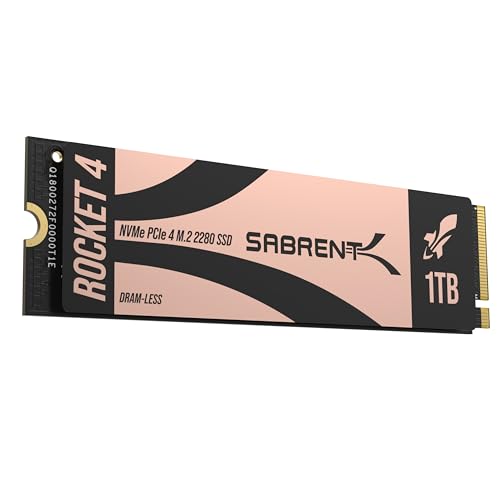
1. SABRENT Rocket 4 1TB NVMe SSD PCIe Gen4 M.2 2280

This 1TB powerhouse is an excellent starting point for anyone looking to embrace the future of storage. The Sabrent Rocket 4 1TB brings PCIe Gen4 speed to your laptop, ensuring that everything from boot-up to gaming feels incredibly responsive. It’s an ideal choice for users who demand high performance without needing the absolute largest capacity, striking a great balance between speed and storage.
-
Key Features:
- Blazing Gen4 Speed: Up to 7450MB/s read and 6100MB/s write.
- High IOPS, Efficient Design: Up to 850K/800K random IOPS with low heat/power.
- Broad System Compatibility: Single-sided M.2 2280 form factor.
- Made for Pros and Gamers: Ideal for demanding workloads.
- Trusted Sabrent Support: Supports Windows, macOS, and Linux.
-
Pros:
- Exceptional read/write speeds for fast data transfer.
- Low power consumption, great for laptop battery life.
- Compact M.2 2280 form factor fits most modern laptops.
- Reliable for gaming and professional applications.
-
Cons:
- Requires a PCIe Gen4 compatible M.2 slot to achieve full speed.
- Might be overkill for casual users.
-
User Impressions: Customers frequently rave about the noticeable performance boost and seamless installation. Many highlight its reliability and impressive speeds, making it a favorite for gamers and content creators.
- See it on Amazon here
2. SABRENT Rocket 4 2TB NVMe SSD PCIe Gen4 M.2 2280

Stepping up the capacity game, the Sabrent Rocket 4 2TB offers all the incredible speed of its 1TB sibling but with double the storage. This is the Sabrent best internal SSD for laptop users who need ample space for a large game library, extensive creative projects, or a vast collection of media files, all while benefiting from cutting-edge PCIe Gen4 performance.
-
Key Features:
- Next-Gen Gen4 Performance: Up to 7450MB/s read and 6400MB/s write speeds.
- High IOPS, Low Heat: Up to 1000K/950K random IOPS with minimal thermal output.
- Universal Compatibility: Desktops, laptops, and PS5 with M.2 2280.
- Power for Pros and Gamers: Fast, reliable storage for intensive applications.
- Sabrent Quality and Support: Premium components, broad OS support.
-
Pros:
- Massive 2TB capacity with top-tier Gen4 speeds.
- Excellent for storing large games, applications, and files.
- Maintains stable performance under heavy loads.
- Backed by Sabrent’s reputable support.
-
Cons:
- Higher price point due to increased capacity.
- Still requires a Gen4 compatible system for maximum speeds.
-
User Impressions: Users love the combination of speed and storage, reporting significant improvements in workflow efficiency. It’s often praised for its “set it and forget it” reliability and robust performance.
- See it on Amazon here
3. SABRENT 2.5 Inch SATA to USB 3.0 Tool Free External Enclosure

While not an internal SSD itself, this Sabrent external enclosure is an incredibly useful accessory for laptop users. If you’re upgrading your laptop’s internal drive, this enclosure lets you repurpose your old 2.5-inch SATA SSD or HDD into a super-fast external storage solution. It’s perfect for data backups, portable media, or even turning a new internal SSD into a temporary external boot drive.
-
Key Features:
- Tool-free design for easy installation.
- Transfer Rates: Up to 5 Gbps with USB 3.0 (480 Mbps with USB 2.0).
- Suitable for 2.5” SATA/SSD (Standard Notebook 2.5″ SATA I/II/III).
- Optimized for SSD, Supports UASP SATA III.
- Hot-swappable, plug and play, no drivers needed.
-
Pros:
- Extends the life of old laptop drives.
- Creates a convenient, fast external storage solution.
- Easy to use with no tools required.
- Broad OS compatibility (Mac, Windows).
-
Cons:
- Not an internal SSD; requires a separate drive.
- Speed is limited by USB 3.0 interface (slower than internal NVMe).
-
User Impressions: Many users find this enclosure indispensable for migrating data or creating portable backups. Its ease of use and solid build quality are frequently highlighted as major positives.
- See it on Amazon here
4. SABRENT Rocket 2230 1TB NVMe SSD – PCIe Gen4 M.2
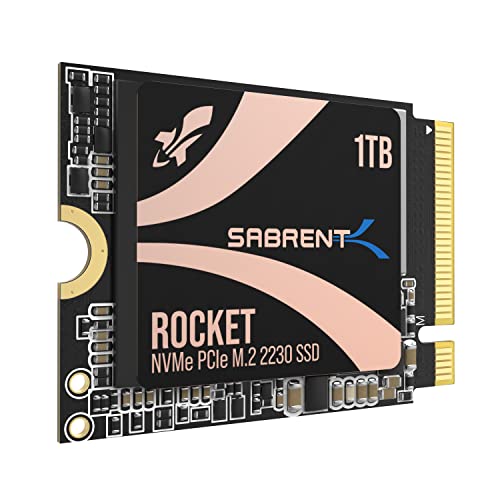
For users with ultra-compact devices like the Steam Deck, Surface Pro, or certain ultrabooks, finding a compatible high-performance SSD can be a challenge. Enter the Sabrent Rocket 2230 1TB – a tiny titan designed specifically for these space-constrained machines. This drive delivers impressive PCIe Gen4 speeds in a miniature form factor, making it the Sabrent best internal SSD for laptop users with compact, cutting-edge portables.
-
Key Features:
- Compact Compatibility: Designed for M.2 2230 slots (Steam Deck, Surface Pro, ultrabooks).
- High-Speed Gen4 Performance: Up to 5GB/s (5000MB/s) read and 800K IOPS.
- 1TB Capacity: Store more games, apps, and files.
- Reliable and Efficient: Gen4 NVMe controller, 3D TLC NAND, DRAM-less with HMB.
- Retail-Grade Quality: Full warranty, Acronis True Image software.
-
Pros:
- Perfect fit for devices requiring the M.2 2230 size.
- Significant upgrade over slower internal storage or microSD cards.
- Low power consumption, great for handhelds and laptops.
- Includes cloning software for easy migration.
-
Cons:
- Not suitable for standard M.2 2280 slots.
- Slightly lower top speeds compared to larger Gen4 drives.
-
User Impressions: Steam Deck and Surface Pro owners particularly praise this drive for its perfect fit and transformative performance. The ease of installation and inclusion of cloning software are also highly valued.
- See it on Amazon here
5. SABRENT Rocket Q4 2230 NVMe SSD 2TB – PCIe Gen4

Need even more storage in your compact device? The Sabrent Rocket Q4 2230 2TB is the answer. Building on the success of the 1TB model, this drive offers a massive 2TB capacity in the same tiny M.2 2230 form factor. It’s the ultimate upgrade for handheld gaming devices or ultrabooks where you need extensive storage for your entire digital library without sacrificing performance.
-
Key Features:
- Designed for Tight Spaces: M.2 2230 form factor (Steam Deck, ASUS ROG Ally, Surface Pro).
- Powerful Performance: Up to 5GB/s read and 800K IOPS with Gen4 PCIe.
- Massive 2TB Capacity: Store your full game library and files internally.
- Efficient and Reliable: DRAM-less with HMB for low power and good thermals.
- Retail Quality You Can Trust: New, fully supported SSD with cloning software.
-
Pros:
- Unprecedented 2TB capacity in a 2230 size.
- High-speed Gen4 performance for quick loading.
- Excellent for gamers and power users on compact devices.
- Efficient design helps with device battery life.
-
Cons:
- Premium price for the specialized size and capacity.
- QLC NAND, while efficient, may have slightly lower endurance than TLC in some extreme cases (though still very high for consumer use).
-
User Impressions: This drive is a game-changer for owners of the Steam Deck and ROG Ally, who appreciate the ability to store vast numbers of games internally. Its performance and compatibility are consistently lauded.
- See it on Amazon here
6. SABRENT Rocket 4 4TB NVMe SSD PCIe Gen4 M.2 2280

For the ultimate power user, the Sabrent Rocket 4 4TB NVMe SSD delivers an immense amount of storage coupled with incredible speed. This is truly the Sabrent best internal SSD for laptop professionals or enthusiasts who juggle massive files, extensive game collections, or complex creative projects that demand both vast capacity and top-tier performance. Say goodbye to external drives and hello to a truly consolidated, high-speed storage solution.
-
Key Features:
- Massive Gen4 Performance: Up to 7450MB/s read and 6400MB/s write speeds.
- Built for Speed and Stability: Up to 1000K/950K random IOPS with consistent low heat.
- Broad Compatibility: Slim, single-sided M.2 2280 design for desktops, laptops, PS5.
- For Demanding Users: Ideal for gamers, media editors, engineers, and power users.
- Sabrent Reliability & Support: Premium hardware, OS compatibility across Windows, macOS, Linux.
-
Pros:
- Unrivaled 4TB capacity for an internal laptop SSD.
- Blazing-fast Gen4 speeds for any workload.
- Highly reliable even under prolonged heavy use.
- Excellent for future-proofing your laptop’s storage.
-
Cons:
- Significant investment due to the high capacity.
- Requires a Gen4 M.2 slot to utilize its full potential.
-
User Impressions: Users requiring vast amounts of fast storage are overwhelmingly positive, citing its ability to handle huge game libraries and video editing projects with ease. The stability and raw speed are frequently highlighted.
- See it on Amazon here
Top Alternative Pick:
7. Samsung 870 EVO SATA III SSD 1TB 2.5” Internal Solid State Drive

While our focus is on Sabrent, it’s impossible to discuss the best internal SSDs for laptops without mentioning the Samsung 870 EVO. This 1TB 2.5-inch SATA SSD is a benchmark in reliability and widespread compatibility. If your laptop doesn’t have an M.2 NVMe slot, or if you prefer the proven performance and extensive compatibility of a SATA drive, the 870 EVO is an outstanding choice that offers excellent value and performance.
-
Key Features:
- The SSD All-Star: Indisputable performance, reliability, and compatibility.
- Excellence in Performance: Up to 560/530 MB/s sequential speeds (SATA interface limit).
- Industry-Defining Reliability: Up to 600 TBW under a 5-year limited warranty.
- More Compatible Than Ever: Tested for major host systems and applications.
- Upgrade with Ease: Standard 2.5-inch SATA form factor, renewed migration software.
- Samsung Magician Software: Easy drive management, health monitoring, performance enhancement.
-
Pros:
- Excellent balance of performance, reliability, and price.
- Widely compatible with most laptops that accept 2.5-inch drives.
- Backed by Samsung’s trusted brand and comprehensive software.
- Long 5-year warranty provides peace of mind.
-
Cons:
- Slower than NVMe PCIe Gen4 drives (limited by SATA interface).
- Not suitable for ultrabooks that only accept M.2 drives.
-
User Impressions: The Samsung 870 EVO consistently receives stellar reviews for its consistent performance, ease of installation, and superb longevity. It’s often recommended as a go-to for upgrading older laptops or as a secondary drive.
- See it on Amazon here
FAQs: Your Questions Answered
Upgrading your laptop’s storage can bring up a few questions. Here are some common ones to help you make an informed decision.
Q1: What’s the biggest difference between NVMe and SATA SSDs for laptops?
A1: The main difference is speed and connection type. NVMe SSDs use the PCIe interface, which is much faster than the SATA interface used by traditional SATA SSDs. NVMe drives typically come in a small M.2 stick form factor, while SATA SSDs are usually 2.5-inch drives, similar to old laptop hard drives. For a noticeable performance boost, especially in modern laptops, NVMe is the way to go.
Q2: How do I know if my laptop supports NVMe PCIe Gen4 SSDs?
A2: You’ll need to check your laptop’s specifications or motherboard manual. Most newer laptops (typically from the last 2-3 years) with M.2 slots support PCIe Gen3, and many recent high-end models support PCIe Gen4. If your laptop only supports Gen3, a Gen4 SSD will still work, but it will be limited to Gen3 speeds.
Q3: Can I install a Sabrent internal SSD myself?
A3: For many laptops, yes! Upgrading an SSD is often one of the easier internal upgrades. You’ll typically need a small screwdriver set, a prying tool, and possibly a static-free mat. However, consult your laptop’s service manual or watch a specific tutorial for your model, as access to the M.2 or 2.5-inch drive bay can vary greatly.
Q4: Do I need to reinstall Windows after installing a new SSD?
A4: Not necessarily. You can use disk cloning software (like Sabrent’s Acronis True Image or Samsung’s Magician software) to transfer your entire existing operating system, applications, and files to the new SSD. This saves you the hassle of a fresh install. However, a fresh Windows installation can sometimes provide a cleaner, snappier experience.
Q5: What capacity Sabrent internal SSD should I choose for my laptop?
A5: It depends on your usage.
* 500GB-1TB: Good for general use, light gaming, and basic productivity.
* 1TB-2TB: Ideal for heavy gamers, content creators, or users with large media libraries.
* 4TB+: Best for professionals, extreme gamers, or anyone needing vast storage for large projects.
Always consider your budget and future needs when deciding.
Q6: Will an SSD improve my laptop’s battery life?
A6: Yes, typically. SSDs have no moving parts, so they consume less power than traditional hard drives (HDDs). This means your laptop’s battery might last a little longer, and the system will run cooler and quieter.
Q7: Is it worth upgrading an older laptop with a new Sabrent internal SSD?
A7: Absolutely! For many older laptops still using a mechanical hard drive, upgrading to a Sabrent internal SSD is the single most impactful upgrade you can make. You’ll notice dramatically faster boot times, application loading, and overall system responsiveness, making your old laptop feel like new again.
Final Thoughts: Finding Your Perfect Sabrent Internal SSD
Choosing the Sabrent best internal SSD for laptop use truly comes down to balancing your laptop’s compatibility, your performance demands, and your budget. Whether you’re a casual user looking for a significant speed boost, a gamer needing lightning-fast load times and ample storage, or a professional demanding top-tier performance for demanding applications, Sabrent offers a range of solid-state drives that won’t disappoint.
Upgrading to an SSD is more than just a component swap; it’s a complete transformation of your laptop’s capabilities. Don’t let slow storage hold you back – unlock your system’s full potential today!