
Your Mac mini is a powerful little workhorse, but let’s face it: storage can be a bottleneck. Whether you’re running out of space for creative projects, large game libraries, or just want to speed up your everyday tasks, upgrading your SSD is often the answer. While Apple’s internal upgrade options can be pricey, the good news is there are fantastic third-party solutions available.
We’re diving deep into some of the best SSD drive for Mac mini options, with a special look at Sabrent’s offerings and other compelling alternatives. We’ll help you navigate the world of external enclosures, versatile docking stations, and even some unique internal solutions designed to boost your Mac mini’s performance and capacity.
Choosing the right SSD can dramatically improve your Mac mini experience, offering lightning-fast data transfers and seamless multitasking. Let’s find the perfect fit for your setup!
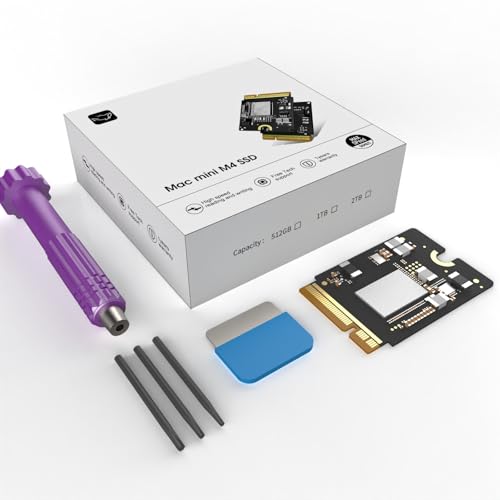
1. CHGRNLF Macmini M4 SSD Hard Disk 2TB

This 2TB internal SSD from CHGRNLF aims to offer a direct, high-capacity upgrade for users looking to boost their Mac mini M4’s storage. With impressive read/write speeds, it promises to cut down on wait times, making it ideal for anyone dealing with large files, media editing, or demanding applications. The focus here is on seamless integration and reliable performance, designed specifically with the Mac mini M4 in mind to provide an enhanced storage solution.
-
Key Features:
- Designed for perfect compatibility with Mac mini M4
- Ultra-fast read/write speeds up to 3300 MB/s
- Expands storage capacity to 2TB
- Superior stability, tested over a 1-month period
- Thoroughly tested for quality and performance
-
Pros:
- High capacity (2TB)
- Very fast speeds for an internal drive
- Specifically designed for Mac mini M4 compatibility (as stated by manufacturer)
- Cost-effective way to increase internal storage
- Promises long-term stability and reliability
-
Cons:
- Modern Mac mini models (especially M4) generally have soldered SSDs, making user-serviceable internal upgrades difficult or impossible without specialized tools and voiding warranty.
- “Easy installation” for an internal Mac mini drive can be misleading for most users.
- Less brand recognition compared to Sabrent.
-
User Impressions: Users considering this product appreciate the promised internal integration and speed boost. However, it’s crucial for buyers to understand the complexities of internal Mac mini upgrades for modern models. This type of drive is likely best suited for those with advanced technical skills or specific older Mac mini models where internal upgrades are more feasible, or if it’s meant for a specialized external enclosure designed for “internal-like” performance.
2. SABRENT Rocket Q4 2230 NVMe SSD 2TB – PCIe Gen4

When it comes to high-performance, compact storage, the Sabrent best ssd drive for mac mini category often leads with options like the Rocket Q4 2230. While primarily designed for devices like the Steam Deck or ASUS ROG Ally due to its M.2 2230 form factor, this powerful 2TB NVMe SSD can absolutely be a phenomenal choice for your Mac mini when paired with a compatible external enclosure. It leverages PCIe Gen4 technology to deliver blazing-fast speeds, making it perfect for gamers, content creators, or anyone needing rapid access to large files. Its massive capacity means you won’t need to constantly juggle external drives or microSD cards.
-
Key Features:
- Compact M.2 2230 form factor, ideal for external enclosures with Mac mini
- Powerful PCIe Gen4 performance with up to 5GB/s read speeds
- Massive 2TB capacity using high-speed QLC flash
- Efficient DRAM-less design with Host Memory Buffer (HMB) for low power draw
- Includes Sabrent Acronis cloning software for easy data migration
-
Pros:
- Exceptional speed (5GB/s) for ultra-fast data transfers
- Huge 2TB capacity in a small footprint
- Sabrent’s renowned reliability and quality
- Excellent thermal behavior
- Versatile for various applications when used with an enclosure
-
Cons:
- Requires an external enclosure to be used with most modern Mac mini models (since it’s a bare NVMe drive).
- Full Gen4 speeds depend on the enclosure and Mac mini’s Thunderbolt/USB-C port capabilities.
- 2230 size means specific enclosures might be needed if you prefer a tiny form factor.
-
User Impressions: Users love the raw speed and compact size of the Sabrent Rocket Q4. When placed in a quality Thunderbolt 3/4 or fast USB-C enclosure, it transforms into an incredibly powerful external Sabrent best ssd drive for mac mini solution, delivering performance that rivals or even exceeds many internal drives. It’s highly recommended for those who want a premium, portable, and lightning-fast external storage.
3. Zinweyton M4 Macmini SSD 1TB, Hard Disk Storage Upgrade

The Zinweyton M4 Macmini SSD offers a 1TB internal storage expansion, aiming for perfect compatibility and easy installation for the Mac mini M4. With read/write speeds up to 3300 MB/s, it promises a significant performance boost for everyday tasks, application launches, and file transfers. Much like the CHGRNLF, this drive positions itself as a direct internal upgrade, providing a cost-effective way to get more space and speed without relying on external devices.
-
Key Features:
- Perfect compatibility with Mac mini M4 for easy installation
- Reliability and stability tested over a 1-month period
- Expands storage capacity to 1TB
- High-speed performance with read/write speeds up to 3300 MB/s
-
Pros:
- Solid 1TB capacity
- Fast read/write speeds for an internal solution
- Designed for Mac mini M4 (manufacturer claim)
- Promises stable and reliable performance
-
Cons:
- Same caveat as CHGRNLF: internal upgrades on modern Mac minis are typically not user-serviceable.
- Less well-known brand, which can sometimes raise questions about long-term support.
- “Easy installation” for an internal drive needs to be critically assessed by the user’s technical skill level.
-
User Impressions: Users interested in the Zinweyton M4 SSD are looking for a straightforward capacity and speed boost. While the promise of internal integration is appealing, potential buyers should research the feasibility of installing such a drive in their specific Mac mini model. For most, an external solution will be significantly easier and safer, though this product does offer competitive speeds if an internal upgrade path is truly viable for their setup.
4. 40Gbps M.2 NVMe SSD Enclosure for Mac mini M4/M4 Pro

This isn’t an SSD itself, but it’s arguably one of the best SSD drive for Mac mini solutions available, especially for modern M4/M4 Pro models. This sleek 40Gbps M.2 NVMe SSD enclosure from NewQ allows you to effortlessly expand your storage capacity without costly internal upgrades or warranty worries. It’s designed to snap on seamlessly, matching your Mac mini’s iconic design, and utilizes Thunderbolt 4 to deliver incredible speeds up to 3000MB/s (with a Gen 4×4 NVMe SSD inside). This enclosure is perfect for professionals handling 4K/8K video editing or massive AI models, offering internal-level performance in an elegant, external package. Pair this with a high-performance Sabrent NVMe SSD for optimal results.
-
Key Features:
- Specifically designed for Mac mini M4/M4 Pro, with snap-on installation
- 40Gbps Thunderbolt 4 connectivity for speeds up to 3000MB/s
- Supports multiple M.2 NVMe SSD sizes (2230, 2242, 2260, 2280)
- Reliable stability, rigorously tested
- Accessible power button groove structure
- No complex disassembly or warranty voiding
-
Pros:
- Eliminates the need for risky internal upgrades for modern Mac minis.
- Seamless aesthetic integration with the Mac mini.
- Blazing-fast speeds via Thunderbolt 4, effectively creating an “internal-like” experience externally.
- Tool-free installation for the enclosure itself.
- Supports a wide range of NVMe SSDs, including Sabrent Rocket drives.
- Highly stable and reliable.
-
Cons:
- Requires a separate purchase of an M.2 NVMe SSD (e.g., a Sabrent Rocket Q4 or Rocket 4 Plus).
- Achieving maximum speeds requires a Gen 4×4 M-Key NVMe SSD.
- Adds a slight physical footprint to your Mac mini.
-
User Impressions: This enclosure is a game-changer for Mac mini M4/M4 Pro owners. Users rave about its design, ease of use, and the incredible performance it unlocks. By allowing users to choose their own high-speed NVMe SSD (like a Sabrent best ssd drive for mac mini option), it offers a flexible, powerful, and aesthetically pleasing storage upgrade solution without any of the typical Mac mini upgrade hassles.
5. SABRENT USB-C Lay Flat Docking Station – NVMe M.2 + 2.5”/3.5” SATA

For ultimate versatility and convenience, the Sabrent USB-C Lay Flat Docking Station is an indispensable tool for any Mac mini user. This isn’t just an SSD enclosure; it’s a powerhouse that supports both M.2 PCIe NVMe SSDs (including various sizes like 2242, 2260, 2280) and larger 2.5″/3.5″ SATA SSDs or HDDs. Equipped with a 10Gbps USB 3.2 Gen 2 Type-C port, it ensures fast data transfers for backups, upgrades, or simply accessing media. Its tool-free design and smart offline cloning function make it incredibly user-friendly, allowing you to swap drives and copy data without needing a PC. This is a robust solution for managing multiple drives, including any Sabrent best ssd drive for mac mini you might acquire.
-
Key Features:
- Dual format support: M.2 PCIe NVMe and 2.5″/3.5″ SATA drives
- 10Gbps high-speed USB-C for fast data transfers
- Tool-free installation with a secure hinged lid
- Smart offline cloning function (PC-free)
- Cross-platform ready (Windows, macOS, Linux)
- Powered via included 12V adapter for stable performance
-
Pros:
- Exceptional versatility for various drive types and sizes.
- Fast 10Gbps USB-C connectivity.
- Extremely easy to use with tool-free design.
- Offline cloning is a major time-saver for backups and upgrades.
- Reliable and stable performance, characteristic of Sabrent products.
- Perfect for IT professionals, content creators, or anyone needing to manage multiple drives.
-
Cons:
- Not as compact or aesthetically integrated as the specific Mac mini enclosure.
- 10Gbps is fast, but not as blazing as 40Gbps Thunderbolt.
- Requires a power adapter, adding to cable clutter.
-
User Impressions: The Sabrent Lay Flat Docking Station is highly praised for its utility and ease of use. Users appreciate its ability to handle almost any drive they throw at it, making backups, data recovery, and drive cloning incredibly straightforward. While not an “internal” solution, it’s a fantastic complementary accessory that enhances the functionality of your Mac mini by providing a flexible and robust external storage management hub. It’s an excellent choice if you frequently work with various drives and need a reliable, high-speed solution from Sabrent.
FAQ Section
Q1: Can I upgrade the internal SSD in my modern Mac mini (M1, M2, M4 models)?
A1: Unfortunately, for most modern Mac mini models (M1, M2, M4 series), the internal SSD is soldered directly onto the logic board. This means it is generally not user-upgradable without highly specialized (and often warranty-voiding) work. For most users, external SSD solutions are the practical and recommended way to expand storage.
Q2: What’s the difference between NVMe and SATA SSDs for Mac mini?
A2: NVMe (Non-Volatile Memory Express) SSDs use the PCIe interface, offering significantly faster read/write speeds (often thousands of MB/s) compared to SATA (Serial Advanced Technology Attachment) SSDs (which typically max out around 500-600 MB/s). For demanding tasks like video editing, large file transfers, or running virtual machines, NVMe SSDs provide a noticeable performance advantage.
Q3: Why choose an external SSD for Mac mini?
A3: External SSDs are a popular choice for Mac mini users because they are easy to install (plug-and-play), don’t void your warranty, are portable, and often offer excellent performance, especially when using a Thunderbolt 3/4 or fast USB-C connection. They provide a flexible way to expand storage without the limitations of internal upgrades.
Q4: Is Sabrent a good brand for Mac mini SSDs and accessories?
A4: Yes, Sabrent is widely regarded as a reliable and high-quality brand for SSDs, enclosures, and docking stations. They are known for offering competitive performance and durable products, making them a popular choice among Mac users looking for robust storage solutions. Many consider a Sabrent best ssd drive for mac mini option to be a solid investment.
Q5: What capacity SSD do I need for my Mac mini?
A5: The ideal capacity depends on your usage.
* 500GB-1TB: Good for general use, documents, photos, and a moderate software library.
* 2TB-4TB: Recommended for video editors, graphic designers, gamers, or anyone with large media collections and extensive software.
* 8TB+: For professional content creators, large data archives, or users who need vast amounts of storage for specialized tasks.
Consider your current needs and potential future growth.
Q6: How do I connect an external SSD to my Mac mini for the best performance?
A6: For the best performance, use an external SSD enclosure that supports Thunderbolt 3 or Thunderbolt 4, or at least USB 3.2 Gen 2 (10Gbps). Connect it to the corresponding Thunderbolt/USB-C port on your Mac mini using a high-quality cable. Ensure your SSD inside the enclosure is an NVMe drive for maximum speed.
Q7: Can I boot macOS from an external SSD connected to my Mac mini?
A7: Yes, you can absolutely install macOS on an external SSD and boot your Mac mini from it. This is a common and effective way to improve performance, especially if your internal storage is slower or nearly full. Make sure your external SSD and enclosure are fast enough (NVMe via Thunderbolt or USB 3.2 Gen 2 at least) for a smooth experience.