
Is your laptop feeling sluggish? Are you tired of slow boot times, lagging applications, and endless loading screens? It might be time for an upgrade, and few upgrades offer a more dramatic performance boost than a solid-state drive (SSD). When it comes to reliable, high-performance storage solutions, Sabrent has carved out a reputation for delivering quality and speed. In this guide, we’ll dive into some of the Sabrent best SSD drives for laptops, helping you find the perfect one to revitalize your machine and unleash its full potential.
Whether you’re a gamer, a creative professional, or just someone who needs their laptop to keep up with everyday tasks, upgrading to a Sabrent SSD can make a world of difference. We’ve hand-picked five top options, ranging from blazing-fast internal NVMe drives to versatile external solutions, ensuring there’s something for every need and budget.
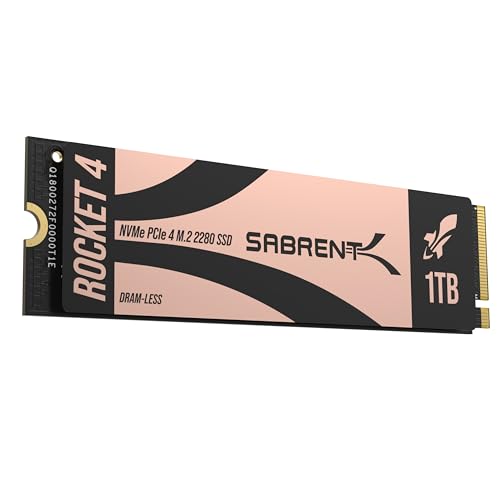
1. SABRENT Rocket 4 1TB NVMe SSD PCIe Gen4 M.2 2280

The Sabrent Rocket 4 1TB NVMe SSD is an absolute game-changer for laptops that support PCIe Gen4. This drive isn’t just fast; it’s blazing fast, designed to cut down load times, transfer huge files in a blink, and ensure your system feels incredibly responsive. If your laptop has an M.2 slot and you’re looking for a serious performance boost for gaming, video editing, or heavy multitasking, this 1TB internal SSD is an excellent choice. It’s engineered for efficiency, meaning you get top-tier speed without excessive heat, which is crucial for the confined spaces inside a laptop.
Key Features:
* Blazing Gen4 Speed: Experience PCIe 4.0 NVMe performance with up to 7450MB/s read and 6100MB/s write speeds.
* High IOPS, Efficient Design: Delivers up to 850K/800K random IOPS while maintaining low heat and power draw.
* Broad System Compatibility: Single-sided M.2 2280 form factor ensures wide compatibility across desktops, laptops, and PS5 systems.
* Made for Pros and Gamers: Ideal for high-performance systems and demanding workloads.
* Trusted Sabrent Support: Engineered with premium hardware and supports Windows, macOS, and Linux.
Pros:
* Exceptional read/write speeds significantly reduce load times.
* Optimized for low power consumption and heat, ideal for laptops.
* 1TB capacity offers ample storage for games and applications.
* Single-sided design increases compatibility with slimmer laptops.
Cons:
* Requires a laptop with a PCIe Gen4 compatible M.2 slot to achieve full speeds.
* Higher price point compared to SATA SSDs.
User Impressions:
Users consistently praise the Rocket 4 1TB for its incredible speed, noting significant improvements in boot times and application loading. Many appreciate its ability to run cool even under heavy loads, a vital factor for laptop users concerned about thermal throttling. It’s often highlighted as a top-tier choice for serious gamers and content creators.
2. SABRENT 2.5 Inch SATA to USB 3.0 Tool Free External Enclosure

While not an SSD itself, this Sabrent external enclosure is a fantastic accessory for laptop users looking to repurpose an old 2.5-inch SATA SSD or HDD, or to easily connect one for external storage. Its tool-free design makes it incredibly simple to swap drives, turning any standard 2.5-inch drive into a portable USB 3.0 storage solution. This is perfect for backing up your laptop’s data, creating a bootable drive, or simply expanding your storage capacity without opening your laptop. It’s a great way to make use of existing drives or build your own custom external SSD.
Key Features:
* Tool free design, easy to install.
* Transfer Rates Up to 480 Mbps when connected to a USB 2.0 port, up to 5 Gbps with USB 3.0.
* Suitable for 2.5” SATA/SSD; Supports Standard Notebook 2.5″ SATA and SATA II Hard drives.
* Optimized for SSD, Supports UASP SATA III.
* Backwards-Compatible with USB 2.0 or 1.1, Hot-swappable, plug and play, no drivers needed.
* Supported Operating Systems: Mac, Windows (7, 8, Vista, XP), Mac OS X and Higher.
Pros:
* Extremely easy to assemble with its tool-free design.
* Transforms old laptop drives into useful external storage.
* Supports UASP for faster speeds with compatible SSDs.
* Highly portable and plug-and-play compatible.
Cons:
* Performance is limited by the speed of the internal SATA drive and the USB interface.
* Does not come with an SSD included.
User Impressions:
Customers love this enclosure for its simplicity and reliability. They frequently mention how easy it is to slide in a drive and how well it performs for data backups and portable storage. Its robust build and consistent transfer speeds are often praised, making it a go-to for many who need flexible external storage.
3. SABRENT 1TB Rocket Nano V2 External SSD – USB 3.2

For those needing robust and incredibly fast external storage for their laptop, the Sabrent 1TB Rocket Nano V2 is a stellar choice. This isn’t just any portable drive; it’s a powerhouse designed for professionals on the go, whether you’re editing 8K video, managing massive photo libraries, or simply need ultra-fast backups. Its rugged design, combined with blistering USB 3.2 speeds, makes it an ideal companion for content creators, photographers, and anyone who demands performance and durability from their portable storage. The included dual cables ensure it’s ready for any laptop, new or old.
Key Features:
* Unrivaled Speed Performance: Reach sustained transfer speeds of over 1500 MB/s—ideal for real-time 8K video recording, ultra-fast backups, and editing high-bitrate content directly from the drive.
* Rugged Yet Refined Design: Anodized aluminum housing and shock-absorbing silicone sleeve provide top-tier protection against drops, dust, and debris.
* Ready for Anything: Store up to 1TB of your most important footage, images, and files in a compact, travel-friendly design.
* Dual-Cable Convenience: Includes USB-C to USB-C and USB-C to USB-A cables for full compatibility.
* Engineered for Longevity: High-endurance NAND flash with advanced wear leveling and real-time health monitoring.
Pros:
* Exceptional transfer speeds make it ideal for demanding tasks like video editing.
* Extremely durable and portable, perfect for travel.
* Comes with both USB-C and USB-A cables for broad compatibility.
* Compact design fits easily in a pocket or bag.
Cons:
* Higher price point than traditional external HDDs.
* Maximum speeds require a USB 3.2 Gen 2×2 compatible port (though still fast on lesser ports).
User Impressions:
Reviewers are consistently impressed by the Rocket Nano V2’s raw speed and build quality. Many highlight its ability to handle large video files and high-resolution photos without breaking a sweat, making it a favorite among creatives. Its sturdy, compact design also receives high marks for portability and peace of mind on the go.
4. SABRENT Rocket 4 2TB NVMe SSD PCIe Gen4 M.2 2280

Stepping up the capacity game, the Sabrent Rocket 4 2TB NVMe SSD offers the same incredible PCIe Gen4 speeds as its 1TB sibling but with double the storage. This is particularly appealing for laptop users who juggle a vast game library, extensive media projects, or multiple virtual machines. Imagine having an entire collection of AAA games, a large video editing cache, and all your essential software loading almost instantly. The 2TB model provides that freedom without compromising on performance, making it one of the Sabrent best SSD drives for laptops that demand both speed and space. Its robust design ensures sustained performance even under heavy loads.
Key Features:
* Next-Gen Gen4 Performance: Reach up to 7450MB/s read and 6400MB/s write speeds with PCIe 4.0 NVMe.
* High IOPS, Low Heat: Get up to 1000K/950K random IOPS with minimal thermal output.
* Universal Compatibility: Compatible with desktops, laptops, and PS5. Single-sided M.2 2280 design fits compact systems.
* Power for Pros and Gamers: Delivers fast, reliable storage for intensive applications.
* Sabrent Quality and Support: Built with premium components and broad OS support.
Pros:
* Massive 2TB capacity for extensive game libraries and large files.
* Identical blazing Gen4 speeds as the 1TB model.
* Excellent for intensive applications and multitasking.
* Single-sided M.2 design ensures broad laptop compatibility.
Cons:
* Requires a PCIe Gen4 compatible M.2 slot in your laptop for peak performance.
* Higher investment compared to smaller capacity drives.
User Impressions:
Gamers and content creators frequently laud the 2TB Rocket 4 for its impressive blend of speed and generous storage. Users appreciate not having to constantly manage space, especially with ever-growing game sizes and media files. The consistent performance even when the drive is nearly full is a commonly highlighted benefit.
5. SABRENT Rocket 4 4TB NVMe SSD PCIe Gen4 M.2 2280

For the ultimate laptop power user, the Sabrent Rocket 4 4TB NVMe SSD is the pinnacle of internal storage. If you refuse to compromise on either speed or capacity, this drive is for you. Imagine fitting literally hundreds of games, terabytes of 4K video footage, or an entire suite of professional applications onto a single, lightning-fast internal drive. This 4TB monster offers the same phenomenal PCIe Gen4 speeds as its smaller siblings but provides virtually limitless space for even the most demanding workflows on your laptop. It’s engineered for peak performance and stability, ensuring your laptop can handle anything you throw at it.
Key Features:
* Massive Gen4 Performance: Unlock up to 7450MB/s read and 6400MB/s write speeds with PCIe 4.0 NVMe.
* Built for Speed and Stability: Achieve up to 1000K/950K random IOPS with consistent low-heat output.
* Broad Compatibility: Slim, single-sided M.2 2280 design works flawlessly in desktops, laptops, and PS5 systems.
* For Demanding Users: Ideal for gamers, media editors, engineers, and power users needing high capacity and top-tier performance.
* Sabrent Reliability & Support: Made with premium hardware and OS compatibility across Windows, macOS, and Linux.
Pros:
* Unrivaled 4TB capacity in an M.2 NVMe form factor.
* Top-tier PCIe Gen4 speeds for the fastest possible laptop experience.
* Perfect for professionals with enormous datasets or extensive game libraries.
* Designed for consistent performance under heavy, prolonged use.
Cons:
* Significant investment, making it suitable for users with specific high-capacity needs.
* Requires a high-end laptop with a PCIe Gen4 M.2 slot.
User Impressions:
Power users and professionals consider the 4TB Rocket 4 a dream come true. They rave about the freedom of having such vast, ultra-fast storage, eliminating the need for external drives or constant file management. The drive’s ability to maintain peak performance even when handling incredibly large files or multiple demanding applications simultaneously is a standout feature.
Frequently Asked Questions (FAQ)
Q1: What’s the main difference between NVMe and SATA SSDs for laptops?
A1: NVMe (Non-Volatile Memory Express) SSDs, especially PCIe Gen4, are significantly faster than SATA (Serial Advanced Technology Attachment) SSDs. NVMe drives connect directly to the CPU via PCIe lanes, offering much higher bandwidth (e.g., up to 7000+ MB/s for Gen4) compared to SATA’s theoretical limit of 600 MB/s. This means faster boot times, quicker application loading, and much faster file transfers for NVMe drives.
Q2: Will a Sabrent NVMe SSD work in my laptop?
A2: It depends on your laptop’s specifications. Most modern laptops (especially those from the last 5-7 years) have an M.2 slot that supports NVMe SSDs. However, some older laptops might only support SATA M.2 drives, or might not have an M.2 slot at all. You’ll need to check your laptop’s manual or manufacturer’s website to confirm compatibility, especially for PCIe Gen4 NVMe drives, as older laptops might only support Gen3.
Q3: How do I know if my laptop supports PCIe Gen4 NVMe speeds?
A3: To fully utilize PCIe Gen4 speeds, your laptop’s CPU and motherboard chipset must support PCIe 4.0. Laptops with Intel 11th Gen (Tiger Lake) or newer, or AMD Ryzen 3000 series (Zen 2) or newer CPUs typically support PCIe Gen4. Check your laptop’s CPU and motherboard specifications to be sure. Even if your laptop only supports Gen3, a Gen4 NVMe SSD will still work, but at Gen3 speeds.
Q4: Is it difficult to install an internal Sabrent SSD in a laptop?
A4: Installing an M.2 NVMe SSD in a laptop typically involves opening the laptop’s back panel, locating the M.2 slot, inserting the drive at an angle, and securing it with a screw. While it’s generally straightforward, it requires some basic technical comfort and the right tools. If you’re unsure, it’s always best to consult your laptop’s manual or seek professional assistance.
Q5: Why should I choose a Sabrent SSD over other brands?
A5: Sabrent has built a reputation for offering high-performance, reliable SSDs at competitive price points. They often use high-quality NAND flash and controllers, provide excellent firmware support, and are known for pushing the boundaries of speed, especially with their Rocket series. Many users appreciate their focus on robust, no-frills performance.
Q6: Can I use an external Sabrent SSD (like the Rocket Nano V2) for gaming or running applications?
A6: Yes, absolutely! High-speed external SSDs like the Sabrent Rocket Nano V2, with its USB 3.2 speeds, are excellent for gaming directly from the drive or running applications. They offer significantly faster load times than traditional external hard drives. This is especially useful for laptops with limited internal storage or for carrying your games/applications between different machines.
Q7: What are LSI keywords and how do they help with SEO?
A7: LSI (Latent Semantic Indexing) keywords are words and phrases that are semantically related to your main topic, even if they aren’t direct synonyms. For “Sabrent best SSD drives for laptops,” LSI keywords might include “laptop storage upgrade,” “NVMe M.2 performance,” “fast boot times,” “gaming laptop SSD,” “portable storage solution,” etc. Using them naturally helps search engines understand the full context and relevance of your article, improving its ranking for a broader range of related searches.
Upgrading your laptop’s storage with one of the Sabrent best SSD drives for laptops is one of the most impactful changes you can make to its overall performance. Whether you opt for the blistering speed of an internal Rocket 4 NVMe or the rugged portability of the Rocket Nano V2, Sabrent offers a solution that combines cutting-edge technology with reliable performance. Say goodbye to frustrating delays and hello to a faster, more responsive computing experience!