
Hey there, Xbox Series S gamers! Are you constantly running into that “storage full” message? You’re not alone. The Xbox Series S is an incredible little console, but its 512GB internal SSD fills up surprisingly fast, especially with today’s massive game files. To keep your gaming marathon going without constantly uninstalling and reinstalling games, an external SSD is practically a must-have.
But which one should you choose? Many folks are searching for the Sabrent best external SSD for Xbox Series S, wondering if Sabrent offers the ultimate solution. While Sabrent makes fantastic storage, there’s a crucial distinction when it comes to playing optimized Xbox Series X|S games. In this article, we’re going to dive deep into the top 5 external SSD options, including a look at Sabrent’s offering, to help you find the perfect storage upgrade for your console. We’ll break down what makes each one stand out, their pros and cons, and real-world user impressions, so you can make an informed decision and get back to gaming!
Understanding Xbox Series S Storage Needs
Before we jump into the reviews, let’s quickly clarify how external storage works with the Xbox Series S. For games specifically optimized for Series X|S (those with the X|S logo), you must run them from either the internal SSD or an officially licensed Xbox Storage Expansion Card. These expansion cards plug directly into a dedicated slot on the back of your console and leverage the Xbox Velocity Architecture for blazing-fast load times and seamless next-gen performance.
Regular external SSDs (like many from Sabrent) are excellent for storing older Xbox One, Xbox 360, and original Xbox games, or for archiving Series X|S games. You can play older titles directly from them, but to play Series X|S optimized games stored on a regular external SSD, you’ll need to transfer them back to your console’s internal drive or an expansion card first. This is a critical point when considering the “best external SSD for Xbox Series S.”
Now, let’s explore our top picks!
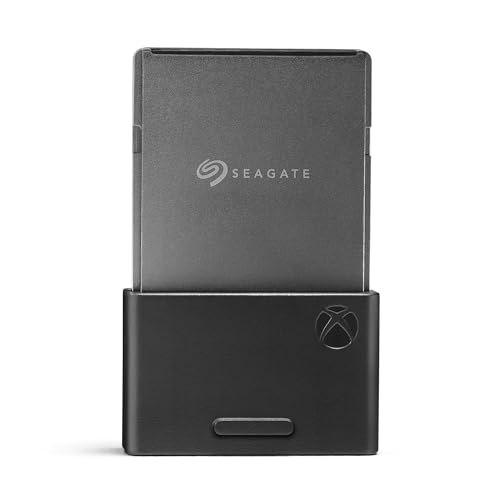
1. Seagate Storage Expansion Card 2TB Solid State Drive

If you’re looking for a seamless, no-compromise experience for your Xbox Series S, this 2TB expansion card from Seagate is a fantastic choice. Designed in direct partnership with Xbox, it integrates perfectly with your console’s Velocity Architecture, meaning you can play all your Xbox Series X|S optimized games directly from it without any performance hit. It’s essentially like adding more internal storage, making it a truly ‘plug-and-play’ dream for serious gamers.
-
Key Features:
- Designed in partnership with Xbox for seamless Xbox Series X|S game play.
- Matches console’s internal SSD performance for all games (Original Xbox, Xbox 360, Xbox One, Series X|S).
- Officially licensed using Xbox Velocity Architecture for faster load times and immersive gameplay.
- Supports Quick Resume, allowing switches between multiple titles in seconds.
- Includes a 3-year limited warranty for peace of mind.
-
Pros:
- Full compatibility with all Xbox Series X|S optimized games.
- Identical performance to the internal SSD.
- Easy plug-and-play installation.
- Reliable and officially licensed by Xbox.
- Generous 2TB capacity.
-
Cons:
- Higher price point compared to standard external SSDs.
- Proprietary design means it only works with the Xbox expansion slot.
-
User Impressions: Gamers rave about how effortlessly this card expands their playable library. They love the peace of mind knowing all their games, new and old, will run flawlessly. Many consider it an essential upgrade, despite the cost, for its sheer convenience and performance.
2. Seagate Storage Expansion Card for Xbox Series X|S 1 TB
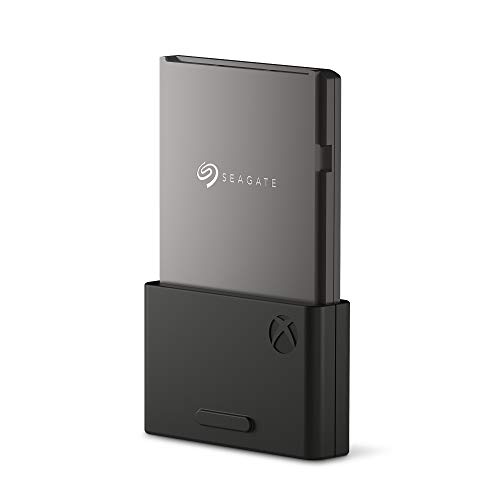
For those who need to expand their Xbox Series S game library but are looking for a slightly more budget-friendly option than the 2TB version, this 1TB Seagate Expansion Card hits a sweet spot. You still get all the incredible benefits of official Xbox partnership and Velocity Architecture integration, ensuring every Xbox Series X|S game plays flawlessly. It’s perfect if you manage your game library a bit more, or if you simply don’t need a massive amount of extra space right away.
-
Key Features:
- Designed in partnership with Xbox for seamless Xbox Series X|S game play.
- Matches console’s internal SSD performance for all games (Original Xbox, Xbox 360, Xbox One, Series X|S).
- Officially licensed using Xbox Velocity Architecture for faster load times and immersive gameplay.
- Supports Quick Resume, allowing switches between multiple titles in seconds.
- Includes a 3-year limited warranty for peace of mind.
-
Pros:
- Full compatibility with all Xbox Series X|S optimized games.
- Identical performance to the internal SSD.
- Easy plug-and-play installation.
- Reliable and officially licensed by Xbox.
- More affordable than higher capacity expansion cards.
-
Cons:
- Still pricier than non-proprietary external SSDs.
- 1TB might still feel limiting for very large game libraries over time.
-
User Impressions: Users appreciate the 1TB card for offering the full next-gen experience without breaking the bank quite as much as the 2TB or 4TB models. It’s a popular choice for new Series S owners looking for their first storage upgrade.
3. WD_Black 1TB C50 Storage Expansion Card, Officially Licensed

Western Digital, a long-time leader in storage, brings its own officially licensed expansion card to the Xbox Series S party with the WD_Black C50. This 1TB card offers the same incredible performance as your console’s internal storage, thanks to its integration with the Xbox Velocity Architecture. What really stands out is its slick, industrial design that perfectly complements the Xbox console aesthetic, making it not just functional but also a cool-looking piece of tech.
-
Key Features:
- Leverages Xbox Velocity Architecture for identical performance to internal storage.
- 1TB capacity lets you keep more top titles installed and ready to go.
- Officially licensed and plug-and-play with your Xbox Series X|S for hassle-free setup.
- Features a slick, industrial aesthetic that fits perfectly with your Xbox.
- Allows keeping Xbox Series X|S games ready to play directly from the card.
-
Pros:
- Full next-gen game compatibility and performance.
- Plug-and-play simplicity.
- Stylish, robust design.
- Reputable brand with a strong gaming focus (WD_Black).
-
Cons:
- Proprietary form factor means higher cost per GB.
- Only 1TB capacity available in this particular model for review.
-
User Impressions: Gamers love the WD_Black C50 for its seamless performance and cool design. Many find it a worthy alternative to the Seagate cards, appreciating WD_Black’s reputation for reliable, high-performance gaming storage. It’s a solid choice if you want guaranteed performance and a bit of extra style.
4. SABRENT Rocket XTRM Plus 2TB Thunderbolt 3 Portable SSD

Now, let’s address the elephant in the room regarding the Sabrent best external SSD for Xbox Series S. The Sabrent Rocket XTRM Plus is an absolute beast of a portable SSD. With incredible speeds up to 2,700 MB/s via Thunderbolt 3, it’s a phenomenal device for content creators, professionals, or anyone needing ultra-fast storage on the go for PC, Mac, or even as a versatile external drive for older Xbox games. Its rugged, aluminum design and included protective sleeve mean it’s built to last.
However, and this is crucial for Xbox Series S owners: you cannot play Xbox Series X|S optimized games directly from this drive. You can store them here, but you’ll have to transfer them to your internal SSD or an official expansion card to play. It will let you play Xbox One, Xbox 360, and original Xbox games directly, and its speed will ensure those titles load incredibly fast. So, while it’s not the best external SSD for Xbox Series S if your primary goal is playing next-gen titles directly, it’s fantastic for general storage, backups, and older-gen games.
-
Key Features:
- Upgraded Thunderbolt 3 portable SSD with a sleek, durable design.
- Flexible high-speed performance: up to 2,700 MB/s (TB3) or 900 MB/s (USB 3.2 Gen 2×1).
- Built with an aluminum shell for ruggedness and improved heat dissipation, plus a removable silicone sleeve.
- Complete package includes premium Thunderbolt 3 and USB-A to USB-C cables.
- Universal compatibility with Windows, macOS, Linux, and other devices.
-
Pros:
- Extremely fast for general data transfer and PC/Mac use.
- Durable and portable design with excellent build quality.
- Versatile connectivity (Thunderbolt 3 and USB).
- Excellent for storing older Xbox games and media.
- Can act as an archive for Series X|S games.
-
Cons:
- Cannot play Xbox Series X|S optimized games directly from it.
- Higher price tag due to Thunderbolt 3 capabilities, which are overkill for standard Xbox use.
- Requires transferring Series X|S games to internal storage or expansion card for play.
-
User Impressions: Users praise its blazing speed and robust build for professional tasks and general data storage. Xbox users who understand its limitations find it perfect for storing their extensive backlog of Xbox One and older titles, freeing up internal space for Series X|S games. It’s a premium drive, but its value proposition changes significantly depending on your specific Xbox Series S use case.
5. Seagate Storage Expansion Card for Xbox Series X|S 4TB
For the ultimate game hoarder, the Seagate Storage Expansion Card 4TB is a dream come true. This is the largest capacity expansion card available, designed specifically to tackle the ever-growing size of modern game libraries. If you despise deleting games and want to have virtually your entire collection—spanning four generations of Xbox—ready to play at a moment’s notice, this is your solution. It offers the same unparalleled performance and seamless integration as its smaller siblings, just with an epic amount of space.
-
Key Features:
- Designed in partnership with Xbox for seamless Xbox Series X|S game play.
- The only 4TB expansion card and highest capacity available, maximizing Xbox Series X|S storage.
- Collect thousands of games across four generations without sacrificing performance.
- Officially licensed using Xbox Velocity Architecture for faster load times and immersive gameplay.
- Supports Quick Resume, allowing switches between multiple titles in seconds.
- Includes a 3-year limited warranty for peace of mind.
-
Pros:
- Massive 4TB capacity – ideal for huge game libraries.
- Full compatibility and identical performance for all Xbox Series X|S optimized games.
- Seamless integration with Xbox Velocity Architecture.
- Official Xbox licensing ensures reliability and support.
- Supports Quick Resume.
-
Cons:
- Very high price point, representing a significant investment.
- Proprietary format.
-
User Impressions: This card is universally loved by those who invest in it. Users report never having to worry about storage again, enjoying the freedom to download new games without a second thought. It’s considered the premium, no-compromise solution for serious Xbox gamers.
Conclusion: Finding Your Best Xbox Series S External SSD
So, what’s the Sabrent best external SSD for Xbox Series S? If your main goal is to seamlessly play Xbox Series X|S optimized games directly from external storage, then an officially licensed expansion card from Seagate or WD_Black is undeniably the best choice. These cards leverage the Xbox Velocity Architecture to deliver identical performance to your console’s internal SSD.
However, if you have a massive library of older Xbox One, Xbox 360, or original Xbox games, or you want a super-fast external drive primarily for PC/Mac use that can also store Series X|S games for archival purposes (requiring transfer back to internal storage to play), then a high-performance portable SSD like the Sabrent Rocket XTRM Plus could be an excellent, versatile option.
Ultimately, the “best” SSD for your Xbox Series S depends on your specific gaming habits, your budget, and whether you prioritize playing next-gen titles directly from external storage or simply need more space for older games and archiving. No matter your choice, expanding your storage will definitely enhance your Xbox Series S gaming experience!
FAQ Section
Q1: Can I use any external SSD with my Xbox Series S?
A1: Yes, you can use almost any external SSD with your Xbox Series S. However, there’s a crucial distinction: only officially licensed Storage Expansion Cards (like those from Seagate and WD_Black) can run Xbox Series X|S optimized games directly. Standard external SSDs can store these games, but you’ll need to transfer them to the console’s internal SSD or an expansion card to play them. They work perfectly for playing older Xbox One, Xbox 360, and original Xbox games directly.
Q2: What’s the difference between an external SSD and an expansion card for Xbox Series S?
A2: An external SSD connects via a USB port and is typically a universal storage device. It’s great for older games and archiving. An expansion card is a proprietary device that plugs into a dedicated expansion slot on the back of your Xbox Series S. It’s specifically designed to integrate with the Xbox Velocity Architecture, offering identical performance to the internal SSD and allowing direct play of all Xbox Series X|S optimized games.
Q3: Why are Xbox Series S expansion cards so expensive?
A3: The higher cost of expansion cards is due to their proprietary technology and specific design requirements. They need to perfectly match the speed and performance of the console’s internal NVMe SSD and integrate with the Xbox Velocity Architecture. This ensures seamless performance for next-gen games, which off-the-shelf external SSDs cannot provide.
Q4: How much storage do I really need for my Xbox Series S?
A4: It really depends on your gaming habits. The Xbox Series S has about 364GB of usable space. If you play a lot of large AAA titles, even 1TB can fill up quickly. Many find 1TB to 2TB to be a good balance. If you’re a serious collector or want to download every game that piques your interest, 4TB might be worth the investment.
Q5: Can I play Xbox Series S/X optimized games directly from a regular external SSD?
A5: No, unfortunately, you cannot. Xbox Series X|S optimized games require the ultra-fast data transfer speeds and specific architecture provided by the console’s internal SSD or an officially licensed expansion card. A regular external SSD can store these games, but you’ll need to move them to the internal drive or an expansion card to actually play them.
Q6: Is it worth getting an expansion card for my Xbox Series S?
A6: If you frequently play Xbox Series X|S optimized games and find yourself constantly deleting and re-downloading titles, then yes, an expansion card is absolutely worth it. It provides a truly seamless, “no-compromise” experience, allowing you to build a larger library of next-gen games ready to play instantly.
Q7: Does using an external SSD or expansion card affect Quick Resume?
A7: When using an official Storage Expansion Card, Quick Resume works exactly as it does with games on the internal SSD. You can switch between multiple titles in seconds, regardless of whether they are on the internal drive or the expansion card. For older Xbox One games stored on a regular external SSD, Quick Resume also typically works well.