
Tired of waiting ages for your computer to boot up or for applications to load? You’re not alone! In today’s fast-paced digital world, a slow storage drive can be a real bottleneck. That’s where Solid State Drives (SSDs) come into play, and specifically, the best 3D SSD technology, which has revolutionized how we store and access data. 3D NAND technology allows manufacturers to stack memory cells vertically, enabling higher capacities, better performance, and improved durability compared to older 2D NAND designs.
If you’re looking to give your desktop or laptop a serious speed injection, upgrading to a high-quality 3D SSD is one of the smartest moves you can make. It’s a true game-changer for everything from gaming to video editing to just everyday browsing. But with so many options out there, how do you pick the right one? Don’t sweat it! We’ve done the legwork for you, diving deep into some of the top contenders to help you find the best 3D SSD that fits your needs and budget. Let’s check them out!
Our Top Picks for the Best 3D SSDs
We’ve rounded up five fantastic options, ranging from budget-friendly upgrades to high-performance beasts. Each one leverages 3D NAND to give you a noticeable boost in speed and efficiency.
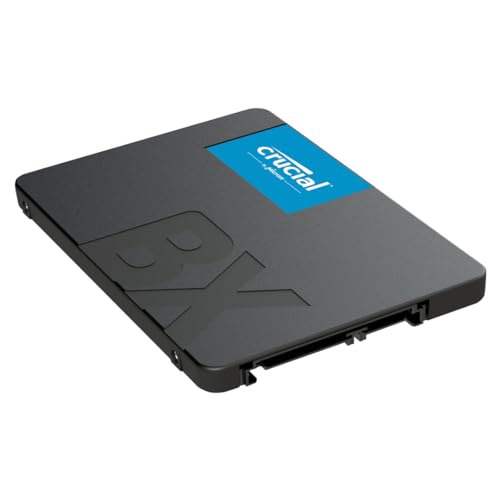
Crucial BX500 2TB 3D NAND SATA 2.5-Inch Internal SSD

The Crucial BX500 is a fantastic entry-point into the world of SSDs, offering incredible value and a significant upgrade over traditional hard drives. If you’re looking to breathe new life into an older laptop or desktop PC without breaking the bank, this 2.5-inch SATA drive is an absolute no-brainer. It focuses on delivering reliable, everyday performance, making your system feel much snappier right from boot-up.
Key Features:
– Boot up faster. Load files quicker. Improve overall system responsiveness.
– 300% faster than a typical hard drive.
– Improves battery life because it’s 45x more energy efficient than a typical hard drive.
– Micron 3D NAND – advancing the world’s memory and storage technology for 40 years.
– Crucial 3-year limited warranty.
Pros:
– Excellent value for money, especially for a 2TB capacity.
– Significant speed boost over traditional HDDs.
– Energy-efficient, leading to better laptop battery life.
– Easy installation for most 2.5-inch drive bays.
– Backed by Crucial’s reputable warranty.
Cons:
– SATA III interface limits maximum speeds compared to NVMe SSDs.
– Not the best choice for high-end gaming or professional workstations demanding cutting-edge performance.
User Impressions:
Users frequently praise the BX500 for its straightforward installation and the immediate, noticeable performance improvement it brings. Many consider it the perfect budget-friendly upgrade for older systems that were previously crawling along with an HDD. It’s often highlighted as a reliable workhorse for everyday computing.
Crucial P3 1TB PCIe Gen3 3D NAND NVMe M.2 SSD

Stepping up the performance ladder, the Crucial P3 is an NVMe SSD that offers a considerable leap in speed over SATA drives, all thanks to its PCIe Gen3 interface. If your motherboard has an M.2 slot and you want faster boot times, quicker game loads, and seamless handling of demanding applications without splurging on the absolute top-tier, the P3 is an excellent choice. It strikes a fantastic balance between performance and affordability.
Key Features:
– NVMe (PCIe Gen3 x4) technology with up to 3500MB/s sequential reads.
– Random read/write 650K/700K IOPS.
– Spacious storage up to 4TB (though this model is 1TB).
– Performs up to 33% better than the previous generation.
– Solid Gen3 performance.
– Rated at MTTF greater than 1.5 million hours for extended longevity and reliability.
Pros:
– Significantly faster than SATA SSDs for quicker operations.
– M.2 form factor saves space and simplifies cable management.
– Excellent longevity rating ensures long-term reliability.
– Good performance for its price point within the NVMe Gen3 category.
– Ideal for modern laptops and desktops with M.2 slots.
Cons:
– Still Gen3, so it won’t hit the extreme speeds of newer Gen4 drives.
– Requires an M.2 slot on your motherboard, which older systems might lack.
User Impressions:
Owners are consistently impressed by the speed and responsiveness of the Crucial P3. It’s frequently recommended for gamers and everyday users who want a substantial performance upgrade without breaking the bank. Installation is generally reported as simple, and users love the clean, cable-free setup.
Crucial P310 1TB 2280 PCIe Gen4 3D NAND NVMe M.2 SSD

Ready to truly push the boundaries of speed? The Crucial P310 takes things to the next level with PCIe Gen4 technology. This SSD is built for power users, content creators, and serious gamers who demand the absolute fastest data transfer speeds. If you have a Gen4 compatible system, this drive will unlock incredible performance, making everything from large file transfers to game loads feel instantaneous. It’s one of the best 3D SSD options for cutting-edge performance.
Key Features:
– SHIFT UP TO GEN4: Next-level Gen4 performance at up to 7,100MB/s — Speed up your bootups, file transfers, and game loads without compromising on quality.
– EXTEND LIFECYCLE AND STORAGE: Increase your device’s capacity and lifecycle to store more of what matters.
– FASTER GAMEPLAY AND BOOTUPS: Nearly 20% faster performance in bootups and gameplay.
– BETTER PRODUCTIVITY: Up to 20% faster performance in real world tasks compared to other Gen4 SSDs when booting Windows, starting applications like Adobe Photoshop and Illustrator, and working in applications like Microsoft Excel and PowerPoint.
– POWER EFFICIENCY: Provides up to 40% better performance-to-power ratio than our previous Gen4 SSD so you can get more done with the same battery life.
Pros:
– Blazing-fast Gen4 speeds dramatically reduce load times.
– Significant performance boost for gaming, professional applications, and large file handling.
– Improved power efficiency is great for laptops.
– Extends the overall lifecycle of your device.
– Future-proof for newer systems.
Cons:
– Requires a PCIe Gen4 compatible motherboard and CPU to achieve full speeds.
– More expensive than Gen3 or SATA alternatives.
– Overkill for basic computing needs.
User Impressions:
Customers who’ve upgraded to the P310 rave about its mind-blowing speed. Many note that their operating systems load in mere seconds and resource-intensive games launch almost instantly. It’s highly praised by tech enthusiasts and professionals for its high performance-to-power ratio and seamless integration into high-end builds.
PNY CS900 1TB 3D NAND 2.5″ SATA III Internal Solid State Drive

The PNY CS900 is another fantastic option for those seeking a reliable and cost-effective upgrade from a traditional hard drive. Like the Crucial BX500, it uses the widely compatible 2.5-inch SATA form factor, making it an easy swap for most laptops and desktops. PNY is known for producing solid, dependable storage, and the CS900 perfectly encapsulates that, offering a noticeable speed boost for everyday tasks without breaking the bank.
Key Features:
– Upgrade your laptop or desktop computer and feel the difference with super-fast OS boot times and application loads.
– Exceptional performance offering up to 535MB/s sequential Read and 515MB/s sequential Write speeds.
– Superior performance as compared to traditional hard drives (HDD).
– Ultra-low power consumption.
– Backwards compatible with SATA II 3GB/sec.
Pros:
– Very affordable way to get into SSD performance.
– Easy to install in almost any laptop or desktop with a 2.5-inch bay.
– Significant performance upgrade over HDDs.
– Low power consumption helps with energy bills and laptop battery life.
– Reliable brand reputation.
Cons:
– SATA speeds are much slower than NVMe alternatives.
– Not designed for high-performance computing or demanding workloads.
User Impressions:
Reviewers often highlight the PNY CS900 as a “great bang for your buck” drive. Users appreciate its ease of installation and the immediate performance improvement, especially for older systems. It’s a popular choice for budget builds or for simply extending the life of an aging PC, providing a smoother user experience.
SP 512GB SSD 3D NAND A55 SLC Cache Performance Boost

For users who need a compact, efficient, and budget-conscious SSD, the SP 512GB SSD 3D NAND A55 is a solid contender. Its 7mm slim design makes it particularly suitable for Ultrabooks and ultra-slim notebooks where space is at a premium. Despite its smaller capacity (512GB), the integration of SLC Cache technology helps to boost performance for common tasks, ensuring a responsive user experience.
Key Features:
– 3D NAND flash are applied to deliver high transfer speeds.
– Remarkable transfer speeds that enable faster bootup and improved overall system performance.
– The advanced SLC Cache Technology allows performance boost and longer lifespan.
– 7mm slim design suitable for Ultrabooks and Ultra-slim notebooks.
– Supports TRIM command, Garbage Collection technology, RAID, and ECC (Error Checking & Correction) to provide the optimized performance and enhanced reliability.
– 3-year limited warranty.
Pros:
– Very slim design, perfect for ultra-slim laptops.
– SLC Cache boosts performance for common tasks.
– Excellent value for its price and features.
– Supports advanced technologies for improved reliability and longevity.
– Decent warranty period.
Cons:
– 512GB capacity might be limiting for some users with large game libraries or media files.
– SATA III interface means it won’t compete with NVMe speeds.
User Impressions:
Many users choose the SP A55 for laptop upgrades due to its slim profile and affordable price. They often report a significant improvement in boot times and general system responsiveness, making their laptops feel like new. It’s praised as a reliable and cost-effective solution for everyday computing and light multitasking.
Final Thoughts on Choosing Your Best 3D SSD
Choosing the best 3D SSD for your setup really boils down to your specific needs and budget. If you’re on an older system and just want a quick, affordable upgrade, a SATA drive like the Crucial BX500 or PNY CS900 is an excellent choice. For modern systems that support it, an NVMe Gen3 drive like the Crucial P3 offers a fantastic balance of speed and value. And if you’re building a high-end gaming rig or a professional workstation, the blazing-fast speeds of a Gen4 NVMe SSD like the Crucial P310 are definitely worth the investment. No matter which you pick, you’re in for a significant performance boost!
Frequently Asked Questions (FAQ)
Q1: What is 3D NAND technology and why is it important for SSDs?
A1: 3D NAND (also known as Vertical NAND) is a type of flash memory that stacks memory cells vertically in multiple layers, rather than arranging them in a single plane. This allows for higher storage densities, increased capacities, improved performance, and better power efficiency compared to older 2D NAND (planar NAND) designs. It’s crucial for modern, high-capacity SSDs.
Q2: What’s the main difference between SATA SSDs and NVMe SSDs?
A2: The main difference lies in their interface and performance. SATA SSDs connect via the SATA III interface (like traditional hard drives) and typically offer speeds up to around 550 MB/s. NVMe (Non-Volatile Memory Express) SSDs connect directly to the PCIe (Peripheral Component Interconnect Express) bus of your motherboard, allowing for significantly higher speeds, often reaching thousands of MB/s. NVMe drives are much faster, especially for sequential reads and writes.
Q3: Do I need an NVMe SSD for gaming?
A3: While an NVMe SSD will certainly improve game load times and overall system responsiveness, the difference in frame rates during actual gameplay between a SATA SSD and an NVMe SSD is often negligible. If you’re building a top-tier gaming rig and want the absolute fastest load times, an NVMe is great. For most gamers, a SATA SSD is a perfectly viable and more affordable option that still offers a massive improvement over an HDD.
Q4: What is an M.2 slot and do I need one for these SSDs?
A4: M.2 is a physical form factor for SSDs, resembling a stick of RAM. It’s designed to be compact and efficient. Many NVMe SSDs use the M.2 form factor, but not all M.2 SSDs are NVMe; some can be SATA. To use an M.2 NVMe SSD, your motherboard must have a compatible M.2 slot that supports NVMe. SATA 2.5-inch SSDs use standard SATA data and power cables and fit into traditional drive bays.
Q5: How much SSD storage do I really need?
A5: It depends on your usage.
– 250GB-500GB: Good for basic use (OS, essential apps, light documents).
– 1TB: Ideal for most users, providing ample space for the OS, many applications, a decent game library, and general files.
– 2TB+: Recommended for content creators, serious gamers with large libraries, or users who store many large files (e.g., video projects, large photo collections).
Q6: Can I install an SSD myself, or do I need a professional?
A6: For most desktop users, installing a 2.5-inch SATA SSD is a straightforward process involving connecting a few cables. M.2 NVMe SSDs are even simpler, usually just requiring you to slot them into the M.2 slot and secure them with a screw. Laptop installations can vary in difficulty, but many are also quite manageable. There are plenty of online tutorials and videos that can walk you through the process step-by-step. Unless you’re uncomfortable opening your computer, it’s generally a DIY-friendly upgrade.
Q7: Will an SSD improve my old computer’s performance?
A7: Absolutely! Upgrading from a traditional hard drive to an SSD is often the single most impactful upgrade you can make to an older computer. You’ll notice significantly faster boot times, quicker application loading, and a much more responsive overall system, even if your processor or RAM aren’t top-of-the-line.