
Thinking about upgrading your PC’s storage? Moving to a faster, more spacious Solid State Drive (SSD) is one of the best ways to breathe new life into an aging system or boost the performance of a new one. But the thought of reinstalling Windows, all your applications, and transferring countless files can be daunting, right? That’s where cloning software comes in! It creates an exact copy of your old drive onto your new SSD, making the upgrade process a breeze.
When we talk about the crucial best cloning software for SSD, we’re looking for solutions that are reliable, user-friendly, and compatible with various drive types, including the popular Crucial brand SSDs. Whether you’re upgrading to a lightning-fast NVMe drive or a reliable SATA SSD, having the right cloning tool is absolutely essential. While some Crucial SSDs often come bundled with cloning software like Acronis, knowing your options for dedicated cloning kits can make all the difference.
In this guide, we’ll dive into five top contenders that can help you seamlessly migrate your data. We’ve got a mix of comprehensive kits with hardware and powerful software-only solutions. Let’s get your upgrade journey started!
The Best Cloning Software and SSDs for a Smooth Upgrade
NTI Cloning Kit | New! Version 6 (SATA Adapter)
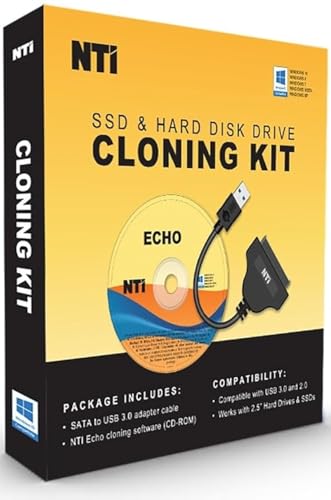
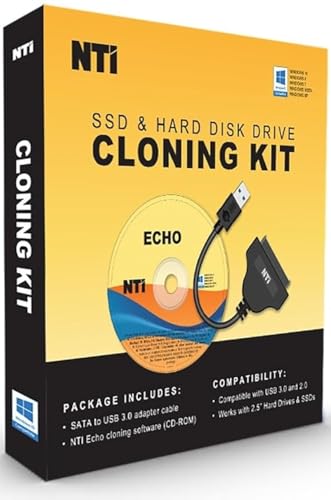
This NTI Cloning Kit offers a comprehensive solution for those looking to upgrade their 2.5″ SATA SSD or HDD. What makes it stand out is the inclusion of a high-speed USB to 2.5″ SATA adapter cable alongside the powerful NTI Echo cloning software. Version 6 introduces a more reliable Windows-mode cloning, which is a fantastic addition, especially for those dealing with BitLocker-encrypted drives or RAID configurations. It’s a solid all-rounder for typical laptop and desktop drive upgrades, ensuring your data migration is as smooth as possible.
-
Key Features:
- [NEW in V6] Added Windows-mode Cloning for improved reliability, BitLocker, and RAID support.
- Includes a USB to 2.5″ SATA adapter cable (6Gbps high-speed chipsets, USB 3.0/2.0 compatible).
- NTI Echo software supports cloning to NVMe, SSD, and HDD.
- “Dynamic Resize” technology allows cloning to target drives of equal, smaller, or bigger sizes.
- Compatible with Windows 11, 10, 8.1, 8, and 7.
- Able to clone Windows, Linux, Mac, or multi-OS partitions.
- Perpetual software license for one PC (becomes a cloning station for unlimited use).
-
Pros:
- Complete kit with both software and essential hardware.
- Windows-mode cloning greatly enhances compatibility and ease of use.
- Supports cloning various operating systems and drive types.
- Dynamic Resize is incredibly useful for different drive sizes.
- One-time purchase for a permanent license.
-
Cons:
- Does NOT support Dynamic disks.
- Adapter is only for 2.5″ SATA drives, not M.2 NVMe.
- Requires internet access for software activation.
-
User Impressions: Customers often praise this kit for its straightforward cloning process, especially with the new Windows-mode. Many found it a reliable solution for upgrading older laptops and desktops to new SATA SSDs, though some wished for broader adapter compatibility without needing separate enclosures.
NTI Cloning Kit | New Version 6 (M.2 NVMe Enclosure)

Specifically designed for the growing popularity of M.2 NVMe SSDs, this NTI Cloning Kit is a dream come true for users looking to upgrade their ultra-fast M.2 drives. Instead of a SATA adapter, this kit comes with a sleek M.2 NVMe SSD enclosure, making it incredibly convenient to connect your new NVMe drive for cloning. Just like its SATA counterpart, it features the enhanced NTI Echo Version 6 software with Windows-mode cloning, making it an excellent choice for migrating your system to a new M.2 NVMe drive, especially when dealing with modern laptops and pre-built systems. This is truly crucial best cloning software for SSD for the latest hardware.
-
Key Features:
- [NEW in V6] Added Windows-mode Cloning, supporting BitLocker and RAID disks.
- Includes an M.2 NVMe SSD enclosure case and USB cables (Type C and 3.0/2.0 compatible).
- Enclosure compatible with M.2 SSD sizes: 2230/2242/2260/2280.
- NTI Echo software supports cloning to M.2 SSD (NVMe and SATA), 2.5″ SATA SSD, and all HDDs.
- “Dynamic Resize” technology for cloning to target drives of equal, smaller, or bigger size.
- Compatible with Windows 11, 10, 8.1, 8, and 7.
- Able to clone Windows, Linux, Mac, or multi-OS partitions.
- Perpetual software license for one PC.
-
Pros:
- Ideal for M.2 NVMe SSD upgrades with a dedicated enclosure.
- Windows-mode cloning offers enhanced reliability for complex setups.
- Versatile software supports various drive types beyond M.2 NVMe.
- Dynamic Resize is a standout feature for flexible upgrades.
- One-time fee for permanent software usage.
-
Cons:
- Enclosure case is strictly for M.2 NVMe SSDs, not other types.
- Does NOT support Dynamic Disks.
- Software activation requires internet access.
-
User Impressions: Reviewers love the convenience of the included NVMe enclosure and the improved reliability of the V6 software. It’s often cited as a go-to solution for seamless M.2 SSD upgrades, simplifying a process that can often be complicated for high-speed drives.
Crucial P310 1TB SSD, PCIe Gen4 NVMe M.2 2280

While not cloning software itself, the Crucial P310 1TB SSD is an exemplary target drive for which you’d need the crucial best cloning software for SSD. This NVMe drive offers impressive PCIe Gen4 performance, making it an ideal upgrade for gamers, content creators, and anyone seeking a significant boost in system responsiveness. With blazing-fast read and write speeds, moving your operating system and frequently used applications to a drive like the P310 can dramatically cut down boot times and load speeds. Crucial often bundles their SSDs with Acronis True Image for Crucial software, a strong cloning utility, making this an even more attractive package for a complete system overhaul.
-
Key Features:
- PCIe 4.0 Performance: Up to 7,100 MB/s read and 6,000 MB/s write speeds.
- Spacious 1TB capacity for games, apps, and media.
- Broad Compatibility: Works with laptops, desktops, and select gaming consoles.
- Backward compatible with PCIe Gen3 systems.
- Micron Quality: Built with advanced G8 NAND and thermal control for reliability.
- Up to 2x faster than previous Gen3 generation, boosting productivity for tasks like booting Windows and launching applications.
-
Pros:
- Exceptional speed for quicker bootups, game loads, and multitasking.
- Generous storage capacity.
- Wide compatibility, including next-gen gaming handhelds.
- Reliable performance backed by Micron’s quality.
- Often paired with reputable cloning software (like Acronis for Crucial).
-
Cons:
- PCIe Gen4 speeds might be bottlenecked on older Gen3 systems.
- Not cloning software, but a target drive for it.
-
User Impressions: Users frequently commend the P310 for its outstanding speed and reliability. It’s a popular choice for significant performance upgrades, with many noting how quickly their systems boot and applications launch after migrating to this drive.
Crucial BX500 1TB 3D NAND SATA 2.5-Inch Internal SSD

Another excellent drive that demands crucial best cloning software for SSD is the Crucial BX500 1TB. This 2.5-inch SATA internal SSD is perfect for replacing traditional hard drives in older laptops and desktops, offering a huge leap in performance without breaking the bank. It’s renowned for its reliability and efficiency, capable of making your system boot up faster, load files quicker, and improve overall responsiveness. For anyone upgrading from a traditional HDD, the BX500 is a fantastic choice, and like other Crucial drives, it often comes with access to their branded Acronis cloning software to simplify your migration.
-
Key Features:
- Significantly improves system responsiveness, boot times, and file loading.
- Up to 300% faster than a typical hard drive.
- Highly energy efficient (45x more efficient than a typical hard drive), improving battery life.
- Built with Micron 3D NAND technology.
- Backed by a Crucial 3-year limited warranty.
- 1TB capacity provides ample storage for most users.
-
Pros:
- Excellent value for a significant performance upgrade from HDDs.
- Improved battery life for laptops.
- Reliable and durable with Micron’s 3D NAND.
- Easy to install in most 2.5-inch drive bays.
- Often includes access to Crucial’s cloning software.
-
Cons:
- SATA interface is slower than NVMe SSDs.
- Not cloning software, but a target drive for it.
-
User Impressions: The BX500 consistently receives high marks for its ease of installation and the dramatic speed improvements it brings to older machines. Users love how it revitalizes slow computers, making them feel brand new again, especially when combined with a good cloning utility.
EZITSOL Disk Cloning Kit with Bootable USB Key & USB3.0

The EZITSOL Disk Cloning Kit is an all-in-one solution designed for users who prefer an offline cloning method and are moderately tech-savvy. This kit shines with its bootable USB key, which contains built-in disk cloning software, eliminating the need to install software on your existing OS. Coupled with a USB3.0-to-SATA cable, it provides everything you need to clone your 2.5″ SATA HDD/SSD without reinstalling Windows or Linux. It’s a robust, straightforward option for drive upgrades and system migrations, especially if you want to bypass any potential OS-level conflicts during the cloning process. This makes it a strong contender for the title of crucial best cloning software for SSD for DIY enthusiasts.
-
Key Features:
- All-in-One Kit: Includes printed user guide, bootable USB key with software, and USB3.0-to-SATA cable.
- Easy Disk Cloning: Clone internal drives to larger SSD/HDD without OS reinstallation.
- Offline Cloning: Boot your PC from the included USB key for the cloning process.
- Compatible with most 64-bit Intel/AMD PCs or Servers running Windows or Linux.
- USB-powered cable for 2.5″ drives.
-
Pros:
- Bootable USB key provides an independent, offline cloning environment.
- Includes necessary hardware for 2.5″ SATA drives.
- Simplifies system migrations and drive upgrades.
- No need for software installation on the main OS.
- Clear user guide included.
-
Cons:
- Not compatible with ARM-based PCs, RAID, LVM, dynamic disks, or Mac file systems.
- Legacy IDE hard disks and M.2 (SATA NGFF/NVME) SSDs are not supported.
- Requires two USB ports for simultaneous use of the key and cable.
- Cloning to a smaller disk is only possible if used space is less than target capacity.
-
User Impressions: Users appreciate the simplicity of the bootable USB approach, finding it less intimidating than software installed on Windows. It’s often recommended for straightforward 2.5″ SATA drive upgrades, though some caution that the lack of M.2 support is a limitation for newer systems.
Frequently Asked Questions (FAQ)
Q1: Why do I need cloning software for an SSD upgrade?
A1: Cloning software creates an exact, byte-for-byte copy of your old drive, including the operating system, applications, settings, and all your files. This saves you hours (or even days) of reinstalling everything from scratch after installing a new SSD. It ensures your new drive is immediately bootable and exactly like your old one, just faster!
Q2: What’s the difference between cloning and backing up?
A2: A “clone” is an exact duplicate of your drive, designed to be immediately bootable and fully functional as a replacement drive. A “backup” is typically a compressed or archived copy of your data (and sometimes the OS) that needs to be restored to a drive before it can be used. While a backup can help you recover data, a clone is about seamless system migration.
Q3: Can I clone my old, larger hard drive to a smaller SSD?
A3: Yes, you usually can, but with a crucial caveat: the amount of used space on your old, larger drive must be less than or equal to the total capacity of your new, smaller SSD. Most good cloning software, like NTI Echo’s “Dynamic Resize” feature, will handle this process by resizing partitions automatically.
Q4: Is cloning an SSD difficult?
A4: With the right software and hardware, cloning an SSD is generally straightforward. Modern cloning tools are designed with user-friendly interfaces to guide you through the process. The kits reviewed above, especially those with included adapters or enclosures, simplify the physical connection, making the whole experience much smoother.
Q5: What is an M.2 NVMe SSD, and why do I need specific cloning tools for it?
A5: M.2 NVMe SSDs are the fastest type of solid-state drives available, connecting directly to your motherboard via a PCIe slot (often looking like a small stick of RAM). They offer significantly higher speeds than traditional SATA SSDs. Because of their unique form factor and interface, you often need specific M.2 enclosures or adapters to connect them externally for cloning, unlike 2.5″ SATA drives.
Q6: Do I need a special cable or adapter to clone my drive?
A6: It depends on your setup. If you’re cloning an internal drive to a new internal drive, you might need a way to connect the new drive to your PC before installing it internally (e.g., via USB). If your new drive is an M.2 NVMe, you’ll likely need an M.2 NVMe enclosure or adapter. For 2.5″ SATA drives, a USB-to-SATA adapter cable is typically sufficient. Many cloning kits, like the NTI and EZITSOL options, include these necessary accessories.
Q7: What if my Crucial SSD came with cloning software?
A7: If your Crucial SSD came with a redemption code or link for software like Acronis True Image for Crucial, absolutely use it! These bundled versions are usually optimized for Crucial drives and offer excellent cloning capabilities. This guide provides alternatives if you don’t have bundled software or prefer a different solution.
Upgrading to an SSD is one of the best investments you can make for your computer’s performance. By choosing one of these crucial best cloning software for SSD solutions, you can ensure your upgrade is hassle-free, efficient, and gets you back to enjoying your lightning-fast system in no time. Happy cloning!