

If you’re a video editor, you know the struggle: massive 4K or even 8K video files, long render times, and the constant need for more storage. Internal drives often just can’t keep up, leading to frustrating bottlenecks in your creative process. That’s where a high-quality external SSD comes in! These little powerhouses offer lightning-fast data transfer speeds, robust durability, and incredible portability, making them an indispensable tool for anyone serious about video production.
Choosing the best external SSD for video editing isn’t just about speed; it’s also about reliability, storage capacity, and whether it can truly handle the demanding workload of a professional editing suite. We’ve rounded up five top contenders that stand out for their performance, features, and overall value. Let’s dive in!
Why an External SSD is a Game-Changer for Video Editing
Before we get to the reviews, let’s quickly touch on why an external SSD is so crucial. Traditional hard disk drives (HDDs) use spinning platters, which are slow and prone to mechanical failure. SSDs, or Solid State Drives, use flash memory, offering significantly faster read/write speeds, silent operation, and much greater resistance to drops and bumps. For video editing, this translates to:
- Faster file transfers: Move gigabytes of footage in seconds, not minutes.
- Smoother playback: Edit high-resolution footage without stuttering.
- Quicker renders: Export your final projects in a fraction of the time.
- Enhanced portability: Take your projects on the go without worrying about data loss from jostling.
Now, let’s explore the best external SSD for video editing options available right now!
1. Samsung T7 Portable SSD

The Samsung T7 Portable SSD is a fantastic all-rounder that hits a sweet spot for many video editors, especially those on the go or working with various devices. It’s incredibly compact and lightweight, making it easy to slip into any bag, but don’t let its small size fool you. This drive packs a punch with NVMe technology, delivering impressive speeds that dramatically cut down transfer times for your large video files. Its broad compatibility, including direct recording for iPhone 15 Pro Res 4K video, makes it incredibly versatile for a wide range of creative workflows.
Key Features:
– PCIe NVMe technology for read/write speeds up to 1,050/1,000 MB/s
– Compact and lightweight design
– Available in capacities up to 4TB
– Extensive compatibility with PCs, Macs, Android devices, and cameras (including iPhone 15 Pro Res 4K 60fps video recording)
– Shock resistant and fall protection up to 6 feet
– Solid aluminum unibody construction for durability
– World’s #1 flash memory brand reliability
Pros:
– Excellent balance of speed and portability
– Wide compatibility across multiple operating systems and devices
– Reliable performance from a trusted brand
– Good value for its speed class
– Durable enough for everyday bumps
Cons:
– Not the absolute fastest compared to some newer, more expensive drives
– Lacks an official IP rating for water/dust resistance (compared to T7 Shield)
User Impressions: Users frequently praise the Samsung T7 for its consistent performance and compact form factor. Many find it perfectly suitable for editing 4K footage on laptops and iPads, highlighting its ease of use and the significant speed upgrade it offers over traditional hard drives. Its reliability is a recurring theme in positive feedback.
2. SanDisk 4TB Extreme PRO Portable SSD

If you’re a professional videographer or editor who needs uncompromising speed and rugged durability, the SanDisk Extreme PRO Portable SSD is definitely one of the best external SSD for video editing choices out there. This drive pushes the limits with read/write speeds up to a blistering 2000MB/s, thanks to its powerful NVMe solid-state performance. What truly sets it apart is its robust build, featuring a forged aluminum chassis that doubles as a heatsink – a critical detail for sustained high-speed transfers without thermal throttling. Plus, its extreme drop protection and IP65 water/dust resistance mean you can take it anywhere, confident your precious footage is safe.
Key Features:
– Powerful NVMe performance with up to 2000MB/s read/write speeds
– Forged aluminum chassis acts as a heatsink for sustained performance
– 5-year limited warranty
– Up to 3-meter drop protection
– IP65 water and dust resistance
– Handy carabiner loop for secure attachment
– SanDisk Memory Zone app for file management
Pros:
– Exceptional speed for demanding video workflows (e.g., 8K, uncompressed footage)
– Superior durability with high drop and IP65 ratings
– Excellent thermal management prevents throttling during long transfers
– Long 5-year warranty for peace of mind
– Ideal for outdoor shoots or rugged environments
Cons:
– Premium price point, reflecting its top-tier performance and durability
– To achieve maximum speed, your host device needs a compatible USB 3.2 Gen 2×2 port (which isn’t ubiquitous yet)
User Impressions: Editors working with high-bitrate footage rave about the SanDisk Extreme PRO’s speed and reliability. Its ruggedness is a huge plus for those who often work on location, with many users appreciating the extra peace of mind provided by its build quality and water/dust resistance. It’s often cited as a go-to for professional content creators.
3. SAMSUNG T9 Portable SSD

The SAMSUNG T9 Portable SSD is Samsung’s answer to the need for ultimate speed and sustained performance, making it a serious contender for the best external SSD for video editing, especially for those with high-end setups. Leveraging the USB 3.2 Gen 2×2 interface, it delivers incredible sustained read and write speeds up to 2,000MB/s – crucial for managing the largest video files and intricate editing projects. Its Dynamic Thermal Guard ensures the drive stays cool even under heavy, prolonged use, preventing performance drops when you’re deep in a demanding render. This SSD is truly built for creators who need speed that doesn’t quit.
Key Features:
– USB 3.2 Gen 2×2 interface for sustained read/write speeds up to 2,000MB/s
– Dynamic Thermal Guard to prevent overheating and maintain performance
– Extensive compatibility with desktops, cameras, gaming consoles, and iPhone 15 Pro Res 4K 60fps
– Strong, solid, stable build for longevity
– Works with Samsung Magician Software for optimal drive health and firmware updates
– Performance and reliability from the world’s #1 flash memory brand
Pros:
– Outstanding sustained transfer speeds, ideal for large, complex video projects
– Excellent thermal management keeps performance consistent
– Robust and reliable construction
– Wide device compatibility, including support for iPhone ProRes recording
– Magician Software adds valuable monitoring and optimization tools
Cons:
– Requires a USB 3.2 Gen 2×2 port on your device to achieve full speed, which isn’t standard on all computers yet
– One of the more expensive options due to its cutting-edge speed
User Impressions: Professionals who’ve upgraded to the T9 often highlight its game-changing speed for their editing workflows, especially when working with high-resolution, high-bitrate files. They appreciate that it maintains its speed even during long transfers, a testament to its thermal management. It’s considered a premium choice for those looking to maximize their productivity.
4. SanDisk 2TB Extreme Portable SSD

The SanDisk Extreme Portable SSD strikes an excellent balance between performance, price, and ruggedness, making it a highly popular choice and a strong candidate for the best external SSD for video editing for many users. While its speeds of up to 1050MB/s read and 1000MB/s write are not as fast as the Extreme PRO or T9, they are still more than adequate for most 4K video editing tasks. Where this drive truly shines is its impressive durability – with 3-meter drop protection and IP65 water/dust resistance, it’s built to withstand the rigors of on-location shoots and everyday creative life. Plus, its hardware encryption offers an extra layer of security for your valuable projects.
Key Features:
– NVMe solid state performance with up to 1050MB/s read and 1000MB/s write speeds
– Up to 3-meter drop protection
– IP65 water and dust resistance
– Handy carabiner loop for secure attachment
– 256-bit AES hardware encryption for password protection
– SanDisk Memory Zone app for file management
Pros:
– Excellent blend of speed and affordability for 4K editing
– Highly durable and rugged design with strong drop and IP ratings
– Built-in hardware encryption for data security
– Compact and lightweight, ideal for portability
– Reliable performance from a leading brand
Cons:
– Not the fastest option for those working with uncompressed 8K or extremely high-bitrate footage
– Capacities might feel limited for very large, long-term archives (though 2TB is substantial for active projects)
User Impressions: This version of the SanDisk Extreme is beloved by users for its sheer reliability and toughness. Many content creators praise it for surviving drops and splashes while consistently delivering solid performance for their video projects. The peace of mind offered by its durability and encryption is a significant selling point for a wide range of users, from hobbyists to semi-pros.
5. SAMSUNG T7 Shield Portable SSD
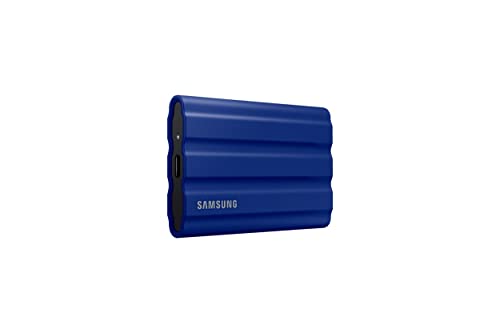
The SAMSUNG T7 Shield is the ultimate rugged companion for video editors who need top-tier durability without compromising on speed. Building on the popular T7, the Shield version adds an extra layer of protection with an IP65 rating for water and dust resistance, along with enhanced drop protection up to 9.8 feet. This makes it an incredibly reliable choice for field recording, outdoor shoots, or simply for those who are a bit rougher on their gear. With read/write speeds up to 1,050/1,000 MB/s, it delivers strong performance that handles 4K video editing with ease, ensuring your creative flow isn’t interrupted by environmental concerns.
Key Features:
– Rugged design with IP65 water and dust resistance
– Enhanced drop protection up to 9.8 feet
– USB 3.2 Gen 2 interface for read/write speeds up to 1,050/1,000 MB/s
– Available in capacities from 1TB to 4TB
– Extensive compatibility with PC, Mac, Android, gaming consoles, and iPhone 15 Pro Res 4K 60fps
– Samsung Magician Software for optimization and monitoring
– Reliability from the world’s #1 flash memory brand
Pros:
– Exceptional durability and ruggedness, ideal for challenging environments
– Reliable and consistent speeds for 4K video editing
– Wide compatibility across various devices and platforms
– Good range of capacities to suit different needs
– Samsung Magician Software adds value for drive management
Cons:
– Slightly larger and heavier than the standard T7 due to the protective casing
– Speeds are good but not as high as the Gen 2×2 drives (T9, Extreme PRO)
User Impressions: Users who frequently work outdoors or in less-than-ideal conditions absolutely love the T7 Shield. They appreciate its robust build quality, confirming its ability to withstand accidental drops and exposure to elements. Editors find its speed perfectly adequate for their 4K workflows, making it a trusted and resilient part of their mobile editing kit.
Frequently Asked Questions (FAQ)
Q1: Why should I choose an SSD over an HDD for video editing?
A: SSDs (Solid State Drives) are vastly superior to HDDs (Hard Disk Drives) for video editing due to their speed, durability, and quiet operation. SSDs use flash memory, allowing for much faster read/write speeds, which means quicker file transfers, smoother playback of high-resolution footage, and faster renders. They also have no moving parts, making them more resilient to drops and vibrations, and they operate silently, which is great for quiet editing environments.
Q2: What read/write speeds are ideal for video editing?
A: For casual 1080p editing, speeds around 500-600 MB/s can be sufficient. However, for 4K video editing, especially with higher bitrates or multi-cam sequences, you’ll want speeds of at least 1,000 MB/s (1GB/s) or higher. For uncompressed 4K, 6K, or 8K footage, and for the smoothest possible workflow, look for drives offering 2,000 MB/s or more, typically found in NVMe SSDs with USB 3.2 Gen 2×2 or Thunderbolt interfaces.
Q3: What storage capacity do I need for video editing?
A: The required capacity depends heavily on your project type, resolution, and the amount of footage you work with.
* 1TB: Good for smaller 1080p projects or as a dedicated scratch disk.
* 2TB: A good starting point for 4K projects, offering a balance of space and cost.
* 4TB+: Ideal for professional 4K, 6K, or 8K projects, large media libraries, or long-term archiving.
Always aim for more capacity than you think you’ll need, as video files quickly add up!
Q4: What’s the difference between USB 3.2 Gen 2, USB 3.2 Gen 2×2, and Thunderbolt for external SSDs?
A: These refer to the connection interfaces and their maximum theoretical speeds:
* USB 3.2 Gen 2 (often just USB-C 10Gbps): Offers speeds up to 10Gbps (approx. 1,000 MB/s). Most common and widely compatible.
* USB 3.2 Gen 2×2: Doubles the lanes of Gen 2, offering speeds up to 20Gbps (approx. 2,000 MB/s). Less common, requiring specific ports on your computer.
* Thunderbolt (e.g., Thunderbolt 3/4): Offers even higher speeds, up to 40Gbps (approx. 4,000 MB/s). Often found on high-end Macs and some PCs. While faster, Thunderbolt SSDs can be more expensive and require a Thunderbolt port.
Always ensure your computer has a compatible port to take full advantage of the SSD’s speed.
Q5: Is durability important for an external SSD for video editing?
A: Absolutely! Video editors often work on location, travel with their gear, or simply move their drives between workstations. An external SSD with shock, water, and dust resistance provides peace of mind that your valuable project files are safe from accidental drops, spills, or harsh environments. Look for features like rugged casings, IP ratings (e.g., IP65), and drop protection specs.
Q6: Can I edit directly from an external SSD, or should I copy files to my internal drive first?
A: With a high-speed external NVMe SSD (like those reviewed here, especially those offering 1000MB/s or more), you can absolutely edit directly from the external drive. This is one of the primary benefits, as it saves valuable internal storage space and avoids the time-consuming process of copying massive files back and forth. Just ensure your connection (USB-C 3.2 Gen 2, Gen 2×2, or Thunderbolt) is robust enough.
Q7: What is “thermal management” and why is it important for video editing SSDs?
A: Thermal management refers to how an SSD handles heat generated during intensive operations. When an SSD gets too hot, it can “throttle” or reduce its performance to prevent damage, leading to slower transfer speeds and longer render times. For video editing, which often involves sustained high-speed reading and writing of large files, good thermal management (like heatsinks or dynamic thermal guards) is crucial to maintain consistent, optimal performance throughout your workflow.
Choosing the best external SSD for video editing is a critical decision that can dramatically impact your productivity and creative freedom. Whether you prioritize sheer speed, rugged durability, or a balance of both, the options we’ve explored offer excellent solutions for every video editor’s needs. Invest wisely, and watch your workflow transform!