
Is your PC feeling sluggish? Are game loading screens making you want to pull your hair out? If you’re still running on an old hard drive or a slower SATA SSD, you’re missing out on a world of speed. Upgrading to a high-performance NVMe PCIe SSD is one of the most impactful improvements you can make to any desktop or laptop. And when it comes to balancing storage and speed, a 2TB capacity is often the sweet spot for many users.
In this guide, we’re diving deep to help you find the best 2TB SSD PCIe drives on the market. These powerful solid-state drives leverage the PCIe interface to deliver mind-boggling read and write speeds, significantly cutting down load times for games, applications, and large files. Whether you’re a hardcore gamer, a content creator, or just someone who craves a super-responsive system, a top-tier 2TB NVMe SSD is an absolute game-changer.
We’ve scoured the options to bring you a hand-picked selection of the most reliable, fastest, and value-packed 2TB NVMe SSDs. Let’s get your system flying!
Why You Need a 2TB PCIe SSD
You might be thinking, “What’s the big deal about PCIe?” Well, traditional SATA SSDs are limited by the SATA III interface, capping speeds at around 550 MB/s. PCIe NVMe SSDs, on the other hand, connect directly to your motherboard via the PCIe lanes, offering vastly higher bandwidth. We’re talking speeds that can reach well over 7,000 MB/s for the latest Gen4 and Gen5 drives!
A 2TB capacity also gives you ample room for:
* A vast library of modern AAA games (which are getting bigger all the time!)
* Large software applications and operating system files
* Extensive media collections (4K videos, high-resolution photos)
* Keeping all your important documents and projects readily accessible
It’s truly the perfect balance of space and speed for most users.
Our Top Picks: Best 2TB SSD PCIe Drives
Let’s jump right into the top contenders for the best 2TB SSD PCIe drives available today. We’ve highlighted what makes each one special, their key features, and what users are saying.
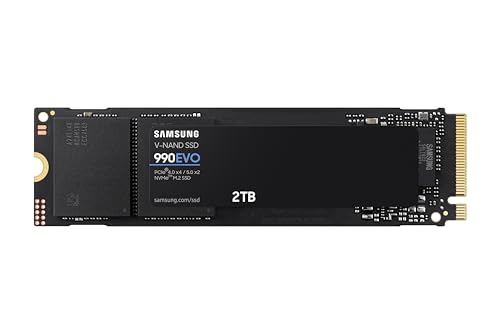
1. Samsung 990 EVO SSD 2TB, PCIe Gen 4×4, Gen 5×2

The Samsung 990 EVO is an intriguing option that offers excellent performance for its price point, particularly appealing to users looking for a versatile drive that bridges PCIe Gen 4 and Gen 5. It stands out by providing solid speeds and impressive power efficiency, making it a smart choice for both desktops and laptops where battery life matters. If you want a reliable Samsung drive without the premium price tag of the Pro series, this is a fantastic middle-ground performer.
-
Key Features:
- READ/WRITE SPEEDS UP TO 5,000/4,200 MB/s
- Up to 70% improved performance per watt over the 970 EVO Plus for excellent power efficiency
- Smart Thermal Control with Samsung’s fine-tuned controller and heat spreading label
- PCIe 5.0 Interface compatibility (supports PCIe 4.0 x4 and PCIe 5.0 x2)
- Always up to date via Magician Software for firmware updates, encryption, and health monitoring
-
Pros:
- Excellent power efficiency, ideal for laptops
- Good performance for a PCIe Gen4 drive, bridging into Gen5 support
- Reliable Samsung brand quality and software support
- Effective thermal management
-
Cons:
- Not as fast as top-tier Gen4 or Gen5 drives
- Hybrid PCIe interface might confuse some users
-
User Impressions: Customers love the 990 EVO for its noticeable speed boost over older drives and its power-saving capabilities. Many appreciate the Samsung Magician software for keeping the drive optimized. It’s often recommended as a great value for those not needing absolute bleeding-edge speeds but still wanting a significant upgrade.
- Call-to-Action: See it on Amazon here
2. WD_BLACK 2TB SN7100 NVMe Internal Gaming SSD Solid State

The WD_BLACK SN7100 is purpose-built for gamers who demand high-octane performance and reliability, especially in portable gaming setups like laptops and handhelds. Its focus on efficiency and sustained performance during intense gaming sessions makes it a strong contender for those who push their systems to the limit. It’s a workhorse that keeps going when others might throttle.
-
Key Features:
- High-octane gaming speeds up to 7,250MB/s read and 6,900MB/s write (1-2TB models)
- Purpose-built for serious on-the-go gamers with a PCIe Gen4 interface and next-gen TLC 3D NAND
- Available in multiple capacities up to 4TB
- Up to 100% more power efficiency over the previous generation, perfect for laptops
- WD_BLACK Dashboard (Windows only) for optimization
- High endurance (up to 2,400TBW for 4TB model) for streaming and content creation
-
Pros:
- Blazing fast speeds optimized for gaming
- Excellent power efficiency for portable devices
- High endurance rating for heavy use
- WD_BLACK Dashboard adds useful monitoring tools
-
Cons:
- Dashboard software is Windows only
- May not be the absolute fastest in sequential writes compared to some top-tier Gen4 drives
-
User Impressions: Gamers consistently praise the SN7100 for dramatically cutting down loading times and improving overall game responsiveness. Its low power consumption is a big plus for laptop users, and the drive’s reliability for sustained gaming sessions is frequently highlighted.
- Call-to-Action: See it on Amazon here
3. Samsung 990 PRO SSD NVMe M.2 PCIe Gen4, M.2 2280

The Samsung 990 PRO is a powerhouse, often hailed as one of the fastest PCIe Gen4 SSDs on the market, pushing the limits of what Gen4 can deliver. If you’re a professional creative, a hardcore enthusiast, or anyone who needs uncompromising speed for heavy computing tasks like 4K video editing, large file transfers, or competitive gaming, this drive is built to impress. It’s the “cheat code” for maximum performance.
-
Key Features:
- Near max performance with lightning-fast speeds up to 7450/6900 MB/s read/write
- More than 55% improvement in random performance compared to 980 PRO
- The fastest SSD from Samsung, a world-leading flash memory brand
- Available in capacities from 1TB to 4TB
- Up to 50% improved performance per watt over the 980 PRO for excellent power efficiency
- Ideal for gaming, video editing, data analysis, and heavy computing
-
Pros:
- Top-tier PCIe Gen4 speeds, near the theoretical maximum
- Exceptional random read/write performance for demanding applications
- High power efficiency despite extreme performance
- Samsung’s renowned reliability and Magician software support
-
Cons:
- Premium price point
- Requires a PCIe Gen4 compatible motherboard to achieve full speeds
-
User Impressions: Users are consistently blown away by the 990 PRO’s speed, noting significant reductions in boot times, application launches, and game loading. Many consider it worth the investment for its reliability and sheer performance, making their systems feel incredibly snappy.
- Call-to-action: See it on Amazon here
4. Crucial P3 Plus 2TB PCIe Gen4 3D NAND NVMe M.2

The Crucial P3 Plus offers an excellent balance of performance and value, making it a superb choice for users who want to step up to PCIe Gen4 speeds without breaking the bank. It’s a fantastic all-rounder for everyday computing, gaming, and general productivity, providing a noticeable upgrade over Gen3 drives. This drive punches above its weight in terms of price-to-performance ratio.
-
Key Features:
- NVMe (PCIe Gen4 x4) technology with up to 5000MB/s sequential reads
- Random read/write up to 680K/850K IOPS
- Spacious storage up to 4TB
- Performs up to 43% faster than the fastest Gen3 NVMe SSDs
- Rated at MTTF greater than 1.5 million hours for extended longevity and reliability
- Backward compatible with Gen3 systems
-
Pros:
- Excellent value for a PCIe Gen4 drive
- Significant speed improvement over Gen3 SSDs
- High reliability and longevity rating
- Good for personal, gaming, and business use
-
Cons:
- Sequential write speeds aren’t as high as premium Gen4 drives
- Doesn’t include a heatsink, which might be needed for sustained heavy loads
-
User Impressions: Customers frequently praise the P3 Plus for its affordability and the tangible speed increase it provides. Many find it to be a “just right” solution for upgrading an older system or building a new mid-range PC, delivering solid performance without the premium cost.
- Call-to-action: See it on Amazon here
5. WD_BLACK 2TB SN850X NVMe Internal Gaming SSD Solid State

The WD_BLACK SN850X is the ultimate performance upgrade for serious gamers and PC enthusiasts, taking the already formidable SN850 to the next level. With even faster speeds and advanced gaming features, it’s designed to ensure peak performance through the most intense gaming sessions and demanding workstation tasks. If you’re building a top-tier gaming rig or need maximum throughput for creative work, the SN850X is a standout choice, especially with its optional heatsink.
-
Key Features:
- Insane speeds up to 7,300 MB/s read for top-tier performance
- Capacities up to 8TB built with Western Digital TLC 3D NAND
- Optional heatsink version available for all capacities to maintain peak performance
- WD_BLACK Dashboard (Windows only) with Game Mode 2.0 for optimization and RGB control (heatsink versions)
- Future-forward features including Predictive Loading, Overhead Balancing, and Adaptive Thermal Management (ATM)
-
Pros:
- Among the fastest PCIe Gen4 SSDs available
- Excellent for gaming and workstation use
- Optional heatsink effectively prevents thermal throttling
- Game Mode 2.0 and other advanced features enhance gaming performance
- High endurance and reliability
-
Cons:
- Premium price point
- Dashboard software and RGB control are Windows only
- Heatsink version might not fit all laptop form factors
-
User Impressions: Gamers rave about the SN850X’s ability to nearly eliminate loading screens and its sustained performance during long play sessions. The heatsink version is highly recommended for its effectiveness, and users appreciate the overall responsiveness it brings to their systems. It’s often cited as the go-to drive for a no-compromise gaming build.
- Call-to-action: See it on Amazon here
What to Consider When Buying a 2TB PCIe SSD
Choosing the best 2TB SSD PCIe drives isn’t just about raw speed. Here are a few things to keep in mind:
- PCIe Generation (Gen3, Gen4, Gen5): Ensure your motherboard supports the PCIe generation of the SSD you’re buying to get full performance. Gen4 is standard for most new builds, while Gen5 is bleeding edge. Gen3 drives are cheaper but significantly slower.
- Read/Write Speeds: Look at both sequential (large file transfers) and random (small file operations, OS, gaming) speeds. Higher numbers are better, especially for random performance.
- Endurance (TBW – Terabytes Written): This indicates how much data can be written to the drive over its lifetime. Higher TBW means longer durability, especially important for heavy users or content creators.
- DRAM vs. DRAM-less: Drives with DRAM caches generally offer better sustained performance and longevity. DRAM-less drives are more budget-friendly but can be slower under heavy load.
- Heatsink: High-performance PCIe Gen4 and Gen5 SSDs can get hot. A heatsink (either built-in or aftermarket) helps prevent thermal throttling, ensuring sustained peak performance.
- Brand Reputation & Warranty: Stick with reputable brands like Samsung, Western Digital, Crucial, and Kingston for better reliability and customer support.
Conclusion
Upgrading to one of the best 2TB SSD PCIe drives is arguably the most significant performance upgrade you can give your PC. From vastly reduced loading times in games and applications to snappier system responsiveness, these NVMe drives transform your computing experience. Whether you prioritize cutting-edge speed, power efficiency, or value, there’s a perfect 2TB solid-state drive waiting to unlock your system’s full potential. So go ahead, pick your champion, and prepare to be amazed by the speed!
Frequently Asked Questions (FAQ)
Q1: What is the difference between a PCIe SSD and a SATA SSD?
A: PCIe SSDs connect directly to your motherboard via the PCIe interface, offering much higher bandwidth and faster speeds (up to 7,000+ MB/s) compared to SATA SSDs, which connect via the SATA III interface and are limited to around 550 MB/s. PCIe SSDs are typically in the M.2 form factor and use the NVMe protocol.
Q2: Is a 2TB SSD enough for gaming?
A: For most gamers, yes! A 2TB SSD provides ample space for the operating system, several large AAA games (which can be 100GB+ each), and various applications. It strikes a great balance between capacity and cost, making it a popular choice.
Q3: Do I need a heatsink for my PCIe 4.0 SSD?
A: While not always strictly necessary for light usage, it’s highly recommended for PCIe Gen4 and especially Gen5 SSDs, particularly if you’re a gamer or frequently transfer large files. These high-performance drives can generate significant heat, and a heatsink helps dissipate it, preventing thermal throttling and ensuring sustained peak performance.
Q4: Will a PCIe Gen4 SSD work in a PCIe Gen3 slot?
A: Yes, PCIe generations are backward compatible. A PCIe Gen4 SSD will work in a PCIe Gen3 slot, but it will be limited to Gen3 speeds. You won’t get the full performance of your Gen4 drive unless your motherboard has a compatible Gen4 slot.
Q5: What is NVMe?
A: NVMe (Non-Volatile Memory Express) is a communication protocol specifically designed for SSDs that connects directly to the CPU via the PCIe interface. It’s much faster and more efficient than older protocols like AHCI, which were designed for traditional hard drives.
Q6: How do I install a 2TB NVMe M.2 SSD?
A: Installing an M.2 NVMe SSD is relatively straightforward. You’ll need to locate an M.2 slot on your motherboard, which typically requires a single screw. Simply align the drive, push it gently into the slot, and secure it with the screw. For desktops, you might need to remove your GPU to access the slot. Always refer to your motherboard’s manual for specific instructions.
Q7: What is “TBW” and why is it important for an SSD?
A: TBW stands for “Terabytes Written,” and it’s an endurance rating for SSDs. It indicates the total amount of data that can be written to the drive over its lifetime before its reliability might start to degrade. A higher TBW rating means the drive is more durable and will last longer, especially under heavy write loads like constant file transfers or video editing.