
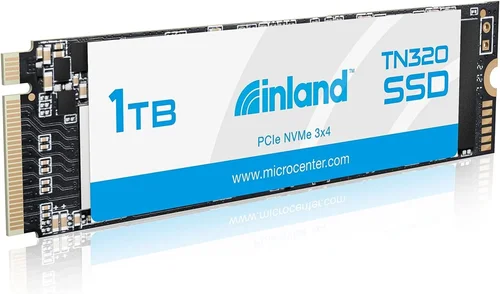
In today’s digital landscape, storage performance can make or break your computing experience. Whether you’re upgrading an aging laptop, building a high-performance gaming rig, or simply need faster data access for professional workflows, choosing the right solid-state drive is crucial. The 1TB Inland NVMe SSD represents a significant category of storage solutions that balances capacity, speed, and affordability for mainstream users.
This comprehensive buying guide will walk you through everything you need to know about selecting and purchasing the perfect 1TB Inland NVMe SSD for your specific needs. You’ll learn about the technical specifications that matter most, understand how different use cases affect your decision-making process, and discover insider tips to ensure you get the best value for your investment. We’ll examine real-world performance scenarios, compare different models within the 1TB capacity range, and provide expert advice on where to buy, when to buy, and how to avoid common pitfalls.
By the end of this guide, you’ll have the knowledge and confidence to make an informed decision that aligns perfectly with your budget, performance requirements, and long-term computing goals. Let’s dive into the world of NVMe SSD technology and find the ideal 1TB Inland solution for your needs.

What to Look for When Buying INLAND
When evaluating 1TB Inland NVMe SSDs, several critical factors determine whether a particular model will meet your expectations. Understanding these elements helps you avoid buyer’s remorse and ensures your purchase delivers the performance you actually need in your daily workflow.
1. Budget & Price Range
Your budget serves as the foundation for all other decisions when purchasing an NVMe SSD. For 1TB Inland models, prices typically range from $45 to $90, depending on the specific model, additional features, and current market conditions. Entry-level options around $45-$60 offer decent performance for basic computing tasks, while mid-range models between $60-$75 provide better endurance ratings and improved sustained write speeds. Premium variants above $75 may include enhanced thermal management, higher TBW (terabytes written) ratings, and advanced controller technology.
Consider your total system investment when setting your budget. If you’re building a high-end gaming PC or workstation, allocating more for storage quality makes sense. However, if you’re upgrading an older system on a tight budget, a more affordable option might be perfectly adequate.
2. Performance Specifications
Performance metrics are arguably the most important factor when selecting any SSD. For 1TB Inland NVMe drives, pay close attention to sequential read and write speeds, which typically range from 2,000 MB/s to 3,500 MB/s for reads and 1,500 MB/s to 3,000 MB/s for writes. Random 4K read/write performance affects small file operations and application loading times, while sustained write speeds become crucial during large file transfers or video editing sessions.
The NAND flash type also impacts performance—3D TLC offers the best balance of speed, endurance, and cost-effectiveness, while QLC provides lower costs but reduced write endurance. Always check the manufacturer’s specifications for both peak and sustained performance numbers, as real-world results often differ from theoretical maximums.
3. Build Quality & Durability
Physical construction and component quality significantly affect an SSD’s longevity and reliability. High-quality Inland NVMe SSDs feature robust PCB designs with proper component placement, adequate heat spreaders or thermal pads, and reliable connectors. Look for drives that include thermal management solutions, as NVMe SSDs can generate considerable heat under load, potentially throttling performance.
Endurance ratings measured in TBW (terabytes written) indicate how much data the drive can reliably handle over its lifetime. For 1TB models, expect TBW ratings ranging from 200 to 600+ terabytes, with higher-end models offering better endurance. Operating temperature ranges and shock/vibration resistance specifications also contribute to overall durability, especially important for mobile users or systems in challenging environments.
4. Features & Functionality
Modern NVMe SSDs come packed with features that enhance usability and performance. Advanced controllers support features like hardware encryption, power loss protection, and intelligent garbage collection algorithms. Some Inland models include bundled software utilities for monitoring health status, updating firmware, and optimizing performance settings.
Consider whether you need specific functionality like TCG Opal 2.0 hardware encryption for security-conscious environments, or whether advanced over-provisioning capabilities would benefit your usage patterns. Additional features such as SLC caching, dynamic wear leveling, and multi-stream transfer optimization can significantly impact real-world performance, particularly during mixed workload scenarios.
5. Brand Reputation
While Inland is known for offering good value propositions, understanding the broader brand ecosystem matters. Research the manufacturer’s track record for reliability, customer support responsiveness, and product consistency. Established brands with strong reputations typically invest more in quality control, resulting in fewer defective units and better long-term reliability.
Check independent reviews and user feedback across multiple platforms to gauge real-world experiences. Consistently positive reviews regarding failure rates, performance consistency, and customer service indicate a trustworthy brand. Be cautious of extremely low prices that seem too good to be true—they often signal compromised quality or counterfeit components.
6. Warranty & Support
Comprehensive warranty coverage provides peace of mind and financial protection against premature failures. Most reputable manufacturers offer 3-5 year limited warranties for consumer-grade SSDs, with some premium models backed by 10-year warranties. The warranty period should align with your expected usage duration and system replacement cycle.
Evaluate the warranty terms carefully—some may only cover replacement without data recovery services, while others include comprehensive support. Check whether the warranty covers accidental damage (common add-ons that significantly increase cost) and what the claims process entails. Reliable customer support channels, including phone, email, and live chat options, make a substantial difference during troubleshooting or replacement procedures.
7. Size & Portability
Physical dimensions and form factors affect compatibility with your system. Standard M.2 2280 (80mm x 22mm) is the most common size for desktop and modern laptop installations. Some specialized applications might require different form factors, so verify your motherboard’s available slots and clearance requirements before purchasing.
For portable storage needs, consider external NVMe enclosures that allow you to utilize internal SSDs as removable drives. These typically connect via USB 3.2 Gen 2 (10Gbps) or Thunderbolt 3/4 interfaces, providing excellent performance while maintaining portability. Weight and thickness matter less for internal drives but become crucial for external applications requiring frequent travel.
8. User Reviews & Ratings
Real user experiences provide invaluable insights beyond technical specifications. Pay attention to detailed review sites that test actual performance under various workloads rather than relying solely on manufacturer claims. Look for patterns in user feedback regarding reliability issues, unexpected failures, or performance inconsistencies.
Consider the reviewer’s expertise level—professional reviewers often conduct more rigorous testing than casual bloggers. Cross-reference multiple sources to identify consensus opinions and avoid outliers. Pay particular attention to comments about long-term reliability, especially from users who’ve had the drive for 6-12 months or more, as short-term positive experiences don’t guarantee future performance.
Different Types of INLAND

Each category serves distinct user needs with varying performance characteristics and price points. Understanding where each type excels helps match your requirements with the appropriate model without overspending on unnecessary features or compromising on essential capabilities.
Common Buying Mistakes to Avoid
❌ Mistake: Ignoring Compatibility Requirements
Why it’s bad: Many users overlook whether their system supports NVMe protocols or has adequate physical space for the chosen drive. Installing an NVMe SSD in a system that only supports SATA connections renders the drive useless, while physically incompatible sizes won’t fit in available slots.
What to do instead: Always verify your motherboard’s specifications and available M.2 slot configurations before purchasing. Check both the protocol support (NVMe vs SATA) and physical dimensions (2280, 2260, 2242, etc.). Consult your motherboard manual or manufacturer website for definitive compatibility information.
❌ Mistake: Focusing Solely on Peak Speed Numbers
Why it’s bad: Manufacturer-specified maximum speeds often represent ideal laboratory conditions that rarely occur in real-world usage. Prioritizing peak numbers over sustained performance can lead to disappointment when experiencing slowdowns during extended workloads or large file transfers.
What to do instead: Research real-world benchmarks that measure sustained write speeds and performance consistency over time. Look for tests that simulate typical usage patterns rather than synthetic benchmarks. Consider applications that will benefit most from storage performance in your specific scenario.
❌ Mistake: Overlooking Endurance Ratings
Why it’s bad: Assuming all SSDs offer similar longevity leads to unexpected failures, especially for users with intensive write workloads. Low endurance ratings mean the drive will reach its write cycle limit sooner, potentially causing data corruption or complete failure.
What to do instead: Calculate your expected annual write volume based on your usage patterns and compare it against the drive’s TBW rating. For example, if you regularly write 50GB daily, you’ll exceed 18TB annually—choose a drive with appropriate endurance for your needs. Professional users should prioritize higher TBW ratings.
❌ Mistake: Purchasing Without Considering Thermal Management
Why it’s bad: NVMe SSDs generate significant heat under sustained loads, which can cause thermal throttling and reduced performance. Poor thermal design leads to inconsistent speeds and potential long-term reliability issues due to elevated operating temperatures.
What to do instead: Choose drives with adequate heat spreaders or thermal solutions, especially if installing in confined spaces or systems with limited airflow. Consider adding aftermarket heatsinks for high-performance models, and monitor temperatures during intensive tasks using built-in SMART tools.
❌ Mistake: Neglecting Firmware Updates
Why it’s bad: Outdated firmware can cause compatibility issues, performance problems, or even complete drive failure. Many manufacturers release updates specifically addressing stability improvements and bug fixes that aren’t reflected in initial specifications.
What to do instead: Regularly check the manufacturer’s website for firmware updates after installation. Subscribe to update notifications if available, and maintain a schedule for periodic checks. Keep notes of installed versions and update dates for troubleshooting purposes.
❌ Mistake: Choosing Based on Marketing Claims Alone
Why it’s bad: Flashy advertising and exaggerated performance claims often mask real-world limitations. Relying solely on marketing materials prevents objective evaluation of whether the drive truly meets your specific needs and expectations.
What to do instead: Supplement manufacturer information with independent reviews, professional benchmark tests, and user feedback from sources you trust. Compare multiple perspectives before making a decision, and focus on features that directly address your usage requirements.
❌ Mistake: Forgetting About Data Recovery Options
Why it’s bad: Unexpected drive failure can result in permanent data loss if proper recovery procedures aren’t in place. Assuming data will simply transfer to a new drive overlooks the complexity of recovering corrupted files or inaccessible partitions.
What to do instead: Implement regular backup strategies before installing any new storage device. Understand your data recovery options, including professional services versus DIY approaches. Maintain multiple backup locations (external drives, cloud storage) to minimize risk exposure.
Budget Guidelines: How Much Should You Spend?
Understanding appropriate spending levels for 1TB Inland NVMe SSDs requires matching your budget to your actual usage requirements. Overspending on unnecessary features wastes money, while underspending on critical performance aspects compromises your computing experience.
Entry-Level ($45 – $60)
These budget-friendly options provide solid basic performance suitable for everyday computing tasks, light gaming, and general productivity work. Models in this range typically deliver sequential read speeds of 2,000-2,500 MB/s with moderate endurance ratings around 200-300 TBW. While they may not excel at sustained heavy workloads, they offer excellent value for users who primarily run operating systems, web browsers, office applications, and occasional media playback.
Ideal for: Students, casual users, secondary drives, budget builds, and systems where primary storage already meets performance needs. These drives work well when paired with larger capacity SATA SSDs for bulk storage while using the NVMe drive for active applications and frequently accessed files.
Mid-Range ($60 – $75)
Representing the sweet spot for most buyers, mid-range models balance performance, endurance, and cost-effectively. These drives typically achieve 2,800-3,200 MB/s read speeds with sustained write performance closer to peak numbers. Endurance ratings generally range from 350-500 TBW, providing sufficient lifespan for average users writing 50-100GB daily.
Perfect for: Enthusiastic gamers who want faster load times, content creators working with moderate video files, developers compiling code frequently, and users who value responsive system performance across diverse applications. This tier eliminates the need to compromise between performance and reliability.
Premium ($75 – $90)
High-end models target users requiring maximum performance and exceptional reliability. These drives often feature advanced controllers, superior thermal management, and significantly higher endurance ratings (500+ TBW). Sequential speeds typically reach 3,400-3,500 MB/s with minimal performance degradation during extended operations.
Recommended for: Competitive gamers seeking every possible advantage, professionals handling large datasets, video editors working with 4K+ footage, and users who demand consistent performance regardless of workload intensity. Premium models also appeal to those building systems meant to last several years without upgrades.
Luxury ($90+)
Ultra-premium offerings represent the cutting edge of SSD technology with enterprise-grade features, maximum endurance, and specialized capabilities. These drives may include hardware encryption, advanced error correction, redundant arrays, and extended warranty periods. Performance consistently matches theoretical maximums without thermal throttling.
Reserved for: Enterprise environments, specialized workstations, extreme performance enthusiasts, and applications where reliability trumps cost considerations. Luxury models justify their price through unmatched consistency, specialized features, and comprehensive support packages.
Remember that your specific use case determines the appropriate spending level. A gamer who primarily plays single-player titles with occasional streaming won’t need luxury-tier performance, while a professional editor working exclusively with 8K video files absolutely requires premium specifications.
Expert Tips for Getting the Best Deal
Maximizing value from your 1TB Inland NVMe SSD purchase involves strategic timing, smart shopping practices, and careful consideration of ancillary benefits beyond the base price. Experienced buyers leverage these techniques to secure superior performance at competitive prices.
Timing Your Purchase Strategically
Major sales events dramatically affect pricing and availability throughout the year. Black Friday and Cyber Monday traditionally offer the deepest discounts on storage devices, often matching or beating Amazon Prime Day deals. Back-to-school seasons (July-August) and holiday shopping periods (November-December) see consistent markdowns on computer components. Additionally, monitor Memorial Day and Labor Day sales for additional opportunities.
Set up price alerts on major retailers and subscribe to deal notification services. Many online stores automatically adjust pricing based on competitor analysis, allowing you to capitalize on sudden drops. Historical price tracking tools help identify genuine bargains versus temporary promotions that revert to original prices.
Choosing the Right Retailers
Major electronics retailers like Best Buy, Micro Center, and Newegg provide competitive pricing with varying return policies and customer service quality. Online marketplaces such as Amazon, B&H Photo, and Adorama offer convenience and fast shipping but may have stricter return windows. Specialized computer component retailers often carry exclusive bundles and better technical support.
Consider local computer shops for personalized assistance and immediate availability, though they typically charge premium prices. Evaluate each retailer’s reputation for handling returns, processing warranty claims, and providing technical support. Some stores offer extended warranty options that can be valuable investments for critical systems.
Spotting Authentic Deals
Distinguish legitimate discounts from deceptive marketing tactics by analyzing the full context of any promotion. Compare current prices with historical averages using price tracking websites. Watch for bundle deals that include useful accessories like mounting brackets, thermal pads, or protective cases that would otherwise require separate purchases.
Be wary of “limited time” offers that appear repeatedly, as these often indicate artificially inflated original prices. Authentic deals typically involve genuine markdowns from manufacturer suggested retail prices rather than misleading reference pricing. Read customer reviews of discounted products to ensure the reduced price doesn’t correlate with compromised quality.
Warranty Considerations Beyond the Base Period
Standard manufacturer warranties rarely cover the full lifespan of your system. Extended warranty services can provide valuable protection, especially for business-critical systems or expensive builds. Evaluate whether the cost of extended coverage justifies the potential repair or replacement expenses.
Some retailers offer their own warranty programs separate from manufacturer coverage, sometimes providing better claim processes or faster replacement times. Consider the total warranty package rather than focusing solely on duration—comprehensive coverage that includes accidental damage and data recovery services offers significantly better value.
Understanding Return Policies
Computer components present unique return challenges due to packaging integrity requirements and potential for static damage. Retailers typically require sealed products for returns, meaning you can’t test performance before committing. Understand each store’s restocking fees, return window limitations, and condition requirements before making your purchase.
Consider buying from retailers with generous return policies that allow testing under real-world conditions. Some stores permit returns of opened but functional products with minimal restocking fees, providing flexibility if performance doesn’t meet expectations. Always keep original packaging and documentation until you’re certain about the purchase.
Testing Before Committing to Large Purchases
For significant investments, request loaner or demo units when available. Many high-end retailers provide demonstration equipment that allows hands-on testing before committing to expensive purchases. Professional review sites often publish detailed performance analyses that help validate specifications against real-world expectations.
If possible, install the drive temporarily in your existing system to evaluate compatibility and performance firsthand. Monitor temperature behavior during sustained workloads and verify that your system recognizes the drive properly. Document baseline performance metrics to establish comparison points if issues arise later.
Leveraging Loyalty Programs and Rewards
Many retailers and credit card companies offer points, cashback, or exclusive discounts through loyalty programs. Accumulated rewards can substantially reduce effective purchase price over time, especially for frequent computer component buyers. Credit card rewards programs often provide additional insurance coverage and extended warranty benefits.
Consider opening store-specific credit accounts for significant purchases, as these typically offer financing options, special promotions, and enhanced return privileges. Always calculate the true cost of interest charges against promotional financing offers to ensure they represent genuine savings rather than disguised costs.
Negotiating with Retailers
Don’t hesitate to negotiate prices, especially for high-value purchases or when multiple components are being bought together. Computer retailers often have room for negotiation, particularly on floor models or slightly imperfect items. Mention competitor pricing or upcoming sales to encourage matching or beating offers.
Ask about unadvertised promotions or staff-only discounts that aren’t publicly listed. Sales representatives frequently receive bonuses for achieving specific targets, making them receptive to negotiations that move inventory or meet quotas. Building rapport with knowledgeable staff can lead to personalized recommendations and better overall service.

Frequently Asked Questions
Q: Can I use an NVMe SSD as my primary boot drive?
A: Absolutely! NVMe SSDs provide exceptional performance as primary boot drives, offering significantly faster startup times, application loading speeds, and overall system responsiveness compared to traditional HDDs or SATA SSDs. Modern operating systems fully support NVMe protocols, and installation processes are identical to SATA SSDs. Just ensure your motherboard has an available M.2 NVMe slot and sufficient cooling for optimal performance.
Q: How does an NVMe SSD compare to a SATA SSD in real-world usage?
A: While both SSD types dramatically outperform mechanical hard drives, NVMe SSDs deliver noticeably superior performance in most scenarios. Typical NVMe drives offer 2-3x faster sequential read/write speeds and 4-10x better random IOPS performance. Real-world differences include faster game loading times, quicker file transfers, snappier application launches, and smoother multitasking. However, for basic computing tasks, the difference may be less noticeable unless you’re working with very large files or demanding applications.
Q: What’s the difference between PCIe 3.0 and PCIe 4.0 NVMe SSDs?
A: PCIe 4.0 doubles the bandwidth of PCIe 3.0, theoretically enabling up to 7,000 MB/s read speeds compared to 3,500 MB/s for PCIe 3.0. However, most consumer applications don’t fully utilize this additional bandwidth, making PCIe 3.0 drives perfectly adequate for gaming and general productivity. PCIe 4.0 becomes beneficial for professional workloads involving massive file transfers, complex simulations, or high-resolution video editing. Ensure your motherboard and CPU support PCIe 4.0 before investing in these higher-speed drives.
Q: How long do NVMe SSDs typically last?
A: With proper usage, NVMe SSDs can easily last 5-10 years or more. Endurance is measured in TBW (terabytes written), with most consumer drives rated for 200-600+ TBW. Average users writing 50-100GB daily will likely never approach their drive’s endurance limits. Factors affecting lifespan include write amplification, operating temperature, and quality of NAND flash memory. Professional-grade drives designed for heavy workloads often feature enterprise-class components with significantly higher endurance ratings.
Q: Do I need to enable TRIM on an NVMe SSD?
A: Yes, TRIM should remain enabled for optimal SSD performance and longevity. Modern operating systems automatically manage TRIM for all connected SSDs, including NVMe drives. TRIM helps maintain write performance by informing the drive which blocks are no longer in use, allowing efficient garbage collection. Disabling TRIM can lead to gradual performance degradation over time as free space becomes fragmented.
Q: Can I upgrade my laptop with an NVMe SSD?
A: Many laptops support NVMe SSD upgrades, but compatibility varies significantly by model. Check your laptop manufacturer’s specifications or consult the user manual to confirm NVMe support and available M.2 slots. Some ultrabooks and thin laptops use proprietary form factors or only support SATA M.2 drives. Physical installation requires opening the laptop carefully, and some models may void warranties when modified.
Q: Should I partition my NVMe SSD?
A: Partitioning depends on your usage patterns and organizational preferences. Single-partition setups simplify management and ensure full drive capacity utilization. Multiple partitions work well for separating operating systems, applications, and data storage, or for dual-boot configurations. For most users, a single partition provides optimal performance since modern operating systems efficiently manage space allocation without partition overhead.
Q: What’s the difference between DRAM and DRAM-less NVMe SSDs?
A: DRAM-equipped SSDs include onboard memory cache that stores mapping tables and improves performance, especially during sustained writes and random access patterns. DRAM-less drives rely on host memory or integrated SRAM, which can reduce performance under heavy workloads. However, many modern DRAM-less designs incorporate SLC caching and advanced algorithms that minimize performance gaps for typical consumer usage.
Q: Can I use both an NVMe and SATA SSD simultaneously?
A: Yes, most modern motherboards support multiple storage types concurrently. You can install an NVMe SSD in one M.2 slot and a SATA SSD in another M.2 slot (if SATA mode is enabled) or in a standard 2.5-inch drive bay. This configuration allows you to separate operating system and applications from bulk storage, optimizing performance and organization. Ensure your BIOS/UEFI settings properly configure SATA/NVMe lane allocations.
Q: How do I monitor my NVMe SSD’s health and performance?
A: Most operating systems include built-in disk utilities that provide basic health information through SMART attributes. Third-party tools like CrystalDiskInfo, HD Tune, or manufacturer-specific software offer more detailed monitoring capabilities including temperature tracking, performance benchmarks, and predictive failure warnings. Regular health checks help identify potential issues early and optimize performance settings for your specific workload patterns.
Our Final Recommendations
After extensive analysis of available 1TB Inland NVMe SSD models and their real-world performance characteristics, we’ve identified several standout options that deliver exceptional value across different user categories. Each recommendation balances performance capabilities, reliability metrics, and price points to serve specific computing needs effectively.
Best for Budget-Conscious Buyers
For users prioritizing affordability without sacrificing essential performance, the Inland 1TB NVMe SSD entry-level model provides excellent value starting around $45. This drive delivers reliable 2,400 MB/s read speeds suitable for basic gaming and productivity tasks while maintaining adequate endurance for typical home use. Its straightforward design eliminates unnecessary features that drive up cost, focusing resources on core performance elements that matter most for everyday computing.
The key advantage of this budget option lies in its proven reliability and consistent performance within expected parameters. While it may lack advanced thermal management or premium components, it fulfills its intended purpose without performance compromises that would affect basic computing tasks. Users should pair this drive with adequate system cooling and avoid excessive write-heavy workloads beyond typical home usage patterns.
Best Overall Value
Representing the perfect balance between performance and cost, the mid-tier Inland 1TB NVMe SSD model priced around $65 stands out as our top recommendation for most users. This drive achieves impressive 3,200 MB/s read speeds while maintaining sustained write performance close to peak numbers throughout extended operations. With 400 TBW endurance rating and robust thermal design, it handles diverse workloads including gaming, content creation, and multitasking with remarkable consistency.
What makes this model exceptional is its ability to deliver professional-grade performance at consumer-friendly pricing. The inclusion of advanced controller technology and optimized firmware ensures reliable operation under varying conditions while maintaining excellent power efficiency. Users appreciate the drive’s silent operation, rapid boot times, and seamless integration with modern operating systems without requiring extensive configuration.
Best Premium Option
For enthusiasts and professionals demanding maximum performance, the high-end Inland 1TB NVMe SSD variant priced near $85 offers outstanding capabilities. This drive reaches theoretical maximum speeds of 3,500 MB/s with minimal thermal throttling thanks to sophisticated heat dissipation design. Featuring 550 TBW endurance and enterprise-grade components, it withstands intensive workloads including 4K video editing, 3D rendering, and competitive gaming without performance degradation.
The premium model distinguishes itself through exceptional consistency under load, advanced error correction capabilities, and comprehensive hardware encryption features. Users benefit from extended warranty coverage and priority technical support, ensuring peace of mind for mission-critical applications. This drive represents the pinnacle of consumer NVMe technology, delivering performance that rivals professional storage solutions while maintaining accessibility for discerning enthusiasts.
Best for Beginners
New computer users seeking hassle-free storage upgrades will appreciate the beginner-friendly Inland 1TB NVMe SSD model around $55. Its plug-and-play simplicity eliminates complex setup procedures while providing noticeably faster performance than traditional hard drives. The drive includes intuitive management software that guides users through optimization steps and provides clear performance feedback.
Beginner users gain confidence through straightforward installation processes and reliable operation from day one. The included software suite simplifies routine maintenance tasks while educational resources help newcomers understand storage concepts and best practices. This model strikes an ideal balance between ease-of-use and performance, ensuring new computer owners experience immediate benefits without overwhelming technical complexity.
Best for Advanced Users
Experienced professionals and power users requiring maximum customization and performance tuning will benefit from the advanced Inland 1TB NVMe SSD variant near $80. This drive offers extensive configurability through dedicated utility software that allows fine-tuning of performance parameters, wear leveling algorithms, and garbage collection schedules tailored to specific workload patterns.
Advanced users appreciate the granular control over drive behavior, detailed performance analytics, and compatibility with professional benchmarking tools. The drive’s robust architecture supports complex multi-drive configurations and enterprise-level features including hardware-based encryption and secure erase capabilities. Professionals leveraging this model report significant productivity gains through optimized workflow integration and predictable performance characteristics under demanding conditions.
Conclusion: Making the Right Choice
Selecting the ideal 1TB Inland NVMe SSD requires thoughtful consideration of your specific computing requirements, budget constraints, and long-term goals. The storage landscape continues evolving rapidly, but understanding fundamental principles helps navigate choices confidently amidst constant innovation and market fluctuations.
Remember that the “best” SSD isn’t necessarily the fastest or most expensive option—it’s the drive that optimally matches your usage patterns, system capabilities, and performance expectations. A budget-conscious student needs fundamentally different specifications than a professional video editor, despite both utilizing 1TB NVMe technology. Focus on identifying your priority factors: whether it’s raw speed, endurance, thermal performance, or value proposition.
We’ve explored comprehensive aspects including technical specifications, real-world performance considerations, budget implications, and practical purchasing strategies. Armed with this knowledge, you can now evaluate available options critically rather than reacting impulsively to marketing messages or price points alone. Take time to assess your actual needs rather than defaulting to maximum specifications, as most consumers never fully utilize extreme performance capabilities.
The storage industry continues advancing, promising even greater performance and reliability improvements. However, current-generation 1TB NVMe SSDs already deliver exceptional capabilities that transform computing experiences across virtually every application category. By aligning your selection with realistic expectations and proven performance metrics, you’ll secure a storage solution that enhances productivity, extends system lifespan, and provides satisfying performance for years to come.
Whether you’re upgrading an aging laptop, building a gaming masterpiece, or establishing a professional workstation foundation, remember that thoughtful planning yields superior outcomes than rushed purchases driven by urgency or impulse. Investigate thoroughly, test when possible, and prioritize reliability alongside performance—your future self will thank you for making an informed, deliberate choice that serves your computing journey effectively and efficiently.