
Ever feel like your laptop is running slower than a snail stuck in molasses? Chances are, your storage drive might be the bottleneck. Upgrading to a solid-state drive (SSD) is one of the most impactful ways to breathe new life into an aging laptop or supercharge a new one. When it comes to reliable, high-performance storage, Sabrent is a name that consistently pops up, offering a fantastic range of options for every need.
But with so many choices, how do you find the Sabrent best SSD drive for laptop – or the perfect Sabrent accessory to complement your existing setup? Don’t sweat it! We’ve done the digging for you, exploring 10 top Sabrent products that can dramatically improve your laptop’s speed, storage, and overall efficiency. Whether you’re a gamer, a creative professional, or just someone who wants a snappier machine, there’s a Sabrent solution here for you.
Let’s dive into the world of lightning-fast storage and discover which Sabrent product will be your laptop’s new best friend!
Understanding Your Laptop’s Storage Needs
Before we jump into the reviews, it’s helpful to know a bit about the different types of SSDs and solutions available.
* NVMe SSDs: These are the fastest, connecting via the PCIe interface, offering incredible data transfer speeds. They come in M.2 form factors (like a small stick of gum). Perfect for high-performance laptops.
* SATA SSDs: Still much faster than traditional HDDs, SATA SSDs are a more budget-friendly option and often come in a 2.5-inch form factor.
* External SSDs, Enclosures & Docks: These solutions offer portability, easy backup, or the ability to reuse old drives. They connect via USB and can be invaluable for expanding storage without opening your laptop.
Internal NVMe SSDs: Unleash Blazing-Fast Performance
If you’re looking for the ultimate speed upgrade for your laptop, an internal NVMe SSD is where it’s at. Sabrent’s Rocket series is renowned for its performance.
SABRENT Rocket 4 1TB NVMe SSD PCIe Gen4 M.2 2280

This 1TB powerhouse is a fantastic entry point into PCIe Gen4 speeds, making it an excellent candidate for the Sabrent best SSD drive for laptop if you’re chasing high performance. It’s designed to make your laptop boot up in a flash, load games at warp speed, and handle demanding applications without breaking a sweat. If you’re upgrading from a traditional hard drive or an older SATA SSD, the difference will be night and day.
- Key Features:
- Blazing Gen4 Speed: Up to 7450MB/s read and 6100MB/s write speeds.
- High IOPS, Efficient Design: Up to 850K/800K random IOPS with low heat and power draw.
- Broad System Compatibility: Single-sided M.2 2280 form factor.
- Made for Pros and Gamers: Ideal for high-performance systems.
- Trusted Sabrent Support: Windows, macOS, Linux support, firmware updates.
- Pros:
- Incredibly fast transfer speeds for quick boots and app loading.
- Efficient design ensures stable performance without throttling.
- Wide compatibility with many modern laptops and desktops.
- Excellent choice for demanding users like gamers and content creators.
- Cons:
- Requires a laptop with a PCIe Gen4 M.2 slot to achieve full speeds.
- Can be pricier than SATA alternatives.
- User Impressions: Users frequently praise its raw speed and reliability, noting significant improvements in system responsiveness. Many highlight its ease of installation and solid performance for gaming.
- See it on Amazon here
SABRENT Rocket 4 2TB NVMe SSD PCIe Gen4 M.2 2280

Need more space without compromising on speed? The 2TB version of the Rocket 4 is a game-changer. It offers the same blistering PCIe Gen4 performance as its 1TB sibling but doubles your storage capacity, making it perfect for those with extensive game libraries, large creative projects, or a vast collection of media. This is truly a contender for the Sabrent best SSD drive for laptop for users who demand both speed and generous storage.
- Key Features:
- Next-Gen Gen4 Performance: Up to 7450MB/s read and 6400MB/s write speeds.
- High IOPS, Low Heat: Up to 1000K/950K random IOPS with minimal thermal output.
- Universal Compatibility: Single-sided M.2 2280 design fits compact systems.
- Power for Pros and Gamers: Fast, reliable storage for intensive applications.
- Sabrent Quality and Support: Premium components, broad OS support.
- Pros:
- Massive capacity combined with top-tier Gen4 speeds.
- Excellent for professionals needing high-speed, high-capacity storage.
- Sustained performance under heavy loads.
- Reliable and compatible across various systems.
- Cons:
- Higher price point due to capacity and performance.
- Optimal performance requires a PCIe Gen4 compatible laptop.
- User Impressions: Customers love the blend of huge storage and incredible speed, finding it perfect for expanding a gaming rig or handling large video editing projects. Its robust performance is a recurring positive comment.
- See it on Amazon here
SABRENT Rocket 4 4TB NVMe SSD PCIe Gen4 M.2 2280

For the ultimate storage solution, the 4TB Rocket 4 takes the crown. If you’re a professional dealing with massive files, a hardcore gamer with countless titles, or someone who simply never wants to worry about running out of space, this drive is for you. It combines colossal capacity with extreme PCIe Gen4 speeds, making it an undisputed top-tier Sabrent best SSD drive for laptop option for power users.
- Key Features:
- Massive Gen4 Performance: Up to 7450MB/s read and 6400MB/s write speeds.
- Built for Speed and Stability: Up to 1000K/950K random IOPS with consistent low-heat output.
- Broad Compatibility: Slim, single-sided M.2 2280 design works flawlessly in desktops, laptops, and PS5.
- For Demanding Users: Ideal for gamers, media editors, engineers, and power users.
- Sabrent Reliability & Support: Premium hardware, OS compatibility across Windows, macOS, and Linux.
- Pros:
- Unmatched capacity for an internal NVMe SSD, perfect for extensive data.
- Maintains high speeds even with large storage, crucial for demanding tasks.
- Robust and stable performance under prolonged heavy use.
- Excellent for future-proofing your laptop’s storage.
- Cons:
- Premium price tag, a significant investment.
- Only older laptops might not support such large capacities or Gen4 speeds.
- User Impressions: Reviewers are consistently impressed by its ability to handle huge workloads and massive game libraries without a hitch. The combination of speed and capacity is frequently cited as its strongest asset.
- See it on Amazon here
SABRENT Rocket 2230 1TB NVMe SSD – PCIe Gen4 M.2
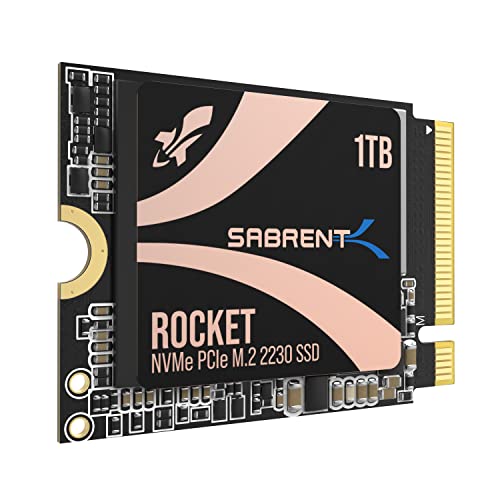
Not all laptops are created equal, especially when it comes to internal space. This tiny yet mighty 1TB Rocket 2230 is specifically designed for ultra-compact devices like the Steam Deck, Microsoft Surface Pro, and other ultrabooks that require the smaller M.2 2230 form factor. Don’t let its size fool you; it still delivers impressive Gen4 NVMe performance, making it a stellar upgrade for devices where space is a premium.
- Key Features:
- Compact Compatibility: Designed for Steam Deck, Surface Pro, ultrabooks, and other small devices.
- High-Speed Gen4 Performance: Achieve speeds up to 5GB/s and 800K IOPS.
- 1TB Capacity: Store more games, apps, and files without slow microSD cards.
- Reliable and Efficient: New Gen4 NVMe controller, premium 3D TLC NAND, DRAM-less with HMB support.
- Retail-Grade Quality: Full warranty, Acronis True Image software, firmware update support.
- Pros:
- Perfect for devices with limited space, like handheld gaming PCs and ultra-thin laptops.
- Significant performance boost over slower internal storage or microSD cards.
- Efficient design for low power usage and cool operation.
- Comes with useful cloning software.
- Cons:
- Lower max sequential speeds compared to the 2280 Rocket 4 series.
- Specific form factor limits its compatibility to certain devices.
- User Impressions: Steam Deck and Surface Pro owners rave about this drive, highlighting the dramatic improvement in game load times and overall system responsiveness. Its perfect fit and performance in small devices are major selling points.
- See it on Amazon here
Portable External SSDs: Speed on the Go
Sometimes, you need speed and capacity that can travel with you. External SSDs offer incredible flexibility.
SABRENT 1TB Rocket Nano V2 External SSD – USB 3.2

This isn’t just an external drive; it’s a statement. The Sabrent Rocket Nano V2 is a marvel of portable engineering, packing 1TB of incredibly fast storage into a sleek, rugged, pocket-sized enclosure. Ideal for content creators on the move, photographers, or anyone needing to transfer large files quickly and securely between devices, it’s a premium external SSD solution.
- Key Features:
- Unrivaled Speed Performance: Sustained transfer speeds over 1500 MB/s.
- Rugged Yet Refined Design: Anodized aluminum housing and shock-absorbing silicone sleeve.
- Ready for Anything: Store up to 1TB; compact, travel-friendly design.
- Dual-Cable Convenience: Includes USB-C to USB-C and USB-C to USB-A cables.
- Engineered for Longevity: High-endurance NAND flash, advanced wear leveling, real-time health monitoring.
- Pros:
- Exceptional transfer speeds, making it great for working directly off the drive.
- Extremely durable and protected against drops and dust.
- Stylish and compact, fits easily in any bag or pocket.
- Broad compatibility out-of-the-box with included cables.
- Cons:
- Premium price point for an external drive.
- Achieving full speeds requires a USB 3.2 Gen 2 (10Gbps) port.
- User Impressions: Users are consistently amazed by its speed and solid build quality. Many report using it for editing 4K video on the go or quick project backups, praising its reliability and pocketable size.
- See it on Amazon here
SSD Enclosures & Adapters: Maximize Your Flexibility
Sometimes you don’t need a new SSD drive, but a way to use an existing one, or turn an internal drive into a portable external solution. Sabrent’s enclosures and cables are perfect for this.
SABRENT 2.5 Inch SATA to USB 3.0 Tool Free External…

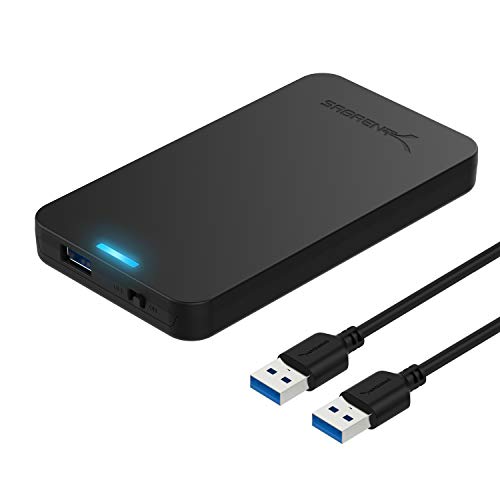
Have an old 2.5-inch SATA SSD or HDD lying around? This tool-free external enclosure is a lifesaver! It lets you quickly turn any standard 2.5-inch SATA drive into a portable USB 3.0 external drive. It’s incredibly easy to use – just slide your drive in, and you’re good to go. This is a brilliant way to recycle old laptop drives or create an affordable external storage device for backups.
- Key Features:
- Tool-free design, easy to install.
- Transfer Rates Up to 5 Gbps (USB 3.0).
- Suitable for 2.5” SATA/SSD, supports standard notebook 2.5″ SATA and SATA II Hard drives.
- Optimized for SSD, Supports UASP SATA III.
- Hot-swappable, plug and play, no drivers needed.
- Broad OS support (Mac, Windows XP/Vista/7/8, Mac OS X and Higher).
- Pros:
- Extremely simple and quick installation.
- Transforms old internal drives into useful external storage.
- Affordable solution for data recovery or external backup.
- UASP support enhances speeds with compatible systems.
- Cons:
- Only works with 2.5-inch SATA drives, not M.2 NVMe SSDs.
- Plastic build, though durable for its price point.
- User Impressions: Users love the simplicity and effectiveness of this enclosure. Many use it for cloning drives, data recovery, or simply as an affordable way to expand laptop storage using an old SSD.
- See it on Amazon here
SABRENT SATA to USB Cable – USB 3.0 to 2.5”…

This little cable is a must-have in any tech toolkit. It’s the quickest and easiest way to connect a 2.5-inch SATA SSD or HDD directly to your laptop via USB. No enclosure needed, no tools, just plug and play! It’s perfect for quick data transfers, testing drives, or recovering data from an old laptop’s hard drive. The UASP support means you’ll get the best possible speeds for your SATA drive.
- Key Features:
- Connects a 2.5″ SATA I/II/III hard drive or SSD to your computer with UASP Support.
- Speeds up to 5Gbps with USB 3.0.
- Hot-swappable, plug and play, no drivers needed.
- LED light indicates Power and Activity status.
- Firmware updates and Acronis True Image software available for download.
- Pros:
- Extremely portable and convenient for quick connections.
- No external power needed for 2.5-inch drives.
- UASP support provides faster transfer rates.
- Bundled software adds value for cloning and data management.
- Cons:
- Only for 2.5-inch SATA drives, not 3.5-inch or M.2.
- Lacks physical protection an enclosure offers.
- User Impressions: This cable receives high praise for its utility and simplicity. Tech enthusiasts and casual users alike find it invaluable for drive diagnostics, quick backups, and hassle-free data migration.
- See it on Amazon here
SABRENT USB 3.2 Type-C Tool-Free Enclosure for M.2 PCIe…

This enclosure is a fantastic solution for those with M.2 SSDs (both SATA and NVMe) that they want to use externally. It’s 100% tool-free, meaning you can swap M.2 drives in and out in seconds. With USB 3.2 Gen 2 Type-C, it offers blazing speeds up to 10Gbps, making it perfect for creating a super-fast portable external drive from an M.2 SSD. If you have an M.2 SSD and a modern laptop with a USB-C port, this is a match made in heaven.
- Key Features:
- CONVENIENCE: 100% Tool-Free installation for M.2 SSDs.
- DESIGN: Ultra-slim Aluminum case with ABS frame, sleek, durable, and portable.
- COMPATIBILITY: M.2 form factor compatible with both SATA and NVME in sizes: 2242/2260/2280.
- SPEED: USB 3.2 supports data transmission speeds of up to 10Gbps.
- PLUG & PLAY: No additional drivers required, bus-powered.
- Pros:
- Versatile, supporting both M.2 SATA and NVMe SSDs.
- Blazing fast 10Gbps speeds over USB 3.2 Type-C.
- Tool-free design makes drive swapping incredibly easy.
- Compact and durable aluminum build, great for travel.
- Cons:
- Requires a USB-C port for optimal connection.
- Doesn’t provide physical protection like the Rocket Nano V2.
- User Impressions: Users are impressed by the enclosure’s speed and its ability to easily convert NVMe SSDs into ultra-fast portable storage. The tool-free design is a frequently highlighted convenience.
- See it on Amazon here
Versatile Docking Stations: For Backup & Beyond
For more comprehensive drive management, especially for larger 3.5-inch drives or multiple drives, a docking station is incredibly useful, even for laptop users.
SABRENT USB 3.0 to SATA External Hard Drive Lay-Flat…

This lay-flat docking station is a great solution for managing multiple 2.5-inch or 3.5-inch SATA drives. Whether you’re upgrading your laptop, performing data recovery, or simply need an easy way to access external drives, this dock makes it simple. Just slide in your drive, and you’re connected via SuperSpeed USB 3.0 with UASP support for optimal transfer rates.
- Key Features:
- Supports all 2.5 and 3.5-inch SATA drives (firmware updates recommended for larger capacities).
- Connects via SuperSpeed USB 3.0 (up to 10x as fast as USB 2.0).
- UASP (USB Attached SCSI Protocol) support for faster performance.
- Serial ATA bus up to 6Gbps Signal bandwidth.
- Comes with a free download of Acronis True Image for Sabrent software for easy cloning.
- Pros:
- Compatible with both laptop (2.5″) and desktop (3.5″) SATA drives.
- Very easy to insert and remove drives.
- UASP support ensures fast data transfers.
- Included cloning software adds significant value.
- Cons:
- Requires an external power adapter.
- Larger footprint than a simple cable or enclosure.
- User Impressions: Users praise its versatility for handling different drive sizes and its reliability for cloning and data backup tasks. The UASP performance is a definite plus for those frequently transferring large files.
- See it on Amazon here
SABRENT USB 3.0 to SATA I/II/III Dual Bay External Hard…

If one bay isn’t enough, how about two? This dual-bay docking station is perfect for serious data management. It supports two 2.5-inch or 3.5-inch SATA drives simultaneously and offers an incredibly useful offline cloning feature. This means you can clone one drive to another without even needing to connect to a computer – a huge time-saver for drive upgrades or backups. For a laptop user managing multiple drives or needing a robust backup solution, this is a top-tier choice.
- Key Features:
- Supports Standard Desktop 2.5″/3.5″ SATA Hard Drives or SSD.
- Supports hard drives up to 10TB.
- Plug and play, no drivers needed.
- Supports Offline Cloning up to 60Mbps.
- Supports Transfer Speeds up to 5Gbps (USB 3.0).
- Pros:
- Dual-bay design allows for simultaneous access to two drives.
- Offline cloning is a highly convenient and powerful feature.
- Supports large capacity drives.
- Simple plug-and-play operation.
- Cons:
- Requires an external power supply.
- Offline cloning speed could be faster for very large drives.
- User Impressions: The offline cloning feature is a consistent highlight for users, simplifying drive upgrades and data backups immensely. Its dual-bay functionality for accessing multiple drives at once is also highly appreciated.
- See it on Amazon here
How to Choose the Right Sabrent SSD for Your Laptop
Picking the Sabrent best SSD drive for laptop (or accompanying accessory) really boils down to a few key considerations:
- Laptop Compatibility:
- Internal SSDs: Does your laptop have an M.2 slot? Is it PCIe Gen3 or Gen4? What M.2 form factor does it support (2280, 2230)? Check your laptop’s manual or manufacturer specs.
- External Solutions: Do you have USB-A or USB-C ports? USB 3.0/3.1/3.2?
- Your Use Case:
- Gaming/Content Creation: You’ll want an internal NVMe SSD like the Rocket 4 series for maximum speed and capacity.
- General Use/Productivity: A fast internal NVMe or a SATA SSD could suffice. External drives like the Rocket Nano V2 are great for portable projects.
- Backup/Data Recovery/Old Drives: Enclosures, cables, or docking stations are your best friends.
- Speed Requirements:
- Blazing Fast (7000+ MB/s): Go for PCIe Gen4 NVMe (Rocket 4 series).
- Very Fast (5000 MB/s): PCIe Gen4 M.2 2230.
- Fast External (1000-1500 MB/s): Rocket Nano V2 or M.2 NVMe in a 10Gbps enclosure.
- Solid External (400-500 MB/s): SATA SSD in a USB 3.0 enclosure/dock.
- Capacity: How much storage do you need? From 1TB to 4TB+ for internal drives, consider your game library, work files, and media.
- Budget: NVMe SSDs, especially Gen4 and high-capacity ones, will be more expensive. SATA options and basic enclosures offer more bang for your buck on a tighter budget.
Frequently Asked Questions (FAQ)
Q1: What’s the main difference between NVMe and SATA SSDs for laptops?
A1: NVMe SSDs use the PCIe interface, offering significantly faster data transfer speeds (often thousands of MB/s) compared to SATA SSDs (which typically max out around 550 MB/s). NVMe drives are ideal for demanding tasks like gaming, video editing, and fast boot-ups, while SATA SSDs are a good, affordable upgrade from traditional hard drives.
Q2: Will a Sabrent NVMe SSD work in any laptop?
A2: Not necessarily. Your laptop needs to have an M.2 slot that supports NVMe. Some older laptops might only support SATA M.2 drives, or might not have an M.2 slot at all. Always check your laptop’s specifications or manual before purchasing an internal NVMe SSD.
Q3: Can I use an external Sabrent SSD for gaming on my laptop?
A3: Yes, you can! For most games, a fast external SSD like the Sabrent Rocket Nano V2 (or an NVMe in a 10Gbps enclosure) will provide much faster load times than installing games on a traditional external HDD. However, internal NVMe SSDs will generally offer the best possible performance for gaming.
Q4: What is UASP, and why is it important for external SSD solutions?
A4: UASP stands for “USB Attached SCSI Protocol.” It’s a protocol that allows USB devices to process commands more efficiently, resulting in faster data transfer speeds, especially with SSDs. If you’re using a Sabrent external enclosure, cable, or dock, look for UASP support to get the best possible performance out of your SSD.
Q5: Is it difficult to install an internal SSD in a laptop?
A5: For most modern laptops, installing an M.2 NVMe SSD is relatively straightforward. It usually involves opening the laptop’s bottom panel, locating the M.2 slot, inserting the SSD, and securing it with a screw. However, procedures vary by laptop model, so always consult your laptop’s service manual or a reliable online guide before attempting installation.
Q6: What is Sabrent Acronis True Image software used for?
A6: Sabrent often bundles or provides access to Acronis True Image for Sabrent software. This powerful tool allows you to clone your existing hard drive or SSD to your new Sabrent SSD, making the upgrade process seamless. It copies everything, including your operating system, programs, and files, so you don’t have to reinstall anything.
Q7: Can Sabrent docking stations be used to recover data from old laptop drives?
A7: Absolutely! Sabrent docking stations are excellent for data recovery. You can simply insert an old 2.5-inch or 3.5-inch SATA hard drive or SSD into the dock, connect it to your laptop via USB, and access the data as if it were an external drive. This is often the easiest way to retrieve files from a non-booting laptop’s drive.
Conclusion
Upgrading your laptop’s storage is one of the smartest investments you can make for performance, and Sabrent offers a robust lineup to meet virtually every need. From the blistering internal speeds of the Rocket 4 series, which could easily be dubbed the Sabrent best SSD drive for laptop for raw power, to the versatile external Rocket Nano V2 and handy tool-free enclosures, there’s a solution here to supercharge your portable workstation or gaming rig.
By understanding your laptop’s specific requirements and your own usage patterns, you can confidently choose the perfect Sabrent SSD or accessory to unlock a whole new level of speed and efficiency. Say goodbye to lag and hello to lightning-fast performance!