
Are you tired of slow loading screens, sluggish file transfers, and a PC that just can’t keep up? Upgrading to a Solid State Drive (SSD) is one of the most impactful changes you can make to breathe new life into your computer. And when it comes to high-performance, reliable, and innovative storage solutions, Sabrent is a name that consistently stands out.
Sabrent has carved out a reputation for delivering cutting-edge SSD technology, from blisteringly fast PCIe Gen5 NVMe drives to versatile external storage and convenient docking stations. Whether you’re a hardcore gamer, a creative professional, or just looking to boost your everyday computing experience, finding the Sabrent best SSD drive for PC means looking at your specific needs.
In this comprehensive guide, we’ll dive deep into 10 of Sabrent’s top SSD drives and related accessories, helping you pick the perfect one to supercharge your setup. Get ready to experience unparalleled speed and efficiency!
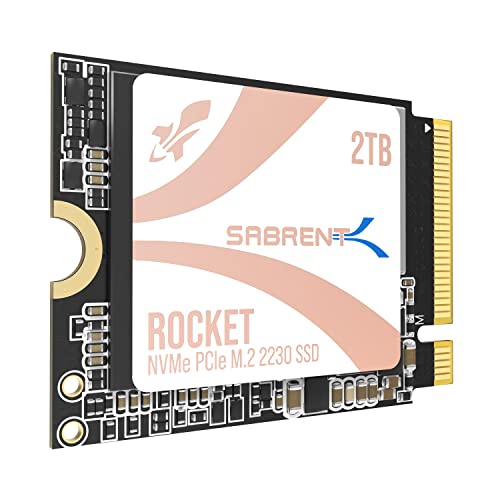
1. SABRENT Rocket Q4 2230 NVMe SSD 2TB – PCIe Gen4

This tiny powerhouse is a game-changer for compact devices like the Steam Deck or ASUS ROG Ally. Don’t let its size fool you; the Rocket Q4 2230 packs a massive 2TB capacity into an M.2 2230 form factor, making it perfect for replacing slow microSD cards and expanding your internal game library without compromises. It leverages PCIe Gen4 speeds for quick load times and smooth performance, proving that great things truly come in small packages.
-
Key Features:
- Designed for Tight Spaces: Fits Steam Deck, ASUS ROG Ally, Surface Pro, and other space-constrained devices with true M.2 2230 form factor.
- Powerful Performance: Achieve up to 5GB/s read and 800K IOPS with a Gen4 PCIe interface and Phison E21T controller.
- Massive 2TB Capacity: Store your full game library and files internally with high-speed QLC flash.
- Efficient and Reliable: DRAM-less with Host Memory Buffer (HMB) support for low power draw and excellent thermal behavior.
- Retail Quality You Can Trust: New, fully supported SSD with downloadable Sabrent Acronis cloning software.
-
Pros:
- Exceptional capacity for its ultra-compact size.
- Significant performance upgrade for handhelds and ultrabooks.
- Low power consumption and good thermal management.
- Includes cloning software for easy migration.
-
Cons:
- QLC NAND may have slightly lower endurance compared to TLC (though still very robust for typical use).
- Premium price due to specialized form factor and capacity.
-
User Impressions: Users rave about the ease of installation and the dramatic speed improvements on their Steam Deck and other compact devices. The 2TB capacity is frequently highlighted as a major benefit, eliminating storage anxieties.
-
Call to Action: See it on Amazon here
2. SABRENT Rocket 5 1TB Gen5 NVMe SSD – PCIe 5.0

If you’re building a cutting-edge PC and demand nothing less than the absolute fastest storage available, the Sabrent Rocket 5 is your answer. This Gen5 NVMe SSD shatters previous speed records, delivering astonishing sequential read speeds up to 14,000 MB/s. It’s engineered for PCIe 5.0 systems, making it ideal for competitive gamers, 4K+ video editors, and power users who need instant access to massive files and benefit from DirectStorage optimization.
-
Key Features:
- Blazing Gen5 Speed: Up to 14GB/s sequential read speeds and up to 2.3M IOPS.
- DirectStorage & Gaming Optimized: Maximize performance in next-gen games with ultra-fast asset streaming.
- Cool Under Pressure: Heatsink Ready (can use motherboard’s heatsink or Sabrent’s solution).
- Power Efficient at Only 7W: High performance without excessive power draw.
- Built for Builders: Compatible with Windows, macOS, and Linux; includes Acronis True Image for migration.
-
Pros:
- Unrivaled read/write speeds for next-gen performance.
- Optimized for DirectStorage in modern games.
- Excellent power efficiency for a Gen5 drive.
- Backward compatible with PCIe 4.0 and 3.0 slots.
-
Cons:
- Requires a PCIe 5.0 compatible motherboard and CPU to reach full speeds.
- Premium price point.
- Can generate significant heat, requiring a robust heatsink.
-
User Impressions: Early adopters are blown away by the sheer speed, noting incredibly fast boot times and near-instant game loading. Many appreciate the inclusion of cloning software for a smooth upgrade.
-
Call to Action: See it on Amazon here
3. SABRENT 2TB External Aluminum SSD, Rocket Nano V2, USB

For those who need portable performance, the Sabrent Rocket Nano V2 is a fantastic external SSD option. This sleek, rugged drive delivers burst transfers over 1500 MB/s, making it perfect for on-the-go video editing, large file transfers, or expanding storage for consoles and laptops. Its aluminum construction with a silicone sleeve ensures your data stays cool and protected, no matter where your work takes you.
-
Key Features:
- Burst transfers over 1500 MB/s with sustained performance for smooth 8K video recording.
- Transfers over USB 3.2 Gen 2×2 interface for maximum speed.
- Constructed of aluminum with an external silicone sleeve for ruggedness and protection.
- Available at up to 4TB capacity.
- Includes both Type-C to Type-A and Type-C to Type-C cables for broad compatibility.
-
Pros:
- Exceptional speed for an external drive.
- Highly durable and portable design.
- Large capacity options available.
- Wide compatibility thanks to included cables.
-
Cons:
- USB 3.2 Gen 2×2 port needed on the host device to achieve maximum speeds.
- Higher cost than traditional portable hard drives.
-
User Impressions: Customers love the Rocket Nano V2’s robust build quality and blazing fast transfer speeds, calling it an essential tool for creative professionals and anyone needing reliable, fast portable storage.
-
Call to Action: See it on Amazon here
4. SABRENT USB-C Lay Flat Docking Station – NVMe M.2 + SATA

This isn’t an SSD itself, but it’s an incredibly useful accessory that helps you make the most of your Sabrent best SSD drive for PC (or any other drive!). The Sabrent Lay Flat Docking Station is a versatile tool for anyone frequently working with multiple drives. It supports both M.2 PCIe NVMe SSDs and traditional 2.5”/3.5” SATA drives, offering a tool-free way to access, clone, or back up your data at 10Gbps USB-C speeds. Its offline clone function is a lifesaver for system migrations!
-
Key Features:
- Wide Compatibility: Dual format support for M.2 PCIe NVMe SSDs (2242, 2260, 2280) and 2.5”/3.5” SATA SSDs or HDDs.
- 10Gbps High-Speed USB-C: Equipped with USB 3.2 Gen 2 Type-C port for fast data transfers.
- Tool-Free Installation: Swap drives effortlessly with a secure hinged lid.
- Smart Cloning, No PC Needed: Use offline clone function to copy one drive to another with progress LEDs.
- Cross-Platform Ready: Fully compatible with Windows, macOS, and Linux.
-
Pros:
- Unparalleled versatility with both NVMe and SATA support.
- Tool-free design makes drive swapping quick and easy.
- Offline cloning feature is extremely convenient.
- Fast USB-C connectivity.
-
Cons:
- Requires an external power adapter.
- Some users might prefer a more enclosed design for long-term use (though it’s designed for quick access).
-
User Impressions: Reviewers consistently praise the docking station’s convenience and “offline clone” feature, calling it a must-have for IT professionals, PC builders, and data hoarders.
-
Call to Action: See it on Amazon here
5. SABRENT USB 3.2 Type-C Tool-Free Enclosure for M.2 PCIe

Looking to turn your M.2 NVMe or SATA SSD into a lightning-fast external drive? The Sabrent USB 3.2 Type-C Tool-Free Enclosure is your go-to solution. This ultra-slim aluminum case offers 10Gbps transfer speeds and is incredibly easy to use, letting you install or remove SSDs without any tools. It’s perfect for creating portable storage, backing up files, or even running an OS externally.
-
Key Features:
- CONVENIENCE: 100% Tool-Free, quickly install and remove SSDs without any tools.
- DESIGN: Ultra-slim Aluminum case with ABS frame. Sleek, Durable, and Convenient.
- COMPATIBILITY: M.2 form factor compatible with both SATA and NVME in sizes: 2242/2260/2280.
- SPEED: USB 3.2 supports data transmission speeds of up to 10Gbps.
- PLUG & PLAY: No additional drivers required, bus powered.
-
Pros:
- Extremely easy, tool-free installation.
- Supports both NVMe and SATA M.2 SSDs.
- Fast 10Gbps transfer speeds.
- Compact and portable design.
-
Cons:
- Can get warm under heavy load (typical for high-speed M.2 enclosures).
- Does not include an M.2 SSD (this is an enclosure only).
-
User Impressions: Customers love the simplicity and versatility of this enclosure, frequently using it for data recovery, portable game libraries, or as a fast backup solution. The tool-free design is a major highlight.
-
Call to Action: See it on Amazon here
6. SABRENT Rocket 2230 1TB NVMe SSD – PCIe Gen4 M.2
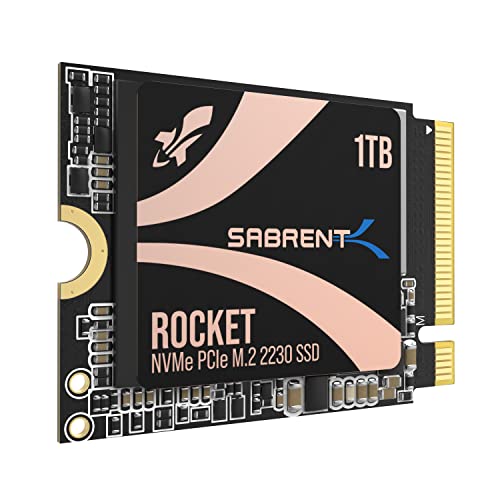
Similar to its 2TB sibling, the Sabrent Rocket 2230 1TB offers incredible performance in a compact M.2 2230 form factor. This makes it an ideal upgrade for devices like the Steam Deck, Surface Pro, or ultrabooks where space is a premium. With PCIe Gen4 speeds up to 5GB/s, it dramatically improves game loading, application responsiveness, and overall system performance, proving a valuable upgrade from slower internal storage or microSD cards.
-
Key Features:
- Compact Compatibility: Designed for Steam Deck, Surface Pro, ultrabooks, and other small devices.
- High-Speed Gen4 Performance: Achieve speeds up to 5GB/s and 800K IOPS.
- 1TB Capacity: Store more games, apps, and files without relying on slow microSD cards.
- Reliable and Efficient: Built with a new Gen4 NVMe controller and premium 3D TLC NAND, DRAM-less with HMB support.
- Retail-Grade Quality: Includes full warranty, Sabrent Acronis True Image cloning software, and firmware update support.
-
Pros:
- Excellent balance of capacity and performance for compact devices.
- Significantly faster than typical OEM drives or microSD cards.
- Uses durable 3D TLC NAND.
- Includes cloning software and full support.
-
Cons:
- Still a specialized form factor, leading to a higher price per GB than standard M.2 2280 drives.
- 1TB might still be limiting for some users with massive game libraries.
-
User Impressions: Users report seamless installation and immediate, noticeable improvements in loading times for games on their handheld consoles and system responsiveness on ultrabooks. The reliability of Sabrent’s retail drives is often praised.
-
Call to Action: See it on Amazon here
7. SABRENT Rocket 4 1TB NVMe SSD PCIe Gen4 M.2 2280

The Sabrent Rocket 4 is a powerhouse PCIe Gen4 NVMe SSD, perfect for desktop PCs, laptops, and even PS5 systems looking for a significant storage boost. With read speeds up to 7450MB/s and write speeds up to 6100MB/s, this drive ensures lightning-fast boot times, incredibly smooth gaming, and efficient handling of demanding workloads like video editing or large software compilations. It’s a fantastic all-rounder for high-performance computing.
-
Key Features:
- Blazing Gen4 Speed: Experience PCIe 4.0 NVMe performance with up to 7450MB/s read and 6100MB/s write speeds.
- High IOPS, Efficient Design: Delivers up to 850K/800K random IOPS while maintaining low heat and power draw.
- Broad System Compatibility: Single-sided M.2 2280 form factor ensures wide compatibility across desktops, laptops, and PS5.
- Made for Pros and Gamers: Ideal for high-performance systems and demanding tasks.
- Trusted Sabrent Support: Engineered with premium hardware and supports Windows, macOS, and Linux.
-
Pros:
- Top-tier PCIe Gen4 performance.
- Wide compatibility, including PS5.
- Efficient operation with good thermal management.
- Backed by Sabrent’s reliable support.
-
Cons:
- Requires a PCIe Gen4 motherboard to achieve full speeds.
- May still require an aftermarket heatsink for sustained peak performance in some scenarios.
-
User Impressions: This drive consistently receives high marks for its raw speed and reliability. Gamers and content creators frequently highlight its ability to cut down load times and make their systems feel much snappier.
-
Call to Action: See it on Amazon here
8. Samsung 870 EVO SATA III SSD 1TB 2.5” Internal Solid

While our focus is on finding the Sabrent best SSD drive for PC, the Samsung 870 EVO is an industry benchmark for SATA SSDs and a popular alternative worth considering. If your PC or laptop doesn’t have an M.2 slot or you’re upgrading an older system, this 2.5-inch SATA III SSD offers exceptional performance, reliability, and compatibility. It maximizes the SATA interface limits with sequential speeds up to 560/530 MB/s, making it a stellar upgrade from traditional hard drives.
-
Key Features:
- EXCELLENCE IN PERFORMANCE: Maximizes the SATA interface limit to 560/530 MB/s sequential speeds.
- INDUSTRY-DEFINING RELIABILITY: Up to 600 TBW under a 5-year limited warranty.
- MORE COMPATIBLE THAN EVER: Compatibility tested for major host systems and applications.
- UPGRADE WITH EASE: Simple plug-and-play installation into standard 2.5-inch SATA form factor.
- SAMSUNG MAGICIAN SOFTWARE: Helps you easily manage your drive, update firmware, and monitor health.
-
Pros:
- Outstanding reliability and endurance (Samsung’s reputation).
- Maximized SATA III performance.
- Broad compatibility with older systems.
- Excellent included management software.
-
Cons:
- Limited by the SATA III interface, significantly slower than NVMe drives.
- Not suitable for ultra-compact devices requiring M.2 form factors.
-
User Impressions: The 870 EVO is a fan-favorite for its consistent performance, long-term reliability, and ease of installation. Many users credit it with bringing old laptops and desktops back to life.
-
Call to Action: See it on Amazon here
9. SABRENT USB 3.0 4-Bay 2.5” SATA SSD and HDD Docking
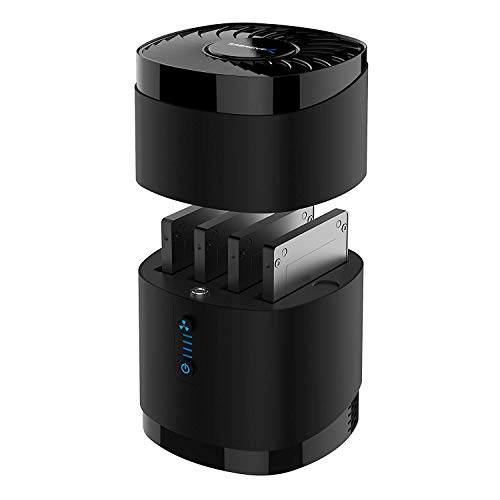
For those with multiple 2.5” SATA drives (SSDs or HDDs) lying around, the Sabrent USB 3.0 4-Bay Docking Station is an organizational dream. This tool-free dock allows you to quickly access up to four drives, making it ideal for data recovery, backups, or expanding your server storage. Its built-in quiet fan ensures your drives stay cool during continuous operation, making it a reliable hub for all your SATA storage.
-
Key Features:
- High Capacity and Broad Compatibility: Supports up to 4x 16TB 2.5” SATA SSDs or HDDs (maximum 12.5mm thickness).
- Blazing Fast Transfers: USB 3.0 interface delivers up to 5Gbps transfer speeds.
- Tool-Free Drive Access: Quickly and easily swap drives with no screws or tools required.
- Enhanced Cooling and Long-Term Reliability: Built-in whisper-quiet fan keeps drives cool and healthy.
- Plug and Play Compatibility: Works right out of the box with Windows, macOS, and Linux.
-
Pros:
- Accommodates up to four 2.5” SATA drives simultaneously.
- Tool-free design for effortless drive swaps.
- Active cooling with a quiet fan.
- Good for backups, data recovery, and drive testing.
-
Cons:
- Only supports 2.5” SATA drives (no 3.5” or NVMe support).
- USB 3.0 (5Gbps) is slower than newer USB 3.2 Gen 2 (10Gbps) docks.
- Not compatible with RAID.
-
User Impressions: Users appreciate the convenience of having multiple drives accessible at once and the peace of mind offered by the cooling fan. It’s often recommended for professionals dealing with many loose drives.
-
Call to Action: See it on Amazon here
10. SABRENT 2.5 Inch SATA to USB 3.0 Tool Free External

Sometimes, simplicity is key. The Sabrent 2.5 Inch SATA to USB 3.0 Tool-Free External Enclosure is the perfect solution for anyone who needs to quickly turn a spare 2.5” SATA SSD or HDD into an external drive. Its tool-free design means you can pop a drive in and out in seconds, and with USB 3.0 speeds, it’s great for backups, data transfers, or even as a portable game drive for consoles that support external storage.
-
Key Features:
- Tool free design, easy to install.
- Transfer Rates Up to 5 Gbps when connected to a USB 3.0 port (480 Mbps for USB 2.0).
- Suitable for 2.5” SATA/SSD; Supports Standard Notebook 2.5″ SATA and SATA II Hard drives.
- Optimized for SSD, Supports UASP SATA III.
- Backwards-Compatible with USB 2.0 or 1.1, Hot-swappable, plug and play, no drivers needed.
-
Pros:
- Extremely simple and quick tool-free setup.
- Cost-effective way to utilize old 2.5″ drives.
- Good transfer speeds for a USB 3.0 enclosure.
- Compact and highly portable.
-
Cons:
- Only supports 2.5” SATA drives.
- Limited to USB 3.0 speeds (5Gbps), not as fast as newer 10Gbps enclosures.
-
User Impressions: Users consistently praise this enclosure for its plug-and-play simplicity and reliability. It’s a popular choice for budget-friendly external storage and quick data access.
-
Call to Action: See it on Amazon here
Conclusion
Sabrent truly offers an impressive range of SSD solutions, catering to virtually every PC user’s needs. Whether you’re chasing the bleeding edge of PCIe Gen5 performance with the Rocket 5, expanding the storage of your Steam Deck with a Rocket 2230, or simply needing a robust external enclosure, there’s a Sabrent best SSD drive for PC in this lineup for you.
When choosing, consider your motherboard’s compatibility (PCIe Gen3, Gen4, or Gen5), the form factor you need (M.2 2280, 2230, or 2.5″ SATA), and your primary use case (gaming, content creation, portable storage, or general computing). By matching your requirements with Sabrent’s innovative products, you’re sure to find an SSD that delivers outstanding speed, reliability, and value. Happy upgrading!
FAQ Section
Q1: What’s the main difference between NVMe and SATA SSDs?
A1: The main difference is speed and interface. NVMe (Non-Volatile Memory Express) SSDs connect directly to your motherboard via the PCIe (Peripheral Component Interconnect Express) interface, offering significantly faster speeds (thousands of MB/s) compared to SATA (Serial ATA) SSDs, which are limited by the SATA III interface to around 550 MB/s. NVMe drives are ideal for modern PCs, gaming, and heavy workloads, while SATA drives are great for older systems or budget-friendly upgrades.
Q2: What do PCIe Gen4 and Gen5 mean for SSDs?
A2: PCIe Generations refer to the version of the Peripheral Component Interconnect Express bus. Each new generation doubles the bandwidth of the previous one. PCIe Gen4 NVMe SSDs are much faster than Gen3, and Gen5 SSDs (like the Sabrent Rocket 5) are twice as fast as Gen4, offering incredible speeds suitable for future-proof systems and highly demanding applications like 8K video editing or next-gen gaming with DirectStorage. To utilize these speeds, your motherboard and CPU must support the corresponding PCIe generation.
Q3: How do I know which Sabrent SSD is compatible with my PC?
A3: First, check your PC’s motherboard specifications.
* M.2 NVMe SSDs: Look for an M.2 slot. Check if it supports PCIe Gen3, Gen4, or Gen5, and if it’s “NVMe” compatible. Also, note the supported M.2 size (e.g., 2280, 2230).
* 2.5″ SATA SSDs: Your PC will need a 2.5-inch drive bay and a SATA data/power connection, common in most desktops and many laptops.
* External SSDs/Enclosures: These connect via USB (Type-A or Type-C), so your PC just needs a compatible USB port.
Q4: Is a heatsink necessary for an NVMe SSD?
A4: For high-performance NVMe SSDs, especially Gen4 and Gen5 drives like the Sabrent Rocket series, a heatsink is highly recommended. These drives can generate significant heat under sustained heavy loads, which can lead to “thermal throttling” – the drive slowing down to prevent overheating. Many modern motherboards come with integrated M.2 heatsinks, or you can purchase aftermarket options.
Q5: What is the benefit of Sabrent’s cloning software (Acronis True Image)?
A5: Sabrent often includes access to Acronis True Image cloning software with their retail SSDs. This software makes it incredibly easy to migrate your existing operating system, applications, and data from your old drive to your new Sabrent SSD without reinstalling everything. It saves a lot of time and hassle, especially for system upgrades.
Q6: Can I use Sabrent SSDs for gaming?
A6: Absolutely! Sabrent SSDs, particularly their Rocket NVMe series, are excellent for gaming. Their high read and write speeds drastically reduce game load times, improve texture streaming, and overall make your gaming experience much smoother and more responsive compared to traditional hard drives. PCIe Gen4 and Gen5 drives are especially beneficial for next-gen games optimized for faster storage.
Q7: What does “Tool-Free” mean for Sabrent enclosures and docks?
A7: “Tool-Free” means you can install or remove a drive from the enclosure or docking station without needing any screwdrivers or other tools. This design emphasizes convenience and speed, allowing for quick hot-swapping of drives for backups, data recovery, or just accessing files on different drives.