

If you’re an ASUS ROG Ally owner, you know it’s a fantastic piece of kit, offering PC-level gaming in a portable package. But let’s be real, that internal storage can fill up fast, especially with today’s massive game files. You might be wondering, “What’s the Sabrent best SSD for ROG Ally?” or “How can I expand my storage for more games?” You’re in luck! Sabrent has become a go-to brand for high-performance storage solutions, especially for compact devices like the ROG Ally.
In this comprehensive guide, we’re diving deep into the top 10 Sabrent SSDs, docks, and essential accessories that can transform your ROG Ally experience. While our primary focus is on Sabrent’s excellent offerings, we’ve also included a couple of top-notch alternatives and crucial adapters to give you a complete picture for upgrading your handheld’s storage. Get ready to supercharge your ROG Ally with faster load times, more games, and seamless connectivity!
Why Upgrade Your ROG Ally Storage?
The ASUS ROG Ally typically comes with a 512GB or 1TB M.2 2230 NVMe SSD. While good to start, serious gamers will quickly run out of space. Upgrading not only gives you more room for your growing game library but can also improve loading times and overall system responsiveness. Plus, with the right accessories, you can unlock even more potential from your Ally, turning it into a versatile mini-PC.
Top 10 SSDs & Accessories for Your ROG Ally
Here’s our curated list of the best options to expand and enhance your ROG Ally’s storage and connectivity.
1. SABRENT Rocket Q4 2230 NVMe SSD 2TB – PCIe Gen4

When it comes to serious storage expansion for your ROG Ally, the Sabrent Rocket Q4 2230 2TB is a game-changer. This compact powerhouse is specifically designed to fit the tight spaces of handhelds like the ROG Ally, offering a massive capacity that lets you forget about juggling games or relying on slow microSD cards. Its PCIe Gen4 speeds mean your games load in a flash, ensuring you spend less time waiting and more time playing. It’s truly a contender for the Sabrent best SSD for ROG Ally if you need maximum internal capacity.
-
Key Features:
- Designed for M.2 2230 form factor devices (Steam Deck, ROG Ally)
- Up to 5GB/s read and 800K IOPS performance
- Massive 2TB capacity with QLC flash
- DRAM-less with Host Memory Buffer (HMB) for efficiency
- Includes Sabrent Acronis cloning software
-
Pros:
- Huge 2TB capacity in a tiny form factor
- Blazing-fast PCIe Gen4 speeds
- Perfect fit for ROG Ally
- Comes with cloning software for easy migration
- Efficient power draw and thermal behavior
-
Cons:
- QLC NAND may have slightly lower endurance than TLC (though still very high for consumer use)
- Higher price point due to capacity and form factor
-
User Impressions: Users rave about the ease of installation and the sheer volume of games they can now store. Many highlight the noticeable improvement in load times, making their ROG Ally feel even snappier. The inclusion of cloning software is frequently praised for simplifying the upgrade process.
- Call to Action: See it on Amazon here
2. SABRENT Rocket 2230 1TB NVMe SSD – PCIe Gen4 M.2
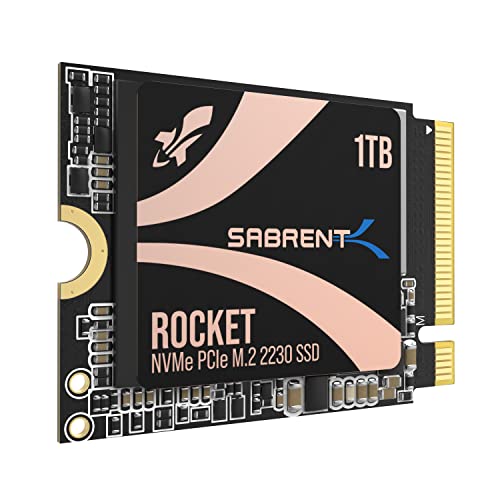
If 2TB is more than you need, the Sabrent Rocket 2230 1TB offers an excellent balance of capacity and performance for your ROG Ally. This SSD brings the same high-speed PCIe Gen4 goodness in a compact M.2 2230 form factor, ensuring a perfect fit and a significant upgrade over the stock drive. It’s an ideal choice for users looking to double their internal storage without breaking the bank, all while enjoying Sabrent’s reputation for quality.
-
Key Features:
- M.2 2230 compact compatibility (Steam Deck, Surface Pro, ROG Ally)
- High-speed Gen4 performance up to 5GB/s read and 800K IOPS
- 1TB capacity with premium 3D TLC NAND
- DRAM-less with HMB support for efficiency
- Includes Sabrent Acronis True Image cloning software
-
Pros:
- Excellent balance of capacity and speed
- Premium 3D TLC NAND for better endurance
- Significant upgrade for most Ally users
- Reliable and efficient operation
- Full retail quality with warranty and software
-
Cons:
- Still a premium price compared to larger M.2 2280 drives
- Installation requires opening the device
-
User Impressions: Owners are consistently impressed by the straightforward upgrade process and the immediate performance boost. The 1TB capacity is often cited as the sweet spot for many, providing ample space for numerous AAA titles. The drive’s reliability and cool operation are also frequently mentioned.
- Call to Action: See it on Amazon here
3. SABRENT Docking Station Compatible with Steam Deck, 7-in-1

Beyond just internal storage, the Sabrent 7-in-1 Docking Station is a must-have accessory that transforms your ROG Ally into a versatile desktop-like experience. This isn’t just a simple dock; it includes an internal M.2 slot for adding even more storage (either NVMe or SATA SSDs) that your Ally can access, alongside essential ports like Gigabit Ethernet, HDMI 2.0 (for 4K@60Hz output!), and multiple USB ports. It truly expands the capabilities of your Sabrent best SSD for ROG Ally setup by adding external storage options and more.
-
Key Features:
- 7-in-1 functionality (USB-C Power Delivery, HDMI, Ethernet, USB ports, M.2 SSD slot)
- RJ45 Gigabit Ethernet port (1000Mbps)
- Internal M.2 slot for NVMe or SATA SSD storage
- HDMI 2.0 port for up to 4K@60Hz display output
- Three USB ports (1x USB 2.0, 2x USB 3.2 Gen 1×1 5Gbps)
-
Pros:
- Massively expands connectivity and display options
- Adds a convenient M.2 slot for external storage expansion
- Gigabit Ethernet for stable online gaming
- High-resolution display output
- Broad compatibility with Windows, macOS, Linux, Steam Deck, ROG Ally
-
Cons:
- Requires an external power adapter (not always included) for full functionality
- Adds bulk compared to direct USB-C adapters
-
User Impressions: Users love the versatility of this dock, especially the integrated M.2 slot which offers a unique way to expand storage without opening their handheld. The stable wired internet connection and 4K display output are major highlights for those who use their Ally for more than just handheld gaming.
- Call to Action: See it on Amazon here
4. SABRENT USB-C Hub & SSD Enclosure, 6-Port Dock with M.2

For those who prioritize portability and multi-functionality, the Sabrent USB-C Hub & SSD Enclosure is an excellent choice. This sleek aluminum hub acts as both a 6-port travel dock and a secure M.2 SSD enclosure. It’s perfect for users who want to add an external SSD for extra games or files, connect peripherals, and get a wired internet connection, all in one compact device. It’s an ideal companion for any ROG Ally owner on the go.
-
Key Features:
- 6-Port USB-C travel hub with integrated M.2 SSD slot
- USB-C 10Gbps input with up to 90W Power Delivery (PD3.0)
- Three USB-A ports (2x 5Gbps, 1x 480Mbps)
- HDMI 2.0 port for up to 4K@60Hz display
- Gigabit Ethernet (1GbE)
- Internal M.2 slot with thermal pad cooling (supports 2242/2260/2280 SATA or NVMe SSDs)
-
Pros:
- Combines essential ports with external M.2 storage in one device
- Robust aluminum build with thermal cooling for the SSD
- High-speed USB-C connectivity
- Supports both NVMe and SATA M.2 SSDs
- Highly portable and versatile for travel
-
Cons:
- SSD slot only supports up to 5Gbps, not full Gen4 speeds for NVMe
- Requires an external SSD to utilize the storage feature
-
User Impressions: Customers appreciate the convenience of having an external SSD enclosure and a full-featured hub in one. The build quality and the effective thermal management for the M.2 SSD are frequently highlighted. It’s seen as a smart way to expand storage without internal modifications.
- Call to Action: See it on Amazon here
5. fanxiang 2TB M.2 2230 NVMe SSD, PCIe Gen 4×4 Speed

While our focus is on the Sabrent best SSD for ROG Ally, the fanxiang 2TB M.2 2230 NVMe SSD is an excellent alternative worth considering. This drive offers a massive 2TB capacity in the compact 2230 form factor, perfect for the ROG Ally. With blazing-fast PCIe 4.0 speeds, it ensures your games load quickly and your system remains responsive. The added graphene heat dissipation sticker is a nice touch for maintaining optimal performance during intense gaming sessions.
-
Key Features:
- Ultra-fast read speeds up to 5200 MB/s, write up to 4500MB/s
- Compact M.2 2230 form factor for Steam Deck, Surface, ROG Ally
- Graphene heat dissipation sticker for thermal management
- High-quality 3D NAND Flash chips and robust controller
- 5-year warranty or 640TBW
-
Pros:
- High capacity (2TB) in the correct form factor
- Excellent PCIe Gen4 speeds
- Integrated graphene heat sink
- Good reliability and long warranty
- Competitive pricing for the performance
-
Cons:
- Not a Sabrent brand (if brand loyalty is a factor)
- Speeds may be limited by older PCIe 3.0 devices (not an issue for Ally)
-
User Impressions: Users are generally impressed with the performance-to-price ratio, finding it a great value for the 2TB capacity. The ease of installation and the noticeable speed improvements are commonly praised. The graphene sticker is a welcome addition for peace of mind regarding thermals.
- Call to Action: See it on Amazon here
6. fanxiang 1TB M.2 2230 NVMe SSD, PCIe Gen 4×4 Speed
Another strong alternative to a Sabrent best SSD for ROG Ally is the fanxiang 1TB M.2 2230 NVMe SSD. Offering a substantial 1TB of storage, this drive provides excellent PCIe Gen 4×4 speeds, making it a fantastic upgrade for anyone looking to double their Ally’s standard storage. Like its 2TB sibling, it features advanced thermal management with a graphene heat dissipation sticker, ensuring consistent performance even under heavy loads.
-
Key Features:
- Fast read speeds up to 5000 MB/s, write up to 3600MB/s
- Compact M.2 2230 form factor, ideal for ROG Ally
- Graphene heat dissipation sticker for effective cooling
- Premium 3D NAND Flash and robust controller
- 5-year warranty or 320TBW
-
Pros:
- Solid 1TB capacity for a balanced upgrade
- Reliable PCIe Gen4 performance
- Effective thermal solution
- Durable and stable operation
- Attractive price point
-
Cons:
- Not a Sabrent branded product
- Similar to other 1TB 2230 drives, installation requires opening the device
-
User Impressions: Customers highlight this drive as a cost-effective way to get a significant storage boost. The performance is consistently reported as excellent, with quick game loads and smooth operation. The integrated cooling solution is often mentioned as a positive design choice.
- Call to Action: See it on Amazon here
7. SABRENT Rocket RGB NVMe & SATA M.2 SSD Enclosure

For those who prefer external storage with a bit of flair, the Sabrent Rocket RGB NVMe & SATA M.2 SSD Enclosure is a fantastic option. This enclosure allows you to turn any M.2 NVMe or SATA SSD (2230, 2242, 2260, 2280 sizes) into a high-speed external drive. With USB 3.2 Gen 2×2, it offers blistering 20Gbps transfer rates, making it one of the fastest external enclosures around. Plus, the RGB lighting adds a cool aesthetic, indicating power and activity. It’s a great way to use extra SSDs or complement your internal Sabrent best SSD for ROG Ally setup.
-
Key Features:
- High-speed USB-C 20Gbps (USB 3.2 Gen 2×2)
- Compatible with both M.2 NVMe and M.2 SATA SSDs
- Tool-free aluminum design with thermal padding
- Status-responsive RGB lighting
- Plug and play with Windows, macOS, Linux, Steam Deck, ROG Ally
-
Pros:
- Extremely fast external transfer speeds
- Versatile, supporting both NVMe and SATA M.2 SSDs
- Tool-free installation for easy SSD swapping
- Durable aluminum construction with good heat dissipation
- Stylish RGB lighting
-
Cons:
- Requires a compatible 20Gbps USB-C port to reach max speeds
- SSD not included
-
User Impressions: Users love the robust build and the effortless, tool-free installation. The blazing fast transfer speeds are frequently praised, making it ideal for large file transfers or running games directly from the external drive. The RGB lighting is a popular aesthetic bonus.
- Call to Action: See it on Amazon here
8. Addlink New S91 2TB 2230 NVMe High Performance PCIe

The Addlink New S91 2TB 2230 NVMe SSD is another excellent choice for expanding your ROG Ally’s internal storage, providing a significant boost in capacity and performance. This PCIe Gen4x4 drive delivers impressive read/write speeds, ensuring your games load quickly and your system remains highly responsive. Its M.2 2230 form factor is specifically designed for devices like the ROG Ally, making it a perfect fit for a seamless upgrade.
-
Key Features:
- PCIe Gen4x4 interface (backward compatible with Gen3x4)
- Read/Write up to 5000/3200MB/s
- Designed for M.2 2230 form factor (ROG Ally, Steam Deck)
- Supports SLC Caching & HMB (Host Memory Buffer)
- 5-year limited warranty
-
Pros:
- Generous 2TB capacity
- High-performance PCIe Gen4 speeds
- Optimal 2230 size for ROG Ally
- Features like SLC Caching and HMB improve performance
- Reliable with a good warranty
-
Cons:
- Not a Sabrent brand
- Actual speeds can vary based on device and usage
-
User Impressions: Customers often highlight this SSD as a reliable and high-capacity upgrade. The performance gains are noticeable, particularly in game load times. The fit and compatibility with devices like the ROG Ally are consistently praised, making installation straightforward for many.
- Call to Action: See it on Amazon here
9. JOYJOM 2230 to 2280 Adapter for ROG Ally SSD
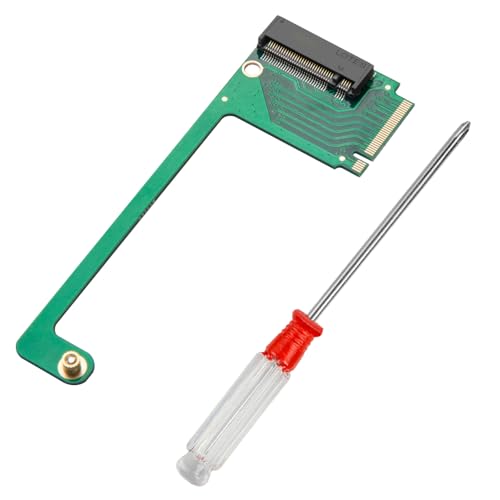
Thinking outside the M.2 2230 box? The JOYJOM 2230 to 2280 Adapter allows you to install a larger, often more affordable and higher-capacity, 2280 NVMe SSD into your ROG Ally. This adapter is specifically designed for the ROG Ally console, bending the longer 2280 drive into the tight internal space. While it requires some technical skill and careful installation, it opens up a world of possibilities for massive storage upgrades that even the Sabrent best SSD for ROG Ally 2230 drives might not match in terms of sheer capacity.
-
Key Features:
- Specifically designed 90-degree adapter for ROG Ally
- Allows upgrading from 2230 to 2280 NVMe M-Key PCIe 4.0 SSDs
- Enables higher capacity and potentially higher-speed storage
- Includes screwdriver for SSD installation
- Instructions for system cloning provided
-
Pros:
- Unlocks access to wider range of 2280 SSDs (often cheaper per GB)
- Allows for potentially massive storage capacities (e.g., 4TB or 8TB 2280 drives)
- Designed precisely for the ROG Ally’s internal layout
- Comes with basic tools and cloning guidance
-
Cons:
- Requires advanced technical skills and careful installation
- May increase internal heat due to the larger SSD
- Could potentially void warranty if not installed correctly
-
User Impressions: Adventurous users who’ve tackled this upgrade are often thrilled with the results, particularly the ability to install huge 2280 drives. They emphasize the need for patience and following guides carefully, but ultimately find it a rewarding upgrade for the storage capacity it unlocks.
- Call to Action: See it on Amazon here
10. chenyang ROG Ally Gaming Internal M.2 NVME M-Key 2230 to

Similar to the JOYJOM adapter, the chenyang ROG Ally Gaming Internal M.2 NVME M-Key 2230 to 2280 Adapter offers another solution for installing a larger 2280 SSD in your ROG Ally. If you’ve collected your Ally and are already running out of space, this adapter provides an avenue to upgrade to widely available and cost-effective 2280 drives, potentially up to 8TB! It’s a “full-fat” solution for serious storage hounds, but remember, installation is a more involved process.
-
Key Features:
- Compatible with ROG Ally for 2230 to 2280 NVME extension
- Enables use of larger 2280 M.2 SSDs (up to 8TB)
- PCI-Express 4.0 x4 adapter for full speed
- Relatively easy process (approx. 20 minutes) once familiar
- Emphasizes cloning the system before replacement
-
Pros:
- Allows for installation of much higher capacity 2280 SSDs
- Utilizes PCIe 4.0 x4 for full speed potential of 2280 drives
- Cost-effective way to get more storage per dollar
- Clear process outline for installation
-
Cons:
- Installation requires opening the device and handling delicate components
- Potential for thermal challenges with larger drives in a confined space
- Not suitable for beginners
-
User Impressions: Reviewers are excited about the significant storage increase this adapter enables, allowing them to carry their entire game library. They appreciate the straightforward guidance provided for the cloning process and highlight the value of using a 2280 drive. However, they consistently advise caution during the physical installation.
- Call to Action: See it on Amazon here
FAQ Section
Q1: What size SSD does the ASUS ROG Ally use?
A1: The ASUS ROG Ally uses an M.2 2230 NVMe SSD. The “2230” refers to its dimensions: 22mm wide by 30mm long. This small form factor is common in handhelds and ultra-compact devices.
Q2: Can I install a 2280 SSD in my ROG Ally?
A2: Officially, the ROG Ally supports 2230 SSDs. However, with a specialized 2230 to 2280 adapter (like the JOYJOM or chenyang products reviewed above), it is physically possible to install a 2280 SSD. This requires opening the device and careful installation, and some users note it can lead to tighter internal component spacing.
Q3: Why is a Sabrent SSD often recommended for the ROG Ally?
A3: Sabrent has a strong reputation for producing high-quality, high-performance NVMe SSDs that often come in a variety of form factors, including the hard-to-find 2230 size. Their “Rocket” series is known for excellent speed and reliability, making them a top choice for a reliable and fast upgrade for the ROG Ally.
Q4: Will upgrading my SSD improve gaming performance on the ROG Ally?
A4: While upgrading your SSD won’t directly increase your in-game frame rates (that’s largely dependent on the CPU and GPU), it will significantly improve game loading times, system boot-up speeds, and file transfer speeds. For games with frequent loading screens, this can make a noticeable difference in your overall gaming experience.
Q5: What’s the difference between QLC and TLC NAND in SSDs?
A5: QLC (Quad-Level Cell) and TLC (Triple-Level Cell) refer to how much data each memory cell can store. TLC stores 3 bits per cell, while QLC stores 4. QLC drives often offer higher capacities at a lower cost, but typically have slightly lower endurance (fewer write cycles) and can sometimes be a bit slower for sustained writes compared to TLC. For most gaming and general use, both are perfectly fine and offer excellent performance.
Q6: Do I need cloning software when upgrading my ROG Ally SSD?
A6: Yes, if you want to transfer your existing operating system, games, and files directly to your new SSD without reinstalling everything from scratch, you’ll need cloning software. Many Sabrent SSDs, for example, include a license for Acronis True Image, which simplifies this process.
Q7: Are the docking stations truly useful for the ROG Ally?
A7: Absolutely! Docking stations greatly expand the versatility of your ROG Ally. They allow you to connect external monitors for a desktop-like gaming experience, use wired keyboards and mice, get a stable internet connection via Ethernet, and even add external SSD storage. They effectively turn your handheld into a portable gaming console and a mini-PC.
Conclusion
Upgrading your ASUS ROG Ally’s storage is one of the best ways to enhance your portable gaming experience. Whether you opt for a high-capacity M.2 2230 NVMe drive like the Sabrent best SSD for ROG Ally options, explore excellent alternatives from other brands, or leverage innovative adapters to use larger 2280 SSDs, the possibilities are vast.
Beyond internal storage, Sabrent’s range of docking stations and external enclosures offers incredible versatility, transforming your Ally into a powerful, multi-functional device. We hope this guide helps you make the perfect choice to keep your game library growing and your load times shrinking! Happy gaming!