

Is your MacBook Pro running low on storage? Or perhaps you’re a creative professional looking for lightning-fast external storage for large video files, photos, and projects? An external SSD is the perfect solution, and finding the Lexar best external SSD for MacBook Pro can significantly upgrade your workflow. Unlike traditional hard drives, Solid State Drives (SSDs) offer superior speed, durability, and portability, making them ideal companions for your high-performance Mac.
In this guide, we’ve rounded up 10 of the best external SSDs available, with a special focus on Lexar’s top-tier offerings, alongside other fantastic choices from brands like SanDisk, Samsung, and Crucial. We’ll help you find the perfect portable storage solution that matches your needs, whether you prioritize blazing-fast speeds, rugged durability, or compact design. Let’s dive in!
Why an External SSD is a Must-Have for Your MacBook Pro
Your MacBook Pro is a powerhouse, and you need storage that can keep up. Here’s why an external SSD is a game-changer:
- Blazing Speeds: SSDs boast significantly faster read and write speeds compared to traditional HDDs. This means quicker file transfers, faster project loading times, and smoother performance for demanding applications like video editing or graphic design.
- Durability: With no moving parts, SSDs are much more resistant to drops and shocks, making them perfect for on-the-go professionals.
- Portability: They’re typically smaller, lighter, and more compact than external hard drives, easily slipping into your bag or even your pocket.
- Silence: Since there are no spinning platters, SSDs operate silently, which is a nice bonus during focused work.
Now, let’s explore the top contenders for your MacBook Pro!
The Best External SSDs for MacBook Pro
1. Lexar 2TB ES3 External SSD, Up to 1050MB/s Read

The Lexar ES3 External SSD is a fantastic choice for MacBook Pro users needing a blend of speed, reliability, and security. With impressive read/write speeds, it’s perfect for quickly offloading large files, backing up your system, or running applications directly from the drive. Its built-in heat dissipation technology keeps it cool under pressure, ensuring consistent performance even during intense data transfers. Plus, Lexar throws in handy encryption software for peace of mind.
-
Key Features:
- Up to 1050MB/s read and 1000MB/s write speeds
- 9.5X faster than traditional HDDs
- Built-in double-layer graphite sheets for superior heat dissipation
- Drop-resistant up to 2 meters for enhanced durability
- Plug-and-play with 2-in-1 USB-C/USB-A cable
- Includes Lexar DataShield 256-bit AES encryption and Recovery Tool software
-
Pros:
- Excellent speed for demanding tasks
- Robust heat management prevents throttling
- Highly durable and shock-resistant
- Broad compatibility with included cables
- Security software adds value
-
Cons:
- May not reach advertised speeds on older USB ports
- Design might be a bit plain for some
-
User Impressions: Users frequently praise its consistent fast performance and robust build. Many appreciate the inclusion of both USB-C and USB-A cables for versatile connectivity and the added data security features. It’s often cited as a reliable workhorse for everyday backups and professional use.
2. Lexar ES3 1TB External SSD, USB 3.2 Gen2 Portable SSD

Similar to its 2TB sibling, the 1TB Lexar ES3 offers superb portability and high-speed data transfer in a sleek, compact package. This tiny powerhouse weighs just 42g and is only 10.5mm thick, making it incredibly easy to carry wherever your MacBook Pro goes. It’s an excellent option for those who need fast, secure storage for daily tasks, project files, or even expanding their iPhone 15’s storage capacity.
-
Key Features:
- High-speed USB 3.2 Gen 2 performance (up to 1050MB/s read, 1000MB/s write)
- Ultra-thin (10.5mm) and lightweight (42g) metal design
- Wide compatibility, including iPhone 15 series, Android, laptops, cameras, gaming consoles
- Comes with a Type-C cable for plug-and-play convenience
- Includes Lexar DataShield 256-bit AES encryption software
-
Pros:
- Extremely portable and lightweight
- Great speeds for its size
- Excellent compatibility across various devices
- Built-in encryption for data protection
-
Cons:
- Performance depends on host device’s USB 3.2 Gen 2 support
- No Magsafe support (as noted by manufacturer)
-
User Impressions: Reviewers love the ES3’s pocket-friendly design and impressive speeds for such a small device. Its broad compatibility, especially with the latest iPhone, makes it a versatile tool for digital nomads and content creators. The metal casing feels premium and durable to most users.
3. SanDisk 2TB Extreme Portable SSD – Up to 1050MB/s, USB-C

The SanDisk Extreme Portable SSD is a legendary choice among creative professionals, and for good reason. This drive combines robust NVMe performance with incredible durability, boasting up to 3-meter drop protection and IP65 water and dust resistance. If you’re often working on location or just want peace of mind, this drive is built to take a beating while delivering fast data transfers. It’s a strong contender if you’re looking for an alternative to the Lexar best external SSD for MacBook Pro.
-
Key Features:
- NVMe solid-state performance with up to 1050MB/s read and 1000MB/s write speeds
- Up to 3-meter drop protection and IP65 water/dust resistance
- Handy carabiner loop for secure attachment
- 256-bit AES hardware encryption for password protection
- SanDisk Memory Zone app for file management
-
Pros:
- Exceptional ruggedness and durability
- Fast NVMe-based performance
- Excellent for outdoor or challenging environments
- Hardware encryption adds strong security
-
Cons:
- Can run warm during extended heavy use
- Included cable might be a bit short for some setups
-
User Impressions: This SSD consistently receives high marks for its “go anywhere” durability and reliable performance. Users in photography and videography particularly appreciate its ability to withstand the elements, making it a trusted companion for fieldwork. The carabiner loop is a small but much-loved feature.
4. SanDisk 1TB Extreme Portable SSD – Up to 1050MB/s, USB-C
Offering the same fantastic features as its 2TB counterpart, the 1TB SanDisk Extreme Portable SSD is ideal for users who need a balance of ample storage and extreme resilience. It’s perfect for photographers storing thousands of RAW images, videographers needing quick project backups, or anyone who frequently transports important data. Its compact size and robust shell make it a worry-free addition to your tech kit.
-
Key Features:
- NVMe solid-state performance with up to 1050MB/s read and 1000MB/s write speeds
- Up to 3-meter drop protection and IP65 water/dust resistance
- Handy carabiner loop for secure attachment
- 256-bit AES hardware encryption for password protection
- SanDisk Memory Zone app for file management
-
Pros:
- Extremely durable for active users
- Fast and reliable data transfers
- Excellent for outdoor use or travel
- Hardware encryption enhances data security
-
Cons:
- Price per GB can be higher than some non-rugged alternatives
- May experience slight thermal throttling under prolonged heavy loads
-
User Impressions: Users love the peace of mind that comes with its rugged design. It’s often recommended by professionals who travel frequently or work in less-than-ideal conditions. The speed is consistently praised for making large file transfers a breeze.
5. SanDisk 4TB Extreme Portable SSD – Up to 1050MB/s, USB-C
For those who simply can’t have enough storage, the 4TB SanDisk Extreme Portable SSD is an absolute beast. It packs all the renowned durability and speed of the Extreme series into a massive 4TB capacity. This is perfect for archiving extensive video libraries, large game collections, or entire project folders that demand both speed and robust protection. It’s an investment, but one that ensures you won’t run out of space anytime soon.
-
Key Features:
- NVMe solid-state performance with up to 1050MB/s read and 1000MB/s write speeds
- Up to 3-meter drop protection and IP65 water/dust resistance
- Handy carabiner loop for secure attachment
- 256-bit AES hardware encryption for password protection
- SanDisk Memory Zone app for file management
-
Pros:
- Huge 4TB capacity in a portable form factor
- Unmatched durability for demanding environments
- Fast NVMe performance for large file handling
- Secure hardware encryption included
-
Cons:
- Premium price point for the capacity
- Still limited by USB 3.2 Gen 2 speeds, not Thunderbolt
-
User Impressions: The 4TB version is highly valued by professional videographers and photographers who deal with massive files regularly. They appreciate having such a large, fast, and resilient storage option that can keep up with demanding workflows without constant offloading. The reliability in harsh conditions is a standout.
6. Lexar Professional Go USB 3.2 Gen 2 Type-C Portable SSD

The Lexar Professional Go SSD is designed for the ultimate on-the-go professional who needs more than just storage. This ingenious device not only offers blazing-fast USB 3.2 Gen 2 speeds but also incorporates a built-in hub with four USB Type-C connectors, delivering up to 30W of power. It’s a multi-tasker’s dream, allowing you to connect multiple peripherals, charge devices, and transfer data all from one compact, rugged gadget.
-
Key Features:
- Blazing fast transfer speeds: up to 1050MB/s read and 1000MB/s write
- Built-in hub with 4 USB Type-C connectors and up to 30W power supply
- Rugged durability: IP65 dust- and water-resistance, 3.3′ (1m) anti-drop protection
- Ultra-small and lightweight design (0.5 oz)
- Universal compatibility with Mac, Windows, iOS (iPhone 15), Android, etc.
-
Pros:
- Innovative integrated USB-C hub is highly convenient
- Excellent speed and robust durability
- Extremely compact and lightweight
- Versatile compatibility across many devices
- Ideal for decluttering mobile workflows
-
Cons:
- Might be overkill if you only need storage and no hub
- 30W power delivery might not be enough for some power-hungry laptops
-
User Impressions: This Lexar SSD is a standout for its clever design. Users absolutely love the integrated hub, calling it a game-changer for reducing clutter and expanding connectivity on their MacBook Pro. Professionals who travel or work from different locations find it incredibly useful for its multi-functionality and rugged build.
7. SanDisk 1TB Extreme PRO Portable SSD – Up to 2000MB/s

When “fast” isn’t fast enough, there’s the SanDisk Extreme PRO Portable SSD. This drive takes performance to the next level with incredible read/write speeds of up to 2000MB/s, thanks to USB 3.2 Gen 2×2. It’s built for the most demanding creative tasks, like editing 8K video directly from the drive. The forged aluminum chassis acts as a heatsink, ensuring sustained high speeds, while maintaining the Extreme series’ signature ruggedness.
-
Key Features:
- Powerful NVMe solid-state performance up to 2000MB/s read/write speeds
- Forged aluminum chassis acts as a heatsink for sustained speeds
- Up to 3-meter drop protection and IP65 water/dust resistance
- 256-bit AES hardware encryption for password protection
- SanDisk Memory Zone app for file management
-
Pros:
- Blazing fast speeds for professional workflows (e.g., 4K/8K video editing)
- Excellent thermal management prevents performance dips
- Superior durability for extreme environments
- Hardware encryption provides top-tier security
-
Cons:
- Requires a USB 3.2 Gen 2×2 port to achieve full speeds (MacBook Pros often have Thunderbolt 3/4 which are backward compatible with USB 3.2 Gen 2, but Gen 2×2 is less common)
- Premium price point
-
User Impressions: Professionals rave about the Extreme PRO’s raw speed, confirming it drastically cuts down on transfer times for massive media files. The thermal performance is a huge plus, as is the trusted SanDisk ruggedness. Users emphasize its value for serious video production and high-resolution photography.
8. SAMSUNG T7 Portable SSD, 2TB External Solid State Drive

Samsung’s T7 Portable SSD is a powerhouse designed for creators and explorers alike. It leverages PCIe NVMe technology to deliver impressive read/write speeds, making it nearly twice as fast as its predecessor, the T5. With capacities up to 4TB, it’s perfect for expansive media libraries. Plus, its solid aluminum unibody construction provides excellent shock resistance and drop protection, making it a reliable partner for your MacBook Pro.
-
Key Features:
- Fast PCIe NVMe technology with up to 1,050MB/s read and 1,000MB/s write speeds
- Compact design with massive capacities up to 4TB
- Broad compatibility with PCs, mobile phones (including iPhone 15 Pro ProRes 4K 60fps), cameras, and consoles
- Shock resistance and fall protection up to 6 feet
- World’s #1 flash memory brand reliability
-
Pros:
- Excellent balance of speed, capacity, and portability
- Very durable with solid aluminum build
- Wide compatibility, including high-res video recording with iPhone 15 Pro
- Trusted Samsung quality and reliability
-
Cons:
- Some users report it can get quite warm during prolonged transfers
- Speeds are good but not as blazing fast as USB 3.2 Gen 2×2 drives
-
User Impressions: The Samsung T7 is a perennial favorite for its sleek design, robust performance, and proven reliability. Users appreciate its compact size and how easily it integrates into various workflows, especially for backing up photos and videos on the go. Its durability is frequently highlighted as a major benefit.
9. Crucial X9 1TB Portable SSD, Up to 1050MB/s, USB 3.2
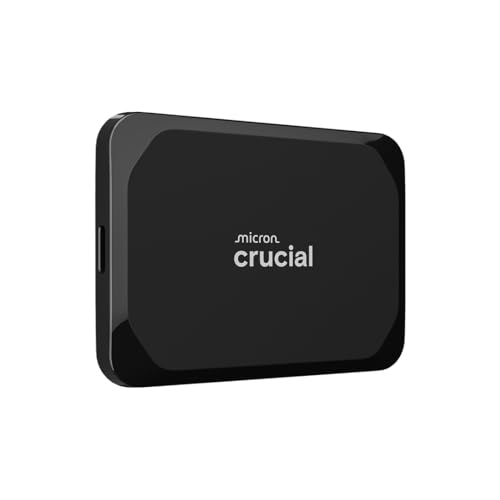
The Crucial X9 Portable SSD is an excellent all-rounder, offering a compelling blend of speed, durability, and broad compatibility at a competitive price. Designed for casual gamers and everyday users, its 1050MB/s speeds accelerate large file transfers and media editing. With IP55 water and dust resistance and 7.5ft drop protection, it’s built to withstand the rigors of travel and daily life, making it a dependable external drive for your MacBook Pro.
-
Key Features:
- High-speed performance up to 1050MB/s for fast transfers and backups
- Built to Last: IP55 water and dust resistance, 7.5 ft (2 meters) drop resistant
- Broad compatibility with Windows, Mac, iPad Pro, Chromebooks, Android, Linux, PS4/PS5, Xbox
- High-capacity storage in a compact form
- Bonus software included: Mylio Photos plus and Acronis True Image (with registration)
-
Pros:
- Great value for speed and features
- Rugged design makes it suitable for travel
- Exceptional compatibility across multiple platforms
- Useful bonus software for photo management and backup
-
Cons:
- Not the absolute fastest drive on the market
- Design is functional but not particularly stylish
-
User Impressions: Customers find the Crucial X9 to be a reliable and straightforward external SSD. Its “set it and forget it” reliability combined with decent speeds makes it a popular choice for general use, school, and work. The durability is a big plus for active users.
10. Lexar SL600 USB 3.2 Type-C Portable External SSD – 4TB
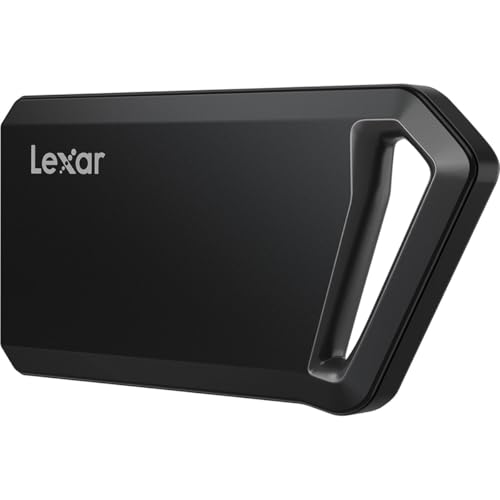
If you’re looking for the ultimate combination of speed and colossal capacity from Lexar, the SL600 Portable External SSD is your answer. With blistering read/write speeds of up to 2000MB/s via USB 3.2 Gen 2×2, this drive is a true speed demon. Packing a massive 4TB of storage into a compact, shock-resistant body, it’s perfect for professionals who handle enormous amounts of data and demand uncompromising performance. This could very well be the Lexar best external SSD for MacBook Pro for power users.
-
Key Features:
- Incredible speeds: up to 2000MB/s read and 2000MB/s write (USB 3.2 Gen 2×2)
- Ample storage capacities (1TB, 2TB, 4TB available)
- Rugged durability: shock and vibration-resistant
- Compact and portable design (4.43 x 2.32 x 0.41 inches, 2.25 oz)
- Universal compatibility with Mac, Windows, and Android, includes USB-C and USB-A cables
-
Pros:
- Exceptional speeds rivaling internal NVMe drives
- Massive 4TB capacity for extensive media libraries
- Robust and durable construction
- Sleek, pocket-friendly design
- Comprehensive compatibility out of the box
-
Cons:
- Requires a USB 3.2 Gen 2×2 port for maximum performance
- Premium pricing for the top-tier speed and capacity
-
User Impressions: Users are blown away by the SL600’s speed, especially those who can utilize its full USB 3.2 Gen 2×2 capabilities. The combination of such high capacity and rapid transfer rates makes it a go-to for professional video editors and gamers. The sleek, durable design also gets high praise.
Frequently Asked Questions about External SSDs for MacBook Pro
Q1: Why should I choose an SSD over an HDD for my MacBook Pro?
A1: SSDs offer significantly faster data transfer speeds, superior durability (no moving parts), and are typically much smaller and lighter than traditional hard drives (HDDs). While HDDs might offer more capacity for a lower price, the speed and ruggedness of an SSD make it ideal for MacBook Pro users who value performance and portability, especially for demanding tasks like video editing or large file backups.
Q2: Do I need to format an external SSD for my MacBook Pro?
A2: Most external SSDs come pre-formatted, often for Windows (NTFS). For optimal performance and full compatibility with your MacBook Pro, it’s highly recommended to reformat the drive to a macOS-native file system like APFS (for macOS 10.13 High Sierra and later) or HFS+ (Mac OS Extended) using Disk Utility. This ensures your Mac can read and write to the drive without issues and utilize features like Time Machine.
Q3: What’s the difference between USB 3.2 Gen 2 and USB 3.2 Gen 2×2?
A3: USB 3.2 Gen 2 offers speeds up to 10 Gbps (approximately 1050 MB/s). USB 3.2 Gen 2×2, on the other hand, doubles that bandwidth to 20 Gbps (approximately 2000 MB/s) by using two lanes of 10 Gbps. To achieve the higher speeds of Gen 2×2, both your MacBook Pro and the external SSD need to support it. Many modern MacBook Pros feature Thunderbolt 3 or 4 ports which are backward compatible with USB 3.2 Gen 2, but native USB 3.2 Gen 2×2 ports are less common on Macs.
Q4: How much external SSD storage do I really need for my MacBook Pro?
A4: This depends entirely on your usage.
* 500GB-1TB: Great for basic backups, expanding your laptop’s internal storage, or storing documents and photos.
* 2TB: Ideal for creative professionals dealing with moderate video projects, large photo libraries, or gamers who want to install several titles.
* 4TB+: Essential for professional videographers, photographers working with huge RAW files, or anyone who needs to store vast amounts of data and media without constantly offloading.
Q5: Is Thunderbolt better than USB-C for external SSDs with my MacBook Pro?
A5: Thunderbolt 3 and 4 ports on your MacBook Pro are indeed generally faster and more versatile than standard USB-C ports. While external SSDs typically use USB-C connectors, many high-end drives leverage the USB 3.2 Gen 2 standard, which is compatible with Thunderbolt ports and offers excellent speeds. If you find a true Thunderbolt 3/4 external SSD, it can offer even higher speeds (up to 40 Gbps), but these drives are often more expensive and not always necessary for all users, as USB 3.2 Gen 2 speeds (1050MB/s) are already very fast.
Q6: Can I boot my MacBook Pro from an external SSD?
A6: Yes, you can! Installing macOS on an external SSD and booting your MacBook Pro from it can significantly speed up an older Mac with a slower internal drive, or simply provide a portable operating system. You’ll need to use Disk Utility to format the drive correctly and then install macOS onto it.
Q7: What security features should I look for in an external SSD?
A7: For protecting your sensitive data, look for external SSDs that offer:
* Hardware Encryption: This is the most secure method, using a dedicated chip to encrypt your data. Many drives, like the SanDisk Extreme series, feature 256-bit AES hardware encryption.
* Password Protection: Often bundled with software encryption, this requires a password to access the drive’s contents.
* Included Software: Some brands, like Lexar, include their own encryption software (e.g., Lexar DataShield) and recovery tools, adding an extra layer of protection and utility.
Final Thoughts
Choosing the right external SSD for your MacBook Pro is a crucial step in optimizing your workflow and protecting your valuable digital assets. Whether you opt for the blazing speed and durability of a Lexar Professional Go, the rugged reliability of a SanDisk Extreme, or the well-rounded performance of a Samsung T7, you’re making a smart investment. Focus on your specific needs regarding speed, capacity, durability, and budget, and you’ll find the perfect portable companion for your Mac. Happy computing!